2011 CHEVROLET CORVETTE battery replacement
[x] Cancel search: battery replacementPage 35 of 428
Black plate (3,1)Chevrolet Corvette Owner Manual - 2011
Keys, Doors and Windows 2-3
Notice:If you ever lose your
transmitter(s) and/or key, it
could be difficult to get into your
vehicle. You may even have to
damage your vehicle to get in.
Be sure you have a spare
transmitter and/or key.
If you are locked out of the vehicle,
contact Roadside Assistance.
See Roadside Assistance Program
(United States and Canada) on
page 13‑8 orRoadside Assistance
Program (Mexico) on page 13‑10.
Remote Keyless Entry
(RKE) System
See Radio Frequency Statement on
page 13‑19 for information
regarding Part 15 of the Federal
Communications Commission
(FCC) rules and Industry Canada
Standards RSS-210/220/310. If there is a decrease in the RKE
operating range:
.Check the distance.
The transmitter may be
too far from the vehicle.
.Check the location. Other
vehicles or objects may be
blocking the signal.
.Check the transmitter's battery.
See
“Battery Replacement” later
in this section.
.If the transmitter is still not
working correctly, see your
dealer or a qualified technician
for service.
Remote Keyless Entry
(RKE) System Operation
The Keyless Access System
transmitter functions work up to
30 m (100 feet) away from the
vehicle.
Keyless Unlocking
Press the door handle sensor to
unlock and open the doors if the
keyless access transmitter is within
range. See Door Locks on page 2‑8
and “Passive Door Unlock” under
Vehicle Personalization on
page 5‑55 for additional information.
Page 39 of 428
Black plate (7,1)Chevrolet Corvette Owner Manual - 2011
Keys, Doors and Windows 2-7
13. A beep sounds onceprogramming in complete.
The DIC displays READY
FOR FOB #2.
To program additional
transmitters, take transmitter 1
out of the transmitter pocket
and place transmitter 2 in
the pocket. Up to four
transmitters can be
programmed. The DIC then
displays MAXIMUM NUMBER
OF FOBS LEARNED and exits
the programming mode.
Press Acc. on the ignition
switch to complete the process.
14. Press Acc. on the ignition switch if programming is
complete.
15. Press
Kon each newly
programmed transmitter to
complete the process.
Starting the Vehicle with a Low
Transmitter Battery
If the transmitter battery is weak,
the DIC may display NO FOBS
DETECTED when trying to start the
vehicle. To start the vehicle, place
the transmitter in the glove box
transmitter pocket with the buttons
facing the passenger side. Then,
with the vehicle in P (Park) for an
automatic transmission, press the
brake pedal and
/. If the vehicle
has a manual transmission, press
the clutch and
/. Replace the
transmitter battery as soon as
possible. Change the transmitter
battery if the DIC displays
FOB BATTERY LOW.
Battery Replacement
Notice: When replacing the
battery, do not touch any of
the circuitry on the transmitter.
Static from your body could
damage the transmitter.
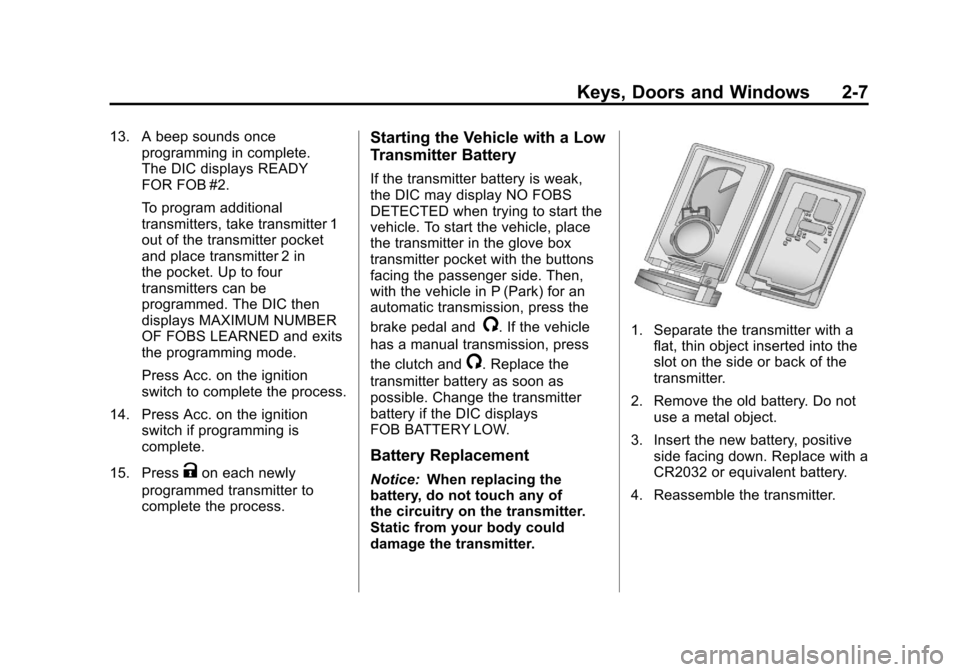
1. Separate the transmitter with a
flat, thin object inserted into the
slot on the side or back of the
transmitter.
2. Remove the old battery. Do not use a metal object.
3. Insert the new battery, positive side facing down. Replace with a
CR2032 or equivalent battery.
4. Reassemble the transmitter.
Page 50 of 428
Black plate (18,1)Chevrolet Corvette Owner Manual - 2011
2-18 Keys, Doors and Windows
Express-Down Window
Press the front of the switch to
the second position to activate the
express-down feature. If you want
to stop the window as it is lowering,
press the switch again.
Window Indexing
This feature automatically lowers
the window a small amount when
the door is opened. When the door
is closed, the window will raise to
its full up position. If either window
does not index properly, it could
be due to loss of power. Before
returning to your dealer for service,
perform the power window initialize
procedure.
Power Window Initialize
After a power reconnect such as
battery replacement, the window
index‐up feature will not function
until the system is initialized.
Once power is restored:
1. Close the door.
2. Raise the window and hold theswitch up for three seconds after
the window is closed.
3. Release the switch, then hold the switch up again for
three seconds and release.
Sun Visors
Pull the visor toward you, or move it
to the side to help reduce glare.
To use the lighted mirror, lift the
cover.
Roof
Roof Panel
On vehicles with a removable roof
panel, follow the procedures when
removing or installing it.
Removing the Roof Panel
{WARNING
Do not try to remove a roof panel
while the vehicle is moving.
Trying to remove the roof panel
while the vehicle is moving could
cause an accident. The panel
could fall into the vehicle and
cause you to lose control, or it
could fly off and strike another
vehicle. You or others could be
injured. Remove the roof panel
only when the vehicle is parked.
Page 155 of 428
Black plate (35,1)Chevrolet Corvette Owner Manual - 2011
Instruments and Controls 5-35
If the ignition is on and the HUD
image cannot be seen, check to
see if:
.Something is covering the
HUD unit.
.The HUD dimmer control is
adjusted properly.
.The HUD image is adjusted to
the proper height.
.Ambient light is low, in the
direction the vehicle is facing.
.A fuse is blown. SeeFuses and
Circuit Breakers on page 10‑51.
Keep in mind that the windshield
is part of the HUD system.
See Windshield Replacement on
page 10‑47.
Vehicle Messages
Messages displayed on the DIC
indicate the status of the vehicle
or some action may be needed
to correct a condition. Multiple
messages may appear one after
another.
The messages that do not
require immediate action can be
acknowledged and cleared by
pressing the RESET button.
The messages that require
immediate action cannot be
cleared until that action is
performed. All messages should
be taken seriously and clearing
the messages does not correct
the problem.
Battery Voltage and
Charging Messages
BATTERY SAVER ACTIVE
This message displays when the
vehicle has detected that the battery
voltage is dropping beyond a
reasonable point. The battery saver
system starts reducing certain
features of the vehicle that you may
be able to notice. At the point that
features are disabled, this message
is displayed. It means that the
vehicle is trying to save the charge
in the battery. Turn off unnecessary
accessories to allow the battery to
recharge.
BATTERY VOLTAGE HIGH
See Voltmeter Gauge on page 5‑15.
BATTERY VOLTAGE LOW
SeeVoltmeter Gauge on page 5‑15.
Page 162 of 428

Black plate (42,1)Chevrolet Corvette Owner Manual - 2011
5-42 Instruments and Controls
LOW FUEL
This message displays when the
fuel tank is less than 10 percent
full and the display is turned off.
A sound will be heard when this
message is displayed. Refill the fuel
tank as soon as possible. SeeFuel
Gauge on page 5‑11.
SERVICE FUEL SYSTEM
This message displays if the
Powertrain Control Module (PCM)
has detected a problem within
the fuel system. Have the vehicle
serviced by your dealer. This
message also displays when the
cluster is not getting fuel information
from the PCM.
Key and Lock Messages
FOB AUTOLEARN WAIT
XX MINUTES
See “Matching Transmitter(s) to
Your Vehicle” underRemote
Keyless Entry (RKE) System
Operation on page 2‑3.
FOB BATTERY LOW
See “Battery Replacement” under
Remote Keyless Entry (RKE)
System Operation on page 2‑3.
KNOWN FOB
See “Matching Transmitter(s) to
Your Vehicle” underRemote
Keyless Entry (RKE) System
Operation on page 2‑3.
MAXIMUM NUMBER OF FOBS
LEARNED
See “Matching Transmitter(s) to
Your Vehicle” underRemote
Keyless Entry (RKE) System
Operation on page 2‑3.
NO FOBS DETECTED
This message displays if the vehicle
does not detect the presence of a
keyless access transmitter when
you have attempted to start the
vehicle or a vehicle door has just
closed. The following conditions
may cause this message to appear:
.Driver-added equipment plugged
into the accessory power outlet
on the center console is causing
interference. Examples of these
devices are cell phones and cell
phone chargers, two-way radios,
power inverters, or similar items.
Try moving the keyless access
transmitter away from these
devices when starting the
vehicle. In addition, PDA devices
and remote garage and gate
openers may also generate
Electromagnetic Interference
(EMI) that may interfere with
the keyless access transmitter.
Do not carry the keyless access
transmitter in the same pocket or
bag as these devices.
Page 229 of 428
Black plate (7,1)Chevrolet Corvette Owner Manual - 2011
Climate Controls 8-7
Maintenance
Passenger Compartment
Air Filter
The passenger compartment air
filter removes certain particles from
the air including pollen and dust
particles. Reductions in airflow,
which may occur more often in
dusty areas, indicate that the
filter may need to be replaced.
SeeMaintenance Replacement
Parts on page 11‑8.
Notice: Driving without a
passenger compartment air filter
in place can cause water and
small particles, like paper and
leaves, to be pulled into your
climate control system which may
cause damage to it. Make sure
you always replace the old filter
with a new one. The passenger compartment air
filter is located on the passenger
side of the engine compartment
near the battery. See
Engine
Compartment Overview on
page 10‑10.
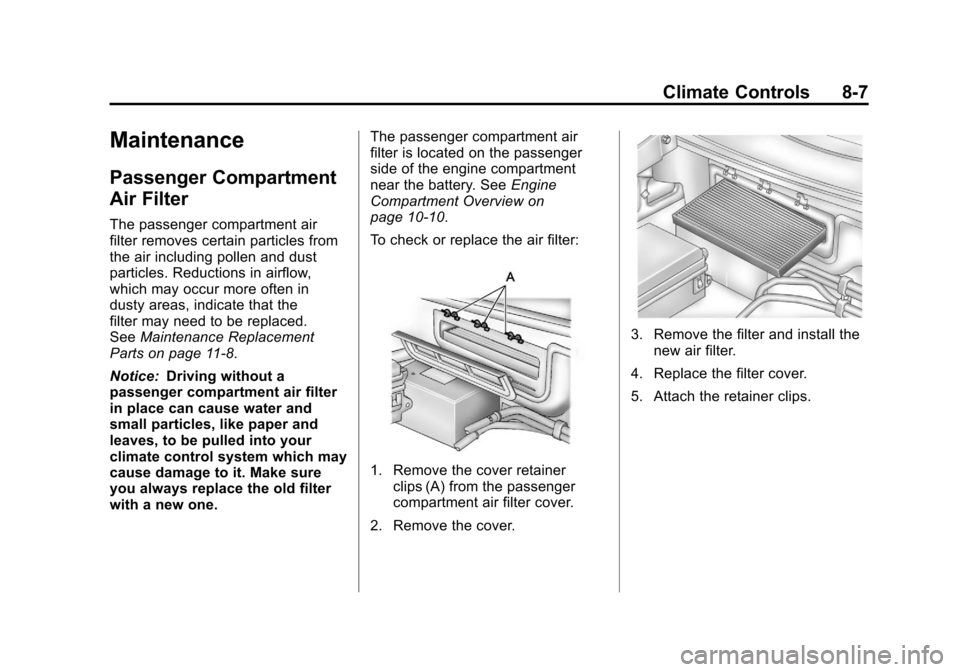
To check or replace the air filter:
1. Remove the cover retainer clips (A) from the passenger
compartment air filter cover.
2. Remove the cover.
3. Remove the filter and install the new air filter.
4. Replace the filter cover.
5. Attach the retainer clips.
Page 252 of 428
Black plate (22,1)Chevrolet Corvette Owner Manual - 2011
9-22 Driving and Operating
Cell phone chargers can interfere
with the operation of the Keyless
Access System. Battery chargers
should not be plugged in when
starting or turning off the engine.
To start the vehicle, do the following:
1. For vehicles with an automatictransmission, with your foot
on the brake pedal, press the
START button located on the
instrument panel. For vehicles
with a manual transmission, you
must also press in the clutch
pedal while pressing the START
button.
If there is not a keyless access
transmitter in the vehicle or if
there is something causing
interference with it, the DIC will
display NO FOBS DETECTED.
See Key and Lock Messages on
page 5‑42 for more information. 2. When the engine begins
cranking, let go of the button and
the engine cranks automatically
until it starts. If the battery in the
keyless access transmitter is
weak, the DIC displays FOB
BATTERY LOW. You can still
drive the vehicle.
See “Battery Replacement”
under Remote Keyless Entry
(RKE) System Operation on
page 2‑3 for more information.
If the fob battery is dead, you
need to insert the fob into
the fob slot to enable engine
starting. See “NO FOBS
DETECTED” underKey and
Lock Messages on page 5‑42.
3. Do not race the engine immediately after starting it.
Operate the engine and
transmission gently until the
oil warms up and lubricates
all moving parts. 4. If the engine does not start and
no DIC message is displayed,
wait 15 seconds before trying
again to let the cranking motor
cool down.
If the engine does not start after
5-10 seconds, especially in very
cold weather (below −18°C
or 0°F), it could be flooded with
too much gasoline. Try pushing
the accelerator pedal all the way
to the floor while cranking for up
to 15 seconds maximum. Wait at
least 15 seconds between each
try, to allow the cranking motor
to cool down. When the engine
starts, let go of the accelerator.
If the vehicle starts briefly but
then stops again, repeat these
steps. This clears the extra
gasoline from the engine.
Page 285 of 428

Black plate (1,1)Chevrolet Corvette Owner Manual - 2011
Vehicle Care 10-1
Vehicle Care
General Information
General Information . . . . . . . . . . 10-3
California Proposition65 Warning . . . . . . . . . . . . . . . . . 10-3
California Perchlorate Materials Requirements . . . . 10-3
Accessories and Modifications . . . . . . . . . . . . . . . 10-4
Lifting the Vehicle . . . . . . . . . . . . 10-5
Vehicle Checks
Doing Your Own Service Work . . . . . . . . . . . . . . . 10-8
Hood . . . . . . . . . . . . . . . . . . . . . . . . 10-9
Engine Compartment Overview . . . . . . . . . . . . . . . . . . 10-10
Engine Oil . . . . . . . . . . . . . . . . . . 10-15
Engine Oil Life System . . . . . 10-22
Automatic Transmission Fluid . . . . . . . . . . . . . . . . . . . . . . 10-23 Manual Transmission
Fluid . . . . . . . . . . . . . . . . . . . . . . 10-23
Hydraulic Clutch . . . . . . . . . . . . 10-24
Engine Air Cleaner/Filter . . . . 10-24
Cooling System (Engine) . . . 10-28
Cooling System (Intercooler) . . . . . . . . . . . . . . . 10-29
Engine Coolant . . . . . . . . . . . . . 10-29
Engine Overheating . . . . . . . . 10-34
Overheated Engine Protection
Operating Mode . . . . . . . . . . . 10-35
Power Steering Fluid . . . . . . . 10-36
Washer Fluid . . . . . . . . . . . . . . . 10-37
Brakes . . . . . . . . . . . . . . . . . . . . . 10-38
Brake Fluid . . . . . . . . . . . . . . . . . 10-41
Battery . . . . . . . . . . . . . . . . . . . . . 10-43
Rear Axle . . . . . . . . . . . . . . . . . . 10-44
Starter Switch Check . . . . . . . 10-44
Automatic Transmission Shift Lock Control Function
Check . . . . . . . . . . . . . . . . . . . . . 10-45 Park Brake and P (Park)
Mechanism Check . . . . . . . . 10-45
Wiper Blade Replacement . . . . . . . . . . . . . . 10-46
Windshield Replacement . . . 10-47
Headlamp Aiming
Headlamp Aiming . . . . . . . . . . 10-48
Bulb Replacement
Bulb Replacement . . . . . . . . . . 10-48
Halogen Bulbs . . . . . . . . . . . . . . 10-48
High Intensity Discharge
(HID) Lighting . . . . . . . . . . . . . 10-48
Headlamps, Front Turn Signal and Parking
Lamps . . . . . . . . . . . . . . . . . . . . 10-49
Taillamps, Turn Signal, and Stoplamps . . . . . . . . . . . . . . . . 10-50
Replacement Bulbs . . . . . . . . . 10-50