2011 CHEVROLET CORVETTE key
[x] Cancel search: keyPage 117 of 428
Black plate (1,1)Chevrolet Corvette Owner Manual - 2011
Storage 4-1
Storage
Storage Compartments
Glove Box . . . . . . . . . . . . . . . . . . . . 4-1
Cupholders . . . . . . . . . . . . . . . . . . . 4-1
Rear Storage . . . . . . . . . . . . . . . . . 4-1
Center Console Storage . . . . . . 4-2
Additional Storage Features
Cargo Cover . . . . . . . . . . . . . . . . . . 4-2
Convenience Net . . . . . . . . . . . . . 4-3
Storage
Compartments
Glove Box
Open the glove box by lifting up on
the lever. Use the key to lock and
unlock the lighted glove box.
Cupholders
Two cupholders are located on the
center console next to the shift
lever. Slide the handle from the left
to the right side to access the lid.
Rear Storage
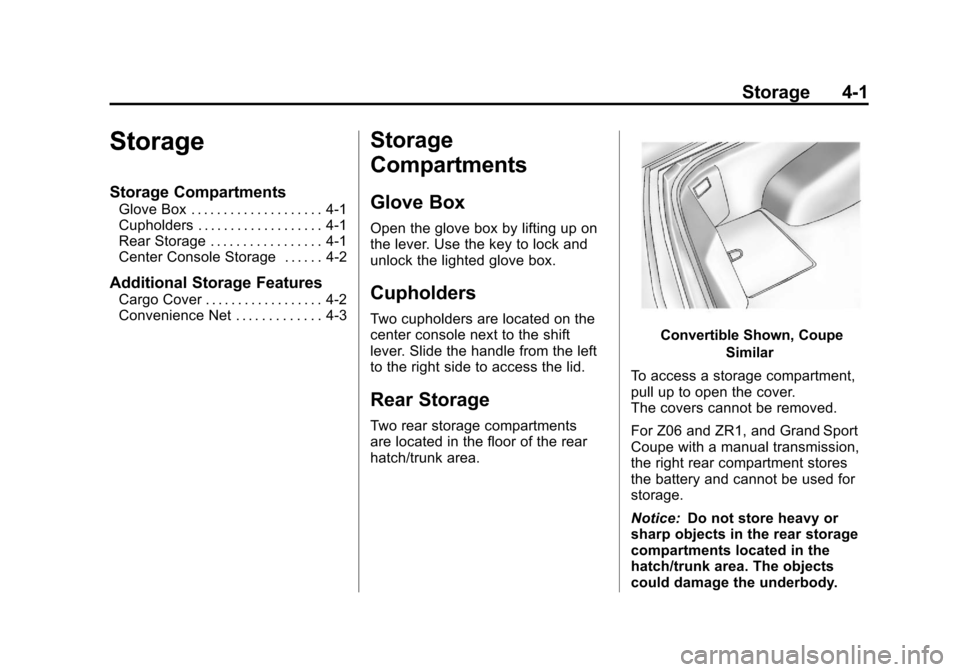
Two rear storage compartments
are located in the floor of the rear
hatch/trunk area.
Convertible Shown, CoupeSimilar
To access a storage compartment,
pull up to open the cover.
The covers cannot be removed.
For Z06 and ZR1, and Grand Sport
Coupe with a manual transmission,
the right rear compartment stores
the battery and cannot be used for
storage.
Notice: Do not store heavy or
sharp objects in the rear storage
compartments located in the
hatch/trunk area. The objects
could damage the underbody.
Page 121 of 428

Black plate (1,1)Chevrolet Corvette Owner Manual - 2011
Instruments and Controls 5-1
Instruments and
Controls
Controls
Steering Wheel Adjustment . . . 5-2
Steering Wheel Controls . . . . . . 5-3
Horn . . . . . . . . . . . . . . . . . . . . . . . . . . 5-4
Windshield Wiper/Washer . . . . . 5-4
Compass . . . . . . . . . . . . . . . . . . . . . 5-5
Clock . . . . . . . . . . . . . . . . . . . . . . . . . 5-6
Power Outlets . . . . . . . . . . . . . . . . . 5-6
Cigarette Lighter . . . . . . . . . . . . . . 5-7
Ashtrays . . . . . . . . . . . . . . . . . . . . . . 5-8
Warning Lights, Gauges, and
Indicators
Warning Lights, Gauges, andIndicators . . . . . . . . . . . . . . . . . . . . 5-8
Instrument Cluster . . . . . . . . . . . . 5-9
Speedometer . . . . . . . . . . . . . . . . 5-11
Odometer . . . . . . . . . . . . . . . . . . . . 5-11
Tachometer . . . . . . . . . . . . . . . . . . 5-11
Fuel Gauge . . . . . . . . . . . . . . . . . . 5-11
Boost Gauge (ZR1) . . . . . . . . . . 5-12
Engine Oil Pressure Gauge . . . . . . . . . . . . . . . . . . . . . . 5-13 Engine Coolant Temperature
Gauge . . . . . . . . . . . . . . . . . . . . . . 5-15
Voltmeter Gauge . . . . . . . . . . . . . 5-15
Safety Belt Reminders . . . . . . . 5-16
Airbag Readiness Light . . . . . . 5-16
Passenger Airbag Status Indicator . . . . . . . . . . . . . . . . . . . . 5-17
Malfunction Indicator Lamp . . . . . . . . . . . . . 5-18
Brake System Warning Light . . . . . . . . . . . . . . . . . . . . . . . 5-21
Antilock Brake System (ABS) Warning Light . . . . . . . . . . . . . . 5-22
One-to-Four Shift Light (Manual Transmission) . . . . . 5-22
Active Handling System Light . . . . . . . . . . . . . . . . . . . . . . . 5-23
Traction Control System (TCS) Warning Light . . . . . . . 5-23
Tire Pressure Light . . . . . . . . . . 5-24
Security Light . . . . . . . . . . . . . . . . 5-24
High-Beam on Light . . . . . . . . . 5-25
Front Fog Lamp Light . . . . . . . . 5-25
Lamps on Reminder . . . . . . . . . 5-25
Information Displays
Driver Information Center (DIC) . . . . . . . . . . . . . . . 5-25
Head-Up Display (HUD) . . . . . 5-31
Vehicle Messages
Vehicle Messages . . . . . . . . . . . 5-35
Battery Voltage and Charging Messages . . . . . . . . . . . . . . . . . . 5-35
Brake System Messages . . . . 5-36
Convertible Top Messages . . . 5-37
Cruise Control Messages . . . . 5-38
Door Ajar Messages . . . . . . . . . 5-39
Engine Cooling System Messages . . . . . . . . . . . . . . . . . . 5-39
Engine Oil Messages . . . . . . . . 5-40
Engine Power Messages . . . . 5-41
Fuel System Messages . . . . . . 5-41
Key and Lock Messages . . . . . 5-42
Lamp Messages . . . . . . . . . . . . . 5-44
Ride Control System Messages . . . . . . . . . . . . . . . . . . 5-44
Safety Belt Messages . . . . . . . 5-49
Anti-Theft Alarm System Messages . . . . . . . . . . . . . . . . . . 5-50
Service Vehicle Messages . . . 5-50
Starting the Vehicle Messages . . . . . . . . . . . . . . . . . . 5-50
Tire Messages . . . . . . . . . . . . . . . 5-51
Transmission Messages . . . . . 5-53
Vehicle Reminder Messages . . . . . . . . . . . . . . . . . . 5-54
Washer Fluid Messages . . . . . 5-54
Page 162 of 428

Black plate (42,1)Chevrolet Corvette Owner Manual - 2011
5-42 Instruments and Controls
LOW FUEL
This message displays when the
fuel tank is less than 10 percent
full and the display is turned off.
A sound will be heard when this
message is displayed. Refill the fuel
tank as soon as possible. SeeFuel
Gauge on page 5‑11.
SERVICE FUEL SYSTEM
This message displays if the
Powertrain Control Module (PCM)
has detected a problem within
the fuel system. Have the vehicle
serviced by your dealer. This
message also displays when the
cluster is not getting fuel information
from the PCM.
Key and Lock Messages
FOB AUTOLEARN WAIT
XX MINUTES
See “Matching Transmitter(s) to
Your Vehicle” underRemote
Keyless Entry (RKE) System
Operation on page 2‑3.
FOB BATTERY LOW
See “Battery Replacement” under
Remote Keyless Entry (RKE)
System Operation on page 2‑3.
KNOWN FOB
See “Matching Transmitter(s) to
Your Vehicle” underRemote
Keyless Entry (RKE) System
Operation on page 2‑3.
MAXIMUM NUMBER OF FOBS
LEARNED
See “Matching Transmitter(s) to
Your Vehicle” underRemote
Keyless Entry (RKE) System
Operation on page 2‑3.
NO FOBS DETECTED
This message displays if the vehicle
does not detect the presence of a
keyless access transmitter when
you have attempted to start the
vehicle or a vehicle door has just
closed. The following conditions
may cause this message to appear:
.Driver-added equipment plugged
into the accessory power outlet
on the center console is causing
interference. Examples of these
devices are cell phones and cell
phone chargers, two-way radios,
power inverters, or similar items.
Try moving the keyless access
transmitter away from these
devices when starting the
vehicle. In addition, PDA devices
and remote garage and gate
openers may also generate
Electromagnetic Interference
(EMI) that may interfere with
the keyless access transmitter.
Do not carry the keyless access
transmitter in the same pocket or
bag as these devices.
Page 163 of 428
Black plate (43,1)Chevrolet Corvette Owner Manual - 2011
Instruments and Controls 5-43
.The vehicle is experiencing
Electromagnetic
Interference (EMI). Some
locations, such as airports,
automatic toll booths, and some
gas stations have EMI fields
which may interfere with the
keyless access transmitter.
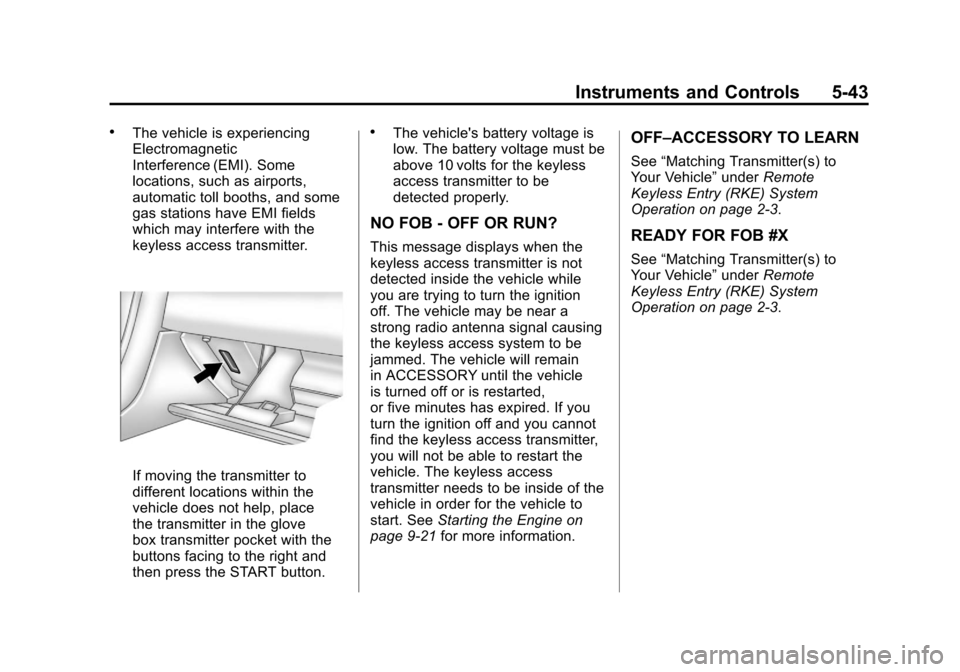
If moving the transmitter to
different locations within the
vehicle does not help, place
the transmitter in the glove
box transmitter pocket with the
buttons facing to the right and
then press the START button.
.The vehicle's battery voltage is
low. The battery voltage must be
above 10 volts for the keyless
access transmitter to be
detected properly.
NO FOB - OFF OR RUN?
This message displays when the
keyless access transmitter is not
detected inside the vehicle while
you are trying to turn the ignition
off. The vehicle may be near a
strong radio antenna signal causing
the keyless access system to be
jammed. The vehicle will remain
in ACCESSORY until the vehicle
is turned off or is restarted,
or five minutes has expired. If you
turn the ignition off and you cannot
find the keyless access transmitter,
you will not be able to restart the
vehicle. The keyless access
transmitter needs to be inside of the
vehicle in order for the vehicle to
start. SeeStarting the Engine on
page 9‑21 for more information.
OFF–ACCESSORY TO LEARN
See“Matching Transmitter(s) to
Your Vehicle” underRemote
Keyless Entry (RKE) System
Operation on page 2‑3.
READY FOR FOB #X
See “Matching Transmitter(s) to
Your Vehicle” underRemote
Keyless Entry (RKE) System
Operation on page 2‑3.
Page 170 of 428

Black plate (50,1)Chevrolet Corvette Owner Manual - 2011
5-50 Instruments and Controls
Anti-Theft Alarm System
Messages
INTRUSION SENSOR OFF
This message may display when the
anti-theft alarm has been disarmed.
INTRUSION SENSOR ON
This message may display when the
anti-theft alarm has been armed.
Service Vehicle Messages
SERVICE AIR CONDITIONING
This message displays when the
electronic sensors that control
the air conditioning and heating
systems are no longer working.
Have the climate control system
serviced by your dealer if you
notice a drop in heating and air
conditioning efficiency.
SERVICE ELECTRICAL
SYSTEM
This message displays if an
electrical problem has occurred
within the Powertrain Control
Module (PCM). Have the vehicle
serviced by your dealer.
SERVICE VEHICLE SOON
This message displays and a sound
will be heard when there may be an
electrical or another system problem
with the vehicle. Have your vehicle
checked by your dealer if this
message keeps appearing.
Starting the Vehicle
Messages
PRESS BRAKE TO START
ENGINE (Automatic
Transmission Only)
This message displays if you
try to start the engine by pressing
the keyless ignition start button
without having the brake pressed.
The brake needs to be pressed
when starting the engine. See
Ignition Positions on page 9‑20for
more information.
Page 174 of 428
Black plate (54,1)Chevrolet Corvette Owner Manual - 2011
5-54 Instruments and Controls
If this message is displayed during
normal vehicle operation on flat
roads, the vehicle may need
service. See your dealer for an
inspection.
If driving in a performance or
competitive manner, the use of
(S) Sport Automatic Mode or
(S) Sport Manual Paddle Shift
gear selection is recommended.
SeeAutomatic Transmission on
page 9‑28 for more information.
To acknowledge the message, press
the RESET button. The message
reappears every 10 minutes until
this condition changes. If you do
not press the RESET button, the
message remains on the display
until the condition changes.
UPSHIFT NOW
See Manual Transmission on
page 9‑32.
Vehicle Reminder
Messages
ACCESSORY MODE ON
This message displays when the
vehicle is in accessory mode.
ICE POSSIBLE
This message displays when
the outside air temperature is
cold enough to create icy road
conditions. Adjust your driving
accordingly.
OPTIONS UNAVAILABLE
This message displays for a
few seconds if a keyless access
transmitter that is not labelled 1 or 2
is used and you try to personalize
the features on the vehicle by
pressing the OPTION button.
The personalization system will
not recognize the transmitter and
the DIC will not display the current
driver number or the menus
used to set personalizations. The personalization features will
then be set to the default states.
See
Vehicle Personalization on
page 5‑55 for more information.
SET PARK BRAKE FOR SEAT
RECALL
If the vehicle has a manual
transmission, this message
displays if you try to recall the
memory positions when the ignition
is on and the parking brake is not
set. If the vehicle is on, you must
set the parking brake in order for
the memory positions to recall.
See“Memory Seat, Mirrors and
Steering Wheel” underPower Seat
Adjustment on page 3‑3 for more
information.
Washer Fluid Messages
CHECK WASHER FLUID
See Washer Fluid on page 10‑37.
Page 175 of 428
Black plate (55,1)Chevrolet Corvette Owner Manual - 2011
Instruments and Controls 5-55
Vehicle
Personalization
Many features on your vehicle can
be personalized. This means that
the operation of these features
can be set to operate differently
depending on who is driving the
vehicle. See“Personal Options”
later in this section for the features
that you can personalize.
The personalization settings for
other features are automatically
updated and saved as the driver
adjusts them. These include the
following settings and presets:
.The radio presets, tone, volume,
fade, balance, equalization (EQ)
settings and source (radio
or CD)
.The last climate control setting
.The Head-Up Display (HUD)
position and dimming level,
if your vehicle has this feature
.The instrument panel cluster
dimming level and last selected
DIC display
Separate personalization settings
are saved for two different drivers.
One of the keyless access
transmitters is assigned to driver 1.
The other is assigned to driver 2.
The back of the keyless access
transmitters are labelled 1 or 2 to
correspond to each driver.
The current driver's preferences are
recalled when one of the following
occurs:
.The lock or unlock button on the
keyless access transmitter,
labelled 1 or 2, is pressed.
.The appropriate memory
button, 1 or 2, located on
the driver's door is pressed.
See “Memory Seat, Mirrors and
Steering Wheel” underPower
Seat Adjustment on page 3‑3
for more information.
.A valid keyless access
transmitter is detected upon
opening the driver's door.
If more than one valid keyless
access transmitter is detected upon
opening the driver's door, the driver
preferences for the lowest driver
number will be recalled.
If a keyless access transmitter
that is not labelled 1 or 2 is used,
the personalization system will not
recognize the transmitter. The Driver
Information Center (DIC) will not
display a current driver number
and the features that are normally
programmed through the DIC will be
set to the default states. Also, if the
OPTION button is pressed, the DIC
does not display the menus used to
set personalizations, but instead
displays OPTIONS UNAVAILABLE
for a few seconds.
Page 177 of 428
Black plate (57,1)Chevrolet Corvette Owner Manual - 2011
Instruments and Controls 5-57
Auto Memory Recall (Automatic
Transmission only):If your
automatic transmission vehicle
has the memory package, you may
have this option. This option allows
the driver's seat, the telescopic
steering column, if your vehicle
has this feature, and the outside
rearview mirrors to automatically
move to the current driver's set
position when the engine starts.
Press the OPTION button until
AUTO MEMORY RECALL appears
on the display, then press the
RESET button to scroll through the
following modes:
.YES
.NO (default)
If you choose YES, the driver's seat,
the outside rearview mirrors and the
telescopic steering column, if your
vehicle has this feature, positions
are recalled when you turn the
ignition on.
If you choose NO, this option will
turn off. When the mode you want is
selected, press the OPTION button
to set your choice and advance to
the next personal option.
Auto Exit Recall:
If your vehicle
has the memory package, you may
have this option. This option allows
the driver's seat and telescopic
steering column, if your vehicle has
this feature, to automatically move
to the current driver's exit position
when one of the following occurs:
.The vehicle is turned off or in
Retained Accessory Power
(RAP) or accessory mode and
the driver's door is opened.
.The vehicle is turned off or in
RAP and the unlock button on
the keyless access transmitter is
pressed.
In order for the Auto Exit Recall
feature to work on an automatic
transmission vehicle, the vehicle
must be in P (Park). On a manual
transmission vehicle, the parking
brake must be set. Press the OPTION button until
AUTO EXIT RECALL appears on
the display, then press the RESET
button to scroll through the following
modes:
.YES
.NO (default)
If you choose YES, when you turn
the ignition off and open the driver's
door or press the unlock button
on the keyless access transmitter,
the seat and the telescopic steering
wheel, if your vehicle has this
feature, will return to their stored
exit positions for an easy exit or an
easy entrance when returning to the
vehicle.
The seat and steering wheel will
only return to the stored driving
position if you press the appropriate
memory button or activate the auto
memory recall feature.
If you choose NO, this option will
turn off.