2011 CHEVROLET CORVETTE buttons
[x] Cancel search: buttonsPage 188 of 428
Black plate (68,1)Chevrolet Corvette Owner Manual - 2011
5-68 Instruments and Controls
The switch positions on the
hand-held transmitter could be
labeled, as follows:
.A switch in the up position
could be labeled as“Up,”
“+,” or“On.”
.A switch in the down
position could be labeled
as “Down,” “−,” or“Off.”
.A switch in the middle
position could be labeled as
“Middle,” “0,” or“Neutral.”
3. Write down the eight to 12 switch settings from left to right as
follows:
.When a switch is in the up
position, write “Left.”
.When a switch is in the
down position, write “Right.”
.If a switch is set between
the up and down position,
write“Middle.”
The switch settings written
down in Step 3 now
become the button strokes
to be entered into the
Universal Home Remote
in Step 5. Be sure to enter
the switch settings written
down in Step 3, in order
from left to right, into the
Universal Home Remote,
when completing Step 5.
4. From inside the vehicle, first firmly press all three buttons
at the same time for about
three seconds. Release the
buttons to put the Universal
Home Remote into
programming mode.
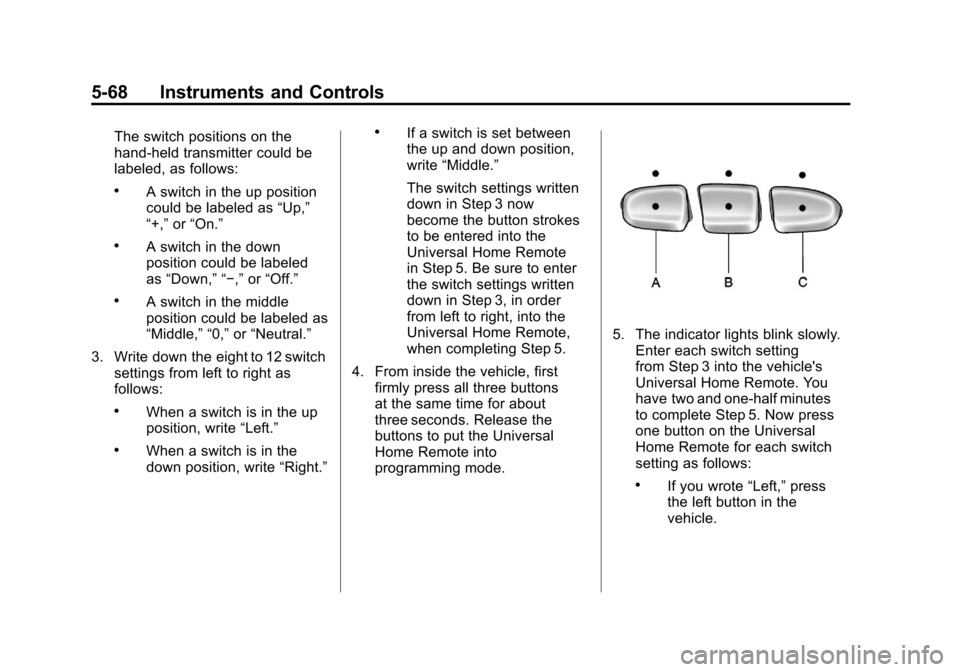
5. The indicator lights blink slowly.Enter each switch setting
from Step 3 into the vehicle's
Universal Home Remote. You
have two and one-half minutes
to complete Step 5. Now press
one button on the Universal
Home Remote for each switch
setting as follows:
.If you wrote “Left,”press
the left button in the
vehicle.
Page 189 of 428
Black plate (69,1)Chevrolet Corvette Owner Manual - 2011
Instruments and Controls 5-69
.If you wrote“Right,”press
the right button in the
vehicle.
.If you wrote “Middle,”press
the middle button in the
vehicle.
6. After entering all of the switch positions, again, firmly press and
release all three buttons at the
same time. The indicator lights
turn on.
7. Press and hold the button that will be used to control the
garage door until the garage
door moves. The indicator
light above the selected button
should slowly blink. This button
may need to be held for up to
55 seconds. 8. Immediately release the button
when the garage door moves.
The indicator light blinks rapidly
until programming is complete.
9. Press and release the same button again. The garage door
should move, confirming that
programming is successful and
complete.
To program another Fixed Code
device such as an additional garage
door opener, a security device,
or home automation device, repeat
Steps 1-9, choosing a different
button in Step 7 than what was
used for the garage door opener.
Universal Remote System
Operation
Press and hold the appropriate
button for at least half of a second.
The indicator light comes on while
the signal is being transmitted.
Operation can occur:
.If the vehicle is in
accessory mode.
.If the vehicle is in running.
.If the vehicle is in Retained
Accessory Mode (RAP).
See Retained Accessory
Power (RAP) on page 9‑21 for
more information.
.Up to an additional 10 minutes
after RAP finishes.
.Up to 10 minutes after any door
is opened.
Page 190 of 428
Black plate (70,1)Chevrolet Corvette Owner Manual - 2011
5-70 Instruments and Controls
Reprogramming Universal
Home Remote Buttons
Any of the three buttons can be
reprogrammed by repeating the
instructions.
Erasing Universal Home
Remote Buttons
The programmed buttons should be
erased when the vehicle is sold or
the lease ends.
To erase either Rolling Code or
Fixed Code on the Universal Home
Remote device:
1. Press and hold the two outsidebuttons at the same time for
approximately 20 seconds,
until the indicator lights, located
directly above the buttons, begin
to blink rapidly. 2. Once the indicator lights begin
to blink, release both buttons.
The codes from all buttons are
erased.
For help or information on the
Universal Home Remote System,
call the customer assistance phone
number under Customer Assistance
Offices (United States and Canada)
on page 13‑5 orCustomer
Assistance Offices (Mexico) on
page 13‑5.
Page 205 of 428
Black plate (7,1)Chevrolet Corvette Owner Manual - 2011
Infotainment System 7-7
Finding a Station
BAND:Press to switch between
FM1, FM2, AM, XM1 or XM2.
O e(Tune): Turn to select radio
stations.
tSEEKu: Press to go to the
previous or to the next station and
stay there.
The radio only stops at stations with
a strong signal.
tSCANu: Press and holdtorufor 2 seconds until
FREQUENCY SCAN displays.
The radio goes to a station, plays
for a few seconds, then goes on
to the next station. Press
toru
again to stop scanning. To scan preset stations:
Press and hold
torufor
four seconds until PRESET
SCAN displays. The radio goes to
the next preset station, plays for a
few seconds, then goes to the next
preset station. Press
toruagain
or one of the pushbuttons to stop
scanning presets.
The radio only scans stations with a
strong signal.
1–6 (Preset Pushbuttons):
Press to play stations that are
programmed to the radio preset
pushbuttons.
Storing Radio Stations
Drivers are encouraged to store
radio station while the vehicle is
parked, see Defensive Driving on
page 9‑2. Tune to stored radio
stations using the presets, favorites
button, and steering wheel controls,
if the vehicle has this feature.
Up to 30 stations (6 FM1, 6 FM2,
and 6 AM, 6 XM1 and 6 XM2),
and equalization settings for each
station can be programmed on the
six numbered pushbuttons.
To set presets:
1. Tune to a radio station.
2. Press AUTO EQ to select the equalization.
3. Press and hold one of the six numbered pushbuttons until the
radio beeps once.
4. Repeat the steps for each pushbutton.
Page 206 of 428
Black plate (8,1)Chevrolet Corvette Owner Manual - 2011
7-8 Infotainment System
Satellite Radio
XM™Satellite Radio Service
XM is a satellite radio service
that is based in the 48 contiguous
United States and 10 Canadian
provinces. XM Satellite Radio
has a wide variety of programming
and commercial-free music,
coast-to-coast, and in digital-quality
sound. A service fee is required
to receive the XM service.
For more information, contact
XM at xmradio.com or call
1-800-929-2100 in the U.S.
and xmradio.ca or call
1-877-438-9677 in Canada.
Finding an XM Channel
BAND: Press to switch between
FM1, FM2, AM, XM1 or XM2.
O e(Tune): Turn to manually
select an XM channel.
tSEEKu: Press to go to the
previous or to the next XM channel.
tSCANu: Press and holdtorufor 2 seconds until FREQUENCY
SCAN displays. The radio goes to a
channel, plays for a few seconds,
then goes on to the next station.
Press
toruagain to stop
scanning.
To scan preset stations:
Press and hold
torufor
four seconds until PRESET SCAN
displays. The radio goes to the
next preset station, plays for a
few seconds, then goes to the next
preset station. Press
toruagain
or one of the pushbuttons to stop
scanning presets.
1–6 (Preset Pushbuttons):
Press to play channels that are
programmed to the radio preset
pushbuttons.
Finding a Category (CAT)
Station
To select an XM station by category:
1. Press the CAT button. The last selected category displays.
2. Turn the
O eknob to select a
category.
3. Press
toruto go to a
category's station. SEEKING
CATEGORY displays.
4. To go to another station within that category, press the CAT
button to display the category,
then press
toruto go to
another station.
If the radio cannot find the desired
category, NONE displays and the
radio returns to the last station
tuned.
Page 207 of 428
Black plate (9,1)Chevrolet Corvette Owner Manual - 2011
Infotainment System 7-9
SCAN:To scan the stations within
a category:
1. Press CAT. The last selected
category displays.
2. Turn the
O eknob to select a
category.
3. Press and hold
toruuntil
a beep sounds and SCAN
CATEGORY displays. The radio
begins scanning the stations in
the category.
4. Press
toruto stop scanning.
Storing XM Channels
Drivers are encouraged to store
XM channels while the vehicle is
parked, see Defensive Driving on
page 9‑2. Tune to stored radio
stations using the presets, favorites
button, and steering wheel controls,
if the vehicle has this feature.
Up to 30 stations (6 FM1, 6 FM2,
and 6 AM, 6 XM1 and 6 XM2),
and equalization settings for each
station can be programmed on the
six numbered pushbuttons.
To set presets:
1. Tune to a channel.
2. Press AUTO EQ to select the equalization.
3. Press and hold one of the six numbered pushbuttons until the
radio beeps once.
4. Repeat the steps for each pushbutton.
XM Radio Messages
XL (Explicit Language
Channels): These channels,
or any others, can be blocked by
calling 1-800-929-2100 in the U.S.
and 1-877-438-9677 in Canada.
Updating: The encryption code in
the receiver is being updated, and
no action is required. This process
should take no longer than
30 seconds.
No Signal: The system is
functioning correctly, but the
vehicle is in a location that is
blocking the XM signal. When
the vehicle is moved into an open
area, the signal should return.
Loading XM: The audio system
is acquiring and processing audio
and text data. No action is needed.
This message should disappear
shortly.
CH Off Air: This channel is not
currently in service. Tune in to
another channel.
Page 216 of 428

Black plate (18,1)Chevrolet Corvette Owner Manual - 2011
7-18 Infotainment System
Phone
Bluetooth
Vehicles with a Bluetooth system
can use a Bluetooth capable cell
phone with a Hands Free Profile
to make and receive phone calls.
The system can be used while
the key is in ON/RUN or ACC/
ACCESSORY position. The range
of the Bluetooth system can be
up to 9.1 m (30 ft). Not all phones
support all functions, and not all
phones are guaranteed to work with
the in-vehicle Bluetooth system.
See www.gm.com/bluetooth for
more information on compatible
phones.
Voice Recognition
The Bluetooth system uses voice
recognition to interpret voice
commands to dial phone numbers
and name tags.
For additional information say
“Help”while you are in a voice
recognition menu. Noise:
Keep interior noise levels to
a minimum. The system may not
recognize voice commands if there
is too much background noise.
When to Speak: A short tone
sounds after the system responds
indicating when it is waiting for a
voice command. Wait until the tone
and then speak.
How to Speak: Speak clearly in a
calm and natural voice.
Audio System
When using the in‐vehicle Bluetooth
system, sound comes through
the vehicle's front audio system
speakers and overrides the
audio system. Use the audio
system volume knob, during
a call, to change the volume
level. The adjusted volume level
remains in memory for later calls.
To prevent missed calls, a minimum
volume level is used if the volume
is turned down too low.
Bluetooth Controls
Use the buttons located on the
steering wheel to operate the
in‐vehicle Bluetooth system.
See Steering Wheel Controls on
page 5‑3 for more information.
bg(Push To Talk) : Press to
answer incoming calls, to confirm
system information, and to start
speech recognition.
c(Phone On Hook): Press to
end a call, reject a call, or to cancel
an operation.
Pairing
A Bluetooth cell phone must be
paired to the Bluetooth system and
then connected to the vehicle before
it can be used. See your cell phone
manufacturers user guide for
Bluetooth functions before pairing
the cell phone. If a Bluetooth phone
is not connected, calls will be made
using OnStar
®Hands‐Free Calling,
if available. Refer to the OnStar
owner's guide for more information.
Page 374 of 428
Black plate (90,1)Chevrolet Corvette Owner Manual - 2011
10-90 Vehicle Care
Chemical Paint Spotting
Some weather and atmospheric
conditions can create a chemical
fallout. Airborne pollutants can fall
upon and attack painted surfaces on
the vehicle. This damage can take
two forms: blotchy, ring-shaped
discolorations, and small, irregular
dark spots etched into the paint
surface.
Although no defect in the paint job
causes this, we will repair, at no
charge to the owner, the surfaces
of new vehicles damaged by this
fallout condition within 12 months
or 20 000 km (12,000 miles) of
purchase, whichever occurs first.
Interior Care
The vehicle's interior will continue to
look its best if it is cleaned often.
Although not always visible, dust
and dirt can accumulate on the
upholstery. Dirt can damage
carpet, fabric, leather, and plastic
surfaces. Regular vacuuming isrecommended to remove particles
from the upholstery. It is important to
keep the upholstery from becoming
and remaining heavily soiled. Soils
should be removed as quickly as
possible. The vehicle's interior may
experience extremes of heat that
could cause stains to set rapidly.
Lighter colored interiors may
require more frequent cleaning.
Use care because newspapers and
garments that transfer color to home
furnishings may also transfer color
to the vehicle's interior.
When cleaning the vehicle's interior,
only use cleaners specifically
designed for the surfaces being
cleaned. Permanent damage may
result from using cleaners on
surfaces for which they were not
intended. Use glass cleaner only
on glass. Remove any accidental
over-spray from other surfaces
immediately. To prevent over-spray,
apply cleaner directly to the
cleaning cloth.
Notice:
Using abrasive cleaners
when cleaning glass surfaces on
the vehicle, could scratch the
glass and/or cause damage to
the rear window defogger. When
cleaning the glass on the vehicle,
use only a soft cloth and glass
cleaner.
Many cleaners contain solvents that
may become concentrated in the
vehicle's breathing space. Before
using cleaners, read and adhere to
all safety instructions on the label.
While cleaning the vehicle's interior,
maintain adequate ventilation by
opening the vehicle's doors and
windows.
Dust may be removed from small
buttons and knobs using a small
brush with soft bristles.
Products that remove odors from
the vehicle's upholstery and clean
the vehicle's glass can be obtained
from your dealer.