2011 CHEVROLET CORVETTE phone
[x] Cancel search: phonePage 217 of 428

Black plate (19,1)Chevrolet Corvette Owner Manual - 2011
Infotainment System 7-19
Pairing Information
.Up to five cell phones can be
paired to the Bluetooth system.
.The pairing process is disabled
when the vehicle is moving.
.Pairing only needs to be
completed once, unless the
pairing information on the cell
phone changes or the cell phone
is deleted from the system.
.Only one paired cell phone can
be connected to the Bluetooth
system at a time.
.If multiple paired cell phones
are within range of the system,
the system connects to the first
available paired cell phone in
the order that they were first
paired to the system. To link
to a different paired phone, see
“Linking to a Different Phone”
later in this section.Pairing a Phone
1. Press and hold
b
gfor
two seconds.
2. Say “Bluetooth”.
3. Say “Pair”. The system responds
with instructions and a four‐digit
PIN number. The PIN number is
used in Step 5.
4. Start the pairing process on the cell phone that you want to pair.
For help with this process, see
your cell phone manufacturers
user guide.
5. Locate the device named “Your
Vehicle” in the list on the cell
phone. Follow the instructions
on the cell phone to enter the
PIN number that was provided in
Step 3. After the PIN number is
successfully entered, the system
prompts you to provide a name
for the paired cell phone. This name will be used to
indicate which phones are
paired and connected to the
vehicle, see
“Listing All Paired
and Connected Phones” later in
this section for more information.
6. Repeat Steps 1 through 5 to pair additional phones.
Listing All Paired and Connected
Phones
The system can list all cell phones
paired to it. If a paired cell phone is
also connected to the vehicle, the
system responds with “is connected”
after that phone name.
1. Press and hold
b gfor
two seconds.
2. Say “Bluetooth”.
3. Say “List”.
Page 218 of 428

Black plate (20,1)Chevrolet Corvette Owner Manual - 2011
7-20 Infotainment System
Deleting a Paired Phone
If the phone name you want to
delete is unknown, see“Listing All
Paired and Connected Phones”.
1. Press and hold
b gfor
two seconds.
2. Say “Bluetooth”.
3. Say “Delete”. The system asks
for which phone to delete.
4. Say the name of the phone you want to delete.
Connecting to a Different Phone
To connect to a different cell phone,
the Bluetooth system looks for the
next available cell phone in the
order in which all the available cell
phones were paired. Depending
on which cell phone you want to
connect to, you may have to use
this command several times.
1. Press and hold
b gfor
two seconds.
2. Say “Bluetooth”. 3. Say
“Change phone”.
.If another cell phone is
found, the response will be
“
connected”.
.If another cell phone is not
found, the original phone
remains connected.
Storing and Deleting Phone
Numbers
The system can store up to
30 phone numbers as name tags
in the Hands Free Directory that is
shared between the Bluetooth and
OnStar systems.
The following commands are used
delete and store phone numbers.
Store:This command will store
a phone number, or a group of
numbers as a name tag Digit Store:
This command allows
a phone number to be stored as a
name tag by entering the digits one
at a time.
Delete: This command is used to
delete individual name tags.
Delete All Name Tags: This
command deletes all stored name
tags in the Hands Free Calling
Directory and the OnStarTurn by
Turn Destinations Directory.
Using the “Store”Command
1. Press and hold
b gfor
two seconds.
2. Say “Store”.
3. Say the phone number or group of numbers you want to store all
at once with no pauses, then
follow the directions given by the
system to save a name tag for
this number.
Page 219 of 428
Black plate (21,1)Chevrolet Corvette Owner Manual - 2011
Infotainment System 7-21
Using the“Digit Store” Command
If an unwanted number is
recognized by the system, say
“Clear” at any time to clear the
last number.
To hear all of the numbers
recognized by the system, say
“Verify” at any time.
1. Press and hold
b gfor
two seconds.
2. Say “Digit Store”.
3. Say each digit, one at a time, that you want to store. After
each digit is entered, the system
repeats back the digit it heard
followed by a tone. After the
last digit has been entered,
say “Store”, and then follow the
directions given by the system to
save a name tag for this number. Using the
“Delete”Command
1. Press and hold
b gfor
two seconds.
2. Say “Delete”.
3. Say the name tag you want to delete.
Using the “Delete All Name Tags”
Command
This command deletes all
stored name tags in the Hands
Free Calling Directory and the
OnStarTurn by Turn Destinations
Directory.
To delete all name tags:
1. Press and hold
b gfor
two seconds.
2. Say “Delete all name tags”.
Listing Stored Numbers
The list command will list all the
stored numbers and name tags. Using the
“List”Command
1. Press and hold
b gfor
two seconds.
2. Say “Directory”.
3. Say “Hands Free Calling”.
4. Say “List”.
Making a Call
Calls can be made using the
following commands.
Dial or Call: The dial or
call command can be used
interchangeably to dial a phone
number or a stored name tag.
Digit Dial: This command allows
a phone number to be dialed by
entering the digits one at a time.
Re‐dial : This command is used to
dial the last number used on the cell
phone.
Page 220 of 428
Black plate (22,1)Chevrolet Corvette Owner Manual - 2011
7-22 Infotainment System
Using the“Dial”or“Call”
Command
1. Press and hold
b gfor
two seconds.
2. Say “Dial”or“Call”.
3. Say the entire number without pausing or say the name tag.
Once connected, the person called
will be heard through the audio
speakers.
Using the “Digit Dial” Command
The digit dial command allows a
phone number to be dialed by
entering the digits one at a time.
After each digit is entered, the
system repeats back the digit it
heard followed by a tone.
If an unwanted number is
recognized by the system, say
“Clear” at any time to clear the
last number. To hear all of the numbers
recognized by the system, say
“Verify”
at any time.
1. Press and hold
b gfor
two seconds.
2. Say “Digit Dial”.
3. Say each digit, one at a time, that you want to dial. After each
digit is entered, the system
repeats back the digit it heard
followed by a tone. After the
last digit has been entered,
say “Dial”.
Once connected, the person called
will be heard through the audio
speakers.
Using the “Re‐dial”Command
1. Press and hold
b gfor
two seconds.
2. After the tone, say “Re‐dial”.
Once connected, the person called
will be heard through the audio
speakers.
Receiving a Call
When an incoming call is received,
the audio system mutes and a ring
tone is heard in the vehicle.
.Pressb gto answer the call.
.Presscto ignore a call.
Call Waiting
Call waiting must be supported on
the cell phone and enabled by the
wireless service carrier.
.Pressbgto answer an
incoming call when another
call is active. The original call
is placed on hold.
.Pressb gagain to return to the
original call.
.To ignore the incoming call, no
action is required.
.Presscto disconnect the
current call and switch to the call
on hold.
Page 221 of 428
Black plate (23,1)Chevrolet Corvette Owner Manual - 2011
Infotainment System 7-23
Three‐Way Calling
Three‐way calling must be
supported on the cell phone and
enabled by the wireless service
carrier.
1. While on a call, press
bg.
2. Say “Three‐way call”.
3. Use the dial or call command to dial the number of the third party
to be called.
4. Once the call is connected, press
bgto link all the callers
together.
Ending a Call
Presscto end a call.
Muting a Call
During a call, all sounds from inside
the vehicle can be muted so that the
person on the other end of the call
cannot hear them. To mute a call, press
b
g, and then
say “Mute Call”.
To cancel mute, press
b g, and
then say “Un‐mute Call”.
Transferring a Call
Audio can be transferred between
the Bluetooth system and the cell
phone.
The cell phone must be paired
and connected with the Bluetooth
system before a call can be
transferred. The connection process
can take up to two minutes after the
ignition is turned to ON/RUN.
To Transfer Audio From the
Bluetooth System to a Cell Phone
During a call with the audio in the
vehicle:
1. Press
bg.
2. Say “Transfer Call”. To Transfer Audio to the Bluetooth
System From a Cell Phone
During a call with the audio on the
cell phone, press
b
g. The audio
transfers to the vehicle. If the audio
does not transfer to the vehicle,
use the audio transfer feature on
the cell phone. See your cell phone
manufacturers user guide for more
information.
Voice Pass-Thru
Voice pass‐thru allows access to
the voice recognition commands on
the cell phone. See your cell phone
manufacturers user guide to see if
the cell phone supports this feature.
To access contacts stored in the cell
phone:
1. Press and hold
b gfor
two seconds.
2. Say “Bluetooth”. The system
responds “Bluetooth ready”,
followed by a tone.
Page 222 of 428
Black plate (24,1)Chevrolet Corvette Owner Manual - 2011
7-24 Infotainment System
3. Say“Voice”. The system
responds “OK, accessing
The cell phone's normal prompt
messages will go through its
cycle according to the phone's
operating instructions.
Dual Tone Multi-Frequency
(DTMF) Tones
The Bluetooth system can send
numbers and the numbers stored
as name tags during a call. You
can use this feature when calling a
menu driven phone system. Account
numbers can also be stored for use.
Sending a Number or Name Tag
During a Call
1. Press
b g. The system
responds “Ready”, followed
by a tone.
2. Say “Dial”.
3. Say the number or name tag to send.
Clearing the System
Unless information is deleted out
of the in‐vehicle Bluetooth system,
it will be retained indefinitely.
This includes all saved name tags in
the phone book and phone pairing
information. For information on how
to delete this information, see the
previous sections on Deleting a
Paired Phone and Deleting
Name Tags.
Other Information
The Bluetooth®word mark and
logos are owned by the Bluetooth®
SIG, Inc. and any use of such marks
by General Motors is under license.
Other trademarks and trade names
are those of their respective owners.
See Radio Frequency Statement on
page 13‑19 for FCC information.
Page 252 of 428
Black plate (22,1)Chevrolet Corvette Owner Manual - 2011
9-22 Driving and Operating
Cell phone chargers can interfere
with the operation of the Keyless
Access System. Battery chargers
should not be plugged in when
starting or turning off the engine.
To start the vehicle, do the following:
1. For vehicles with an automatictransmission, with your foot
on the brake pedal, press the
START button located on the
instrument panel. For vehicles
with a manual transmission, you
must also press in the clutch
pedal while pressing the START
button.
If there is not a keyless access
transmitter in the vehicle or if
there is something causing
interference with it, the DIC will
display NO FOBS DETECTED.
See Key and Lock Messages on
page 5‑42 for more information. 2. When the engine begins
cranking, let go of the button and
the engine cranks automatically
until it starts. If the battery in the
keyless access transmitter is
weak, the DIC displays FOB
BATTERY LOW. You can still
drive the vehicle.
See “Battery Replacement”
under Remote Keyless Entry
(RKE) System Operation on
page 2‑3 for more information.
If the fob battery is dead, you
need to insert the fob into
the fob slot to enable engine
starting. See “NO FOBS
DETECTED” underKey and
Lock Messages on page 5‑42.
3. Do not race the engine immediately after starting it.
Operate the engine and
transmission gently until the
oil warms up and lubricates
all moving parts. 4. If the engine does not start and
no DIC message is displayed,
wait 15 seconds before trying
again to let the cranking motor
cool down.
If the engine does not start after
5-10 seconds, especially in very
cold weather (below −18°C
or 0°F), it could be flooded with
too much gasoline. Try pushing
the accelerator pedal all the way
to the floor while cranking for up
to 15 seconds maximum. Wait at
least 15 seconds between each
try, to allow the cranking motor
to cool down. When the engine
starts, let go of the accelerator.
If the vehicle starts briefly but
then stops again, repeat these
steps. This clears the extra
gasoline from the engine.
Page 281 of 428
Black plate (51,1)Chevrolet Corvette Owner Manual - 2011
Driving and Operating 9-51
Filling the Tank
{WARNING
Fuel vapor burns violently and a
fuel fire can cause bad injuries.
To help avoid injuries to you and
others, read and follow all the
instructions on the fuel pump
island. Turn off the engine when
refueling. Do not smoke near
fuel or when refueling the vehicle.
Do not use cellular phones. Keep
sparks, flames, and smoking
materials away from fuel. Do not
leave the fuel pump unattended
when refueling the vehicle. This is
against the law in some places.
Do not re-enter the vehicle while
pumping fuel. Keep children away
from the fuel pump; never let
children pump fuel.
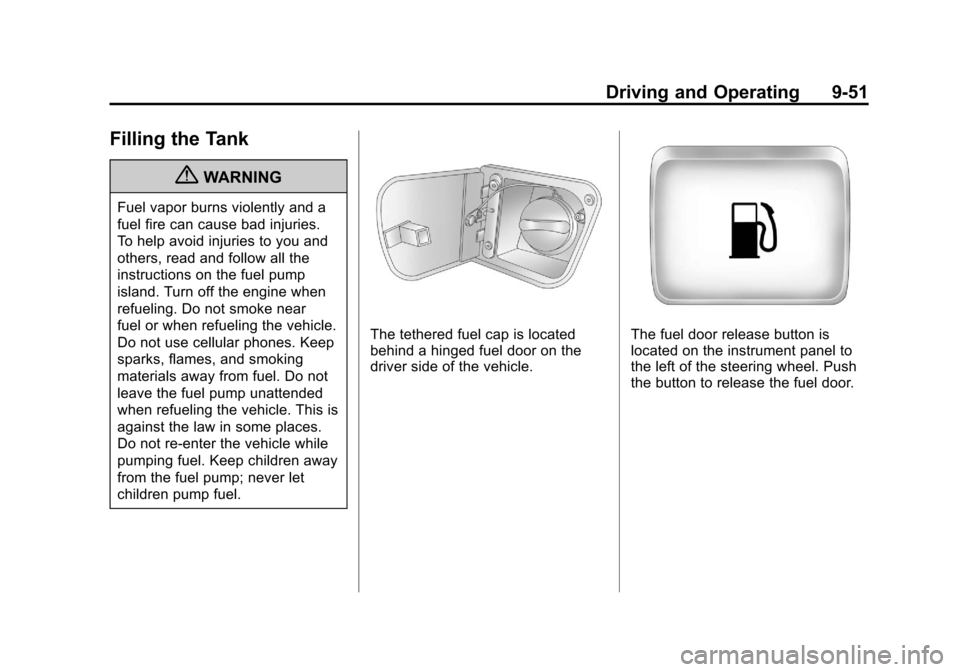
The tethered fuel cap is located
behind a hinged fuel door on the
driver side of the vehicle.The fuel door release button is
located on the instrument panel to
the left of the steering wheel. Push
the button to release the fuel door.