2011 CHEVROLET COLORADO display
[x] Cancel search: displayPage 113 of 392
Black plate (1,1)Chevrolet Colorado Owner Manual - 2011
Instruments and Controls 5-1
Instruments and
Controls
Controls
Steering Wheel Adjustment . . . 5-2
Horn . . . . . . . . . . . . . . . . . . . . . . . . . . 5-2
Windshield Wiper/Washer . . . . . 5-2
Compass . . . . . . . . . . . . . . . . . . . . . 5-3
Clock . . . . . . . . . . . . . . . . . . . . . . . . . 5-4
Power Outlets . . . . . . . . . . . . . . . . . 5-5
Cigarette Lighter . . . . . . . . . . . . . . 5-5
Ashtrays . . . . . . . . . . . . . . . . . . . . . . 5-6
Warning Lights, Gauges, and
Indicators
Warning Lights, Gauges, andIndicators . . . . . . . . . . . . . . . . . . . . 5-6
Chime Level Adjustment . . . . . . 5-6
Instrument Cluster . . . . . . . . . . . . 5-7
Speedometer . . . . . . . . . . . . . . . . . 5-8
Odometer . . . . . . . . . . . . . . . . . . . . . 5-8
Trip Odometer . . . . . . . . . . . . . . . . . 5-8 Tachometer . . . . . . . . . . . . . . . . . . . 5-8
Fuel Gauge . . . . . . . . . . . . . . . . . . . 5-8
Engine Coolant Temperature
Gauge . . . . . . . . . . . . . . . . . . . . . . . 5-9
Safety Belt Reminders . . . . . . . . 5-9
Airbag Readiness Light . . . . . . 5-10
Passenger Airbag Status
Indicator . . . . . . . . . . . . . . . . . . . . 5-11
Charging System Light . . . . . . 5-12
Malfunction Indicator Lamp . . . . . . . . . . . . . 5-12
Brake System Warning Light . . . . . . . . . . . . . . . . . . . . . . . 5-15
Antilock Brake System (ABS) Warning Light . . . . . . . . . . . . . . 5-16
Up-Shift Light . . . . . . . . . . . . . . . . 5-16
Traction Control System (TCS)/StabiliTrak®Light . . . . 5-17
Tire Pressure Light . . . . . . . . . . 5-17
Engine Oil Pressure Light . . . . 5-18
Security Light . . . . . . . . . . . . . . . . 5-18
High-Beam On Light . . . . . . . . . 5-19
Cruise Control Light . . . . . . . . . 5-19
Information Displays
Driver Information Center (DIC) . . . . . . . . . . . . . . . 5-19
Vehicle Messages
Vehicle Messages . . . . . . . . . . . 5-22
Battery Voltage and ChargingMessages . . . . . . . . . . . . . . . . . . 5-23
Brake System Messages . . . . 5-23
Door Ajar Messages . . . . . . . . . 5-24
Engine Cooling System Messages . . . . . . . . . . . . . . . . . . 5-24
Engine Oil Messages . . . . . . . . 5-24
Engine Power Messages . . . . 5-24
Fuel System Messages . . . . . . 5-25
Lamp Messages . . . . . . . . . . . . . 5-25
Ride Control System Messages . . . . . . . . . . . . . . . . . . 5-25
Service Vehicle Messages . . . 5-26
Tire Messages . . . . . . . . . . . . . . . 5-26
Transmission Messages . . . . . 5-26
Page 115 of 392
Black plate (3,1)Chevrolet Colorado Owner Manual - 2011
Instruments and Controls 5-3
Move the band to one of the
following positions:
8(Mist):Single wipe, move the
band to
zand then release it.
Several wipes, hold the band on
z
longer.
N(Adjustable Interval Wipes):
For a delayed wiping cycle. Turn the
band up for more frequent wipes or
down for less frequent wipes.
6(Low Speed): Slow wipes,
turn the band to the first solid
position past the delay settings.
1(High Speed): Fast wipes, turn
the band to the second solid
position past the delay settings.
9(Off): Turns the wipers off.
Clear snow and ice from the wiper
blades before using them. If frozen
to the windshield, carefully loosen or
thaw them. Damaged wiper blades
should be replaced.
Windshield Washer
{WARNING
In freezing weather, do not use
your washer until the windshield
is warmed. Otherwise the washer
fluid can form ice on the
windshield, blocking your vision.
Q L(Washer Fluid): Push the
paddle on top of the multifunction
lever to spray washer fluid on the
windshield. The wipers will clear the
window and then either stop or
return to your preset speed.
Compass
Compass Operation
PressY bor depending on the
mirror, press
Oonce to turn the
display on or off.
Compass Calibration
The compass may need
calibration if:
.CAL is displayed while driving in
the vehicle.
.After approximately five seconds,
the display does not show a
compass heading, N for North,
for example, there may be a
strong magnetic field interfering
with the compass. Interference
can be caused by a magnetic
antenna mount, magnetic note
pad holder, or a similar
magnetic item.
.The compass does not display
the correct heading and the
compass zone variance is set
correctly.
To calibrate, CAL must be displayed
in the mirror compass windows.
If CAL is not displayed, press and
hold
Y b/Ofor several seconds or
until CAL is displayed.
Page 116 of 392
Black plate (4,1)Chevrolet Colorado Owner Manual - 2011
5-4 Instruments and Controls
The compass can be calibrated by
driving the vehicle in circles at
8 km/h (5 mph) or less until the
display reads a direction.
Compass Variance
The mirror is set to zone eight.
If you do not live in zone eight or
drive out of the area, the compass
variance needs to be changed to
the appropriate zone.
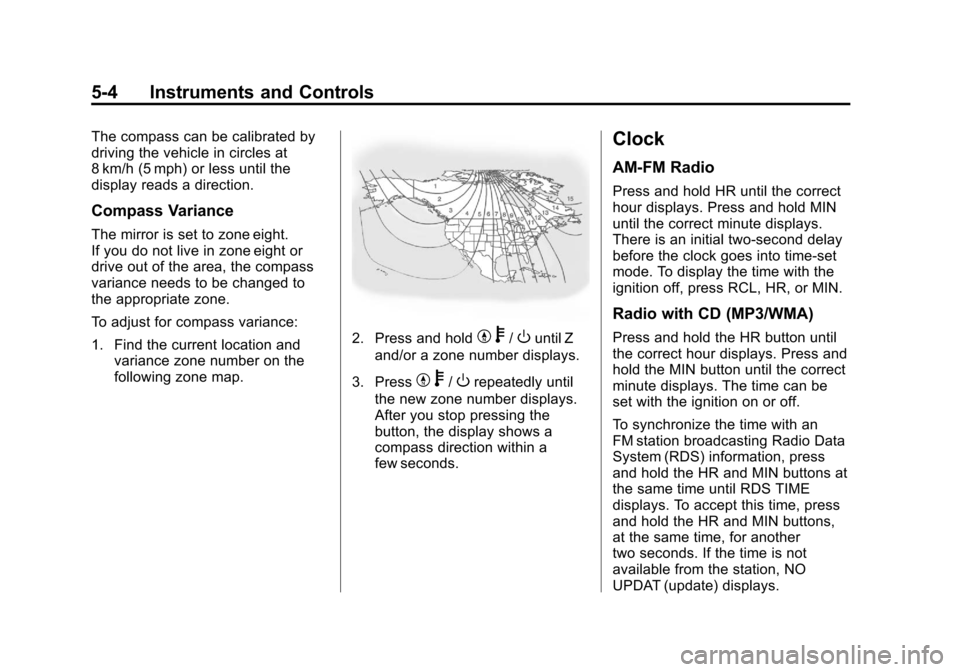
To adjust for compass variance:
1. Find the current location andvariance zone number on the
following zone map.
2. Press and holdYb/Ountil Z
and/or a zone number displays.
3. Press
Y b/Orepeatedly until
the new zone number displays.
After you stop pressing the
button, the display shows a
compass direction within a
few seconds.
Clock
AM-FM Radio
Press and hold HR until the correct
hour displays. Press and hold MIN
until the correct minute displays.
There is an initial two-second delay
before the clock goes into time-set
mode. To display the time with the
ignition off, press RCL, HR, or MIN.
Radio with CD (MP3/WMA)
Press and hold the HR button until
the correct hour displays. Press and
hold the MIN button until the correct
minute displays. The time can be
set with the ignition on or off.
To synchronize the time with an
FM station broadcasting Radio Data
System (RDS) information, press
and hold the HR and MIN buttons at
the same time until RDS TIME
displays. To accept this time, press
and hold the HR and MIN buttons,
at the same time, for another
two seconds. If the time is not
available from the station, NO
UPDAT (update) displays.
Page 118 of 392
Black plate (6,1)Chevrolet Colorado Owner Manual - 2011
5-6 Instruments and Controls
Ashtrays
The vehicle may have a removable
ashtray and cigarette lighter.
The ashtray is located in the center
console area. The ashtray can be
removed for cleaning. When the
ashtray is removed, this area can
also be used as a cupholder.
Notice:If papers, pins, or other
flammable items are put in the
ashtray, hot cigarettes or other
smoking materials could ignite
them and possibly damage the
vehicle. Never put flammable
items in the ashtray.
Warning Lights,
Gauges, and
Indicators
Warning lights and gauges can
signal that something is wrong
before it becomes serious enough
to cause an expensive repair or
replacement. Paying attention to the
warning lights and gauges could
prevent injury.
Warning lights come on when there
could be a problem with a vehicle
function. Some warning lights come
on briefly when the engine is started
to indicate they are working.
Gauges can indicate when there
could be a problem with a vehicle
function. Often gauges and warning
lights work together to indicate a
problem with the vehicle.
When one of the warning lights
comes on and stays on while
driving, or when one of the gauges
shows there may be a problem,
check the section that explains what to do. Follow this manual's advice.
Waiting to do repairs can be costly
and even dangerous.Chime Level Adjustment
The radio is used to adjust the
vehicle's chime level. To change the
volume level of the chime, press
and hold pushbutton 6 with the
ignition on and the radio power off.
The volume level will change from
the normal level to loud, and LOUD
will appear on the radio display. To
change back to the default or
normal setting, press and hold
pushbutton 6 again. The volume
level will change from the loud level
to normal, and NORMAL will appear
on the radio display. Each time the
chime volume is changed, three
chimes will sound to indicate the
new volume selected. Removing the
radio and not replacing it with a
factory radio or chime module will
disable vehicle chimes.
Page 120 of 392

Black plate (8,1)Chevrolet Colorado Owner Manual - 2011
5-8 Instruments and Controls
Speedometer
The speedometer shows the speed
in both miles per hour (mph) and
kilometers per hour (km/h).
Odometer
The odometer shows how far the
vehicle has been driven, in either
miles (used in the United States) or
kilometers (used in Canada).
The odometer mileage can be
checked without the vehicle running
by pressing the trip information
stem. See“Odometer” underDriver
Information Center (DIC) on
page 5‑19 for more information.
If the cluster is replaced the new
one will automatically detect and
update the vehicle's accumulated
mileage.
Trip Odometer
The vehicle has a trip odometer that
indicates how far the vehicle has
been driven since the trip odometer
was last set to zero.
See “Trip Odometer” underDriver
Information Center (DIC) on
page 5‑19 for more information.
Tachometer
The tachometer displays the engine
speed in revolutions per
minute (rpm).
Notice:If the engine is operated
with the tachometer in the shaded
warning area, the vehicle could
be damaged, and the damages
would not be covered by the
vehicle warranty. Do not operate
the engine with the tachometer in
the shaded warning area.
Fuel Gauge
When the ignition is on, the fuel
gauge shows how much fuel the
vehicle has remaining in the
fuel tank.
An arrow on the fuel gauge
indicates the side of the vehicle the
fuel door is on.
Page 121 of 392

Black plate (9,1)Chevrolet Colorado Owner Manual - 2011
Instruments and Controls 5-9
Here are four things that some
owners ask about. None of these
indicate a problem with the vehicle's
fuel gauge:
.At the gas station, the gas pump
shuts off before the gauge
reads full.
.It takes a little more or less fuel
to fill up than the gauge
indicated. For example, the
gauge may have indicated the
tank was half full, but it actually
took a little more or less than
half the tank's capacity to fill
the tank.
.The gauge moves a little while
turning a corner or speeding up.
.The gauge does not go back to
empty when the ignition is
turned off.
When the fuel in the fuel tank is low,
a LOW FUEL message will display
on the Driver Information
Center (DIC). See Fuel System
Messages on page 5‑25 for more
information.
Engine Coolant
Temperature Gauge
This gauge shows the engine
coolant temperature.
If the gauge pointer is near the top
of the gauge, the engine is too hot.
It means that the engine coolant has
overheated. If the vehicle has been
operating under normal driving
conditions, pull the vehicle off the
road, stop the vehicle and turn off
the engine as soon as possible. See
Engine Overheating on
page 10‑23 for more information.
Safety Belt Reminders
Driver Safety Belt Reminder
Light
When the engine is started, a chime
sounds for several seconds to
remind a driver to fasten the safety
belt, unless the driver safety belt is
already buckled.
The safety belt light comes on and
stays on for several seconds, then
flashes for several more.
This chime and light are repeated if
the driver remains unbuckled and
the vehicle is in motion. If the driver
Page 129 of 392

Black plate (17,1)Chevrolet Colorado Owner Manual - 2011
Instruments and Controls 5-17
Traction Control System
(TCS)/StabiliTrak®Light
The StabiliTrak and Traction Control
System (TCS) indicator/warning light
comes on briefly while starting the
engine.
If it does not, have the vehicle
serviced by your dealer. If the
system is working normally the
indicator light then goes off.
The light flashes while the
StabiliTrak system and TCS are
working to assist the driver with
directional control of the vehicle in
difficult driving conditions.If the StabiliTrak system and TCS
light comes on and stays on while
driving and a TRACTION FAULT or
SERVICE STAB SYS message
displays on the DIC, the vehicle
needs service.
The light also comes on steady
when the StabiliTrak system and/or
TCS are turned off. The DIC also
displays a TRAC OFF and/or STAB
SYS OFF message. If the TCS is
off, wheel spin is not limited. If the
StabiliTrak system is off, the system
does not assist the driver with
directional control of the vehicle.
The light turns off when the TCS
and StabiliTrak system are turned
back on.
See
StabiliTrak
®System on
page 9‑47, Traction Control System
(TCS) on page 9‑46 andRide
Control System Messages on
page 5‑25 for more information.
Tire Pressure Light
For vehicles with a Tire Pressure
Monitor System (TPMS), this light
comes on briefly when the engine is
started. It provides information
about tire pressures and the TPMS.
When the Light is On Steady
This indicates that one or more of
the tires are significantly
underinflated.
A tire pressure message can
accompany the light. See Tire
Messages on page 5‑26 for more
information. Stop as soon as
possible, and inflate the tires to the
pressure value shown on the Tire
and Loading Information Label. See
Tire Pressure on page 10‑53 for
more information.
Page 131 of 392

Black plate (19,1)Chevrolet Colorado Owner Manual - 2011
Instruments and Controls 5-19
High-Beam On Light
This light comes on when the
high-beam headlamps are in use.
SeeHeadlamp High/Low-Beam
Changer on page 6‑2 for more
information.
Cruise Control Light
The cruise control light comes on
whenever the cruise control is set.
The light goes out when the cruise
control is turned off. See Cruise
Control on page 9‑49 for more
information.
Information Displays
Driver Information
Center (DIC)
The Driver Information Center (DIC)
displays information such as the trip
odometer, personalization features,
and warning messages. The DIC
display is located on the instrument
panel cluster.
Operation and Displays
The Driver Information Center (DIC)
comes on when the ignition is on.
If a problem is detected, a warning
message appears on the display.
Pressing and releasing the trip
odometer reset stem on the DIC
acknowledges some current
warnings or service messages.
Some messages only clear after the
required action has been taken.
The DIC has different menu items
which can be accessed by pressing
the trip odometer reset stem on the
DIC. This includes trip information,