2011 CHEVROLET COLORADO change time
[x] Cancel search: change timePage 140 of 392

Black plate (2,1)Chevrolet Colorado Owner Manual - 2011
6-2 Lighting
Exterior Lamps Off
Reminder
If a door is open, a reminder chime
sounds when the headlamps or
parking lamps are manually turned
on and the key is out of the ignition.
To turn off the chime, turn the
headlamp switch to off and then
back on. In the automatic mode, the
headlamps turn off once the ignition
is in LOCK/OFF.
For vehicles first sold in Canada,
if the parking lamps are turned on
manually, the Daytime Running
Lamps (DRL) will stay on.
Headlamp High/
Low-Beam Changer
2 3
Headlamp High/Low Beam
Changer: Push the turn signal/
multifunction lever away from you to
turn the high beams on.
Pull the lever towards you to return
to low beams.
This indicator light turns on in the
instrument panel cluster when the
high beam headlamps are on.
Flash-to-Pass
This feature lets you use the
high-beam headlamps to signal a
driver in front of you that you want
to pass. It works even if the
headlamps are in the automatic
position.
To use it, pull the turn signal lever
toward you, then release it.
If the headlamps are in the
automatic position or on low beam,
the high-beam headlamps will turn
on. They will stay on as long as the
lever is held toward you. The
high-beam indicator on the instrument panel cluster will come
on. Release the lever to return to
normal operation.
Daytime Running
Lamps (DRL)
Daytime Running Lamps (DRL) can
make it easier for others to see the
front of your vehicle during the day.
Fully functional daytime running
lamps are required on all vehicles
first sold in Canada.
The DRL system will come on when
the following conditions are met:
.The ignition is on.
.The exterior lamps control is
in AUTO.
.The transmission is not in
P (Park) if you have an
automatic transmission.
.The light sensor determines it is
daytime.
When the DRL are on, only the
parking lamps or reduced intensity
low beam headlamps will be on.
Page 141 of 392

Black plate (3,1)Chevrolet Colorado Owner Manual - 2011
Lighting 6-3
The taillamps, sidemarkers, and
other lamps will not be on. The
instrument panel will not be lit up
either.
When it begins to get dark, the
headlamps will automatically switch
from DRL to the regular headlamps.
The regular headlamp system
should be turned on when needed.
Automatic Headlamp
System
When it is dark enough outside, the
automatic headlamp system will turn
on after the transmission has been
shifted from P (Park) to D (Drive).
The headlamps, taillamps,
sidemarker, parking lamps, roof
marker lamps, and the instrument
panel lights turn on at normal
brightness. The radio lights will
become dimmer when the
headlights are off compared to when
the headlights are on.The vehicle has a light sensor
located on the top of the instrument
panel. Do not cover the sensor,
or the system will be on whenever
the ignition is on.
The system can turn on the
headlamps when driving in a
parking garage, through a tunnel or
when there is overcast weather.
This is normal.
There is a delay in the transition
between the daytime and nighttime
operation of the Daytime Running
Lamps (DRL) and the automatic
headlamp system so that driving
under bridges or bright overhead
street lights does not affect the
system. The DRL and automatic
headlamp system will only be
affected when the light sensor
detects a change in lighting lasting
longer than the delay.
If the vehicle is started in a dark
garage, the automatic headlamp
system will come on immediately.Once the vehicle leaves the garage,
it will take about 1 minute for the
automatic headlamp system to
change to DRL if it is light outside.
During that delay, the instrument
panel cluster may not be as bright
as usual. Make sure the instrument
panel brightness control is in the full
bright position. See
Instrument
Panel Illumination Control on
page 6‑5.
Hazard Warning Flashers
|
(Hazard Warning Flasher):
Press this button located on the
instrument panel, to make the front
and rear turn signal lamps flash on
and off. This warns others that you
are having trouble.
Press
|again to turn the
flashers off.
The turn signals do not work while
the hazard warning flashers are on.
Page 148 of 392
Black plate (4,1)Chevrolet Colorado Owner Manual - 2011
7-4 Infotainment System
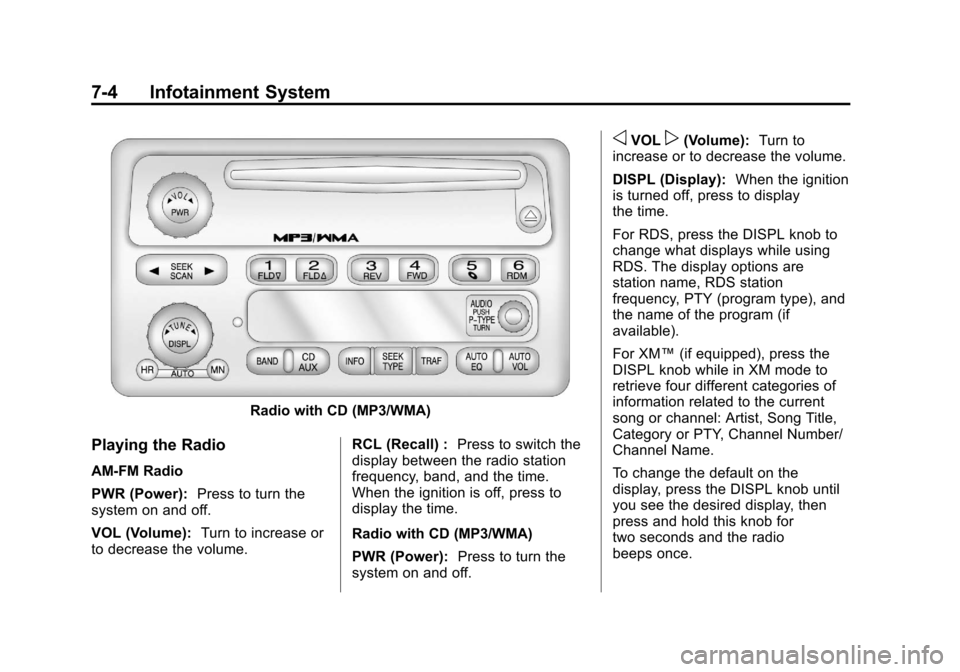
Radio with CD (MP3/WMA)
Playing the Radio
AM-FM Radio
PWR (Power):Press to turn the
system on and off.
VOL (Volume): Turn to increase or
to decrease the volume. RCL (Recall) :
Press to switch the
display between the radio station
frequency, band, and the time.
When the ignition is off, press to
display the time.
Radio with CD (MP3/WMA)
PWR (Power): Press to turn the
system on and off.
oVOLp(Volume): Turn to
increase or to decrease the volume.
DISPL (Display): When the ignition
is turned off, press to display
the time.
For RDS, press the DISPL knob to
change what displays while using
RDS. The display options are
station name, RDS station
frequency, PTY (program type), and
the name of the program (if
available).
For XM™ (if equipped), press the
DISPL knob while in XM mode to
retrieve four different categories of
information related to the current
song or channel: Artist, Song Title,
Category or PTY, Channel Number/
Channel Name.
To change the default on the
display, press the DISPL knob until
you see the desired display, then
press and hold this knob for
two seconds and the radio
beeps once.
Page 159 of 392

Black plate (15,1)Chevrolet Colorado Owner Manual - 2011
Infotainment System 7-15
If the surface of a CD is soiled, take
a soft, lint free cloth or dampen a
clean, soft cloth in a mild, neutral
detergent solution mixed with water,
and clean it. Make sure the wiping
process starts from the center to
the edge.
Playing a CD
Insert a CD partway into the slot,
label side up. The player pulls it in,
and READING displays. The CD
should begin playing. To insert a CD
with the ignition off, first press the
Z(eject) button or the
DISPL knob.
If the ignition or radio is turned off
with a CD in the player it stays in
the player. When the ignition or
radio is turned on, the CD starts to
play where it stopped, if it was the
last selected audio source.
When the CD is inserted, the CD
symbol displays. As each new track
starts to play, the track number
displays. The CD player can play the smaller
8 cm (3 in) single CDs with an
adapter ring. Full-size CDs and the
smaller CDs are loaded in the same
manner.
3 REV (Fast Reverse):
Press and
hold to reverse quickly within a
track. Press and hold for less than
two seconds to reverse at 10 times
the normal playing speed. Press
and hold for more than two seconds
to reverse at 20 times the normal
playing speed. Release to play the
track.
4 FWD (Fast Forward): Press and
hold to advance quickly within a
track. Press and hold for less than
two seconds to advance at six times
the normal playing speed. Press
and hold for more than two seconds
to advance at 17 times the normal
playing speed. Release to play the
track.
6 RDM (Random): Press to hear
the tracks in random, rather than
sequential, order. RDM ON displays. RDM and the track number displays
when each track starts to play.
Press again to turn off random play.
RDM OFF displays.
qSEEKr:
Press the left arrow to
go to the start of the current or the
previous track. Press the right arrow
to go to the start of the next track.
Pressing either arrow for more than
two seconds scans the next tracks,
playing the first eight seconds of
each track until all of the tracks
have been previewed. Press either
arrow again to stop scanning and to
play the track.
qTUNEr: Turn to go to the
previous or next track.
DISPL (Display): Press to see how
long the current track has been
playing. ET and the elapsed time of
the track displays. To change the
default on the display (track or
elapsed time), press until you see
the desired display, then press and
hold for two seconds. The radio
beeps once. The selected display is
now the default.
Page 163 of 392

Black plate (19,1)Chevrolet Colorado Owner Manual - 2011
Infotainment System 7-19
arrow for more than 2 seconds
searches the previous or next tracks
at two tracks per second. Release
the button to stop searching and to
play the track.
qTUNEr:Turn to reverse or
advance through the tracks in all
folders or playlists. The track
number and file name displays for
each track. Turning this knob while
in random reverses or advances the
tracks in sequential order.
DISPL (Display): Press this knob
to switch between track mode,
folder/playlist mode, and time of day
mode. The display shows only
8 characters, but there can be up to
4 pages of text. If there are more
than 8 characters in the song, folder,
or playlist name, pressing this knob
within 2 seconds takes you to the
next page of text. If there are no other pages to be shown, pressing
this knob within 2 seconds takes
you to the next display mode.
.Track mode displays the current
track number and the ID3 tag
song name.
.Folder/playlist mode displays the
current folder or playlist number
and the folder/playlist name.
.Time of day mode displays the
time of day and the ID3 tag
song name.
To change the default on the
display, press the DISPL knob until
you see the desired display, then
press and hold this knob for
2 seconds. The radio produces
one beep and the selected display
is now the default. INFO (Information):
INFO displays
when a current track has ID3 tag
information. Press this button to
display the artist name and album
contained in the tag. INFO
disappears from the display when
the information in the ID3 tag has
finished being read.
BAND: Press this button to listen to
the radio when a CD is playing. The
inactive CD remains inside the radio
for future listening.
CD AUX (Auxiliary): Press this
button to play a CD when listening
to the radio. The CD symbol
illuminates on the display when a
CD is loaded.
Z(Eject): Press this button to
eject a CD. Eject can activate while
either the ignition or radio is off.
CDs can be loaded with the ignition
and radio off if this button is pressed
first.
Page 165 of 392
Black plate (21,1)Chevrolet Colorado Owner Manual - 2011
Infotainment System 7-21
Noise:Keep interior noise levels to
a minimum. The system may not
recognize voice commands if there
is too much background noise.
When to Speak: A short tone
sounds after the system responds
indicating when it is waiting for a
voice command. Wait until the tone
and then speak.
How to Speak: Speak clearly in a
calm and natural voice.
Audio System
When using the in‐vehicle Bluetooth
system, sound comes through the
vehicle's front audio system
speakers and overrides the audio
system. Use the audio system
volume knob, during a call, to
change the volume level. The
adjusted volume level remains in
memory for later calls. To prevent
missed calls, a minimum volume
level is used if the volume is turned
down too low.
Bluetooth Controls
Use thegbutton, located on the
driver side of the instrument panel
near the headlamp controls, to
operate the Bluetooth system.
g(Push To Talk) : Press to
answer incoming calls, to confirm
system information, and to start
speech recognition.
Pairing
A Bluetooth cell phone must be
paired to the Bluetooth system and
then connected to the vehicle before
it can be used. See your cell phone
manufacturer's user guide for
Bluetooth functions before pairing
the cell phone. If a Bluetooth phone
is not connected, calls will be made
using OnStar
®Hands‐Free Calling,
if available. Refer to the OnStar
owner's guide for more information. Pairing Information
.Up to five cell phones can be
paired to the Bluetooth system.
.The pairing process is disabled
when the vehicle is moving.
.Pairing only needs to be
completed once, unless the
pairing information on the cell
phone changes or the cell phone
is deleted from the system.
.Only one paired cell phone can
be connected to the Bluetooth
system at a time.
.If multiple paired cell phones are
within range of the system, the
system connects to the first
available paired cell phone in the
order that they were first paired
to the system. To link to a
different paired phone, see
“Linking to a Different Phone”
later in this section.
Pairing a Phone
1. Press and release
g.
2. Say “Bluetooth.”
Page 166 of 392
Black plate (22,1)Chevrolet Colorado Owner Manual - 2011
7-22 Infotainment System
3. Say“Pair.”The system responds
with instructions and a four‐digit
Personal Identification
Number (PIN).
4. Start the pairing process on the cell phone that you want to pair.
For help with this process, see
your cell phone manufacturer's
user guide.
5. Locate the device named “Your
Vehicle” in the list on the cell
phone. Follow the instructions
on the cell phone to enter the
PIN that was provided in Step 3.
After the PIN is successfully
entered, the system prompts you
to provide a name for the paired
cell phone. This name will be
used to indicate which phones
are paired and connected to the
vehicle, see “Listing All Paired
and Connected Phones” later in
this section for more information.
6. Repeat Steps 1 through 5 to pair additional phones. Listing All Paired and Connected
Phones
The system can list all cell phones
paired to it. If a paired cell phone is
also connected to the vehicle, the
system responds with
“is connected”
after that phone name.
1. Press and release
g.
2. Say “Bluetooth.”
3. Say “List.”
Deleting a Paired Phone
If the phone name you want to
delete is unknown, see “Listing All
Paired and Connected Phones.”
1. Press and release
g.
2. Say “Bluetooth.”
3. Say “Delete.” The system asks
for which phone to delete.
4. Say the name of the phone you want to delete. Connecting to a Different Phone
To connect to a different cell phone,
the Bluetooth system looks for the
next available cell phone in the
order in which all the available cell
phones were paired. Depending on
which cell phone you want to
connect to, you may have to use
this command several times.
1. Press and release
g.
2. Say “Bluetooth.”
3. Say “Change phone.”
.If another cell phone is
found, the response will be
“
connected.”
.If another cell phone is not
found, the original phone
remains connected.
Page 168 of 392
Black plate (24,1)Chevrolet Colorado Owner Manual - 2011
7-24 Infotainment System
Listing Stored Numbers
The list command will list all the
stored numbers and name tags.
Using the“List”Command
1. Press and release
g.
2. Say “Directory.”
3. Say “Hands Free Calling.”
4. Say “List”.
Making a Call
Calls can be made using the
following commands.
Dial or Call: The dial or call
command can be used
interchangeably to dial a phone
number or a stored name tag.
Digit Dial: This command allows a
phone number to be dialed by
entering the digits one at a time.
Re‐dial: This command is used to
dial the last number used on the cell
phone. Using the
“Dial”or“Call”
Command
1. Press and release
g.
2. Say “Dial”or“Call.”
3. Say the entire number without pausing or say the name tag.
Once connected, the person called
will be heard through the audio
speakers.
Using the “Digit Dial” Command
The digit dial command allows a
phone number to be dialed by
entering the digits one at a time.
After each digit is entered, the
system repeats back the digit it
heard followed by a tone.
If an unwanted number is
recognized by the system, say
“Clear” at any time to clear the last
number. To hear all of the numbers
recognized by the system, say
“Verify”
at any time.
1. Press and release
g.
2. Say “Digit Dial.”
3. Say each digit, one at a time, that you want to dial. After each
digit is entered, the system
repeats back the digit it heard
followed by a tone. After the last
digit has been entered,
say “Dial.”
Once connected, the person called
will be heard through the audio
speakers.
Using the “Re‐dial”Command
1. Press and release
g.
2. After the tone, say “Re‐dial.”
Once connected, the person called
will be heard through the audio
speakers.