2011 CHEVROLET COLORADO buttons
[x] Cancel search: buttonsPage 151 of 392

Black plate (7,1)Chevrolet Colorado Owner Manual - 2011
Infotainment System 7-7
LOC (Locked):This message
displays when the THEFTLOCK®
system has locked up. Take the
vehicle to your dealer for service.
If any error occurs repeatedly or if
an error cannot be corrected,
contact your dealer.
Radio with CD (MP3/WMA)
CAL ERR (Calibration Error): The
audio system has been calibrated
for the vehicle from the factory.
If CAL ERR displays it means that
the radio has not been configured
properly for the vehicle and it must
be returned to your dealer for
service.
LOCKED: This message displays
when the THEFTLOCK
®system has
locked up. Take the vehicle to your
dealer for service.
If any error occurs repeatedly or if
an error cannot be corrected,
contact your dealer.
Radio
AM-FM Radio
Finding a Station
AM-FM Radio
AM FM: Press to switch between
FM1, FM2, or AM.
TUNE : Turn to select radio
stations.
oSEEK: Press to go to the
previous station and stay there.
To scan stations, press and hold
o
SEEK for two seconds until a beep
sounds. The radio goes to a station,
plays for a few seconds, then goes
to the next station. Press
oSEEK
again to stop scanning.
To scan preset stations, press
and hold
oSEEK for more than
four seconds until two beeps sound. The radio goes to the first preset
station, plays for a few seconds,
then goes to the next preset station.
Press
oSEEK again to stop
scanning presets.
SEEK
p: Press to go to the next
station and stay there.
To scan stations, press and hold
SEEK
pfor two seconds until a
beep sounds. The radio goes to a
station, plays for a few seconds,
then goes to the next station. Press
SEEK
pagain to stop scanning.
To scan preset stations, press
and hold SEEK
pfor more than
four seconds until two beeps sound.
The radio goes to the first preset
station stored on the pushbuttons,
plays for a few seconds, then goes
to the next preset station. Press
SEEK
pagain to stop scanning
presets.
Page 154 of 392
Black plate (10,1)Chevrolet Colorado Owner Manual - 2011
7-10 Infotainment System
If the radio cannot find the desired
program type, NONE displays and
the radio returns to the last tuned
station.
SCAN:To scan PTYs, press and
hold the SEEK / SCAN until a beep
sounds. The radio goes to a station,
plays for a few seconds, then goes
to the next station.
BAND (Alternate Frequency):
Alternate frequency lets the radio
switch to a stronger station with
the same program type. To turn
alternate frequency on, press and
hold BAND for two seconds. AF ON
displays. The radio could switch to
stations with a stronger frequency.
To turn alternate frequency off,
press and hold BAND again for
2 seconds. AF OFF displays. The
radio does not switch to other
stations.
DISPL (Display): Press to change
what information displays while
using RDS. The display options are
station name, RDS station frequency, PTY (program type),
and the name of the program (if
available).
Setting Preset PTYs Only
The six pushbuttons have factory
PTY presets. Up to 12 PTYs
(6 FM1 and 6 FM2), can be
programmed on the numbered
pushbuttons. To program PTYs:
1. Press BAND to select FM1
or FM2.
2. Turn the P‐TYPE knob to activate program type select
mode. TYPE and the last
selected PTY displays.
3. Turn the P‐TYPE knob to select a PTY.
4. Press and hold one of the six numbered pushbuttons until a
beep sounds. When that
numbered pushbutton is
pressed, the PTY that was set,
returns.
5. Repeat the steps for each pushbutton.Setting Preset Stations
If the radio does not have XM, up to
18 stations (6 FM1, 6 FM2, and
6 AM) can be programmed on the
six numbered pushbuttons.
If the radio has XM, up to
30 stations (6 FM1, 6 FM2, 6 AM,
6 XM1, and 6 XM2) can be
programmed on the six numbered
pushbuttons.
To program either radio:
1. Tune in the desired station.
2. Press and hold one of the six
numbered pushbuttons until the
radio beeps once. When that
numbered pushbutton is pressed
again, the station that was
stored, returns.
3. Repeat the steps for each pushbutton.
Page 156 of 392
Black plate (12,1)Chevrolet Colorado Owner Manual - 2011
7-12 Infotainment System
Setting Preset Channels
If the radio has XM, up to
30 stations (6 FM1, 6 FM2, 6 AM,
6 XM1, and 6 XM2) can be
programmed on the six numbered
pushbuttons.
To program either radio:
1. Tune in the desired channel.
2. Press and hold one of the sixnumbered pushbuttons until the
radio beeps once. When that
numbered pushbutton is pressed
again, the channel that was
stored, returns.
3. Repeat the steps for each pushbutton.
XM Radio Messages
XL (Explicit Language
Channels): These channels, or
any others, can be blocked at a
customer's request, by calling
1-800-929-2100 in the U.S. and
1-877-438-9677 in Canada. Updating:
The encryption code in
the receiver is being updated, and
no action is required. This process
should take no longer than
30 seconds.
No Signl: The system is
functioning correctly, but the vehicle
is in a location that is blocking the
XM signal. When the vehicle is
moved into an open area, the signal
should return.
Loading: The radio system is
acquiring and processing audio and
text data. No action is needed. This
message should disappear shortly.
Off Air: This channel is not
currently in service. Tune to another
channel.
CH Unavl: This previously
assigned channel is no longer
assigned. Tune to another station.
If this station was one of the
presets, choose another station for
that preset button. Unauth:
This channel is blocked or
cannot be received with your XM
Subscription package.
No Info: No artist, song title,
category, or text information is
available at this time on this
channel. The system is working
properly.
NotFound: No artist, song title,
category, or text information is
available at this time on this
channel. The system is working
properly.
XM Lock: The XM receiver in your
vehicle could have previously been
in another vehicle. For security
purposes, XM receivers cannot be
swapped between vehicles. If this
message is received after having
your vehicle serviced, check with
your dealer.
Radio ID: If this message is
received when tuned to channel 0,
there could be a receiver fault.
Consult with your dealer.
Page 161 of 392

Black plate (17,1)Chevrolet Colorado Owner Manual - 2011
Infotainment System 7-17
to the next folder in the file structure
that contains compressed audio
files. The empty folder does not
display.
No Folder
When the CD contains only
compressed files, the files are
located under the root folder. The
next and previous folder functions
have no function on a CD that was
recorded without folders or playlists.
When displaying the name of the
folder the radio displays ROOT.
When the CD contains only playlists
and compressed audio files, but no
folders, all files are located under
the root folder. The folder down and
the folder up buttons search
playlists (Px) first and then go to the
root folder. When the radio displays
the name of the folder, the radio
displays ROOT.Order of Play
Tracks are played in the following
order:
.Play begins from the first track in
the first playlist and continues
sequentially through all tracks in
each playlist. When the last
track of the last playlist has
played, play continues from the
first track of the first playlist.
.If the CD does not contain any
playlists, then play begins from
the first track under the root
directory. When all tracks from
the root directory have played,
play continues from files
according to their numerical
listing. After playing the last
track from the last folder, play
begins again at the first track of
the first folder or root directory.
When play enters a new folder, the
display does not automatically show
the new folder name unless you
have chosen the folder mode as the
default display. See DISPL (display) later in this section for more
information. The new track name
displays.
File System and Naming
The song name that displays is the
song name that is contained in the
ID3 tag. If the song name is not
present in the ID3 tag, then the
radio displays the file name without
the extension (such as .mp3) as the
track name.
Track names longer than
32 characters or four pages are
shortened. Parts of words on the
last page of text and the extension
of the filename does not display.
Preprogrammed Playlists
Preprogrammed playlists which
were created by WinAmp™,
MusicMatch™, or Real Jukebox™
software can be accessed, however,
they cannot be edited. These
playlists are treated as special
folders containing compressed
audio song files.
Page 213 of 392
Black plate (39,1)Chevrolet Colorado Owner Manual - 2011
Driving and Operating 9-39
Drive Systems
Four-Wheel Drive
If the vehicle has four-wheel
drive, you can send the engine's
driving power to all four wheels for
extra traction. To get the best
performance out of four-wheel
drive, you must be familiar with its
operation. Read this section before
using four-wheel drive. You should
use two-wheel drive high for most
normal driving conditions.
Notice:Driving on clean, dry
pavement in four-wheel drive for
an extended period of time can
cause premature wear on the
vehicle's powertrain. Do not drive
on clean, dry pavement in
Four-Wheel Drive for extended
periods of time. Notice:
If the vehicle has
four-wheel drive and the different
size spare tire is installed on the
vehicle, do not drive in four-wheel
drive until you can have your flat
tire repaired and/or replaced. You
could damage the vehicle, and
the repair costs would not be
covered by your warranty. Never
use four-wheel drive when the
different size spare tire is
installed on the vehicle.
Notice: If the vehicle has
four-wheel drive and the compact
spare tire is installed on the
vehicle, do not drive in four-wheel
drive until you can have the flat
tire repaired and/or replaced. You
could damage the vehicle, and
the repair costs would not be
covered by your warranty. Never
use four-wheel drive when the
compact spare tire is installed on
the vehicle.
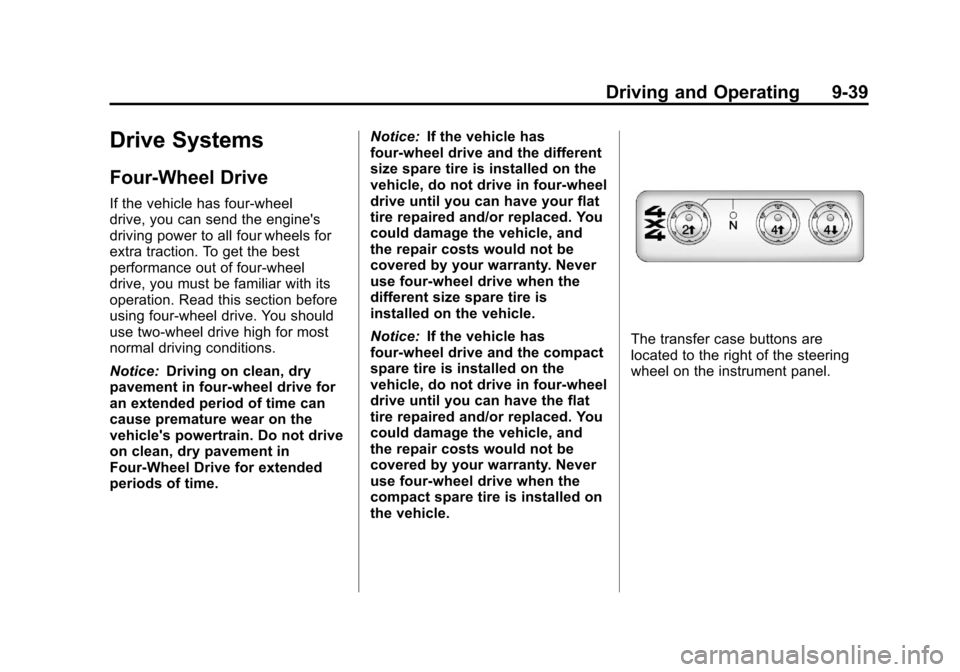
The transfer case buttons are
located to the right of the steering
wheel on the instrument panel.
Page 214 of 392

Black plate (40,1)Chevrolet Colorado Owner Manual - 2011
9-40 Driving and Operating
Recommended Transfer Case Settings
Driving ConditionsTransfer Case Settings
2m4m4nN
Normal YES Severe YES
Extreme YES
Vehicle in Tow* YES
*See Recreational Vehicle Towing on page 10‑90 orTowing the Vehicle on
page 10‑90 for further information.
Shifting into Four‐Wheel Low will
turn Traction Control and
StabiliTrak
®off. See Traction
Control System (TCS) on page 9‑46
and StabiliTrak
®System on
page 9‑47 for more information. Use these buttons to shift into and
out of four-wheel drive. You can
choose from the following:
2m(Two-Wheel High):
This setting
is for driving in most street and
highway situations. The front axle is
not engaged in two-wheel drive.
{WARNING
Shifting the transfer case to
N (Neutral) can cause the vehicle
to roll even if the transmission is
in P (Park). You or someone else
could be seriously injured. Be
sure to set the parking brake
before placing the transfer case in
N (Neutral). See Parking Brake on
page 9‑44.
N (Neutral): Shift the vehicle's
transfer case to N (Neutral) only
when towing the vehicle.
4
m(Four-Wheel High): This setting
engages the front axle to help drive
the vehicle. Use four-wheel high
when you need extra traction, such
as on snowy or icy roads, or in most
off-road situations.
4
n(Four-Wheel Low): This setting
also engages the front axle to give
you extra traction. It sends the
maximum power to all four wheels.
Page 215 of 392

Black plate (41,1)Chevrolet Colorado Owner Manual - 2011
Driving and Operating 9-41
You might choose four-wheel low if
you were driving off-road in sand,
mud, or deep snow and while
climbing or descending steep hills.
Shifting into Four‐Wheel Low will
turn Traction Control and
StabiliTrak
®off. SeeTraction
Control System (TCS) on page 9‑46
and StabiliTrak
®System on
page 9‑47 for more information.
Indicator lights in the buttons show
you which setting you are in. The
indicator lights will come on briefly
when you turn on the ignition and
one will stay on the selected setting.
If the lights do not come on, you
should take the vehicle in for
service. An indicator light will flash
while shifting. It will stay on when
the shift is completed.
If the transfer case does not shift, it
will return to the last chosen setting. Shifting from Two-Wheel High to
Four-Wheel High
Press and release the Four-Wheel
High button. This can be done at
any speed, and the front axle will
lock automatically.
Shifting from Four-Wheel High to
Two-Wheel High
Press and release the Two-Wheel
High button. This can be done at
any speed, and the front axle will
unlock automatically.
It is normal to hear and feel the
vehicle's transfer case shift into
Four-Wheel High. If you shift with
the vehicle stopped, the indicator
light may still flash slowly. It may be
necessary to shift the transmission
momentarily into R (Reverse) and
D (Drive), for an automatic
transmission, or R (Reverse) and
1 (First) for a manual transmission
to have the light stop flashing.Shifting from Two-Wheel High or
Four-Wheel High to
Four-Wheel Low
To shift from Two-Wheel High or
Four-Wheel High to Four-Wheel
Low, the vehicle must be stopped or
moving less than 5 km/h (3 mph)
with the transmission in N (Neutral)
for an automatic transmission or the
clutch pedal pressed for a manual
transmission. The preferred method
for shifting into Four-Wheel Low is
to have your vehicle moving
1.6 to 3.2 km/h (1 to 2 mph).
Press and release the Four-Wheel
Low button. You must wait for the
Four-Wheel Low indicator light to
stop flashing and stay on before
shifting the transmission into gear or
releasing the clutch pedal.
If the Four-Wheel Low button is
pressed when the vehicle is in gear
and/or moving faster than 5 km/h
(3 mph), the Four-Wheel Low
indicator light will flash for
30 seconds and not complete the
shift.
Page 216 of 392

Black plate (42,1)Chevrolet Colorado Owner Manual - 2011
9-42 Driving and Operating
Shifting from Four-Wheel Low to
Two-Wheel High or
Four-Wheel High
To shift from Four-Wheel Low to
Two-Wheel High or Four-Wheel
High, the vehicle must be stopped
or moving less than 5 km/h (3 mph)
with the transmission in N (Neutral)
for an automatic transmission or the
clutch pedal pressed for a manual
transmission. The preferred method
for shifting out of Four-Wheel Low is
to have your vehicle moving
1.6 to 3.2 km/h (1 to 2 mph).
Press and release the Four-Wheel
High or Two-Wheel High button. You
must wait for the Four-Wheel High
or Two-Wheel High indicator light to
stop flashing and stay on before
shifting the transmission into gear or
releasing the clutch pedal.
If the Four-Wheel High or
Two-Wheel High button is pressed
when the vehicle is in gear and/or
moving faster than 5 km/h (3 mph),
the Four-Wheel High or Two-WheelHigh indicator light will flash for
30 seconds but not complete the
shift.
Shifting to Neutral
Use N (Neutral) when you plan to
tow the vehicle. See
Recreational
Vehicle Towing on page 10‑90 for
towing instructions. To shift the
transfer case into N (Neutral) do the
following:
1. Set the parking brake.
2. Start the vehicle.
3. Press the regular brake pedal and shift the transmission in
N (Neutral), or press in the clutch
for vehicles with a manual
transmission.
4. Shift the transfer case to Two-Wheel High.
5. Press and hold the Two-Wheel High and Four-Wheel Low
buttons at the same time for
10 seconds. The N (Neutral) light will come on when the transfer
case shift to N (Neutral) is
complete.
6. Press and hold the regular brake pedal and shift the transmission
to R (Reverse) for one second,
then shift the transmission to
D (Drive) for one second,
or 1 (First) for vehicles with
manual transmissions, and let
out the clutch to insure the
transfer case is in N (Neutral).
If the transfer case is not in
N (Neutral), repeat this
procedure starting at Step 3.
7. Turn the engine off by turning the key to ACC/ACCESSORY.
8. Place the transmission shift lever in P (Park), or 1 (First) for
vehicles that have a manual
transmission.
9. Turn the ignition to LOCK/OFF.