2011 CHEVROLET CAMARO service
[x] Cancel search: servicePage 196 of 414

Black plate (32,1)Chevrolet Camaro Owner Manual - 2011
7-32 Infotainment System
Using the“Digit Dial” Command
The digit dial command allows a
phone number to be dialed by
entering the digits one at a time.
After each digit is entered, the
system repeats back the digit it
heard followed by a tone.
If an unwanted number is
recognized by the system, say
“Clear” at any time to clear the
last number.
To hear all of the numbers
recognized by the system,
say “Verify” at any time.
1. Press
b g.
2. Say “Digit Dial.”
3. Say each digit, one at a time, that you want to dial. After each
digit is entered, the system
repeats back the digit it heard
followed by a tone. After the
last digit has been entered,
say “Dial.” Once connected, the person called
will be heard through the audio
speakers.
Using the
“Re‐dial”Command
1. Press
b g.
2. After the tone, say “Re‐dial.”
Once connected, the person called
will be heard through the audio
speakers.
Receiving a Call
When an incoming call is received,
the audio system mutes and a ring
tone is heard in the vehicle.
.Pressb gto answer the call.
.Press$ cto ignore a call.
Call Waiting
Call waiting must be supported on
the cell phone and enabled by the
wireless service carrier.
.Pressbgto answer an
incoming call when another
call is active. The original call
is placed on hold.
.Pressb gagain to return to the
original call.
.To ignore the incoming call, no
action is required.
.Press$ cto disconnect the
current call and switch to the call
on hold.
Page 197 of 414

Black plate (33,1)Chevrolet Camaro Owner Manual - 2011
Infotainment System 7-33
Three‐Way Calling
Three‐way calling must be
supported on the cell phone and
enabled by the wireless service
carrier.
1. While on a call, press
bg.
2. Say “Three‐way call.”
3. Use the dial or call command to dial the number of the third party
to be called.
4. Once the call is connected, press
bgto link all the callers
together.
Ending a Call
Pressc $to end a call.
Muting a Call
During a call, all sounds from inside
the vehicle can be muted so that the
person on the other end of the call
cannot hear them.
To mute a call, press
b g, and then
say “Mute Call.”
To cancel mute, press
b g, and
then say “Un‐mute Call.”
Transferring a Call
Audio can be transferred between
the Bluetooth system and the cell
phone.
The cell phone must be paired
and connected with the Bluetooth
system before a call can be
transferred. The connection process
can take up to two minutes after the
ignition is turned to ON/RUN. To Transfer Audio from the
Bluetooth System to a Cell Phone
During a call with the audio in the
vehicle:
1. Press
b
g.
2. Say “Transfer Call.”
To Transfer Audio to the Bluetooth
System from a Cell Phone
During a call with the audio on the
cell phone, press
b g. The audio
transfers to the vehicle. If the audio
does not transfer to the vehicle,
use the audio transfer feature on
the cell phone. See your cell phone
manufacturer's user guide for more
information.
Page 209 of 414

Black plate (7,1)Chevrolet Camaro Owner Manual - 2011
Driving and Operating 9-7
Of course, traction is reduced when
water, snow, ice, gravel, or other
material is on the road. For safety,
slow down and adjust your driving
to these conditions. It is important
to slow down on slippery surfaces
because stopping distance is longer
and vehicle control more limited.
While driving on a surface with
reduced traction, try to avoid
sudden steering, acceleration,
or braking, including reducing
vehicle speed by shifting to a lower
gear. Any sudden changes could
cause the tires to slide. You might
not realize the surface is slippery
until the vehicle is skidding. Learn
to recognize warning clues—such
as enough water, ice, or packed
snow on the road to make a
mirrored surface —and slow
down when you have any doubt.
Remember: Antilock brakes help
avoid only the braking skid.Competitive Driving
Competitive driving may affect the
vehicle warranty. See the warranty
book before using the vehicle for
racing or other competitive driving.
The new vehicle break‐in must be
performed before the vehicle is
used for competitive driving. See
New Vehicle Break-In on page 9‑18.
Notice: If you use your vehicle
for competitive driving, the
engine may use more oil than it
would with normal use. Low oil
levels can damage the engine.
Be sure to check the oil level
often during competitive driving
and keep the level at or near the
upper mark that shows the proper
operating range on the engine oil
dipstick. For information on how
to add oil, see Engine Oil on
page 10‑10.
For competitive driving, it is
recommended that the brake fluid
be replaced with a high performance
brake fluid that has a dry boiling
point greater than 279°C (534°F). After conversion to the high
performance brake fluid,
follow the brake fluid service
recommendations outlined by the
fluid manufacturer. Do not use
silicone or DOT‐5 brake fluids.
If the vehicle is used for racing,
competitive driving, sustained high
speed , or events that generate
excessive wheel slip, the rear axle
fluid temperatures will be higher
than would occur in normal driving.
We recommend that the rear axle
fluid be drained and refilled with
new fluid after every six hours
of racing or competitive driving.
See
Recommended Fluids and
Lubricants on page 11‑7 for what
fluid to use.
Regularly inspect the driveshaft/
propshaft couplings and halfshaft
boots for cracking or grease
leakage. It is not recommended that
the vehicle be used for ongoing race
track/competitive driving.
Page 211 of 414

Black plate (9,1)Chevrolet Camaro Owner Manual - 2011
Driving and Operating 9-9
Highway Hypnosis
Always be alert and pay attention
to your surroundings while driving.
If you become tired or sleepy, find
a safe place to park the vehicle
and rest.
Other driving tips include:
.Keep the vehicle well ventilated.
.Keep interior temperature cool.
.Keep your eyes moving—scan
the road ahead and to the sides.
.Check the rearview mirror and
vehicle instruments often.
Hill and Mountain Roads
Driving on steep hills or through
mountains is different than driving
on flat or rolling terrain. Tips for
driving in these conditions include:
.Keep the vehicle serviced and in
good shape.
.Check all fluid levels and brakes,
tires, cooling system, and
transmission.
.Shift to a lower gear when going
down steep or long hills.
{WARNING
If you do not shift down, the
brakes could get so hot that they
would not work well. You would
then have poor braking or even
none going down a hill. You could
crash. Shift down to let the engine
assist the brakes on a steep
downhill slope.
{WARNING
Coasting downhill in N (Neutral)
or with the ignition off is
dangerous. The brakes will
have to do all the work of slowing
down and they could get so hot
that they would not work well.
You would then have poor braking
or even none going down a hill.
You could crash. Always have the
engine running and the vehicle
in gear when going downhill.
.Stay in your own lane. Do not
swing wide or cut across the
center of the road. Drive at
speeds that let you stay in
your own lane.
.Top of hills: Be alert —
something could be in your
lane (stalled car, accident).
.Pay attention to special road
signs (falling rocks area, winding
roads, long grades, passing or
no-passing zones) and take
appropriate action.
Page 222 of 414

Black plate (20,1)Chevrolet Camaro Owner Manual - 2011
9-20 Driving and Operating
4. Set the parking brake.See Parking Brake on
page 9‑37.
{WARNING
Turning off the vehicle while
moving may cause loss of power
assist in the brake and steering
systems and disable the airbags.
While driving, only shut the
vehicle off in an emergency.
5. If the vehicle must be shut off while driving, turn the ignition to
ACC/ACCESSORY.
The ignition switch can bind in the
LOCK/OFF position with the wheels
turned off center. If this happens,
move the steering wheel from
right to left while turning the key
to ACC/ACCESSORY. If this does
not work, then the vehicle needs
service. B (ACC/ACCESSORY):
This
position provides power to some
of the electrical accessories.
It unlocks the steering wheel and
ignition. To move the key from
ACC/ACCESSORY to LOCK/OFF,
push in the key and then turn it to
LOCK/OFF.
C (ON/RUN): The ignition switch
stays in this position when the
engine is running. This position
can be used to operate the
electrical accessories, including
the ventilation fan and 12 volt
power outlet, as well as to display
some warning and indicator lights.
The transmission is also unlocked
in this position on automatic
transmission vehicles. The battery could be drained if the
key is left in the ACC/ACCESSORY
or ON/RUN position with the engine
off. The vehicle might not start if the
battery is allowed to drain for an
extended period of time.
D (START):
This position starts
the engine. When the engine starts,
release the key. The ignition switch
will return to ON/RUN for normal
driving.
A warning tone sounds when the
driver door is opened if the ignition
is still in ACC/ACCESSORY and the
key is in the ignition.
Page 234 of 414
Black plate (32,1)Chevrolet Camaro Owner Manual - 2011
9-32 Driving and Operating
4 (Fourth) Gear Hold (V6 Engine)
If, during highway driving, you
wish to pass another vehicle, but
then change your mind (quickly
pushing the accelerator pedal
all the way to the floor and then
immediately releasing the pedal),
the transmission will shift to a
lower gear and then upshift to
4 (Fourth). This leaves the
transmission prepared with
increased responsiveness for
additional driver input. The passing
maneuver can then be resumed
from 4 (Fourth) gear, or 4 (Fourth)
gear hold can be canceled by lightly
pressing on the accelerator pedal.
Notice:If the vehicle seems to
accelerate slowly or not shift
gears when you go faster, and
you continue to drive the vehicle
that way, you could damage the
transmission. Have the vehicle
serviced right away. M (Manual Mode):
This position
allows the driver to select the range
of gears appropriate for current
driving conditions.
In M (Manual Mode) the
transmission will shift as an
automatic until the Tap Shift
controls are used. Tap Shift
activates driver manual gear
selection.
While driving in M (Manual Mode),
if Tap Shift has not been activated,
the transmission determines when
the vehicle is being driven in a
competitive manner. It selects and
holds the transmission in lower
gears and has more noticeable
upshifts for sportier vehicle
performance.
See Manual Mode on page 9‑32 for
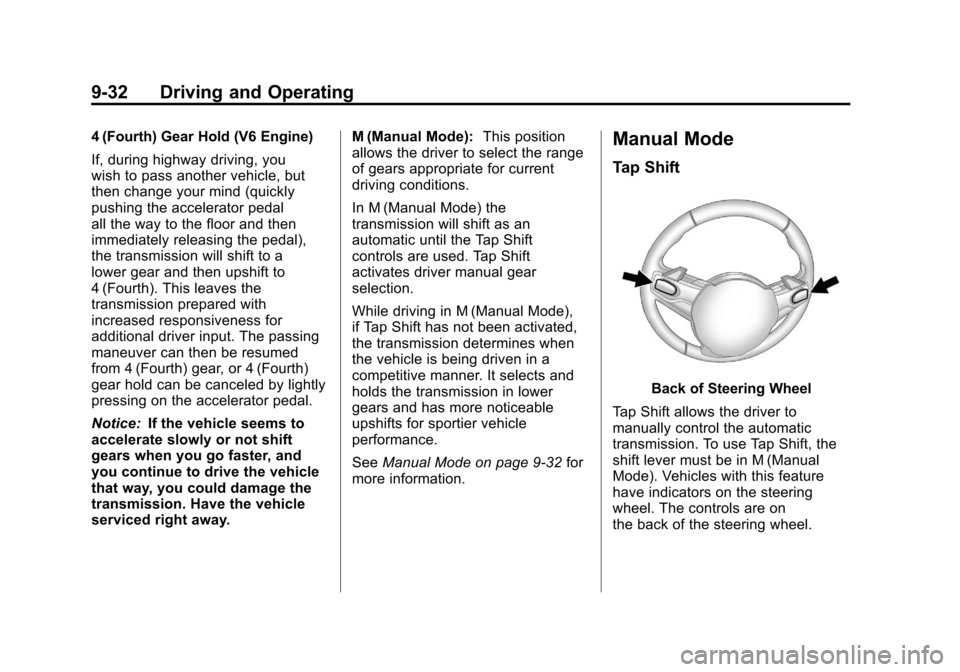
more information.Manual Mode
Tap Shift
Back of Steering Wheel
Tap Shift allows the driver to
manually control the automatic
transmission. To use Tap Shift, the
shift lever must be in M (Manual
Mode). Vehicles with this feature
have indicators on the steering
wheel. The controls are on
the back of the steering wheel.
Page 240 of 414

Black plate (38,1)Chevrolet Camaro Owner Manual - 2011
9-38 Driving and Operating
Brake Assist
This vehicle has a brake assist
feature designed to assist the
driver in stopping or decreasing
vehicle speed in emergency driving
conditions. This feature uses the
stability system hydraulic brake
control module to supplement
the power brake system under
conditions where the driver has
quickly and forcefully applied the
brake pedal in an attempt to quickly
stop or slow down the vehicle.
The stability system hydraulic brake
control module increases brake
pressure at each corner of the
vehicle until the ABS activates.
Minor brake pedal pulsation or
pedal movement during this time
is normal and the driver should
continue to apply the brake pedal
as the driving situation dictates.
The brake assist feature will
automatically disengage when
the brake pedal is released or
brake pedal pressure is quickly
decreased.
Ride Control Systems
Traction Control
System (TCS)
The vehicle has a Traction Control
System (TCS) that limits wheel spin.
The system utilizes engine and
braking controls to control wheel
spin during acceleration at all
driving speeds for maximum driver
control regardless of conditions.
When the system senses impending
wheel slip during acceleration, it
signals the throttle control to reduce
drive wheel torque. Under extreme
situations, such as going from
pavement to ice during acceleration,
the system will selectively apply
the brakes to maintain control.
The system may be heard or felt
while it is working, but this is
normal.The TCS/StabiliTrak warning light
flashes when the traction control
system is limiting wheel spin.
The TCS/StabiliTrak warning light
comes on solid if there is a problem
with the traction control system.
SeeTraction Control System (TCS)/
StabiliTrak
®Light on page 5‑22 for
more information. If the light stays
on, see your dealer for service.
When the TCS/StabiliTrak warning
light is on, the system will not limit
wheel spin. Adjust your driving
accordingly.
Page 242 of 414

Black plate (40,1)Chevrolet Camaro Owner Manual - 2011
9-40 Driving and Operating
The Traction Control System (TCS)/
StabiliTrak button is located in front
of the shift lever.
When the system activates, the
TCS/StabiliTrak warning light
flashes on the instrument panel
cluster. You may also hear a noise
or feel vibration in the brake pedal.
This is normal. Continue to steer the
vehicle in the intended direction.
If there is a problem detected
with StabiliTrak, a SERVICE
STABILITRAK message displays
on the DIC and the StabiliTrak/TCS
warning light on the instrument
panel cluster comes on. When
this message and warning light
display, the system is not
operational. Driving should be
adjusted accordingly. SeeRide
Control System Messages on
page 5‑38 andTraction Control
System (TCS)/StabiliTrak
®Light on
page 5‑22 for more information.
StabiliTrak comes on automatically
whenever the vehicle is started.
The system should be left on to help
assist with directional control of the
vehicle. If StabiliTrak needs to be
turned off, press and hold the TCS/
StabiliTrak button until the Traction
Control Off light and the StabiliTrak
Off light come on in the instrument
panel cluster. If the system has
been turned off, press and release
the TCS/StabiliTrak button to turn
the system back on.