2011 CHEVROLET AVEO radio
[x] Cancel search: radioPage 155 of 328
Black plate (15,1)Chevrolet Aveo Owner Manual - 2011
Infotainment System 7-15
.The air is very humid. If so, wait
about an hour and try again.
.The format of the CD is not
compatible. See“Using an MP3”
earlier in this section.
.There was a problem while
burning the CD.
.The label is caught in the CD
player.
If the CD is not playing correctly, for
any other reason, try a known
good CD.
If any error occurs repeatedly or if
an error cannot be corrected,
contact your dealer. If the radio
displays an error message, write it
down and provide it to your dealer
when reporting the problem.
Auxiliary Devices
The infotainment system has a
3.5 mm (1/8 in) auxiliary input jack
located on the lower right side of
the faceplate. This is not an audio
output; do not plug headphones into
the 3.5 mm (1/8 in) auxiliary input
jack. An external audio device such
as an iPod
®, laptop computer, MP3
player, CD changer, etc. can be
connected to the 3.5 mm (1/8 in)
auxiliary input jack for use as
another audio source.
Drivers are encouraged to set up
any auxiliary device while the
vehicle is in P (Park). See Defensive
Driving on page 9‑2 for more
information on driver distraction.
To use a portable audio player,
connect a 3.5 mm (1/8 in) cable to
the radio's 3.5 mm (1/8 in) auxiliary
input jack. When a device is
connected, press the radio AUX
button to begin playing audio from
the device over the vehicle
speakers.
O(Power/Volume): Turn to adjust
the volume. Additional volume
adjustments may have to be made
from the portable device if the
volume is too quiet or too loud.
AUX (Auxiliary): Press to listen to
the radio while a portable audio
device is playing. Press again and
the system begins playing audio
from the connected portable audio
player. If a portable audio player is
not connected, No Aux Input Device
Found may display.
CD/AUX (Auxiliary): Press to play
a CD while a portable audio device
is playing. Press CD/AUX a second
time for the system to begin playing
audio from the connected portable
audio player. The portable audio
device continues playing until it is
turned off.
Page 180 of 328
Black plate (18,1)Chevrolet Aveo Owner Manual - 2011
9-18 Driving and Operating
LOCK (STOPPING THE ENGINE/
LOCK/OFF):When the vehicle is
stopped, turn the ignition switch to
LOCK/OFF to turn the engine off.
This position locks the steering
wheel, ignition, shift lever and
transmission. This is the only
position in which you can insert or
remove the key.
Do not turn the engine off when the
vehicle is moving. This will cause a
loss of power assist in the brake
and steering systems and disable
the airbags.
In an emergency:
1. Brake using a firm and steady pressure. Do not pump the
brakes repeatedly. This may
deplete power assist, requiring
increased brake pedal force.
2. Shift the vehicle to neutral. This can be done while the vehicle is
moving. After shifting to neutral,
firmly apply the brakes and steer
the vehicle to a safe location. 3. Come to a complete stop. Shift
to P (Park) with an automatic
transmission, or neutral with a
manual transmission. Turn the
ignition to LOCK/OFF.
4. Set the parking brake. See Parking Brake on page 9‑31.
The steering can bind with the
wheels turned off center. If this
happens, move the steering wheel
from right to left while turning the
key to ACC/ACCESSORY. If this
doesn't work, then the vehicle needs
service.
ACC (ACC/ACCESSORY): This
position operates some of the
electrical accessories, such as the
radio, but not the climate control
system. ON (ON/RUN):
This position can
be used to operate the electrical
accessories, and to display some
instrument panel cluster warning
and indicator lights. The switch
stays in this position when the
engine is running. If you leave the
key in the ACC/ACCESSORY or
ON/RUN position with the engine
off, the battery could be drained.
You may not be able to start the
vehicle if the battery is allowed to
drain for an extended period of time.
START: This is the position that
starts the engine. When the engine
cranks, release the key. The ignition
switch returns to ON/RUN for
driving. Do not turn the key to
START if the engine is running.
Page 252 of 328
Black plate (50,1)Chevrolet Aveo Owner Manual - 2011
10-50 Vehicle Care
Remove the valve cap from the
tire valve stem. Press the tire
gauge firmly onto the valve to
get a pressure measurement.
If the cold tire inflation pressure
matches the recommended
pressure on the Tire and
Loading Information label, no
further adjustment is necessary.
If the inflation pressure is low,
add air until you reach the
recommended amount.
If you overfill the tire, release
air by pushing on the metal stem
in the center of the tire valve.
Re‐check the tire pressure with
the tire gauge.
Be sure to put the valve caps
back on the valve stems. They
help prevent leaks by keeping
out dirt and moisture.Tire Pressure Monitor
System
The Tire Pressure Monitor System
(TPMS) uses radio and sensor
technology to check tire pressure
levels. The TPMS sensors monitor
the air pressure in your tires and
transmit tire pressure readings to a
receiver located in the vehicle.
Each tire, including the spare
(if provided), should be checked
monthly when cold and inflated to
the inflation pressure recommended
by the vehicle manufacturer on the
vehicle placard or tire inflation
pressure label. (If your vehicle has
tires of a different size than the size
indicated on the vehicle placard or
tire inflation pressure label, you
should determine the proper tire
inflation pressure for those tires.)
As an added safety feature, your
vehicle has been equipped with a
tire pressure monitoring system
(TPMS) that illuminates a low tirepressure telltale when one or
more of your tires is significantly
under‐inflated.
Accordingly, when the low tire
pressure telltale illuminates, you
should stop and check your tires as
soon as possible, and inflate them
to the proper pressure. Driving on
a significantly under‐inflated tire
causes the tire to overheat and can
lead to tire failure. Under‐inflation
also reduces fuel efficiency and tire
tread life, and may affect the
vehicle's handling and stopping
ability.
Please note that the TPMS is
not a substitute for proper tire
maintenance, and it is the driver's
responsibility to maintain correct tire
pressure, even if under‐inflation has
not reached the level to trigger
illumination of the TPMS low tire
pressure telltale.
Your vehicle has also been
equipped with a TPMS malfunction
indicator to indicate when the
system is not operating properly.
Page 253 of 328
Black plate (51,1)Chevrolet Aveo Owner Manual - 2011
Vehicle Care 10-51
The TPMS malfunction indicator is
combined with the low tire pressure
telltale. When the system detects a
malfunction, the telltale will flash for
approximately one minute and then
remain continuously illuminated.
This sequence will continue upon
subsequent vehicle start‐ups as
long as the malfunction exists.
When the malfunction indicator is
illuminated, the system may not be
able to detect or signal low tire
pressure as intended. TPMS
malfunctions may occur for a variety
of reasons, including the installation
of replacement or alternate tires or
wheels on the vehicle that prevent
the TPMS from functioning properly.
Always check the TPMS malfunction
telltale after replacing one or more
tires or wheels on your vehicle to
ensure that the replacement or
alternate tires and wheels allow the
TPMS to continue to function
properly.
SeeTire Pressure Monitor
Operation on page 10‑51 for
additional information.Federal Communications
Commission (FCC) and
Industry Canada
See Radio Frequency Statement on
page 13‑16 for information
regarding Part 15 of the Federal
Communications Commission (FCC)
rules and Industry Canada
Standards RSS-210/220/310.
Tire Pressure Monitor
Operation
This vehicle may have a Tire
Pressure Monitor System (TPMS).
The TPMS is designed to warn the
driver when a low tire pressure
condition exists. If your vehicle has
this feature, the TPMS sensors are
mounted onto each tire and wheel
assembly, excluding the spare tire
and wheel assembly. The TPMS
sensors monitor the air pressure in
your vehicle's tires and transmit tire
pressure readings to a receiver
located in the vehicle.
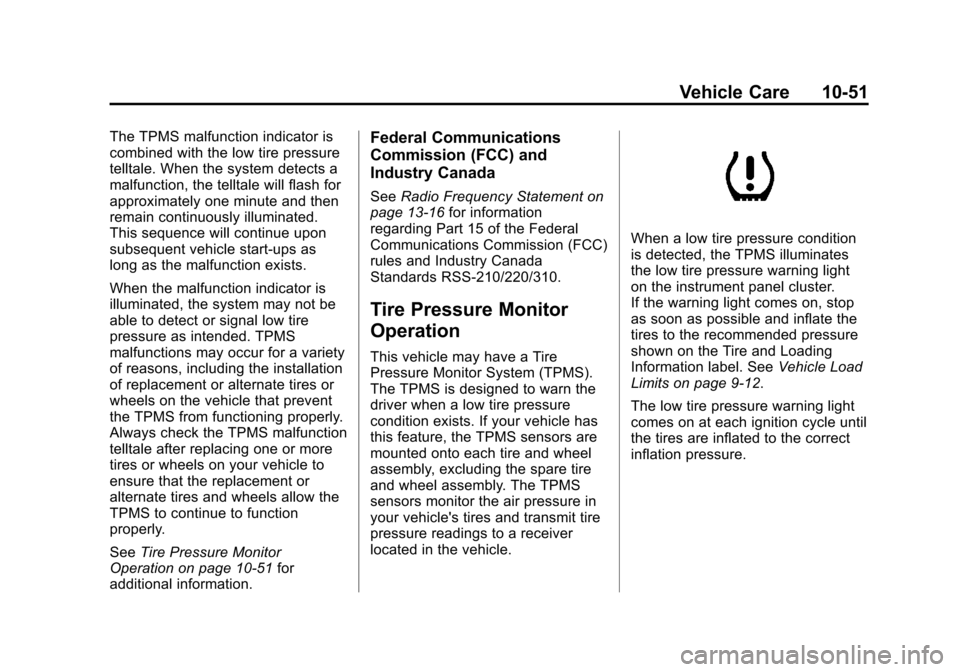
When a low tire pressure condition
is detected, the TPMS illuminates
the low tire pressure warning light
on the instrument panel cluster.
If the warning light comes on, stop
as soon as possible and inflate the
tires to the recommended pressure
shown on the Tire and Loading
Information label. See Vehicle Load
Limits on page 9‑12.
The low tire pressure warning light
comes on at each ignition cycle until
the tires are inflated to the correct
inflation pressure.
Page 255 of 328
Black plate (53,1)Chevrolet Aveo Owner Manual - 2011
Vehicle Care 10-53
.The TPMS sensor matching
process was not done or not
completed successfully after
rotating the vehicle's tires. The
malfunction light should go off
after successfully completing the
sensor matching process.
.One or more TPMS sensors
are missing or damaged. The
malfunction light should go off
when the TPMS sensors are
installed and the sensor
matching process is performed
successfully. See your dealer for
service.
.Replacement tires or wheels do
not match your vehicle's original
equipment tires or wheels. Tires
and wheels other than those
recommended for your vehicle
could prevent the TPMS from
functioning properly. SeeBuying
New Tires on page 10‑56.
.Operating electronic devices or
being near facilities using radio
wave frequencies similar to the
TPMS could cause the TPMS
sensors to malfunction. If the TPMS is not functioning it
cannot detect or signal a low tire
condition. See your dealer for
service if the TPMS malfunction
light comes on and stays on.
TPMS Sensor Identification
Codes
Each TPMS sensor has a unique
identification code. Any time you
replace one or more of the TPMS
sensors, or rotate the vehicle's tires,
the identification codes need to be
matched to the new tire/wheel
position. The sensors are matched,
to the tire/wheel positions, in the
following order: driver side front tire,
passenger side front tire, passenger
side rear tire, and driver side rear
tire using a TPMS diagnostic tool.
See your dealer for service.
Tire Inspection
We recommend that you
regularly inspect the vehicle's
tires, including the spare tire,
if the vehicle has one, for signs
of wear or damage at least once
a month.
Always remove the tires if any of
the following statements
are true:
.You can see the indicators at
three or more places around
the tire.
.You can see cord or fabric
showing through the tire's
rubber.
.The tread or sidewall is
cracked, cut, or snagged
deep enough to show cord or
fabric.
.The tire has a bump, bulge,
or split.
.The tire has a puncture, cut,
or other damage that cannot
be repaired well because of
the size or location of the
damage.
Page 272 of 328
Black plate (70,1)Chevrolet Aveo Owner Manual - 2011
10-70 Vehicle Care
Jump Starting
For more information about the
vehicle battery, seeBattery on
page 10‑27.
If the vehicle's battery has run
down, you may want to use another
vehicle and some jumper cables to
start your vehicle. Be sure to use
the following steps to do it safely.
{WARNING
Batteries can hurt you. They can
be dangerous because:
.They contain acid that can
burn you.
.They contain gas that can
explode or ignite.
.They contain enough
electricity to burn you.
If you do not follow these steps
exactly, some or all of these
things can hurt you. Notice:
Ignoring these steps
could result in costly damage to
the vehicle that would not be
covered by the warranty.
Trying to start the vehicle by
pushing or pulling it will not
work, and it could damage the
vehicle.
1. Check the other vehicle. It must
have a 12-volt battery with a
negative ground system.
Notice: Only use a vehicle that
has a 12-volt system with a
negative ground for jump
starting. If the other vehicle does
not have a 12-volt system with a
negative ground, both vehicles
can be damaged.
2. Get the vehicles close enough so the jumper cables can reach,
but be sure the vehicles are
not touching each other. If they
are, it could cause a ground
connection you do not want. You would not be able to start
your vehicle, and the bad
grounding could damage the
electrical systems.
To avoid the possibility of the
vehicles rolling, set the parking
brake firmly on both vehicles
involved in the jump start
procedure. Put an automatic
transmission in P (Park) or a
manual transmission in
N (Neutral) before setting the
parking brake.
Notice: If the radio or other
accessories are left on during the
jump starting procedure, they
could be damaged. The repairs
would not be covered by the
warranty. Always turn off the
radio and other accessories when
jump starting the vehicle.
Page 273 of 328
Black plate (71,1)Chevrolet Aveo Owner Manual - 2011
Vehicle Care 10-71
3. Turn off the ignition on bothvehicles. Unplug unnecessary
accessories plugged into the
cigarette lighter or the accessory
power outlet. Turn off the radio
and all lamps that are not
needed. This will avoid sparks
and help save both batteries.
And it could save the radio!
4. Open the hoods and locate the batteries. Find the positive (+)
and negative (−) terminal
locations on each vehicle. See
Engine Compartment Overview
on page 10‑8 for more
information on location.
{WARNING
An electric fan can start up even
when the engine is not running
and can injure you. Keep hands,
clothing and tools away from any
underhood electric fan.
{WARNING
Using a match near a battery can
cause battery gas to explode.
People have been hurt doing this,
and some have been blinded.
Use a flashlight if you need more
light.
Be sure the battery has enough
water. You do not need to add
water to the battery installed in
your new vehicle. But if a battery
has filler caps, be sure the right
amount of fluid is there. If it is low,
add water to take care of that
first. If you don't, explosive gas
could be present.
Battery fluid contains acid that
can burn you. Do not get it on
you. If you accidentally get it in
your eyes or on your skin, flush
the place with water and get
medical help immediately.
{WARNING
Fans or other moving engine
parts can injure you badly. Keep
your hands away from moving
parts once the engine is running.
5. Check that the jumper cables do not have loose or missing
insulation. If they do, you could
get a shock. The vehicles could
be damaged too.
Before you connect the
cables, here are some things
you should know. Positive (+) will
go to positive (+) or to a remote
positive (+) terminal if the vehicle
has one. Negative (−) will go to a
heavy, unpainted metal engine
part or to a remote negative (−)
terminal if the vehicle has one.
Page 303 of 328
Black plate (1,1)Chevrolet Aveo Owner Manual - 2011
Customer Information 13-1
Customer
Information
Customer Information
Customer SatisfactionProcedure . . . . . . . . . . . . . . . . . . 13-1
Customer Assistance Offices . . . . . . . . . . . . . . . . . . . . . 13-3
Customer Assistance for Text Telephone (TTY) Users . . . . . 13-4
Online Owner Center . . . . . . . . 13-4
GM Mobility Reimbursement Program . . . . . . . . . . . . . . . . . . . . 13-5
Roadside Assistance Program . . . . . . . . . . . . . . . . . . . . 13-6
Scheduling Service Appointments . . . . . . . . . . . . . . 13-8
Courtesy Transportation Program . . . . . . . . . . . . . . . . . . . . 13-8
Collision Damage Repair . . . 13-10
Service Publications Ordering Information . . . . . . 13-12
Reporting Safety Defects
Reporting Safety Defects tothe United States
Government . . . . . . . . . . . . . . . 13-13
Reporting Safety Defects to the Canadian
Government . . . . . . . . . . . . . . . 13-14
Reporting Safety Defects to General Motors . . . . . . . . . . . 13-14
Vehicle Data Recording and
Privacy
Vehicle Data Recording andPrivacy . . . . . . . . . . . . . . . . . . . . 13-15
Event Data Recorders . . . . . . 13-15
OnStar
®. . . . . . . . . . . . . . . . . . . . 13-16
Radio Frequency Identification (RFID) . . . . . . . 13-16
Radio Frequency Statement . . . . . . . . . . . . . . . . . 13-16
Customer Information
Customer Satisfaction
Procedure
Your satisfaction and goodwill are
important to the dealer and to
Chevrolet. Normally, any concerns
with the sales transaction or the
operation of the vehicle will be
resolved by the dealer's sales or
service departments. Sometimes,
however, despite the best intentions
of all concerned, misunderstandings
can occur. If your concern has not
been resolved to your satisfaction,
the following steps should be taken:
STEP ONE: Discuss your concern
with a member of dealership
management. Normally, concerns
can be quickly resolved at that level.
If the matter has already been
reviewed with the sales, service,
or parts manager, contact the owner
of the dealership or the general
manager.