2011 CHEVROLET AVEO radio
[x] Cancel search: radioPage 115 of 328
Black plate (3,1)Chevrolet Aveo Owner Manual - 2011
Instruments and Controls 5-3
+ VOLUME−:Press the toggle
bar located below the + VOLUME −
button to adjust the volume. Press
the left side of the toggle bar, below
the + (plus) sign to increase the
volume. Press the right side of the
toggle bar, below the −(minus) sign
to decrease the volume.
MODE: Press and release this
button multiple times to cycle
through the audio playback options
that are available on the vehicle.
Options may include FM, AM, XM,
CD, and AUX.
SEEK: Press and release to go to
the next preset station.
Press and hold for a long time to go
to the next AM, FM, or XM station.
The radio seeks stations only with
a strong signal that are in the
selected band.
When playing a CD, press and
release to go to the next track.
Press and hold to fast forward
through the tracks.Horn
Press near or on the horn symbols
on the steering wheel pad to sound
the horn.
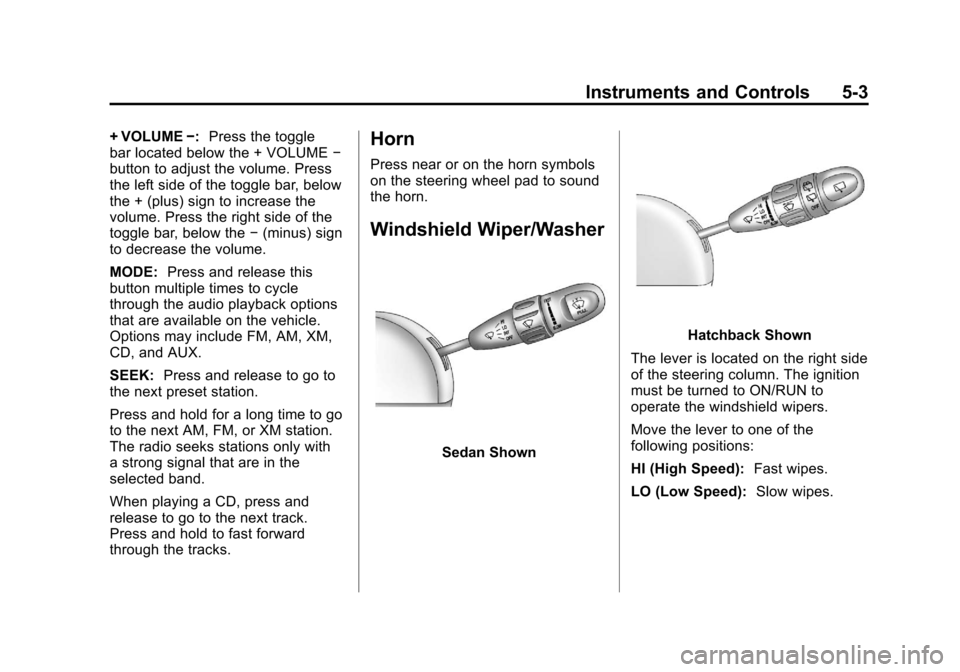
Windshield Wiper/Washer
Sedan Shown
Hatchback Shown
The lever is located on the right side
of the steering column. The ignition
must be turned to ON/RUN to
operate the windshield wipers.
Move the lever to one of the
following positions:
HI (High Speed): Fast wipes.
LO (Low Speed): Slow wipes.
Page 125 of 328

Black plate (13,1)Chevrolet Aveo Owner Manual - 2011
Instruments and Controls 5-13
or either the on or off symbol, to let
you know the status of the right front
passenger frontal and seat-mounted
side impact airbag (if equipped).
If the words PASSENGER AIRBAG
ON or the on symbol is lit on the
passenger airbag status indicator, it
means that the right front passenger
frontal airbag and seat-mounted
side impact airbag (if equipped) is
enabled (may inflate).
If the words PASSENGER AIRBAG
OFF or the off symbol is lit on the
passenger airbag status indicator, it
means that the passenger sensing
system has turned off the right
front passenger frontal airbag and
seat-mounted side impact airbag
(if equipped).If, after several seconds, both status
indicator lights remain on, or if there
are no lights at all, there may be
a problem with the lights or the
passenger sensing system. See
your dealer for service.
{WARNING
If the airbag readiness light ever
comes on and stays on, it means
that something may be wrong
with the airbag system. To help
avoid injury to yourself or others,
have the vehicle serviced right
away. See
Airbag Readiness
Light on page 5‑12 for more
information, including important
safety information.
Charging System Light
This light will come on briefly when
the ignition is turned on, and the
engine is not running, as a check to
show it is working.
It should go out when the engine is
started. If it stays on, or comes on
while driving, there may have a
problem with the electrical charging
system. Have it checked by your
dealer. Driving while this light is on
could drain the battery. If a short
distance must be driven with the
light on, turn off all accessories,
such as the radio and air conditioner
to help reduce the drain on the
battery.
Page 141 of 328
Black plate (1,1)Chevrolet Aveo Owner Manual - 2011
Infotainment System 7-1
Infotainment
System
Introduction
Infotainment . . . . . . . . . . . . . . . . . . . 7-1
Operation . . . . . . . . . . . . . . . . . . . . . 7-2
Radio
AM-FM Radio . . . . . . . . . . . . . . . . . 7-3
Satellite Radio . . . . . . . . . . . . . . . . 7-6
Radio Reception . . . . . . . . . . . . . . 7-8
Fixed Mast Antenna(Hatchback) . . . . . . . . . . . . . . . . . 7-9
Backglass Antenna (Sedan) . . . . . . . . . . . . . . . . . . . . . . 7-9
Multi-Band Antenna . . . . . . . . . . 7-10
Audio Players
CD Player . . . . . . . . . . . . . . . . . . . 7-10
Auxiliary Devices . . . . . . . . . . . . 7-15
Introduction
Infotainment
Determine which radio the vehicle
has and read the following pages to
become familiar with its features.
{WARNING
Taking your eyes off the road for
extended periods could cause a
crash resulting in injury or death
to you or others. Do not give
extended attention to
entertainment tasks while driving.
This system provides access to
many audio and non‐audio listings. To minimize taking your eyes off the
road while driving, do the following
while the vehicle is parked:
.Become familiar with the
operation and controls of the
audio system.
.Set up the tone, speaker
adjustments, and preset radio
stations.
For more information, see Defensive
Driving on page 9‑2.
Notice: Contact your dealer
before adding any equipment.
Adding audio or communication
equipment could interfere with
the operation of the engine, radio,
or other systems, and could
damage them. Follow federal
rules covering mobile radio and
telephone equipment.
Page 142 of 328
Black plate (2,1)Chevrolet Aveo Owner Manual - 2011
7-2 Infotainment System
Operation
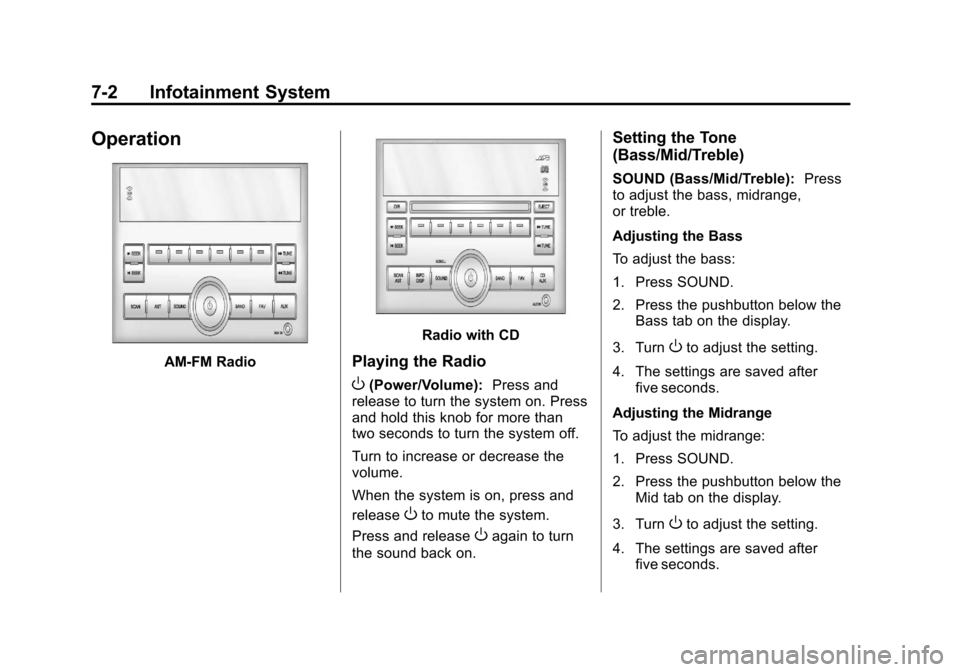
AM-FM Radio
Radio with CD
Playing the Radio
O(Power/Volume):Press and
release to turn the system on. Press
and hold this knob for more than
two seconds to turn the system off.
Turn to increase or decrease the
volume.
When the system is on, press and
release
Oto mute the system.
Press and release
Oagain to turn
the sound back on.
Setting the Tone
(Bass/Mid/Treble)
SOUND (Bass/Mid/Treble): Press
to adjust the bass, midrange,
or treble.
Adjusting the Bass
To adjust the bass:
1. Press SOUND.
2. Press the pushbutton below the Bass tab on the display.
3. Turn
Oto adjust the setting.
4. The settings are saved after five seconds.
Adjusting the Midrange
To adjust the midrange:
1. Press SOUND.
2. Press the pushbutton below the Mid tab on the display.
3. Turn
Oto adjust the setting.
4. The settings are saved after five seconds.
Page 143 of 328
Black plate (3,1)Chevrolet Aveo Owner Manual - 2011
Infotainment System 7-3
Adjusting the Treble
To adjust the treble:
1. Press SOUND.
2. Press the pushbutton below theTreb tab on the display.
3. Turn
Oto adjust the setting.
4. The settings are saved after five seconds.
Adjusting the Speakers
(Balance/Fade)
SOUND (Balance/Fade): Press to
adjust the balance or fade.
Adjusting the Balance
To adjust the balance:
1. Press SOUND.
2. Press the pushbutton below the Bal tab on the display.
3. Turn
Oto adjust the setting.
4. The settings are saved after five seconds. Adjusting the Fade
To adjust the fade:
1. Press SOUND.
2. Press the pushbutton below the
Fad tab on the display.
3. Turn
Oto adjust the setting.
4. The settings are saved after five seconds.
Setting the EQ
SOUND (Equalization): Press to
select an equalization setting.
Setting the EQ
1. Press SOUND.
2. Press the pushbutton below the P.E.Q. tab on the display. The
Pop, Rock, Ctry, Voice, Jazz,
Clas tabs appear on the display.
3. Press the pushbutton below the desired selection to set the EQ.
Pressing the same pushbutton
again cancels the EQ setting.
Radio
AM-FM Radio
Finding a Station
(AM‐FM Radio)
BAND: Press to choose FM, AM,
or XM™ (if equipped). The display
will show the selection.
uSEEK: Press to seek the next
radio station with a strong signal in
the selected band.
tSEEK: Press to seek the
previous radio station with a strong
signal in the selected band.
[TUNE: Press to go to the next
station manually.
rTUNE: Press to go to the
previous station manually.
Page 144 of 328
Black plate (4,1)Chevrolet Aveo Owner Manual - 2011
7-4 Infotainment System
SCAN:Press to scan radio
stations. The radio goes to a station,
plays for a few seconds, then goes
to the next station. Press this button
again to stop scanning.
The radio only scans stations with a
strong signal in the selected band.
AST (Automatic Store): Twelve
preset stations with the strongest
reception in the area can be
automatically stored. The radio will
only scan stations with a strong
signal that are in the selected AM or
FM band. If the Automatic Store
function is started in the FM band,
only FM stations are stored in
preset pages A1 and A2. If the
Automatic Store function is started
in the AM band, only AM stations
are stored in A1 and A2.
A combination of AM, FM and XM (if
equipped) stations can be stored
manually into the other four favorite
pages. To use Automatic Store:
1. Press and hold AST to use Auto
Store mode.
2. Press the pushbutton below the ON tab on the radio display.
3. Automatic Store searches for radio stations with a strong
signal and automatically set
presets A1 and A2 with new
stations.
4. After all stations are set, press the pushbutton below the arrow
tab on the radio display to return
to the main radio screen
To reset the automatically stored
radio stations, press and hold AST.
Then press the pushbutton below
the RESE tab on the radio display.
If no stations are stored on preset
pages A1 and A2, the RESE option
does not appear in the radio display.
When the Automatic Store function
is used, any stations that were
previously set will be deleted and
replaced with new stations.Finding a Station
(Radio with CD, and Radio
with Six‐Disc CD)
BAND: Press to choose FM, AM,
or XM (if equipped). The display will
show the selection.
uSEEK: Press to seek the next
radio station with a strong signal in
the selected band.
tSEEK: Press to seek the
previous radio station with a strong
signal in the selected band.
[TUNE: Press to go to the next
station manually.
rTUNE: Press to go to the
previous station manually.
SCAN/AST: Press to scan radio
stations. The radio goes to a station,
plays for a few seconds, then goes
to the next station. The radio only
scans stations with a strong signal
in the selected band. Press SCAN/
AST again to stop scanning.
Page 145 of 328
Black plate (5,1)Chevrolet Aveo Owner Manual - 2011
Infotainment System 7-5
Press and hold SCAN/AST to use
Automatic Store. The radio only
scans stations with a strong signal
in the selected band.
AST (Automatic Store):Twelve
preset stations with the strongest
reception in the area can be
automatically stored. The radio will
only scan stations with a strong
signal that are in the selected AM or
FM band. If the Automatic Store
function is started in the FM band,
only FM stations are stored in
preset pages A1 and A2. If the
Automatic Store function is started
in the AM band, only AM stations
are stored in A1 and A2.
A combination of AM, FM, and XM
(if equipped) stations can be stored
manually into the other four favorite
pages. To use Automatic Store:
1. Press and hold SCAN/AST to
use Automatic Store mode.
2. Press the pushbutton below the ON tab on the radio display.
3. Automatic Store searches for radio stations with a strong
signal and automatically sets
presets A1 and A2 with new
stations.
4. After all stations are set, press the pushbutton below the arrow
tab on the radio display to return
to the main radio screen.
To reset the automatically stored
radio stations, press and hold
SCAN/AST. Then press the
pushbutton below the RESE tab on
the radio display. If no stations are
stored on preset pages A1 and A2,
the RESE option does not appear
in the radio display. When the
Automatic Store function is used,
any stations that were previously set
will be deleted and replaced with
new stations.Storing a Radio Station
Drivers are encouraged to set up
radio station favorites while the
vehicle is in P (Park). Tune to
favorite stations using the
pushbuttons, favorites button, and
steering wheel controls. See
Defensive Driving on page 9‑2.
A maximum of 36 stations can be
programmed as favorites using the
6 pushbuttons positioned below the
radio station frequency labels and
by using the radio favorites page
button (FAV button). Press the FAV
button to go through up to six pages
of favorites, each having six favorite
stations available per page.
If Automatic Store is used, then four
pages of favorites are available.
Each page of favorites can contain
any combination of AM, FM, or XM
(if equipped) stations. To store a
station as a favorite:
1. Tune in the desired station.
2. Press and release the FAV button to display the page where
the station is to be stored.
Page 146 of 328
Black plate (6,1)Chevrolet Aveo Owner Manual - 2011
7-6 Infotainment System
3. Press and hold one of the sixnumbered pushbuttons until
a beep sounds. When the
pushbutton is pressed and
released, the station that was
set will return.
4. Repeat the Steps 1 through 3 for each radio station to be stored
as a favorite.
To set up the number of favorites
pages:
1. Press and hold FAV until the radio setup menu displays.
2. Select the desired number of favorites pages by pressing the
pushbutton located below the
displayed page numbers.
3. Press FAV to return to the original main radio screen
showing the radio station
frequency tabs and to begin
the process of programming
favorites for the chosen number
of numbered pages.Satellite Radio
XM™ Satelite Radio Service
XM is a satellite radio service based
in the 48 contiguous United States
and 10 Canadian provinces. XM
Satellite Radio has a wide variety of
programming and commercial-free
music, coast-to-coast, and in
digital-quality sound. A service fee
is required to receive the XM
service. For more information,
contact XM at www.xmradio.com or
call 1-800-929-2100 in the U.S. and
www.xmradio.ca or call
1-877-438-9677 in Canada.
Finding a Channel
BAND: Press to choose FM, AM,
or XM. The display will show the
selection.
uSEEK: Press to seek the next
XM channel.
tSEEK: Press to seek the
previous XM channel.
[TUNE: Press to go to the next
XM channel.
rTUNE: Press to go to the
previous XM channel.
SCAN/AST: Press to scan XM
channels. The radio goes to a
channel, plays for a few seconds,
then goes to the next channel.
Press SCAN/AST again to stop
scanning.
SCAN: Press to scan XM
channels. The radio goes to a
channel, plays for a few seconds,
then goes to the next channel.
Press this button again to stop
scanning.