2011 CHEVROLET AVEO display
[x] Cancel search: displayPage 153 of 328
Black plate (13,1)Chevrolet Aveo Owner Manual - 2011
Infotainment System 7-13
Root Directory
The root directory is treated as a
folder. If the root directory has
compressed audio files, the
directory is displayed as ROOT. All
files contained directly under the
root directory are accessed prior to
any other directory.
Empty Directory or Folder
If a root directory or a folder exists
somewhere in the file structure that
contains only folders/subfolders
and no compressed files directly
beneath them, the player advances
to the next folder in the file structure
that contains compressed audio
files. The empty folder does not
display.
No Folder
When a CD contains only
compressed files, the files are
located under the root folder. The
next and previous folder function
does not function on a CD that wasrecorded without folders or playlists.
When displaying the name of the
folder the radio displays ROOT.
When a CD contains only
compressed audio files, but no
folders, all files are located under
the root folder. When the radio
displays the name of the folder, the
radio displays ROOT.
Order of Play
Play will begin from the first track
under the root directory. When all
tracks from the root directory have
been played, play will continue from
files according to their numerical
listing. After playing the last track
from the last folder, the player will
begin playing again at the first track
of the first folder or root directory.
File System and Naming
The song name in the ID3 tag is
displayed. If the song name is not
present in the ID3 tag, then the
radio displays the file name without
the extension (such as MP3/WMA)
instead.Track names longer than
32 characters or 4 pages are
shortened. Parts of words on the
last page of text and the extension
of the filename do not display.
Playing an MP3/WMA
With the ignition in the ON/RUN
position, insert a CD partway into
the slot, label side up. The player
pulls the disc in. The CD should
begin playing. As each new track
starts to play, the track number and
the song name will appear on the
display. If the ignition or radio is
turned off with a CD in the player, it
will stay in the player. When a CD is
in the player and the ignition is
turned on, the radio must be turned
on before the CD will start playback.
When the ignition and radio are
turned on, the CD will start playing
where it stopped, if it was the last
selected audio source.
Page 154 of 328
Black plate (14,1)Chevrolet Aveo Owner Manual - 2011
7-14 Infotainment System
The CD player can play the smaller
8 cm (3 in) single CDs with an
adapter ring. Full-size CDs and the
smaller CDs are loaded in the same
manner.
Sound quality may be reduced due
to CD-R quality, the method of
recording, the quality of the music
that has been recorded, and the
way the CD-R has been handled.
DIR (Directory):Press to repeat
the tracks in the current directory.
DIR displays.
Press DIR again to repeat the
tracks in all of the directories.
ALL displays.
Press DIR again to turn off
repeat play.
uSEEKt(Next/Previous
Folder) (in MP3/WMA Mode):
Press to change the folder. If CD-R
does not have any folders, “ROOT”
flashes on the display for a
short time.
[TUNE (Next Track): Press the
up TUNE arrow to go to the next
track. The track number displays.
The player continues moving
forward through the CD each time
TUNE is pressed.
rTUNE (Previous Track): Press
the down TUNE arrow to go to the
start of the current track. The
track number displays. The player
continues moving backward through
the CD each time TUNE is pressed.
INFO/DISP (Information/Display):
Press to display additional text
information related to the current
MP3/WMA song. A choice of
additional information such as: Song
Title, Album Title, and Artist. Bit
Rate might also display.
When information is not available,
No Info displays.
Press this button for longer than
two seconds to change
display mode. SCROLL (MP3/WMA Mode Only):
Press the SOUND button for longer
than two seconds. The song title or
other available information of a song
scrolls on/off. The offset is scroll on.
The scroll mode can be changed
only when the SOUND button is
pressed for longer than
two seconds.
CD Player Messages
(Radio with CD, and Radio
with Six‐Disc CD)
CHECK CD:
If this message
displays and/or the CD comes out, it
could be for one of the following
reasons:
.It is very hot. When the
temperature returns to normal,
the CD should play.
.The road is very rough. When
the road becomes smoother, the
CD should play.
.The CD is dirty, scratched, wet,
or upside down.
Page 155 of 328
Black plate (15,1)Chevrolet Aveo Owner Manual - 2011
Infotainment System 7-15
.The air is very humid. If so, wait
about an hour and try again.
.The format of the CD is not
compatible. See“Using an MP3”
earlier in this section.
.There was a problem while
burning the CD.
.The label is caught in the CD
player.
If the CD is not playing correctly, for
any other reason, try a known
good CD.
If any error occurs repeatedly or if
an error cannot be corrected,
contact your dealer. If the radio
displays an error message, write it
down and provide it to your dealer
when reporting the problem.
Auxiliary Devices
The infotainment system has a
3.5 mm (1/8 in) auxiliary input jack
located on the lower right side of
the faceplate. This is not an audio
output; do not plug headphones into
the 3.5 mm (1/8 in) auxiliary input
jack. An external audio device such
as an iPod
®, laptop computer, MP3
player, CD changer, etc. can be
connected to the 3.5 mm (1/8 in)
auxiliary input jack for use as
another audio source.
Drivers are encouraged to set up
any auxiliary device while the
vehicle is in P (Park). See Defensive
Driving on page 9‑2 for more
information on driver distraction.
To use a portable audio player,
connect a 3.5 mm (1/8 in) cable to
the radio's 3.5 mm (1/8 in) auxiliary
input jack. When a device is
connected, press the radio AUX
button to begin playing audio from
the device over the vehicle
speakers.
O(Power/Volume): Turn to adjust
the volume. Additional volume
adjustments may have to be made
from the portable device if the
volume is too quiet or too loud.
AUX (Auxiliary): Press to listen to
the radio while a portable audio
device is playing. Press again and
the system begins playing audio
from the connected portable audio
player. If a portable audio player is
not connected, No Aux Input Device
Found may display.
CD/AUX (Auxiliary): Press to play
a CD while a portable audio device
is playing. Press CD/AUX a second
time for the system to begin playing
audio from the connected portable
audio player. The portable audio
device continues playing until it is
turned off.
Page 180 of 328

Black plate (18,1)Chevrolet Aveo Owner Manual - 2011
9-18 Driving and Operating
LOCK (STOPPING THE ENGINE/
LOCK/OFF):When the vehicle is
stopped, turn the ignition switch to
LOCK/OFF to turn the engine off.
This position locks the steering
wheel, ignition, shift lever and
transmission. This is the only
position in which you can insert or
remove the key.
Do not turn the engine off when the
vehicle is moving. This will cause a
loss of power assist in the brake
and steering systems and disable
the airbags.
In an emergency:
1. Brake using a firm and steady pressure. Do not pump the
brakes repeatedly. This may
deplete power assist, requiring
increased brake pedal force.
2. Shift the vehicle to neutral. This can be done while the vehicle is
moving. After shifting to neutral,
firmly apply the brakes and steer
the vehicle to a safe location. 3. Come to a complete stop. Shift
to P (Park) with an automatic
transmission, or neutral with a
manual transmission. Turn the
ignition to LOCK/OFF.
4. Set the parking brake. See Parking Brake on page 9‑31.
The steering can bind with the
wheels turned off center. If this
happens, move the steering wheel
from right to left while turning the
key to ACC/ACCESSORY. If this
doesn't work, then the vehicle needs
service.
ACC (ACC/ACCESSORY): This
position operates some of the
electrical accessories, such as the
radio, but not the climate control
system. ON (ON/RUN):
This position can
be used to operate the electrical
accessories, and to display some
instrument panel cluster warning
and indicator lights. The switch
stays in this position when the
engine is running. If you leave the
key in the ACC/ACCESSORY or
ON/RUN position with the engine
off, the battery could be drained.
You may not be able to start the
vehicle if the battery is allowed to
drain for an extended period of time.
START: This is the position that
starts the engine. When the engine
cranks, release the key. The ignition
switch returns to ON/RUN for
driving. Do not turn the key to
START if the engine is running.
Page 213 of 328
Black plate (11,1)Chevrolet Aveo Owner Manual - 2011
Vehicle Care 10-11
This certification mark indicates that
the oil has been approved to the
dexos™specification.
Notice:Use only engine oil that is
approved to the dexos™
specification or an equivalent
engine oil of the appropriate
viscosity grade. Engine oils
approved to the dexos™
specification will show the
dexos™ symbol on the container.
Failure to use the recommended
engine oil or equivalent can result
in engine damage not covered by
the vehicle warranty. If you are
unsure whether the oil is
approved to the dexos™
specification, ask your service
provider. Use of Substitute Engine Oils if
dexos™
is unavailable: In the event
that dexos™ approved engine oil is
not available at an oil change or for
maintaining proper oil level, you
may use substitute engine oil
displaying the API Starburst symbol
and of SAE 5W-30 viscosity grade.
Use of oils that do not meet the
dexos™ specification, however, may
result in reduced performance under
certain circumstances.
Viscosity Grade
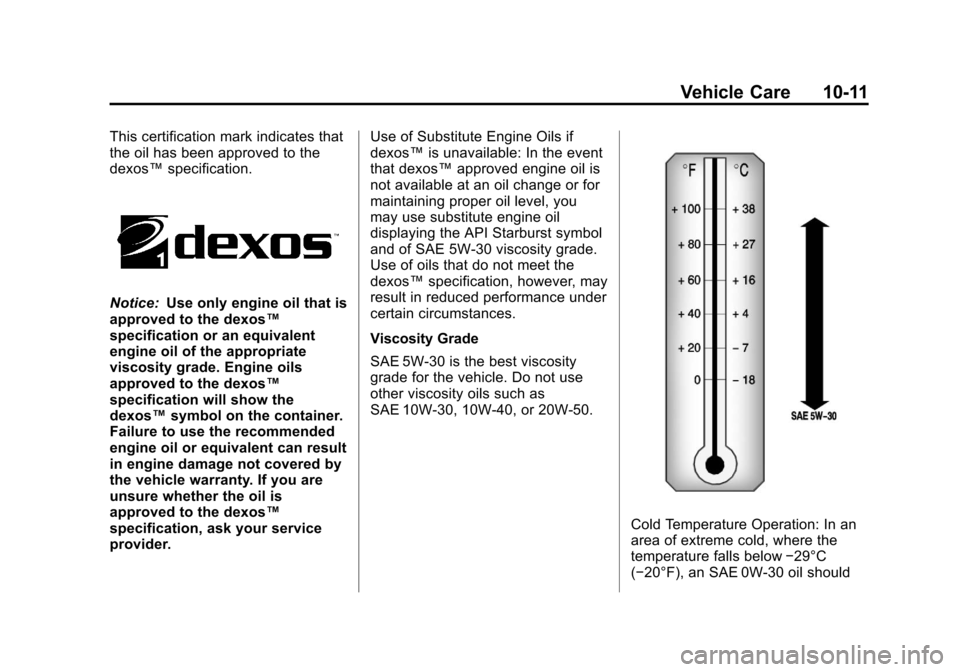
SAE 5W-30 is the best viscosity
grade for the vehicle. Do not use
other viscosity oils such as
SAE 10W‐30, 10W‐40, or 20W-50.
Cold Temperature Operation: In an
area of extreme cold, where the
temperature falls below −29°C
(−20°F), an SAE 0W-30 oil should
Page 214 of 328
Black plate (12,1)Chevrolet Aveo Owner Manual - 2011
10-12 Vehicle Care
be used. An oil of this viscosity
grade will provide easier cold
starting for the engine at extremely
low temperatures. When selecting
an oil of the appropriate viscosity
grade, be sure to always select an
oil that meets the required
specification, dexos™. See
“Specification”in this section for
more information.
Engine Oil Additives/Engine
Oil Flushes
Do not add anything to the oil. The
recommended oils with the dexos™
specification and displaying the
dexos™ certification mark are all
that is needed for good performance
and engine protection.
Engine oil system flushes are not
recommended and could cause
engine damage not covered by the
vehicle warranty.
What to Do with Used Oil
Used engine oil contains certain
elements that can be unhealthy for
your skin and could even cause
cancer. Do not let used oil stay on
your skin for very long. Clean your
skin and nails with soap and water,
or a good hand cleaner. Wash or
properly dispose of clothing or rags
containing used engine oil. See the
manufacturer's warnings about the
use and disposal of oil products.
Used oil can be a threat to the
environment. If you change your
own oil, be sure to drain all the oil
from the filter before disposal. Never
dispose of oil by putting it in the
trash or pouring it on the ground,
into sewers, or into streams or
bodies of water. Recycle it by taking
it to a place that collects used oil.
Engine Oil Life System
When to Change Engine Oil
This vehicle has the Engine Oil Life
System, a computer system that
indicates when to change the
engine oil and filter. This is based
on engine revolutions and engine
temperature, and not on mileage.
Based on driving conditions, the
mileage at which an oil change is
indicated can vary considerably. For
the oil life system to work properly,
the system must be reset every time
the oil is changed.
When the system has calculated
that oil life has been diminished, it
indicates that an oil change is
necessary. A change engine oil light
displays. Change the oil as soon as
possible within the next 1 000 km
(600 miles). It is possible that,
if driving under the best conditions,
the oil life system might indicate that
an oil change is not necessary for
up to a year. The engine oil and
filter must be changed at least once
a year and, at this time, the system
Page 224 of 328
Black plate (22,1)Chevrolet Aveo Owner Manual - 2011
10-22 Vehicle Care
Then check to see if the engine
cooling fan is running. If the engine
is overheating, the fan should be
running. If it is not, do not continue
to run the engine. Have the vehicle
serviced.
Notice:Engine damage from
running the engine without
coolant is not covered by the
warranty.
Notice: If the engine catches fire
because of being driven with no
coolant, the vehicle can be badly
damaged. The costly repairs
would not be covered by the
vehicle warranty.If Steam is Coming from the
Engine Compartment
{WARNING
Steam from an overheated engine
can burn you badly, even if you
just open the hood. Stay away
from the engine if you see or hear
steam coming from it. Just turn it
off and get everyone away from
the vehicle until it cools down.
Wait until there is no sign of
steam or coolant before you open
the hood.
If you keep driving when the
engine is overheated, the liquids
in it can catch fire. You or others
could be badly burned. Stop the
engine if it overheats, and get out
of the vehicle until the engine
is cool.
If No Steam is Coming from
the Engine Compartment
If an engine overheat warning is
displayed but no steam can be seen
or heard, the problem may not be
too serious. Sometimes the engine
can get a little too hot when the
vehicle:
.Climbs a long hill on a hot day
.Stops after high-speed driving
.Idles for long periods in traffic
If the overheat warning is displayed
with no sign of steam:
1. Turn the air conditioning off, if equipped.
2. Turn the heater on to the highest temperature and to the highest
fan speed. Open the windows as
necessary.
3. If in a traffic jam, let the engine idle in N (Neutral) while stopped.
If it is safe to do so, pull off
the road, shift to P (Park) or
N (Neutral) and let the
engine idle.
Page 225 of 328
Black plate (23,1)Chevrolet Aveo Owner Manual - 2011
Vehicle Care 10-23
If the temperature overheat gauge
is no longer in the overheat zone
or an overheat warning no longer
displays, the vehicle can be driven.
Continue to drive the vehicle slowly
for about 10 minutes. Keep a safe
vehicle distance from the vehicle in
front. If the warning does not come
back on, continue to drive normally.
If the warning continues, pull over,
stop, and park the vehicle
right away.
If there is no sign of steam, idle the
engine for three minutes while
parked. If the warning is still
displayed, turn off the engine
until it cools down.Power Steering Fluid
When to Check Power
Steering Fluid
The power steering fluid reservoir is
located toward the front of the
engine compartment on the driver
side of the vehicle. SeeEngine
Compartment Overview on
page 10‑8 for reservoir location.
It is not necessary to regularly
check power steering fluid unless
there is a leak suspected in the
system or an unusual noise is
heard. A fluid loss in this system
could indicate a problem. Have the
system inspected and repaired.
How to Check Power
Steering Fluid
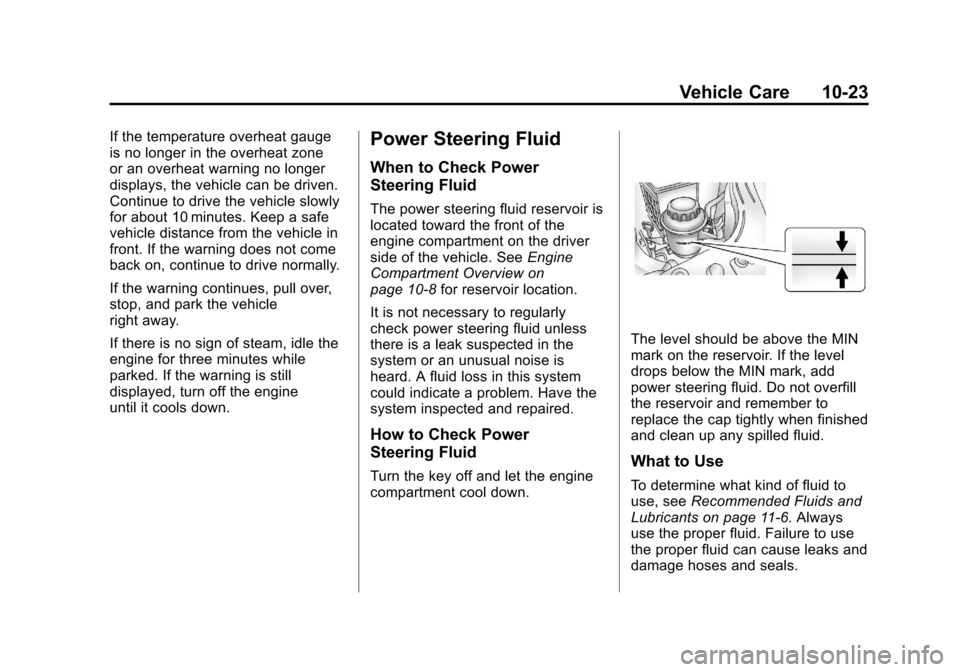
Turn the key off and let the engine
compartment cool down.
The level should be above the MIN
mark on the reservoir. If the level
drops below the MIN mark, add
power steering fluid. Do not overfill
the reservoir and remember to
replace the cap tightly when finished
and clean up any spilled fluid.
What to Use
To determine what kind of fluid to
use, see Recommended Fluids and
Lubricants on page 11‑6. Always
use the proper fluid. Failure to use
the proper fluid can cause leaks and
damage hoses and seals.