2011 CHEVROLET AVEO stop start
[x] Cancel search: stop startPage 123 of 328

Black plate (11,1)Chevrolet Aveo Owner Manual - 2011
Instruments and Controls 5-11
Engine Coolant
Temperature Gauge
Metric
English
The vehicle has an engine coolant
temperature gauge. With the ignition
turned to ON/RUN, this gauge
shows the engine coolant
temperature.
If the gauge pointer moves into the
red area, the engine is too hot.
It means that the engine coolant
has overheated.
If the vehicle has been operating
under normal driving conditions, pull
off the road, stop the vehicle, and
turn off the engine as soon as
possible. See
Engine Overheating on
page 10‑21.
Safety Belt Reminders
Safety Belt Reminder Light
When the engine is started, a chime
sounds for several seconds to
remind a driver to fasten the safety
belt, unless the driver safety belt is
already buckled.
The safety belt light comes on and
stays on for several seconds, then
flashes for several more.
This chime and light are repeated if
the driver remains unbuckled and
the vehicle is in motion. If the driver
safety belt is already buckled,
neither the chime nor the light
comes on.
Page 127 of 328

Black plate (15,1)Chevrolet Aveo Owner Manual - 2011
Instruments and Controls 5-15
The following can prevent more
serious damage to the vehicle:
.Reduce vehicle speed.
.Avoid hard accelerations.
.Avoid steep uphill grades.
If the light continues to flash, when
it is safe to do so, stop the vehicle.
Find a safe place to park the
vehicle. Turn the vehicle off, wait at
least 10 seconds, and restart the
engine. If the light is still flashing,
follow the previous steps and see
your dealer for service as soon as
possible.
Light On Steady: An emission
control system malfunction has
been detected on the vehicle.
Diagnosis and service might be
required. The following may correct an
emission system malfunction:
.Make sure the fuel cap is fully
installed. See
Filling the Tank on
page 9‑37. The diagnostic
system can determine if the
fuel cap has been left off or
improperly installed. A loose or
missing fuel cap allows fuel to
evaporate into the atmosphere.
A few driving trips with the cap
properly installed should turn the
light off.
.Make sure the electrical system
is not wet. The system could be
wet if the vehicle was driven
through a deep puddle of water.
The condition is usually
corrected when the electrical
system dries out. A few driving
trips should turn the light off.
.Make sure to fuel the vehicle
with quality fuel. Poor fuel quality
causes the engine not to run as
efficiently as designed and may
cause: stalling after start-up,
stalling when the vehicle is
changed into gear, misfiring,
hesitation on acceleration,
or stumbling on acceleration.
These conditions might go away
once the engine is warmed up.
If one or more of these
conditions occurs, change the
fuel brand used. It will require at
least one full tank of the proper
fuel to turn the light off.
See Recommended Fuel on
page 9‑35.
If none of the above have made
the light turn off, have your dealer
check the vehicle. The dealer has
the proper test equipment and
diagnostic tools to fix any
mechanical or electrical problems
that might have developed.
Page 129 of 328
Black plate (17,1)Chevrolet Aveo Owner Manual - 2011
Instruments and Controls 5-17
This light should come on briefly
when the ignition is turned to ON.
If it does not come on then, have it
fixed so it will be ready to warn if
there is a problem.
When the ignition is on, the brake
system warning light will also come
on when the parking brake is set.
The light will stay on if the parking
brake does not fully release. If it
stays on after the parking brake is
fully released, it means there is a
brake problem.
If the light comes on while driving,
carefully pull off the road and stop.
The pedal may be harder to push or
may go closer to the floor. It may
take longer to stop. If the light is still
on, have the vehicle towed for
service. SeeTowing the Vehicle on
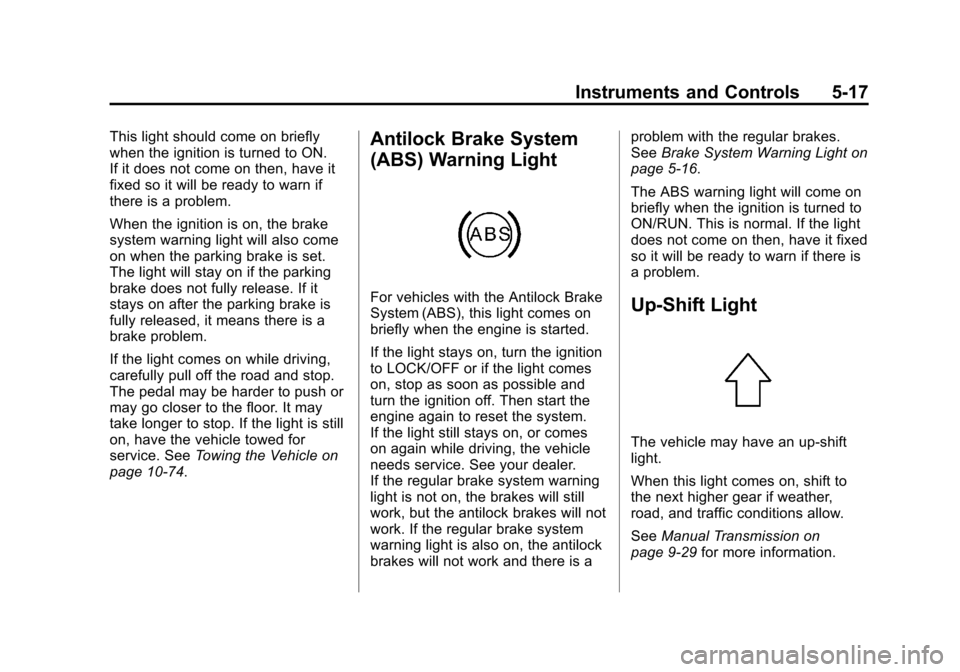
page 10‑74.Antilock Brake System
(ABS) Warning Light
For vehicles with the Antilock Brake
System (ABS), this light comes on
briefly when the engine is started.
If the light stays on, turn the ignition
to LOCK/OFF or if the light comes
on, stop as soon as possible and
turn the ignition off. Then start the
engine again to reset the system.
If the light still stays on, or comes
on again while driving, the vehicle
needs service. See your dealer.
If the regular brake system warning
light is not on, the brakes will still
work, but the antilock brakes will not
work. If the regular brake system
warning light is also on, the antilock
brakes will not work and there is a problem with the regular brakes.
See
Brake System Warning Light on
page 5‑16.
The ABS warning light will come on
briefly when the ignition is turned to
ON/RUN. This is normal. If the light
does not come on then, have it fixed
so it will be ready to warn if there is
a problem.Up-Shift Light
The vehicle may have an up-shift
light.
When this light comes on, shift to
the next higher gear if weather,
road, and traffic conditions allow.
See Manual Transmission on
page 9‑29 for more information.
Page 130 of 328

Black plate (18,1)Chevrolet Aveo Owner Manual - 2011
5-18 Instruments and Controls
Hold Mode Light
If the vehicle has this feature, this
light comes on when the Hold Mode
is active.
If the HOLD mode light flashes,
have the vehicle checked. See
“Hold Mode”underAutomatic
Transmission on page 9‑25 for more
information.
Tire Pressure Light
For vehicles with the Tire Pressure
Monitoring System, this light comes
on briefly when the engine is
started.
It provides information about tire
pressures and the Tire Pressure
Monitoring System.
When the Light is On Steady
This indicates that one or more of
the tires are significantly
underinflated.
Stop and check the tires as soon as
it is safe to do, and inflate them to
the proper pressure. See Tires on
page 10‑42 for more information. When the Light Flashes First and
Then is On Steady
This indicates that there may be a
problem with the Tire Pressure
Monitor System. The light flashes
for about a minute and then stays
on steady for the remainder of the
ignition cycle. This sequence will
repeat with every ignition cycle. See
Tire Pressure Monitor Operation on
page 10‑51
for more information.
Engine Oil Pressure Light
If the vehicle has low engine oil
pressure, this light will stay on after
the engine is started, or come on
while driving.
Page 144 of 328
Black plate (4,1)Chevrolet Aveo Owner Manual - 2011
7-4 Infotainment System
SCAN:Press to scan radio
stations. The radio goes to a station,
plays for a few seconds, then goes
to the next station. Press this button
again to stop scanning.
The radio only scans stations with a
strong signal in the selected band.
AST (Automatic Store): Twelve
preset stations with the strongest
reception in the area can be
automatically stored. The radio will
only scan stations with a strong
signal that are in the selected AM or
FM band. If the Automatic Store
function is started in the FM band,
only FM stations are stored in
preset pages A1 and A2. If the
Automatic Store function is started
in the AM band, only AM stations
are stored in A1 and A2.
A combination of AM, FM and XM (if
equipped) stations can be stored
manually into the other four favorite
pages. To use Automatic Store:
1. Press and hold AST to use Auto
Store mode.
2. Press the pushbutton below the ON tab on the radio display.
3. Automatic Store searches for radio stations with a strong
signal and automatically set
presets A1 and A2 with new
stations.
4. After all stations are set, press the pushbutton below the arrow
tab on the radio display to return
to the main radio screen
To reset the automatically stored
radio stations, press and hold AST.
Then press the pushbutton below
the RESE tab on the radio display.
If no stations are stored on preset
pages A1 and A2, the RESE option
does not appear in the radio display.
When the Automatic Store function
is used, any stations that were
previously set will be deleted and
replaced with new stations.Finding a Station
(Radio with CD, and Radio
with Six‐Disc CD)
BAND: Press to choose FM, AM,
or XM (if equipped). The display will
show the selection.
uSEEK: Press to seek the next
radio station with a strong signal in
the selected band.
tSEEK: Press to seek the
previous radio station with a strong
signal in the selected band.
[TUNE: Press to go to the next
station manually.
rTUNE: Press to go to the
previous station manually.
SCAN/AST: Press to scan radio
stations. The radio goes to a station,
plays for a few seconds, then goes
to the next station. The radio only
scans stations with a strong signal
in the selected band. Press SCAN/
AST again to stop scanning.
Page 151 of 328

Black plate (11,1)Chevrolet Aveo Owner Manual - 2011
Infotainment System 7-11
Playing a CD
Radio with CD
Insert a CD partway into the slot,
label side up. The player pulls it in
and the CD begins playing. A CD
can be loaded while the ignition is in
the OFF position.
When the CD is inserted, CD
Loading appears on the display. As
each new track starts to play, the
track number displays.
If the ignition or radio is turned off
with a CD in the player, it will stay in
the player. When a CD is in the
player and the ignition is in the ON/
RUN position, the radio must be
turned on before the CD will start
playing. When the ignition and radio
are turned on, the CD will start
playing where it stopped, if it was
the last selected audio source.
The CD player can play the smaller
8 cm (3 in) single CDs with an
adapter ring. Full-size CDs and the
smaller CDs are loaded in the same
manner.
[TUNE (Next Track):
Press
[TUNE to go to the next
track. The track number will appear
on the display. The player will
continue moving forward through
the CD with each press of
[TUNE.
rTUNE (Previous Track): Press
to go to the start of the current track.
The track number will appear on the
display. The player will continue
moving backward through the CD
with each press of
rTUNE.
BAND: Press to listen to the radio
while a CD is playing. The CD
remains inside the radio for future
listening.
CD/AUX: Press to play a CD when
listening to the radio. CD Loading
appears on the display when the CD
player has been selected. The CD
symbol will appear on the display
when a CD is loaded. Press CD/AUX while a CD is
playing to pause the CD. PAUSE
flashes on the display. Press CD/
AUX again to start playing the CD.
Press CD/AUX to play a CD when
listening to the audio contents from
other device (AUX mode). CD
Loading appears on the display
when the CD player has been
selected. The CD symbol will
appear on the display when a CD is
loaded.
EJECT:
Press to eject a CD. The
CD can be ejected when the ignition
or the radio is turned off.
INFO/DISP (Information/Display):
: Press to display additional text
information related to the current
MP3/WMA song. A choice of
additional information such as: Song
Title , Album Title, Artist, Bit rate
may appear.
Page 153 of 328
Black plate (13,1)Chevrolet Aveo Owner Manual - 2011
Infotainment System 7-13
Root Directory
The root directory is treated as a
folder. If the root directory has
compressed audio files, the
directory is displayed as ROOT. All
files contained directly under the
root directory are accessed prior to
any other directory.
Empty Directory or Folder
If a root directory or a folder exists
somewhere in the file structure that
contains only folders/subfolders
and no compressed files directly
beneath them, the player advances
to the next folder in the file structure
that contains compressed audio
files. The empty folder does not
display.
No Folder
When a CD contains only
compressed files, the files are
located under the root folder. The
next and previous folder function
does not function on a CD that wasrecorded without folders or playlists.
When displaying the name of the
folder the radio displays ROOT.
When a CD contains only
compressed audio files, but no
folders, all files are located under
the root folder. When the radio
displays the name of the folder, the
radio displays ROOT.
Order of Play
Play will begin from the first track
under the root directory. When all
tracks from the root directory have
been played, play will continue from
files according to their numerical
listing. After playing the last track
from the last folder, the player will
begin playing again at the first track
of the first folder or root directory.
File System and Naming
The song name in the ID3 tag is
displayed. If the song name is not
present in the ID3 tag, then the
radio displays the file name without
the extension (such as MP3/WMA)
instead.Track names longer than
32 characters or 4 pages are
shortened. Parts of words on the
last page of text and the extension
of the filename do not display.
Playing an MP3/WMA
With the ignition in the ON/RUN
position, insert a CD partway into
the slot, label side up. The player
pulls the disc in. The CD should
begin playing. As each new track
starts to play, the track number and
the song name will appear on the
display. If the ignition or radio is
turned off with a CD in the player, it
will stay in the player. When a CD is
in the player and the ignition is
turned on, the radio must be turned
on before the CD will start playback.
When the ignition and radio are
turned on, the CD will start playing
where it stopped, if it was the last
selected audio source.
Page 168 of 328
Black plate (6,1)Chevrolet Aveo Owner Manual - 2011
9-6 Driving and Operating
Skidding
In a skid, a driver can lose control of
the vehicle. Defensive drivers avoid
most skids by taking reasonable
care suited to existing conditions,
and by not overdriving those
conditions. But skids are always
possible.
The three types of skids correspond
to the vehicle's three control
systems. In the braking skid, the
wheels are not rolling. In the
steering or cornering skid, too much
speed or steering in a curve causes
tires to slip and lose cornering force.
And in the acceleration skid, too
much throttle causes the driving
wheels to spin.
If the vehicle starts to slide, ease
your foot off the accelerator pedal
and quickly steer the way you want
the vehicle to go. If you start
steering quickly enough, the vehicle
may straighten out. Always be ready
for a second skid if it occurs.Of course, traction is reduced when
water, snow, ice, gravel, or other
material is on the road. For safety,
slow down and adjust your driving to
these conditions. It is important to
slow down on slippery surfaces
because stopping distance will be
longer and vehicle control more
limited.
While driving on a surface with
reduced traction, try to avoid
sudden steering, acceleration,
or braking, including reducing
vehicle speed by shifting to a lower
gear. Any sudden changes could
cause the tires to slide. You may not
realize the surface is slippery until
the vehicle is skidding. Learn to
recognize warning clues
—such as
enough water, ice, or packed snow
on the road to make a mirrored
surface —and slow down when you
have any doubt. If the vehicle has the Antilock Brake
System (ABS), remember: It helps
avoid only the braking skid. If the
vehicle does not have ABS, then in
a braking skid, where the wheels
are no longer rolling, release
enough pressure on the brakes to
get the wheels rolling again. This
restores steering control. Push the
brake pedal down steadily when you
have to stop suddenly. As long as
the wheels are rolling, you will have
steering control.