2011 CADILLAC STS steering wheel
[x] Cancel search: steering wheelPage 187 of 528

Black plate (1,1)Cadillac STS Owner Manual - 2011
Section 4 Instrument Panel
Instrument Panel Overview. . . . . . . . . . . . . . . . . . . . . . . .4-3
Hazard Warning Flashers . . . . . . . . . . . . . . . . . . . . . . . 4-3
Horn . . . . . . . . . . . . . . . . . . . . . . . . . . . . . . . . . . . . . . . . . . . . 4-3
Power Tilt Wheel and Telescopic Steering Column . . . . . . . . . . . . . . . . . . . . . . . . . . . . . . . . . . . . . . . 4-3
Heated Steering Wheel . . . . . . . . . . . . . . . . . . . . . . . . . 4-4
Turn Signal/Multifunction Lever . . . . . . . . . . . . . . . . . . 4-4
Turn and Lane-Change Signals . . . . . . . . . . . . . . . . . 4-4
Headlamp High/Low-Beam Changer . . . . . . . . . . . . 4-5
Forward Collision Alert (FCA) System . . . . . . . . . . . 4-6
Flash-to-Pass . . . . . . . . . . . . . . . . . . . . . . . . . . . . . . . . . . . 4-9
Windshield Wipers . . . . . . . . . . . . . . . . . . . . . . . . . . . . . 4-10
Windshield Washer . . . . . . . . . . . . . . . . . . . . . . . . . . . . 4-11
Headlamp Washer . . . . . . . . . . . . . . . . . . . . . . . . . . . . . 4-11
Cruise Control . . . . . . . . . . . . . . . . . . . . . . . . . . . . . . . . . 4-12
Adaptive Cruise Control . . . . . . . . . . . . . . . . . . . . . . . 4-15
Headlamps . . . . . . . . . . . . . . . . . . . . . . . . . . . . . . . . . . . . 4-27
Wiper Activated Headlamps . . . . . . . . . . . . . . . . . . . 4-31
Headlamps on Reminder . . . . . . . . . . . . . . . . . . . . . . 4-31
Daytime Running Lamps (DRL) . . . . . . . . . . . . . . . . 4-32
Fog Lamps . . . . . . . . . . . . . . . . . . . . . . . . . . . . . . . . . . . . 4-33
Twilight Sentinel
®. . . . . . . . . . . . . . . . . . . . . . . . . . . . . . 4-34
Exterior Lighting Battery Saver . . . . . . . . . . . . . . . . . 4-35
Instrument Panel Brightness . . . . . . . . . . . . . . . . . . . 4-35
Entry Lighting . . . . . . . . . . . . . . . . . . . . . . . . . . . . . . . . . . 4-36
Parade Dimming . . . . . . . . . . . . . . . . . . . . . . . . . . . . . . . 4-36 Reading Lamps . . . . . . . . . . . . . . . . . . . . . . . . . . . . . . . . 4-36
Battery Load Management . . . . . . . . . . . . . . . . . . . . . 4-36
Electric Power Management . . . . . . . . . . . . . . . . . . . 4-37
Inadvertent Power Battery Saver . . . . . . . . . . . . . . . 4-37
Head-Up Display (HUD) . . . . . . . . . . . . . . . . . . . . . . . 4-38
Accessory Power Outlet(s) . . . . . . . . . . . . . . . . . . . . . 4-42
Climate Controls . . . . . . . . . . . . . . . . . . . . . . . . . . . . . . . . . . 4-43
Dual Climate Control System . . . . . . . . . . . . . . . . . . 4-43
Outlet Adjustment . . . . . . . . . . . . . . . . . . . . . . . . . . . . . . 4-48
Rear Climate Control System . . . . . . . . . . . . . . . . . . 4-49
Passenger Compartment Air Filter . . . . . . . . . . . . . 4-50
Warning Lights, Gauges, and Indicators . . . . . . . .4-51
Instrument Panel Cluster . . . . . . . . . . . . . . . . . . . . . . . 4-52
Speedometer and Odometer . . . . . . . . . . . . . . . . . . . 4-53
Tachometer . . . . . . . . . . . . . . . . . . . . . . . . . . . . . . . . . . . . 4-53
Safety Belt Reminders . . . . . . . . . . . . . . . . . . . . . . . . . 4-53
Airbag Readiness Light . . . . . . . . . . . . . . . . . . . . . . . . 4-54
Passenger Airbag Status Indicator . . . . . . . . . . . . . 4-55
Charging System Light . . . . . . . . . . . . . . . . . . . . . . . . 4-57
Brake System Warning Light . . . . . . . . . . . . . . . . . . . 4-58
Antilock Brake System (ABS) Warning Light . . . 4-59
Traction Control System (TCS) Warning Light . . . . . . . . . . . . . . . . . . . . . . . . . . . . . . . . . . . . . . . . . 4-60
Lane Departure Warning (LDW) Light . . . . . . . . . . 4-60
Engine Coolant Temperature Warning Light . . . . 4-61
4-1
Page 188 of 528

Black plate (2,1)Cadillac STS Owner Manual - 2011
Section 4 Instrument Panel
Engine Coolant Temperature Gauge . . . . . . . . . . . 4-61
Tire Pressure Light . . . . . . . . . . . . . . . . . . . . . . . . . . . . 4-62
Malfunction Indicator Lamp . . . . . . . . . . . . . . . . . . . . 4-62
Oil Pressure Light . . . . . . . . . . . . . . . . . . . . . . . . . . . . . 4-66
Security Light . . . . . . . . . . . . . . . . . . . . . . . . . . . . . . . . . . 4-67
Front Fog Lamp Light . . . . . . . . . . . . . . . . . . . . . . . . . . 4-67
Lights On Reminder . . . . . . . . . . . . . . . . . . . . . . . . . . . 4-67
Cruise Control Light . . . . . . . . . . . . . . . . . . . . . . . . . . . 4-67
Highbeam On Light . . . . . . . . . . . . . . . . . . . . . . . . . . . . 4-68
Fuel Gauge . . . . . . . . . . . . . . . . . . . . . . . . . . . . . . . . . . . . 4-68
Driver Information Center (DIC) . . . . . . . . . . . . . . . . . .4-69
DIC Operation and Displays . . . . . . . . . . . . . . . . . . . 4-70
DIC Warnings and Messages . . . . . . . . . . . . . . . . . . 4-76
Other Messages . . . . . . . . . . . . . . . . . . . . . . . . . . . . . . . 4-93 Audio System(s)
. . . . . . . . . . . . . . . . . . . . . . . . . . . . . . . . . . 4-94
Setting the Clock . . . . . . . . . . . . . . . . . . . . . . . . . . . . . . 4-95
Radio(s) . . . . . . . . . . . . . . . . . . . . . . . . . . . . . . . . . . . . . . . 4-95
Using an MP3 . . . . . . . . . . . . . . . . . . . . . . . . . . . . . . . . 4-108
XM Radio Messages . . . . . . . . . . . . . . . . . . . . . . . . . 4-112
Navigation/Radio System . . . . . . . . . . . . . . . . . . . . . 4-113
Bluetooth
®. . . . . . . . . . . . . . . . . . . . . . . . . . . . . . . . . . . . 4-113
Radio Personalization . . . . . . . . . . . . . . . . . . . . . . . . 4-120
Theft-Deterrent Feature . . . . . . . . . . . . . . . . . . . . . . 4-123
Audio Steering Wheel Controls . . . . . . . . . . . . . . . 4-124
Radio Reception . . . . . . . . . . . . . . . . . . . . . . . . . . . . . . 4-125
Backglass Antenna . . . . . . . . . . . . . . . . . . . . . . . . . . . 4-126
XM™ Satellite Radio Antenna System . . . . . . . . 4-126
4-2
Page 189 of 528

Black plate (3,1)Cadillac STS Owner Manual - 2011
Instrument Panel Overview
Hazard Warning Flashers
|:Press this button located on the console, near the
shift lever, to make the front and rear turn signal lamps
flash on and off. This warns others that you are having
trouble. Press again to turn the flashers off.
When the hazard warning flashers are on, the turn
signals do not work.
Horn
Press near or on the horn symbols on the steering
wheel pad to sound the horn.
Power Tilt Wheel and Telescopic
Steering Column
The power tilt and telescope wheel control is located on
the left side of the steering column.
To adjust the steering wheel:
.Push the control up or down to tilt the steering
wheel up or down.
.Push the control forward or rearward to move the
steering wheel towards the front or rear of the
vehicle.
To set the memory position, see Vehicle Personalization
on page 3‑59andMemory Seat, Mirrors and Steering
Wheel on page 3‑75.
4-3
Page 190 of 528

Black plate (4,1)Cadillac STS Owner Manual - 2011
Heated Steering Wheel
For vehicles with a heated steering wheel, the button for
this feature is located on the steering wheel.
(:Press to turn the heated steering wheel on or off.
A light on the button displays when the feature is
turned on.
The steering wheel takes about three minutes to start
heating.
Turn Signal/Multifunction Lever
The lever on the left side of the steering column
includes the following:
G :Turn and Lane-Change Signals
O :Headlamps
3 :Headlamp High/Low-Beam Changer #
:Fog Lamps
I :Cruise Control
.Adaptive Cruise Control (If Equipped).
.Forward Collision Alert (FCA) (If Equipped).
.Flash-To-Pass Feature.
Information for these features is on the pages following.
Turn and Lane-Change Signals
An arrow on the
instrument panel cluster
flashes in the direction of
the turn or lane change.
Move the lever all the way up or down to signal a turn.
Raise or lower the lever until the arrow starts to flash to
signal a lane change. Hold it briefly until the lane
change is complete.
4-4
Page 201 of 528

Black plate (15,1)Cadillac STS Owner Manual - 2011
When going downhill, you might have to brake to keep
the vehicle speed down. When the brakes are applied
the cruise control is disengaged.
Ending Cruise Control
There are three ways to end cruise control.
.To disengage cruise control; step lightly on the
brake pedal.
.Press the[button on the steering wheel.
.To turn off cruise control, move the cruise control
switch to
9.
Erasing Speed Memory
The cruise control set speed is erased from memory by
moving the cruise control switch to
9or if the ignition
is turned off.
Adaptive Cruise Control
If the vehicle has adaptive cruise control, read the
Radio Frequency Statementon page 8‑20before using
this feature.
Changes or modifications to this system by other than
an authorized service facility could void authorization to
use this equipment.
Adaptive Cruise Control is an enhancement to
traditional cruise control and is not a safety system.
It allows you to keep cruise control engaged in
moderate traffic conditions without having to constantly
be reset. Adaptive Cruise Control uses radar to
detect a vehicle directly ahead in your path, within a
distance of 100 m (328 ft), and operates at speeds
above 48 km/h (30 mph). When it is engaged by
the driver, the system can apply limited braking or
acceleration of the vehicle, automatically, to maintain
a selected following distance to the vehicle ahead.
4-15
Page 203 of 528

Black plate (17,1)Cadillac STS Owner Manual - 2011
WARNING: (Continued)
.On slippery roads, fast changes in tire traction
can cause needless wheel spinning, and you
could lose control. Do not use cruise control
on slippery roads.
.When weather limits visibility, such as when in
fog, rain, or snow conditions, Adaptive Cruise
Control performance is limited. There may not
be enough distance to adapt to the changing
traffic conditions. Do not use cruise control
when visibility is low.
The cruise controls are
located on the end of the
multifunction lever.
The Adaptive Cruise controls are located on the left
side of the steering wheel.
9 (Off): Turns the system off.
R (On): Turns the system on.
S (Resume/Increase): Use this position to make the
vehicle resume a previously set speed or increase the
set speed when Adaptive Cruise Control is already
active.
T (Set/Decrease): Press to set the speed or to
decrease the set speed when Adaptive Cruise Control
is already active.
[(Cancel): Press to disengage cruise control without
erasing the set speed from memory.
4-17
Page 206 of 528

Black plate (20,1)Cadillac STS Owner Manual - 2011
.To increase the set speed in small amounts, move
the switch briefly to resume/increase. Each time
this is done, the vehicle set speed increases by
about 1.6 km/h (1 mph).
Your vehicle will not reach the set speed until the
system determines there is no vehicle in front of you.
At that point, your vehicle speed will increase to the set
speed.
Decreasing Set Speed While Using
Adaptive Cruise Control
If the Adaptive Cruise Control system is already
activated,
.PressTat the end of the lever until the lower
speed desired is reached, then release the button.
.To slow down in small amounts, briefly
press
T. Each time this is done, the vehicle
set speed decreases by about 1.6 km/h (1 mph).
Selecting the Follow Distance (GAP)
When the system detects a slower moving vehicle, it
will adjust your vehicle's speed and maintain the
following distance (gap) selected.
Use the GAP button on the steering wheel to adjust
the follow distance between your vehicle and other
vehicle's.
Press the top of the button to increase the distance or
the bottom of the button to decrease the distance. The
first button press shows the current follow distance
setting on the HUD. The current following distance
setting is maintained until it is changed.
There are six follow distances to choose from. The
follow distance selection ranges from near to far
(one second to two seconds follow time). The distance
maintained for a selected follow distance varies based
on vehicle speed. The faster the vehicle speed the
further back you will follow. Consider traffic and weather
conditions when selecting the follow distance.
4-20
Page 225 of 528
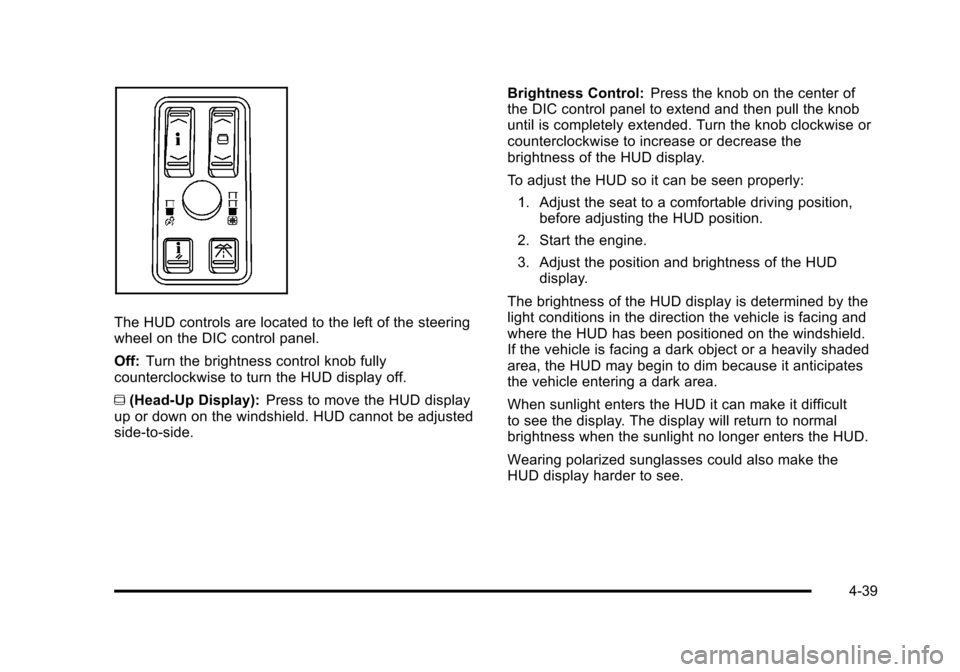
Black plate (39,1)Cadillac STS Owner Manual - 2011
The HUD controls are located to the left of the steering
wheel on the DIC control panel.
Off:Turn the brightness control knob fully
counterclockwise to turn the HUD display off.
~ (Head-Up Display): Press to move the HUD display
up or down on the windshield. HUD cannot be adjusted
side‐to‐side. Brightness Control:
Press the knob on the center of
the DIC control panel to extend and then pull the knob
until is completely extended. Turn the knob clockwise or
counterclockwise to increase or decrease the
brightness of the HUD display.
To adjust the HUD so it can be seen properly:
1. Adjust the seat to a comfortable driving position, before adjusting the HUD position.
2. Start the engine.
3. Adjust the position and brightness of the HUD display.
The brightness of the HUD display is determined by the
light conditions in the direction the vehicle is facing and
where the HUD has been positioned on the windshield.
If the vehicle is facing a dark object or a heavily shaded
area, the HUD may begin to dim because it anticipates
the vehicle entering a dark area.
When sunlight enters the HUD it can make it difficult
to see the display. The display will return to normal
brightness when the sunlight no longer enters the HUD.
Wearing polarized sunglasses could also make the
HUD display harder to see.
4-39