2011 CADILLAC SRX instrument cluster
[x] Cancel search: instrument clusterPage 174 of 498

Black plate (28,1)Cadillac SRX Owner Manual - 2011
5-28 Instruments and Controls
Front Fog Lamp Light
The fog lamp light comes on when
the fog lamps are in use.
The light goes out when the fog
lamps are turned off. SeeFront
Fog Lamps on page 6‑6 for more
information.
Lamps On Reminder
For vehicles with the lamps on
reminder light, it comes on when
the lights are in use.
Cruise Control Light
The cruise control light is white
whenever the cruise control is set,
and turns green when the cruise
control is active.
The light turns off when the cruise
control is turned off. See Cruise
Control on page 9‑38 for more
information.
Information Displays
Driver Information
Center (DIC)
The DIC displays information about
the vehicle. It also displays warning
messages if a system problem is
detected. See Vehicle Messages on
page 5‑32 for more information.
All messages appear in the DIC
display located in the center of the
instrument panel cluster.
The vehicle may also have features
that can be customized through the
controls on the radio. See Vehicle
Personalization on page 5‑40 for
more information.
The DIC may display an indicator
when the Rainsense wipers are
active.
Page 178 of 498

Black plate (32,1)Cadillac SRX Owner Manual - 2011
5-32 Instruments and Controls
It cannot be reset accurately
until the next oil change.
To reset the engine oil life system
press the SET/CLR button while
the Oil Life display is active.
SeeEngine Oil Life System on
page 10‑14.
Battery Voltage
This display, available on some
vehicles, shows the current battery
voltage. If the voltage is in the
normal range, the value will display.
For example, the display may
read Battery Voltage 15.0 Volts.
The vehicle's charging system
regulates voltage based on the
state of the battery. The battery
voltage can fluctuate while viewing
this information on the DIC. This is
normal. See Charging System Light
on page 5‑19 for more information.
If there is a problem with the battery
charging system, the DIC will
display a message. See Battery
Voltage and Charging Messages on
page 5‑33. Unit
Move the thumbwheel up or
down to switch between metric or
English when the Unit display is
active. Press SET/CLR to confirm
the setting. This will change the
displays on the cluster and DIC
to either metric or English
measurements.
Blank Display
This display shows no information.
Compass
The vehicle may have a compass
display in the Driver Information
Center (DIC). See
Compass on
page 5‑7.
Vehicle Messages
Messages displayed on the DIC
indicate the status of the vehicle or
some action that may be needed
to correct a condition. Multiple
messages may display one after
the other.
The messages that do not
require immediate action can be
acknowledged and cleared by
pressing SET/CLR. The messages
that require immediate action cannot
be cleared until that action is
performed. All messages should be
taken seriously and clearing the
messages does not correct the
problem.
Page 198 of 498

Black plate (2,1)Cadillac SRX Owner Manual - 2011
6-2 Lighting
It controls the following systems:
.Headlamps
.Taillamps
.Parking Lamps
.License Plate Lamps
.Instrument Panel Lights
.Fog Lamps
The exterior lamps control has four
positions:
O(Off): Briefly turn to this position
to turn the automatic light control off
or on again.
AUTO (Automatic): Turns the
headlamps on automatically at
normal brightness, together with
the following:
.Parking Lamps
.Taillamps
.License Plate Lamps
.Instrument Panel Lights
;(Parking Lamps): Turns the
parking lamps on together with the
following:
.Taillamps
.License Plate Lamps
.Instrument Panel Lights
2(Headlamps): Turns the
headlamps on together with the
following lamps listed below.
A warning chime sounds if the
driver's door is opened when
the ignition switch is off and the
headlamps are on.
.Parking Lamps
.Taillamps
.License Plate Lamps
.Instrument Panel Lights
#(Front Fog Lamps): For
vehicles with fog lamps, press to
turn the lamps on or off.
See Front Fog Lamps on page 6‑6.
Headlamp High/
Low-Beam Changer
2 3
Headlamp High/Low Beam
Changer: Push the turn signal/lane
change lever away from you to turn
the high beams on.
Pull the lever toward you to return to
low beams.
This indicator light turns on in the
instrument panel cluster when the
high beam headlamps are on.
Flash-to-Pass
The flash‐to‐pass feature works with
the low beams or Daytime Running
Lamps (DRL) on or off.
To flash the high beams, pull the
turn signal/lane change lever all the
way toward you, then release it.
Page 200 of 498

Black plate (4,1)Cadillac SRX Owner Manual - 2011
6-4 Lighting
Curve Lighting
The Xenon light beam pivots based
on the steering wheel position and
vehicle speed of at least 10 km/h
(6 mph). The headlamps shine at
an angle of up to 15 degrees to the
right or left of the direction of travel.
Highway Lighting
If the vehicle is traveling straight
continuously at high speeds, the
light beam automatically raises
slightly to increase the headlamp
range.
City Lighting
If the vehicle speed is less than
50 km/h (31 mph), the headlamp
range is automatically reduced.Twilight Sentinel
This feature automatically turns the
lamps on and off. A light sensor on
top of the instrument panel makes
the Twilight Sentinel
®work, so be
sure it is not covered.
With Twilight Sentinel the following
will happen:
.When it is dark enough outside,
and the exterior lamps control
is in the AUTO position, the
Daytime Running Lamps (DRL)
go off, and the headlamps and
parking lamps come on. The
other lamps that come on with
the headlamps also come on.
.When it is bright enough outside,
the headlamps go off, and the
DRL come on, as long as the
exterior lamp switch is in the
AUTO position. See Exterior
Lamp Controls on page 6‑1. If the vehicle is started in a dark
garage, the automatic headlamp
system comes on immediately.
If it is light outside when the vehicle
leaves the garage, there is a
slight delay before the automatic
headlamp system changes to
the DRL. During that delay, the
instrument panel cluster may not
be as bright as usual. Make sure
the instrument panel brightness
control is in full bright position.
See
Instrument Panel Illumination
Control on page 6‑6 for more
information.
The vehicle can be idled with the
lamps off, even when it is dark
outside. After starting the vehicle,
turn the exterior lamp control to off,
then release it. The lamps will
remain off until the control is turned
to off again.
Page 201 of 498
Black plate (5,1)Cadillac SRX Owner Manual - 2011
Lighting 6-5
Twilight Sentinel also provides
exterior illumination as you leave
the vehicle. If Twilight Sentinel has
turned on the lamps when the
ignition is turned off, the lamps
remain on until:
.The exterior lamp control is
moved from
Oto the parking
lamp position, or
.the delay time selected has
elapsed.
See Vehicle Personalization on
page 5‑40 to select the delay time.
You can also select no delay time.
If the ignition is turned off with the
exterior lamp control in the parking
lamp or headlamp position, the
Twilight Sentinel delay will not
occur. The lamps will turn off as
soon as the control is turned off.
The regular headlamp system
should be turned on when needed.
Hazard Warning Flashers
|
Hazard Warning Flasher:
Press this button located on the
instrument panel near the audio
system, to make the front and rear
turn signal lamps flash on and off.
This warns others that you are
having trouble. Press again to turn
the flashers off.
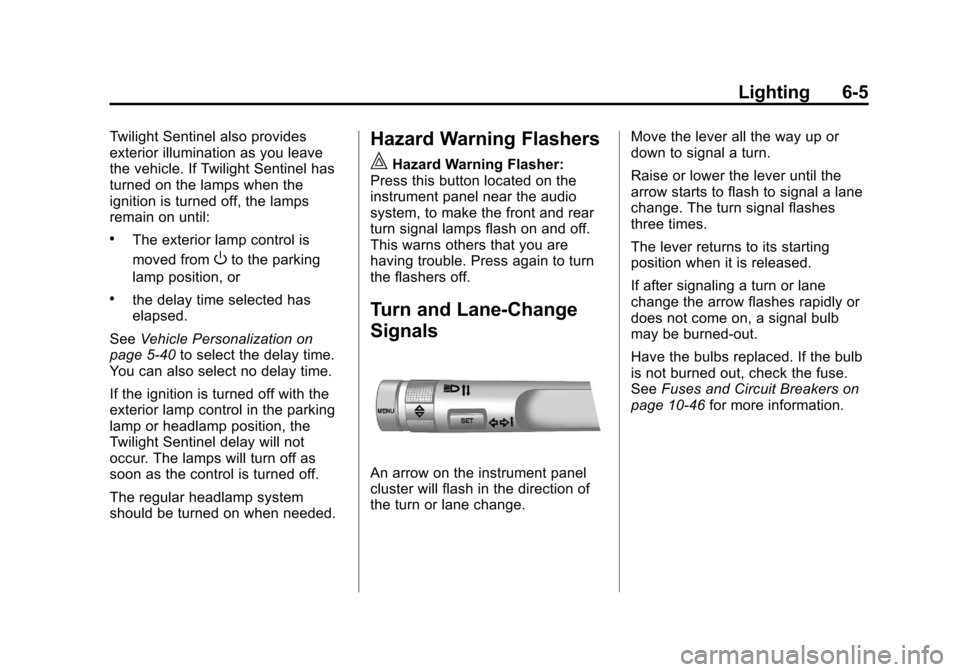
Turn and Lane-Change
Signals
An arrow on the instrument panel
cluster will flash in the direction of
the turn or lane change. Move the lever all the way up or
down to signal a turn.
Raise or lower the lever until the
arrow starts to flash to signal a lane
change. The turn signal flashes
three times.
The lever returns to its starting
position when it is released.
If after signaling a turn or lane
change the arrow flashes rapidly or
does not come on, a signal bulb
may be burned-out.
Have the bulbs replaced. If the bulb
is not burned out, check the fuse.
See
Fuses and Circuit Breakers on
page 10‑46 for more information.
Page 202 of 498

Black plate (6,1)Cadillac SRX Owner Manual - 2011
6-6 Lighting
Front Fog Lamps
For vehicles with front fog lamps,
the button is located on the exterior
lamp control, on the outboard side
of the steering wheel.
The ignition and the low‐beam
headlamps must be on to turn on
the fog lamps.
#:Press to turn the fog lamps
on or off. An indicator light on the
instrument panel cluster comes on
when the fog lamps are on.
The fog lamps come on together
with the parking lamps.
If the high‐beam headlamps are
turned on, the fog lamps will turn off.
If the high‐beam headlamps are
turned off, the fog lamps will turn
back on again.
Some localities have laws that
require the headlamps to be on
along with the fog lamps.
Interior Lighting
Instrument Panel
Illumination Control
This feature controls the brightness
of the instrument panel lights.
D(Instrument Panel
Brightness): Turn the thumbwheel
up or down to brighten or dim the
instrument panel lights.
Cargo Lamp
The cargo lamp is located over the
rear compartment and is controlled
by the dome lamp. See Dome
Lamps on page 6‑6.
Courtesy Lamps
The courtesy lamps come on
automatically when any door is
opened and the dome lamp is in
the door position.
Dome Lamps
The dome lamp controls are located
in the overhead console.
To change the dome lamp settings,
press the following:
*(Dome Lamp Override): Turns
the lamp off, even when a door
is open.
1(Door): The lamp comes on
automatically when a door is
opened.
+(On): Turns the dome lamp on.
Page 304 of 498

Black plate (28,1)Cadillac SRX Owner Manual - 2011
9-28 Driving and Operating
Manual Mode
Driver Shift Control (DSC)
Notice:If you drive the vehicle
at a high rpm without upshifting
while using Driver Shift Control
(DSC), you could damage the
vehicle. Always upshift when
necessary while using DSC.
Driver Shift Control (DSC)
allows you to shift an automatic
transmission similar to a manual
transmission. To use the DSC
feature:
1. Move the shift lever to the left from D (Drive) to
M (Manual Mode).
If you do not move the shift lever
forward or rearward, the vehicle
will be in Sport Mode. When you
are in Sport Mode the vehicle
will still shift automatically.
The transmission may remain
in a gear longer than it would in
the normal driving mode based
on braking, throttle input, and
vehicle lateral acceleration. SPORT MODE ON will be
displayed in the DIC. See
Ride
Control System Messages on
page 5‑37. The word “sport”
will display below the odometer.
The gear position will also be
indicated in the tachometer.
Within Sport Mode there is a
further performance feature
called Performance Mode Lift
Foot (PMLF) Mode. The feature
is activated automatically when
sports oriented driving is
detected, based on cornering
and on/off throttle application.
PMLF allows the transmission to
hold the current gear instead of
upshifting when the throttle is
lifted.
2. To enter M (Manual Mode), press the shift lever forward to upshift
or rearward to downshift.
An M will be displayed in
the DIC. 3. To return to Sport Mode from
M (Manual Mode), press and
briefly hold the shift lever
forward.
The tachometer display on the
instrument panel cluster will
show which gear the vehicle is in.
The number indicates the requested
gear range when moving the
shift lever forward or rearward.
See Tachometer on page 5‑12
for more information.
While using the DSC feature, the
vehicle will have firmer, quicker
shifting. You can use this for
sport driving or when climbing or
descending hills, to stay in gear
longer, or to down shift for more
power or engine braking.
Page 305 of 498

Black plate (29,1)Cadillac SRX Owner Manual - 2011
Driving and Operating 9-29
The transmission will only allow
you to shift into gears appropriate
for the vehicle speed and engine
Revolutions Per Minute (RPM).
The transmission will not
automatically shift to the next
lower gear if the engine RPM
is too high, nor to the next higher
gear when the maximum engine
RPM is reached.
If shifting is prevented for any
reason, the currently selected gear
will flash multiple times, indicating
that the transmission has not shifted
gears.
While in the DSC mode, the
transmission will automatically
downshift when the vehicle comes
to a stop. This will allow for more
power during take-off.
When accelerating the vehicle from
a stop in snowy and icy conditions,
you may want to shift into second
gear. A higher gear ratio allows you
to gain more traction on slippery
surfaces.Fuel Economy Mode
The vehicle may have a fuel
economy mode. When engaged,
fuel economy mode can improve
the vehicle's fuel economy.
Pressing the eco button by the
shift lever will engage fuel economy
mode. When activated, the eco lightin the instrument cluster will come
on. See
Fuel Economy Light on
page 5‑26. Pressing the button a
second time will turn fuel economy
mode off.
When fuel economy mode is on:
.The transmission will upshift
sooner, and downshift later.
.The torque converter will
lock–up sooner, and stay on
longer.
.The gas pedal will be less
sensitive.
.The vehicle's computers will
more aggressively shut off fuel
to the engine under deceleration.