2011 CADILLAC ESCALADE brake light
[x] Cancel search: brake lightPage 176 of 558

Black plate (38,1)Cadillac Escalade/Escalade ESV Owner Manual - 2011
5-38 Instruments and Controls
There are several conditions that
can cause this message to appear.
.One condition is overheating,
which could occur if StabiliTrak
activates continuously for an
extended period of time.
.The message also displays if the
brake system warning light is on.
SeeBrake System Warning
Light on page 5‑21.
.The message could display
if the stability system takes
longer than usual to complete
its diagnostic checks due to
driving conditions.
.The message displays if an
engine or vehicle related
problem has been detected
and the vehicle needs service.
See your dealer.
The message turns off as soon
as the conditions that caused the
message to be displayed are no
longer present.
TRACTION CONTROL OFF
If your vehicle has StabiliTrak, this
message displays when the Traction
Control System (TCS) is turned off.
Adjust your driving accordingly.
See StabiliTrak
®System on
page 9‑47 for more information.
Airbag System Messages
SERVICE AIR BAG
This message displays if there is
a problem with the airbag system.
Have your dealer inspect the
system for problems. See Airbag
Readiness Light on page 5‑16 and
Airbag System on page 3‑39 for
more information.
Anti-Theft Alarm System
Messages
SERVICE THEFT DETERRENT
SYSTEM
This message displays when there
is a problem with the theft-deterrent
system. The vehicle may or may not
restart so you may want to take the
vehicle to your dealer before turning
off the engine. See Immobilizer
Operation on page 2‑15 for more
information.
Page 326 of 558

Black plate (4,1)Cadillac Escalade/Escalade ESV Owner Manual - 2011
9-4 Driving and Operating
Braking
SeeBrake System Warning Light on
page 5‑21.
Braking action involves perception
time and reaction time. Deciding
to push the brake pedal is
perception time. Actually doing
it is reaction time.
Average reaction time is about
three‐fourths of a second. But that
is only an average. It might be
less with one driver and as long
as two or three seconds or more
with another. Age, physical
condition, alertness, coordination,
and eyesight all play a part. So do
alcohol, drugs, and frustration. But
even in three‐fourths of a second,
a vehicle moving at 100 km/h
(60 mph) travels 20 m (66 ft).
That could be a lot of distance
in an emergency, so keeping
enough space between the
vehicle and others is important. And, of course, actual stopping
distances vary greatly with the
surface of the road, whether it is
pavement or gravel; the condition
of the road, whether it is wet, dry,
or icy; tire tread; the condition of the
brakes; the weight of the vehicle;
and the amount of brake force
applied.
Avoid needless heavy
braking. Some people drive in
spurts
—heavy acceleration
followed by heavy braking —rather
than keeping pace with traffic.
This is a mistake. The brakes
might not have time to cool between
hard stops. The brakes will wear
out much faster with a lot of heavy
braking. Keeping pace with the
traffic and allowing realistic following
distances eliminates a lot of
unnecessary braking. That means
better braking and longer brake life. If the engine ever stops while
the vehicle is being driven, brake
normally but do not pump the
brakes. If the brakes are pumped,
the pedal could get harder to push
down. If the engine stops, there will
still be some power brake assist but
it will be used when the brake is
applied. Once the power assist is
used up, it can take longer to stop
and the brake pedal will be harder
to push.
Adding non‐dealer accessories
can affect vehicle performance.
See
Accessories and Modifications
on page 10‑3.
Page 328 of 558
Black plate (6,1)Cadillac Escalade/Escalade ESV Owner Manual - 2011
9-6 Driving and Operating
The fact that such emergency
situations are always possible is a
good reason to practice defensive
driving at all times and wear safety
belts properly.
Off-Road Recovery
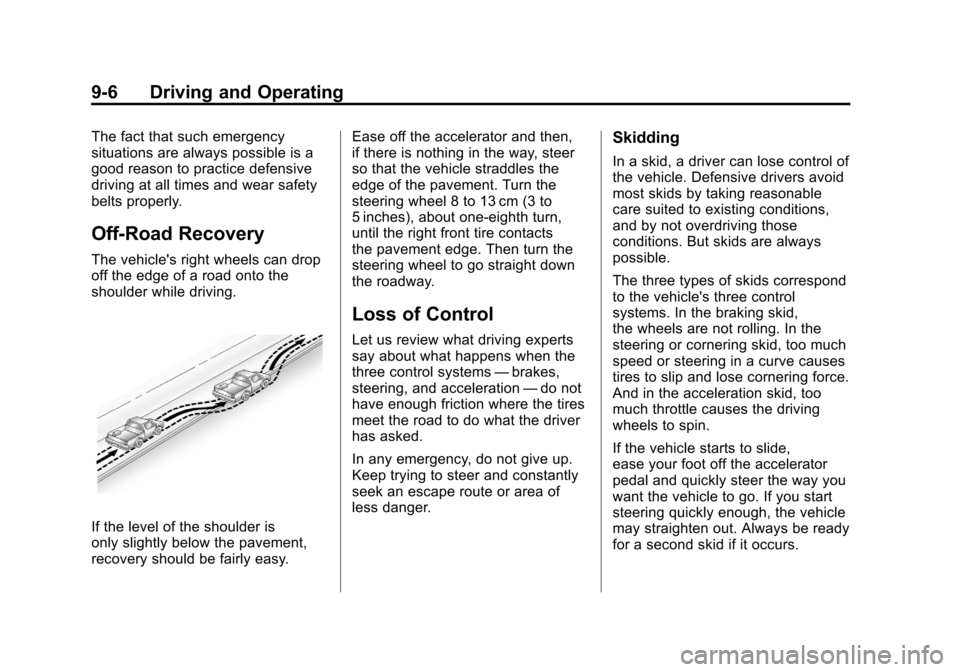
The vehicle's right wheels can drop
off the edge of a road onto the
shoulder while driving.
If the level of the shoulder is
only slightly below the pavement,
recovery should be fairly easy.Ease off the accelerator and then,
if there is nothing in the way, steer
so that the vehicle straddles the
edge of the pavement. Turn the
steering wheel 8 to 13 cm (3 to
5 inches), about one-eighth turn,
until the right front tire contacts
the pavement edge. Then turn the
steering wheel to go straight down
the roadway.
Loss of Control
Let us review what driving experts
say about what happens when the
three control systems
—brakes,
steering, and acceleration —do not
have enough friction where the tires
meet the road to do what the driver
has asked.
In any emergency, do not give up.
Keep trying to steer and constantly
seek an escape route or area of
less danger.
Skidding
In a skid, a driver can lose control of
the vehicle. Defensive drivers avoid
most skids by taking reasonable
care suited to existing conditions,
and by not overdriving those
conditions. But skids are always
possible.
The three types of skids correspond
to the vehicle's three control
systems. In the braking skid,
the wheels are not rolling. In the
steering or cornering skid, too much
speed or steering in a curve causes
tires to slip and lose cornering force.
And in the acceleration skid, too
much throttle causes the driving
wheels to spin.
If the vehicle starts to slide,
ease your foot off the accelerator
pedal and quickly steer the way you
want the vehicle to go. If you start
steering quickly enough, the vehicle
may straighten out. Always be ready
for a second skid if it occurs.
Page 337 of 558

Black plate (15,1)Cadillac Escalade/Escalade ESV Owner Manual - 2011
Driving and Operating 9-15
If you decide you can go down a
hill safely, try to keep the vehicle
headed straight down. Use a low
gear so engine drag can help the
brakes so they do not have to do all
the work. Descend slowly, keeping
the vehicle under control at all
times.
{WARNING
Heavy braking when going down
a hill can cause your brakes to
overheat and fade. This could
cause loss of control and a
serious accident. Apply the
brakes lightly when descending
a hill and use a low gear to keep
vehicle speed under control.Things not to do when driving down
a hill:
.When driving downhill, avoid
turns that take you across the
incline of the hill. A hill that is not
too steep to drive down might
be too steep to drive across.
The vehicle could roll over.
.Never go downhill with the
transmission in N (Neutral),
called free-wheeling. The brakes
will have to do all the work and
could overheat and fade.
Vehicles are much more likely to
stall when going uphill, but if it
happens when going downhill:
1. Stop the vehicle by applying the regular brakes and apply the
parking brake.
2. Shift to P (Park) and, while still braking, restart the engine.
3. Shift back to a low gear, release the parking brake, and drive
straight down.
4. If the engine will not start, get out and get help.
Driving Across an Incline
An off-road trail will probably go
across the incline of a hill. To decide
whether to try to drive across the
incline, consider the following:
{WARNING
Driving across an incline that is
too steep will make your vehicle
roll over. You could be seriously
injured or killed. If you have any
doubt about the steepness of the
incline, do not drive across it.
Find another route instead.
.A hill that can be driven straight
up or down might be too steep
to drive across. When going
straight up or down a hill, the
length of the wheel base —the
distance from the front wheels
to the rear wheels —reduces
the likelihood the vehicle
will tumble end over end.
Page 341 of 558

Black plate (19,1)Cadillac Escalade/Escalade ESV Owner Manual - 2011
Driving and Operating 9-19
WARNING (Continued)
After driving through a large
puddle of water or a car/vehicle
wash, lightly apply the brake
pedal until the brakes work
normally.
Flowing or rushing water creates
strong forces. Driving through
flowing water could cause your
vehicle to be carried away. If this
happens, you and other vehicle
occupants could drown. Do not
ignore police warnings and be
very cautious about trying to
drive through flowing water.
Hydroplaning
Hydroplaning is dangerous. Water
can build up under your vehicle's
tires so they actually ride on the
water. This can happen if the road
is wet enough and you are going
fast enough. When your vehicle
is hydroplaning, it has little or no
contact with the road.
There is no hard and fast rule about
hydroplaning. The best advice is to
slow down when the road is wet.
Other Rainy Weather Tips
Besides slowing down, other wet
weather driving tips include:
.Allow extra following distance.
.Pass with caution.
.Keep windshield wiping
equipment in good shape.
.Keep the windshield washer fluid
reservoir filled.
.Have good tires with proper
tread depth. SeeTires on
page 10‑50.
.Turn off cruise control.
Page 367 of 558
Black plate (45,1)Cadillac Escalade/Escalade ESV Owner Manual - 2011
Driving and Operating 9-45
Drive Systems
All-Wheel Drive
If the vehicle has this feature,
engine power is sent to all four
wheels when extra traction is
needed. This is like four-wheel
drive, but there is no separate lever
or switch to engage or disengage
the front axle. It is fully automatic,
and adjusts itself as needed for road
conditions.
If the vehicle is a hybrid, see
“Four-Wheel Drive”in the hybrid
supplement.
Brakes
Antilock Brake
System (ABS)
This vehicle has the Antilock
Brake System (ABS), an advanced
electronic braking system that helps
prevent a braking skid.
When the engine is started and the
vehicle begins to drive away, ABS
checks itself. A momentary motor
or clicking noise might be heard
while this test is going on, and it
might even be noticed that the
brake pedal moves a little. This is
normal.If there is a problem with ABS, this
warning light stays on. See Antilock
Brake System (ABS) Warning Light
on page 5‑22.
If driving safely on a wet road
and it becomes necessary to slam
on the brakes and continue braking
to avoid a sudden obstacle, a
computer senses that the wheels
are slowing down. If one of the
wheels is about to stop rolling,
the computer will separately work
the brakes at each wheel.
Page 368 of 558

Black plate (46,1)Cadillac Escalade/Escalade ESV Owner Manual - 2011
9-46 Driving and Operating
ABS can change the brake pressure
to each wheel, as required, faster
than any driver could. This can help
the driver steer around the obstacle
while braking hard.
As the brakes are applied, the
computer keeps receiving updates
on wheel speed and controls
braking pressure accordingly.
Remember: ABS does not change
the time needed to get a foot up to
the brake pedal or always decrease
stopping distance. If you get too
close to the vehicle in front of you,
there will not be enough time to
apply the brakes if that vehicle
suddenly slows or stops. Always
leave enough room up ahead to
stop, even with ABS.
Using ABS
Do not pump the brakes. Just hold
the brake pedal down firmly and let
ABS work. You might hear the ABS
pump or motor operating and feel
the brake pedal pulsate, but this is
normal.
Braking in Emergencies
ABS allows the driver to steer and
brake at the same time. In many
emergencies, steering can help
more than even the very best
braking.
Parking Brake
Set the parking brake by holding
the regular brake pedal down, then
pushing down the parking brake
pedal.If the ignition is on, the brake
system warning light will come on.
See
Brake System Warning Light on
page 5‑21.
Notice: Driving with the parking
brake on can overheat the brake
system and cause premature
wear or damage to brake system
parts. Make sure that the parking
brake is fully released and the
brake warning light is off before
driving.
To release the parking brake, hold
the regular brake pedal down, then
push down momentarily on the
parking brake pedal until you feel
the pedal release. Slowly pull your
foot up off the parking brake pedal.
If the parking brake is not released
when you begin to drive, the brake
system warning light will flash and a
chime will sound warning you that
the parking brake is still on.
If you are towing a trailer and
are parking on a hill, see Driving
Characteristics and Towing Tips on
page 9‑71.
Page 369 of 558

Black plate (47,1)Cadillac Escalade/Escalade ESV Owner Manual - 2011
Driving and Operating 9-47
Brake Assist
This vehicle has a brake assist
feature designed to assist the
driver in stopping or decreasing
vehicle speed in emergency driving
conditions. This feature uses the
stability system hydraulic brake
control module to supplement
the power brake system under
conditions where the driver has
quickly and forcefully applied the
brake pedal in an attempt to quickly
stop or slow down the vehicle.
The stability system hydraulic brake
control module increases brake
pressure at each corner of the
vehicle until the ABS activates.
Minor brake pedal pulsation or
pedal movement during this time
is normal and the driver should
continue to apply the brake pedal
as the driving situation dictates.
The brake assist feature will
automatically disengage when
the brake pedal is released or
brake pedal pressure is quickly
decreased.
Ride Control Systems
StabiliTrak®System
The vehicle has a vehicle stability
enhancement system called
StabiliTrak. It is an advanced
computer-controlled system that
assists the driver with directional
control of the vehicle in difficult
driving conditions.
StabiliTrak activates when the
computer senses a discrepancy
between the intended path and
the direction the vehicle is actually
traveling. StabiliTrak selectively
applies braking pressure at any
one of the vehicle's brakes to assist
the driver with keeping the vehicle
on the intended path.
When the vehicle is started
and begins to move, the system
performs several diagnostic checks
to insure there are no problems.
The system may be heard or felt
while it is working. This is normal
and does not mean there is a
problem with the vehicle. Thesystem should initialize before the
vehicle reaches 32 km/h (20 mph).
In some cases, it may take
approximately 3.2 km (2 miles) of
driving before the system initializes.
If cruise control is being used
when StabiliTrak activates, the
cruise control automatically
disengages. The cruise control
can be re-engaged when road
conditions allow. See
Cruise
Control on page 9‑51.
If the system fails to turn on or
activate, the StabiliTrak light along
with one of the following messages
will be displayed on the Driver
Information Center (DIC):
TRACTION CONTROL OFF,
SERVICE TRACTION CONTROL,
STABILITRAK OFF, SERVICE
STABILITRAK. If these DIC
messages appear, make sure the
StabiliTrak system has not been
turned off using the StabiliTrak on/
off button. Then turn the vehicle off,
wait 15 seconds, and then turn it
back on again to reset the system.
If any of these messages still