2011 CADILLAC CTS auxiliary battery
[x] Cancel search: auxiliary batteryPage 172 of 496

Black plate (32,1)Cadillac CTS/CTS-V Owner Manual - 2011
5-32 Instruments and Controls
Battery Volts Low
This message displays when the
electrical system is charging less
than 10 volts or the battery has
been drained.
If this message appears
immediately after starting the
engine, it is possible that the
generator can still recharge the
battery. The battery should recharge
while driving, but may take a
few hours to do so. Consider using
an auxiliary charger to boost the
battery after returning home or to a
final destination. Make sure you
follow the manufacturer's
instructions.
If this message appears while
driving or after starting the vehicle
and stays on, have it checked
immediately to determine the cause
of this problem.
To help the generator recharge the
battery quickly, reduce the load on
the electrical system by turning off
the accessories.The normal battery voltage range is
11.5 to 15.5 volts. Monitor battery
voltage on the DIC by pressing the
vehicle information button until
Battery Voltage is displayed.
Service Battery Charging
System
This message displays when there
is a problem with the generator and
battery charging systems. Driving
with this problem could drain the
battery. Turn off all unnecessary
accessories. Stop and turn off the
vehicle as soon as it is safe to do
so. Have the electrical system
checked by your dealer. Under
certain conditions, the charging
system light may also turn on in the
instrument panel cluster. See
Charging System Light
on
page 5‑19for more information.
Brake System Messages
Park Brake Released
For vehicles with the Electric
Parking Brake, this message
displays when the parking brake
has been released from the set
position. See the Electric Parking
Brake information under Parking
Brake (Manual)
on page 9‑33or
Parking Brake (Electric)on
page 9‑34for more information.
Park Brake Set
For vehicles with the Electric
Parking Brake, this message
displays when the parking brake
has been applied to the set position.
See the Electric Parking Brake
information under Parking Brake
(Manual)
on page 9‑33or Parking
Brake (Electric)on page 9‑34for
more information.
Page 243 of 496

Black plate (37,1)Cadillac CTS/CTS-V Owner Manual - 2011
Infotainment System 7-37
USB Port
The USB connector uses the USB
standards, 1.1 and 2.0.
USB Supported Devices
.USB Flash Drives
.Portable USB Hard Drives
.Fifth generation or later iPods*
.First, Second, or Third
generation iPod nanos*
.iPod classics*
*For proper operation, make sure
the iPod has the latest firmware
from Apple
®. The iPod firmware can
be updated using the latest iTunes
application. See www.apple.com/
itunes.
Connecting a USB Storage Device
Connect the USB storage device to
the USB port located in the center
console. Some USB devices may
not be supported. Playing an MP3/WMA from a USB
Storage Device
See
MP3
on page 7‑25for more
information.
Connecting an iPod
To connect the iPod, connect one
end of the special iPod connection
cable to the iPod’s dock connector.
Connect the other end to both the
USB port and the auxiliary input jack
located in the center console. The
USB port and the auxiliary input jack
are located in the center console
bin. If the vehicle is on and the USB
connection works, a GM logo may
appear on the iPod. The iPod's
music information will be shown on
the radio’s display and the music
begins playing through the vehicle's
audio system. The iPod's battery charges while it
is connected to the vehicle and if
the ignition is turned to ACC/
ACCESSORY or ON/RUN. It can
also be left connected to the vehicle
after the vehicle is turned off. With
the vehicle turned off, the iPod will
automatically be powered off and
will not charge or draw power from
the vehicle's battery.
A standard iPod USB cable, like the
one that came with the iPod, cannot
be used to connect an iPod to the
vehicle. The special iPod
connection cable that came
equipped with the vehicle or that
was made available from your
dealer must be used to command
and control an iPod.
Use a standard 3.5 mm (1/8 in)
stereo cable to connect an older
iPod model that is not supported,
or if the special iPod connection
cable is missing. Command and
control of the iPod using the
infotainment control buttons and
knobs is not supported when only a
3.5 mm (1/8 in) stereo cable is used.
Page 370 of 496

Black plate (52,1)Cadillac CTS/CTS-V Owner Manual - 2011
10-52 Vehicle Care
Mini‐Fuses Usage60 Instrument Panel
Auxiliary Power
Outlet
61 Air Quality Sensor,
Inside Rear View
Mirror, Rear
Camera
62 Ignition
64 Steering Wheel
Illumination
65 Front Fog Lamps
(HID Only)
69 Body Control
Module 6, Body
Control Module 7
70 Emissions 1
71 Even Ignition Coils
72 Engine Control
Module Mini‐Fuses Usage
73 Emissions 2
74 Odd Ignition Coils
75 Transmission
Output Speed
Sensor, Brake
Vacuum Relay
76 Spare
77 Spare
78 Spare
79 Spare
80 Spare
81 Spare
J-Case Fuses Usage
6 Cooling Fan 2
7 Cooling Fan 1
8 Starter J-Case
Fuses Usage
9 Brake
Vacuum Pump
10 Antilock Brake
System Motor
13 Not Used
14 Electric Parking
Brake
15 Not Used
16 Not Used
17 Blower Motor
18 Transmission
Control Module
Battery
37 Trailer (Export Only)
Page 373 of 496

Black plate (55,1)Cadillac CTS/CTS-V Owner Manual - 2011
Vehicle Care 10-55
Mini‐Fuses Usage28 Navigation Motor
29 Not Used
30 Transmission
Control Module
Battery
31 Horn
33 Not Used
34 Pedestrian
Protection System
(Export Only)
35 Body Control
Module 3
36 Body Control
Module 2
38 Headlamp Washer
(HID Only) Mini‐Fuses Usage
40 Not Used
41 Air Conditioning
Compressor Clutch
43 Left Daytime
Running
Lamp (HID)
46 Left High‐Beam
Headlamp
47 Right High‐Beam
Headlamp
50 Right Daytime
Running Lamp
51 Airbag System
Ignition Switch
52 Engine Control
Module Ignition,
Transmission
Control Module
Ignition Mini‐Fuses Usage
54 Power Moding
(Immobilizer
Module, Ignition
Switch)
55 Intercooler Pump
56 Windshield Wipers
57 Right Low‐Beam
(HID Only)
58 Left Low‐Beam
(HID Only)
59 Right Daytime
Running Lamp
(HID Only)
60 Instrument Panel
Auxiliary Power
Outlet
61 Air Quality Sensor,
Inside Rear View
Mirror, Rear
Camera
Page 376 of 496
Black plate (58,1)Cadillac CTS/CTS-V Owner Manual - 2011
10-58 Vehicle Care
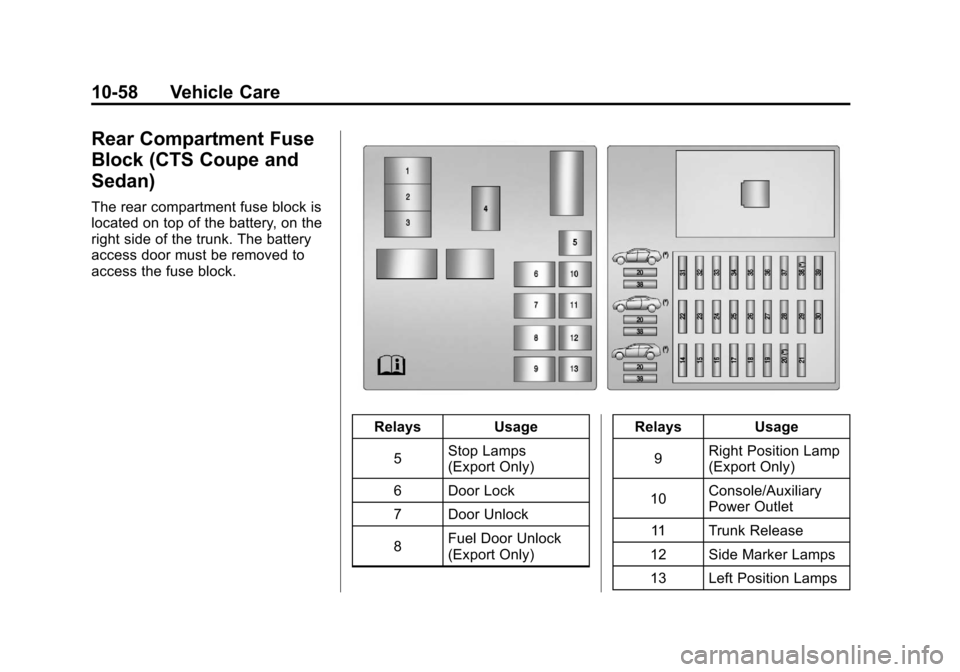
Rear Compartment Fuse
Block (CTS Coupe and
Sedan)
The rear compartment fuse block is
located on top of the battery, on the
right side of the trunk. The battery
access door must be removed to
access the fuse block.
RelaysUsage
5 Stop Lamps
(Export Only)
6 Door Lock
7 Door Unlock
8 Fuel Door Unlock
(Export Only) Relays
Usage
9 Right Position Lamp
(Export Only)
10 Console/Auxiliary
Power Outlet
11 Trunk Release
12 Side Marker Lamps
13 Left Position Lamps
Page 378 of 496
Black plate (60,1)Cadillac CTS/CTS-V Owner Manual - 2011
10-60 Vehicle Care
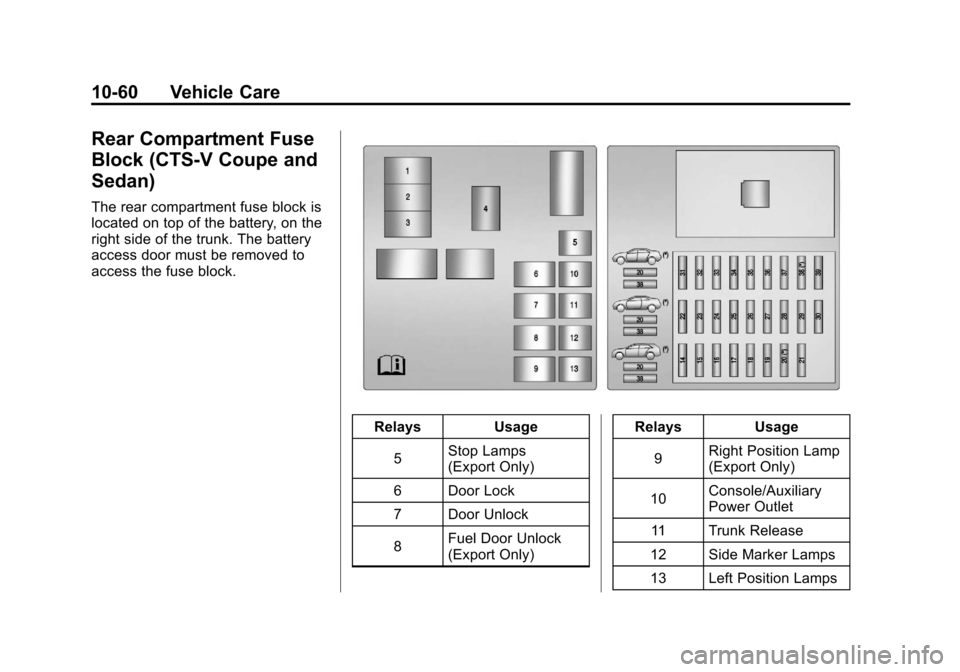
Rear Compartment Fuse
Block (CTS-V Coupe and
Sedan)
The rear compartment fuse block is
located on top of the battery, on the
right side of the trunk. The battery
access door must be removed to
access the fuse block.
RelaysUsage
5 Stop Lamps
(Export Only)
6 Door Lock
7 Door Unlock
8 Fuel Door Unlock
(Export Only) Relays
Usage
9 Right Position Lamp
(Export Only)
10 Console/Auxiliary
Power Outlet
11 Trunk Release
12 Side Marker Lamps
13 Left Position Lamps
Page 484 of 496

Black plate (2,1)Cadillac CTS/CTS-V Owner Manual - 2011
i-2 INDEX
AutomaticDoor Locks . . . . . . . . . . . . . . . . . . . 2-15
Headlamp System . . . . . . . . . . . . . 6-3
Automatic Transmission . . . . . . . 9-26 Fluid . . . . . . . . . . . . . . . . . . . . . . . . 10-15
Manual Mode . . . . . . . . . . . . . . . . . 9-28
Automatic Transmission
Shift Lock Control
Function Check . . . . . . . . . . . . . 10-33
Auxiliary Devices . . . . . . . . . . . . . . 7-36
Axle, Rear . . . . . . . . . . . . . . . . . . . . 10-31
B
Battery . . . . . . . . . . . . . . . . . . . . . . . 10-30 Exterior Lighting BatterySaver . . . . . . . . . . . . . . . . . . . . . . . . 6-7
Jump Starting . . . . . . . . . . . . . . 10-112
Load Management . . . . . . . . . . . . . 6-6
Power Protection . . . . . . . . . . . . . . 6-7
Voltage and Charging Messages . . . . . . . . . . . . . . . . . . . 5-31 Blade Replacement, Wiper . . . 10-34
Bluetooth . . . . . . . . . . . . . . . . . . . . . . 7-38
Boost Gauge . . . . . . . . . . . . . . . . . . 5-14
Brakes . . . . . . . . . . . . . . . . . . . . . . . . 10-27
Antilock . . . . . . . . . . . . . . . . . . . . . . . 9-32
Assist . . . . . . . . . . . . . . . . . . . . . . . . . 9-36
Fluid . . . . . . . . . . . . . . . . . . . . . . . . 10-28
Parking . . . . . . . . . . . . . . . . . 9-33, 9-34
System Messages . . . . . . . . . . . . 5-32
Braking . . . . . . . . . . . . . . . . . . . . . . . . . 9-3
Break-In, New Vehicle . . . . . . . . . 9-16
Bulb Replacement . . . . . . . . . . . . 10-40 Fog Lamps . . . . . . . . . . . . . 10-38, 6-5
Halogen Bulbs . . . . . . . . . . . . . . 10-38
Headlamp Aiming . . . . . . . . . . . 10-35
Headlamps . . . . . . . . . . . . . . . . . 10-38
High Intensity Discharge(HID) Lighting . . . . . . . . . . . . . 10-38
License Plate Lamps . . . . . . . 10-39
Buying New Tires . . . . . . . . . . . . . 10-83
C
Calibration . . . . . . . . . . . . . . . . . . . . . . 5-7
California Fuel Requirements . . . . . . . . . . . 9-48
Perchlorate MaterialsRequirements . . . . . . . . . . . . . . . 10-3
Warning . . . . . . . . . . . . . . . . . . . . . . 10-3
Camera, Rear Vision . . . . . . . . . . 9-44
Canadian Vehicle Owners . . . . . . . . iv
Capacities and Specifications . . . . . . . . . . . . . . . . 12-2
Carbon Monoxide Engine Exhaust . . . . . . . . . . . . . . . 9-24
Liftgate . . . . . . . . . . . . . . . . . . . . . . . 2-20
Trunk . . . . . . . . . . . . . . . . . . . . . . . . . 2-17
Winter Driving . . . . . . . . . . . . . . . . . 9-9
Cargo Cover . . . . . . . . . . . . . . . . . . . . . . . . . . 4-2
Management System . . . . . . . . . . 4-3
Cargo Net . . . . . . . . . . . . . . . . . . . . . . 4-4