2011 BUICK REGAL buttons
[x] Cancel search: buttonsPage 161 of 368

Black plate (11,1)Buick Regal Owner Manual - 2011
Infotainment System 7-11
Selecting an XM Channel
XM channels can be selected by
station lists or category lists.
Selecting a Channel by
Station List
XM channels can be selected by
using
s©,¨\, or the
Zknob.
To select an XM channel using
s
©
or¨ \, do one of the following:
.Press and releases ©or¨
\
to go to the previous or next
channel.
.Press and holds ©or¨\
to scroll through the previous or
next channels until the channel
is reached. To select an XM channel using the
Zknob:
1. Turn the
Zknob to highlight
an XM channel.
2. Press the
Zknob to select
the channel, or leave the
channel highlighted.
To select an XM channel using
the menu:
1. Press the
Zknob.
2. Select XM Stations List.
3. Select the channel.
Selecting a Channel by Category
1. Press the
Zknob.
2. Select XM Category List. A list of all programming types available
displays.
3. Select the programming type.
4. Select the channel.
Storing an XM Channel as a
Favorite
Channels from all bands can be
stored in any order in the favorites
pages.
Up to six channels can be stored in
each favorites page and the number
of available favorites pages can
be set.
Storing a Channel as a Favorite
To store the channel to a position in
the list, press and hold the
corresponding 1 to 6 button until the
channel can be heard again.
Retrieving Channels
Press the FAV button to open a
favorites page or to change to
another favorites page. Briefly press
one of the 1 to 6 buttons to retrieve
the channel.
Page 165 of 368

Black plate (15,1)Buick Regal Owner Manual - 2011
Infotainment System 7-15
If the bottom surface of a disc is
dirty, take a soft lint‐free cloth,
or dampen a clean soft cloth in a
mild neutral detergent solution
mixed with water, and clean it. Wipe
the disc from the center to the
outer edge.
Care of the CD Player
Do not add a label to a disc; it could
get caught in the CD player. If a
label is needed, write on the top of
the recorded disc with a
marking pen.
Do not use disc lens cleaners
because they could contaminate the
lens of the disc optics and damage
the CD player.Notice:
If a label is added to a
CD, more than one CD is inserted
into the slot at a time, or an
attempt is made to play scratched
or damaged CDs, the CD player
could be damaged. While using
the CD player, use only CDs in
good condition without any label,
load one CD at a time, and keep
the CD player and the loading slot
free of foreign materials, liquids,
and debris.
Control Buttons
The buttons used to control the CD
player are:
CD/AUX: Press to use the CD
player.
s ©/¨\:Press to select
tracks or to fast rewind or forward
within a track.
INFO: Press to display additional
information about the current track
that may be available.
Z(Menu/Select): Turn to
select tracks. Press to enter the CD
menu and select items.
Z(Eject): Press to eject the disc.
Inserting a CD
With the printed side facing up,
insert a disc into the CD slot until it
is drawn in.
Removing a CD
Press theZbutton.
The disc is pushed out of the
CD slot.
If the disc is not removed after it is
ejected, it is pulled back in after a
few seconds.
Playing a CD or MP3 CD
Press the CD/AUX button if there is
a disc in the player; it begins
playing.
Information about the disc and
current track is shown on the
display depending on the data
stored.
Page 166 of 368

Black plate (16,1)Buick Regal Owner Manual - 2011
7-16 Infotainment System
Selecting a CD Track
Using the control buttons:
.Press thes©or¨\button
to select the previous or next
track.
.Turn theZknob.
Using the CD Menu:
1. Press the
Zknob.
2. Select Tracks list.
3. Select the track.
Playing Tracks in Random Order
Press the
Zknob and then set
Shuffle Songs to On.
Fast Forward and Rewind
Press and hold
¨ \ors ©to
fast forward or rewind within the
current track. Selecting an MP3 Track
Using the control buttons:
.Press thes
©or¨\button
to select the previous or next
track.
.Turn theZknob.
Using the CD Menu:
1. Press the
Zknob.
2. Select Playlists/Folders.
3. Select the playlist or folder.
4. Select the track.
Searching for MP3 Tracks
The search feature may take some
time to display the information after
reading the disc due to the amount
of information stored on the disc.
FM automatically plays while the
disc is being read. Tracks can be searched by:
.Playlists
.Artists
.Albums
.Song Titles
.Genres
.Folder View
To search for tracks:
1. Press the
Zknob.
2. Select Search.
3. Select: Playlists, Artists, Albums, Song Titles, Genres,
or Folder View.
4. Select the track.
Page 170 of 368

Black plate (20,1)Buick Regal Owner Manual - 2011
7-20 Infotainment System
Phone
Bluetooth (Overview)
Vehicles with a Bluetooth system
can use a Bluetooth‐capable cell
phone with a Hands‐Free Profile to
make and receive phone calls. The
infotainment system and voice
recognition are used to control the
system. The system can be used
while the ignition is in ON/RUN or
ACC/ACCESSORY. The range of
the Bluetooth system can be up to
9.1 m (30 ft). Not all phones support
all functions and not all phones work
with the Bluetooth system. See
www.gm.com/bluetooth for more
information about compatible
phones.
Bluetooth Controls
Use the buttons located on the
infotainment system and the
steering wheel to operate the
Bluetooth system.Steering Wheel Controls
b/g(Push to Talk):
Press to
answer incoming calls, confirm
system information, and start voice
recognition.
$/i(Mute/End Call): Press to
end a call, reject a call, or cancel an
operation.
Infotainment System Controls
For information about how to
navigate the menu system using the
infotainment controls, see Operation
on page 7‑4.
V/$(Phone): Press to enter the
Phone main menu.
Voice Recognition
The voice recognition system uses
commands to control the system
and dial phone numbers.
Noise: The system may not
recognize voice commands if there
is too much background noise. When to Speak:
A tone sounds to
indicate that the system is ready for
a voice command. Wait for the tone
and then speak.
How to Speak: Speak clearly in a
calm and natural voice.
Audio System
When using the Bluetooth system,
sound comes through the vehicle's
front audio system speakers and
overrides the audio system. Use the
3/Oknob during a call to
change the volume level. The
adjusted volume level remains in
memory for later calls. The system
maintains a minimum volume level.
Other Information
The Bluetooth®word mark and
logos are owned by Bluetooth®SIG,
Inc. and any use of such marks by
General Motors is under license.
Other trademarks and trade names
are those of their respective owners.
Page 229 of 368
Black plate (39,1)Buick Regal Owner Manual - 2011
Driving and Operating 9-39
Drive Mode Control
Drive Mode Control (DMC) analyzes
the driving style and the active state
of the vehicle and automatically
changes the settings within the
selected driving mode. When there
is a more noticeable change in
driving style or conditions, the
driving mode is changed to Sport
until the previous driving style
returns.
If Standard mode is selected and
sport driving is detected, several
settings of the Standard mode
change to sport settings. If sport
driving increases, DMC changes to
Sport mode.
If Tour mode is selected and sudden
braking or cornering is necessary,
DMC changes the suspension
settings to Sport mode to increase
vehicle stability.
When the driving characteristic or
the active state of the vehicle
returns to the previous style, DMC
changes the settings to the
preselected driving mode.
Cruise Control
With cruise control, the vehicle can
maintain a speed of about 40 km/h
(25 mph) or more without keeping
your foot on the accelerator. Cruise
control does not work at speeds
below 40 km/h (25 mph).
On vehicles with the Traction
Control System (TCS) or the
Stabilitrak
®system may begin to
limit wheel spin while you are using
cruise control. If this happens, the
cruise control will automatically
disengage. See Traction Control
System (TCS) on page 9‑34 or
StabiliTrak
®System on page 9‑36.
{WARNING
Cruise control can be dangerous
where you cannot drive safely at
a steady speed. So, do not use
the cruise control on winding
roads or in heavy traffic.
(Continued)
WARNING (Continued)
Cruise control can be dangerous
on slippery roads. On such roads,
fast changes in tire traction can
cause excessive wheel slip, and
you could lose control. Do not use
cruise control on slippery roads.
The cruise control buttons are
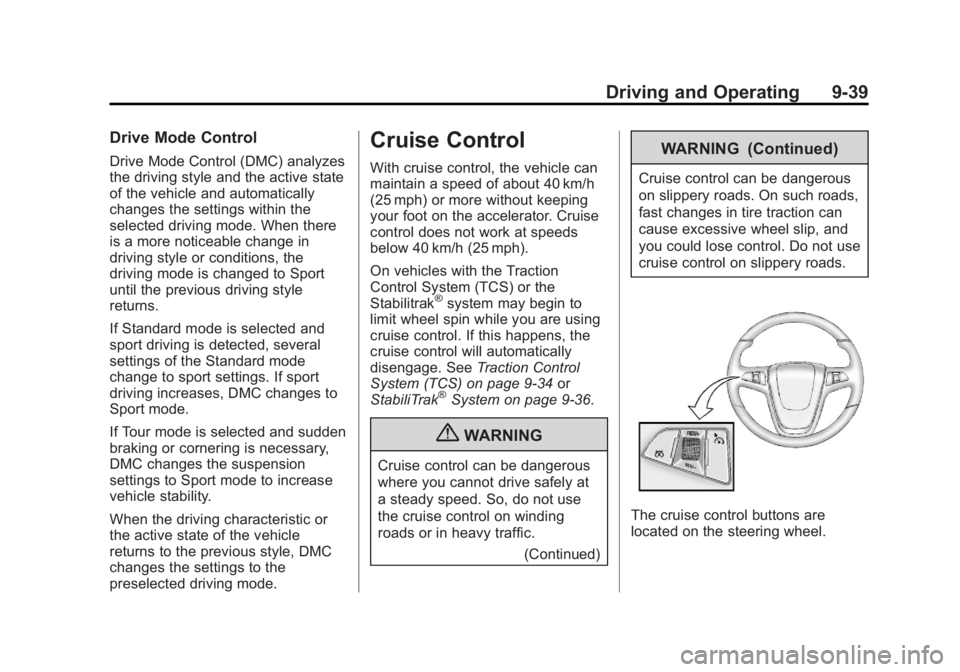
located on the steering wheel.
Page 320 of 368
Black plate (80,1)Buick Regal Owner Manual - 2011
10-80 Vehicle Care
Original manufacturer replacement
parts will provide the corrosion
protection while maintaining the
vehicle warranty.
Finish Damage
Any stone chips, fractures, or deep
scratches in the finish should be
repaired right away. Bare metal will
corrode quickly and may develop
into major repair expense.
Minor chips and scratches can be
repaired with touch-up materials
available from your dealer. Larger
areas of finish damage can be
corrected in your dealer's body and
paint shop.
Underbody Maintenance
Chemicals used for ice and snow
removal and dust control can collect
on the underbody. If these are not
removed, corrosion and rust can
develop on the underbody parts
such as fuel lines, frame, floor pan,
and exhaust system even though
they have corrosion protection.At least every spring, flush these
materials from the underbody with
plain water. Clean any areas where
mud and debris can collect. Dirt
packed in close areas of the frame
should be loosened before being
flushed. Your dealer or an
underbody car washing system can
do this.
Chemical Paint Spotting
Some weather and atmospheric
conditions can create a chemical
fallout. Airborne pollutants can fall
upon and attack painted surfaces on
the vehicle. This damage can take
two forms: blotchy, ring-shaped
discolorations, and small, irregular
dark spots etched into the paint
surface.
Interior Care
The interior will continue to look its
best if it is cleaned often. Dust and
dirt can accumulate on the
upholstery and cause damage to
the carpet, fabric, leather, andplastic surfaces. Stains should be
removed quickly as extreme heat
could cause them to set rapidly.
Lighter colored interiors may
require more frequent cleaning.
Newspapers and garments that can
transfer color to home furnishings
can also transfer color to the
interior.
Remove dust from small buttons
and knobs with a small brush with
soft bristles.
Your dealer has products for
cleaning the interior. When cleaning
the interior, only use cleaners
specifically designed for the
surfaces that are being cleaned.
Permanent damage can result from
using cleaners on surfaces for
which they were not intended. Apply
the cleaner directly to the cleaning
cloth to prevent over-spray. Remove
any accidental over-spray from
other surfaces immediately.