2011 BUICK REGAL radio
[x] Cancel search: radioPage 29 of 368

Black plate (3,1)Buick Regal Owner Manual - 2011
Keys, Doors and Windows 2-3
Remote Keyless Entry
(RKE) System
SeeRadio Frequency Statement on
page 13‑15 for information
regarding Part 15 of the Federal
Communications Commission (FCC)
rules and Industry Canada
Standards RSS-210/220/310.
If there is a decrease in the RKE
operating range:
.Check the distance. The
transmitter may be too far
from the vehicle.
.Check the location. Other
vehicles or objects may be
blocking the signal.
.Check the transmitter's battery.
See “Battery Replacement” later
in this section.
.If the transmitter is still not
working correctly, see your
dealer or a qualified technician
for service.
Remote Keyless Entry
(RKE) System Operation
The RKE transmitter will work up to
20 m (65 ft) away from the vehicle.
There are other conditions which
can affect the performance of the
transmitter. See Remote Keyless
Entry (RKE) System on page 2‑3.
The following buttons are on the
transmitter:
Q(Lock): Press to lock all doors.
The turn signal indicators may flash
and/or the horn may sound to indicate locking; see
“Remote
Lock Feedback” underVehicle
Personalization on page 5‑31.
The fuel door will be locked when
the doors are locked.
If any door is open when
Qis
pressed, all doors lock. These
settings can be modified. See
“Unlocked Door Anti Lock Out”
under Vehicle Personalization on
page 5‑31.
Pressing
Qmay also arm the
theft-deterrent system. See
Anti-theft Alarm System on
page 2‑9.
K(Unlock): Press to unlock the
driver door or all doors; see
“Remote Door Unlock” under
Vehicle Personalization on
page 5‑31. The turn signal
indicators flash to indicate unlocking
has occurred. For more information
see “Remote Unlock Light
Feedback” underVehicle
Personalization on page 5‑31.
Page 35 of 368

Black plate (9,1)Buick Regal Owner Manual - 2011
Keys, Doors and Windows 2-9
Vehicle Security
This vehicle has theft-deterrent
features; however, they do not
make it impossible to steal.
Anti-theft Alarm System
This vehicle has an anti-theft alarm
system.
Arming the System
To arm the system, close all of the
windows and doors and then either:
.PressQon the RKE transmitter.
.Lock the vehicle using the key in
the driver door.
The alarm arms after about
30 seconds.
The security light, located in the
center of the instrument panel, will
flash slowly.
Press
Qagain and the system arms
immediately.
Disarming the System
To disarm the system pressKon
the RKE transmitter.
Turning off the System Alarm
If there is an attempt to open the
doors, trunk, or hood without first
pressing
Kon the transmitter or
unlocking the driver door with the
key, the system alarm will be
activated. The exterior lamps will
flash and the horn will sound for
about 30 seconds.
To turn off the system alarm press
QorKon the RKE transmitter.
Immobilizer
See Radio Frequency Statement on
page 13‑15 for information
regarding Part 15 of the Federal
Communications Commission (FCC)
rules and Industry Canada
Standards RSS-210/220/310.
Immobilizer Operation
This vehicle has a passive
theft-deterrent system.
The system does not have to be
manually armed or disarmed.
The vehicle is automatically
immobilized when the key is
removed from the ignition.
The system is automatically
disarmed when the vehicle is
started with the correct key. The key
uses a transponder that matches an
immobilizer control unit in the
vehicle and automatically disarms
the system. Only an authorized key
starts the vehicle. The vehicle may
not start if the key is damaged.
Page 110 of 368

Black plate (2,1)Buick Regal Owner Manual - 2011
5-2 Instruments and Controls
Controls
Steering Wheel
Adjustment
To adjust the steering wheel:
1. Pull the lever down.
2. Move the steering wheel up,down, forward, and backward.
3. Pull the lever up to lock the steering wheel in place.
Do not adjust the steering wheel
while driving.
Steering Wheel Controls
For vehicles with audio steering
wheel controls, some audio controls
can be adjusted at the steering
wheel.
b/g(Push to Talk): For
vehicles with a Bluetooth, OnStar,
or navigation system, press to
interact with those systems. See
Bluetooth (Overview) on page 7‑20
or Bluetooth (Infotainment Controls)
on page 7‑21 orBluetooth (Voice
Recognition) on page 7‑23, the OnStar Owner's Guide, or the
separate navigation manual for
more information.
$/i(Mute/End Call):
Press to
silence the vehicle speakers only.
Press again to turn the sound
on. For vehicles with OnStar or
Bluetooth systems, press to reject
an incoming call, or end a
current call.
_SRC^(Rotary Control): Turn
to select an audio source.
Press
_or^to select the next or
previous favorite radio station, CD,
or MP3 track.
+
x− (Volume): Press + to
increase the volume. Press −to
decrease the volume.
Horn
Press near the horn symbols or
press on the steering wheel pad to
sound the horn.
Page 112 of 368

Black plate (4,1)Buick Regal Owner Manual - 2011
5-4 Instruments and Controls
Windshield Washer
Pull the windshield wiper lever
toward you to spray windshield
washer fluid and activate the wipers.
The wipers will continue until the
lever is released or the maximum
wash time is reached.
When the windshield wiper lever is
released, additional wipes may
occur depending on how long
the windshield washer had been
activated. SeeWasher Fluid on
page 10‑24 for information on
filling the windshield washer fluid
reservoir.
{WARNING
In freezing weather, do not use
the washer until the windshield is
warmed. Otherwise the washer
fluid can form ice on the
windshield, blocking your vision.
Compass
There is a compass display in the
Driver Information Center (DIC).
The compass receives its heading
and other information from the
Global Positioning System (GPS)
antenna, StabiliTrak, and vehicle
speed information.
Avoid covering the GPS antenna for
long periods of time with objects
that may interfere with the antenna's
ability to receive a satellite signal.
See Backglass Antenna on
page 7‑13 andSatellite Radio
Antenna on page 7‑14 for the
location of the vehicle's antennas. The compass system is designed to
operate for a certain number of
miles or degrees of turn before
needing a signal from the GPS
satellites. When the compass
display shows CAL, drive the
vehicle for a short distance in an
open area where it can receive
a GPS signal. The compass
system will automatically determine
when the GPS signal is restored
and provide a heading again.
See
Compass Messages on
page 5‑26 for more information
on the messages that may be
displayed for the compass.
Page 121 of 368

Black plate (13,1)Buick Regal Owner Manual - 2011
Instruments and Controls 5-13
If, after several seconds, both
status indicator lights remain on,
or if there are no lights at all, there
may be a problem with the lights
or the passenger sensing system.
See your dealer for service.
{WARNING
If the airbag readiness light ever
comes on and stays on, it means
that something may be wrong
with the airbag system. To help
avoid injury to yourself or others,
have the vehicle serviced right
away. SeeAirbag Readiness
Light on page 5‑11 for more
information, including important
safety information.
Charging System Light
The charging system light comes on
briefly when the ignition is turned
on, but the engine is not running, as
a check to show the light is working.
The light turns off when the engine
is started. If it does not, have the
vehicle serviced by your dealer.
If the light stays on, or comes on
while driving, there could be a
problem with the electrical charging
system. Have it checked by your
dealer. Driving while this light is on
could drain the battery.
If a short distance must be driven
with the light on, be sure to turn off
all accessories, such as the radio
and air conditioner.
Malfunction
Indicator Lamp
A computer system called OBD II
(On-Board Diagnostics-Second
Generation) monitors operation
of the fuel, ignition, and emission
control systems. It makes sure that
emissions are at acceptable levels
for the life of the vehicle, helping to
produce a cleaner environment.
This light comes on when the
ignition is on, but the engine is not
running, as a check to show it is
working. If it does not, have the
vehicle serviced by your dealer.
If the malfunction indicator lamp
comes on and stays on, while the
engine is running, this indicates that
there is an OBD II problem and
service is required.
Page 130 of 368

Black plate (22,1)Buick Regal Owner Manual - 2011
5-22 Instruments and Controls
Cruise Control Light
The cruise control light is white
whenever the cruise control is set,
and turns green when the cruise
control is active.
The light turns off when the cruise
control is turned off. SeeCruise
Control on page 9‑39 for more
information.
Door Ajar Light
This light comes when a door is
open or not securely latched.
Information Displays
Driver Information
Center (DIC)
The Driver Information Center (DIC)
displays information about the
vehicle. It also displays warning
messages if a system problem is
detected. See Vehicle Messages on
page 5‑25 for more information.
All messages appear in the DIC
display located in the center of the
instrument panel cluster.
On some models, the DIC may have
some warning lights or indicators
shown in the top portion of the
display. See Warning Lights,
Gauges, and Indicators on page 5‑7
for more information.
The vehicle may also have features
that can be customized through the
controls on the radio. See Vehicle
Personalization on page 5‑31 for
more information.
DIC Operation and Displays
The DIC has different displays
which can be accessed by using
the DIC buttons located on the turn
signal lever located on the left side
of the steering wheel. The DIC
displays trip, fuel, and vehicle
system information, and warning
messages if a system problem is
detected.
The bottom of the DIC display
shows the position of the shift lever
and the odometer. It may also show
the direction the vehicle is driving.
In cold weather the DIC display
may change slowly. This is normal
and will move more quickly as the
vehicle's interior temperature rises.
Page 151 of 368

Black plate (1,1)Buick Regal Owner Manual - 2011
Infotainment System 7-1
Infotainment
System
Introduction
Infotainment . . . . . . . . . . . . . . . . . . . 7-1
Theft-Deterrent Feature . . . . . . . 7-2
Overview . . . . . . . . . . . . . . . . . . . . . . 7-2
Operation . . . . . . . . . . . . . . . . . . . . . 7-4
Radio
AM-FM Radio . . . . . . . . . . . . . . . . . 7-7
Satellite Radio . . . . . . . . . . . . . . . 7-10
Radio Reception . . . . . . . . . . . . . 7-13
Backglass Antenna . . . . . . . . . . 7-13
Satellite Radio Antenna . . . . . . 7-14
Audio Players
CD Player . . . . . . . . . . . . . . . . . . . 7-14
Auxiliary Devices . . . . . . . . . . . . 7-17
Phone
Bluetooth (Overview) . . . . . . . . 7-20
Bluetooth (InfotainmentControls) . . . . . . . . . . . . . . . . . . . 7-21
Bluetooth (Voice Recognition) . . . . . . . . . . . . . . . 7-23
Introduction
Infotainment
Read the following pages to
become familiar with the audio
system's features.
{WARNING
Taking your eyes off the road for
extended periods could cause a
crash resulting in injury or death
to you or others. Do not give
extended attention to
entertainment tasks while driving.
This system provides access to
many audio and non‐audio listings. To minimize taking your eyes off the
road while driving, do the following
while the vehicle is parked:
.Become familiar with the
operation and controls of the
audio system.
.Set up the tone, speaker
adjustments, and preset radio
stations.
For more information, see Defensive
Driving on page 9‑2.
Notice: Contact your dealer
before adding any equipment.
Adding audio or communication
equipment could interfere with
the operation of the engine, radio,
or other systems, and could
damage them. Follow federal
rules covering mobile radio and
telephone equipment.
The vehicle has Retained
Accessory Power (RAP). With RAP,
the audio system can be played
even after the ignition is turned off.
Page 152 of 368
Black plate (2,1)Buick Regal Owner Manual - 2011
7-2 Infotainment System
SeeRetained Accessory Power
(RAP) on page 9‑21 for more
information.
Navigation System
For vehicles with a navigation
system, see the separate Navigation
System Manual.
Theft-Deterrent Feature
The theft-deterrent feature works by
learning a portion of the Vehicle
Identification Number (VIN) to the
infotainment system. The
infotainment system does not
operate if it is stolen or moved to a
different vehicle.
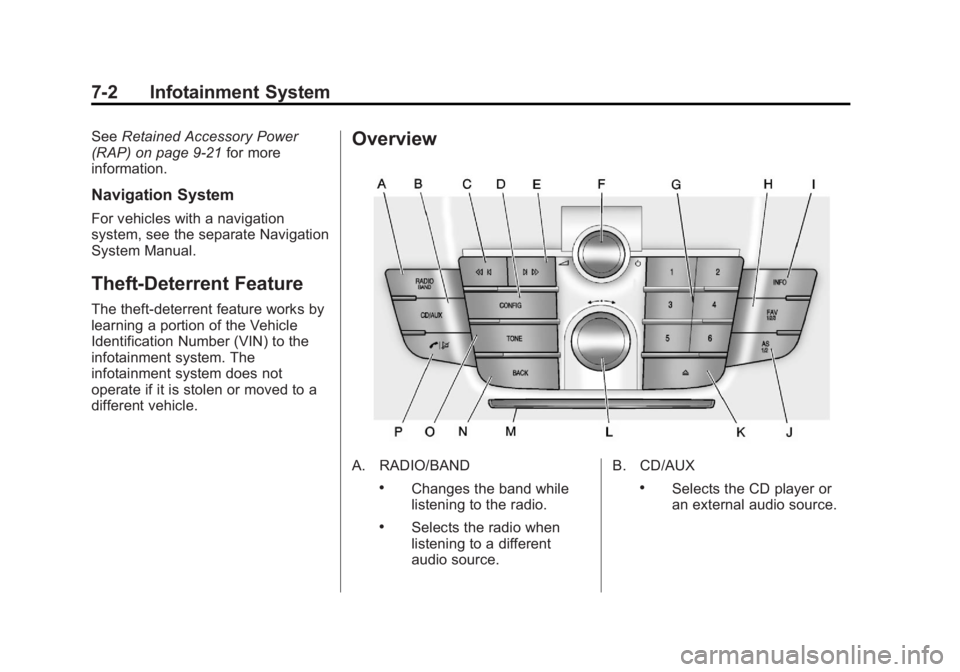
Overview
A. RADIO/BAND
.Changes the band while
listening to the radio.
.Selects the radio when
listening to a different
audio source. B. CD/AUX
.Selects the CD player or
an external audio source.