Page 5 of 262

ContentsThe fastest way to find information on a partic‐
ular topic or item is by using the index, refer to
page 252.
Using this Owner's Manual6Notes
At a glance
12Cockpit19iDrive25Voice activation system27Integrated Owner's Manual in the vehicle
Controls
32Opening and closing47Adjusting55Transporting children safely58Driving67Displays76Lamps80Safety86Driving stability control systems91Driving comfort101Climate control107Interior equipment114Storage compartments
Driving tips
120Things to remember when driving
Navigation
128Navigation
Entertainment
146Tone148Radio155CD/multimediaCommunication176Professional mobile phone preparation
package185Office193Contacts195BMW Assist
Mobility
204Refueling206Fuel207Wheels and tires215Engine compartment217Engine oil219Maintenance221Replacing components228Breakdown assistance233Care
Reference
238Technical data243Short commands of the voice activation
system252Everything from A to ZSeite 5
Online Edition for Part no. 01 40 2 606 190 - 12 10 500
ReferenceMobilityCommunicationEntertainmentNavigationDriving tipsControlsAt a glance
Page 12 of 262
Cockpit
All around the steering wheel1Rear window safety switch 442Power windows 433Exterior mirror operation 534LampsFront fog lamps* 79Parking lamps 76Low beams 76Automatic headlamp con‐
trol* 77
Daytime running lights* 77
Adaptive light control* 77
High-beam Assistant* 78Instrument lighting 795Steering column stalk, leftTurn signal 61High beams, head‐
lamp flasher 61High-beam Assistant* 78Roadside parking lamps 77Computer* 706Steering wheel buttons, leftStore speed* 91Resume speed 92Cruise control on/off, interrupt‐
ing 91Seite 1212
Online Edition for Part no. 01 40 2 606 190 - 12 10 500Cockpit
Page 13 of 262
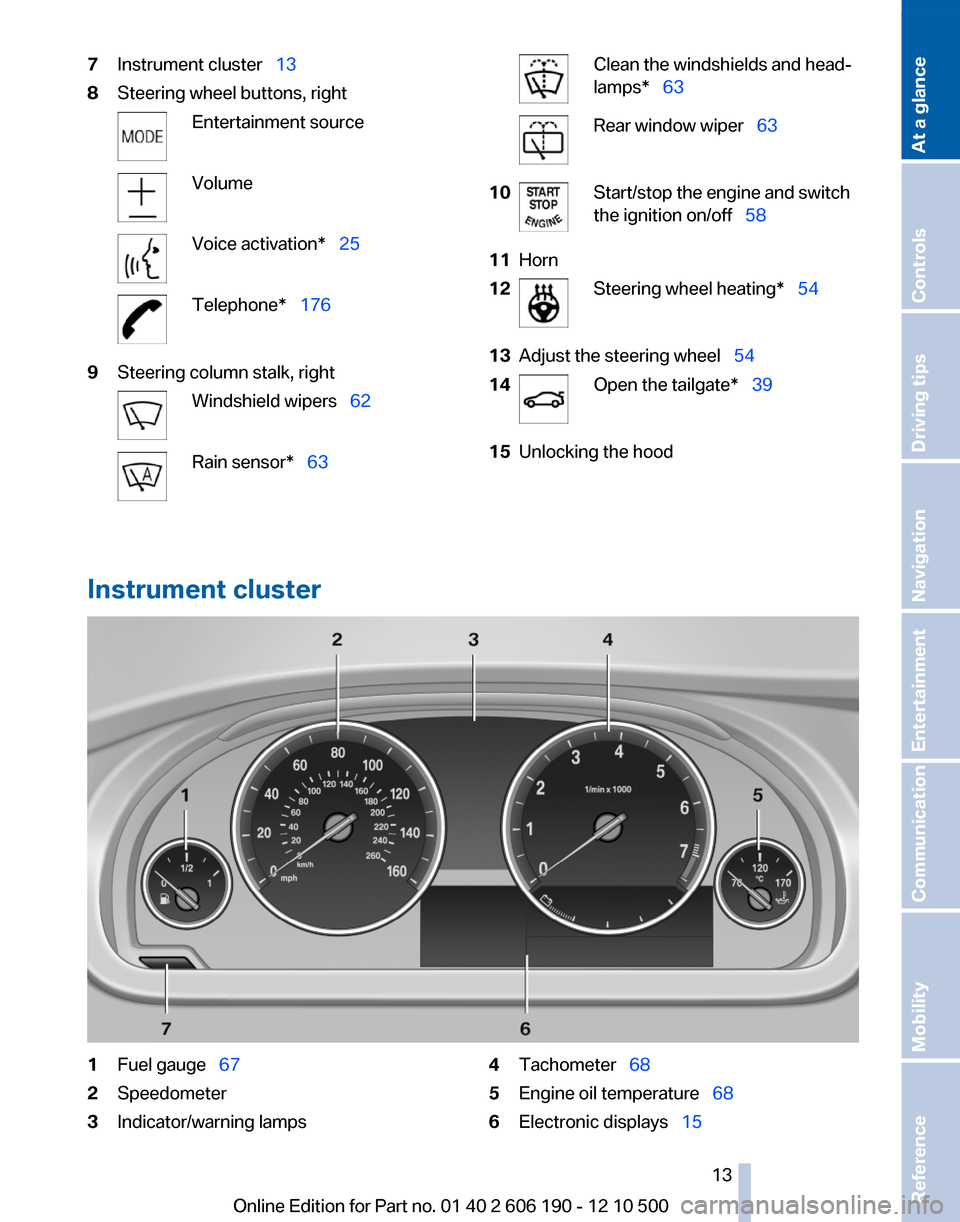
7Instrument cluster 138Steering wheel buttons, rightEntertainment sourceVolumeVoice activation* 25Telephone* 1769Steering column stalk, rightWindshield wipers 62Rain sensor* 63Clean the windshields and head‐
lamps* 63Rear window wiper 6310Start/stop the engine and switch
the ignition on/off 5811Horn12Steering wheel heating* 5413Adjust the steering wheel 5414Open the tailgate* 3915Unlocking the hood
Instrument cluster
1Fuel gauge 672Speedometer3Indicator/warning lamps4Tachometer 685Engine oil temperature 686Electronic displays 15Seite 1313
Online Edition for Part no. 01 40 2 606 190 - 12 10 500
ReferenceMobilityCommunicationEntertainmentNavigationDriving tipsControlsAt a glance
Page 14 of 262

7External temperature 69Time 698Miles, trip miles 689Reset miles 68Indicator/warning lamps
Instrument cluster
The indicator and warning lamps can light up in
a variety of combinations and colors.
Several of the lamps are checked for proper
functioning when the engine is started or the ig‐
nition is switched on, and light up briefly in the
process.
Overview: indicator/warning lamps
SymbolFunction or systemTurn signalParking brakeParking brakeAutomatic Hold*Front fog lamps*High beamsSymbolFunction or systemHigh-beam Assistant*Parking lamps, headlamp controlDSC Dynamic Stability Control or
DTC Dynamic Traction ControlTire Pressure Monitor*Safety beltsAirbag systemSteering systemEmissionsBrake systemBrake system in Canadian modelsAntilock Brake System ABSAntilock Brake System ABS in Cana‐
dian models
Text messages
Text messages in combination with a symbol in
the instrument cluster explain a Check Control
Seite 1414
Online Edition for Part no. 01 40 2 606 190 - 12 10 500Cockpit
Page 15 of 262
message and the meaning of the indicator and
warning lamps.
Supplementary text messages
Additional information on the Control Display,
e.g., on the cause of a malfunction or the re‐quired action, can be called up via Check Con‐
trol, refer to page 74.
The text of urgent messages is displayed auto‐
matically.
Instrument cluster, electronic displays
With the Professional navigation system
1Selection list, e.g., radio 69
Navigation display 128Computer 702Transmission displays 663Service requirements 73
Messages, e.g., warnings 14Seite 1515
Online Edition for Part no. 01 40 2 606 190 - 12 10 500
ReferenceMobilityCommunicationEntertainmentNavigationDriving tipsControlsAt a glance
Page 18 of 262
All around the headliner1Emergency Request* 2282Panoramic glass sunroof* 453Indicator lamp, front passenger
airbag* 824Reading lamps* 795Interior lamps 79Seite 1818
Online Edition for Part no. 01 40 2 606 190 - 12 10 500Cockpit
Page 32 of 262
Opening and closingRemote control/key
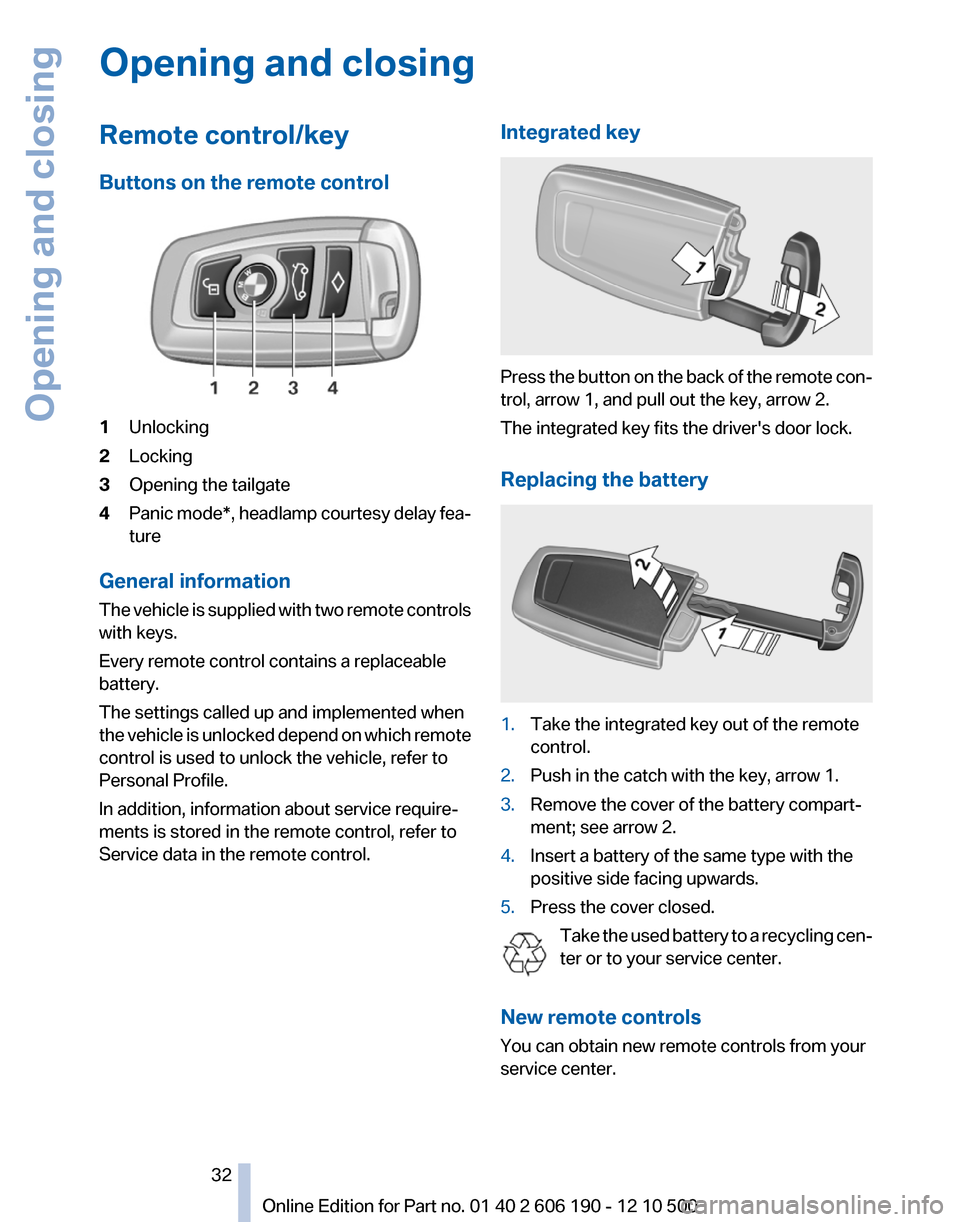
Buttons on the remote control1Unlocking2Locking3Opening the tailgate4Panic mode*, headlamp courtesy delay fea‐
ture
General information
The vehicle is supplied with two remote controls
with keys.
Every remote control contains a replaceable
battery.
The settings called up and implemented when
the vehicle is unlocked depend on which remote
control is used to unlock the vehicle, refer to
Personal Profile.
In addition, information about service require‐
ments is stored in the remote control, refer to
Service data in the remote control.
Integrated key
Press the button on the back of the remote con‐
trol, arrow 1, and pull out the key, arrow 2.
The integrated key fits the driver's door lock.
Replacing the battery
1.Take the integrated key out of the remote
control.2.Push in the catch with the key, arrow 1.3.Remove the cover of the battery compart‐
ment; see arrow 2.4.Insert a battery of the same type with the
positive side facing upwards.5.Press the cover closed.
Take the used battery to a recycling cen‐
ter or to your service center.
New remote controls
You can obtain new remote controls from your
service center.
Seite 3232
Online Edition for Part no. 01 40 2 606 190 - 12 10 500Opening and closing
Page 35 of 262

▷Driver's seat position, refer to page 37: au‐
tomatically retrieved after unlocking.▷Programmable memory buttons, refer to
page 23: assignment.▷Head-up Display*, refer to page 99: selec‐
tion, brightness and position of the display.▷Headlamp courtesy delay feature, refer to
page 76: time setting.▷Tone, refer to page 146: tone settings.▷Automatic climate control/Automatic cli‐
mate control with enhanced features *, refer
to page 101: settings.▷Navigation*, refer to page 128: map views,
route criteria, voice output on/off.▷PDC Park Distance Control*: adjusting the
volume of the signal tone, refer to
page 93.▷Radio: stored stations, station listened to
last, special settings, refer to page 148.▷Backup camera*, refer to page 95: selec‐
tion of functions and type of display.▷Language on the Control Display, refer to
page 73.▷Triple turn signal activation, refer to
page 62.▷Daytime running lights*, refer to page 77:
current setting.▷Locking the vehicle, refer to page 36: after
a brief period or after starting to drive.
Central locking system
The concept
The central locking system becomes active
when the driver's door is closed.
The system simultaneously engages and re‐
leases the locks on the following:
▷Doors.▷Tailgate.▷Fuel filler flap.Operating from the outside▷Via the remote control.▷Via the driver's door lock*.▷Via the door handles of the driver's and front
passenger doors*.▷Via the button on the tailgate*.
The following takes place simultaneously when
locking/unlocking the vehicle via the remote
control:
▷Anti-theft protection is switched on/off.
Doors cannot be unlocked using the lock
buttons or the door opener.▷The welcome lamps, interior lamps and
courtesy lamps* are switched on and off.▷The alarm system*, refer to page 42, is
armed or disarmed.
Operating from the inside
Via the button for the central locking system.
If the vehicle has been locked from inside, the
fuel filler flap remains unlocked.
If an accident of a certain severity occurs, the
central locking system unlocks automatically.
The hazard warning system and interior lamps
come on.
Seite 3535
Online Edition for Part no. 01 40 2 606 190 - 12 10 500
ReferenceMobilityCommunicationEntertainmentNavigationDriving tipsControlsAt a glance