2011 BMW 740I settings
[x] Cancel search: settingsPage 280 of 299
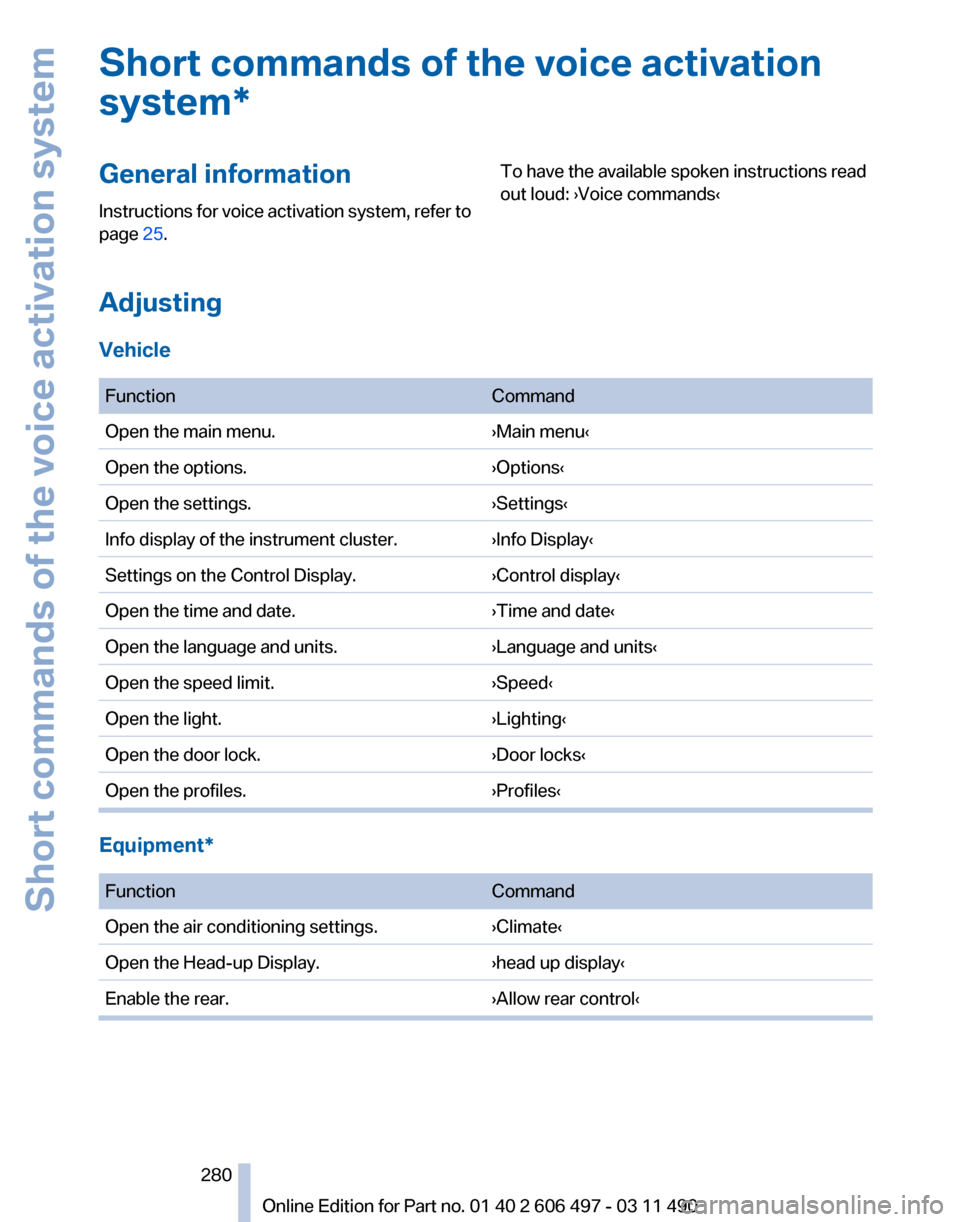
Short commands of the voice activation
system*
General information
Instructions
for voice activation system, refer to
page 25. To have the available spoken instructions read
out loud: ›Voice commands‹
Adjusting
Vehicle
Function
Command
Open the main menu. ›Main menu‹
Open the options. ›Options‹
Open the settings. ›Settings‹
Info display of the instrument cluster. ›Info Display‹
Settings on the Control Display. ›Control display‹
Open the time and date. ›Time and date‹
Open the language and units. ›Language and units‹
Open the speed limit. ›Speed‹
Open the light. ›Lighting‹
Open the door lock. ›Door locks‹
Open the profiles. ›Profiles‹Equipment*
Function
Command
Open the air conditioning settings. ›Climate‹
Open the Head-up Display. ›head up display‹
Enable the rear. ›Allow rear control‹ Seite 280
280 Online Edition for Part no. 01 40 2 606 497 - 03 11 490
Short commands of the voice activation system
Page 282 of 299
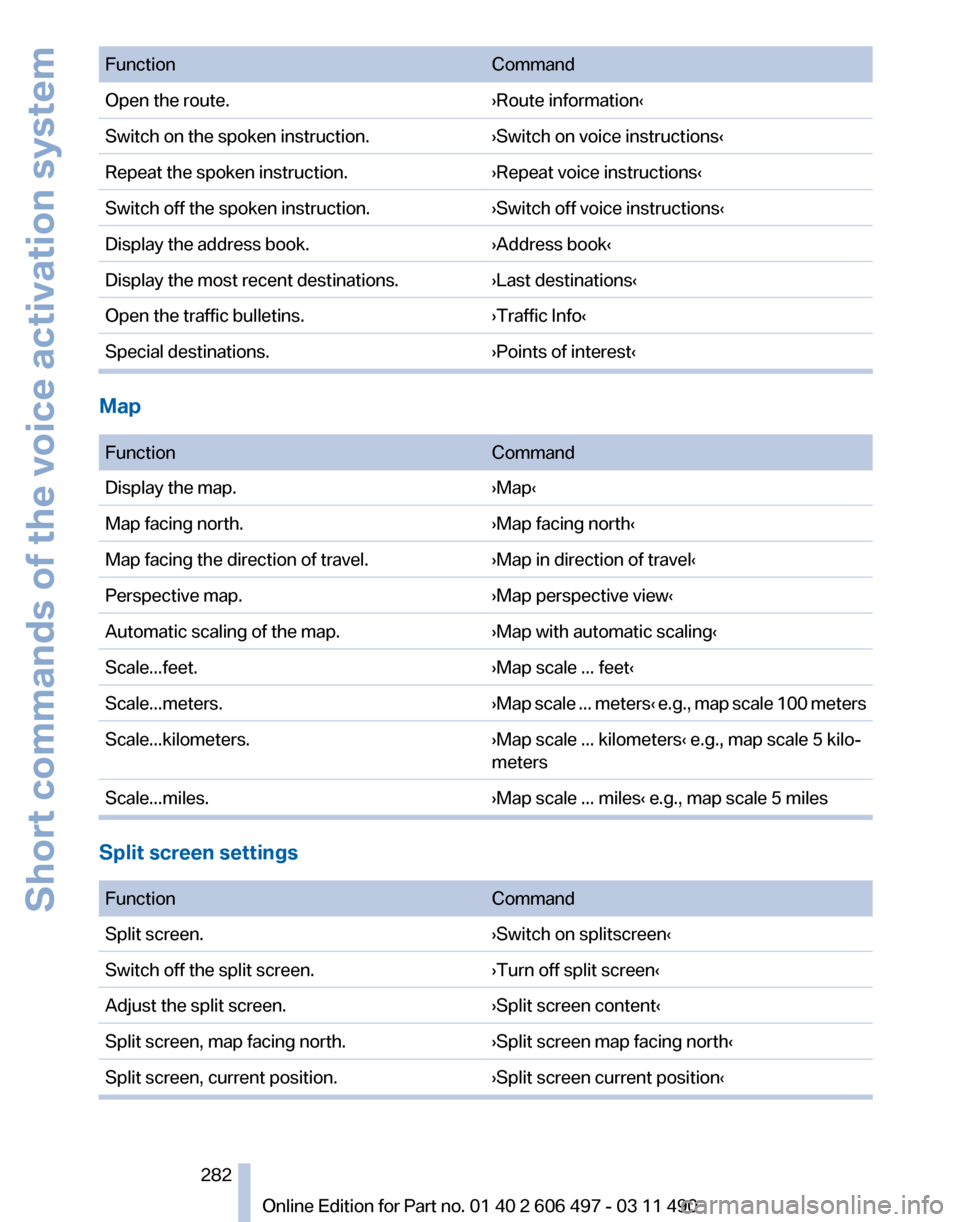
Function
Command
Open the route. ›Route information‹
Switch on the spoken instruction. ›Switch on voice instructions‹
Repeat the spoken instruction. ›Repeat voice instructions‹
Switch off the spoken instruction. ›Switch off voice instructions‹
Display the address book. ›Address book‹
Display the most recent destinations. ›Last destinations‹
Open the traffic bulletins. ›Traffic Info‹
Special destinations. ›Points of interest‹Map
Function
Command
Display the map. ›Map‹
Map facing north. ›Map facing north‹
Map facing the direction of travel. ›Map in direction of travel‹
Perspective map. ›Map perspective view‹
Automatic scaling of the map. ›Map with automatic scaling‹
Scale...feet. ›Map scale ... feet‹
Scale...meters. ›Map scale ... meters‹ e.g., map scale 100 meters
Scale...kilometers. ›Map scale ... kilometers‹ e.g., map scale 5 kilo‐
meters
Scale...miles. ›Map scale ... miles‹ e.g., map scale 5 milesSplit screen settings
Function
Command
Split screen. ›Switch on splitscreen‹
Switch off the split screen. ›Turn off split screen‹
Adjust the split screen. ›Split screen content‹
Split screen, map facing north. ›Split screen map facing north‹
Split screen, current position. ›Split screen current position‹ Seite 282
282 Online Edition for Part no. 01 40 2 606 497 - 03 11 490
Short commands of the voice activation system
Page 286 of 299
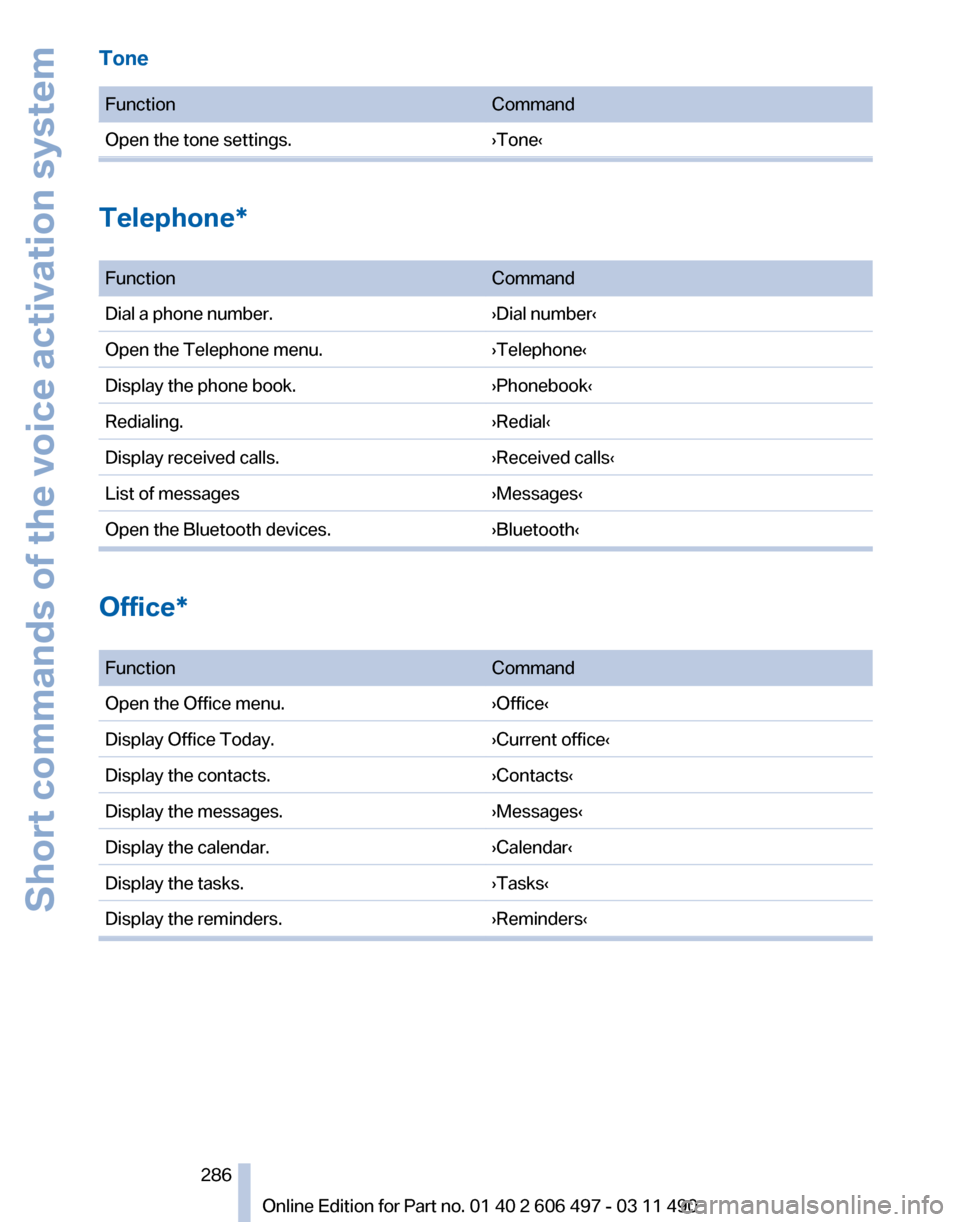
Tone
Function
Command
Open the tone settings. ›Tone‹Telephone*
Function
Command
Dial a phone number. ›Dial number‹
Open the Telephone menu. ›Telephone‹
Display the phone book. ›Phonebook‹
Redialing. ›Redial‹
Display received calls. ›Received calls‹
List of messages ›Messages‹
Open the Bluetooth devices. ›Bluetooth‹Office*
Function
Command
Open the Office menu. ›Office‹
Display Office Today. ›Current office‹
Display the contacts. ›Contacts‹
Display the messages. ›Messages‹
Display the calendar. ›Calendar‹
Display the tasks. ›Tasks‹
Display the reminders. ›Reminders‹ Seite 286
286 Online Edition for Part no. 01 40 2 606 497 - 03 11 490Short commands of the voice activation system
Page 290 of 299

Condition Based Service
CBS 258
Confirmation signal 37
Contacts 223, 232
Control Display 19
Control Display, settings 80
Controller 19
Control systems, driving sta‐ bility 98
Convenient opening 36
Coolant 256
Coolant temperature 76
Cooler 135
Cooling function 127
Cooling, maximum 126
Cooling system 256
Corrosion on brake discs 146
Cruise control 111
Cruise control, active with Stop & Go 105
Cruising range 75
Cupholder 140
Curb weight 278
Current fuel consumption 76
Current location, storing 154
Customer Relations 237
D
Damage, tires 249
Damping control, dy‐ namic 100
Data, technical 276
Date 77
Daytime running lights 85
Defrosting, refer to Windows, defrosting 126
Destination distance 78
Destination guidance 159
Destination guidance with in‐ termediate destinations 158
Destination input, naviga‐ tion 152
Digital clock 77
Digital radio 173
Dimensions 276
Dimmable interior rearview mirror 59 Direction indicator, refer to
Turn signals 70
Display in front wind‐ shield 123
Display,
instrument cluster 75
Display lighting, refer to Instru‐ ment lighting 87
Displays 14
Displays, cleaning 273
Disposal, coolant 257
Disposal, vehicle battery 265
Distance control, refer to PDC 113
Distance, selecting for ACC 106
Distance to destination 78
Divided screen view, split screen 23
Door lock, refer to Remote control 32
Doors, Automatic Soft Clos‐ ing 39
Downhill control 99
Drive-off assistant 98
Drive-off assistant, refer to DSC 98
Driving instructions, breaking in 144
Driving notes, general 144
Driving stability control sys‐ tems 98
Driving tips 144
DSC Dynamic Stability Con‐ trol 98
DTC Dynamic Traction Con‐ trol 99
DVD/CD 179
DVD/CD notes 185
DVD/CD player, rear 199, 204
DVD changer 183
DVD settings 182
DVDs, storing 186
DVD, video 181
Dynamic Damping Con‐ trol 100
Dynamic destination guid‐ ance 165
Dynamic Drive 100 Dynamic Driving Control
102
Dynamic Stability Control DSC 98
Dynamic Traction Control DTC 99
E
EfficientDynamics, refer to Saving fuel 148
Electronic displays, instru‐ ment cluster 16
Electronic engine oil level check 255
Electronic Stability Program ESP, refer to DSC 98
Emergency detection, remote control 33
Emergency release, door lock 38
Emergency release, fuel filler flap 242
Emergency release, parking brake 67
Emergency Request 266
Emergency service, refer to Roadside Assistance 267
Emergency start function, en‐ gine start 33
Emergency unlocking, trunk lid 42
Energy Control 76
Energy recovery 77
Engine compartment 253
Engine compartment, working in 253
Engine coolant 256
Engine oil 255
Engine oil, adding 255
Engine oil additives 256
Engine oil filler neck 255
Engine oil temperature 76
Engine oil types, alterna‐ tive 256
Engine oil types, ap‐ proved 256
Engine start during malfunc‐ tion 33
Seite 290
290 Online Edition for Part no. 01 40 2 606 497 - 03 11 490
Everything from A to Z
Page 292 of 299

House number, entering for
navigation 153
Hydroplaning 145
I
Ice warning, refer to External temperature warning 76
Icy roads, refer to External temperature warning 76
Identification marks, tires 248
Identification number, refer to Engine compartment 253
iDrive 19
Ignition key, refer to Remote control 32
Ignition off 65
Ignition on 65
Indication of a flat tire 92
Indicator and warning mes‐ sages 14
Indicator lamps 14
Individual air distribution 125
Individual settings, refer to Personal Profile 33
Inflation pressure, tires 244
Info display, refer to Com‐ puter 77
Information on the navigation data 166
Initialization, Integral Active Steering 101
Initializing,
Tire Pressure Mon‐
itor TPM 92
Instrument cluster 14, 75
Instrument cluster, electronic displays 16
Instrument lighting 87
Integral Active Steering 101
Integrated key 32
Integrated universal remote control 132
Intensity, AUTO program 126
Interactive map 156
Interior equipment 132
Interior lamps 87
Interior lamps via remote con‐ trol 36 Interior motion sensor 44
Interior rearview mirror
59
Interior rearview mirror, auto‐ matic dimming feature 59
Intermediate
destinations 158
Internet page 6
Intersection, entering for navi‐ gation 153
Interval display, service re‐ quirements 81
iPod/iPhone 191
J
Jacking points for the vehicle jack 264
Jack, refer to Vehicle jack 264
Joystick, automatic transmis‐ sion 73
K
Key/remote control 32
Keyless Go, refer to Comfort Access 42
Key Memory, refer to Personal Profile 33
Kickdown, automatic trans‐ mission 73
Knee airbag 88
L
Lamp replacement 260
Lamp replacement, front 261
Lamp replacement, rear 263
Lamps 84
Lamps and bulbs 260
Lane departure warning 94
Lane margin, warning 94
Language on Control Dis‐ play 81
Lashing eyes, securing cargo 147
LATCH child restraint fixing system 62
Leather, care 272 LEDs, light-emitting di‐
odes 261
Length, vehicle 277
Letters and numbers, enter‐ ing 24
License plate lamp, bulb re‐ placement 263
Light-alloy wheels, care 272
Light control 85
Light-emitting diodes, LEDs 261
Lighter, front 134
Lighter, rear 134
Lighting 84
Lighting
via remote control 36
Light switch 84
Load 147
Loading 146
Lock, door 38
Locking/unlocking from in‐ side 39
Locking/unlocking via door lock 38
Locking/unlocking with re‐ mote control 36
Locking, automatic 39
Locking, central 35
Locking via trunk lid 40
Lock, power window 45
Locks, doors, and win‐ dows 64
Low beams 84
Low beams, automatic, refer to High-beam Assistant 86
Lower back support 49
Lug bolt lock 264
Luggage rack, refer to Roof- mounted luggage rack 148
Lumbar support 49
M
Maintenance 258
Maintenance require‐ ments 258
Maintenance, service require‐ ments 81
Seite 292
292 Online Edition for Part no. 01 40 2 606 497 - 03 11 490
Everything from A to Z
Page 295 of 299

Seats 48
Seats, rear, adjusting 51
Seat ventilation, front 51
Seat ventilation, rear 53
Selection list in instrument cluster 77
Selector lever, automatic transmission 73
Self-leveling suspension, air suspension 101
Self-leveling suspension, mal‐ function 102
Sensors, care 273
Service and warranty 7
Service requirements, CBS Condition Based Serv‐
ice 258
Service requirements, dis‐ play 81
Service, Roadside Assis‐ tance 267
Settings on Control Dis‐ play 80
Settings, storing for seat, mir‐ rors, steering wheel 57
Shifting, automatic transmis‐ sion 72
Short commands 280
Shoulder support 49
Side airbags 88
Side View 118
Signaling, horn 12
Signals when unlocking 37
Sitting safely 48
Size 276
Ski bag 136
Slide/tilt glass roof 46
Smallest turning circle 277
Smoker's package 134
Snap-in adapter, mobile phone 221
Snow chains 251
Socket 134
Socket, OBD Onboard Diag‐ nostics 258
Software applications, iPhone 238
Software update 197 Spare fuse 265
Special destinations, naviga‐ tion 155
Specified engine oil types 256
Speed, average 78
Speed limit, setting 79
Speedometer 14
Split screen 23
Split
screen map settings 163
Spoken instructions, naviga‐ tion 161
SPORT+ program, Dynamic Driving Control 103
SPORT program, Dynamic Driving Control 103
Sport program, transmis‐ sion 74
Stability control systems 98
Start/Stop button 65
Start function during malfunc‐ tion 33
Starting aid 267
Starting the engine 65
State/province, selecting for navigation 152
Stations, stored 178
Station, storing 172
Status display, tires 91
Status information, iDrive 22
Status of Owner's Manual 6
Steering, Integral Active Steering 101
Steering wheel, adjusting 60
Steering wheel heating 60
Steering wheel memory 57
Steptronic, automatic trans‐ mission 72
Stopping the engine 66
Storage compartments 138
Storage compartments, loca‐ tions 138
Storage, tires 251
Storing the vehicle 273
Street, entering for naviga‐ tion 153
Summer tires, tread 249 Supplementary text mes‐
sage 83
Surround View 115
Suspension settings 102
Switch for Dynamic Driving Control 102
Switch-on times, parked-car ventilation 131
Switch, refer to Cockpit 12
Symbols 6
T
Tachometer 76
Tail and brake lamps 263
Tailgate 39
Tailgate, automatic 40
Tailgate
via remote control 37
Tail lamps 263
Tail lamps, bulb replace‐ ment 263
Tasks 229
Technical changes, refer to Safety 7
Technical data 276
TeleService 234
Temperature, automatic cli‐ mate control 126
Temperature display, external temperature 76
Temperature, engine oil 76
Tempomat, refer to Active Cruise Control 105
Terminal, starting aid 268
Text messages 226
Text message, supplemen‐ tary 83
Theft alarm system, refer to Alarm system 43
Theft protection, lug bolts 264
Theft protection, refer to Cen‐ tral locking system 35
Thermal camera, refer to Night Vision 120
Thigh support 48
Tilt alarm sensor 44
Tilt, seats 48
Seite 295
295Online Edition for Part no. 01 40 2 606 497 - 03 11 490
Reference Mobility Communication Entertainment Navigation Driving tips Controls At a glance