2011 BMW 535I idrive
[x] Cancel search: idrivePage 236 of 304
Automatic Service Request*
The TeleService data necessary for servicing
the
vehicle are automatically sent to your service
partner prior to the service deadline. If possible,
the service partner will contact you and a service
appointment can be arranged.
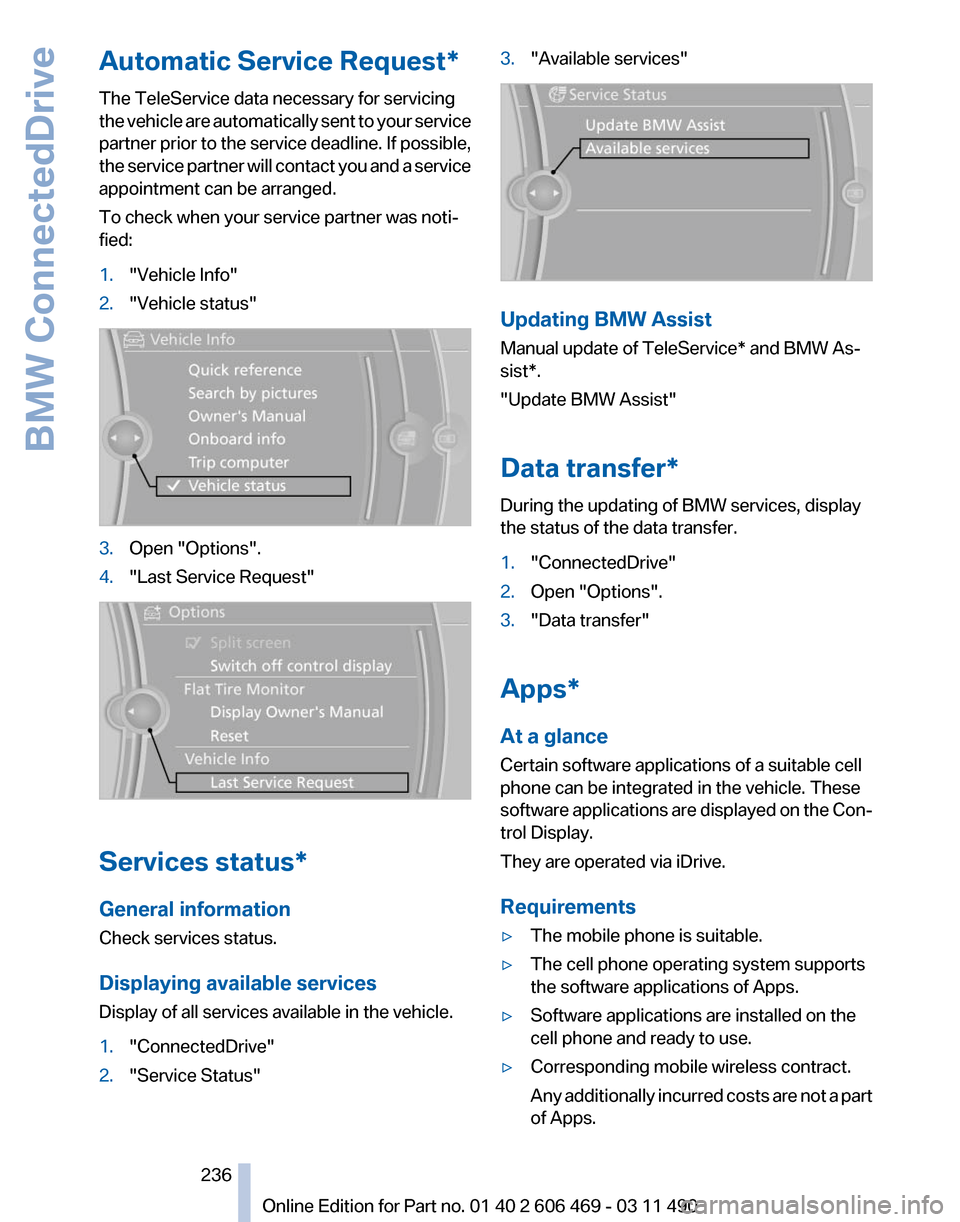
To check when your service partner was noti‐
fied:
1. "Vehicle Info"
2. "Vehicle status" 3.
Open "Options".
4. "Last Service Request" Services status*
General information
Check services status.
Displaying available services
Display of all services available in the vehicle.
1.
"ConnectedDrive"
2. "Service Status" 3.
"Available services" Updating BMW Assist
Manual update of
TeleService* and BMW As‐
sist*.
"Update BMW Assist"
Data transfer*
During the updating of BMW services, display
the status of the data transfer.
1. "ConnectedDrive"
2. Open "Options".
3. "Data transfer"
Apps*
At a glance
Certain software applications of a suitable cell
phone can be integrated in the vehicle. These
software
applications are displayed on the Con‐
trol Display.
They are operated via iDrive.
Requirements
▷ The mobile phone is suitable.
▷ The cell phone operating system supports
the software applications of Apps.
▷ Software applications are installed on the
cell phone and ready to use.
▷ Corresponding mobile wireless contract.
Any
additionally incurred costs are not a part
of Apps.
Seite 236
236 Online Edition for Part no. 01 40 2 606 469 - 03 11 490
BMW ConnectedDrive
Page 237 of 304

▷
Use only BMW approved software applica‐
tions; otherwise, it may result in malfunc‐
tions.
Information about suitable cell phones, available
software applications and their installation can
be found at www.bmw.com/connectivity or at
the service center.
Create the entries.
Make entries only when traffic and road
conditions allow. Otherwise, the vehicle occu‐
pants
and other road users may be put in danger
because of the distraction from driving.
For reasons of safety, some software applica‐
tions are usable only while the vehicle is station‐
ary.◀
Operate Apps
1. Connect the cell phone via the snap-in
adapter or via the USB audio interface.
2. "ConnectedDrive"
3. Select the desired software application.
Displaying status
Information about the currently available soft‐
ware applications can be displayed.
1. "ConnectedDrive"
2. "BMW apps"
PlugIn*
Selected functions of the cell phone are dis‐
played on the Control Display. They can be op‐
erated via iDrive.
1. Connect cell phone via the snap-in adapter.
2. "ConnectedDrive"
3. "PlugIn"
4. "Activate PlugIn"
5. Navigate to the displayed functions via the
controller
and select, for example, a desired
category or track.
Press button to switch within the cell
phone functions to a higher level or back. Press button twice to switch back to the
main menu.
Notes
▷ The ranges of Apps that can be displayed on
the Control Display depend on the range of
installed software applications on the cell
phone.
▷ The data transmission of the software ap‐
plications
from the cell phone to the vehicle
can last some time. Some software applica‐
tions depend on the speed of the available
Internet connection of the cell phone.
▷ Some cell phones cannot simultaneously
use
Apps and the Bluetooth hands-free sys‐
tem.
If necessary, restart the software application
on the cell phone after a phone conversa‐
tion.
TeleService Report*
Transmits
technical data that is evaluated for the
ongoing development of BMW products from
your vehicle to BMW in regular intervals if nec‐
essary.
TeleService Report is activated in vehicles that
meet certain technical requirements and have a
valid Assist contract; this feature is free of
charge.
Neither personal data nor position data is trans‐
mitted.
Indicate when the last Teleservice Report was
transmitted:
1. "Vehicle Info"
2. "Vehicle status"
3. Open "Options".
4. "Last Teleservice Info" Seite 237
237Online Edition for Part no. 01 40 2 606 469 - 03 11 490
Reference Mobility
Communication Entertainment Navigation Driving tips Controls At a glance
Page 253 of 304

The wheels are composed of special rims and
tires that are self-supporting, to a limited de‐
gree.
The
support of the sidewall allows the tire to re‐
main drivable to a restricted degree in the event
of a pressure loss.
Continued driving with a damaged tire., refer to
page 90
Changing run-flat tires
For your own safety, only use run-flat tires. No
spare tire is available in the case of a flat tire. Your
service center will be glad to advise you.
Snow chains
Fine-link snow chains
Only certain types of fine-link snow chains have
been tested by the manufacturer of your vehicle,
classified as road-safe and recommended.
Consult your service center for more informa‐
tion.
Use
Use only in pairs on the rear wheels, equipped
with the tires of the following size:
▷ 225/55 R 17.
▷ 245/45 R 18.
Follow the chain manufacturer's instructions.
Make
sure that the snow chains are always suf‐
ficiently tight. Retighten as needed according to
the chain manufacturer's instructions.
Do not initialize the Tire Pressure Monitor after
mounting snow chains, as doing so may result
in incorrect readings.
When driving with snow chains, briefly activate
Dynamic Traction Control if necessary.
Maximum speed with snow chains
Do not exceed a speed of 30 mph/50 km/h when
using snow chains. Snow chain detection*
The concept
When using snow chains, you should set
whether you are driving with or without snow
chains via the iDrive.
The
snow chain detection system supports you
by automatically showing the detected state on
the Control Display.
When snow chains are in use, the rear axle steer‐
ing of the Integral Active Steering* is deacti‐
vated automatically.
At speeds above the maximum allowable speed
with snow chains of 30 mph/50 km/h, the rear
axle steering is activated again automatically.
Activating the status
1. "Settings"
2. "Tire chains"
3. "Tire chains installed"
Automatic detection
If functioning properly:
▷ Snow chains are mounted. The setting is not
activated .
After you drive a short distance, a Check
Control message is shown and the state is
activated automatically.
Confirm the automatic activation.
▷ Snow chains are not mounted. The setting
is activated .
At speeds above 30 mph/50 km/h, a Check
Control message is displayed. Deactivate
the status manually.
If not functioning properly:
▷ Snow chains are mounted. The setting is not
activated .
A Check Control message is not displayed.
The
automatic detection system is malfunc‐
tioning. Activate the status manually.
Seite 253
253Online Edition for Part no. 01 40 2 606 469 - 03 11 490
Reference
Mobility Communication Entertainment Navigation Driving tips Controls At a glance
Page 270 of 304
Assist Response Center may still be able to
hear you.
Initiating an Emergency Request
automatically
Under certain conditions, an Emergency Re‐
quest is automatically initiated immediately after
a severe accident. Automatic Collision Notifica‐
tion is not affected by pressing the SOS button.
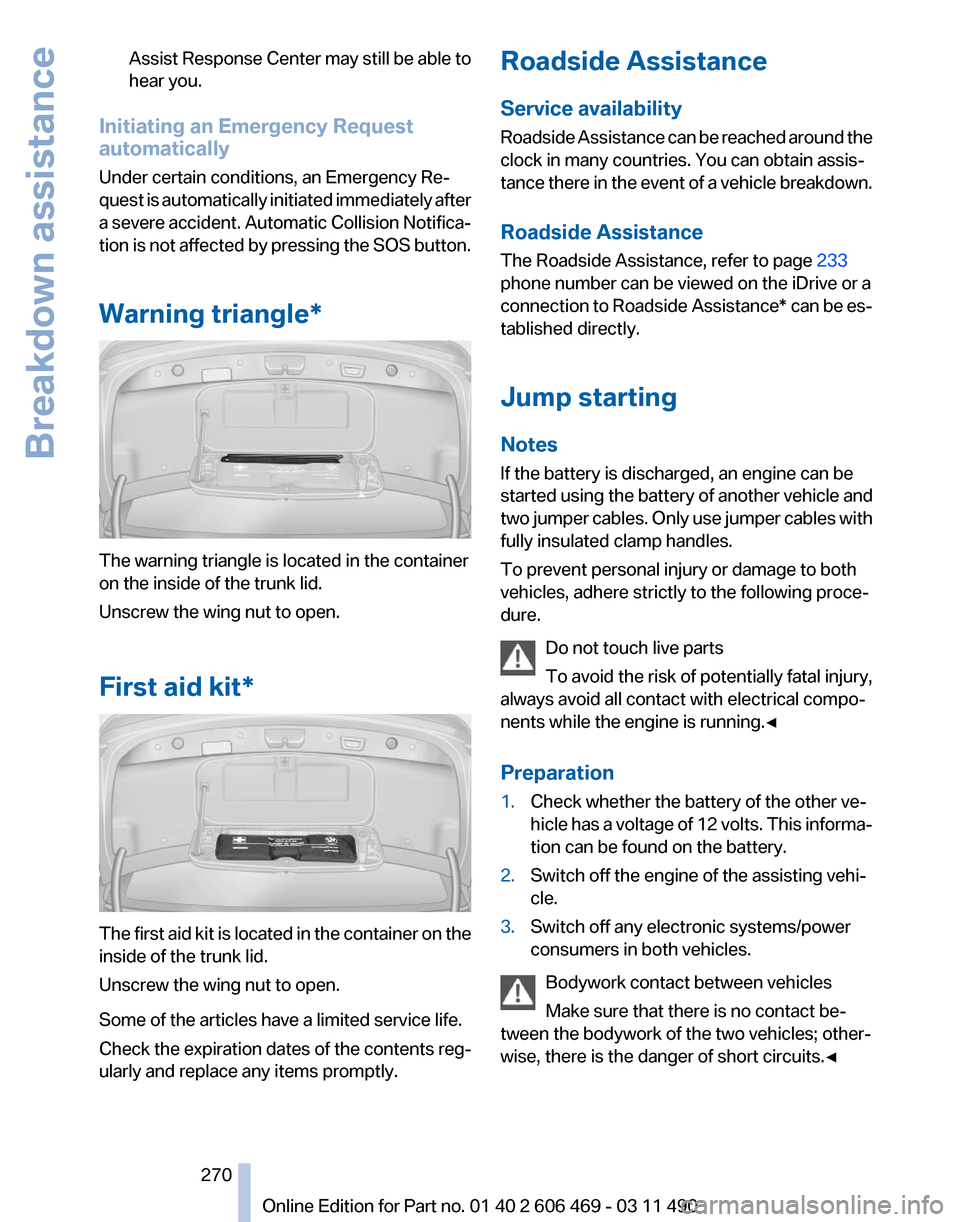
Warning triangle* The warning triangle is located in the container
on the inside of the trunk lid.
Unscrew the wing nut to open.
First aid kit*
The first aid kit is located in the container on the
inside of the trunk lid.
Unscrew the wing nut to open.
Some of the articles have a limited service life.
Check the expiration dates of the contents reg‐
ularly and replace any items promptly. Roadside Assistance
Service availability
Roadside Assistance can be reached around the
clock in many countries. You can obtain assis‐
tance there in the event of a vehicle breakdown.
Roadside Assistance
The Roadside Assistance, refer to page
233
phone number can be viewed on the iDrive or a
connection to Roadside Assistance* can be es‐
tablished directly.
Jump starting
Notes
If the battery is discharged, an engine can be
started using the battery of another vehicle and
two jumper cables. Only use jumper cables with
fully insulated clamp handles.
To prevent personal injury or damage to both
vehicles, adhere strictly to the following proce‐
dure.
Do not touch live parts
To avoid the risk of potentially fatal injury,
always avoid all contact with electrical compo‐
nents while the engine is running.◀
Preparation
1. Check whether the battery of the other ve‐
hicle has a voltage of 12 volts. This informa‐
tion can be found on the battery.
2. Switch off the engine of the assisting vehi‐
cle.
3. Switch off any electronic systems/power
consumers in both vehicles.
Bodywork contact between vehicles
Make sure that there is no contact be‐
tween the bodywork of the two vehicles; other‐
wise, there is the danger of short circuits.◀ Seite 270
270 Online Edition for Part no. 01 40 2 606 469 - 03 11 490Breakdown assistance
Page 297 of 304

External temperature warn‐
ing 73
Eyes for securing cargo 149
F
Fader 172
Failure message, refer to Check Control 70
False alarm, refer to Uninten‐ tional alarm 40
Fan, refer to Air volume 127
Fault displays, refer to Check Control 70
Filler neck for engine oil 257
Fine wood, care 276
First aid kit 270
Fitting
for towing, refer to Tow
fitting 273
Flat tire, Tire Pressure Monitor TPM 88
Flat tire, warning lamp 89
Flat tire, wheel change 267
Flooding 147
Floor carpet, care 276
Floor mats, care 276
FM/AM station 174
Fold-out position, windshield wipers 64
Foot brake 147
Front airbags 85
Front fog lamps 83
Front fog lamps, front, bulb re‐ placement 265
Front lamps 263
Front passenger airbags, au‐ tomatic deactivation 86
Front passenger airbags, indi‐ cator lamp 87
Front seats, adjusting 44
Fuel cap 240
Fuel consumption, current 74
Fuel consumption, refer to Average fuel consump‐
tion 76
Fuel filler flap 240
Fuel gauge 72
Fuel quality 241 Fuel, tank capacity
284
Fuse 268
G
Garage door opener, refer to Integrated universal remote
control 132
Gas station recommenda‐ tion 163
Gear
change, automatic trans‐
mission 65
Gear shift indicator 75
General driving notes 146
Glass sunroof, powered 41
Glove compartment 138
GPS navigation, refer to Navi‐ gation system 154
Gross vehicle weight, ap‐ proved 283
Gross weight, permissible for trailer towing 283
H
Hand brake, refer to Parking brake 60
Hand-held transmitter, alter‐ nating code 133
Hazard warning flashers 269
HDC Hill Descent Control 96
HD Radio 175
Head airbags 85
Headlamp control, auto‐ matic 81
Headlamp courtesy delay fea‐ ture 80
Headlamp courtesy delay fea‐ ture via remote control 33
Headlamp flasher 62
Headlamp glass 263
Headlamps 263
Headlamps, care 275
Headlamp washer system 62
Headliner 15
Headphones, rear entertain‐ ment 205
Head restraints 44 Head restraints, front 49
Head restraints, rear 50
Head-up Display
124
Head-up Display, care 276
Heavy cargo, stowing 149
Height, seats 44
Height, vehicle 280
High-beam Assistant 82
High beams 62
High beams/low beams, refer to High-beam Assistant 82
Hill Descent Control HDC 96
Hills 148
Hill start assistant, refer to Drive-off assistant 95
Hints 6
Holder for beverages 140
Homepage 6
Hood 255
Horn 12
Hotel function, trunk lid 37
Hot exhaust system 146
House number, entering for navigation 155
Hydroplaning 147
I
Ice warning, refer to External temperature warning 73
Icy roads, refer to External temperature warning 73
Identification marks, tires 249
Identification number, refer to Engine compartment 255
iDrive 16
Ignition key, refer to Remote control 28
Ignition off 58
Ignition on 58
Indication of a flat tire 89
Individual air distribution 126
Individual settings, refer to Personal Profile 29
Inflation pressure, tires 242
Info display, refer to Com‐ puter 75
Seite 297
297Online Edition for Part no. 01 40 2 606 469 - 03 11 490
Reference Mobility Communication Entertainment Navigation Driving tips Controls At a glance
Page 299 of 304

Manual transmission 64
Map, destination entry
158
Map in split screen 165
Map view 163
Marking on approved tires 252
Marking, run-flat tires 252
Massage seat, front 46
Master key, refer to Remote control 28
Maximum cooling 127
Maximum speed, winter tires 252
Measure, units of 79
Medical kit 270
Memory for seat, mirrors, steering wheel 51
Menu
in instrument cluster 75
Menus, operating, iDrive 16
Menus, refer to iDrive operat‐ ing concept 17
Message list, traffic bulle‐ tins 165
Messages 224
Messages, refer to Check Control 70
Microfilter 129
Minimum tread, tires 251
Mirror 51
Mirror memory 51
Mobile communication devi‐ ces in the vehicle 147
Mobile phone 210
Modifications, technical, refer to Safety 7
Moisture in headlamp 263
Monitor, refer to Control Dis‐ play 16
Mounting of child restraint fix‐ ing systems 54
MP3 player 192
Multifunction steering wheel, buttons 12
Multimedia 181
Music collection 188
Music search 189
Music, storing 188 N
Navigation
154
Navigation data 168
Neck restraints, front, refer to Head restraints 49
Neck restraints, rear, refer to Head restraints 50
New wheels and tires 251
Night Vision with pedestrian detection 122
NORMAL program, Dynamic Driving Control 100
Notes 227
Number of cylinders, en‐ gine 281
Nylon rope for tow-starting/ towing 273
O
OBD Onboard Diagnos‐ tics 260
Obstacle marking, backup camera 115
Odometer 73
Office 221
Oil 257
Oil, adding 257
Oil additives 258
Oil
change interval, service re‐
quirements 74
Oil filler neck 257
Oil level check 257
Oil types, alternative 258
Oil types, approved 258
Old batteries, disposal 268
Onboard Diagnostics OBD 260
Onboard monitor, refer to Control Display 16
Online, refer to BMW On‐ line 234
Opening/closing from in‐ side 35
Opening/closing via door lock 34 Opening/closing with remote
control 32
Operating concept, iDrive 16
Outside air, refer to Automatic recirculated-air control 127
Overheating
of engine, refer to
Coolant temperature 72
P
Paint, vehicle 275
Panic mode 32
Parallel parking assistant 118
Park Distance Control PDC 111
Parked-car ventilation 131
Parked vehicle, condensa‐ tion 148
Parking aid, refer to PDC 111
Parking assistant 118
Parking brake 60
Parking lamps 80
Parking with Auto Hold 60
Passenger side mirror, tilting downward 52
Pathway lines, backup cam‐ era 114
PDC Park Distance Con‐ trol 111
Pedestrian detection, refer to Night Vision 122
People detection, refer to Night Vision 122
Permissible axle load 283
Personal information 221
Personal Profile 29
Phone 210
Pinch protection system, glass sunroof 42
Pinch protection system, win‐ dows 40
Plastic, care 276
PlugIn 237
Position, storing 156
Postal code, entering in navi‐ gation 154
Power failure 268
Power output, engine 281
Seite 299
299Online Edition for Part no. 01 40 2 606 469 - 03 11 490
Reference Mobility Communication Entertainment Navigation Driving tips Controls At a glance
Page 300 of 304

Power sunroof, glass 41
Power windows
40
Pressure, tire air pres‐ sure 242
Profile, refer to Personal Pro‐ file 29
Programmable memory but‐ tons, iDrive 20
Protective
function, glass sun‐
roof 42
Protective function, win‐ dows 40
Push-and-turn switch, refer to Controller 16
R
Radiator fluid 258
Radio 174
Radio-operated key, refer to Remote control 28
Radio ready state 58
Rain sensor 63
Random 182
Random playback 182
RDS 175
Reading out loud 228
Rear automatic climate con‐ trol 130
Rear axle steering 98
Rear entertainment 201
Rear lamps 265
Rear socket 136
Rear source, selecting for rear entertainment 204
Rearview mirror 51
Rear window defroster 128
Recirculated-air mode 127
Recommended tire brands 252
Refueling 240
Remaining range 73
Reminders 227
Remote control/key 28
Remote control, malfunc‐ tion 33
Remote control, rear enter‐ tainment 202 Remote control, universal
132
Replacement fuse 268
Replacing parts 262
Replacing wheels/tires 251
Reporting safety defects 8
RES button 104
Reserve warning, refer to Range 73
Resetting,
Tire Pressure Mon‐
itor TPM 89
Residual heat, automatic cli‐ mate control 128
Retaining straps, securing cargo 149
Retreaded tires 252
Roadside Assistance 233
Roadside parking lamps 81
Roller sunblinds 41
Roll stabilization, refer to Adaptive Drive 97
Roll stabilization, refer to Dy‐ namic Drive 98
Roof load capacity 283
Roof-mounted luggage rack 150
Rope for tow-starting/tow‐ ing 273
Route 162
Route criteria, route 161
Route, displaying 162
Routes, avoiding 162
Route section, bypassing 163
RPM, engine 281
RSC Runflat System Compo‐ nent, refer to Run-flat
tires 252
Rubber components, care 276
Run-flat tires 252
S
Safe braking 147
Safety 7
Safety belt reminder 48
Safety belts 48
Safety belts, care 276
Safety switch, windows 41 Safety systems, airbags
85
Satellite radio 176
Saving fuel 150
Scale, changing during navi‐ gation 164
Screen, refer to Control Dis‐ play 16
Screwdriver 262
Screw thread for tow fit‐ ting 273
Seat belts, refer to Safety belts 48
Seat heating, front 47
Seat heating, rear 47
Seating position for chil‐ dren 54
Seat, mirror, and steering wheel memory 51
Seats 44
Seat ventilation, front 47
Selection list in instrument cluster 75
Selector lever, automatic transmission 65
Sensors, care 276
Service and warranty 7
Service requirements, CBS Condition Based Serv‐
ice 260
Service requirements, dis‐ play 74
Service, Roadside Assis‐ tance 270
Settings on Control Dis‐ play 78
Settings, storing for seat, mir‐ rors, steering wheel 51
Shifting, automatic transmis‐ sion 65
Shifting, manual transmis‐ sion 64
Shift paddles on steering wheel 66
Short commands 285
Shoulder support 46
Side airbags 85
Side View 117
Signaling, horn 12
Seite 300
300 Online Edition for Part no. 01 40 2 606 469 - 03 11 490
Everything from A to Z
Page 301 of 304

Signals when unlocking 33
Sitting safely
44
Size 280
Ski bag 137
Slide/tilt glass roof 41
Smallest turning circle 281
Smoker's package 134
Snap-in adapter, mobile phone 219
Snow chains 253
Socket 135
Socket, OBD Onboard Diag‐ nostics 260
Software applications, iPhone 236
Software update 199
Spare fuse 268
Special destinations, naviga‐ tion 157
Specified engine oil types 258
Speed, average 76
Speed limit, setting 77
Split screen 20
Split
screen map settings 165
Spoken instructions, naviga‐ tion 163
SPORT+ program, Dynamic Driving Control 99
Sport automatic transmis‐ sion 66
SPORT program, Dynamic Driving Control 100
Sport program, transmis‐ sion 66
Stability control systems 95
Start/Stop button 58
Start function during malfunc‐ tion 29
Starting aid 270
Starting the engine 59
State/province, selecting for navigation 154
Stations, stored 180
Station, storing 174
Status display, tires 88
Status information, iDrive 19
Status of Owner's Manual 6 Steering, Integral Active
Steering 98
Steering wheel, adjusting 53
Steering wheel heating 53
Steering wheel memory 51
Steptronic, automatic trans‐ mission 65
Stopping the engine 59
Storage
compartment, remote
control 141
Storage compartments 138
Storage compartments, loca‐ tions 138
Storage, tires 252
Storing the vehicle 276
Street, entering for naviga‐ tion 155
Summer tires, tread 250
Supplementary text mes‐ sage 71
Surround View 113
Suspension settings 99
Switch for Dynamic Driving Control 99
Switch-on times, parked-car ventilation 131
Switch, refer to Cockpit 12
Symbols 6
T
Tachometer 72
Tail and brake lamps 266
Tailgate 35
Tailgate, automatic 36
Tailgate via remote control 33
Tail lamps 265
Tail lamps, bulb replace‐ ment 266
Tasks 227
Technical changes, refer to Safety 7
Technical data 280
TeleService 232
Temperature, automatic cli‐ mate control 127
Temperature display, external temperature 73 Temperature, engine oil
72
Tempomat, refer to Active Cruise Control 102
Terminal, starting aid 271
Text messages 224
Text message, supplemen‐ tary 71
Theft alarm system, refer to Alarm system 39
Theft protection, lug bolts 267
Theft protection, refer to Cen‐ tral locking system 31
Thermal
camera, refer to Night
Vision 122
Thigh support 44
Through-loading system 136
Tilt alarm sensor 39
Tilt, seats 44
Time of arrival 77
Tire damage 251
Tire identification marks 249
Tire inflation pressure 242
Tire Pressure Monitor TPM 88
Tires, changing 251
Tires, everything on wheels and tires 242
Tires, run-flat tires 252
Tire tread 250
Toll roads, route 162
Tone 172
Tool kit 262
Tools 262
Top View 116
Torque, engine 281
Total vehicle weight 283
Tow fitting 273
Towing 271
Town/city, navigation 154
Tow-starting 271
Tow truck 272
TPM Tire Pressure Moni‐ tor 88
Traction control 96
TRACTION program, Dynamic Driving Control 96
Seite 301
301Online Edition for Part no. 01 40 2 606 469 - 03 11 490
Reference Mobility Communication Entertainment Navigation Driving tips Controls At a glance