2011 BMW 3 SERIES tow
[x] Cancel search: towPage 150 of 325

Connection for an external audio
device
This can be used to connect an external audio
device, such as an MP3 player.
▷AUX-IN port, refer to page 210.
▷USB audio interface, refer to page 210.
Storage compartment in the
rear
Storage compartment is located in the rear cen‐
ter console.
Cupholders
Notes
Shatter-proof containers and no hot
drinks
Use light and shatter-proof containers and do
not transport hot drinks. Otherwise, there is the
increased danger of injury in an accident.◀
Unsuitable containers
Do not forcefully push unsuitable contain‐
ers into the cupholders. This may result in dam‐
age.◀
Front
Storage tray for front cupholders
The cupholder with the storage tray can be used
for additional storage. To do this, place the stor‐
age tray in the cupholder.
Only use the storage tray for small objects, such
as keys or the remote control.
When not in use, stow the storage tray in the
glove compartment net. Insert the storage tray
into the net so that the top surface faces up.
Note the trapezoidal shape of the net and tray.
Rear
In the center armrest.
Pull the center armrest forward at the strap.
To open: press the button.
To close: push both covers back in, one after the
other.
Pushing back the covers
Push back the covers before folding up the
center armrest; otherwise, the cupholder could
become damaged.◀
Seite 150
ControlsStorage compartments
150Online Edition for Part no. 01 40 2 608 633 - 11 09 490
Page 151 of 325
Clothes hooks
The clothes hooks are located in the grab han‐
dles in the rear.
Do not obstruct view
When suspending clothing from the
hooks, ensure that it will not obstruct the driver's
vision.◀
No heavy objects
Do not hang heavy objects from the hooks;
otherwise, they may present a danger to pas‐
sengers during braking and evasive maneu‐
vers.◀
Storage compartments in the
cargo area
Left storage compartment
A storage compartment is located on the left
side.
Net
Small objects can be stowed in the net on the
left side.
Right storage compartment
Located on the right side is a storage compart‐
ment for the onboard vehicle tool kit, refer to
page 279, and first aid kit, refer to page 291.
Hooks/multi-function hook
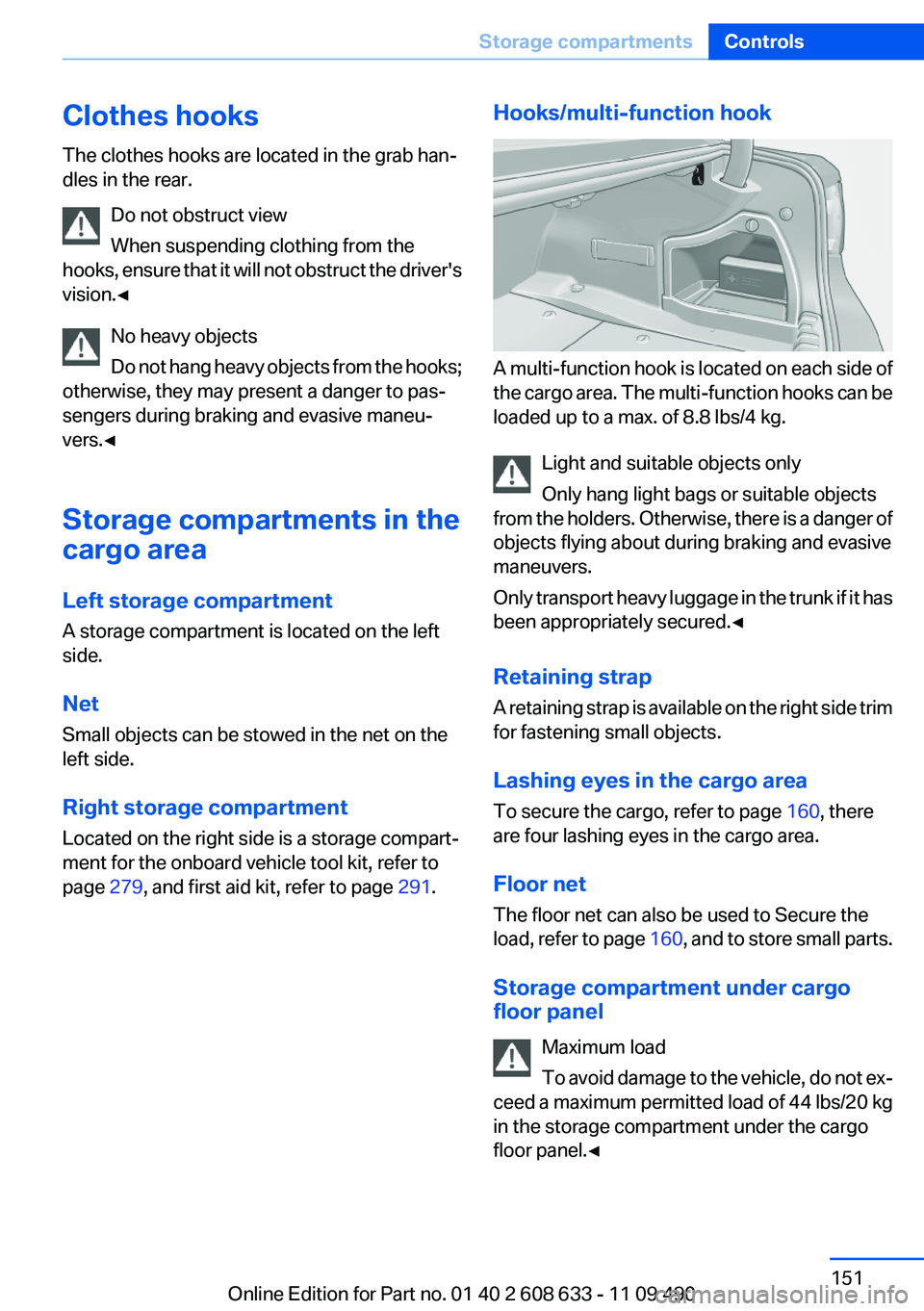
A multi-function hook is located on each side of
the cargo area. The multi-function hooks can be
loaded up to a max. of 8.8 lbs/4 kg.
Light and suitable objects only
Only hang light bags or suitable objects
from the holders. Otherwise, there is a danger of
objects flying about during braking and evasive
maneuvers.
Only transport heavy luggage in the trunk if it has
been appropriately secured.◀
Retaining strap
A retaining strap is available on the right side trim
for fastening small objects.
Lashing eyes in the cargo area
To secure the cargo, refer to page 160, there
are four lashing eyes in the cargo area.
Floor net
The floor net can also be used to Secure the
load, refer to page 160, and to store small parts.
Storage compartment under cargo
floor panel
Maximum load
To avoid damage to the vehicle, do not ex‐
ceed a maximum permitted load of 44 lbs/20 kg
in the storage compartment under the cargo
floor panel.◀
Seite 151
Storage compartmentsControls
151Online Edition for Part no. 01 40 2 608 633 - 11 09 490
Page 160 of 325

Stowing cargo
▷Heavy cargo: stow as far forward and as low
as possible, ideally directly behind the cargo
area separating wall.
▷Very heavy cargo: when the rear seat is not
occupied, secure each of the outer safety
belts in the opposite buckle.
▷Cover sharp edges and corners.
▷If necessary, fold down the rear backrests to
stow cargo.
▷Do not stack cargo above the top edge of the
backrests.
▷Place protective material around any sharp-
edged or pointed objects that could bump
against the rear window while the vehicle is
in motion.
Securing cargo
Lashing eyes in the cargo area
To secure the cargo, there are four lashing eyes
in the cargo area
Floor net
The floor net can also be used to Secure the load
and to store small parts.
Hook the floor net into the fittings in the cargo
area floor.
Securing cargo
▷Smaller and lighter items: secure with re‐
taining straps, the floor net or draw straps.
▷Larger and heavy objects: secure with cargo
straps.
Attach the cargo straps, retaining straps or draw
straps to the lashing eyes in the cargo area.
Securing cargo
Always position and secure the cargo as
described above; otherwise, it can endanger the
car's occupants if sudden braking or swerving
becomes necessary.
Heavy or hard objects should not be carried
loose inside the car; otherwise, they could be
thrown around as a result of hard braking, sud‐
den swerves, etc., and endanger the occu‐
pants.◀
Roof-mounted luggage rack
Note
Roof racks are available as special accessories.
Attachment
Follow the installation instructions of the roof
rack.
Seite 160
Driving tipsLoading
160Online Edition for Part no. 01 40 2 608 633 - 11 09 490
Page 168 of 325

Navigation system
Vehicle equipment
All standard, country-specific and optional
equipment that is offered in the model series is
described in this chapter. Therefore, equipment
is also described that is not available in a vehicle,
e. g., because of the selected optional equip‐
ment or country variant. This also applies for
safety-related functions and systems.
General information
The navigation system can determine the pre‐
cise position of the vehicle, with the aid of sat‐
ellites and vehicle sensors, and can reliably
guide you to every entered destination.
Navigation data are stored in the vehicle and can
be updated.
Entries in stationary vehicle
Enter data only when the vehicle is sta‐
tionary, and always give priority to the applicable
traffic regulations in the event of any contradic‐
tion between traffic and road conditions and the
instructions issued by the navigation system.
Failure to take to this precaution can place you
in violation of the law and put vehicle occupants
and other road users in danger.◀
Starting navigation system
1. Press the button on the controller.
2."Navigation"
The navigation system can also be ac‐
cessed directly with the button on the con‐
troller.
Destination input
Manual destination entry
General information
The system supports you in entering street
names and house numbers by automatically
completing the entry and providing entry com‐
parisons, refer to page 22.
Stored town/city and street names can be called
up quickly.
▷If the existing entries should not be changed,
the entries for the state/province and town/
city can be skipped.
▷Destination guidance is started to the town/
city center if no street is entered.
Entering a state/province
1."Navigation"
2."Enter address"
3.Select "State/Province" or the displayed
state/province.
Seite 168
NavigationNavigation system
168Online Edition for Part no. 01 40 2 608 633 - 11 09 490
Page 169 of 325

Entering a town/city
1.Select "Town/City/Postal Code" or the dis‐
played town/city.
2.Select letters, if necessary.
The list is narrowed down further with each
entry.
3.Move the controller to the right.
4.Select the town/city name from the list.
If there are several towns/cities with the same
name:
1.Change to the list of town/city names.
2.Highlight the town/city.
3.Select the town/city.
Entering the postal code
1.Select "Town/City/Postal Code" or the dis‐
played town/city.
2. Select the symbol.
3.Select the numbers.
4.Change to the list of postal codes and towns/
cities.
5.Highlight the entry.
6.Selecting an entry.
Entering a street and intersection
1.Select "Street" or the displayed street.
2.Enter a street and intersection in the same
way as you would enter a town/city.
If there are several streets with the same name:
1.Change to the list of street names.
2.Highlight the street.
3.Select the street.
Alternative: enter the street address
and house number
1.Select "Street" or the displayed street.
2.Enter the street as you would the town/city.
3."House number"
4.Select the numbers.
5.Change to the list of house numbers.
6.Select a house number or range of house
numbers.
Street does not exist in the destination
city/town
The desired street does not exist in the specified
city/town because it belongs to another part of
the city/town.
1."Navigation"
2."Enter address"
3.Select "Street" or the displayed street.
4.Change to the list of street names.
5.Select "In" the displayed country.
All streets of the selected state/province are
offered. The associated town/city is dis‐
played after the street name.
6.Select the letters.
7.Change to the list of street names.
8.Highlight the street.
9.Select the street.
Seite 169
Navigation systemNavigation
169Online Edition for Part no. 01 40 2 608 633 - 11 09 490
Page 172 of 325
3. Select the symbol.
4."Start guidance"
A-Z search
1."A-Z search"
2."Town/City"
Select or enter the town/city.
3."Category"
4.Select the category.
5."Category details"
For some special destinations, multiple cat‐
egory details can be selected. Move the
controller to the left to leave the category
details.
6."Keyword"
7.Enter the keyword.
A list of the special destinations is displayed.
8.Select a special destination.
Details are displayed.
If multiple details are stored, you can leaf
through the pages.
If a phone number is available, a connection
can be established if necessary.
9. Select the symbol.
"Start guidance" or "Add as another
destination"
Add, refer to page 175, a destination as a
further destination.
"Start search": if a search term is not entered,
the search is repeated with the previous search
term.
Category search
1."Category search"
2."Town/City"
Select or enter the town/city.
3."Category"
4.Select the category.
5."Category details"
For some special destinations, multiple cat‐
egory details can be selected. Move the
controller to the left to leave the category
details.
6."Start search"
A list of the special destinations is displayed.
7.Select a special destination.
Details are displayed.
If multiple details are stored, you can leaf
through the pages.
If a phone number is available, a connection
can be established if necessary.
8. Select the symbol.
"Start guidance" or "Add as another
destination"
Add, refer to page 175, a destination as a
further destination.
Display of special destinations
List of special destinations: special destinations
are organized by distance and are displayed with
a directional arrow to the special destination.
On the split screen, special destinations of the
selected category are displayed in the map view
as symbols. The display depends on the scale
of the map and the category.
Destination entry via BMW Assist
A connection is established to the Concierge
service, refer to page 251.
1."Navigation"
2."Enter address"
3."Options" Open.
4."BMW Assist dest. entry"
Seite 172
NavigationNavigation system
172Online Edition for Part no. 01 40 2 608 633 - 11 09 490
Page 173 of 325
Displaying special destinations in the
map
To display symbols of the special destinations
in the map view:
1."Navigation"
2."Map"
3."Options" Open.
4."Display Points of Interest"
5.Select the setting.
Destination entry by map
Selecting the destination
1."Navigation"
2."Map"
The current position of the vehicle is indi‐
cated on the map.
3. "Interactive map"
4.Select the destination with crosshairs.
▷To change the scale: turn the controller.
▷To shift the map: move the controller in
the required direction.
▷To shift the map diagonally: move the
controller in the required direction and
turn it.
Specifying the street
If the system does not recognize a street, one of
the following is displayed:
▷The name of a street nearby.
▷The county.
▷The coordinates of the destination.
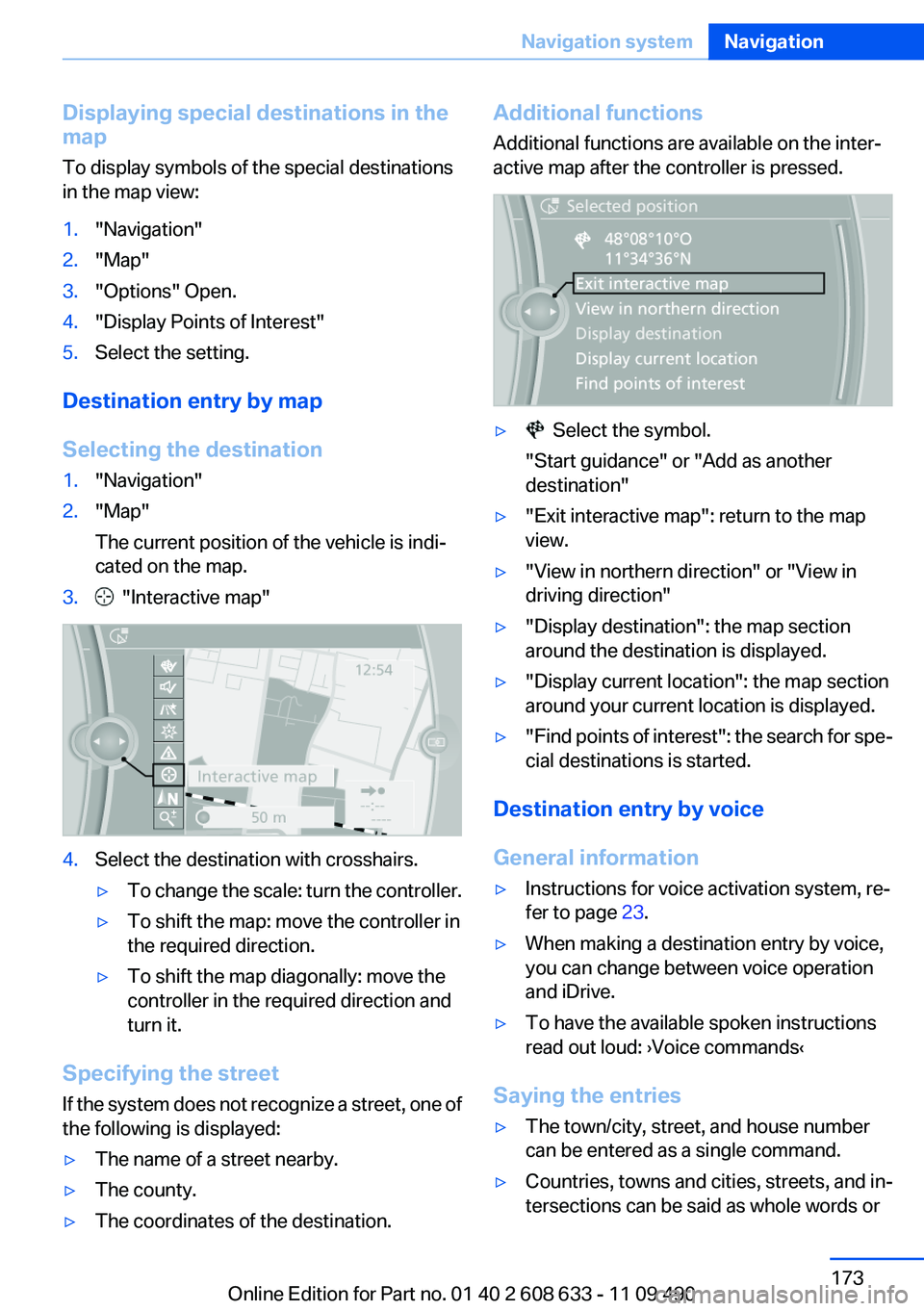
Additional functions
Additional functions are available on the inter‐
active map after the controller is pressed.
▷ Select the symbol.
"Start guidance" or "Add as another
destination"
▷"Exit interactive map": return to the map
view.
▷"View in northern direction" or "View in
driving direction"
▷"Display destination": the map section
around the destination is displayed.
▷"Display current location": the map section
around your current location is displayed.
▷"Find points of interest": the search for spe‐
cial destinations is started.
Destination entry by voice
General information
▷Instructions for voice activation system, re‐
fer to page 23.
▷When making a destination entry by voice,
you can change between voice operation
and iDrive.
▷To have the available spoken instructions
read out loud: ›Voice commands‹
Saying the entries
▷The town/city, street, and house number
can be entered as a single command.
▷Countries, towns and cities, streets, and in‐
tersections can be said as whole words or
Seite 173
Navigation systemNavigation
173Online Edition for Part no. 01 40 2 608 633 - 11 09 490
Page 174 of 325

spelled in the language of the system. Set
the language, refer to page 84.
Example: to enter a town/city in a US state
as a whole word, the language of the system
must be English.
▷Spell the entry if the spoken language and
the language of the system differ.
▷Say the letters smoothly, and avoid exag‐
gerating the pronunciation and inserting
lengthy pauses between the letters.
▷The options available for entering data de‐
pend on the navigation data and the country
and language settings.
Entering an address in a command
1. Press the button on the steering
wheel.
2.›Enter address‹
3.Wait for a request from the system.
4.Say the address in the suggested order.
5.Continue making the entry as prompted by
the system.
If necessary, individually name the separate
components of the address, e.g., the town/city.
Entering a town/city separately
The name of the town/city can be said as a
word or spelled out.
With the destination entry menu displayed:
1. Press the button on the steering
wheel.
2.›City‹ or ›Spell city‹.
3.Wait for the system to prompt you for the
town/city.
4.Say the name of the town/city, or say at least
the first three letters.
Depending on the entry, up to 20 towns/cit‐
ies may be suggested.
5.Select the town/city.
▷To select a recommended town/
city: ›Yes‹
▷To select a different town/city: ›New
entry‹
▷Select an entry: ›Entry ...‹ e.g., entry 2
▷To spell an entry: ›Spell city‹
6.Continue making the entry as prompted by
the system.
If there are several towns/cities with the same
name:
Towns/cities of the same name are grouped in a
list and displayed as one location followed by an
ellipsis.
1.Select an entry: ›Yes‹ or ›Entry ...‹ e.g., en‐
try 2.
2.Select the desired town/city.
Entering a street or intersection
separately
Enter a street and intersection in the same way
as you would enter a town/city.
Entering a house number separately
Depending on the data in the navigation system,
house numbers up to number 2,000 can be en‐
tered.
1.›House number‹
2.Say the house number.
Say each digit separately.
3.Continue making the entry as prompted by
the system.
Planning a trip with intermediate
destinations
New trip
A trip can be planned with several intermediate
destinations.
1."Navigation"
2."Map"
Seite 174
NavigationNavigation system
174Online Edition for Part no. 01 40 2 608 633 - 11 09 490