2011 BMW 3 SERIES buttons
[x] Cancel search: buttonsPage 106 of 325

This results in a sporty steering response. In ad‐
dition, it becomes easier to steer during parking
and maneuvering.
Driving Experience Switch
The concept
The Driving Experience Switch can be used to
adjust the certain characteristics of the vehicle.
Various programs can be selected for this pur‐
pose. The Driving Experience Switch and the
DSC OFF buttons can each be used to activate
a program.
Operating the programs
Press the button Program
DSC OFF
TRACTION
SPORT+
SPORT
COMFORT
ECO PRO
Automatic program change
The system automatically switches to COM‐
FORT in the following situations:
▷Failure of DSC Dynamic Damping Control.
▷The vehicle has a flat tire.
▷When activating cruise control in TRAC‐
TION or DSC OFF mode.
DSC OFF
When DSC OFF, refer to page 104, is active,
driving stability is limited during acceleration
and when driving in bends.
TRACTION
When TRACTION is active, the vehicle has max‐
imum traction on loose road surfaces. DTC Dy‐
namic Traction Control, refer to page 105, is ac‐
tivated. Driving stability is limited during
acceleration and when driving in bends.
SPORT+
Sporty driving with optimized chassis and sus‐
pension with limited driving stabilization.
The driver handles several of the stabilization
tasks.
Activating SPORT+
Press the button repeatedly until SPORT+ ap‐
pears in the instrument cluster and the DSC OFF
indicator lamp lights up.
Automatic program change
When activating cruise control, the program au‐
tomatically switches to SPORT mode.
Indicator/warning lamps
SPORT+ is displayed in the instrument cluster.
The DSC OFF indicator lamp lights up.
SPORT
Sporty driving with optimized chassis and sus‐
pension with maximum driving stabilization.
The program can be configured to individual
specifications. The configuration is stored for
the remote control currently in use.
Activating SPORT
Press button repeatedly until SPORT is dis‐
played in the instrument cluster.
Configuring SPORT
When the display is activated on the Control
Display, refer to page 107, the sport program
can be set to individual specifications.
▷Activate the sport program.
▷"Configure SPORT mode"
▷Configure the program.
Seite 106
ControlsDriving stability control systems
106Online Edition for Part no. 01 40 2 608 633 - 11 09 490
Page 109 of 325
Driving comfort
Vehicle equipment
All standard, country-specific and optional
equipment that is offered in the model series is
described in this chapter. Therefore, equipment
is also described that is not available in a vehicle,
e. g., because of the selected optional equip‐
ment or country variant. This also applies for
safety-related functions and systems.
Active Cruise Control with
Stop & Go function, ACC
The concept
This system can be used to select a desired
speed that the vehicle will maintain automati‐
cally on clear roads.
To the extent possible, the system automatically
adjusts the speed to a slower vehicle ahead of
you.
The distance that the vehicle maintains to the
vehicle ahead of you can be varied.
For safety reasons, it depends on the speed.
To maintain a certain distance, the system au‐
tomatically decelerates, applies the brakes
lightly, or accelerates again if the vehicle ahead
begins moving faster.
If the vehicle ahead of you brakes to a halt, the
system is able to detect this within the given
system limits. If the vehicle ahead of your drives
away again from a halt, your vehicle is able to
accelerate if operated accordingly.
Even if some time passes before the vehicle
drives away again, the BMW can still be accel‐
erated automatically and simply.
As soon as the road is clear, it accelerates to the
desired speed.
The speed is also maintained on downhill gra‐
dients, but may not be maintained on uphill
slopes if engine power is insufficient.
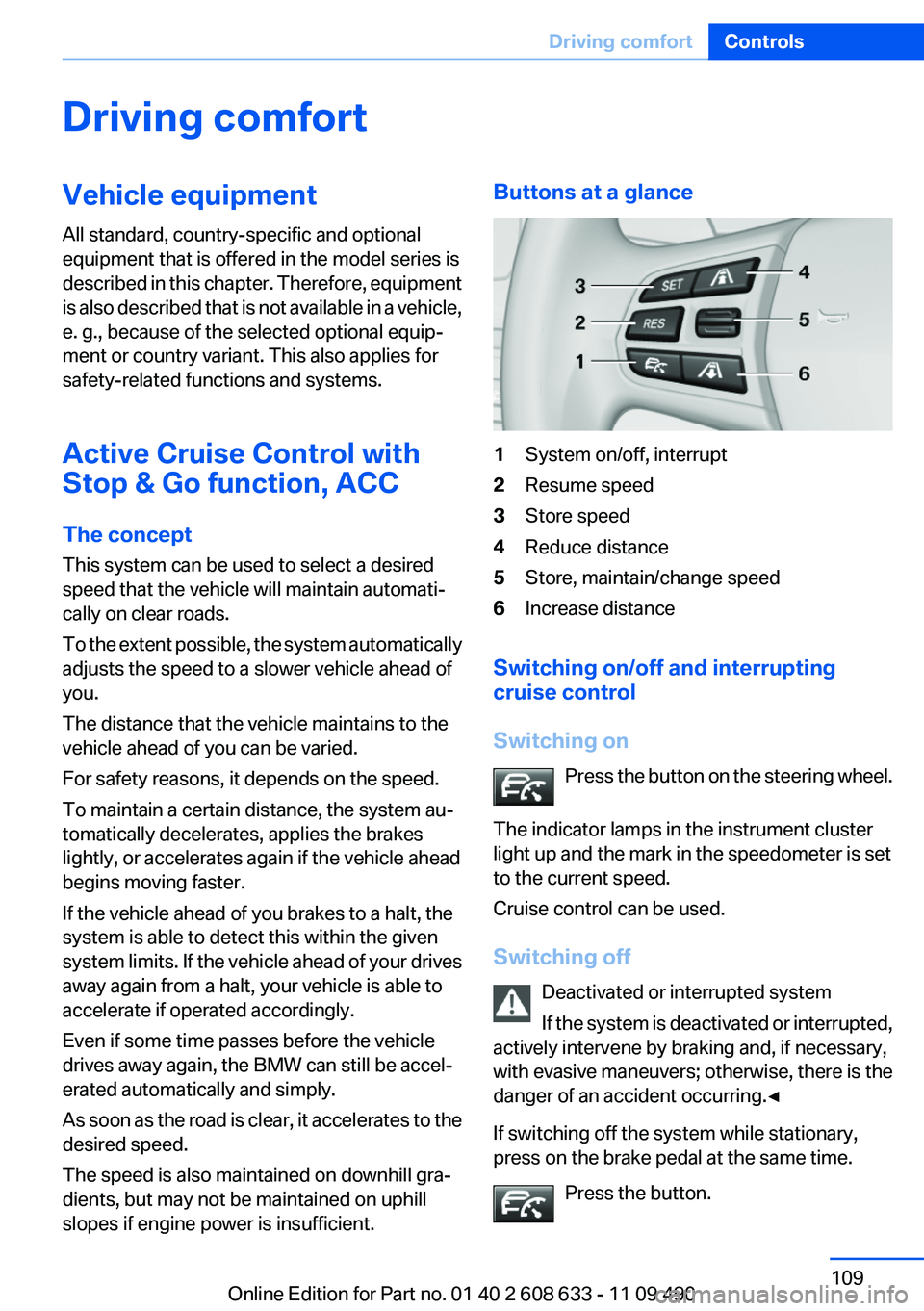
Buttons at a glance
1System on/off, interrupt
2Resume speed
3Store speed
4Reduce distance
5Store, maintain/change speed
6Increase distance
Switching on/off and interrupting
cruise control
Switching on
Press the button on the steering wheel.
The indicator lamps in the instrument cluster
light up and the mark in the speedometer is set
to the current speed.
Cruise control can be used.
Switching off
Deactivated or interrupted system
If the system is deactivated or interrupted,
actively intervene by braking and, if necessary,
with evasive maneuvers; otherwise, there is the
danger of an accident occurring.◀
If switching off the system while stationary,
press on the brake pedal at the same time.
Press the button.
Seite 109
Driving comfortControls
109Online Edition for Part no. 01 40 2 608 633 - 11 09 490
Page 141 of 325
Interior equipment
Vehicle equipment
All standard, country-specific and optional
equipment that is offered in the model series is
described in this chapter. Therefore, equipment
is also described that is not available in a vehicle,
e. g., because of the selected optional equip‐
ment or country variant. This also applies for
safety-related functions and systems.
Integrated universal remote
control
The concept
The integrated universal remote control can op‐
erate up to 3 functions of remote-controlled sys‐
tems such as garage door drives or lighting sys‐
tems. The integrated universal remote control
replaces up to 3 different hand-held transmit‐
ters. To operate the remote control, the buttons
on the interior rearview mirror must be program‐
med with the desired functions. The hand-held
transmitter for the particular system is required
in order to program the remote control.
During programming
During programming and before activat‐
ing a device using the integrated universal re‐
mote control, ensure that there are no people,
animals, or objects in the range of movement of
the remote-controlled device; otherwise, there
is a risk of injury or damage.
Also follow the safety instructions of the hand-
held transmitter.◀
Before selling the vehicle, delete the stored
functions for the sake of security.
Compatibility
If this symbol is printed on the packaging
or in the instructions of the system to be
controlled, the system is generally com‐
patible with the integrated universal remote
control.
If you have any questions, please contact:
▷Your service center.
▷www.homelink.com on the Internet.
HomeLink is a registered trademark of Johnson
Controls, Inc.
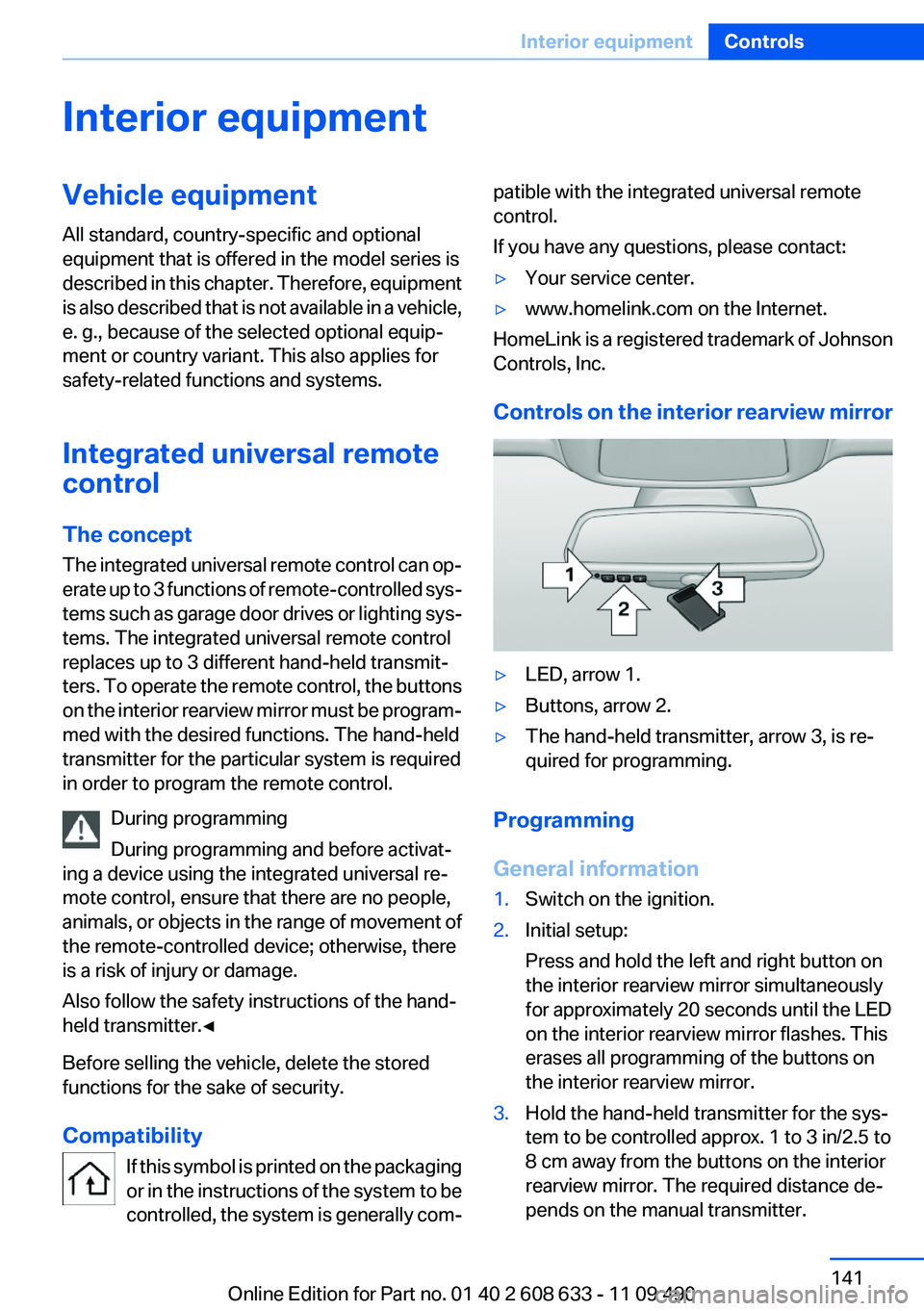
Controls on the interior rearview mirror
▷LED, arrow 1.
▷Buttons, arrow 2.
▷The hand-held transmitter, arrow 3, is re‐
quired for programming.
Programming
General information
1.Switch on the ignition.
2.Initial setup:
Press and hold the left and right button on
the interior rearview mirror simultaneously
for approximately 20 seconds until the LED
on the interior rearview mirror flashes. This
erases all programming of the buttons on
the interior rearview mirror.
3.Hold the hand-held transmitter for the sys‐
tem to be controlled approx. 1 to 3 in/2.5 to
8 cm away from the buttons on the interior
rearview mirror. The required distance de‐
pends on the manual transmitter.
Seite 141
Interior equipmentControls
141Online Edition for Part no. 01 40 2 608 633 - 11 09 490
Page 142 of 325

4.Simultaneously press and hold the button of
the desired function on the hand-held trans‐
mitter and the button to be programmed on
the interior rearview mirror. The LED on the
interior rearview mirror will begin flashing
slowly.
5.Release both buttons as soon as the LED
flashes more rapidly. When the LED flashes
faster, this indicates that the button on the
interior rearview mirror has been program‐
med.
If the LED does not flash faster after at least
60 seconds, change the distance between
the interior rearview mirror and the hand-
held transmitter and repeat the step. Several
more attempts at different distances may be
necessary. Wait at least 15 seconds be‐
tween attempts.
Canada: if programming with the hand-held
transmitter was interrupted, hold down the
interior rearview mirror button and repeat‐
edly press and release the hand-held trans‐
mitter button for 2 seconds.
6.To program other functions on other but‐
tons, repeat steps 3 to 5.
The systems can be controlled using the interior
rearview mirror buttons.
Special feature of the alternating-code
wireless system
If you are unable to operate the system after re‐
peated programming, please check if the sys‐
tem to be controlled features an alternating-
code system.
Read the system's operating manual, or press
the programmed button on the interior rearview
mirror longer. If the LED on the interior rearview
mirror starts flashing rapidly and then stays lit
constantly for 2 seconds, the system features
an alternating-code system. Flashing and con‐
tinuous illumination of the LED will repeat for
approximately 20 seconds.
For systems with an alternating-code system,
the integrated universal remote control and the
system also have to be synchronized.
Please read the operating manual of the system
being set up for information on how to syn‐
chronize the system.
Synchronizing is easier with the aid of a second
person.
To synchronize:
1.Park the vehicle within range of the remote-
controlled system.
2.Program the relevant button on the interior
rearview mirror as described.
3.Locate and press the synchronizing button
on the system being programmed. You have
approx. 30 seconds for the next step.
4.Hold down the programmed button on the
interior rearview mirror for approximately
3 seconds and then release it. If necessary,
repeat this work step up to three times in or‐
der to finish synchronization. Once synchro‐
nization is complete, the programmed func‐
tion will be carried out.
Reprogramming individual buttons
1.Switch on the ignition.
2.Press and hold the interior rearview mirror
button to be programmed.
3.As soon as the interior rearview mirror LED
starts flashing slowly, hold the hand-held
transmitter for the system to be controlled
approx. 1 to 3 in/2.5 to 8 cm away from the
buttons on the interior rearview mirror. The
required distance depends on the manual
transmitter.
4.Likewise, press and hold the button of the
desired function on the hand-held transmit‐
ter.
5.Release both buttons as soon as the interior
rearview mirror LED flashes more rapidly.
When the LED flashes faster, this indicates
that the button on the interior rearview mir‐
Seite 142
ControlsInterior equipment
142Online Edition for Part no. 01 40 2 608 633 - 11 09 490
Page 178 of 325
Resuming the original route
If the route section should no longer be by‐
passed:
1."Navigation"
2."Route information"
3."New route for:"
4."Remove blocking"
Gas station recommendation
The remaining range is calculated, and if nec‐
essary gas stations along the route are dis‐
played.
Even with the most current navigation data, in‐
formation regarding individual gas stations may
have changed. For instance, certain gas stations
may not be operating.
1."Navigation"
2."Route information"
3."Recommended refuel"
A list of the gas stations is displayed.
4.Highlight a gas station.
The position of the gas station is displayed
on the split screen.
5.Select the gas station.
6. Select the symbol.
7."Start guidance": destination guidance to
the selected gas station is started.
"Add as another destination": the gas sta‐
tion is added to the route.
Switching spoken instructions on/off
The setting is stored for the remote control cur‐
rently in use.
1."Navigation"
2."Map"
3. "Voice instructions"
Repeating spoken instructions
1."Navigation"
2."Map"
3. Highlight the symbol.
4.Press the controller twice.
Volume of spoken instructions
Turn the volume button while giving an instruc‐
tion until the desired volume is set.
Saving the spoken instructions on the
programmable memory buttons
The function for switching the spoken instruc‐
tions on/off can be stored on a programmable
memory button, refer to page 21, for quick ac‐
cess.
Map view
Selecting the map view
1."Navigation"
2."Map"
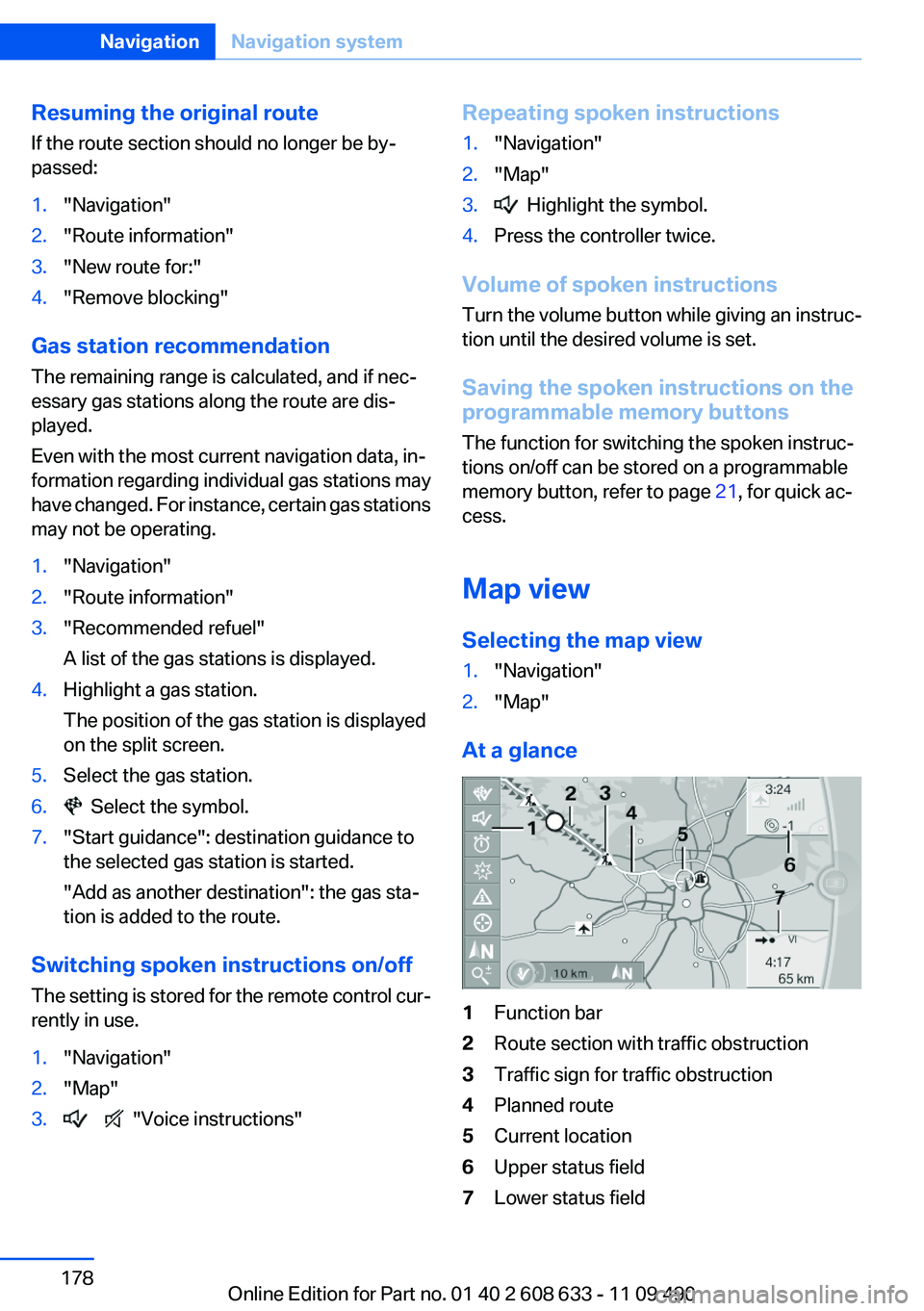
At a glance
1Function bar
2Route section with traffic obstruction
3Traffic sign for traffic obstruction
4Planned route
5Current location
6Upper status field
7Lower status field
Seite 178
NavigationNavigation system
178Online Edition for Part no. 01 40 2 608 633 - 11 09 490
Page 190 of 325
Radio
Vehicle equipment
All standard, country-specific and optional
equipment that is offered in the model series is
described in this chapter. Therefore, equipment
is also described that is not available in a vehicle,
e. g., because of the selected optional equip‐
ment or country variant. This also applies for
safety-related functions and systems.
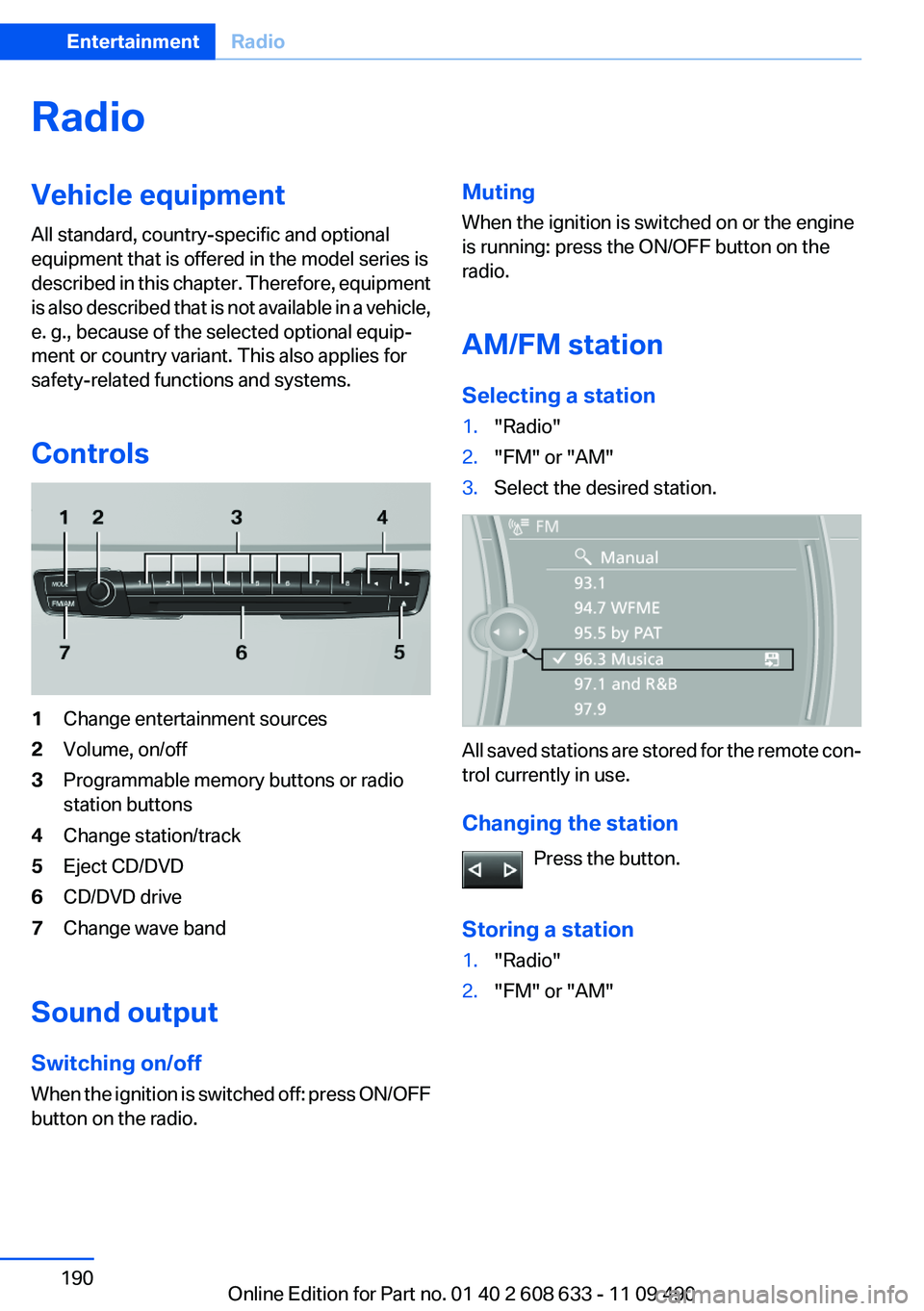
Controls
1Change entertainment sources
2Volume, on/off
3Programmable memory buttons or radio
station buttons
4Change station/track
5Eject CD/DVD
6CD/DVD drive
7Change wave band
Sound output
Switching on/off
When the ignition is switched off: press ON/OFF
button on the radio.
Muting
When the ignition is switched on or the engine
is running: press the ON/OFF button on the
radio.
AM/FM station
Selecting a station
1."Radio"
2."FM" or "AM"
3.Select the desired station.
All saved stations are stored for the remote con‐
trol currently in use.
Changing the station
Press the button.
Storing a station
1."Radio"
2."FM" or "AM"
Seite 190
EntertainmentRadio
190Online Edition for Part no. 01 40 2 608 633 - 11 09 490
Page 191 of 325

3.Highlight the desired station.
4.Press the controller for an extended period.
5.Select the desired memory location.
The stations are stored for the remote control
currently in use.
With navigation system: the stations can also be
stored on the programmable memory buttons,
refer to page 21.
Selecting a station manually
Station selection via the frequency.
1."Radio"
2."FM" or "AM"
3."Manual"
4.To select the frequency: turn the controller.
To store the station: press the controller for an
extended period.
Renaming a station
A station with changing station names can be
renamed.
1."Radio"
2."FM" or "AM"
3.Select the desired station.
4."Options" Open.
5."Rename to:"
If necessary, wait until the desired name ap‐
pears.
The selected station name is copied to the list
of current stations and stored stations.
RDS
RDS broadcasts additional information, such as
the station name, in the FM wave band.
Switching the RDS on/off
1."Radio"
2."FM"
3."Options" Open.
4."RDS"
The setting is stored for the remote control cur‐
rently in use.
HD Radio™ reception
Many stations broadcast both analog and digital
signals.
License conditions
HD Radio™ technology manufactured under li‐
cense from iBiquity Digital Corp. U. S. and For‐
eign Patents. HD Radio™ and the HD and HD
Radio logos are proprietary trademarks of iBiq‐
uity Digital Corp.
Seite 191
RadioEntertainment
191Online Edition for Part no. 01 40 2 608 633 - 11 09 490
Page 192 of 325

Activating/deactivating digital radio
reception
1."Radio"
2."FM" or "AM"
3."Options" Open.
4."HD Radio Reception"
The setting is stored for the remote control cur‐
rently in use.
This symbol is displayed in the status line
when the audio signal is digital.
When setting a station with a digital signal, it may
take a few seconds before the station plays in
HD quality.
In areas in which the station is not continuously
received in digital mode, the playback switches
between analog and digital reception. In this
case, switch off digital radio reception.
Displaying additional information
Some stations broadcast additional information
on the current track, such as the name of the ar‐
tist.
1.Select the desired station.
2."Options" Open.
3."Station info"
Selecting a substation
This symbol indicates that a main station also
broadcasts additional substations. The station
name of the main station ends in HD1. Station
names of the substations end in HD2, HD3, etc.
1.Select the desired station.
2.Press the controller.
3.Select the substation.
When reception is poor, the substation is muted.
Satellite radio
General information
The channels are offered in predefined pack‐
ages. The packages must be enabled by tele‐
phone.
Navigation bar overview
Symbol Function
Change the list view.
Select the category.
Direct channel entry
Timeshift
Open the My Favorites category/
open a favorite.
Manage the favorites.
Traffic Jump
With navigation system: the functions of the
navigation bar symbols can also be stored on the
programmable memory buttons, refer to
page 21.
They are stored.
Managing a subscription
To be able to enable or unsubscribe from the
channels, you must have reception. It is usually
at its best when you have an unobstructed view
of the sky. The channel name is displayed in the
status line.
Enabling channels
The Unsubscribed Channels category contains
all disabled channels.
1."Radio"
2."Satellite radio"
Seite 192
EntertainmentRadio
192Online Edition for Part no. 01 40 2 608 633 - 11 09 490