2011 AUDI S8 light
[x] Cancel search: lightPage 77 of 302
Warm and cold 7 5
Operation
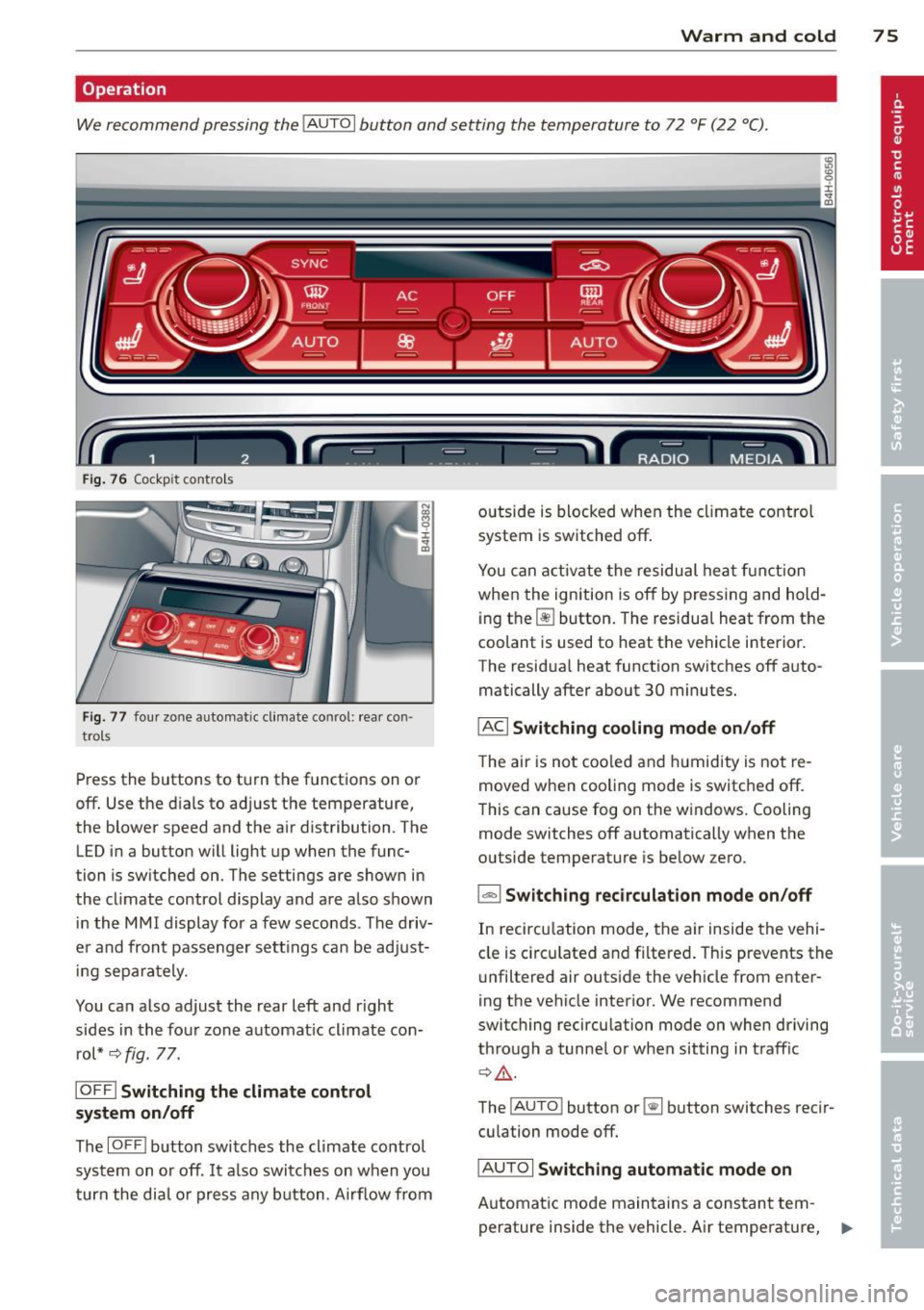
We recommend pressing the IAUTO I button and setting the temperature to 72 °F (22 °C) .
Fig. 7 6 Cockp it co ntrols
Fig. 77 four zo ne a utomat ic cl imat e co nr ol: rear con ·
tro ls
Press the buttons to turn the functions on or
off . Use the dials to adjust the temperature,
the blower speed and the air distribution . The
LED in a button will light up when the func
tion is sw itched on. The settings are shown in
the climate control display and are also shown in the MMI display for a few seconds . The driv
er and front passenger settings can be adjust ing separately.
You can also adjust the rear left and right
sides in the four zone automat ic climate con
rol*
~ fig. 77.
IOFF I Switching the climate control
system on/off
The IOFFI button switches the climate control
system on or off . It also switches on when you
turn the dial o r press any button . Airf low from outside
is blocked when the climate control
system is switched off.
You can activate the residual heat function
when the ignition is off by pressing and hold
i ng the ~ button . The residual heat from the
coolant is used to heat the vehicle interior.
The residua l heat function switches off auto
matically after about 30 minutes.
IAC I Switching cooling mode on/off
The air is not coo led and hum idity is not re
moved when cooling mode is switched off.
This can cause fog on the w indows. Cooling
mode switches off automatically when the
outside temperature is below zero.
l=-1 Switching recirculation mode on/off
In recircu lation mode, the air inside the vehi
cle is circu lated and filtered . This prevents the
unf iltered air outside the vehicle from enter
ing the vehicle interior. We recommend
switching recirculation mode on when driving
through a tunnel or when sitting in traff ic
~ A .
The !AU TO l button or~ button switches reci r
cu lation mode off.
IAUTOI Switching automatic mode on
Automat ic mode maintains a constant tem
perature inside the vehicle. Air temperature, .,..
Page 79 of 302

place heavy loads on a small area of the
seat.
Setup
The climate control system setup is accessed
through the MMI.
.. Se lect : I CARI f u nct ion but ton> Car sy stem s
control b utton > AC .
Rear cabin settings*
When th is function is selected, all sett ings for
the rear can be adjusted through the climate con trol system in the cockpit. The cl ima te
con trol system setti ngs cannot be adjus ted in
the rear seat a t the same time . This func tion
switches off after a ce rtain period of time or
when one of the dials in the cockpit is press
ed.
Auto reci rculation*
The sens itivity level of the au tom atic rec i rcu
l ation mode can be set at v arious leve ls from
off to sensit ive . When recirculation mode ia:. !
is switched on, air recirculation is contro lled
automatically . You must press the~ button if
fog forms on the windows.
Footwell temperature
You ca n ad just the footwe ll tempe rat ur e so
that it is cooler or wa rmer.
AC mode
T he strengt h of t he airflow ca n be adjusted to
light, med ium o r strong.
Windshield heat*
When the defroster~ is switched o n and the
Auto sett ing is selected, the windshie ld de
froster is controll ed automatically .
Solar roof*
When the ignition is off, so lar-powered park
i n g vent ilation may switch o n, as long as
- there is sufficient sunlight,
- th e outside tempe ratu re is not too low,
- the center vents are open,
- the sun roof is clos ed o r til te d and
W arm and cold 77
- recirculation mode l""' I (climate control sys
tem) and
Auto ( M MI) are selected.
Pa rking ventila tion is cont rolled au toma tic ally
in the
Auto sett ing.
~ Steering wheel heating
App lies to vehicles : wi th hea ted s teering wheel
The steering wheel rim con be heated .
Fig. 7 8 Steeri ng col umn: steering w hee l h eating bu t
to n
.. Press the lil button to switc h steer ing whee l
heating on/off . Th e message
Ste ering wh eel
heating on! /Steering wheel heat ing off!
a p pears in the instr ument cluster d is pla y.
T he tempe rat ure is ma intained at a constant
l evel when steering whe el heat ing is sw itc hed
o n.
The steering wheel heating sett ings are stor
ed a utomat ically and assigne d to the remote
control key that is in use.
Page 81 of 302

the stored position as soon as you switch on
the ignition.
Starting and stopping
the engine
Starting the engine
This button switches on the ignition and
starts the engine.
Fig. 80 Center console: S TART ENGINE S TOP b utton
" Step on the brake pedal¢&_ .
.. Press on the !START ENGINE STOP I button
¢ fig. 80 -the engine w ill start .
By pressing the
I START ENGINE STOP I button
without depressing the brake pedal, the igni tion is on and switched off by pressing it
again.
After a cold engine is started, there may be a
brief period of increased noise because oil
pressure must first build up in the hydraulic
valve adjusters. This is normal and not a cause
for concern.
If the engine should not start immediately,
the starting process is automatically stopped
after a short time. Repeat starting procedure.
Driver message in the instrument cluster
display
Press brake pedal to start engine
This message appears if you press the
I START ENGINE S TOP I button to start the en
gine and do not depress the brake pedal. The
engine can only be started if the brake pedal is depressed.
!! Convenience key: Is key not in the vehi
cle?
On the road 79
This message appears along with thee sym
bol if the master key is removed from the ve
hicle with the eng ine running.
It is intended
to remind you (e.g . when changing drivers)
not to continue the journey without the mas
ter key.
If the master key is no longer in the veh icle,
you cannot switch on the ignition after stop
ping the engine and you also cannot start the
engine again . Moreover, you cannot lock the
vehicle from the outside with the key.
Shift to P, otherwise vehicle can roll away.
Doors do not lock if lever is not in
P.
This message appears for safety reasons
along with an audible warning tone if the
P
selector lever position is not engaged when
stopping the engine with the
I START ENGINE STOP I button. Select the P se
lector lever position . Otherwise the vehicle
cou ld roll and it cannot be locked .
Key not recognised. Hold back of key against
marked area . See owner's manual.
If the indicator light turns on and this mes
sage appears, there is a malfunction
¢ page 80.
Steering lock
The steering locks when you turn the engine
off using the
I START ENGINE STOP I button
and open the driver's door. The locked steer ing helps prevent vehicle theft.
A WARNING
- Never allow the engine to run in confined
spaces - danger of asphyx iation.
- Never turn off the engine until the vehi
cle has come to a complete stop.
- The brake booster and power steering
only work when the engine is running. If
the engine is off, you have to use more
force when steering or braking. Because
you cannot steer and brake as you usual
ly would, this could lead to crashes and
serious injuries.
Page 82 of 302

80 On the road
(D Note
-Avoid hig h engine rpm, fu ll throttle and
heavy engine loads unti l the engine has
reached operating temperat ure -other
wise you risk eng ine damage.
- The engine cannot be started by pushing
or towing the vehicle.
- If the engine has been under heavy load
for an extended period, heat b uilds up in
the engine compartment after the en
gine is switched off - there is a risk of
damaging the engine . Allow the eng ine
to run at idle for about 2 minutes before
switching it off.
@ Tips
If you open the driver's door with the igni
tion on, a buzzer sounds and the message
Igniti on is on appears in the instrument
cluster display. Sw itch the ignition off .
Stopping the engine
• Bring your vehicle to a complete stop.
.. Move the se lector lever to the
P or N pos i
t ion .
.. Pre ss the I STAR T ENGINE ST OP I button
r:> page 79, fig. 80 .
Emergency off
If necessary, the engine can be switched off
with the selector lever in the
R , D or S posi
tions . The engine stops if you press the
I S TAR T ENGINE ST OP ! button at speeds be low
6 mph (10 km/h).
A WARNING
- Never turn off the eng ine unti l the vehi
cle has come to a complete stop.
- The brake booster and power steer ing
only work when the engine is runn ing .
If
the engine is off, you have to use more
force when steering or braking. Because
you cannot steer and brake as you usua l
ly wo uld, this could lead to crashes and
serious injuries. -
For safety reasons, you should a lways
park your vehicle w ith the selector lever
in P . Otherwise, the vehicle could inad
vertently roll away .
- After the engine has been switched off,
the radiator fan can cont inue to run for
up to 10 minutes -even with the ignition
sw itched off. It can also sw itch on again
after some time if the coolant tempera
ture rises as the result ofa heat bu ildup
or if the engine is hot and the engine
compartment is additionally heated by
the sun's rays .
(D Note
Do not stop the eng ine immedia tely after
hard o r extended driving. Keep the engine
running for approximate ly two minutes to
prevent excessive heat bui ld-up.
Starting the engine if there is a
malfunction
It may not be possible to start the engine un
der certain circumstances, for example if the
battery in the vehicle key is drained, if inter
ference is affected the key or if there is a sys
tem malfunction.
"' ij
:c
-- --- -~
Fig . 81 Ce nter co nsole/master key: start ing the e ngin e
i f there is a malfunct ion
Requirement: The message K ey not recog
niz ed . Hold back of ke y again st ma rked are a.
See o wner's manual.
must appear and the in
dicator light
m must switch on .
.. Hold the master key vertically in the loca
tion indicated
y >>) <=> fig . 81.
• Press the brake pedal r=> & in Starting the
engine on page 79 .
IJ>,
Page 83 of 302

.. Press the !START ENGINE STOPI button. The
engine will start.
.. Drive to your author ized Audi dealer imme
diately to have the malfunction corrected .
@ Tips
You can view the message again by press
ing the
! START ENGINE STOPI button.
Electromechanical
parking brake
Operation
The electromechanical parking brake replaces
the hand brake.
Fig. 82 Center console: Park ing brake
.. Pull on the switch<®> c> fig . 82 @to apply
the parking brake. The indicator light in the
switch illuminates.
.. Step on the brake pedal or the accelerator
pedal and press the switch <®> at the same
t ime to release the parking brake. The indi
cator light in the switch goes out.
Your vehicle is equipped with an electrome
chan ical parking brake. The parking brake is
designed to prevent the vehicle from roll ing
un intent ionally and replaces the hand brake.
In addition to the normal functions of a tradi
tional hand brake, the electromechanical parking brake provides various convenience
and safety functions.
When starting from rest
-The integral starting assist helps you when
driving by automatically releasing the park
i ng brake
c> page 82, Starting from rest.
On the road 81
- When start ing on inclines, the starting as
sist prevents the vehicle from unintentional
ly rolling back. The braking force of the
parking brake is not released until sufficient
driving force has been built up at the
wheels.
Emergency brake function
An emergency brake ensures that the vehicle
can be slowed down even if the
normal brakes
fail
c> page 83, Emergency braking.
Indicator lights
-If the parking brake is closed with the igni
tion
switched on the indicator lights come
on - (USA mode ls)/ . (Canada models)
in the instrument cluster and the switch.
- If the parking brake is closed with the igni
tion
switched off the indicator lights come
on - (USA models)/ . (Canada models)
in the instrument cluster and the switch for
about 20 seconds .
A WARNING
Do not press the accelerator pedal inadver
tently if the veh icle is stationary but the
engine is running and a gear is selected .
Otherwise the vehi cle w ill start to move
immediately and could result in a crash.
(D Note
If the symbol . in the display or the indi
cator light
11111 (USA models)/ . (Cana
da models) in the instrument cluster flash
es, there is a malfunction in the brake sys
tem. Please refer to the detailed descrip
tion of the indicator lights
c>page 14.
- If the indicator light -(USA mod-
els)/ . (Canada models) or
Im turns
on, there may be a malfunction in the
parking brake
c> page 15.
{I) Tips
-Yo u can app ly the parking brake at any
time -even with the ignition switched
off. The ignition must be on in order to
release the parking brake.
Page 85 of 302

Depending on the weight of the r ig (vehicle
and trai ler) and the severity of the incline, you
may roll backwards as you start. You can pre
vent roll ing backwards by holding the parking
brake switch(®) pulled out and accelerating -
just as you would when starting on a hill with
a conventional hand brake.
Emergency braking
In the event that the conventional brake sys
tem fails or locks.
... In an emergency, pull the switch(®) and
continue to pull it to slow your vehicle down
with the parking brake.
... As soon as you release t he sw itch (®) or ac-
ce lerate, the braking p rocess stops.
If you pull the sw itch(®) and hold it above a
speed of about 5 mph (8 km/h), t he emergen
cy braking fu nction is in itiated . The vehicle is
b raked at all four wheels by activating the hy
d ra u lic bra ke system. The b rake performance
i s simi lar to making an emergency stop
c::> &. .
In order not to activate the emergency brak
ing by m ista ke, an audible warning tone (b uz
z er) sou nds when the switch®> is pulled. As
soon as the switch(®) is released, or the acce l
erator pedal is dep ressed, emergency brak ing
stops .
A WARNING
Emergency braking should only be used i n
an emergency, when the normal foot brake
has failed or the brake pedal is obstructed.
Using the parking brake to perform emer
gency braking will slow you r vehicle down
as if you had made a fu ll brake applicat ion.
T he laws of physics can not be s uspended
even w ith ESP and its associated compo
nents (ABS, ASR, EDL). In corners and
when road or weather conditions are bad,
a full brake application can cause the vehi
cle to skid or the rear end to break away -
r isking an accident.
On th e ro ad 83
Speed warning system
Introduction
The speed warning system helps you to stay
under a specified maximum speed .
The speed warning system warns you if you
are exceeding the maximum speed that you
have set. You will hear a warning tone when
you r speed exceeds the stored value by ap
proximately 3 mph (3 km/h) . An indicator
li ght . (USA
models) ;a (Canada mode ls) in
the instr ument cluster d isp lay al so tur ns on at
the same time. The indicator light . /.
turns off when the speed decreases be low the
stored maxim um speed .
Se tting a t hreshold is recommended if you
would like to be rem inded w hen you reach a
certain maximum speed. Situations where you
may want to do so incl ude driv ing in a co untry
with a genera l speed limit or if there is a
specified maximum speed for winter tires.
(D Tips
Even though your vehicle is eq uipped w ith
a speed warn ing system, you sho uld still
watch the speedometer to make sure you
are not dr iv ing faster than the speed limit.
Setting the threshold
You can set, change and delete the threshold
in the MMI.
... Select: !CAR ! function button > Car systems
contro l button > Dri ver ass ist > Speed warn
ing .
You can set any threshold between 20 mph
(30 km/h) and 150 mph (240 km/h) . Sett ings
can each be adjusted in increments of 5 mph
(10 km/h).
Page 86 of 302

84 On the road
Cruise control
Switching on
The cruise control system makes it possible to
drive at a constant speed starting at 20 mph
(30 km/h).
0
f
®t
0
Fig. 83 Control lever w it h set butt on
Fig . 84 D is pl ay: Selected speed
"' Pull the lever to position (D c::> fig. 83 to
switch the system on.
"' Drive at the speed you wish to set.
"'Press button@to set that speed .
I :i:. ... a,
The stored speed and the ind icator light
[ij;W~1~ (US models) / 0 (Canadian models) ap
pear in the instrument cluster display
c:;, fig. 84 . The display may vary, depending on
the type of display in your vehicle . The indic a
tor light . in the instrument cluster also illu
minates.
The speed is kept constant
via an engine out
put adjustment or active brake intervention .
8_ WARNING
-Always pay attention to traffic even when
the cruise control is switched on . You are
always responsible for your speed and
the distance between your vehicle and
other vehicles. -
For safety reasons, the cruise contro l
should not be used in the city, in stop
and-go traffic, on twisting roads and
when road conditions are poor (such as ice, fog, gravel, heavy rain and hydro
plan ing) - risk of accident.
- Turn off the cruise control temporarily when enter ing turn lanes, highway exit
lanes or in construction zones .
- Please note that inadvertently "resting" your foot on the accelerator pedal causes
the cruise control not to brake. This is
because the cruise control is overridden
by the drive r's acceleration.
- If a brake system malfunction such as
overheating occurs when the cruise con
trol system is switched on, the braking
function in the system may be switched
off . The other cruise control functions re
main active as long as the indicator light
m:lmi (US models)/ . (Canadian mod
els) is on.
(D Tips
The brake lights illuminate as soon as th e
brakes decelerate automatically.
Changing speed
"' Press lever in the 0 or O direction
c::>page 84, fig. 83 to increase or decrease
your speed.
"' Release the lever to save that speed .
Change speed in increments of 1 mph (1 km/
h) by lightly press ing the lever. If you keep the
lever pressed down , you will alter your speed
in 5 mph (10 km/h) increments .
You can also press the accelerator pedal down
to increase your speed, e .g. if you want to
pass someone . The speed you saved earlier
will resume as soon as you release the acceler
ator pedal.
If, however, you exceed your saved speed by
6 mph (10 km/h) for longer than 5 minutes,
the cruise control will turn off temporari ly.
The green symbol in the display
c> page 84, .,..
Page 91 of 302

Adaptive cru ise co ntrol and b rakin g guar d 89
You must also press the b rake pedal when
the vehicle is stopped.
Sw itching adapti ve cruis e co ntrol off
~ Push the lever away from you into position
@ until it clic ks into p lace. The message
A CC off appears.
I ndicator lamps and messages in the instru
ment cluster display inform you about the c ur
rent system status and settings.
@ Indic ator light s
fl-adaptive cruise control is sw itched on . No
veh icles are detected up ahead . The stored
speed is ma inta ined.
I -A moving vehicle is detected up ahead .
The adaptive cruise control system regulates
the speed and distance to the moving veh icle
ahead and accelerates/brakes automat ically.
f:i -adaptive cru ise control is switched on. A
mov ing vehicle up ahead was detected. Your
veh icle remains stopped and will not start
driving automatically.
I -When automat ic braking is not able to
keep enough distance to a previously detected
mov ing vehicle up ahead, you must take con
trol and brake¢
page 90, Prompt for driver
intervention.
© Di splay
If adaptive cruise control is not shown in the
d isplay, you can call it up with the multifunc
tion steering wheel buttons
¢ page 23 .
Based on the symbols in the display, you can
determine if the system is maintaining a dis
tance to the vehicle ahead and what that d is
tance is .
No v ehicle -No vehicle ahead was detected.
White vehicle -A vehicle ahead was detected .
Red ve hicl e -Prompt for the d river to take ac
tion
¢ page 90.
Both arr ow s on the scal e© indicate the dis
tance to the vehicle ahead . No ar row appears
when the vehicle is on an open road and there is no object ahead.
If an object is detected
ahead, the arrow moves on the scale .
T he green zone on the sca le shows the stored
distance. For informat ion on changing the
stored distance ¢
page 91. If the distance
selected is too close or may soon become too
close, the arrows move into the red zone on
the scale .
A WARNING
Improper use of the adaptive cruise con
trol can cause collisions, other accidents
and serious personal injur ies .
- Pressing the
!SET ! button when driv ing at
speeds below
20 mph (30 km/h), w ill au
tomatically accelerate the vehicle to
20
mph (30 km/h), wh ich is the minimum
speed that can be set .
(D Tips
- If you switch the ignit ion or the adaptive
cruise control off, the set speed is e rased
from the system memory.
- You cannot switch the Electron ic Stabili
zation Program (ESP) to the SPORT mode
when adaptive c ruise control is sw itched
on.
Driving in stop-and-go traffic
Appl ies to vehicles: wi th adap tive c ruise control
T he adaptive cru ise contro l system also as
sists yo u in stop-and-go traffic. If a previous
detected vehicle ahead stops, your vehicle wi ll
brake to a stop, within the limits of the sys
tem.
~ To resume driving with adaptive cruise con
trol, tap the acce lerator pedal or
~ Pull the lever toward you into position @
¢ page 88, fig. 89.
(D Tips
- If adaptive cruise control is act ive and
your vehicle does not start driving as ex pected after pu lling the lever once, you
can start out again by tapping the acce l-
erator peda l. ..,.