2011 AUDI Q7 wheel
[x] Cancel search: wheelPage 128 of 392

1111..__0_ n_ t_h _e_ r_o _ a_ d _________________________________________________ _
Easy entry feature
The easy entry feature makes it easier to enter and e xit
the vehicle by automatically adjusting the steering
wheel.
Press the button®~ page 125, fig. 123 to turn the easy
entry feature on or off .
When the easy entry feature is turned on (button depressed), the
steering wheel moves up to the parked position when the ignition is
t urned off . After you enter the vehicle, the steer ing wheel moves to
the stored pos ition as soon as you t urn on the ign ition .
Easy entry feature on vehi cles with memory seat *
For the stored steering whee l position to be recalled, t he driver's seat
memory must be switched on ( ( ON/OFFI switch in depressed posi
tion) .
If the easy e ntry feature i s sw itched off, the steer ing wheel mov es to
the stored pos ition as soon as you press the seat memory button. •
Ignition Lock and ignition switch
Ignition key positions
The engine can be st arted or turned off with the ign ition
key .
Position @
Fig. 124 Ign ition
sw itch position s
The ig nition key can be inserted into the ignition switch i n this posi
tion. This automatically unlo cks the steering co lumn lo ck. When the
ign ition key is removed, the steer ing colum n lock is automat ically
lo ck ed
~ & .
Switching the ignition on /preheating (D
Tu rn the ignit ion key to this position and re lease i t. On veh icles wi th
a diesel engine *, the system can preheat in this position.
Starting the engine@
The engine starts with the key in this position. Major e lectrical loads
are tempo rar ily tur ned off .
Ignition off@
Turn t he ign it ion key to this pos ition and re lease i t.
Page 129 of 392

_________________________________________________ O_ n_ t_ h_ e_ r _o_ a_d _ __.fflll
& WARNING
• Never remove the key from the ignition lock while the vehicle
is moving. The steering wheel will lock , cau sing loss of control.
• If you ha ve to leave your vehicle, even for ju st a minute, alw ays
remove the ignition key and take it with you. This i s especially
important if you are going to leave children unattended in the
vehicle. The children could start the engine or use other vehicle c ontrols . Unsupervised us e of vehicle controls (for example, power
windows) can cause serious personal inju ries.
0 Note
• If the ~ symbol in the display blinks, there is a malfunction in the
electronic stee ring column lock. Follow the instr uctions in
~ page 36, "Steering malfu nction i" .
• If the ~ symbol in the display blinks, there is a malfunction in the
electronic ignition lock . Follow the instr uctions in~
page 37, "Igni
t ion lock malfunct ion ~" .
(I] Tips
• If you release the ignit ion key i n pos it io n @ , the key automatically
returns to pos ition
(D .
• If you open the driver 's doo r whe n the ignition is sw itched on, a
buzze r sounds and the message
Ignition is on appears in the instru
ment cl uster d isplay. Please swi tch the ignition off.
• T o prevent malf unctions in the ignition lock, remove any dirt or
deposits from t he key bit so that t hey do not ente r th e ignit ion lock. •
Contro ls a nd e quip
m en t Vehicle
OP-eration
Ignition key safety Lock
The ignition key can only be r emoved when the selector
le ver is in the "P" (Park) position .
After turning off the ignition, the ignition key can only be removed
from the igni tion lock when t he se lector lever is in the "P" (Park) posi
tion. A fter you have removed the key, the selector lever is locked and
cannot be move d.•
Starting and stopping the engine
Starting the engine
The engine can only be sta rted with you r origina l A udi
key.
Fig . 125 I gnition key
pos iti ons
Vehicles with gasoline engine:
- Step on the brake.
- Move the se lector leve r into P or N
=> &.
- Turn the ig nition key to position @=> fig . 125 -do not
dep ress th e gas pedal when s tarting the engine .
Vehicle care Do-it-yourselt service iTechnical data
Page 134 of 392

Ill On the road ..___ ______________ _
• If you close the driver's door and lock your vehicle from the
outs ide. •
Parking brake
Op eration
The parking brake replaces the handbrake.
Applying parking brake
Fig. 128 Sect ion of
instrument cluster: Par king brake
- Press the pedal down forcefully~ page 132, fig. 128 @
in the d irection of the arrow.
Releasing parking brake
-Pull the handle to the rear ® in the direction of the arrow
~& -
If you should drive off with the parking brake still set, a warning tone
w ill sou nd and the following will appear in the instrument cluster to
remind you to release the parking brake:
Parking brake i s applied
The parking brake warning comes on only after you have driven for
longer than 3 seconds and faster than 5 mph (5 km/h). The parking brake warn
ing light ::, (USA)/ © (CON) illuminates when
the parking brake is set and you switch on the ignition.
& WARNING
Always release the parking brake completely. A partially engaged
brake will overheat the rear brakes, reduce their effectiveness and
c ause excessive wear. This could lead to brake failure and an acci
dent.
0 Note
Only after the vehicle has come to complete stop, should you firmly
set the parking brake and move the selector leve r into "P". •
Parking
To prevent a parked vehicle from rolling away, there are
a few things you should do.
When you park your vehicle, do the following
-Stop the vehicle using the brake pedal.
- Apply the parking brake firmly.
- Move the selector lever into the
P position =;,& .
- Switch off the engine and remove the ignition key from
the ignition lock .
When you park your vehicle on hills, do the
following
- Stop the vehicle using the brake pedal.
- Apply the parking brake firmly.
- If you are parking headed
downhill , turn the front wheels
toward the curb . .,_
Page 135 of 392

On the road -
----------------
- If you are parki ng h eaded uphill, turn t he fro nt w heel s
away from t he curb.
- Move th e se lector lever i nto t he
P posit ion.
- Swi tc h off the eng ine and rem ove t he ignit ion key from
t h e ign ition loc k.
& WARNING
This is how you can reduce the risk of injury when leaving your
vehicle.
• Never park the vehicle where it can come in contact with dry
grass, spilled fuel or any other flammable material s.
• When parking on hills, always turn the wheel s so that the front
wheel s will fir st roll into the curb, if the vehicle should start to
roll.
• Never allow anyone -especially small children -to remain
in
the vehicle when it is loc ked. Locked doors make it more difficult
for res cuer s to ac ce ss the pa ssenger compartment in the event of
an emergency. Danger to life!
• Never leave children un supervised in the vehicle . Children
could release the parking brake or move the gearshift lever out of
gear . The vehicle could start to roll away and cause an accident.
• No matter what the season is , the temperature in a parked
vehicle can reach dangerou s levels.
0 Note
• Please exer cise care w hen you par k your vehicle in pa rking areas
with park ing barriers or c urbs. Pa rking barriers and c urbs vary in
heig ht and co uld dam age yo ur bumpe r and related co mponen ts as
the front of your vehicle moves over a barrier or curb that is too h igh,
as yo u p ark or as you back out of a par king s pot. I n or der to be sure
that no such damage can occur, you may wish to stop short of havi ng
t he front t ires of your car touch the park ing barrier or c urb.
Controls and equip
ment Safety first
•
Please also exerc ise exceptiona l care w hen you dr ive up or dow n
stee p ramps or dr ive ove r cur bs or o ther obs ta cl es, for w hich t he
vehicle is not des igned, beca use components of the vehicle close to
the groun d, such as bumper covers, spoilers and s uspension and
ex haust system componen ts, may become damaged .•
Starting on hills
H ill Hold makes it easier to s tart on hills .
The system is activated when the brake peda l is depressed
for a few
seconds .
Fo r t his, t he vehicle mus t be st anding in uphill driving direc
tion.
After releas ing t he brake pedal, the brake power is he ld for a
brief
moment to prevent the vehicle from rolling back when sta rt ing . At
this time, you can easi ly begin to move your vehicle .
& WARNING
• If you did not begin moving immediately after relea sing the
brake pedal, under certain circumstances, the vehicl e would begin
to roll backward. Depress the brake pedal immediately or engage
the parking brake .
• Should the engine stall, depre ss the brake pedal immediately
or engage the parking brake.
• In order to prevent the vehicle from rolling back unintention
ally when starting in stop-and-go traffic , keep the brake pedal
depre ssed for a few se cond s before driving off .
• When you leave the vehicle -even if only briefly -, sw itch off
the ignition and make sure to remove the ignition key . Also
engage the parking brake to prevent your vehicle from rolling
unintentionally . This particularly applies if children are left in the
veh icle -danger of accident! •
Vehicle care Technical data
Page 138 of 392
IIIIL---=..A...;:.=: d:...:a ;;.i:p;;;... t.=. i:....: v :....: e::.....: C::.: r:....: u:;.:....: is:...e::.....: C;;;... o.::....:.. n:....:t :.:. r:....:o :....: l;__ ________________________________________ _
Adaptive Cruise Control
Speed and distance control system
Applies to veh icles : w it h Adap tive Cru ise Cont ro l
Description
Th e Adaptiv e Cruis e Control driver a ssistanc e program is
a co mbine d speed and d istan ce contr ol s ys tem.
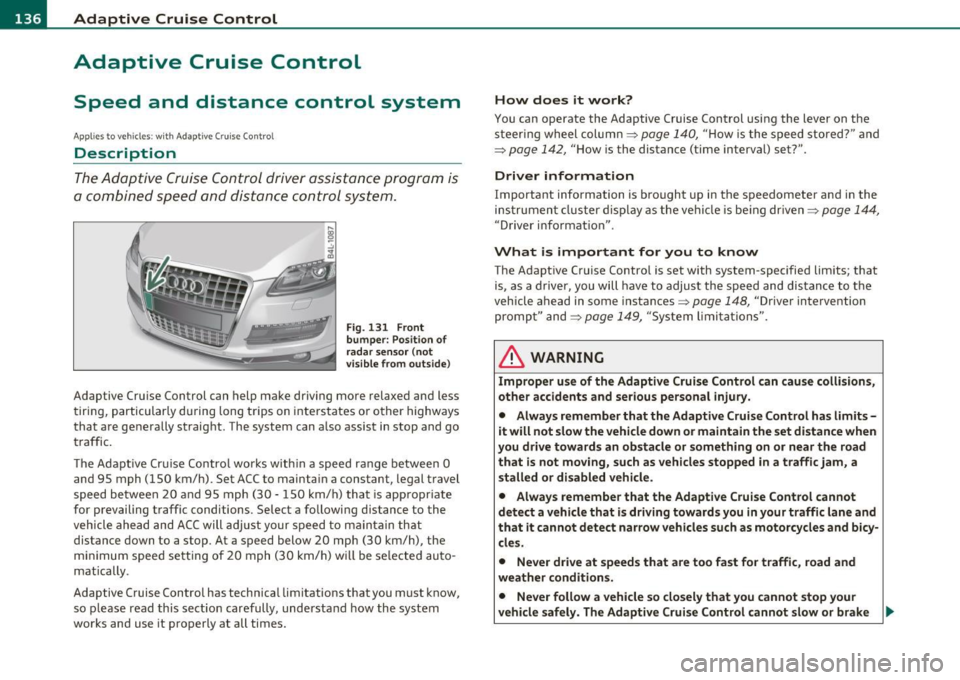
Fig. 131 Front
bumper: Po sition of
rada r sensor (not
v isible from outs ide )
Adaptive Cru ise Cont rol can h elp ma ke driving mo re relaxed and less
t iri ng , par ticularly d uring lon g trips on i nte rs t a tes o r oth er hig hways
that are generally straig ht. The system can a lso assist in stop and go
tr aff ic.
T he A da pti ve Cr uise Co ntro l w ork s w ithin a spee d ran ge between 0
and 95 mph ( 150 km/h). Set ACC to mainta in a constant, legal t ravel
speed betwee n 20 and 95 m ph ( 30 -15 0 km/ h) that is appropr iate
for p revailing traffic conditions . Select a followi ng distance to the
vehicle ahe ad and A CC will adjust your s peed to mai ntain that
distance down to a stop . At a speed below 20 mph (30 km/h) , the
m inim um sp eed s ett ing of 2 0 mp h (30 k m/h) w ill be se le cte d a uto
matically .
Adaptive Cruise Control has technica l limitat ions that you must know ,
so p lease re ad th is s ect io n car efully, und erstan d how th e syst em
works and use it proper ly at all times.
How does it work?
You can operate the Adaptive Cruise Control usi ng the lever on t he
stee ring wheel col umn =:>
page 14 0, "Ho w is t he s peed stored?" and
=:>
page 142, " H ow is the distance (time interval) set?".
Driver information
Important information is bro ught up in the speedometer a nd in the
i n stru men t cluster dis play as the ve hicle is be ing dr iven =:>
page 14 4,
"Driver i nfo rmat io n".
What is important for you to know
The Adapt ive Cruise Contro l is set with system -specifie d limits; that
i s , as a drive r, you will hav e to adjus t the sp eed and dis tance to the
v ehicle ahead in some instances =:>
page 148, "Drive r inte rve ntion
pro mpt" and =:>
page 14 9, "Sy stem limi ta tio ns".
& WARNING
Improper use of the Adaptive Cruise Control can cause collisions,
other accidents and serious personal injury.
• Always remember that the Adaptive Cruise Control has limits -
it will not slow the vehicle down or maintain the set distance when
you drive towards an obstacle or something on or near the road
that is not moving, such as vehicles stopped in a traffic jam, a
stalled or disabled vehicle.
• Always remember that the Adaptive Cruise Control cannot
detect a vehicle that is driving towards you in your traffic lane and
that it cannot detect narrow vehicles such as motorcycles and bicy
cles.
• Never drive at speeds that are too fast for traffic, road and
weather conditions.
• Never follow a vehicle so closely that you cannot stop your
vehicle safely. The Adaptive Cruise Control cannot slow or brake _.,
Page 153 of 392
Adaptive Cruise Control -____________ ___,__ __ ____.
App lies to veh icles : with Adapt ive C ru ise C ontro l
Vehicles that are difficult to detect
------------------1
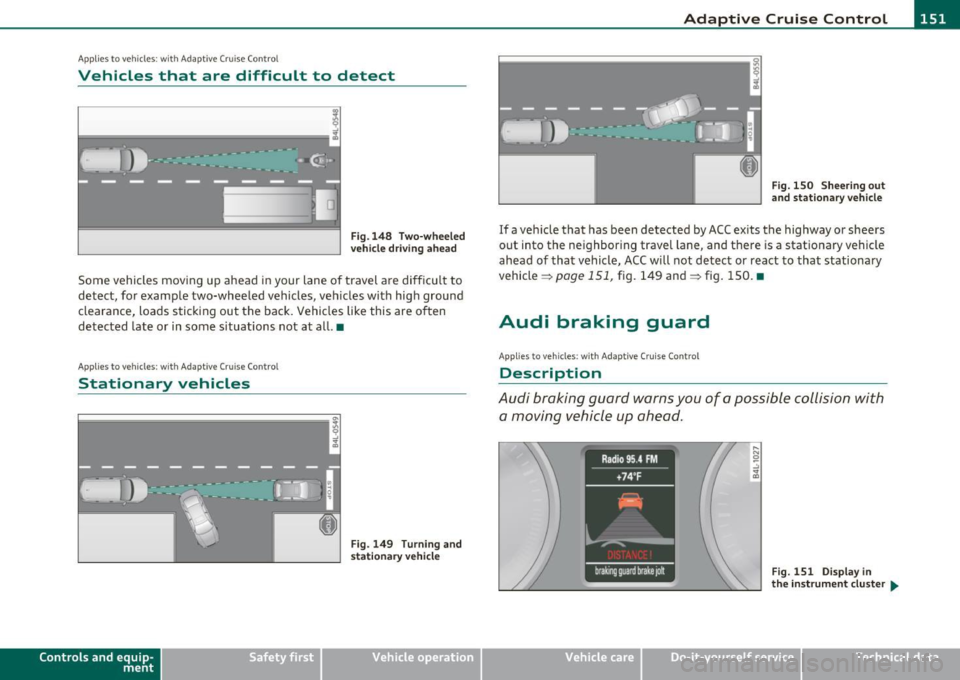
Fig .1 48 T wo-wheele d
ve hicle driv in g ahea d
Some vehicles moving up ahead in your lane of travel are difficu lt to
detect, for example two-wheeled vehicles, veh icles with high ground
clearance, loads sticking out the back. Vehicles like this are often
detected late or in some s ituations not at all. •
Applies to v ehicles: with Adap tiv e Cruis e Contro l
Stationary vehicles
Contro ls a nd e quip
m en t
Fig. 149 Turning and
stat iona ry v ehi cle
Vehicle OP-eration
Fig. 1 50 Shee ring out
a nd s tation ary ve hicl e
If a vehicle that has been detected by ACC ex its the highway or sheers
out into the neighboring travel lane, and there is a stat ionary vehicle
ahead of that vehicle, ACC will not detect or react to that stationary
vehicle =>
page 151, fig. 149 and=> fig. 150. •
Audi braking guard
Applies to ve hicles: w ith Adaptive Cru is e Cont rol
Description
Audi braking guard warns you of a possible collision with
a moving vehicle up ahead.
Fig. 151 Disp lay i n
th e in st rum ent cl ust er ...
Vehicle care Do-it-yourselt service iTechnical data
Page 166 of 392

1111....__A_ u_ t_o _m_ a_ t_ic _ t_ r_ a_ n_s _m_ i _s_ s_ i_ o_ n ____________________________________________ _
Before you move the selector lever from t he P position, yo u must
a lw ays app ly the b rake ped al befo re and while dep ress ing the bu tton
in the handle of the selector lever.
& WARNING
• Unintended vehicle movement can cause serious injury.
- When the selector lever is in a driving position, the vehicle
may creep, even at idle speed. Therefore do not release the
parking brake o r foot brake until you are ready to move ,
because power is transmitted to the wheel s as soon as a driving
position i s engaged.
- Do not accelerate while selecting a driving position. At this
time the engine must be at idle speed so that undue stre ss is
not placed on the clutches in the tran smission.
- Remember: -even when stopped briefly with the automatic
tran smission in "D ", "S" or "R ", engine power is being trans
mitted to the wheels. Your vehicle could "creep" forward or
backward. When stopped, keep the brake pedal fully
depressed and use the parking brake if necessary to keep the
vehicle from rolling .
• If the selector lever is unintentionally moved into N while you
are driving, take your foot off the acc elerator pedal and wait for
the eng ine to return to idle speed before selecting a driv ing posi
tion .
• Never shift into "R " or "P" when the vehicle is in motion.
• Never get out of th e driver's seat when the engine is running .
• If you must get out of the vehicle, move the selector lever
securely into the P pos ition and apply the parking brake firmly.
• If the engine must remain running, never have any driving
position engaged when checking under the hood . Ma ke sure the
s elector lever ha s securely engaged and is locked in "P" with the
parking brake firmly set=> page
290, "Engi ne compartment".
Otherwise, any increa se in engine speed may set the vehicle in
motion, even with the parking brake applied. •
Selector lever positions
This s ectio n de scri bes the selector leve r posi tio ns and
driving ranges.
"' ....
"' 0 ..:, ;g
Fig. 16 3 Displ ay in
the i nstrument cluster :
s electo r le v e r in posi
ti on P
The instrument cluster display shows the current se lector lever posi
t ion.
P -Park
In th is sele ctor lever posi tion t he transmi ssion is mecha nica lly
locked. Engage
P only when the vehicle is completely stopped=> &
in "Driving t he automa tic tr ansm ission" o n page 163 .
To shift in or out of pos ition P , yo u must first press and hold the bra ke
peda l
and then press t he release button in t he selecto r leve r handle
w hile moving the selecto r lever to or from
P. You ca n shi ft o ut of this
position on ly w ith the ignition o n.
R -Reverse
Th e transm ission will automatica lly select the lowest gea r ratio when
you sh ift i nto reve rse .
Select
R only when the veh icle is at a full stop and the engine is
r un ning a t id le speed=>
& in "D riving the a utomat ic tr ansm issio n"
on
page 163.
B efore yo u move the se lector lever to R , press both the but ton in the
hand le of the se lector lever
and t he brake peda l at the same t ime. ~
Page 170 of 392

ffl..__A_ u_ t_ o_ m_ a_ t _ ic_ t_r_a _ n_ s_m _ i_ s _s_ i_ o _ n _____________________________________________ _
Applie s to veh icles : wi th tip tron ic -s te eri ng whe el
Steering wheel with tiptronic ®
The shift buttons on the steering wheel allow the driver to
shift gears manually.
Fig. 167 Steering
wheel: Shift buttons
- To downshift, touch the button on the left Q.
- To upshift, touch the button on the right G).
The shift buttons a re activated when the selector lever is in D, Sor in
the manual shift program (t iptronic).
Of course, you can continue to use the manual shift program with the
selector lever on the center console. •
Automatic transmission malfunction I
In the event of a system malfunction, the automat ic transmission
switches to emergency operation mode .
., Gearbox malfunction: you can continue driving
You can continue to drive the vehicle. See an authorized Audi dealer
or other qualified workshop at the next opportunity .
Gearbox malfunction: you can continue driving (limited
functionality )
There is a serious system malfunction:
• The program shifts only into certain gears.
• The engine may stall.
• It is not poss ible to restart the engine if it has been switched off.
• Continuing to drive could result in subsequent damage .
0 Note
If the transmission switches to fail-safe mode, you should take the
vehicle to an authorized Audi dealership as soon as poss ible to have
the condition corrected. •
Emergency release for selector lever
If the vehicle's power supply fails, the selector lever can
be released in an emergency.
Fig. 168 Emergency
release for selector
lever
The emergency release is located under a rubber mat.
- Carefully lift the rubber mat with a screwdriver or some
thing similar=> fig. 168.
- You now have access to a rocker switch . Using a screw
dr iver or similar object, press the rocker switch down and
hold it down. ._