2011 AUDI A6 lock
[x] Cancel search: lockPage 327 of 370
What do I do now? -________________ Vf'.'11
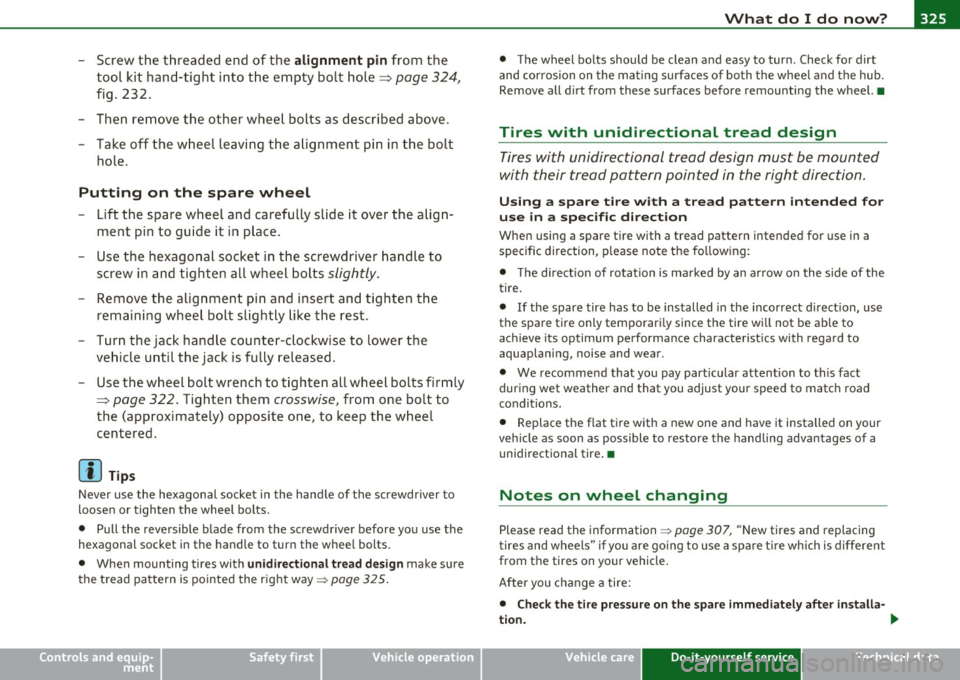
- Screw the threaded end of the alignment pin from the
tool kit hand-tight into the empty bo lt hole~
page 324,
fig. 232.
- Then re m ove the o ther wheel bolts as described above.
- Take off t he w heel leaving the alignment pin i n the bolt
hole.
Putting on the spare wheel
- Lift the spare wheel and carefully slide it over the alig n
ment pi n to guide it in p lace .
- Use the hexagona l socket in the screwdriver handle to
screw in and tighte n all w heel bolts
slightly.
- Remove the alig nment pi n and inse rt an d tighten the
remaining wheel bolt slig htly like the rest.
- Turn the jac k han dle counter-c lockwise to lower the
ve hicle u ntil the jack is fully released.
- Use the wheel bolt wrench to t ighten all whee l bolts firmly
~ page 322. Ti ghten them crosswise, from one bolt to
the (approximately) opposite one, to keep the w heel
centered.
[I] Tips
Never use the hexagonal socket i n the handle of the screwdriver to
loosen or tighten the wheel bolts.
• Pull the reve rsible blade from the screwdriver before yo u use the
hexagonal socket in the handle to t urn the whee l bolts.
• When mounting tires with
unidirectional tread design make sure
t he tread pa ttern is po inted the right way~
page 325.
Safety first
• The wheel bolts should be clea n and easy to turn. Check for dirt
and cor rosion on the mat ing surfa ces o f bo th the whee l and the hub.
Remove all d irt from these surfaces before remounting the wheel. •
Tires with unidirectional tread design
Tires with unidirectional tread design must be mounted
with their trea d pattern pointed in the right direction .
Using a spare tire with a tread pattern intended for
use in a specific direction
When using a spare tire w ith a tread pattern intended for use in a
specific direction, p lease note the fo llow ing:
• T he direct ion of rotation is marked by an ar row on the s ide of the
tire.
• If the spare tire has to be installed in the incor rect d irect ion, use
the spare tire only tempo rari ly since the tire wi ll not be ab le to
achieve its optimum pe rforma nce charact erist ics with rega rd to
aquaplaning, noise and wear.
• We recommend that you pay particular attention to this fact
during wet weather and that you adjust your speed to match road
condit ions.
• Replace the flat t ire with a new one and have it installed on your
vehicle as soon as possible to restore the handling advantages of a
unidirect iona l tire .•
Notes on wheel changing
Please read the information~ page 307, "New tires and replacing
t ires and wheels" if yo u are go ing to use a spa re t ire wh ich is d iffe rent
from the tires on yo ur vehicle .
After you c hange a ti re:
• Check the tire pressure on the spa re immediately after installa-
tion. ..,
Vehicle care Do-it-yourself service Technical data
Page 330 of 370
-L_!F~U:!_:S~ e~ s ~ a~ n~ d~b~ u~l~b ~s ~-------------------------------------------
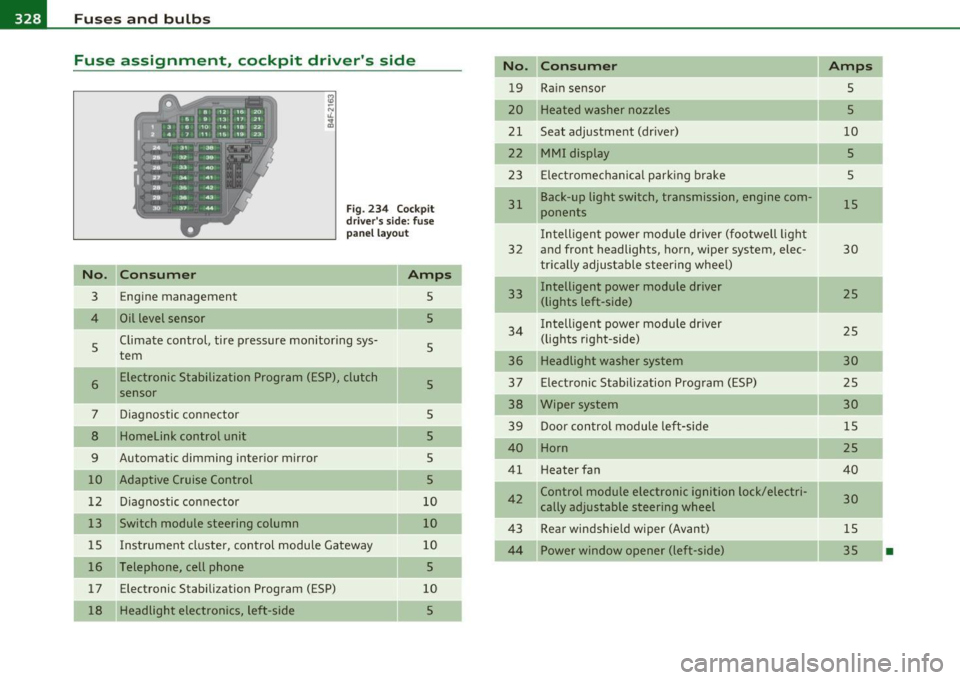
Fuse assignment, cockpit driver's side
Fig. 234 Cockpit
driver's side: fuse
panel layout
No. Consume r
3 Engine management
4
5
6
7
8
9
10
12
13
Oil level sensor
Climate control, tire pressure monitoring sys
tem Electronic Stabilization Program (ESP), clutch
sensor
Diagnostic connector
Homelink control unit
Automatic dimming interior mirror
Adaptive Cruise Control Diagnostic connector
Switch module steering column
15 Instrument cluster, control module Gateway
16 Telephone, cell phone
17 Electronic Stabili zation Program (ESP)
18 Headlight electronics, left-side
Amps
5
5
5
5
5
5
s
5
10
10
10
5
10
5
No. Con sum er
19 Rain sensor
20 Heated washer nozzles
21 Seat adjustment (driver)
22 MMI display
23 Electromechanical park ing brake
31
32
33
34
36
37
38
39
40
41
42
43
Back-up light switch, transmission, engine com
ponents
I ntelligent power module driver (footwell light
and front headlights , horn, wiper system, elec
trically adjustable steering wheel)
Intelligent power module driver (lights left-side)
I ntelligent power module driver
(lights right-side)
Headlight washer system
Electronic Stabilization Program (ESP)
Wiper system Door control module left-side
Horn
Heater fan
Control module electronic ignition lock/elec tri
cally adjustable steering wheel
Rear windshield wiper (Avant)
44 Power window opener (left-side)
Amps
5
5
10
5
5
15
30
25
25
30
25
30
15
25
40
30
15
35
-
•
Page 331 of 370

______________________________________________ F _u_s _e_ s_ a_ n_ d _ b _u_l_b _ s_---J _
Fuse assignment, cockpit passenger's side
No . Consumer
Fu se pa nel (bl ack )
1 Control module Convenience key
2 Cigarette lighter front
3 Tire pressure monitoring system
4 Electrical outlet front (center console)
5 Intelligent power module passenger
(glove box lock)
6 Door control module right-s ide
7 Sunroof
8 A/C cont rols
9 Heated seats, front
10 MMI
11 Seat adjustment (passenger)
12 Communication
Fu se pan el (brown )
1 Electr ic fuel pump
Fig . 235 Cockp it
passenger 's side : fuse
pa nel layo ut
Amps
15
20
5
20
15
15
-
20 1 0
30
7 ,5
10
5
20/30
Vehicle OP-eration
No. Consume r .,
2 Adaptive Air Suspension
3 Lane assist
4 Audi side assist
S Adaptive Air Suspens ion
6 Shift gate automatic transmission/clutch switch Parking System
9
10 Control module Gateway
Automatic headlight range control (a
uxiliary
driving lights) , headl ight electronics, right -side
Airbag
11 Heated rear seats
12 Telephone
Amps
15
10
5
5
5
5
5
5
5
5
5
Fuse assignment , luggage compartment
right
F ig. 236 R ight
luggage compartment:
fuse pane l layo ut
Re ad nu mber s of the fuses in the l ug ga ge comp art men t sta rti ng
from below ~ fig . 236.
•
Vehicle care Do-it-yourself service Technical data
Page 336 of 370

lffll.___E_ m_ e_r -=g =- e_ n_c -=y ;..._ s_i_t _u _a _ t_ i_ o _ n_ s ____________________________________________ _
Connect POSITIVE(+) to POSITIVE(+) (red)
- Open the red cover o n the posi tive po le => page 333,
fig . 237 .
1. Connect one end of t he positive cable (red) on the
jump
start bolt=>
page 333, fig. 238 (D (B olts under red cove r
= "positive") of t he vehicle to be star ted @.
2. Con nect t he ot her end to t he positive terminal @ of t he
booster battery @.
Connect NEGATIVE(-) to NEGATIVE(-)
(black)
3 . Co nnect one end to th e n egative t ermin al@ of t he
b oost er batter y@ .
4. Con nect the o ther e nd of th e nega tiv e cabl e (b la ck) to the
jump start bolt© (Bolts wi th hex hea d= "n ega tiv e") of
the v ehic le t o b e sta rted
@ .
Starting the engine
- S ta rt the e ngi ne of t he ve hic le with the booster battery.
R un the e ngi ne at a moderate speed.
- Star t engi ne wi th discha rged vehi cle battery in the usual
ma nner.
- If the engine fails to start: do not keep t he star ter
c ran kin g f or l onge r tha n 1 0 seco nds . W ait f or a bo ut
3 0 seco nds an d the n try aga in .
- Wi th eng ine ru nn ing , rem ove jum per cables from bot h
v ehic les i n the exact
re ve rs e orde r.
- C lose the red cover on the posi tive po le.
The battery is vented to the outside to prevent gases from enter ing
th e ve hicl e int erior. Ma ke sure th at th e jum per cl amp s are well
connected w ith t he ir
metal parts in full contact w ith the batte ry
terminals .
& WARNING
To avoid serious personal injury and damage to the vehicle, heed
all warnings and instructions of the jumper cable manufacturer. If
in doubt, call for road service.
• Jumper cables must be long enough so that the vehicles do not
touch.
• When connecting jumper cables , make sure that they cannot
get caught in any moving parts in the engine compartment .
• Before you check anything in the engine compartment, always
read and heed all WARNINGS~
page 271, "Engine compart
ment ".
0 Note
Improper hook-up of jumpe r cables can ruin the generator.
• Always connect POSI TIVE(+) to POSI TIV E(+ ), and NEGA TIVE( -)
to NEGATIVE( -) ground post of the batte ry manage r contro l unit.
• Check t hat all sc rew p lugs on the battery cells are screwed in
firmly . If not, tighten plugs prior to co nnecting clam p on negative
battery terminal.
• P lease note th at the p roce dure for connec ting a jumper cab le as
described
a bove ap pli es specifically to the case o f yo ur vehicle be ing
jump starte d. When you are giving a j ump sta rt to anot her vehicle, do
not con nect the negative (-) cab le to t he negat ive (-) termina l on the
discharged battery ©~
page 333, fig. 238. Instea d, secure ly
c o nnec t the neg ative (- ) cable to ei ther a soli d met al c o m ponen t that
is firm ly bolted to the eng ine b lock or to the eng ine b lock itself .
If the
b att ery th at is being ch arged does not
ven t to th e ou tside, es caping
battery gas could ignite and exp lode! •
Page 340 of 370

lffll.___E_ m_ e_ r-' g=- e_n_ c=-y _ s_it _ u _ a_t_ i_ o _ n_ s ______________________________________________ _
in. WARNING
• To reduce the risk of serious injury and vehicle damage.
-Always lift the vehicle only at the special workshop hoist and
floor jack lift points illustrated=>
page 337, fig. 243 and
=>
page 337, fig. 244.
- Failure to lift the vehicle at these points could cause the
vehicle to tilt or fall from a lift if there is a change in vehicle
weight distribution and balance. This might happen, for
example, when heavy components such as the engine block or
transmission are removed.
• When removing heavy components like these, anchor vehicle
to hoist or add corresponding weights to maintain the center of
gravity. Otherwise, the vehicle might tilt or slip off the hoist,
causing serious personal injury.
0 Note
• Be aware of the following points before lifting the vehicle :
-The vehicle should never be lifted or jacked up from under
neath the engine oil pan, the transmission housing, the front or
rear axle or the body side members. This could lead to serious
damage.
- To avoid damage to the underbody or chassis frame, a rubber
pad must be inserted between the floor jack and the lift points.
- Before driving over a workshop hoist, check that the vehicle
weight does not exceed the permissible lifting capacity of the hoist.
- Before driving over a workshop hoist, ensure that there is sufficient clearance between the hoist and low parts of the
vehicle. •
Page 350 of 370

___ C=-.:: o...:.n...:. s =-.:: u:..:m...:....:. e.::..:.. r:....: I:.. n:...:....:. f...:.o :....:r...:. m...:....:. a.::.:....:: t...:.io .::..:. n-=-----------------------------------------------
& WA RNING (conti nu ed )
• Always rem ove the ignition key before anyone get s under the
vehicle .
• Always support your vehicle with safety stands if it i s nece ssary
to work underneath the vehicl e. Th e jack supp lied with the vehicle
is not adequate for thi s purpose and could collap se causing
seriou s personal injury .
• If you must work underneath the vehicle with the wheels on
the ground, a lway s make sure the vehicle is on level ground, that
the wheels are alway s securely blocked and that the engine cannot
be started .
• Always make sure the transmi ssion selector lever (automatic
tran smission ) is in "P " (Park po sition ) and the park brake is firmly
applied.
For the sake of the environment
• Changing the engine settings will adversely affect emission levels .
Thi s is det rimenta l to the envi ronme nt and increases fue l co nsump
tion.
• Always observe enviro nmental regulations when disposing of old
engine oi l, used brake fl uid, dirty engine coo lant, spent batteries or
worn out t ires.
• Undep loyed a irbag modules an d pretens ioners migh t be classified
as Pe rchlorate Mater ia l -spec ial handling may apply, see
www.dtsc.ca.gov/hazardouswaste/perchlorate . When the vehicle or
parts of the rest raint system includ ing a irbag modu les safety belts
w ith pretens ioners are scrapped, all applicable laws and regulat ions
must be obse rved. Yo ur author ized Aud i dealer is f amiliar wi th t hese
req uirements and we recommend that you have your dealer perform
t his se rvi ce f or yo u.•
Additional accessories,
modifications and parts
replacement
Additional accessories and parts replacement
A lways consult an autho riz ed Au di dealer bef ore
purchasing access ories.
Your vehicle incorporates the latest safety desig n featu res ens uring a
hig h standard of active and passive safety .
Th is safety co uld be compromised by non-app roved changes to the
vehicle. Fo r this reaso n, if par ts have to be replaced, p lease observe
the following points when installing addit ional accessories :
Approved Audi accessories and genuine Aud i parts are available from
author ized Aud i dea lers.
T hese dea lers a lso have the necessary fac ilities, tools and tra ined
specialists to i nstall the parts and a ccessor ies p roperly.
& WARNING
Using the wrong spare parts or u sing non-approved acces sorie s
can cause damage to the vehicle and serious personal injury.
• Use only accessories expressly approved by Audi and genuine
Audi spare parts
• These parts and accessories have been specially designed to be
used on your vehicle .
• Never install accessories such as telephone cradles or beverage
holder s on airbag covers or within the airbag deployment zones .
Doing so will increase the r isk of injury if airbags are triggered in
an accident!
• Before you check anything in the engine compartment , always
read and heed all WARNINGS~
page 271. _..
Page 354 of 370

___ A_l_,_ p _ h_ a _ b_e _ t_ i_c __ a _l _i_n :...::d __ e::..: x:...::...,_ _________________________________________ _
A Temporarily turning off .......... . 124
warning/indicator lights .... ...... . 127
Danger of fitting a child safety seat on the
front passenge r seat ............
199
Accessories ..... ................... 348 Adaptive Light ......... ....... .. .. .. 61 Disposal .................. .. .... 211
Adapter for cupholder ................ 89 defective ........................ 32 Front airbags ......... ... .... 201, 202
Adaptive Air Suspension ............. 168
Automatic mode .. .. ... .... ...... 169
Comfort mode ................... 169
Description ..................... 168
Dynamic mode ... .. ... ...... .... 169
Jacking mode when changing a flat tire ...
170
Lift mode ....................... 169
Setting the driving modes ......... 169
Trailer towing mode .............. 170
Warning/indicator lights .... ....... 16
Adaptive Cruise Control ......... ... .. 119
Changing speed ....... ........... 123
Driver information .............. .
Driver intervention prompt ...... . . Adding
Engine coolant ........... ...... .
287
Engine oil ............ ...... ..... 284
Windshield washer fluid ........... 294
Additional accessories ............... 348
Additives
Engine oil ............ .. .........
284
Adjusting
Instrument cluster illum ination .....
11
Steering column electrically ........ 107
Steering column manually .. .. .. .. . 106
Adjus ting front seats ................. 75
Air conditioning
See Climate controls ...............
96
Air distribution How do the front airbags work?
.....
206
How many airbags does my vehicle have? .
204
How the Advanced Airbag System compo-
nents work together ............
205
Important things to know ... .. .. .. 197
Indicator light ................... 208
Monitoring ... .................. 208
PASSENGER AIR BAG OFF light ..... 209
Repairs ............ .. .. .. ...... 211
Safety instructions ............... 210
Side airbags .... .... ............. 213
Side curtain airbags .............. 216
Weight-sensing mat ..............
220
When must the system be inspected? 208
All Wheel Drive ... ... ............... 248 Dr iv ing in traffic ................ .
Driving program .. ...... ........ .
127
130
120
131
Climate controls 100 Alloy wheels ................. .... .. 265
Error messages . .. .. .... ........ .
Open road ... .. .. .. .. ....... ... . 129 Air pollutants filter
120 Climate controls .................. 96
All-wheel drive
Winter tire s .....................
311
Override ...................... .. 120 Airbag
Alternator
Request for driver to assume control
120 Warning/indicator lights ..... ...... 14 Malfunction ........ .............. 26
Save speed . ...... .. .. ........... 122 Airbag system .................. 197,214 Ambience lighting
Setting distance .. ...... ...... .. .
125 Advanced Airbag System .......... 201 Lighting profiles .. .. .............. 64
Setting time interval .............. 125 Advanced Airbag System components 204 Anti-freeze
Settings ...................... ..
131 Care ... .. .......... ....... .. .. . 211 See Engine coolant system ......... 286
Special driving situations .......... 131
Status messages ................. 129
Switching on and off .............. 122
System limits ................... 131
Child restraints .................. 221
Children ........................ 220
Components (front airbags) ... ..... 204
Anti-glare inside day-night mirror .... 69, 70
Anti-lock brake system
How the ABS system works ...... ..
246
Warning/indicator lights ........... 17
Page 355 of 370

Alphabetical index -________________ fWI
Anti-Slip Regulation System (ASR)
How the system works ....... .. .. . 244
Anti-theft systems Anti-theft alarm system ....... ... .. 49
Electronic immobilizer ............. 40
Ashtray Front .............. ...... .. .. .. .. 91
Rea r ........ .... .. .. ... ......... 91
ASR How the Anti-Slip Regulation System works . ...... .. ... .. .. ......... 244
Asterisk What does it mean when something is
marked with an asterisk? ........... S
Audi Service Repair Manuals and Literature
346
AUTO mode AC climate controls ...... .... .. .. .. 99
Auto Safety Hotline .... .. .. .. ....... 185
Auto-Check Control .. ........ .... ... .. 24
Automatic belt retractor ............. 191
Automatic car wash
See Washing ....... .. .... .. .. .. . 261
Automatic Shift Lock (ASL) ..... .. 148, 155
Automatic transmission 6-speed automatic transmission ... . 146
Automatic Shift Lock (ASL) .... 148, 155 Driving ............ .. .. .. .. .... . 146
Dynamic shift program ... .. .. .. .. . 149
Emergency release for selector lever . 152
Emergency release for selector lever
(mu ltitron ic®) .............. .... 159
Fail-safe mode .............. 151, 158
Controls and equip
ment Safety first
Ignition key safety lock
.... ... .. .. . 109
Kick -down . .. .. .... .. .. .. ....... 149
Manual shift program .. ... ... .... . 150
multitronic ® ....... ... ... .. .. ... 152
Selector lever .... .. .. .. .. .. . 147, 154
Shift buttons . ........... ... 151, 158
Steering wheel with tiptron ic® . 151, 158
Average speed .. ... .... .. .. .. .... .... 34
Avoid damaging the vehicle ........... 252
B
Battery ... ..... .................... 290
Battery location ins.ide the luggage
compartment . ........ ......... 291
Charging ................ .... .. .. 292
Important warnings when wo rk ing on the
battery . .. .. ..... ....... ... .. .. 291
Jump starting ..... ...... ..... .. .. 332
Low ..... .. ... ..... .. ....... .... 249
Replacing the battery .. .. ... ...... 294
State of charge .... ... ........... 249
Voltage ................. .. .. .. .. . 31
Winter operation ...... .. .. .. ..... 290
Working on the battery .... ... .. .. . 291
Before driving .. ... ... .. ... .. .. .. .. . 177
Blended gasoline ................... 273
Body cavity seal ing . ...... .. ......... 266
Booster seats . .. .. ........ ......... 227
Brake assistant ...... ............... 247
Brake booster . ........ ... ... .. .. ... 246 Brake fluid
Changing the brake fluid ....... .... 289
Checking the brake fluid level ....... 289
Reservoir . .... .. .. ... .... ... ... . 289
What is the correct brake fluid level? . 289
What should I do if the brake fluid warning
light comes on? . ................ 289
Brake light Defective ... .. ................... 21
Brake system . .. .. .. .. .. ... ..... .. .. 289
Anti-lock brake system ............. 17
Brake fluid ........ ............. . 289
Brake fluid spec ificat ions for refil l and
replacement . .... ....... ... ... . 289
Brake pads .. .. .. .. ...... .. .. .. .. 252
Electromechanical parking brake ... . 113
General informat ion ..... ...... .. . 245
How does moisture or road salt affect the
brakes? ... .................. .. 245
Malfunction ...................... 26
Warning/indicator lights ... .. .. .. .. 18
Worn brake pads symbol ........... 31
Break -in period ... .. .. .............. 251
Brake pads . ... ................ .. 252
Tires ... .... .................... 251
Bulbs .................. .. .. .. .. ... 330
Bumper cover Caution when parking near a parking barri-er or curb . ................... .. 114
C
California Proposition 65 Warning ..... 280
Battery specific .... .............. 292
Vehicle operation Vehicle care Do-it-yourself service Technical data