2011 AUDI A5 COUPE mirror
[x] Cancel search: mirrorPage 163 of 362

______________________________________________________ P_a _ r_ k_ a_ s_s _i _ s _t __ _
Sensors in the bumper
Sensors are located in the rear bumpers . If these detect a n obsta cle,
audib le and visual sig nals wa rn you. The range at w hich the sensors
beg in to measure is approximately:
T o the sid e
2 ft (0. 60 m)
Center rear 5 .2 ft (1.60 m)
Distan ce warning when reversing s tarts w hen an obsta cle is detec ted
in the range of the parking ass ist system. As the d ista nce decreases,
t he time in te rval between the audib le tones becomes shorter .
When the dis tance is less tha n 1ft
(0.30 m), the tone becomes
cont inuo us. At th is point yo u should stop back ing up.
If the dis tance to an obs tacle stays the s am e, t he volume o f the
distance signal chime is grad ually reduced after about
4 seconds
(does not affe ct the conti nuous signal tone) . App roac hing an oth er
obs tacle w ill cause the distance sig nal to sound aga in at t he normal
vol ume.
Rear view camera coverage area
Th e MM I display s hows the area covere d by the rea r view c amera
=>
page 160, fig. 15 5 G). Objects that a re not in the area covered @
are not s hown on the MMI dis play .
W e recommend that you prac tice parking w ith th e rear v iew camera
in a traff ic-free location o r parking lot to become fam iliar with the
system, the or ientat ion lines, a nd their functi on . W hen doing this,
there should be good light and weathe r cond itions.
I n the MMI di spla y, obje cts o r ve hicl es appea r closer or fu rt h er aw ay
if:
• you are dr iv ing in reverse gea r from a level sur face onto an incline,
or a dow nwar d slop e,
• you are drivin g in reverse gear toward protrud ing ob jects,
• t he vehicle is ca rry ing too much load in the rear.
T he accuracy of the orientat ion lines and blue s urfaces d imin ishes if :
Controls and equip
ment Safety first
• t
he rear view camera does not provide a re liable image , fo r
ex am ple, in po or visib ility co ndi tion s or if the lens is dir ty,
• the image on the screen is not visible due to sun g la re and reflec
t io n.
Caring for the rear view camera lens
The re ar view came ra is locat ed above the r ear license pla te br acket .
For the pa rking ass ist to operate, the lens =>
page 160, fig. 156 m ust
be ke pt clean:
• Dampen the lens wi th a household alcoho l-based glass cleaner,
and clean the lens wi th a d ry cloth => 0.
• Remove snow with a hand br us h and ice preferab ly w it h a de- icing
sp ray =>0.
& WARNING
• The parking aid cannot replace the driver's attention. The
driver alone is responsible for parking and similar driving maneu •
vers.
• Always keep your eyes on the vehicle 's surroundings, using the
rear view mirror as well.
• Do not allow yourself to be distracted from traffic by the rear
view camera pictures.
• If the position and the installation angle of the camera has
changed, for example, after a rear end collision, do not continue
to use the system for safety reasons. Have it checked by a qualified dealership .
0 Note
• Low obstacles a lready s ignaled by a wa rning can disapp ea r from
the system's detection range as they are approached and will not
co ntinu e to be signaled. O bje cts such a s barrier c hains , trailer draw
bars, thin painted vertical po les or fences may not be detected by the
sys te m , pos ing r isk of d amage. _..
Vehicle care Technical data
Page 165 of 362
___________________________________________________ P_ a _ r_k :...:.; a..::s ...:s...: i..::s ...:t _ ___,J_
Fig. 158 MMI D isplay:
Ali gning the vehicl e
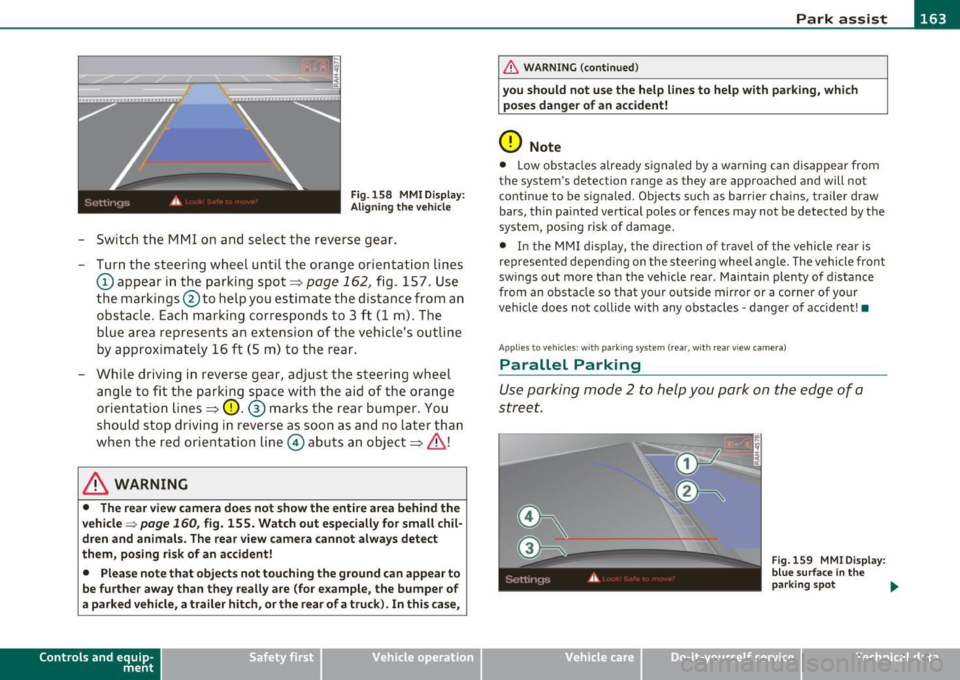
-Switch the MMI on and se lect the reverse gear .
- Turn the steering wheel until the orange orientation lines
(D appear in the parking spot=> page 162 , fig. 157. Use
the markings @to help you estimate the distance from an
obstac le. Each marking corresponds to 3 ft (1 m) . The
b lue ar ea represents an extension of the vehicle's outline
by approximately 16
ft (5 m) to the rear .
- While driving in reverse gear, adjust the steering wheel ang le to fit the parking space with the aid of the orange
orientation lines =>
0. ® marks the rear bumper . You
should stop driving in reverse as soon as and no la ter than
when the red orientation line© abuts an object=>& !
& WARNING
• The rear view came ra does not show the enti re area beh ind the
v ehicle =>
page 160, fig. 155. Watch out e spe cially fo r s mall chil ·
dren and animal s. The rear v iew cam era cannot alwa ys dete ct
them , posing ri sk of an accident!
• Plea se note that obje ct s not tou ching the groun d can appear to
be further awa y than th ey reall y are (for example , th e bum per of
a parked vehi cle, a trailer hit ch , or the r ear of a truck) . In thi s case ,
Con tro ls a nd e quip ·
m en t Vehicle
OP-eration
& WARNING (con tin ued)
you sh o uld not use the help lin es to help with p arking , whic h
po se s dang er of an accident!
0 Note
• Low obstacles a lready signaled by a wa rning c an disappear from
the sys tem's de te ct ion range as they are app roached and will no t
conti nue to be signaled . Objects such as barrier cha ins, trailer draw
bars, thin painted ve rtical poles or fences may not be detected by the
system , posing risk of damage.
• In the MMI display , the direc tion o f travel o f the vehicle rear is
represen ted depend ing on the steering whee l angle. The vehicle front
swings out more than the veh icle rear . Maintain plenty of distance
from an obstacle so that your outside mirror or a corner of your
vehicle does not collide with any obstacles -danger of accident !•
Ap plie s to veh icle s: with pa rk ing syst e m (r ea r, wi th rear vie w cam era)
Parallel P arking
Use parking mode 2 to help you park on the edge of a
street.
Vehicle care
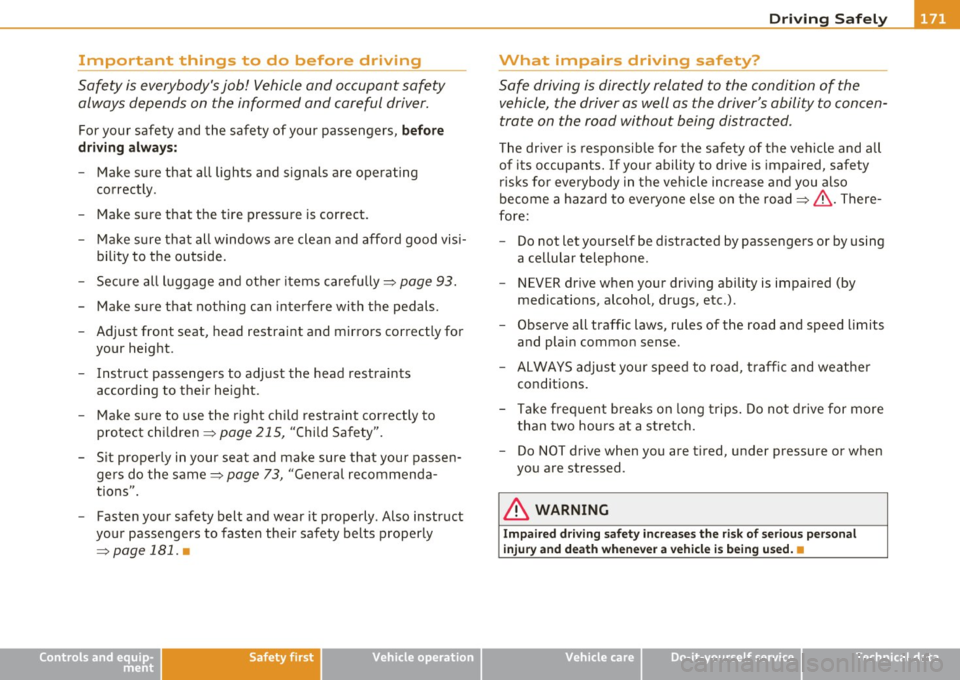
Fig. 159 MMI Di spl ay :
blue surface In the
p arking s pot
~
Do-it-yourselt service iTechnical data
Page 167 of 362

Park assist IIJII _________________________________ _____;.....:;_;_.:..:,____;;_ ____ _
0 Note
In the MMI display, the d irect ion of t ravel of the vehicle rear is rep re
sented depend ing on the steering wheel angle. The vehicle front
swi ngs ou t mo re t han t he ve hicle re ar. M ain tain ple nty of dist ance
from an obstacle so t hat your outs ide mirror or a corner of your
vehicle d oes no t collide with any o bstacles - dange r of accide nt!
[ i ) Tips
Th e left or right or ientat ion lines and s urfaces will be displ aye d,
depending on the tu rn signal being used. •
App lies to veh icles : with park ing syst em (rear, wit h rea r view cam era)
Adjusting the display and warning tones
The display and warning tones are adjusted in the radio
or fv1fv1 I*.
-Select : [CAR]> Parking system.
Display
• Off -
when the parking system is switched off, only aud ible sig nals
are given.
• On -when the pa rking system is switc hed on, the pic ture from the
rea r view camera is displayed.
Warning tones
• Rear volume -rear sensor vo lume
• Rear frequency -rear sensor frequency
• In-car entertainment fader -when the par kin g sys tem i s sw itched
on, the volume of the active audio source is lowered.
T he newly a djusted value is br iefly hear d from the signal generator .
T he settings are automatica lly stored and assigned to the remote
cont rol key.
Controls and equip
ment Safety first
& WARNING
•
Always make sure that the volume and frequency of the
warning tones i s adju sted so that you can easily hear the acou stic
distance signal even if the radio is playing , the air-conditioner
blower is on High or there is a high level of outside noise.
• Check the settings whenever someone else has driven the
vehicle before you.
[I] Tips
• Th e warning tones can also be ad justed directly from the rea r view
camera image . Simply p ress the
[Settings I* cont rol b utton .
• C han ged settings are a ctivat ed w hen parking assist is switched on
again .•
A pplies to v ehicl es: w ith park ing syst em (r e a r, wi th re ar view cam era)
Error messages
If a warni ng tone is aud ible fo r about five se conds when yo u turn on
the ignition, the re is a ma lfunction in t he system. Have the prob lem
co rrected by yo ur a utho rized Audi dea ler .
K eep the se nsors in the rear b umper clean and free from i ce s o th at
the acoustic pa rk assist system can function p roper ly .•
Vehicle care Technical data
Page 173 of 362
Driving Safely ---------------------"~'---
Important things to do before driving
Safety is everybody's job! Vehicle and occupant safety
always depends on the informed and careful driver.
For your safety and the safety of your passengers, before
driving always:
- Make sure that all lights and signals are operating
correctly.
- Make sure that the tire pressure is correct.
- Make sure that all windows are clean and afford good visi-
bility to the outside.
- Secure all luggage and other items carefully::::>
page 93.
-Make sure that nothing can interfere with the pedals.
- Adjust front seat, head restraint and mirrors correctly for your height .
- Instruct passengers to adjust the head restraints according to their height.
- Make sure to use the right child restraint correctly to
protect children ::::,
page 215, "Child Safety".
- Sit properly in your seat and make sure that your passen gers do the same::::,
page 73, "General recommenda
tions".
- Fasten your safety belt and wear it properly. Also instruct
your passengers to fasten their safety belts properly
=:> page 181. •
Controls and equip
ment Safety first Vehicle operation
What impairs driving safety?
Safe driving is directly related to the condition of the
vehicle, the driver as well as the driver's ability to concen
trate on the road without being distracted .
The driver is responsible for the safety of the vehicle and all
of its occupants. If your ability to drive is impaired, safety
risks for everybody in the vehicle increase and you also
become a hazard to everyone else on the road::::,,& . There
fore:
Do not let yourself be distracted by passengers or by using
a cellular telephone.
NEVER drive when your driving ability is impaired (by
medications, alcohol, drugs, etc.).
- Observe all traffic laws, rules of the road and speed limits
and plain common sense .
- ALWAYS adjust your speed to road, traffic and weather
conditions.
- Take frequent breaks on long trips. Do not drive for more than two hours at a stretch.
- Do NOT drive when you are tired, under pressure or when
you are stressed .
& WARNING
Impaired driving safety increases the risk of serious personal
injury and death whenever a vehicle is being used.•
Vehicle care Do-it-yourself service Technical data
Page 253 of 362

Trailer towing
Driving with a trailer
General information
Your Audi was designed primarily for passenger transpor
tation.
If yo u plan to tow a t rai ler, p lease rem emb er that the add itiona l load
wi ll affect durab ility, economy and performance.
T railer tow ing not on ly p laces mo re s tress on the vehicle, it a lso calls
for more concentrat ion from the driver.
For this reason, a lways follow the ope rating and dr iv ing instr uctions
prov ided and use common sense .
Technical requirements
Trailer hitch
Use a weight-carrying hitch conforming to the gross trailer weig ht.
Th e hitch mus t be suitable for yo ur vehicle a nd tra ile r and mus t be
mounted secure ly on the vehicle's chassis at a
technically sound l oca
t ion. Use only a trailer hitch wi th a remov ab le b all m ount. Alw ays
check w ith the tra iler hitch manufacturer to make sure that you are
using t he cor re ct hi tch.
Do not use a bumper hitch.
The h itch must be installed in such a way t hat it does not interfere
w ith the impa ct-absorbing b umper system. No mod ifi cat ions sho uld
be made to the vehicle exhaust and brake systems. From time to
ti me, chec k tha t all hitc h mou ntin g bol ts rem ain secure ly f aste n ed.
When you a re not tow ing a tra iler, remove the tra iler hitch ba ll
mount. This prevents the hitc h from caus ing damage should yo ur
vehicle be struck from behind=> &.
Controls and equip
ment Safety first Vehicle operation
Trailer brakes
If your trailer is eq
uipped with a braking system, check to be s ure that
i t confo rm s to all regula tions.
The tra iler hydraulic brake system must not be directly connected to
the vehicle's hydraulic brake system=>& .
Safety chains
Alw ays use safety chains be twee n your vehicle and the trai ler.
Trailer lights
Tr ailer l ights m ust meet all reg ulat io ns. Be su re to check with your
author ized Audi deale r for correct wir ing, switches, and re lays.
Mirrors
If you are unab le to see the traffic behind you us ing the regular
outside m irro rs, then you
must install extended m irro rs. It is impor
tant that yo u
always have clear vision to the rear.
& WARNING
• If a trailer has electrical b rake s please note that these brakes
are not activated by the factory-fitted control unit -ri sk of acci
dent!
• After removing the trailer hitch , do not store it in your vehicle.
In case of sudden braking, the hitch could fly fo rward and injure
you or your passengers. •
Operating instructions
Maximum trailer we ight
A trailer for your vehicle is limited to a typical class 1 or class 2 trailer . .,.
Vehicle care Do-it-yourself service Technical data
Page 262 of 362

-~_C_ le_ a_n_ i_ n_ g=- a_ n_d__. p_ ro_ t_e _c_ t_ i_o _n ___________________________________________ _
Plastic and vinyl
Plastic needs special care.
Use a clean, damp cloth or sponge to remove dust and light surface
dirt. For other soil, use a lukewarm all-purpose cleaning solution or a
mild saddle soap for vinyl trim . Remove water spots and traces of
soap with a clean, damp cloth or sponge. Use a clean, soft cloth to rub
dry.
Grease, tar or oil stains can be removed with a clean cloth or sponge
soaked with all-purpose cleaner or with a solvent designed especially
to clean vinyl.
Occasionally apply a colorless vinyl or leather preservative to retain
the material's luster and pliability.
& WARNING
Always read and heed all WARNINGS and other information
:::> page 256. •
Aluminum trim
Use only neutral-pH products to remove spots and deposits from
aluminum surfaces. Chrome care products and alkaline cleaners will
attack aluminum surfaces and can damage them over time .
& WARNING
Always read and heed all WARNINGS and other information
=>page 256. •
Touch-up paint
Minor paint damages should be touched up immediately.
- Use either a touch-up paint stick or spray paint to cover
minor scratches and nicks.
Your authorized Audi dealer has touch-up paint for minor scratches
and stone chips. Scratches should be touched up soon after they
occur to prevent corrosion.
If a spot starts to rust, however, a simple touch-up job will not be
enough. The affected surface must be sanded smooth and coated
with an anti-rust primer before the painted finish can be restored.
The number for the original vehicle paint can be found on the vehicle identification label=>
page 336.
& WARNING
Always read and heed all WARNINGS and other information
=>page 256. •
Windows
Clear vision to all sides.
Clean all windows regularly to remove road film and car wash
wax buildup.
- Remove snow from windows using a brush.
- Use a plastic ice scraper to remove ice from windows and
mirrors.
- Remove other residue on the windows with a spray-on glass cleaner.
- Wipe the windows dry with a clean piece of cloth or
kitchen paper towel.
Page 263 of 362

____________________________________________ C_l_e _a_ n_ i n--= g=--- a_n_ d----' p,__ r_o _t_ e_ c_ t_ i _o_ n __ _
The best way to remove snow from windows and mirrors is to use a
brush. Use a non-abrasive
plastic ice scraper -better still, a spray
deicer -to remove
ice from windows and mirrors.
Th e windows must not be cleaned with insect remover or wax since
these can interfere with the function of the windshie ld wipe r blades
(chatter).
Oil , grease, or silicone residue can be removed with
glass cleaner or
silicone remover. However, wax residue requires the use of a specially
formulated solvent . P lease contact your authorized Audi dea le r for
advice on safe products for wax removal.
Windows should also be cleaned on the inside at regular intervals .
Never dry windows w ith the same chamo is that you use to dry painted
surfaces. Wax residue on the chamois can impair vision through the
windows.
& WARNING
• Always read and heed all WARNINGS and other information
=> page 256.
• The windshield must not be treated with water-repellent
materials. They can increase glare under poor visibility conditions
such as wetness, darkness, or when the sun is low on the horizon.
In addition, they can cause the windshield wipers to chatter.
0 Note
• Never use warm or hot water to remove snow and ice from
windows and mir rors . This could cause the glass to crack.
• To prevent damage to the wires of the rear defogger, do not place
any adhesive stickers on the inside of the rear window over the wires.
• T o help prevent dirt from scratching the window, a lways scrape in
a forward direction -pushing the scraper away from you -never back
and forth.
• Water leaking from the inside of the rear windows may damage
sensitive e lectrica l components located either under the rear parce l
Safety first
shelf or in the rear trunk area. Always ensure that water never leaks
t hrough the body section of the vehicle . You can do this by using
waterproof protection over the vehicle's electrical components (e .g.
when installing window tinting).
• Damage or malfunct ion of electrical components due to water
damage or any other outside influence is not covered by the Audi New
Vehicle Limited Warranty. See your Warranty
& Ma intenance booklet
for additional details about your warranty .•
Weatherstrips
Complete car care includes the weatherstrips as well.
-Apply a suitable rubber conditioner to the weatherstrips
from time to t ime.
To be able seal properly, the weatherstrips around the hood, doors,
rear lid, etc. must remain pliable. Spray the weatherstrips with sili
cone or coat them with talcum powder or glycerin to reta in the flexi
bility of the rubber and to protect them against freezing in the
wi nter.
& WARNING
Always read and heed all WARNINGS and other information
=> page 256.
[ i ] Tips
Keep silicone sprays off the windshield to avoid wiper smear in rain .•
Cast (Light) alloy wheels
Cast (light) alloy wheels require special care.
- Wash the wheels with a sponge or hose brush every other
week. _,.
Vehicle care Technical data
Page 326 of 362

-Fuses and bulbs
~-;,_;__:_:_;..:..:.:....::~=---------------------------
Left cockpit fuse assignment
No. C onsumer
Fu se p anel@ (bla ck )
1 Dynamic steering
3 Homelink
5 Climate control
6 Right headlight range adjustment
7 Left headlight range adjustment
F ig. 229 Left cockpit:
f use panel w ith p lastic
clip
Amps
5
5
5
8 Vehicle electrical system control module 1
5
5
5
5 9 Adaptive Cruise Control No. Con
sumer Amps
10 Shift gate 5
11 Heater washer fluid nozzles 5
12 Climate control 5
13 Cell phone prep 5
14 A irbag 5
15 Terminal 15 25
16 Terminal 15 engine
40
Fuse panel ® (brow n)
1 Automatic dimming interior rearv
iew mirror
5
2 Clutch sensor 5
3 Gasoline fuel pump
25
5 Left
seat heating with/without seat heating
15/30
6 Elect ronic Stabilization Program 10
7 Horn
25
8 Left door w
indow regulator motor
30
9 Wiper motor 30
10 Electronic Stabilization Program 25
11 Left doors 15
12 Ra in and light sensor 5
Fuse p an el © (red )
3 Lumbar support 10
4 Dynamic steering 35
5 Antenna (Avant)
5
6 Vehicle electrical system control module 1 35
7 Vehicle electrical system control modu le 1 20