Page 288 of 562
Press this button to cancel the
current screen and return to the
previous screen. This button switches the display
between day mode, night mode, and
of f (see page ). Press the button to display the set up
screen (see page ) to change and
update inf ormation in the system. Press this button to display thescreen (see page ).
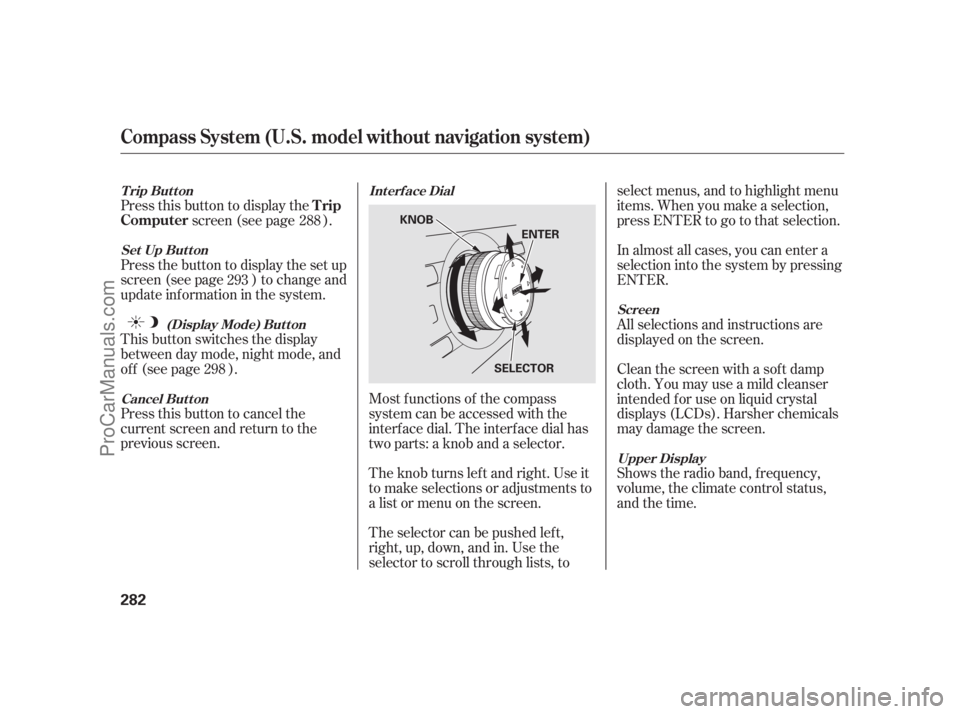
Most f unctions of the compass
system can be accessed with the
interf ace dial. The interf ace dial has
two parts: a knob and a selector.
The knob turns lef t and right. Use it
to make selections or adjustments to
a list or menu on the screen.
The selector can be pushed lef t,
right, up, down, and in. Use the
selector to scroll through lists, to select menus, and to highlight menu
items. When you make a selection,
press ENTER to go to that selection.
In almost all cases, you can enter a
selection into the system by pressing
ENTER.
All selections and instructions are
displayed on the screen.
Clean the screen with a sof t damp
cloth. You may use a mild cleanser
intended f or use on liquid crystal
displays (LCDs). Harsher chemicals
may damage the screen.
Shows the radio band, f requency,
volume, the climate control status,
and the time.
288
293
298
Int erf ace Dial
Cancel But t on (Display Mode) But t on
Set Up But t on
Trip Button
Screen
Upper Display
Trip
Computer
Compass System (U.S. model without navigation system)
282
KNOB
ENTER
SELECTOR
10/08/04 19:30:03 31SJA660_287
ProCarManuals.com
Page 291 of 562

The vehicle ‘‘senses’’ the driver
number, based on which keyless
remote is used to unlock the vehicle.
If two drivers with remotes approach
thevehicleatthesametime,the
welcome display and related settings
are based on which remote the
vehicle f irst ‘‘senses.’’If both remotes come within
range simultaneously, the
‘‘Welcome’’ display may be
unpredictable.
The compass system uses the driver
number (as recognized by the multi-
inf ormation display) to personalize
the compass system. For example, if
Driver 1 unlocks the vehicle, the
‘‘Driver 1’’ personal address book
and other navigation settings are
automatically loaded when the
vehicle is started. There is no way to
change f rom one driver’s settings to
another while driving. For inf ormation on ‘‘linking’’ and
‘‘unlinking’’ the keyless access
remotes, see page .
The calendar f eature is not
selectable (buttons grayed out).
Setup values (like volume,
brightness, etc.) can be changed
but are not remembered the next
time you restart the vehicle.
When the keyless access remote is
deliberately ‘‘unlinked,’’ (as when
giving the remote without the built-in
key to a valet) the multi-inf ormation
display will display ‘‘Welcome.’’ Then
the f ollowing occurs:
174
K eyless Memory Settings
Compass System (U.S. model without navigation system)
Features
285
NOTE:
TM
10/08/04 19:30:36 31SJA660_290
ProCarManuals.com
Page 295 of 562

The calendar f eature allows you to
enter events and be reminded of
them in the future.
When you say ‘‘Calendar’’ or select
the on the
screen, the display changes to thescreen.
Dates with an icon indicate there is a
schedule entry f or that date.
Shows the estimated distance you
cantravelonthefuelremainingin
the tank. This distance is estimated
f rom the average f uel economy over
the last several miles, so it will vary
withchangesinspeed,traffic,etc.
The average fuel, average speed, and
elapsed time meters can be reset
automatically (see page ).
The ‘‘Range’’ value is approximate,
and may vary from actual range. The ‘‘Average Fuel’’ and ‘‘MPG’’
may vary f rom actual f uel
consumed. These values are
estimates only.
Shows the instantaneous f uel
economy in miles per gallon.
Shows you the instant f uel economy
in miles per gallon.
Shows you the average f uel economy
in miles per gallon since the display
was last reset.
Shows the elapsed time that the
ignition has been on since the display
was last reset.
Shows you the average speed in
miles per hour since the display was
last reset.
75
Range
MPG
Instant FuelAverage Fuel
Elapsed TimeAverage Speed
CONT INUED
Calendar
Resetting the Display
Calendar Main Menu
Calendar
Compass System (U.S. model without navigation system)
Features
289
NOTE:
10/08/04 19:31:29 31SJA660_294
ProCarManuals.com
Page 296 of 562

You can scroll through the calendar
daybydaybyturningtheinterface
knob, or select the day by voice.
When you push the interf ace
selector up or down, you can also
scroll through the calendar week by
week. When you say ‘‘Next month’’
or ‘‘Previous month,’’ or when you
push the interface selector to the
right or left, the system displays the
next or previous month.Set your schedule by selecting the
day on the calendar, and the display
changes to the
screen.The def ault f or the reminder is .
This allows the system to remind
you of the calendar item the next
time you start the vehicle. See
on page .
Say or select , then enter
thenameof yourtitleusingthe
interf ace selector. Once you enter
the title, say or select . The
title will be displayed on the
specif ied date of the
screen.
Say or select , and the
system will show the screen. You can enter a
message on two lines. Use to
change the line. Once you have
entered the message, say or select . The message will be
displayed on the specif ied date of the screen. 283Reminder
System Start-upTitle
Message
Ent ering Your Schedule
Edit schedule
ON
Edit T itle DONE
Calendar
Edit Message Enter
Message
DONE
Calendar
Compass System (U.S. model without navigation system)
290
10/08/04 19:31:40 31SJA660_295
ProCarManuals.com
Page 300 of 562

�µ
�µ
Brightness Black LevelVolume
If you are having trouble viewing
the screen in bright lighting conditions, try increasing the brightness.
Contrast
There are 11 possible brightness
settings. To change the brightness,
say ‘‘Brightness up’’ or ‘‘Brightness
down.’’ You can also select and change the setting
by turning the interf ace knob. There are 11 possible black level
settings. To change the black level,
say ‘‘Black level up’’ or ‘‘Black level
down.’’ You can also select
and change the setting by
turning the interf ace knob. Changes
tothedisplayareverysubtle this
is normal. Say ‘‘Volume up’’ or ‘‘Volume down.’’
There are 11 possible contrast
settings. To adjust the contrast, say
‘‘Contrast up’’ or ‘‘Contrast down.’’
You can also select and
change the setting by turning the
interf ace knob. Changes to the
display are very subtle this is
normal. You can have separate
daytime and nighttime settings f or
brightness, contrast, and black level.
Adjust each setting when the display
is in either daytime or nighttime
mode. Use the Display mode button
(see page ) to select daytime or
nighttime mode. Toadjustthevolumeof thesystem
voice, do one of these actions:
Select volume off. If youturnthevolumeoff,
you will not hear voice command
conf irmations. Select , then change the
setting by turning the interface
knob.
298
Brightness
Black
Level
Contrast Volume
Tip:
Compass System (U.S. model without navigation system)
294
NOTE:
NOTE:
10/08/04 19:32:32 31SJA660_299
ProCarManuals.com
Page 301 of 562

Interf ace Dial Feedback
On
Auto
(def ault)
NoThe system always
reads what you select.
The system reads your
selection only while
the vehicle is moving.
The system does not
read your selection.
Clock Adjustment
Changing this setting allows you to
controlwhen(andif)thesystemwill
read the current selection you
choose with the interf ace dial. This
feature can minimize the need to
look at the screen while operating
the dial. The three settings are
explained in the f ollowing table. The
f actory def ault setting is . You can adjust the clock of your
system. When the battery is
disconnected or the f use f or the
compass system is removed, you
need to reset the time. See page
f or more inf ormation on setting
the clock.
The second setup screen allows you
to change the system’s voice
recognition f eedback, auto volume
f or speed, and clock settings. To
select a setup item, turn the interf ace
knob until it is highlighted, then
press ENTER to select it.
313
CONT INUED
AUTO
Set t ing Feedback L evel
Second Set up Screen
Compass System (U.S. model without navigation system)
Features
295
10/08/04 19:32:45 31SJA660_300
ProCarManuals.com
Page 304 of 562

If the battery goes dead or is
disconnected f or any reason, you will
have to enter a security code into
both the audio system and the
compass system bef ore you can use
it again.
If f or any reason, you lose power to
the compass system (the battery was
disconnected), the system needs to
be initialized bef ore you can use it.
Initialization requires this:
Entry of the compass system 4-
digit security code to ‘‘unlock’’ the
system.
GPS initialization. This may not be
needed depending on how long the
system was without power.
Pressing the (
) button allows you to switch
display modes.
Each time you turn the ignition
switch to the ACCESSORY (I)
position, the display mode is in auto.
The screen changes between day
and night modes when you turn the
headlights on and of f .
To override the auto mode, select
either day or night mode. This can
be usef ul if you want to use the
headlights during the day. Be aware
that using day mode at night will
make the screen extremely bright.
Compass System (U.S. model without navigation system)
Entering the Security CodeSystem Initialization
Setting Display Mode
Display
mode
298
10/08/04 19:33:24 31SJA660_303
ProCarManuals.com
Page 305 of 562

Depending on the length of time the
battery was disconnected, your
system may require GPS
initialization. If it does, the above
screen appears. Follow the
instructions on the screen.
When you purchased the vehicle,
you should have received two cards
that have the audio and compass
system’s security codes and serial
numbers. Keep these cards in a saf e
placeincaseyouneedthecodes.If
you lose the cards, you must obtain
the security codes f rom your dealer.
Enter the f our-digit compass system
security code. If you have entered it
correctly, the display changes to the
. You have ten
chances to enter the correct code. If
all ten are incorrect, turn the ignition
switch to the LOCK (0) position,
then back to the ON (II) position to
have ten more chances to enter the
correct code.
To enter the code, turn the interf ace
knob to select the number, then
press ENTER to select it. Keep
doing the same procedure to enter
all f our correct numbers. If you need
to delete the number you entered mistakenly, move the interf ace
selector to the right.
Follow the instructions in the audio
system section to enter the 5-digit
audiocode(seepage ).The
system voice will not operate if the
audio code is not entered.
280
CONT INUED
GPS init ializat ion
Compass System (U.S. model without navigation system)
Disclaimer screen
Features
299
10/08/04 19:33:34 31SJA660_304
ProCarManuals.com