Page 92 of 562
To set the def ault settings again,
select DEFAULT ALL, and press the
SEL/RESET button. Then select
SET, and press the SEL/RESET
button.When DEFAULT ALL is set, you will
see the above display for several
seconds, then the screen returns to
CUSTOMIZE ENTRY.
If DEFAULT ALL is not set, you will
see the above display for several
seconds, then the screen goes back
to the normal message mode. Repeat
the procedure to select DEFAULT
ALL.
Multi-Inf ormation Display
86
10/08/04 18:56:54 31SJA660_091
ProCarManuals.com
Page 116 of 562
�Û�Ý
To exit DOOR UNLOCK MODE
without changing the current setting,
select EXIT by pressing the INFO
( / ) button, then press the SEL/
RESET button. The screen goes
back to CUSTOMIZE MENU.
When your choice is set, you will see
the above display f or several seconds,
then the screen goes back to
CUSTOMIZE ENTRY.
If your choice is not set, you will see
the above display f or several seconds,
then the screen goes back to
CUSTOMIZE SETUP. If this
happens, you need to repeat the door
unlock mode setup.
Multi-Inf ormation Display
110
10/08/04 19:00:20 31SJA660_115
ProCarManuals.com
Page 134 of 562
�Û�Ý
When your choice is set, you will see
the above display f or several seconds,
then the screen goes back to
CUSTOMIZE ENTRY. To exit DOOR LOCK MODE
without changing the current setting,
select EXIT by pressing the INFO
( / ) button, and then press the
SEL/RESET button. The screen
goes back to CUSTOMIZE MENU.
If your choice is not set, you will see
the above display f or several seconds,
then the screen goes back to
CUSTOMIZE SETUP. If this
happens, you need to repeat the door
lock mode setup.
Multi-Inf ormation Display
128
10/08/04 19:02:57 31SJA660_133
ProCarManuals.com
Page 159 of 562
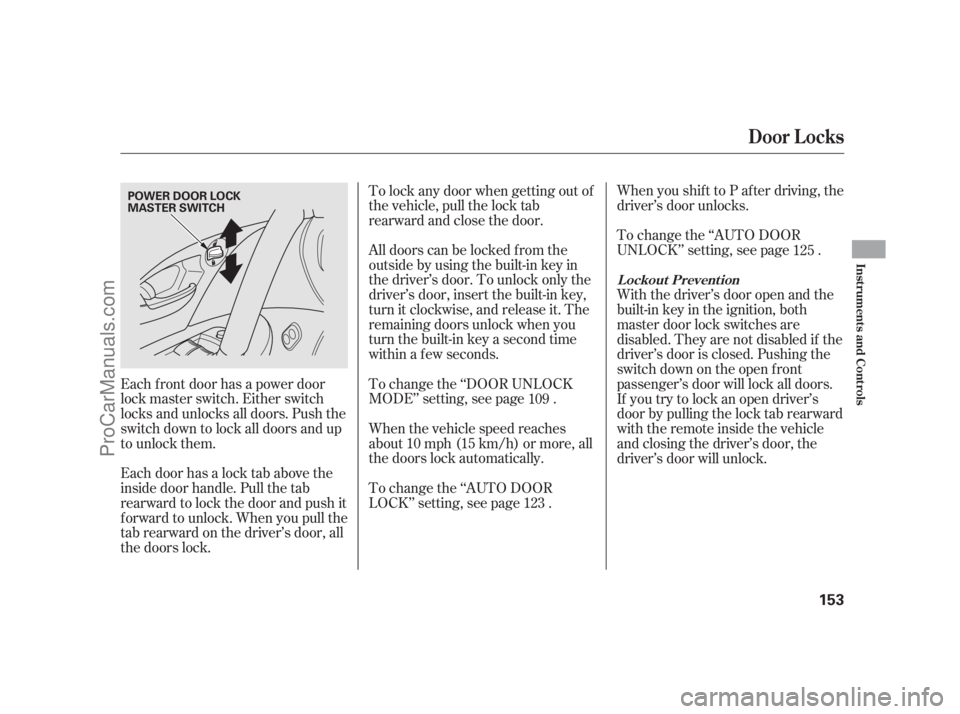
All doors can be locked f rom the
outsidebyusingthebuilt-inkeyin
the driver’s door. To unlock only the
driver’s door, insert the built-in key,
turn it clockwise, and release it. The
remaining doors unlock when you
turn the built-in key a second time
within a f ew seconds.
Each f ront door has a power door
lock master switch. Either switch
locks and unlocks all doors. Push the
switch down to lock all doors and up
to unlock them. To change the ‘‘DOOR UNLOCK
MODE’’ setting, see page .
When the vehicle speed reaches
about 10 mph (15 km/h) or more, all
the doors lock automatically.When you shif t to P af ter driving, the
driver’s door unlocks.
To change the ‘‘AUTO DOOR
UNLOCK’’ setting, see page .
With the driver’s door open and the
built-in key in the ignition, both
master door lock switches are
disabled. They are not disabled if the
driver’s door is closed. Pushing the
switch down on the open f ront
passenger’s door will lock all doors.
If you try to lock an open driver’s
door by pulling the lock tab rearward
withtheremoteinsidethevehicle
and closing the driver’s door, the
driver’s door will unlock.
To change the ‘‘AUTO DOOR
LOCK’’ setting, see page .
Each door has a lock tab above the
inside door handle. Pull the tab
rearward to lock the door and push it
f orward to unlock. When you pull the
tabrearwardonthedriver’sdoor,all
the doors lock. To lock any door when getting out of
the vehicle, pull the lock tab
rearward and close the door.
109 125
123
L ockout Prevent ion
Door L ocks
Inst rument s and Cont rols
153
POWER DOOR LOCK
MASTER SWITCH
10/08/04 19:07:01 31SJA660_158
ProCarManuals.com
Page 175 of 562

The handle of each f ront door has a
sensor. That sensor works with the
remote so you can automatically
unlock/lock the door(s).
By def ault, only the driver’s door
unlocks when you grab its handle.If a remote is within operating range
while you wash your vehicle or when
it is raining heavily, the door sensors
may respond by unlocking the doors.
The unlock sensors do not operate
when:
Theremoteisnotwithinthe
operating range.
The remote is too close to the
vehicle.
When the doors are unlocked.
Theremotebatteryisdead.
The vehicle battery is dead.
If you do not open any of the doors
within 30 seconds, they will
automatically relock. If you wear a glove while grabbing a
f ront door handle, the door sensor
maybeslowtorespondormaynot
respond by unlocking the doors. To change the ‘‘KEYLESS ACCESS
BEEP’’ setting, see page . To change the ‘‘KEYLESS ACCESS
LIGHT FLASH’’ setting, see page .
When you unlock the door(s), some
exterior lights blink twice and the
system beeps twice. All the doors unlock when you grab
the handle of the f ront passenger’s
door. To change the ‘‘DOOR UNLOCK
MODE’’ setting, see page .
To unlock the remaining doors and
the trunk, press the UNLOCK
button on the remote or the rear of
the master door lock switch on the
driver’s door. 109
111 113
Unlocking the Door(s)
K eyless A ccess System
Inst rument s and Cont rols
169
10/08/04 19:10:17 31SJA660_174
ProCarManuals.com
Page 179 of 562

�µ�µ
�µ
You cannot lock the doors if any
door is not f ully closed, if the built-in
key is in the ignition switch, or if the
ignition switch is in any position
except the LOCK (0) position.
When you cannot set the security
system because the trunk or hood is
open, no exterior light blinks and/or
no beeper sounds.
Press this button once
to unlock the driver’s door. Press it
twice to unlock the other doors.
Some exterior lights will f lash twice
each time you press the button. The
ceiling light (if the ceiling light
switch is in the DOOR position) will
come on when you press the
UNLOCK button. If you do not open
any door within 30 seconds, the
ceiling light f ades out. If you relock
the doors with the remote before 30
seconds have elapsed, the ceiling
light will go of f immediately. To change the ‘‘DOOR LOCK
MODE’’ setting, see page .
To change the ‘‘INTERIOR LIGHT
DIMMING TIME,’’ see page .
If you unlock the doors with the
remote, but do not open any door
within 30 seconds, the doors
automatically relock and the security
system sets.
To change the ‘‘SECURITY
RELOCK TIMER’’ setting, see page
.
To change the ‘‘KEYLESS LOCK
ACKNOWLEDGMENT’’ setting, see
page .
You can also open all power windows
and the moonroof f rom outside the
vehicle with the remote transmitter
(see page ). Pressthisbuttonfor
about 1 second to open the trunk.
You cannot open the trunk if the
built-in key is in the ignition or the
ignition switch is in any position
except the LOCK (0) position. You
cannot open the trunk with the
remote if the trunk main switch is
turned off.
Pressthisbuttonfor
about 2 seconds to attract attention:
the horn will sound and the exterior
lights will f lash f or about 30 seconds.
To cancel panic mode, press any
other button on the remote.
127
116
129
131
187
K eyless A ccess System
UNL OCK TRUNK
PA NIC
Inst rument s and Cont rols
173
10/08/04 19:11:11 31SJA660_178
ProCarManuals.com
Page 222 of 562

�µ�µ
�µ The scan f unction samples
all stations with strong signals on the
selected band. To activate it, press the SCAN button, then release it.
The skip (seek)
f unction searches up and down f rom
the current f requency to f ind a
station with a strong signal. To
activate it, press either side ( or ) of the SKIP bar, then release
it. You can also activate the skip
f unction (SEEK is displayed on the
screen) by pushing the interf ace
selector to the right or lef t.
Use the TUNE bar to tune
the radio to a desired f requency.
Press the right side of the bar to
tune to a higher f requency, or the
lef t side to tune to a lower f requency.
To tune with the interf ace dial, push
the selector down, and turn the knob
to the TUNE icon. Then press
ENTER on the selector, and turn the
knob to the desired f requency. To
exit the TUNE mode, press ENTER
on the selector, then push the
selector up. To scan with the interf ace dial, push
the selector down, and then push it
to the right. You will see SCAN
f lashing on the screen and the upper
display.
The system will scan f or a station
with a strong signal. When it finds a
strong signal, it will stop and play
that station for about 10 seconds. If
you do nothing, the system will then
scan f or the next strong station and
play it f or 10 seconds. When it plays
a station that you want to listen to,
press the scan button again, or push
the interface selector to the right
again.
Audio System
SCAN SK IP (SEEK )
TUNE
216
SCAN ICON
TUNE ICON
10/08/04 19:18:49 31SJA660_221
ProCarManuals.com
Page 223 of 562

�µ
�µ
Push the interf ace selector down to
scroll down the screen, highlight
A.SEL, then press ENTER on the
interf ace selector. You will see
A.SEL on the upper display and
A.SEL on the screen, and the system
goes into scan mode f or several
seconds.
Press the A.SEL button. You will see
A.SEL on the upper display, A.SEL
on the screen, and the system goes
into scan mode f or several seconds.
The system stores the f requencies of
six AM and twelve FM stations in
the preset buttons.
If you are
traveling and can no longer receive
your preset stations, you can use the
auto select feature to find stations in
the local area.
Each preset button or
preset icon can store one f requency
on AM and two f requencies on FM.
Select the desired band, AM or
FM. FM1 and FM2 let you store
twosetsof FMfrequencieswith
the preset buttons (on-screen
icons).
Usethetune,skip(seek),scan,or
RDS function to tune the radio to a
desired station.
Press the preset button, and hold
it until you hear a beep. You can
also store f requencies with the
interf ace dial. Select the preset
icon you want to store the
f requency on, then press ENTER
on the interf ace selector, and hold
it f or more than 2 seconds.
Repeat steps 1 through 3 to store a
total of six stations on AM and
twelve stations on FM.
1.
2.
3.
4.
To store a preset memory location:
U.S. models (except Hawaiian) and
Canadian models
Hawaiian models
CONT INUED
AUTO SELECT
Preset
Audio System
Features
217
A.SEL ICON
10/08/04 19:19:01 31SJA660_222
ProCarManuals.com


