Page 172 of 517

Recirculation ButtonWhen the indicator in the button is
on, air from the vehicle's interior is
sent through the system again.
When the indicator is off, air is
brought in from the outside of the
vehicle (fresh air mode).
The outside air intakes for the
climate control system are at the
base of the windshield. Keep this
area clear of leaves and other debris.
The system should be left in fresh air
mode under almost all conditions.
Keeping the system in recirculation
mode, particularly with the A/C off,
can cause the windows to fog up.
Switch to recirculation mode when
driving through dusty or smoky
conditions, then return to fresh air
mode.Windshield Defroster Button
This button turns the windshield
defroster on and off.
When you push this button, air flows
from the defroster vents at the base
of the windshield, and the system
automatically switches to fresh air
mode and turns on the A/C. When
the indicator in the button is on, the
passenger's temperature cannot be
set separately from the driver's.
Rear Window Defogger
Button
This button turns the rear window
defogger on and off. Pushing this
button also turns the mirror heaters
on and off (see page 121).
CONTINUED
Climate Control System
167
Features
10/06/08 17:42:32 11 ACURA RDX MMC North America Owner's M 50 31STK640 enu
Page 353 of 517
On models with navigation systemRefer to the navigation system
manual for operation of the rearview
camera.
On models without navigation systemYou can turn the camera display on
and off by pressing the power button
when the shift lever is in reverse.
The camera display turns on
everytime you shift to reverse, even if
you turned it off the last time.
Whenever you shift to reverse (R)
with the ignition switch in the ON
(II) position, the rear view appears on
a display in the rearview mirror.
For the best picture, always keep the
rearview camera clean, and do not
cover the camera lens. To avoid
scratching the lens when you clean
it, use a moist, soft cloth.
Since the rearview camera display
area is limited, you should always
back up slowly and carefully, and
look behind you for obstacles.
REARVIEW CAMERA DISPLAYPOWER BUTTON
Rearview Mirror with Rearview Camera Display34810/06/08 17:42:32 11 ACURA RDX MMC North America Owner's M 50 31STK640 enu
Page 354 of 517
If the engine has just been started, it
may take a short time for the system
to display the rearview.
The camera display brightness is
adjusted automatically by sensors. If
you use the camera display
continuously at high temperature,
the image will gradually dim and
eventually turn off automatically. If
you change to another shift position,
the camera display will come on
again when you return to reverse.
The inside mirror will be hot when
you use the monitor for an extended
period of time.
If a bright light (such as sunlight) is
reflected on the mirror, the image
may be difficult to see.
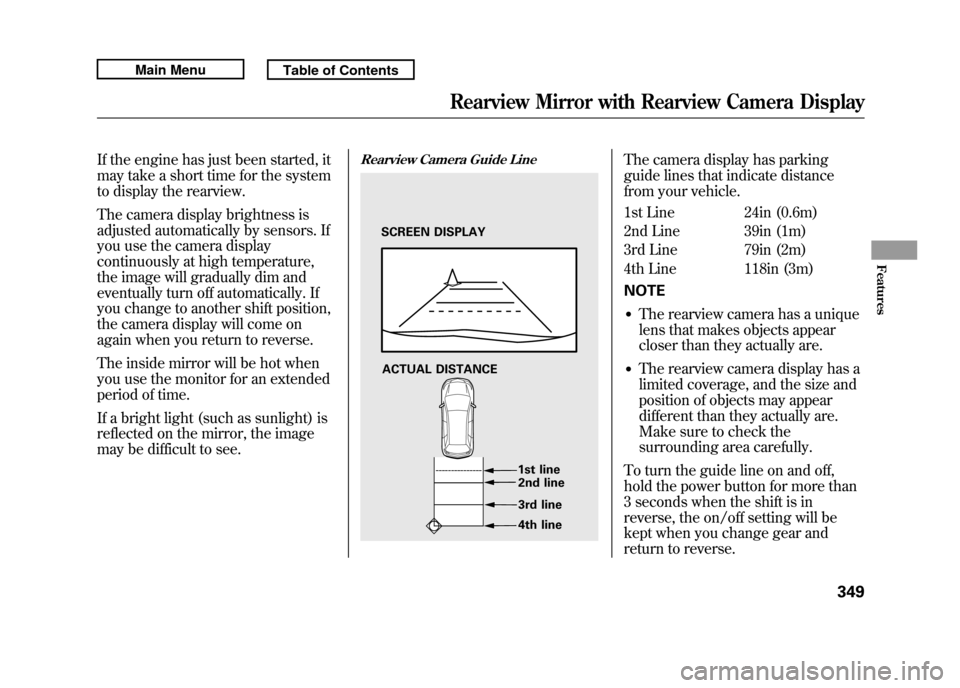
Rearview Camera Guide Line
The camera display has parking
guide lines that indicate distance
from your vehicle.
1st Line 24in (0.6m)
2nd Line 39in (1m)
3rd Line 79in (2m)
4th Line 118in (3m)
NOTE●The rearview camera has a unique
lens that makes objects appear
closer than they actually are.●The rearview camera display has a
limited coverage, and the size and
position of objects may appear
different than they actually are.
Make sure to check the
surrounding area carefully.
To turn the guide line on and off,
hold the power button for more than
3 seconds when the shift is in
reverse, the on/off setting will be
kept when you change gear and
return to reverse.
SCREEN DISPLAY
ACTUAL DISTANCE 1st line2nd line
3rd line
4th line
Rearview Mirror with Rearview Camera Display
349
Features
10/06/08 17:42:32 11 ACURA RDX MMC North America Owner's M 50 31STK640 enu
Page 378 of 517

You should do these checks and
adjustments before you drive your
vehicle:1. Make sure all windows, mirrors, and outside lights are clean and
unobstructed. Remove frost, snow,
or ice.
2. Check that the hood is fully closed.
3. Visually check the tires. If a tire looks low, use a gauge to check its
pressure.
4. Check that any items you may be carrying are stored properly or
fastened down securely. 5. Check the seat adjustment (see
page 134).
6. Check the adjustment of the inside and outside mirrors (see page
146).
7. Check the steering wheel adjustment (see page 122).
8. Make sure the doors and the tailgate are securely closed and
locked.
9. Fasten your seat belt. Check that your passengers have fastened
their seat belts (see page 15). 10. When you start the engine, check
the gauges and indicators in the
instrument panel, and the
messages on the multi-information
display (see pages 63, 73 and 74).
Preparing to Drive
373
Driving
10/06/08 17:42:32 11 ACURA RDX MMC North America Owner's M 50 31STK640 enu
Page 406 of 517

Since lighting and wiring vary by
trailer type and brand, you should
have a qualified technician install a
suitable connector between the
vehicle and the trailer. Improper
equipment or installation can cause
damage to your vehicle's electrical
system and affect your vehicle
warranty.
Additional Towing EquipmentMany states, Canadian provinces and
territories require special outside
mirrors when towing a trailer. Even if
they don't, you should install special
mirrors if you cannot clearly see
behind you, or if the trailer creates a
blind spot.
Ask your trailer sales or rental
agency if any other items are
recommended or required for your
towing situation.Pre-Tow Checklist
When preparing to tow, and before
driving away, be sure to check the
following:
●The vehicle has been properly
serviced, and the suspension,
cooling system, and lights are in
good operating condition.
CONTINUED
Towing a Trailer
401
Driving
10/06/08 17:42:32 11 ACURA RDX MMC North America Owner's M 50 31STK640 enu
Page 442 of 517
3. Remove the socket from the lightassembly by turning it one-quarter
turn counterclockwise.
4. Pull the bulb straight out of its socket. Push the new bulb straight
into the socket until it bottoms. 5. Press the brake pedal to make
sure the new bulb is working.
6. Put the socket back into the light assembly, and turn it clockwise to
lock it in place.
7. Reinstall the high-mount brake light assembly into the tailgate.
Tighten the two screws and
reinstall the covers. Side Turn Signal Lights
Each outside mirror has side turn
signal lights. The lights should be
replaced by your dealer.
Replacing a Rear License Plate
Light Bulb
The license plate has two lights
above it. The bulbs should be
replaced by your dealer.BULB
SOCKET
Lights
437
Maintenance
10/06/08 17:42:32 11 ACURA RDX MMC North America Owner's M 50 31STK640 enu
Page 486 of 517

LightsHeadlights High12 V-60 W (HB3)
Low
ꭧ
12 V -35 W (D2S)
Front turn signal/parking lights 12 V -24/2.2 CP (Amber)
Front fog lights 12 V -55 W (H11)
Front side marker lights 12 V -3CP
Rear turn signal lights 12 V -21 W
Brake/Taillights (in fenders) 12 V -21/5 W
Taillights (in tailgate) 12 V -3CP
Back-up lights 12 V -21 W
Rear side marker lights 12 V -2CP
License plate lights 12 V -3CP
High-mount brake light 12 V -16 W
Front ceiling lights/Spotlights 12 V -4CP
Rear ceiling light 12 V -8W
Glove box light 14 V -1.4 W
Console compartment light 14 V -1.4 W
Vanity mirror lights 12 V -2W
Door courtesy lights 12 V -2CP
Cargo area light 12 V -5W
ꭧ : The low beam headlights are high voltage discharged type.
Replacement of a low beam headlight bulb should be performed by
your dealer.
Air ConditioningRefrigerant type HFC-134a (R-134a)
Charge quantity 15.9-17.6 oz (450 -500 g)
Lubricant type SP-10BatteryCapacity12 V-52 AH/5 HR
12 V -65 AH/20 HRFusesInterior See page 473 or the fuse label
attached to the dashboard.
Under-hood See page 474 or the fuse box
covers.AlignmentToe-in Front 0.0 in (0 mm)
Rear 0.10 in (2.5 mm)
Camber Front 0 ° 10’
Rear -1°
Caster Front 2 ° 57’TiresSize Front/Rear P235/55R18 99V
Spare T165/80D17 104M
Pressure Front/Rear 32 psi (220 kPa , 2.2 kgf/cm
2)
Spare 60 psi (420 kPa , 4.2 kgf/cm2)
Specifications
481
Technical Information
10/06/08 17:42:32 11 ACURA RDX MMC North America Owner's M 50 31STK640 enu
Page 508 of 517

Gross Axle Weight Rating(GAWR)
.................................
398
Gross Vehicle Weight Rating (GVWR)
.................................
398
H
HandsFreeLink
®........................
306
Hazard Warning Flashers
..........
121
Headlights Aiming
....................................
431
Automatic Lighting Off
............
118
Automatic Lighting On
............
117
Daytime Running Lights
.........
119
High Beam Indicator
................
69
High Beams, Turning on
.........
116
Lights On Indicator
..................
70
Low Beams, Turning on
..........
116
Reminder Chime
.....................
116
Turning on
..............................
116
Head Restraints
..........................
135
Heated Mirrors
..........................
147
Heaters, Seats
............................
141
Heating and Cooling
..................
164
High Altitude, Starting at
............
374 High-Low Beam Switch
..............
117
HomeLink
®Universal
Transceiver
............................
303
Hood, Opening and Closing
the
..........................................
355
Horn
......................................
4, 113
I
Identification Number, Vehicle
...................................
478
Ignition Keys
........................................
122
Switch
.....................................
125
Timing Control System
...........
488
Immobilizer System
...................
124
Important Safety Precautions
.........
6
Indicators, Instrument Panel
........
63
ABS (Anti-lock Brake)
.......
66, 388
A/T Temp
................................
65
Brake (Amber)
..................
67, 468
Brake (Red)
......................
67, 467
Charging System
..............
65, 465
Cruise Control
..........................
69
Cruise Main
.............................
69 Fog Lights
................................
70
High Beam
...............................
69
Key (Immobilizer System)
.......
66
Lights On
.................................
70
Low Fuel
..................................
68
Low Oil Pressure
..............
65, 465
Low Tire Pressure/ TPMS
............................
71, 390
Maintenance Minder ™
............
411
Malfunction Indicator Lamp
.............................
65, 466
Passenger Airbag Off
...............
33
Seat Belt Reminder
.............
20, 64
Security System
.......................
70
SH-AWD
®.................................
70
Side Airbag Off
....................
32, 66
SRS
.....................................
32, 65
System Message
......................
72
TPMS/Tire Pressure Monitor
.........................
71, 390
Turn Signal and Hazard
Warning
...............................
69
VSA Activation
.........................
69
VSA System
.............................
68
Individual Map Lights
................
152
CONTINUED
Index
V
INDEX
10/06/08 17:42:32 11 ACURA RDX MMC North America Owner's M 50 31STK640 enu

