2011 Acura MDX driving position
[x] Cancel search: driving positionPage 474 of 609

VSA and Tire Sizes
Driving with varying tire or wheel
sizes may cause the VSA to
malfunction. When replacing tires,
make sure they are of the same size
and type as your original tires (see
page 539).
If you install winter tires, make sure
they are the same size as those that
were originally supplied with your
vehicle. Exercise the same caution
during winter driving as you would if
your vehicle was not equipped with
VSA.Hill Start Assist
Your vehicle is equipped with a hill
start assist feature to help prevent
the vehicle from rolling on steep
inclines as you move your foot from
the brake pedal to the accelerator.
This feature starts operating a few
seconds after you are in any drive
gear position (when faced uphill) or
in reverse (when faced downhill).
This feature requires that the vehicle
has come to a complete stop before it
can work.
Hill start assist may not hold a
heavily loaded vehicle, such as when
your vehicle is connected to a trailer,
or prevent your vehicle from rolling
downhill on a very steep or slippery
slope.
Vehicle Stability Assist (VSA
®), aka Electronic Stability Control (ESC), System
469
Driving
10/06/29 11:59:04 11 ACURA MDX MMC North America Owner's M 50 31STX640 enu
Page 476 of 609
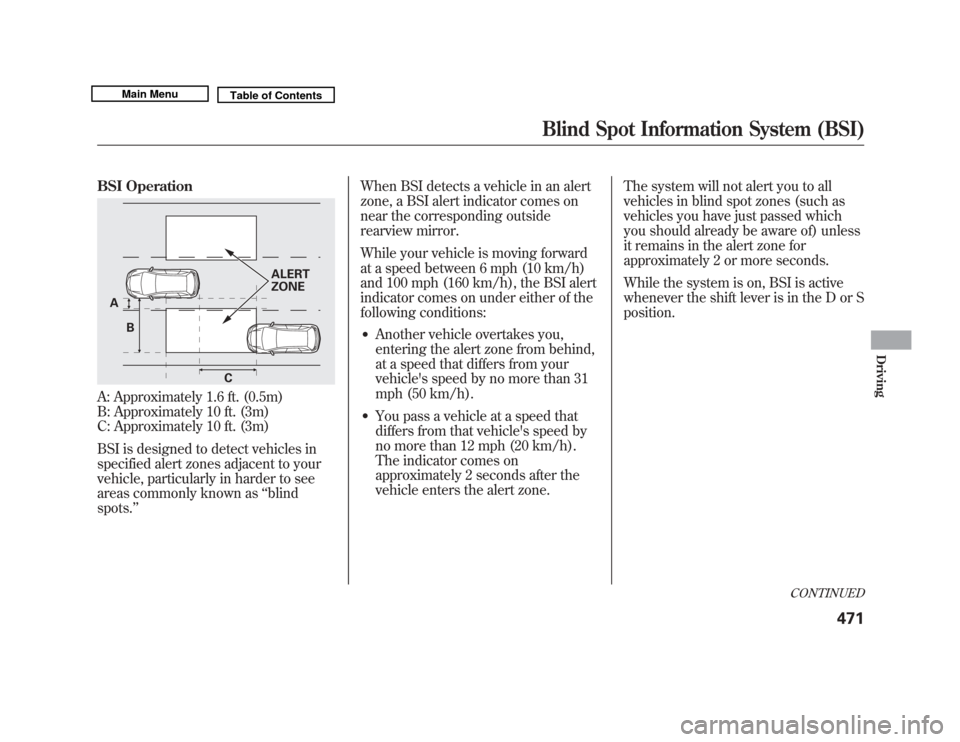
BSI OperationA: Approximately 1.6 ft. (0.5m)
B: Approximately 10 ft. (3m)
C: Approximately 10 ft. (3m)
BSI is designed to detect vehicles in
specified alert zones adjacent to your
vehicle, particularly in harder to see
areas commonly known as‘‘blind
spots. ’’ When BSI detects a vehicle in an alert
zone, a BSI alert indicator comes on
near the corresponding outside
rearview mirror.
While your vehicle is moving forward
at a speed between 6 mph (10 km/h)
and 100 mph (160 km/h), the BSI alert
indicator comes on under either of the
following conditions:
●
Another vehicle overtakes you,
entering the alert zone from behind,
at a speed that differs from your
vehicle's speed by no more than 31
mph (50 km/h).
●
You pass a vehicle at a speed that
differs from that vehicle's speed by
no more than 12 mph (20 km/h).
The indicator comes on
approximately 2 seconds after the
vehicle enters the alert zone.
The system will not alert you to all
vehicles in blind spot zones (such as
vehicles you have just passed which
you should already be aware of) unless
it remains in the alert zone for
approximately 2 or more seconds.
While the system is on, BSI is active
whenever the shift lever is in the D or S
position.
A
C
B ALERT
ZONE
CONTINUED
Blind Spot Information System (BSI)
471
Driving
10/06/29 11:59:04 11 ACURA MDX MMC North America Owner's M 50 31STX640 enu
Page 496 of 609

Towing Speeds and GearsDrive slower than normal in all
driving situations, and obey posted
speed limits for vehicles with trailers.
Use the D position when towing a
trailer on level roads. See‘‘
Driving on
Hills
’’ for additional gear information.
When towing a fixed-sided trailer (e.
g., camper), do not exceed 55 mph
(88 km/h). At higher speeds, the
trailer may sway or affect vehicle
handling. If the automatic transmission fluid
temperature increases and exceeds
the specified limit, the A/T
temperature indicator comes on (see
page 70). You will also see a
‘‘A/T
TEMP HIGH ’’message on the multi-
information display.
Making Turns and BrakingMake turns more slowly and wider
than normal. The trailer tracks a
smaller arc than your vehicle, and it
can hit or run over something the
vehicle misses.
Allow more time and distance for
braking. Do not brake or turn
suddenly as this could cause the
trailer to jackknife or turn over.
Driving on HillsWhen climbing hills, closely watch
your temperature gauge. If it nears
the red (Hot) mark, turn the air
conditioning off, reduce speed and, if
necessary, pull to the side of the road
to let the engine cool.
If you must stop when facing uphill,
use the foot brake or parking brake.
Do not try to hold the vehicle in place
by pressing on the accelerator, as
this can cause the automatic
transmission to overheat.
When driving down hills, reduce
your speed and shift down to S
position, or use the paddle shifters to
lower gear (3 or 2) in the S position.
When towing a trailer, do not ‘‘ride ’’
the brakes, and remember, it takes
longer to slow down and stop when
towing a trailer.
CONTINUED
Towing a Trailer
491
Driving
10/06/29 11:59:04 11 ACURA MDX MMC North America Owner's M 50 31STX640 enu
Page 501 of 609

Accelerating and Braking
For better traction on all surfaces,
accelerate slowly and gradually build
up speed. If you try to start too fast
on wet soil, mud, snow, or ice, you
might not have enough traction to
get underway, and you may dig
yourself a hole. Starting with the shift
lever in the D position will help you
have a smoother start on snow or ice.
Keep in mind that you will usually
need more time and distance to
brake to a stop on unpaved surfaces.
Avoid hard braking. Do not‘‘pump ’’
the brakes; let the anti-lock braking
system pump them for you.
Avoiding Obstacles
Debris in the road can damage your
suspension or other components.
Because your vehicle has a high
center of gravity, driving over a large
obstacle, or allowing a wheel to drop
into a deep hole can cause your
vehicle to tip or roll over. Driving on Slopes
If you can't clearly see all conditions
or obstacles on a slope, walk the
slope before you drive on it. If you
have any doubt whether or not you
can safely drive on the slope, don't
do it. Find another route.
If you are driving up a hill and find
that you cannot continue,
do not try to
turn around.
Your vehicle could roll
over. Slowly back down the hill,
following the same route you took up
the hill.
Crossing a Stream
Before driving through water, stop,
get out if necessary, and make sure
that:
●
The water is not deep enough to
cover your wheel hubs, axles, or
exhaust pipe. You could stall and
not be able to restart your engine.
The water can also damage
important vehicle components.
●
The banks are sloped so you can
drive out.
●
The water is not flowing too fast.
Deep rushing water can sweep you
downstream. Even very shallow
rushing water can wash the
ground from under your tires and
cause you to lose traction and
possibly roll over.
●
The banks and surface under the
water provide good traction. The
water may hide hazards such as
rocks, holes, or mud.
If you decide it is safe to drive
through water, choose a suitable
speed, and proceed without shifting,
changing speeds, stopping, or
shutting off the engine.
After driving through water, test your
brakes. If they got wet, gently
‘‘ pump ’’them while driving slowly
until they operate normally.
Off-Highway Driving Guidelines49610/06/29 11:59:04 11 ACURA MDX MMC North America Owner's M 50 31STX640 enu
Page 543 of 609

Tire Maintenance
In addition to proper inflation, correct
wheel alignment helps to decrease
tire wear. If you find a tire is worn
unevenly, have your dealer check the
wheel alignment.
Have your dealer check the tires if
you feel a consistent vibration while
driving. A tire should always be
rebalanced if it is removed from the
wheel. When you have new tires
installed, make sure they are
balanced. This increases riding
comfort and tire life. For best results,
have the installer perform a dynamic
balance.Improper wheel weights can damage
your vehicle's aluminum wheels. Use
only Acura wheel weights for
balancing.Tire Rotation
To help increase tire life and
distribute wear more evenly, rotate
the tires according to the
maintenance messages displayed on
the multi-information display. Move
the tires to the positions shown in
the illustration each time they are
rotated. If you purchase directional
tires, rotate only front-to-back.
Replacing Tires and Wheels
Replace your tires with radial tires of
the same size, load range, speed
rating, and maximum cold tire
pressure rating (as shown on the
tire's sidewall).
Mixing radial and bias-ply tires on
your vehicle can reduce braking
ability, traction, and steering
accuracy. Using tires of a different
size or construction can cause the
ABS and vehicle stability assist
system (VSA) to work inconsistently.
The ABS works by comparing the
speed of the wheels. When replacing
tires, use the same size originally
supplied with the vehicle. Tire size
and construction can affect wheel
speed and may cause the system to
activate.
When the tires are rotated, make
sure the air pressures are checked.
Front Front
(For Non-directional
Tires and Wheels) (For Directional
Tires and Wheels)
Tires53810/06/29 11:59:04 11 ACURA MDX MMC North America Owner's M 50 31STX640 enu
Page 550 of 609

If you have a flat tire while driving,
stop in a safe place to change it.
Drive slowly along the shoulder until
you get to an exit or an area to stop
that is far away from the traffic lanes.
The vehicle can easily roll off
the jack, seriously injuring
anyone underneath.
Follow the directions for
changing a tire exactly, and
never get under the vehicle
when it is supported only by the
jack.
1. Park the vehicle on firm, level, and non-slippery ground. Put the
transmission in Park. Apply the
parking brake.
2. Turn on the hazard warning lights,and turn the ignition switch to the
LOCK (0) position. Have all
passengers get out of the vehicle
while you change the tire.
3. Open the tailgate. 4. Push the rear edge of the handle
to raise the handle loop and pull up
the loop to raise the cargo area
floor.
CARGO AREA
FLOOR
TOOLS
SPARE TIRE JACK
CONTINUED
Changing a Flat Tire
545
Taking Care of the Unexpected
10/06/29 11:59:04 11 ACURA MDX MMC North America Owner's M 50 31STX640 enu
Page 562 of 609

If this indicator comes on
while driving, it means one
of the engine's emissions control
systems may have a problem. Even
though you may feel no difference in
your vehicle's performance, it can
reduce your fuel economy and cause
increased emissions. Continued
operation may cause serious damage.
If you have recently refueled your
vehicle, the indicator coming on
could be due to a loose or missing
fuel fill cap. Tighten the cap until it
clicks at least once. Tightening the
cap will not turn the indicator off
immediately; it can take several days
of normal driving. If the indicator comes on repeatedly,
even though it may turn off as you
continue driving, have your vehicle
checked by the dealer as soon as
possible.
If you keep driving with the malfunction
indicator lamp on, you can damage
your vehicle's emissions controls and
engine. Those repairs may not be
covered by your vehicle's warranties.
You will also see a
‘‘CHECK
EMISSION SYSTEM ’’message on
the multi-information display (see
page 86).
Readiness Code
Your vehicle has certain ‘‘readiness
codes ’’that are part of the on-board
diagnostics for the emissions systems. In
some states, part of the emissions testing
is to make sure these codes are set. If
they are not set, the test cannot be
completed.
If the battery in your vehicle has been
disconnected or gone dead, these codes
may be erased. It takes several days of
driving under various conditions to set
the codes again.
To check if they are set, turn the ignition
switch to the ON (II) position, without
starting the engine. The malfunction
indicator lamp will come on for 20
seconds. If it then goes off, the readiness
codes are set. If it blinks five times, the
readiness codes are not set. If possible,
do not take your vehicle for an emissions
test until the readiness codes are set.
Refer to Emissions Testing for more
information (see page 583).Malfunction Indicator Lamp
557
Taking Care of the Unexpected
10/06/29 11:59:04 11 ACURA MDX MMC North America Owner's M 50 31STX640 enu
Page 563 of 609

U.S. Canada
The brake system
indicator normally
comes on when you turn the ignition
switch to the ON (II) position, and as
a reminder to check the parking
brake. It will stay on if you do not
fully release the parking brake.
If the brake system indicator comes
on while driving, the brake fluid level
is probably low. Press lightly on the
brake pedal to see if it feels normal. If
it does, check the brake fluid level
the next time you stop at a service
station (see page 519).
You will also see a ‘‘LOW BRAKE
FLUID ’’message on the multi-
information display (see page 86). If the fluid level is low, take your
vehicle to a dealer, and have the
brake system inspected for leaks or
worn brake pads.
However, if the brake pedal does not
feel normal, you should take
immediate action. A problem in one
part of the system's dual circuit
design will still give you braking at
two wheels. You will feel the brake
pedal go down much farther before
the vehicle begins to slow down, and
you will have to press harder on the
pedal.
You will also see a
‘‘CHECK BRAKE
SYSTEM ’’message on the multi-
information display (see page 86). Slow down by shifting to a lower
gear, and pull to the side of the road
when it is safe. Because of the long
distance needed to stop, it is
hazardous to drive the vehicle. You
should have it towed, and repaired as
soon as possible (see
Emergency
Towing on page 566).
If you must drive the vehicle a short
distance in this condition, drive
slowly and carefully.
If the ABS indicator and the VSA
system indicator come on with the
brake system indicator, have your
vehicle inspected by your dealer
immediately.
Brake System Indicator55810/06/29 11:59:04 11 ACURA MDX MMC North America Owner's M 50 31STX640 enu