Page 98 of 146
8-20
1
2
3
4
5
6
78
9
10
11
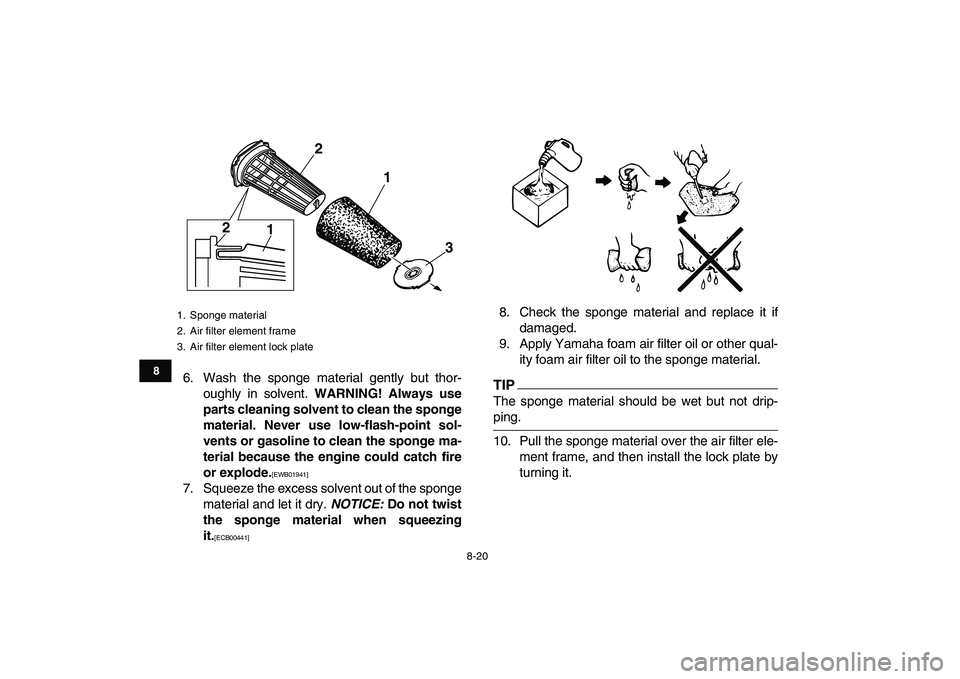
6. Wash the sponge material gently but thor-
oughly in solvent.
WARNING! Always use
parts cleaning solvent to clean the sponge
material. Never use low-flash-point sol-
vents or gasoline to clean the sponge ma-
terial because the engine could catch fire
or explode.
[EWB01941]
7. Squeeze the excess solvent out of the sponge
material and let it dry.
NOTICE:
Do not twist
the sponge material when squeezing
it.
[ECB00441]
8. Check the sponge material and replace it if
damaged.
9. Apply Yamaha foam air filter oil or other qual-
ity foam air filter oil to the sponge material.
TIP
The sponge material should be wet but not drip-
ping.
10. Pull the sponge material over the air filter ele-
ment frame, and then install the lock plate by
turning it.
1. Sponge material
2. Air filter element frame
3. Air filter element lock plate
1 22
1
3
✦✯��✬�✩✧�✤✲✣ ✥✣ ��
����������������������
Page 108 of 146
8-30
1
2
3
4
5
6
78
9
10
11
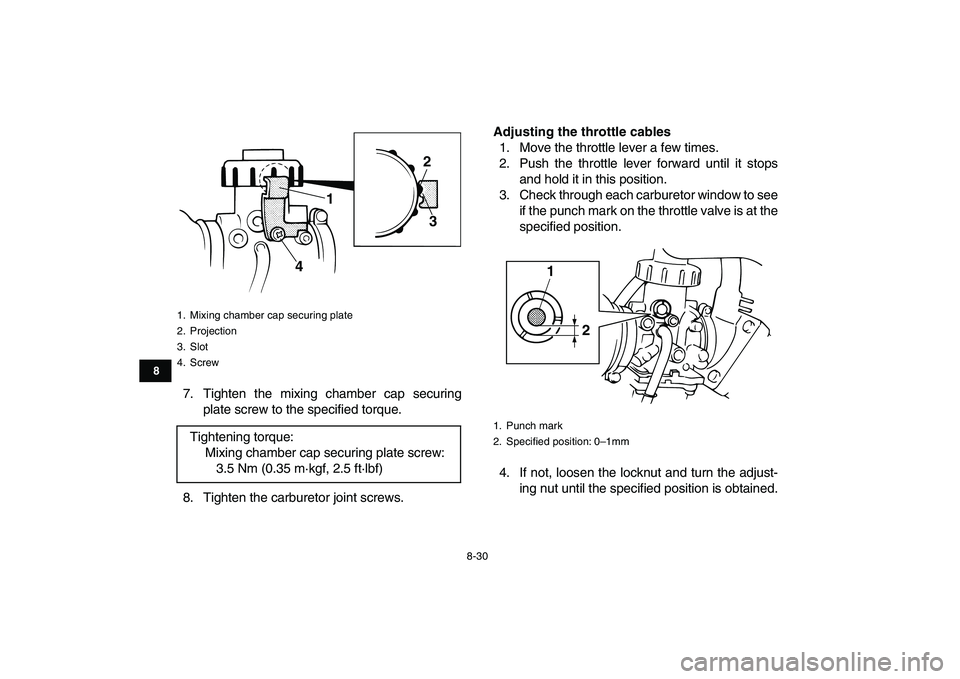
7. Tighten the mixing chamber cap securing
plate screw to the specified torque.
8. Tighten the carburetor joint screws.
Adjusting the throttle cables
1. Move the throttle lever a few times.
2. Push the throttle lever forward until it stops
and hold it in this position.
3. Check through each carburetor window to see
if the punch mark on the throttle valve is at the
specified position.
4. If not, loosen the locknut and turn the adjust-
ing nut until the specified position is obtained.
1. Mixing chamber cap securing plate
2. Projection
3. Slot
4. Screw
Tightening torque:
Mixing chamber cap securing plate screw:
3.5 Nm (0.35 m·kgf, 2.5 ft·lbf)
12
3
4
1. Punch mark
2. Specified position: 0–1mm
1
2
✦✯��✬�✩✧�✤✲✣ ✦✣ ��
����������������������
Page 109 of 146

8-31
1
2
3
4
5
6
78
9
10
11
5. Move the throttle lever a few times and re-
check the position.
6. Install the fuel tank, side cover, radiator cover
and air filter case cover.
7. Connect the fuel hoses.
8. Install the seat.
EBU24020
Adjusting the engine idling speed
The engine idling speed must be checked and, if
necessary, adjusted as follows at the intervals
specified in the periodic maintenance and lubrica-tion chart.TIP
�
A diagnostic tachometer is needed to make this
adjustment.
�
The carburetor synchronization and the throttle
cable free play must be checked, and adjusted if
necessary, before adjusting the engine idling
speed.
1. Start the engine and warm it up.
TIP
The engine is warm when it quickly responds to the
throttle.
2. Attach the tachometer to the spark plug lead.
3. Turn in both pilot air screws until they lightly
seat.
4. Turn out both pilot air screws to specification.
(See the “Changing the carburetor settings”
section on the page 8-23.)
1. Adjusting nut
2. Locknut
1
2
✦✯��✬�✩✧�✤✲✣ ✦✤ ��
����������������������
Page 111 of 146
8-33
1
2
3
4
5
6
78
9
10
11
optimum engine performance.
TIP
If the specified idling speed cannot be obtained as
described above, have a Yamaha dealer make the
adjustment.
7. Install the seat.
EBU24045
Adjusting the throttle cable free play
The throttle cable free play should be checked
and, if necessary, adjusted at the intervals speci-
fied in the periodic maintenance and lubrication
chart.
The throttle cable free play should measure
4.0–6.0 mm (0.16–0.24 in) at the throttle lever.
Periodically check the throttle cable free play
and, if necessary, adjust it as follows.
TIP
The engine idling speed must be checked, and ad-
justed if necessary, before adjusting the throttle ca-
ble free play.
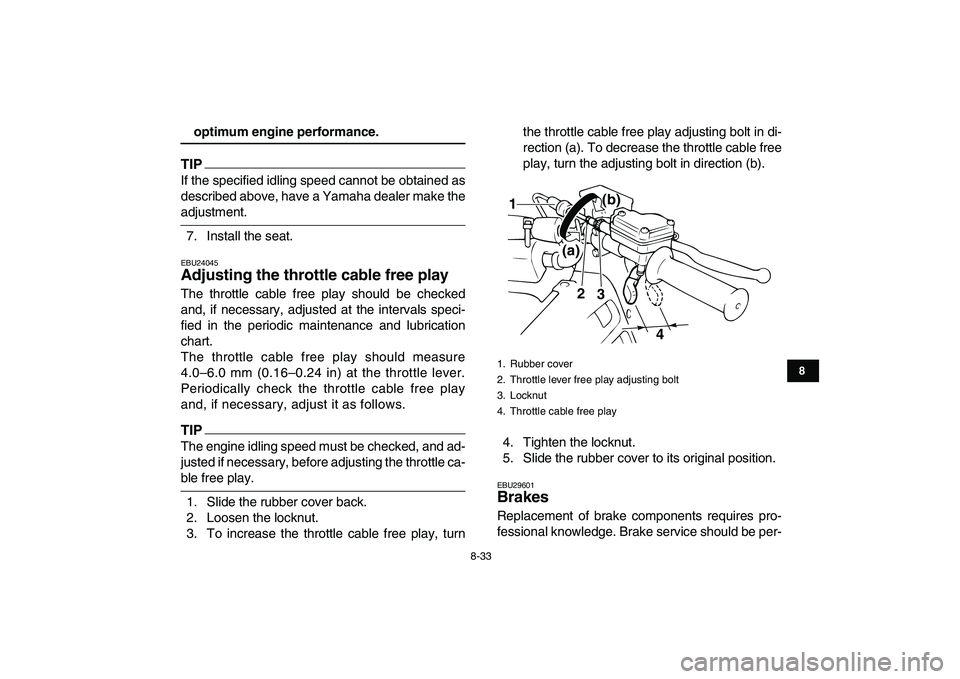
1. Slide the rubber cover back.
2. Loosen the locknut.
3. To increase the throttle cable free play, turnthe throttle cable free play adjusting bolt in di-
rection (a). To decrease the throttle cable free
play, turn the adjusting bolt in direction (b).
4. Tighten the locknut.
5. Slide the rubber cover to its original position.
EBU29601
Brakes
Replacement of brake components requires pro-
fessional knowledge. Brake service should be per-
1. Rubber cover
2. Throttle lever free play adjusting bolt
3. Locknut
4. Throttle cable free play
2
3
4
(a)(b)
1
✦✯��✬�✩✧�✤✲✣ ✦✦ ��
����������������������
Page 115 of 146
8-37
1
2
3
4
5
6
78
9
10
11
fluids may result in a harmful chemical reaction
and lead to poor braking performance.
�
Be careful that water does not enter the brake
fluid reservoir when refilling. Water will signifi-
cantly lower the boiling point of the fluid and may
result in vapor lock.
�
Brake fluid may deteriorate painted surfaces or
plastic parts. Always clean up spilled fluid imme-
diately.
�
As the brake pads wear, it is normal for the brake
fluid level to gradually go down. However, if the
brake fluid level goes down suddenly, have a
Yamaha dealer check the cause.
EBU24291
Changing the brake fluid
Have a Yamaha dealer change the brake fluid at
the intervals specified in the TIP after the periodic
maintenance and lubrication chart. In addition,
have the oil seals of the master cylinders and cali-
pers as well as the brake hoses replaced at the in-
tervals listed below or whenever they are damaged
or leaking.
�
Oil seals: Replace every two years.
�
Brake hoses: Replace every four years.
EBU24394
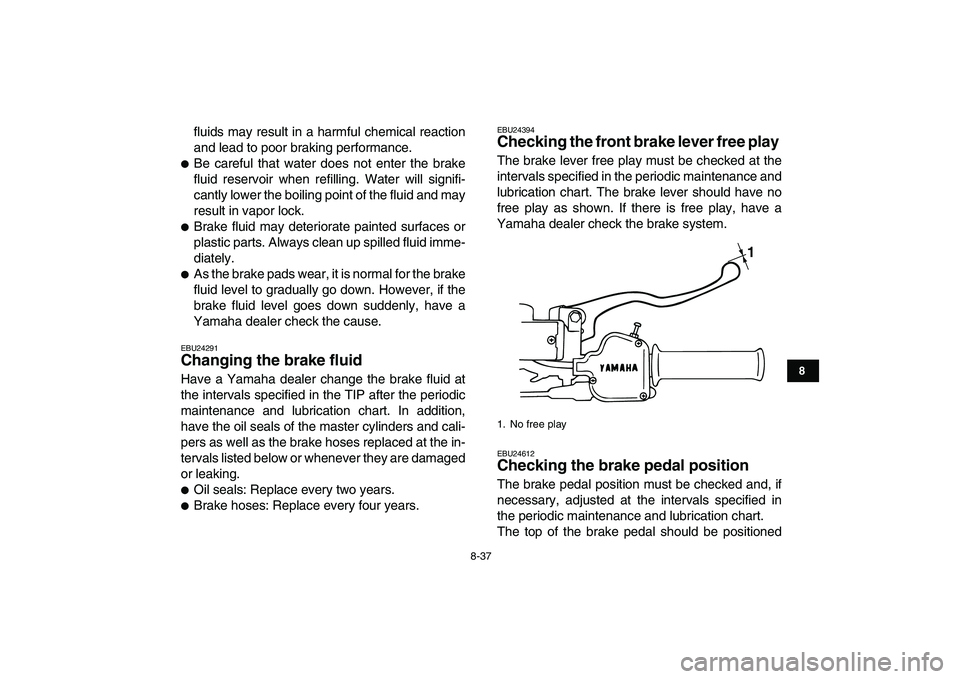
Checking the front brake lever free play
The brake lever free play must be checked at the
intervals specified in the periodic maintenance and
lubrication chart. The brake lever should have no
free play as shown. If there is free play, have a
Yamaha dealer check the brake system.
EBU24612
Checking the brake pedal position
The brake pedal position must be checked and, if
necessary, adjusted at the intervals specified in
the periodic maintenance and lubrication chart.
The top of the brake pedal should be positioned
1. No free play
1
✦✯��✬�✩✧�✤✲✣ ✦✪ ��
����������������������
Page 116 of 146
8-38
1
2
3
4
5
6
78
9
10
11
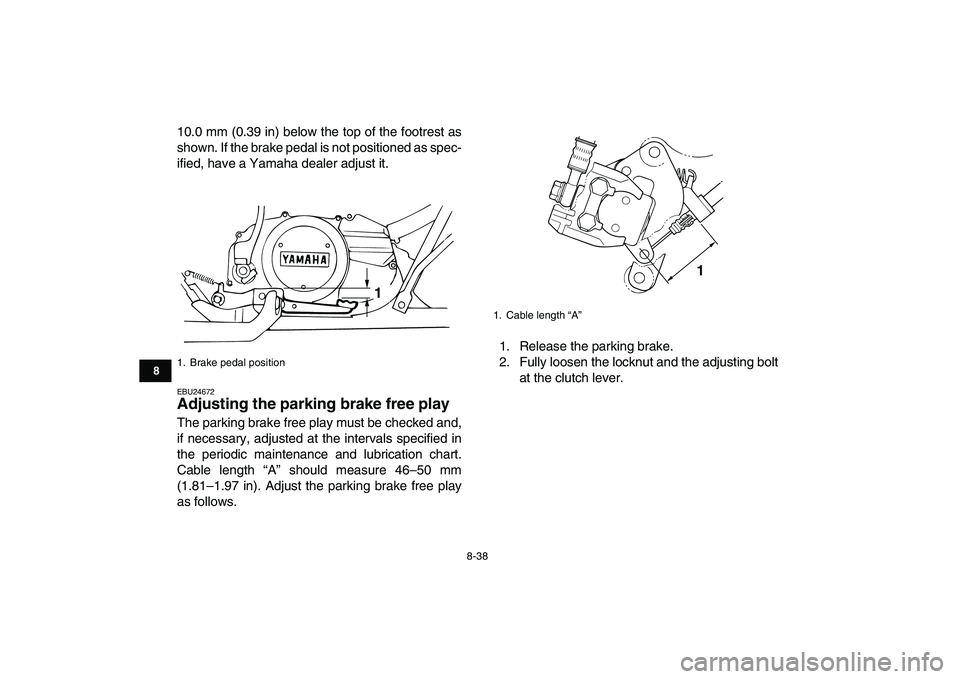
10.0 mm (0.39 in) below the top of the footrest as
shown. If the brake pedal is not positioned as spec-
ified, have a Yamaha dealer adjust it.
EBU24672
Adjusting the parking brake free play
The parking brake free play must be checked and,
if necessary, adjusted at the intervals specified in
the periodic maintenance and lubrication chart.
Cable length “A” should measure 46–50 mm
(1.81–1.97 in). Adjust the parking brake free play
as follows.1. Release the parking brake.
2. Fully loosen the locknut and the adjusting bolt
at the clutch lever.
1. Brake pedal position
1
1. Cable length “A”
1
✦✯��✬�✩✧�✤✲✣ ✦✫��
����������������������
Page 117 of 146
8-39
1
2
3
4
5
6
78
9
10
11
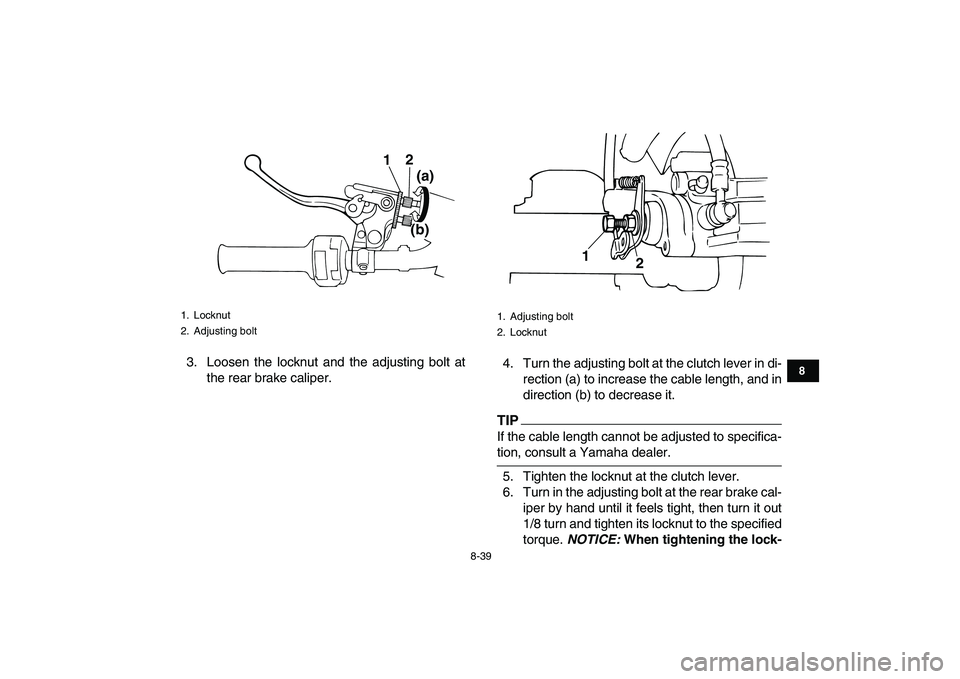
3. Loosen the locknut and the adjusting bolt at
the rear brake caliper.4. Turn the adjusting bolt at the clutch lever in di-
rection (a) to increase the cable length, and in
direction (b) to decrease it.TIP
If the cable length cannot be adjusted to specifica-
tion, consult a Yamaha dealer.
5. Tighten the locknut at the clutch lever.
6. Turn in the adjusting bolt at the rear brake cal-
iper by hand until it feels tight, then turn it out
1/8 turn and tighten its locknut to the specified
torque.
NOTICE:
When tightening the lock-
1. Locknut
2. Adjusting bolt
12
(a)
(b)
1. Adjusting bolt
2. Locknut
1
2
✦✯��✬�✩✧�✤✲✣ ✦✬ ��
����������������������
Page 118 of 146
![YAMAHA BANSHEE 350 2010 Owners Manual
8-40
1
2
3
4
5
6
78
9
10
11
nut, hold the adjusting bolt with a wrench
so that it does not turn together with the
locknut.
[ECB00521]
WARNING
EWB02090
Operating with improperly serviced o](/manual-img/51/49359/w960_49359-117.png "YAMAHA BANSHEE 350 2010 Owners Manual
8-40
1
2
3
4
5
6
78
9
10
11
nut, hold the adjusting bolt with a wrench
so that it does not turn together with the
locknut.
[ECB00521]
WARNING
EWB02090
Operating with improperly serviced o")
8-40
1
2
3
4
5
6
78
9
10
11
nut, hold the adjusting bolt with a wrench
so that it does not turn together with the
locknut.
[ECB00521]
WARNING
EWB02090
Operating with improperly serviced or adjust-
ed brakes could cause the brakes to malfunc-
tion, resulting in reduced braking
performance. This could increase the chance
of a collision or accident. After adjusting the
parking brake free play, block the rear of the
ATV off the ground and spin the rear wheels.
Check to make sure there is no brake drag. If
brake drag is noticed, perform the adjustment
again.
EBU24740
Brake light switches
The operation of the brake light switches must be
checked and, if necessary, adjusted at the inter-
vals specified in the periodic maintenance and lu-
brication chart.The brake light switch for the brake pedal can be
adjusted as follows, but the other brake light
switches should be adjusted by a Yamaha dealer.
TIP
The brake light switch is properly adjusted when
the brake light comes on just before braking takes
effect.
Turn the adjusting nut while holding the brake light
switch in place. To make the brake light come on
earlier, turn the adjusting nut in direction (a). To
make the brake light come on later, turn the adjust-
ing nut in direction (b). Tightening torque:
Locknut (rear brake caliper):
16 Nm (1.6 m·kgf, 11 ft·lbf)
1. Brake light switch
2. Brake light switch adjusting nut
1
2
(a)
(b)
✦✯��✬�✩✧�✤✲✣ ✧✣ ��
����������������������