Page 153 of 516
Power windows-features
on page 53.
One-touch opening and closing
The one-touch feature automatically opens/closes
a power window
the switch for the
window up briefly as far as it goes.
For one-touch opening: Press lhe switch for the
window down brie fly as fa r as it goes.
touch feature
Close
up the switch for the respect ive window
and hold it for at least 2 seconds in this position.
Release the switch, up and hold again. The
one -touch feature is now reactivated .
T h e one-touch feature can be reactivated for one
or more windows at the same time.
Convenience closing
T he convenience closing feature lets you close the
windows and the power sunroof as follows:
Power window pinch protection
on page 53.
Pinch protection can help reduce the risk
of
one-touc h wi ndow closing meets res istan ce or
there is something in the way, the window stop
a nd go down again.
Check why the window did not close.
Try one -touch window closing again.
Before driving
up and hold the
switch for the drive r wi ndow until
Improper use of power windows can result in serious personal injury.
use the power windows for several minutes after the ignition is switched off as long as the driver or front passenger door has not been opened .
the power windows malfunction, the touch feature, as as pinch protection
the windo w meets resistance a second time,
so that it stops and goes back down, one-touch
closing is deactivated for about
seconds.
you the powe r w indow button up the
way and hold it duri ng this close without pinch protection
Page 174 of 516
The switchable locking feature makes a sound when the safety a// the way out. When ever a child restraint is with a safe ty belt , the safety belt must be locked so
that the safe ty webbing cannot unreel 103, Child safety and child restraints. ac
tive, deactivate t he locking feature before us ing the safety belt to restrain a person without a chi ld re
straint system .
Fastening safety belts
Always buckle your safety belt before driving.
Adjust the front seat and head restraint correct
ly
Make sure the seat backrest of the rea r sea t
benc h is in an upright position and sec urely latch
ed in place be for e using th e sa fety
Hold the safety belt by the tongue and
51.
on the safety to make sure that it is securely latche d in the buckle .
Unfastening safety belts
Unfasten safety only when the vehicle is not
Press the red button on the buckle 52.
T he buckle tongue is ejected .
Let the belt wind up on the retractor as you
gu ide the belt tongue to its stowed position to help
preve nt th e safety belt from twisting an d to help
avoid damage to the interior trim.
Im
properly positioned safety belts can cause serious p ersonal injury or death in a n acci
dent.
Safety belts offer optimum protection only when the seat backrest is upright and belts are correctly positi oned on the body.
slips from the stronger parts of the body sensitive are as like the abdomen.
Page 216 of 516
Activating the switchable locking feature
the way out of the retracto r.
While keeping your weight on th e child re
straint , g u ide the shoulder belt portion of the safety
b elt back into the retrac tor until the belt lies flat and
is tightened against the child restraint.
You should hear a noise as the bel t
winds back into the inertia reel of the safety belt re
t ractor . Test the switchable locking feature by ing on the belt. You should no longer be able to the belt out o f the retractor. The switchable
l ocking feature is
on the safety belt to make sure the safety
belt is properly fastened and tight.
Deactivating the switchable locking feature
The switchab le locking featu re for child restraints
the way back into the retractor.
Press the red button on the safety belt buckle .
T he belt tongue
Guide the sa fety belt back by hand so that it
the switch able locking feature should be activat
ed inadvertently , the safety belt must be unfas
tened and guided comple te ly back into its stowed
position to deactivate this feat ure .
Using the wrong restraint or an improperly re strain t can cause seri
o u s pe rsonal injury or d eath in an accid ent.
even if a is not sitting in it. A
in an upright position and securely latched into place and cannot fold forward . Otherwise , the seat backrest with the
whenever using a child restraint in a ve hicle Child safety and child restraints. precautions apply when a
child seat on the front passenge r seat 104 , Child restraints and the Advanced front airbag system.
installed child restraints increase the risk of ser ious per sonal injury and death
in a
properly a nd safe ly 117
Page 223 of 516
with the Lights & Vision menu, the feature can
be deactivated by an authorized Volkswagen deal
er or authorized Volkswagen Service Facility.
use of high beams can distract and blind others, causing accidents and serious injuries.
299.
Switching
The indicator twice as fast if a turn signa l bulb is burned out.
High beams can only be switched on when low beams are on.
tory information and hee d the WARNon page 122.
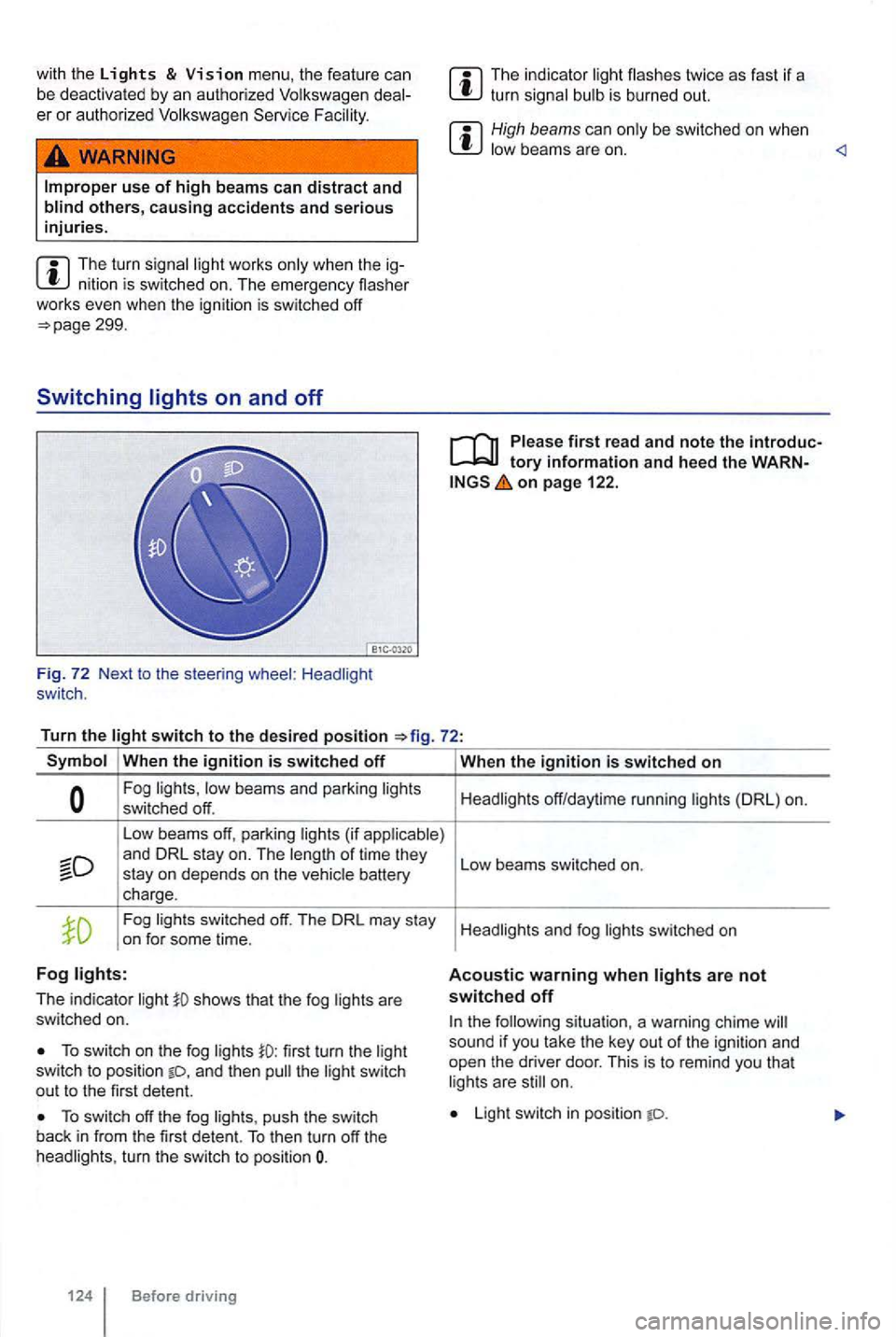
Turn
the switch to the desired position
Symbol When the ignition is switched off
Fog lights, low beams and parking lights
switched off.
Low beams off, parking lights (if applicable)
Fog lights switched off. The DRL may stay
on for some time.
Fog lights:
The indicator li ght shows that the fog lights are
switched on.
To switch on the fog lights first turn the light
switch to posi tion and then the li ght switch
out to the first detent.
To switch off the fog lights , push the switch
back in from the first detent. To then turn off the
headlights , turn the switch to position
124 Before driving When
the ig
nition is switched on
Headlights off/daytime running lights (DRL) on.
L
ow beams switched on.
H eadlights and fog
switched on
Acoustic warning when lights are not switched off
the following situation, a warning chime sound if yo u tak e th e ke y out of the ignition and
open the driver door. This is to remind you that
l ig hts are still on.
Light switch in position
Page 280 of 516
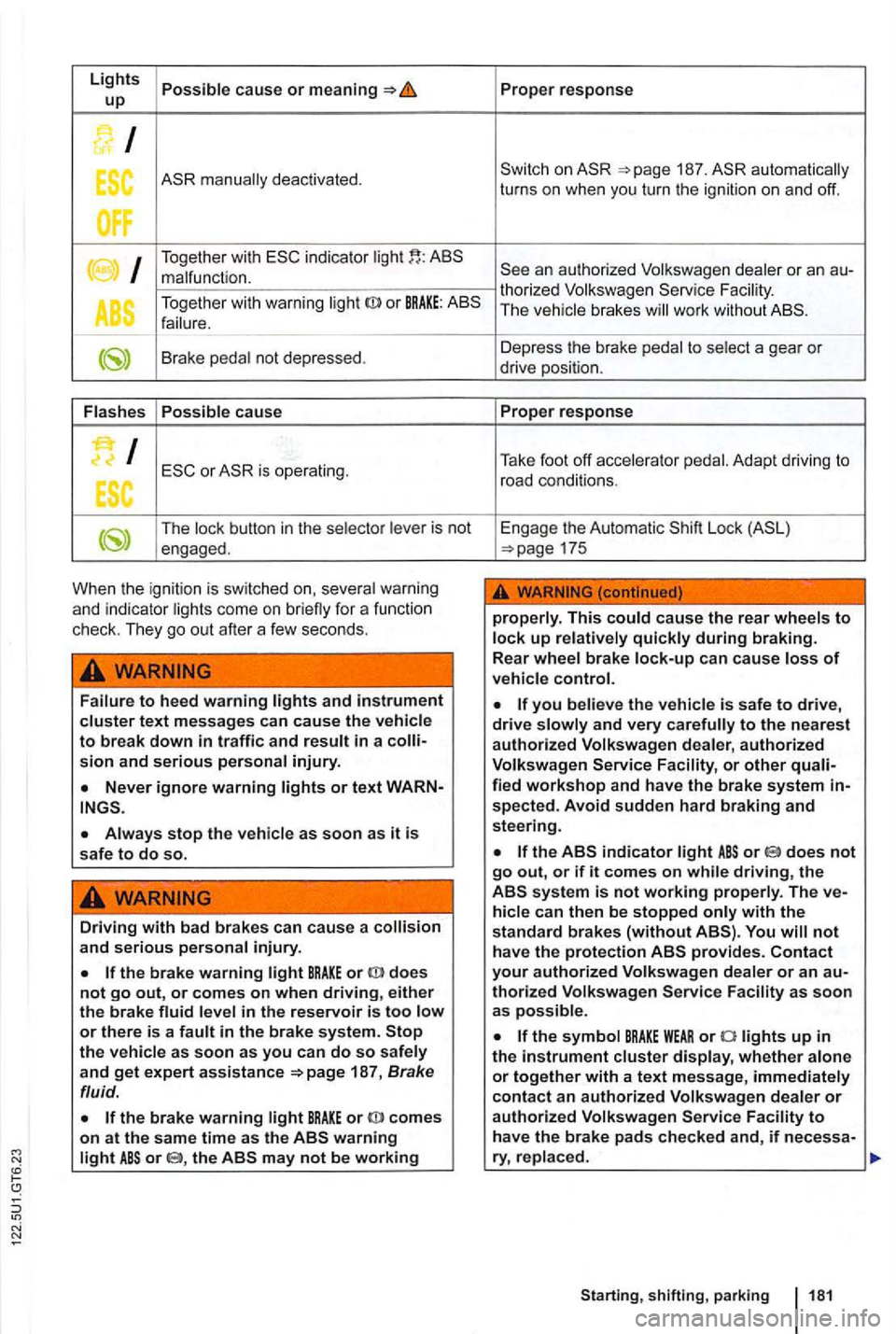
Lights cause or up
I
ES deactivated.
I Together with indicator malfunction .
T ogethe r with warning
or BRAKE:
Brake not dep ressed.
cause
I
The butt on in the is not
engaged .
When the ign ition is switch ed on,
text messages can cause the to break down in traffic and
or text WARN
stop the as soon as it is safe to do so.
Driving with bad brakes can cause a and serious
the brake warning BRAKE or does not go out, or comes on when driving, either the brake or there is a the as soon as you can do so and get expert assistance 187, Brake
fluid.
the brake warning comes on at the same time as the or the
187 . automatically
turns on when you turn the ignition on and off.
an authorized Volkswagen or an thorized Volkswage n The brake s work without
to
Adapt driving to
road conditions.
E ngage the Automatic
Lock
This up brake
you is safe to drive, drive and very authorized Volkswagen Service or other
spected. Avoid sudden hard braking and steering.
or does not go out, or if it comes on while driving, the system is not working can then be stopped with the
s tandard brakes (without not have the protection
thorized Volkswagen Service as soon as
Starting, shifting, parki ng 181