Page 231 of 513
231
3-1. Using the air conditioning system
and defogger
3
Interior features
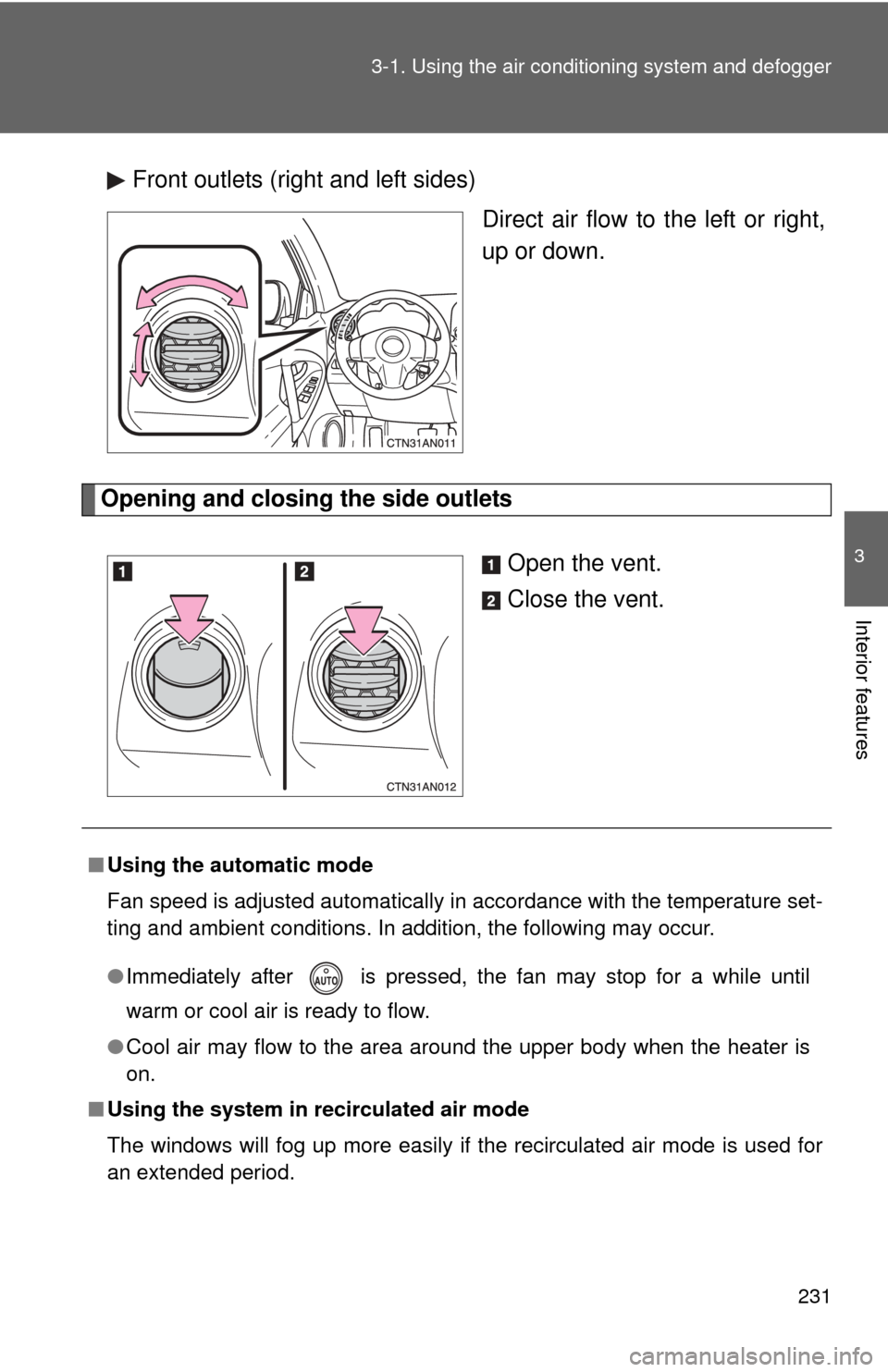
Front outlets (right and left sides)
Direct air flow to the left or right,
up or down.
Opening and closing the side outlets
Open the vent.
Close the vent.
■Using the automatic mode
Fan speed is adjusted automatically in accordance with the temperature set-
ting and ambient conditions. In addition, the following may occur.
●Immediately after is pressed, the fan may stop for a while until
warm or cool air is ready to flow.
● Cool air may flow to the area around the upper body when the heater is
on.
■ Using the system in recirculated air mode
The windows will fog up more easily if the recirculated air mode is used for
an extended period.
Page 232 of 513

232 3-1. Using the air conditioning system and defogger
■Switching between outside air and recirculated air modes
Recirculated air mode or outside air mode may be automatically switched to
in accordance with the temperature setting and the inside temperature.
■ Window defogger feature
Recirculated air mode may automatically switch to outside air mode in situa-
tions where the windows need to be defogged.
■ When outside temper ature approaches 32F (0 C)
The air conditioning system may not operate even when is pressed.
■ When
is selected for the air outlets used
For your driving comfort, air flowing to the feet may be warmer than air flow-
ing to the upper body depending on the position of the temperature setting.
■ Micro dust and pollen filter
●In order to prevent the windows from fogging up when the outside air is
cold, the following may occur.
• Outside air mode is not switched to recirculated air mode.
• The air conditioning system operates automatically.
• The operation is canceled after 1 minute.
● In rainy weather, the windows may fog up. Press .
■ When the indicator light on flashes
Press
and turn off the air conditioning system before turning it on once
more. There may be a problem in the ai r conditioning system if the indicator
light keep flashing. Turn the air conditioning system off and have it inspected
by your Toyota dealer.
■ Air conditioning odors
●During use, various odors from inside and outside the vehicle may enter
into and accumulate in the air conditioning system. This may then cause
odor to be emitted from the vents.
● To reduce potential odors from occurring:
• It is recommended that the air conditioning system be set to outside air
mode prior to turning the vehicle off.
• The start timing of the blower may be delayed for a short period of time immediately after the air conditioning system is started in automatic
mode.
Page 257 of 513

256 3-2. Using the audio system
■MP3 and WMA files
MP3 (MPEG Audio LAYER3) is a standard audio compression format.
Files can be compressed to approximately 1/10 of their original size using
MP3 compression.
WMA (Windows Media
TM Audio) is a Microsoft audio compression format.
This format compresses audio data to a size smaller than that of the MP3
format.
There is a limit to the MP3 and WMA file standards that can be used and to
the media/formats on which the files are recorded.
● MP3 file compatibility
• Compatible standards
MP3 (MPEG1 LAYER3, MPEG2 LSF LAYER3)
• Compatible sampling frequencies MPEG1 LAYER3: 32, 44.1, 48 (kHz)
MPEG2 LSF LAYER3: 16, 22.05, 24 (kHz)
• Compatible bit rates (compatible with VBR) MPEG1 LAYER3: 64, 80, 96, 112, 128, 160, 192, 224, 256, 320 (kbps)
MPEG2 LSF LAYER3: 64, 80, 96, 112, 128, 144, 160 (kbps)
• Compatible channel modes: stereo, joint stereo, dual channel and monaural
● WMA file compatibility
• Compatible standards
WMA Ver. 7, 8, 9
• Compatible sampling frequencies 32, 44.1, 48 (kHz)
• Compatible bit rates (only compatible with 2-channel playback) Ver. 7, 8: CBR 48, 64, 80, 96, 128, 160, 192 (kbps)
Ver. 9: CBR 48, 64, 80, 96, 128, 160, 192, 256, 320 (kbps)
● Compatible media
Media that can be used for MP3 and WMA playback are CD-Rs and CD-
RWs.
Playback in some instances may not be possible if the CD-R or CD-RW is
not finalized. Playback may not be possible or the audio may jump if the
disc is scratched or marked with fingerprints.
Page 259 of 513

258 3-2. Using the audio system
●Extensions
If the file extensions .mp3 and .wma are used for files other than MP3 and
WMA files, they will be mistakenly recognized and played as MP3 and
WMA files. This may result in large amounts of interference and damage
to the speakers.
● Playback
• To play MP3 file with steady sound quality, we recommend a fixed bit
rate of at least 128 kbps and a sampling frequency of 44.1 kHz.
• CD-R or CD-RW playback may not be possible in some instances, depending on the characteristics of the disc.
• There is a wide variety of freeware and other encoding software for MP3 and WMA files on the market, and depending on the status of the
encoding and the file format, poor sound quality or noise at the start of
playback may result. In some cases, playback may not be possible at
all.
• When files other than MP3 or WMA files are recorded on a disc, it may take more time to recognize the disc and in some cases, playback may
not be possible at all.
• Microsoft, Windows, and Windows Media are the registered trade- marks of Microsoft Corporation in the U.S. and other countries.
NOTICE
■ CDs that cannot be used
P. 250
■ CD player precautions
P. 251
Page 331 of 513
330
4-1. Maintenance and care
Cleaning and protecting the vehicle exterior
■Automatic car washes
●Before washing the vehicle, do the following.
• Fold the mirrors back.
• Remove the antenna.
● Brushes used in automatic car washes may scratch the vehicle surface
and harm your vehicle’s paint.
■ High pressure car washes
●Do not allow the nozzles of the car wash to come within close proximity
of the windows.
● Before car wash, check that the fuel filler door on your vehicle is closed
properly.
Perform the following to protect the vehicle and maintain it in prime
condition.
● Working from top to bottom, liber ally apply water to the vehicle
body, wheel wells and underside of the vehicle to remove any
dirt and dust.
Wash the vehicle body using a sponge or soft cloth, such as a
chamois.
● For hard-to-remove marks, use car wash soap and rinse thor-
oughly with water.
● Wipe away any water.
● Wax the vehicle when the waterproof coating deteriorates.
If water does not bead on a clean surface, apply wax when the vehicle
body is cool.
Page 336 of 513

335
4-1. Maintenance and care
4
Maintenance and care
NOTICE
■
Cleaning detergents
●Do not use organic substances such as benzene or gasoline, acidic or
alkaline solutions, dye, bleach or other detergent. Doing so may discolor
the vehicle interior or cause streaks or damage to painted surfaces.
● Do not use polish wax or polish cleaner. The instrument panel's or other
interior part’s painted surface may be damaged.
■ Preventing damage to leather surfaces
Observe the following precautions to avoid damage to and deterioration o\
f
leather surfaces.
●Remove any dust or dirt on leather surfaces immediately.
● Do not expose the vehicle to direct sunlight for extended periods of time.
Park the vehicle in the shade, especially during summer.
● Do not place items made of vinyl, plastic, or that contain wax on the uphol-
stery, as they may stick to the leather surface if the vehicle interior heats
up significantly.
■ Water on the floor
Do not wash the vehicle floor with water.
Vehicle systems such as the audio system may be damaged if water comes
into contact with electrical components under the floor of the vehicle, and
may also cause the body to rust.
■ Cleaning the inside of the rear window
●Do not use glass cleaner to clean the rear window, as this may cause
damage to the rear window defogger heater wires. Use a cloth dampened
with lukewarm water to gently wipe the windows clean. Wipe the windows
in strokes running parallel to the heater wires.
● Be careful not to scratch or damage the heater wires.
Page 393 of 513
392 4-3. Do-it-yourself maintenance
*1: Vehicles without towing package
*
2: Vehicles with towing package
*
3: Vehicles with 2.5 L 4-cylinder (2AR-FE) engine
*
4: Vehicles with 3.5 L V6 (2GR-FE) engine
■ Under the instrument panel
20 A/F 20 A A/F sensor, fuel pump*3
FuseAmpereCircuit
1 TAIL 10 A Parking lights, tail lights, license
plate light, front fog lights, rear side
marker lights
2 PANEL 7.5 A Clock, instrument panel lights,
audio system
3 GAUGE 1 10 A Back-up lights, charging system
4 D FR DOOR 20 A Power windows (front doors)
5 RL DOOR 20 A Power windows
6 RR DOOR 20 A Power windows
7 S/ROOF 25 A Electric moon roof
8 CIG 15 A Power outlet
FuseAmpereCircuit
Page 395 of 513
394 4-3. Do-it-yourself maintenance
*: Vehicles without smart key system
21 OBD7.5 A On-board diagnosis system
22 STOP 10 AStop/tail lights, high mounted stop-
light, automatic transmission shift
lock system, multiport fuel injection
system/sequential multiport fuel
injection system, ABS, TRAC,
Enhanced VSC, AUTO LSD sys-
tem, downhill assist control system,
hill-start assist control system
23 DOOR 25 AMain body ECU, power door lock
system
24 ACC-B 25 A ACC, CIG, fuses
25 4WD 7.5 A Active torque control 4WD system
26 FR FOG 15 A Front fog lights
27 AM1* 7.5 A Starting system
28 DEF 30 ARear window defogger, MIR HTR
fuse
29 P/SEAT 30 A Power seat
30 POWER 30 A Power windows
FuseAmpereCircuit