Page 332 of 592

332 3-4. Using the hands-free system (for cellular phone)
L/C200_U
■Conditions under which th e system will not operate
● If using a mobile phone that does not support Bluetooth
®
●If the mobile phone is switched off
● If you are outside service range
● If the mobile phone is not connected
● If the mobile phone’s battery is low
● If the mobile phone is behind the seat or in the glove box or console box
● If metal is covering or touching the phone
■ When using the hands-free system
● The audio system and voice guidance are muted when making a call.
● If both parties speak at the same time, it may be difficult to hear.
● If the incoming call volume is overly loud, an echo may be heard.
● Try to face toward the microphone as much as possible when speaking.
● In the following circumstances, it may be difficult to hear the other party:
• When driving on unpaved roads
• When driving at high speeds
• When a window is open
• When the air conditioning is blowing directly on the microphone
• When the air conditioning is set to high
■ When transferring ownership of the vehicle
Be sure to initialize the system to prevent the personal data from being
improperly accessed.
Page 342 of 592
342 3-4. Using the hands-free system (for cellular phone)
L/C200_U
■Automatic volume adjustment
When vehicle speed reaches 50 mph (80 km/h) or more, the volume auto-
matically increases. The volume returns to the previous volume setting when
vehicle speed drops to 43 mph (70 km/h) or less.
■ When using a voice command
● For numbers, say a combination of single digits from zero to nine, #
(pound), (star), and + (plus).
● Say a command correctly and clearly.
■ Situations that the system ma y not recognize your voice
● When driving on a rough road
● When driving at high speeds
● When air is blowing out of the vents onto the microphone
● When the air conditioning fan emits a loud noise
■ Operations that cannot be performed while driving
● Operating the system with
● Registering a cellular phone to the system
■ Changing the passkey
P. 352
Page 380 of 592
380
L/C200_U
3-7. Other interior features
Cool box
: If equipped
■While the cool box is on
The front air conditioning system cannot be turned off.
■ When the outside temperature is 32°F (0°C) or below
The cool box may not operate.
While the engine is running, the co ol box, which is cooled by the air
conditioning, can be used.
Lift the lever to open.
On/off
When on, the indicator light
comes on.
If the front air conditioning sys-
tem is not in use, the front air
conditioning system is auto-
matically turned on when the
cool box is turned on.
ITY34C029
STEP1
COOLBOX
PWR
ITY34C027
STEP2
Page 411 of 592
Maintenance and care4
411
L/C200_U
4-1. Maintenance and careCleaning and protecting the vehicle exterior ......... 412
Cleaning and protecting the vehicle interior .......... 415
4-2. Maintenance Maintenance requirements .................. 418
General maintenance....... 420
Emission inspection and maintenance (I/M)
programs ........................ 423
4-3. Do-it-yourself maintenance Do-it-yourself service precautions .................... 424
Hood ................................ 427
Engine compartment ........ 428
Tires ................................. 443
Tire inflation pressure ...... 452
Wheels ............................. 456
Air conditioning filter......... 458
Electronic key battery....... 461
Checking and replacing fuses .............................. 464
Light bulbs........................ 477
Page 426 of 592

426 4-3. Do-it-yourself maintenance
L/C200_U
CAUTION
The engine compartment contains many mechanisms and fluids that may
move suddenly, become hot, or become electrically energized. To avoid death
or serious injury.
■When working on the engine compartment
● Keep hands, clothing, and tools away from the moving fan and engine
drive belt.
● Be careful not to touch the engine, inverter, radiator, exhaust manifold, etc.
right after driving as they may be hot. Oil and other fluids may also be hot.
● Do not leave anything that may burn easily, such as paper or rags, in the
engine compartment.
● Do not smoke, cause sparks or expose an open flame to fuel or the bat-
tery. Fuel and battery fumes are flammable.
● Be extremely cautious when working on the battery. It contains poisonous
and corrosive sulfuric acid.
■ When working near the electric cooling fan or radiator grille
Be sure the “ENGINE START STOP” switch is OFF.
With the “ENGINE START STOP” switch in IGNITION ON mode, the electric
cooling fan may automatically start to run if the air conditioning is on and/or if
the coolant temperature is high. ( P. 435)
■ When working on or under the vehicle
● Do not get under the vehicle with just the jack supporting it.
Always use automotive jack stands or other solid supports.
● Use eye protection to prevent flying or falling material, fluid spray, etc. from
getting in your eyes.
NOTICE
■If you remove the air cleaner filter
Driving with the air cleaner filter removed may cause excessive engine wear
due to dirt in the air. Also a backfire could cause a fire in the engine compart-
ment.
Page 458 of 592
458
4-3. Do-it-yourself maintenance
L/C200_U
Air conditioning filter
The air conditioning filter must be cleaned or changed regularly to
maintain air conditioning efficiency.
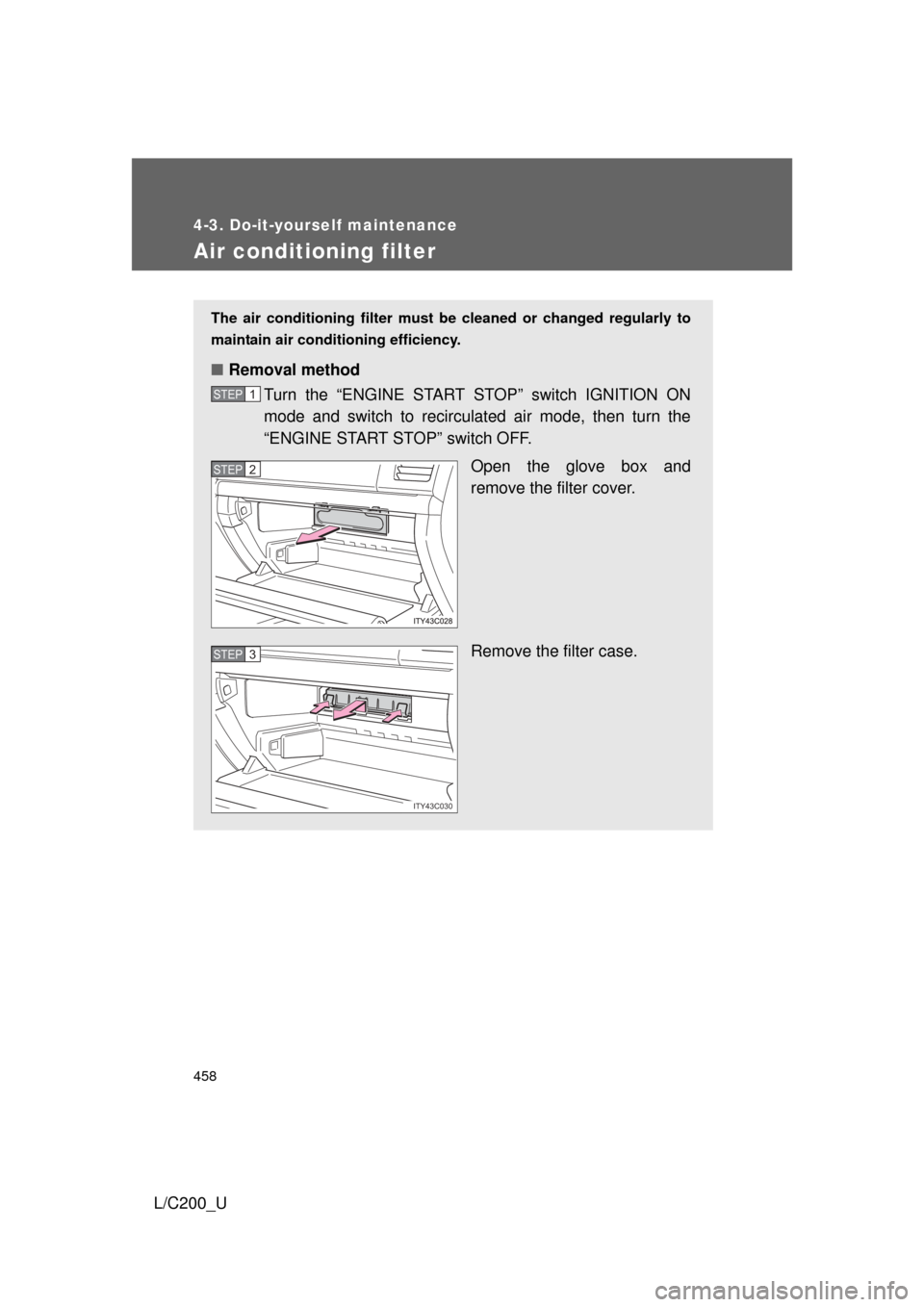
■ Removal method
Turn the “ENGINE START STOP” switch IGNITION ON
mode and switch to recirculated air mode, then turn the
“ENGINE START STOP” switch OFF.
Open the glove box and
remove the filter cover.
Remove the filter case.
STEP1
STEP2
ITY43C030
STEP3
Page 459 of 592
459
4-3. Do-it-yourself maintenance
4
Maintenance and care
L/C200_U
■
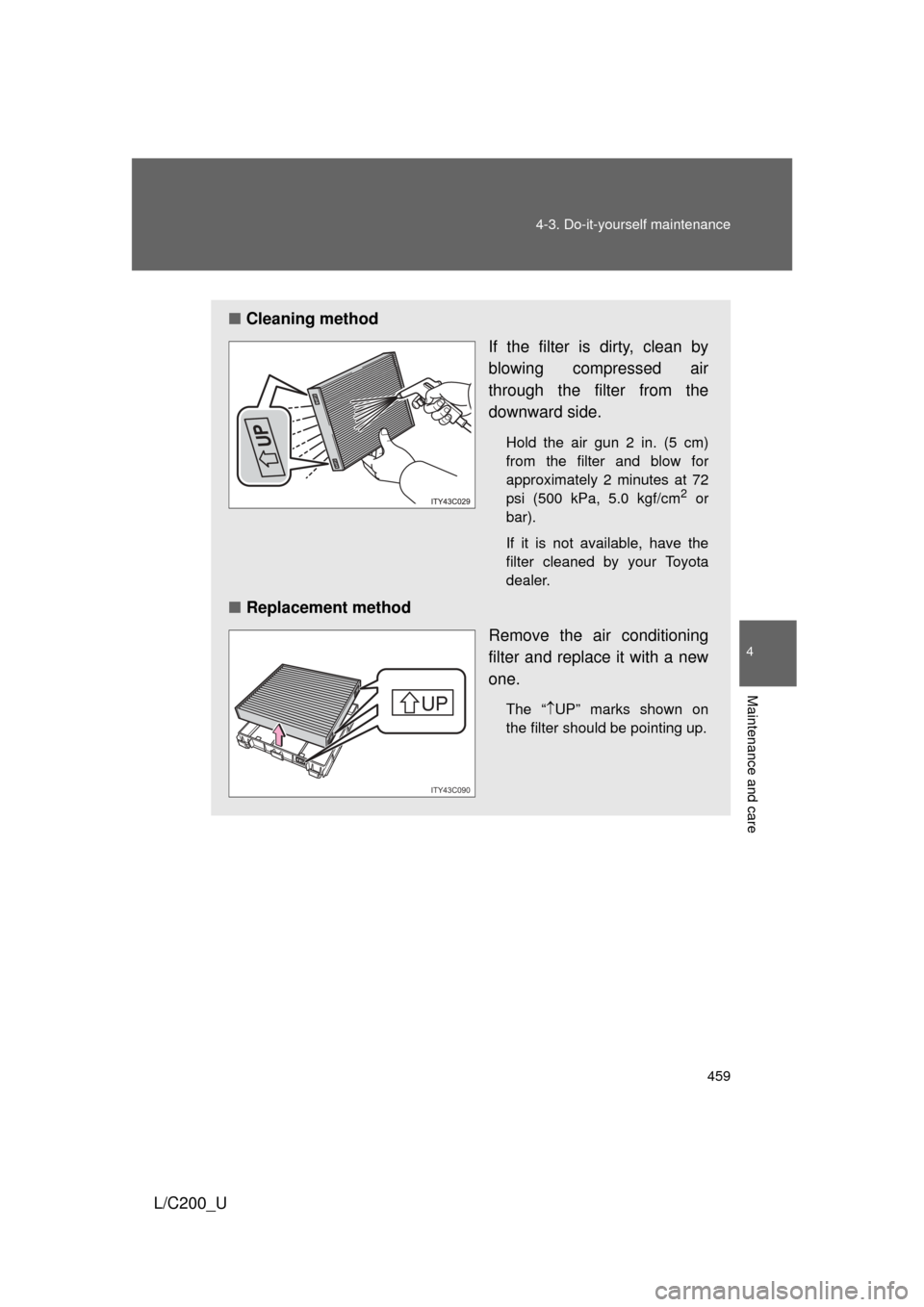
Cleaning method
If the filter is dirty, clean by
blowing compressed air
through the filter from the
downward side.
Hold the air gun 2 in. (5 cm)
from the filter and blow for
approximately 2 minutes at 72
psi (500 kPa, 5.0 kgf/cm
2 or
bar).
If it is not available, have the
filter cleaned by your Toyota
dealer.
■ Replacement method
Remove the air conditioning
filter and replace it with a new
one.
The “UP” marks shown on
the filter should be pointing up.
UP
UP
UP
ITY43C090
Page 460 of 592
460 4-3. Do-it-yourself maintenance
L/C200_U
■Checking interval
Inspect, clean and replace the air conditioning filter according to the mainte-
nance schedule. In dusty areas or areas with heavy traffic flow, more fre-
quent cleaning or early replacement may be required. (For scheduled
maintenance information, read the “Scheduled Maintenance Guide”,
“Owner’s Manual Supplement”.)
■ If air flow from the vents decreases dramatically
The filter may be clogged. Check the filter and replace if necessary.
NOTICE
■To prevent damage to the system
● When using the air conditioning system, make sure that a filter is always
installed.
● When cleaning the filter, do not clean the filter with water.