Page 204 of 538
204 3-1. Using the air conditioning system and defogger
NOTICE
■To prevent battery discharge
Do not leave the automatic air conditioning system on longer than necessary
when the engine is stopped.
■ To prevent damage to the Plasmacluster
Do not insert anything into the driver's side vent, attach anything to it, or use
sprays around the drive's side vent. These things may cause the system not
to work properly.
Page 208 of 538
208 3-1. Using the air conditioning system and defogger
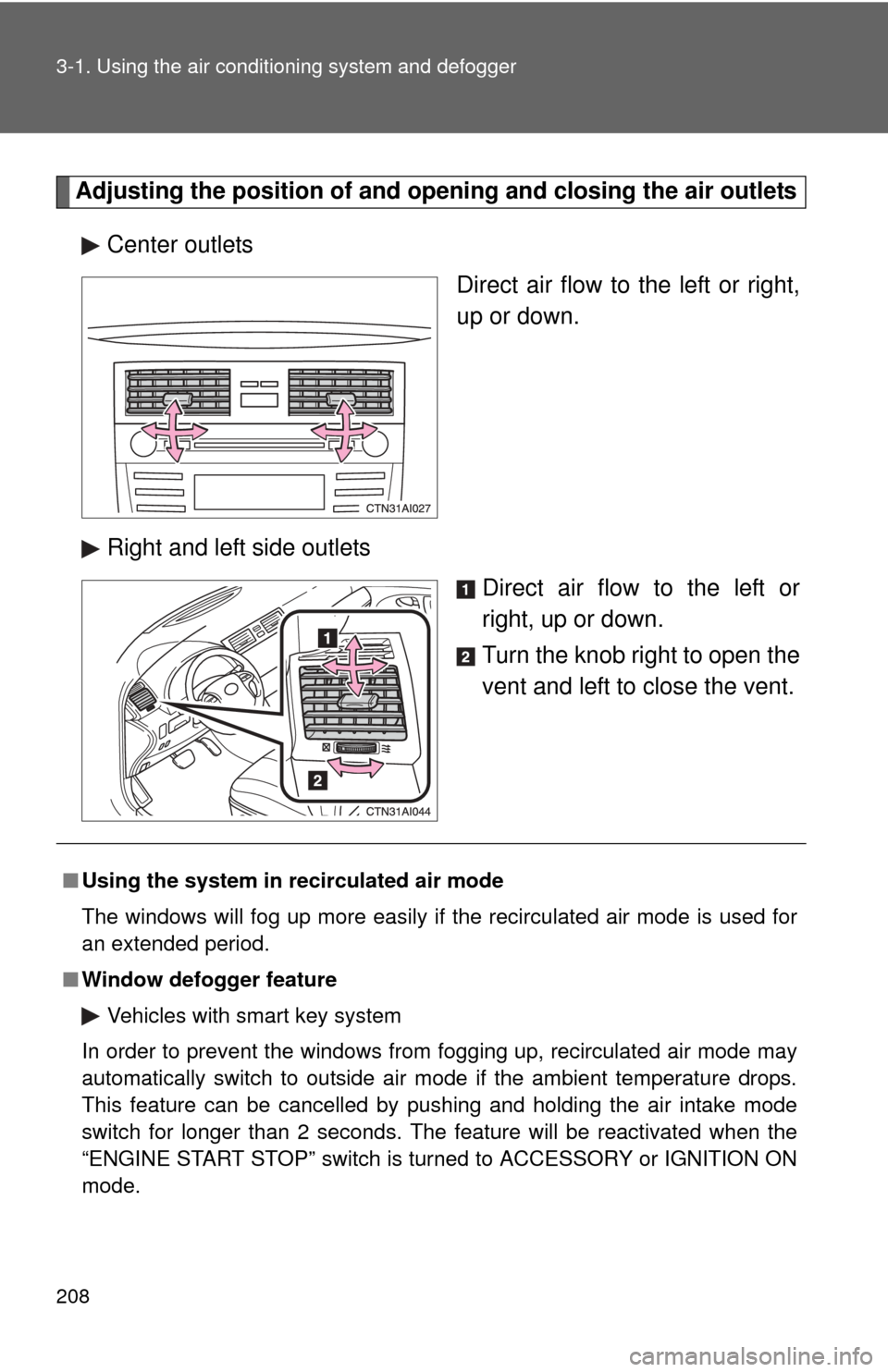
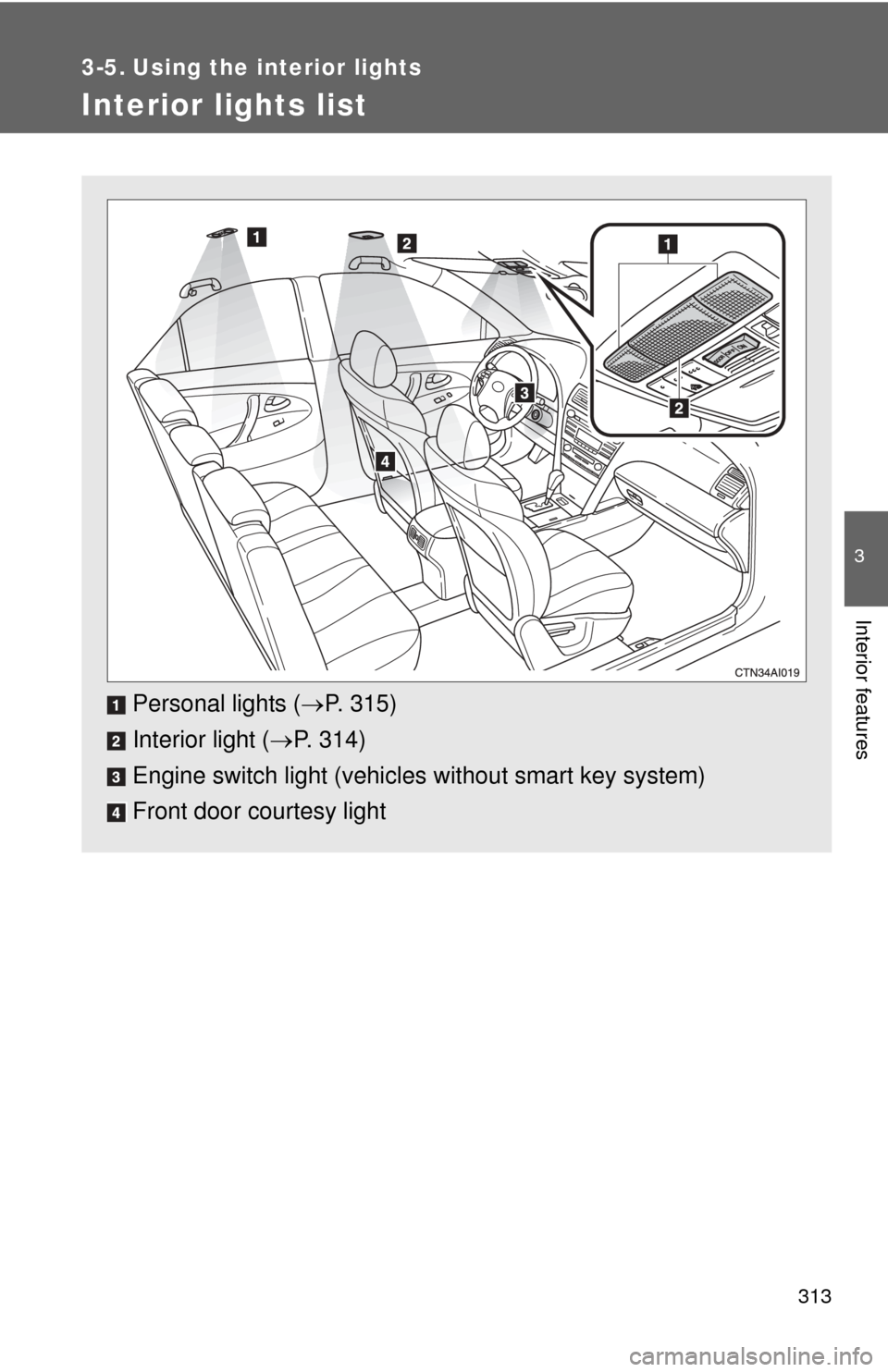
Adjusting the position of and opening and closing the air outlets
Center outlets Direct air flow to the left or right,
up or down.
Right and left side outlets Direct air flow to the left or
right, up or down.
Turn the knob right to open the
vent and left to close the vent.
■Using the system in recirculated air mode
The windows will fog up more easily if the recirculated air mode is used for
an extended period.
■ Window defogger feature
Vehicles with smart key system
In order to prevent the windows from fogging up, recirculated air mode may
automatically switch to outside air mode if the ambient temperature drops.
This feature can be cancelled by pushing and holding the air intake mode
switch for longer than 2 seconds. The feature will be reactivated when the
“ENGINE START STOP” switch is turned to ACCESSORY or IGNITION ON
mode.
Page 209 of 538
209
3-1. Using the air conditioning system
and defogger
3
Interior features
Vehicles without smart key system
In order to prevent the windows from fogging up, recirculated air mode may
automatically switch to outside air mode if the ambient temperature drops.
This feature can be cancelled by pushing and holding the air intake mode
switch for longer than 2 seconds. The feature will be reactivated when the
engine switch is turned to the “ACC” or “LOCK” position.
■ When outside air temperature approaches 32°F (0°C)
The air conditioning system may not operate even when
is pressed.
■ When the indicator light on
flashes
Press
and turn off the air conditioning system before turning it on
once more. There may be a problem in the air conditioning system if the indi-
cator light continues to flash. Turn the air conditioning system off and have it
inspected by your Toyota dealer.
■ Air conditioning odors
●During use, various odors from inside and outside the vehicle may enter
into and accumulate in the air conditioning system. This may then cause
odor to be emitted from the vents.
● To reduce potential odors from occurring:
It is recommended that the air conditioning system be set to outside air
mode prior to turning the vehicle off.
CAUTION
■To prevent the windshield from fogging up
Do not set the air outlet selection dial to during cool air operation in
extremely humid weather. The difference between the temperature of the
outside air and that of the windshield can cause the outer surface of the
windshield to fog up, blocking your vision.
Page 210 of 538
210 3-1. Using the air conditioning system and defogger
NOTICE
■To prevent battery discharge
Do not leave the air conditioning system on longer than necessary when the
engine is stopped.
Page 211 of 538
211
3-1. Using the air conditioning system and defogger
3
Interior features
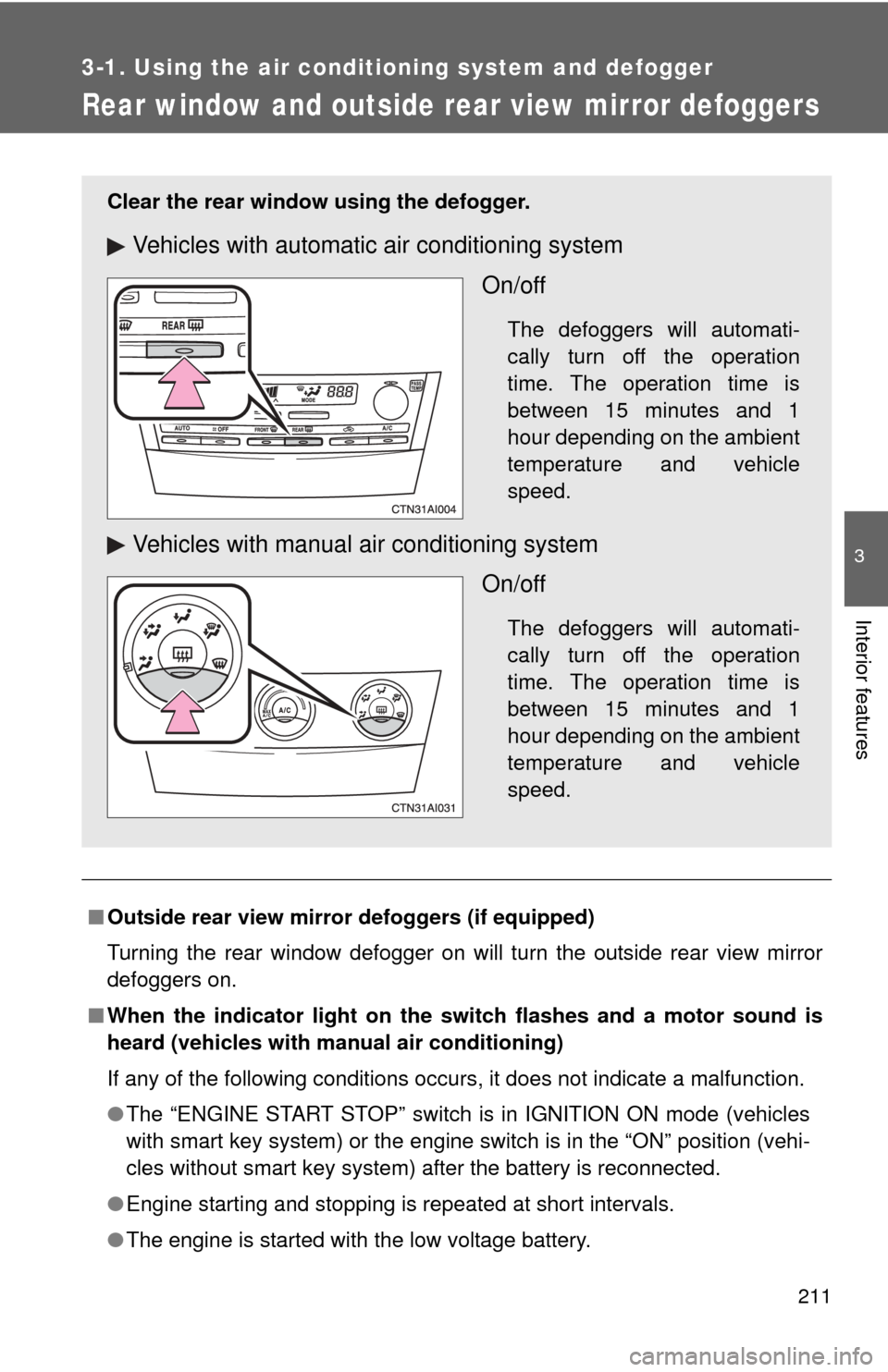
Rear window and outside rear view mirror defoggers
■Outside rear view mirror defoggers (if equipped)
Turning the rear window defogger on will turn the outside rear view mirror
defoggers on.
■ When the indicator light on the sw itch flashes and a motor sound is
heard (vehicles with manual air conditioning)
If any of the following conditions occurs, it does not indicate a malfun\
ction.
● The “ENGINE START STOP” switch is in IGNITION ON mode (vehicles
with smart key system) or the engine switch is in the “ON” position (vehi-
cles without smart key system) after the battery is reconnected.
● Engine starting and stopping is repeated at short intervals.
● The engine is started with the low voltage battery.
Clear the rear window using the defogger.
Vehicles with automatic air conditioning system
On/off
The defoggers will automati-
cally turn off the operation
time. The operation time is
between 15 minutes and 1
hour depending on the ambient
temperature and vehicle
speed.
Vehicles with manual air conditioning systemOn/off
The defoggers will automati-
cally turn off the operation
time. The operation time is
between 15 minutes and 1
hour depending on the ambient
temperature and vehicle
speed.
Page 216 of 538

214 3-2. Using the audio system
CAUTION
■For vehicles sold in U.S.A. and Canada
●Part 15 of the FCC Rules
FCC Warning:
Any unauthorized changes or modifications to this equipment will void the
user’s authority to operate this device.
● Laser products
• Do not take this unit apart or attempt to make any changes yourself.
This is an intricate unit that uses a laser pickup to retrieve information
from the surface of compact discs. The laser is carefully shielded so
that its rays remain inside the cabinet. Therefore, never try to disas-
semble the player or alter any of its parts since you may be exposed to
laser rays and dangerous voltages.
• This product utilizes a laser. Use of controls or adjustments or performance of procedures other
than those specified herein may result in hazardous radiation expo-
sure.
NOTICE
■ To prevent battery discharge
Do not leave the audio system on longer than necessary with the engine o\
ff.
■ To avoid damaging the audio system
Take care not to spill drinks or other fluids over the audio system.
Page 277 of 538
275
3-3. Using the Bluetooth
® audio system
3
Interior features
Press the talk switch and say “From Car” or “From Audio”, and
select “Confirm” by using a voice command or .
Vehicles with smart key system: If “From Car” is selected, the porta-
ble player will be automatically connected whenever the “ENGINE
START STOP” switch is in either ACCESSORY or IGNITION ON
mode.
Vehicles without smart key system: If “From Car” is selected, the
portable player will be automatically connected whenever the engine
switch is in either the “ACC” or “ON” position.
Changing the registered name of a portable player
Select “Change Name” using a voice command or .
Select the name of the portable player to be changed by
either of the following methods, and select “Confirm” using a
voice command or :
a. Press the talk switch and say the name of desired portableplayer.
b. Press the talk switch and say “List Audio Players”. When
the name of the desired portable player is read aloud, press
the talk switch.
Press the talk switch or select “Record Name” using ,
and say the new name.
Select “Confirm” using a voice command or .
STEP3
STEP1
STEP2
STEP3
STEP4
Page 315 of 538
313
3
Interior features
3-5. Using the interior lights
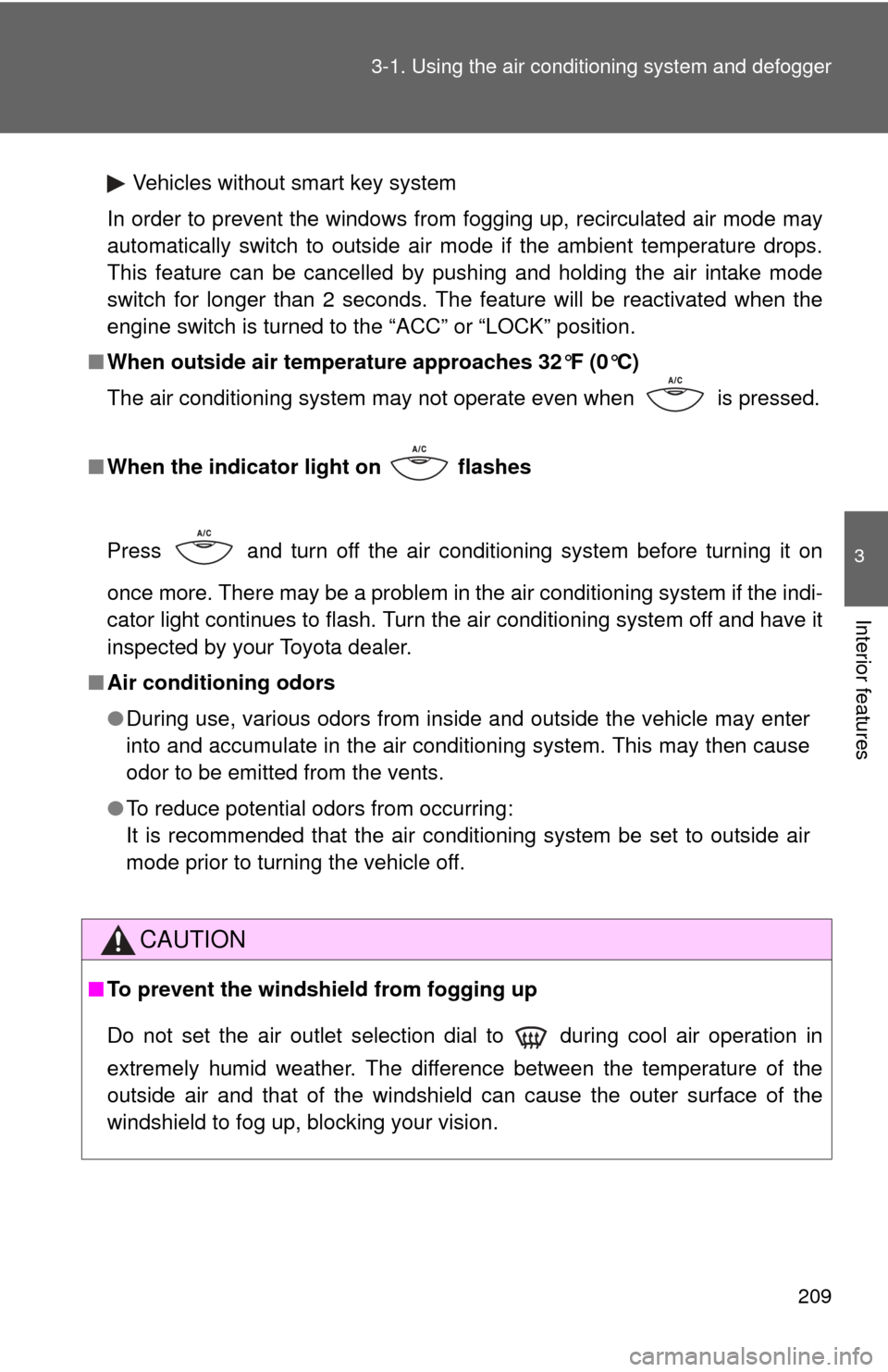
Interior lights list
Personal lights (P. 315)
Interior light ( P. 314)
Engine switch light (vehicle s without smart key system)
Front door courtesy light