Page 12 of 476
12
AVALON_U (OM41437U)
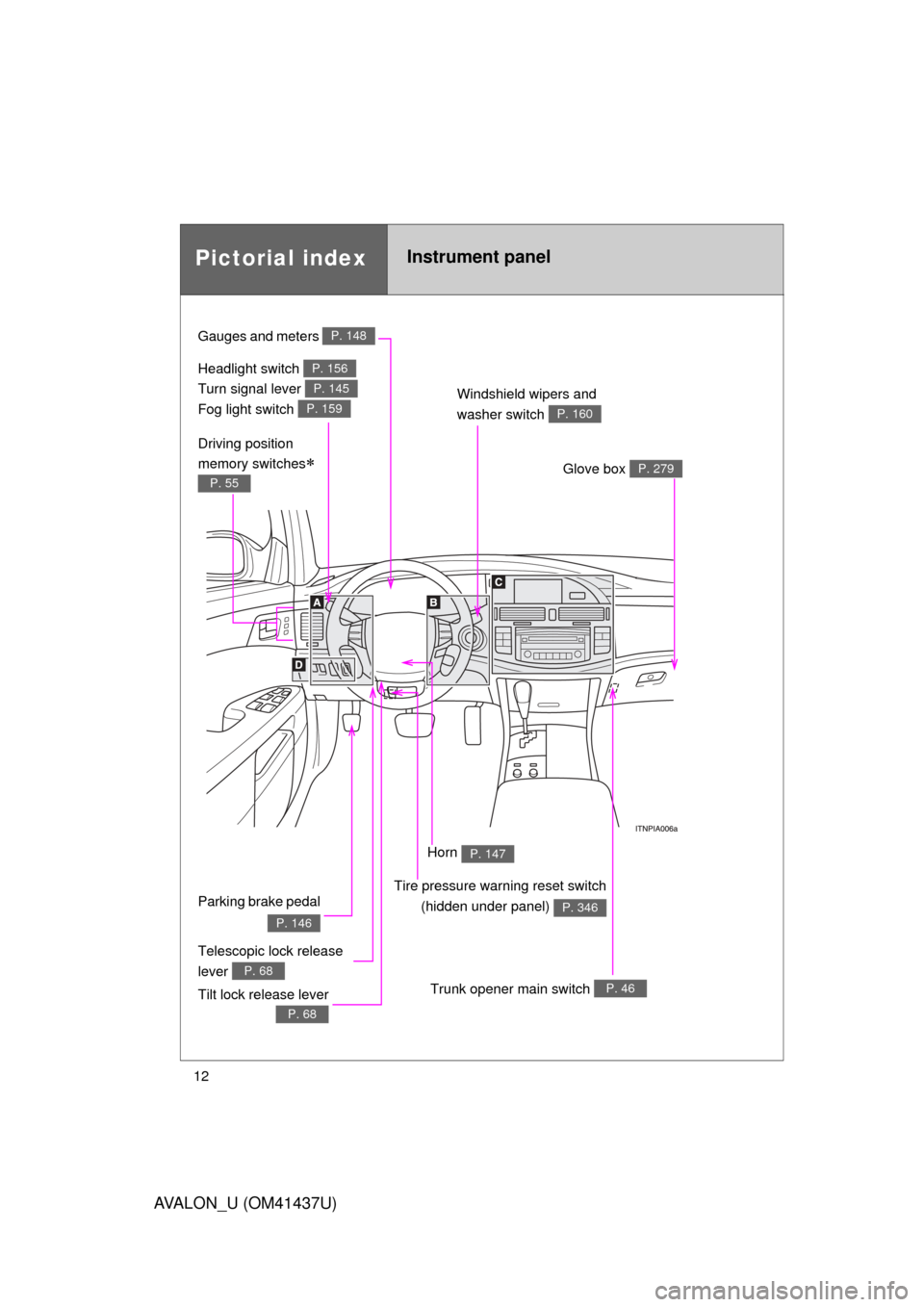
Pictorial indexInstrument panel
Headlight switch
Turn signal lever
Fog light switch P. 156
P. 145
P. 159
Gauges and meters P. 148
Windshield wipers and
washer switch
P. 160
Trunk opener main switch P. 46
Glove box P. 279
Telescopic lock release
lever
P. 68
Parking brake pedal
P. 146
Tilt lock release lever
P. 68
Driving position
memory switches
P. 55
Tire pressure warning reset switch
(hidden under panel)
P. 346
Horn P. 147
Page 23 of 476

23
1-1. Key information
1
Before driving
AVALON_U (OM41437U)
■
When required to leave a key to th e vehicle with a parking attendant
Turn the trunk opener main switch OFF, lock the glove box and trunk storage
extension door as circumstances demand. ( P. 46, 300)
● Vehicles with smart key system: Remove the mechanical key for your
own use and provide the attendant with the electronic key only.
● Vehicles without smart key system: Provide the attendant with the valet
key.
■ Key number plate
Keep the plate in a safe place such as your wallet, not in the vehicle. In the
event that a key is lost, a new key can be made at your Toyota dealer using
the key number plate. ( P. 417)
■ When riding in an aircraft
When bringing a key onto an aircraft, make sure you do not press any but-
tons on the key while inside the aircraft cabin. If you are carrying a key in
your bag etc., ensure that the buttons are not likely to be pressed acciden-
tally. Pressing a button may cause the key to emit radio waves that could
interfere with the operation of the aircraft.
NOTICE
■To prevent key damage
● Do not disassemble the key.
● Do not subject the keys to strong shocks, expose them to high tempera-
tures by placing them in direct sunlight, or get them wet.
● Do not expose the keys to electromagnetic materials or attach any mate-
rial that blocks electromagnetic waves to the key surface.
Page 31 of 476

31
1-2. Opening, closing and locking the doors and trunk
1
Before driving
AVALON_U (OM41437U)
■
Note for the smart key system
● Even when the electronic key is within the effective range (detection
areas), the system may not operate properly in the following cases.
• The electronic key is too close to the window or outside door handle,
near the ground, or in a high place when the doors are locked or
unlocked.
• The electronic key is near the ground or in a high place, or too close to the rear bumper center when the trunk is unlocked.
• The electronic key is on the instrument panel, rear package tray or floor, or in the glove box when the engine is started or “ENGINE
START STOP” switch modes are changed.
● As long as the electronic key is within the effective range, the doors may
be locked or unlocked by anyone.
● Even if the electronic key is not inside the vehicle, it may be possible to
start the engine if the electronic key is near the window.
● The doors may unlock if a large amount of water splashes on the door
handle, such as in the rain or in a car wash when the electronic key is
within the effective range. (The doors will automatically be locked after
approximately 60 seconds if the doors are not opened and closed.)
● Gripping the door handle when wearing a glove may not unlock the door.
● If the wireless remote control is used to lock the doors when the elec-
tronic key is near the vehicle, there is a possibility that the door may not
be unlocked by the entry function. (Use the wireless remote control to
unlock the doors.)
● A sudden approach to the effective range or door handle operation may
prevent the doors from being unlocked. In this case, return the door han-
dle to the original position and check that the doors unlock before pulling
the door handle again.
■ When the vehicle is not dr iven for extended periods
To prevent theft of the vehicle, do not leave the electronic key within 6 ft. (2
m) of the vehicle.
■ Security feature
If a door is not opened within approximately 60 seconds after the vehicle is
unlocked, the theft deterrent system automatically locks the vehicle again.
Page 46 of 476
46
1-2. Opening, closing and locking the doors and trunk
AVALON_U (OM41437U)
Trunk
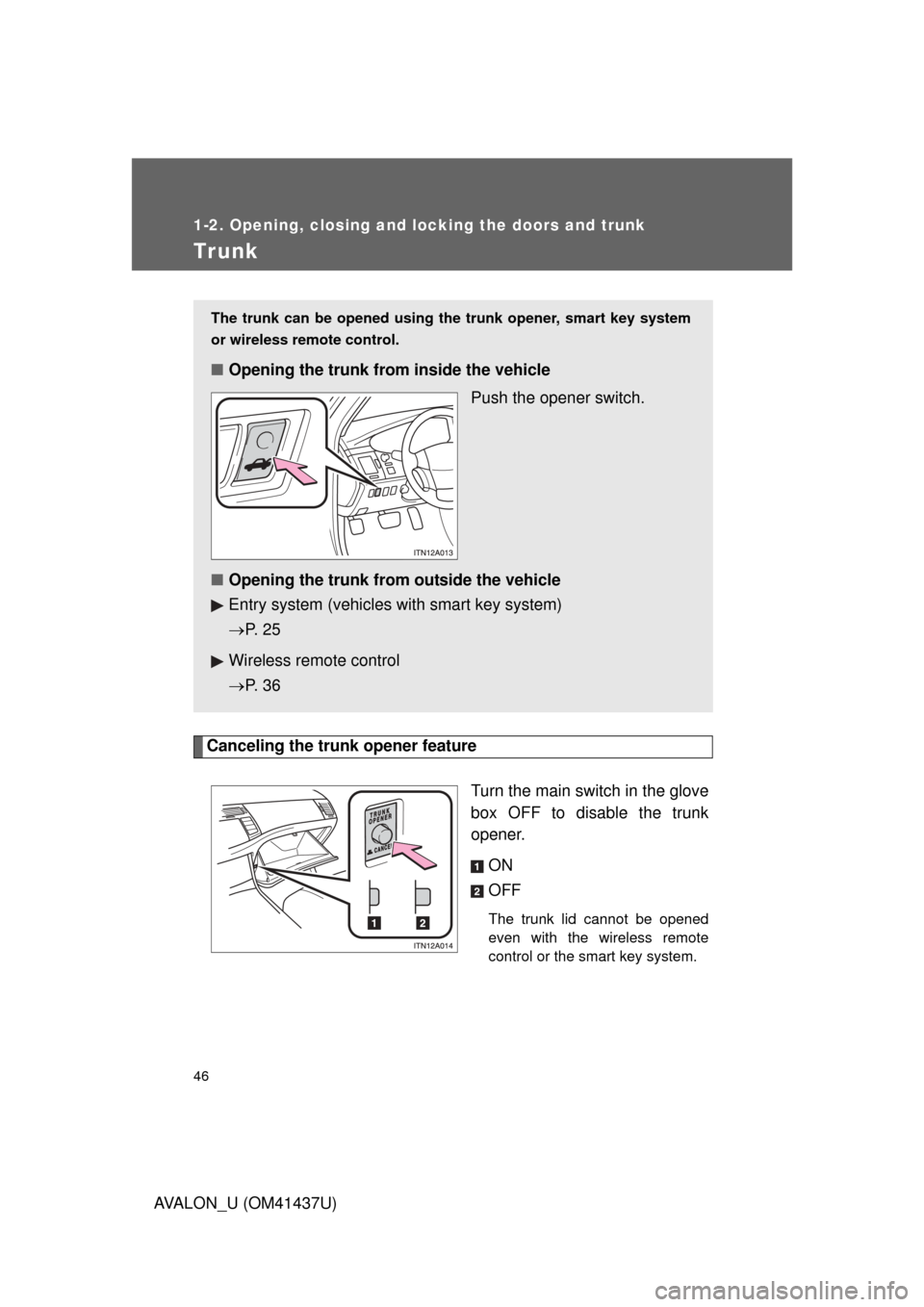
Canceling the trunk opener featureTurn the main switch in the glove
box OFF to disable the trunk
opener.ON
OFF
The trunk lid cannot be opened
even with the wireless remote
control or the smart key system.
The trunk can be opened using the trunk opener, smart key system
or wireless remote control.
■ Opening the trunk from inside the vehicle
Push the opener switch.
■ Opening the trunk from outside the vehicle
Entry system (vehicles with smart key system)
P. 2 5
Wireless remote control
P. 3 6
Page 47 of 476
47
1-2. Opening, closing and locking the doors and trunk
1
Before driving
AVALON_U (OM41437U)
■
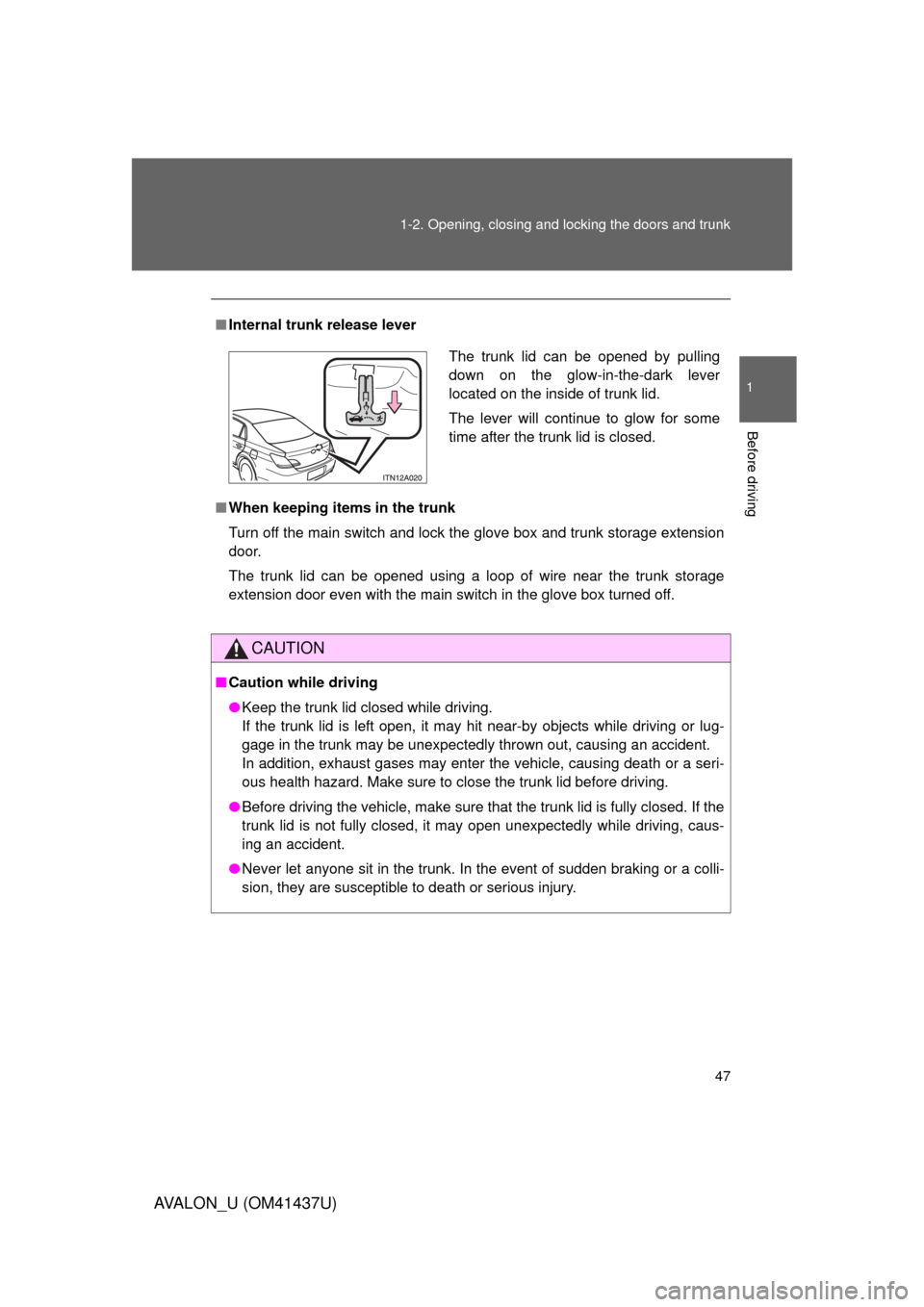
Internal trunk release lever
■ When keeping items in the trunk
Turn off the main switch and lock the glove box and trunk storage extension
door.
The trunk lid can be opened using a loop of wire near the trunk storage
extension door even with the main switch in the glove box turned off.
CAUTION
■Caution while driving
● Keep the trunk lid closed while driving.
If the trunk lid is left open, it may hit near-by objects while driving or lug-
gage in the trunk may be unexpectedly thrown out, causing an accident.
In addition, exhaust gases may enter the vehicle, causing death or a seri-
ous health hazard. Make sure to close the trunk lid before driving.
● Before driving the vehicle, make sure that the trunk lid is fully closed. If the
trunk lid is not fully closed, it may open unexpectedly while driving, caus-
ing an accident.
● Never let anyone sit in the trunk. In the event of sudden braking or a colli-
sion, they are susceptible to death or serious injury.
The trunk lid can be opened by pulling
down on the glow-in-the-dark lever
located on the inside of trunk lid.
The lever will continue to glow for some
time after the trunk lid is closed.
Page 278 of 476
278
AVALON_U (OM41437U)
3-5. Using the storage features
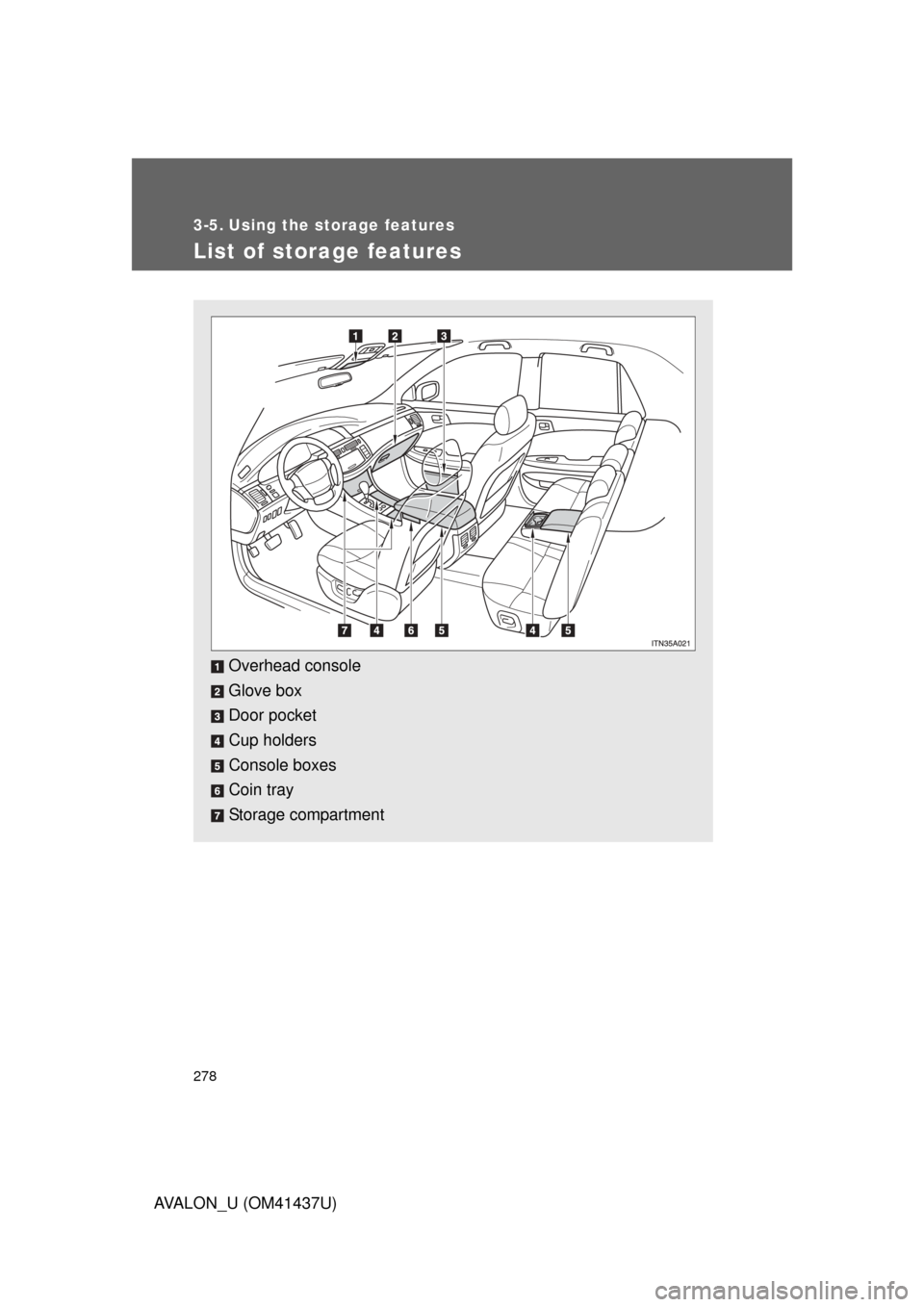
List of storage features
Overhead console
Glove box
Door pocket
Cup holders
Console boxes
Coin tray
Storage compartment
Page 279 of 476
279
3-5. Using the
storage features
3
Interior features
AVALON_U (OM41437U)
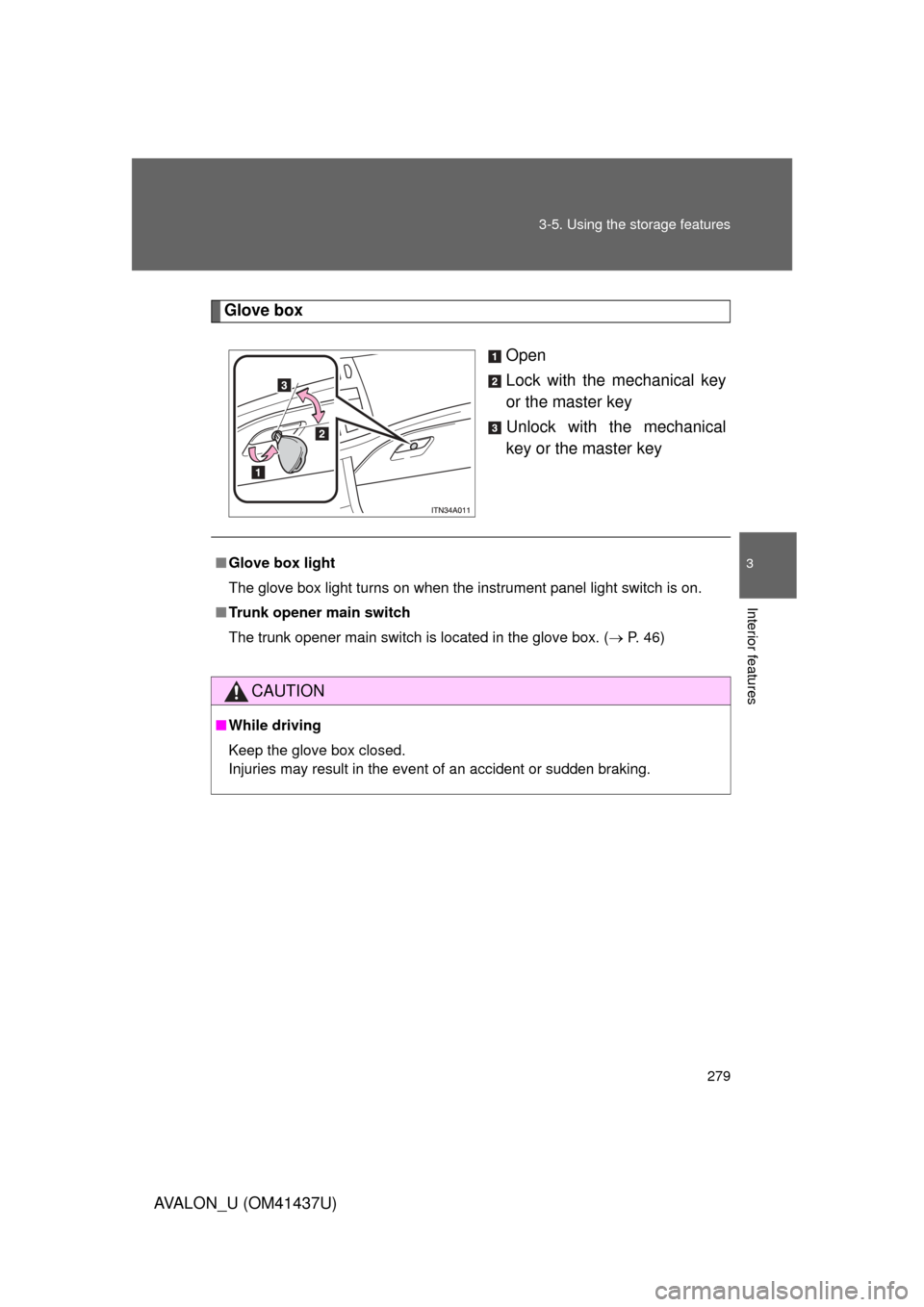
Glove box
Open
Lock with the mechanical key
or the master key
Unlock with the mechanical
key or the master key
■Glove box light
The glove box light turns on when the instrument panel light switch is on.
■ Trunk opener main switch
The trunk opener main switch is located in the glove box. ( P. 46)
CAUTION
■While driving
Keep the glove box closed.
Injuries may result in the event of an accident or sudden braking.
Page 360 of 476
360
4-3. Do-it-yourself maintenance
AVALON_U (OM41437U)
Air conditioning filter
The air conditioning filter must be cleaned or changed regularly to
maintain air conditioning efficiency.
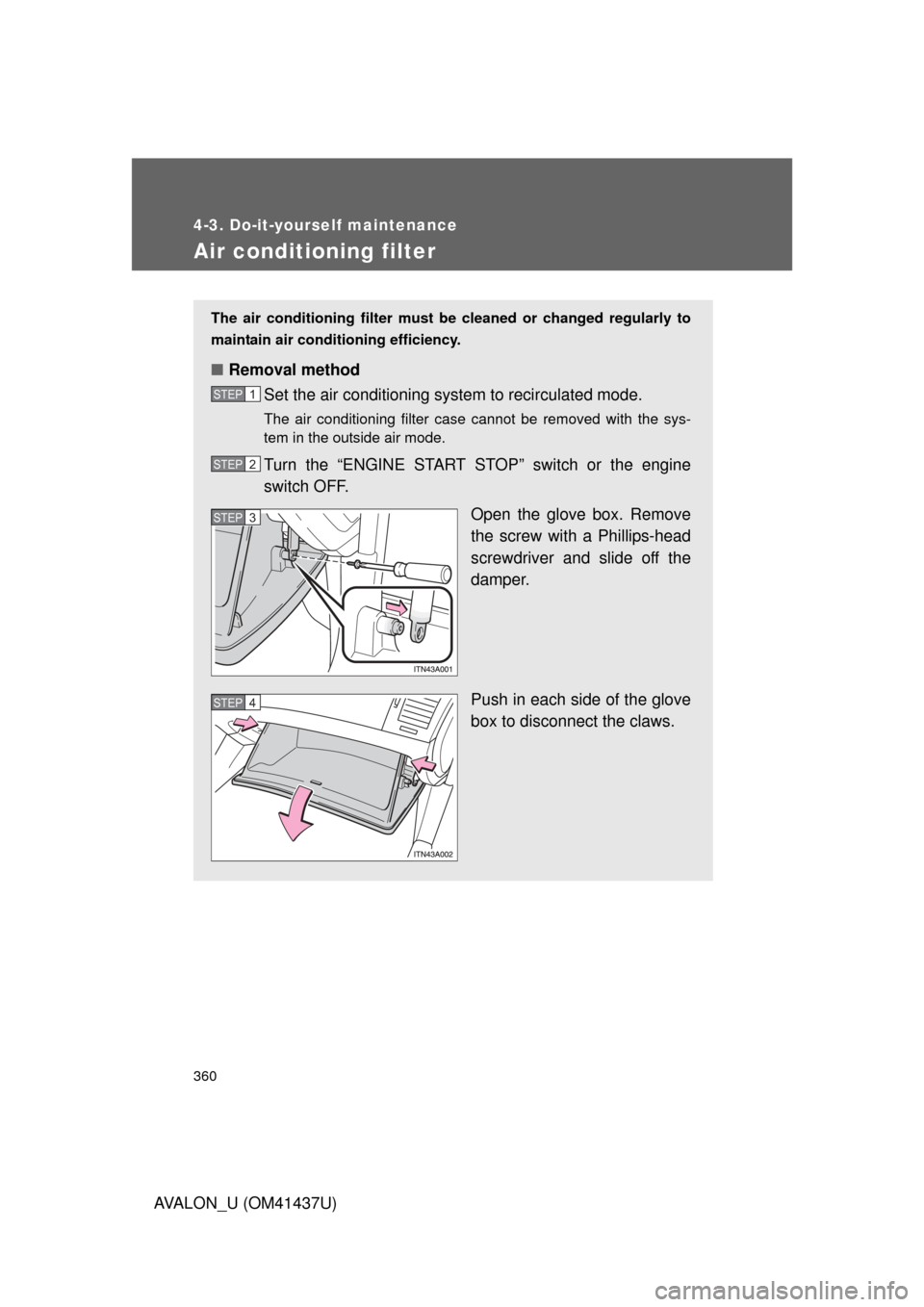
■ Removal method
Set the air conditioning system to recirculated mode.
The air conditioning filter case cannot be removed with the sys-
tem in the outside air mode.
Turn the “ENGINE START STOP” switch or the engine
switch OFF.
Open the glove box. Remove
the screw with a Phillips-head
screwdriver and slide off the
damper.
Push in each side of the glove
box to disconnect the claws.
STEP1
STEP2
STEP3
STEP4