Page 135 of 476
135
2-1. Driving procedures
2
When driving
AVALON_U (OM41437U)
■
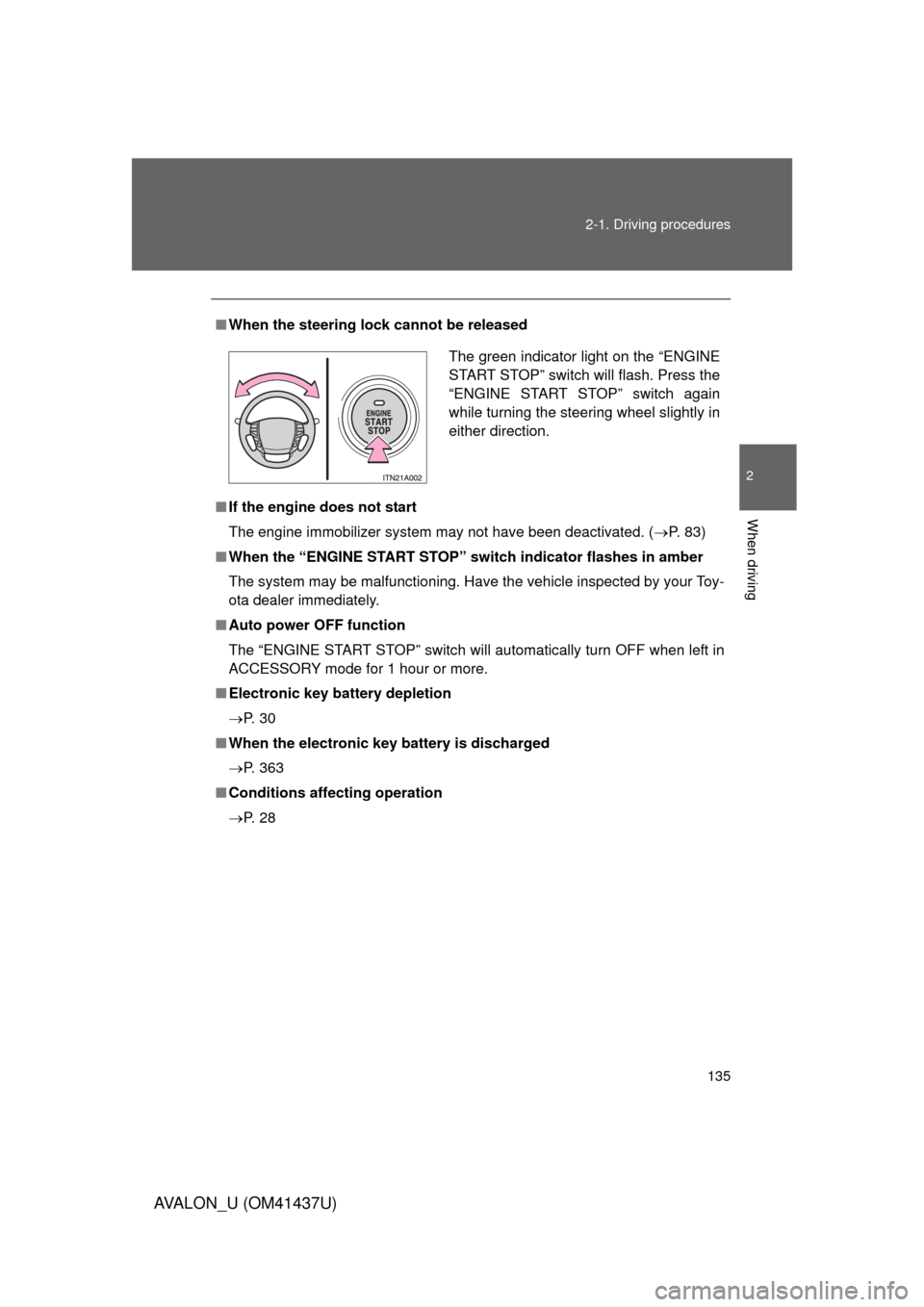
When the steering lock cannot be released
■ If the engine does not start
The engine immobilizer system may not have been deactivated. ( P. 83)
■ When the “ENGINE START STOP” switch indicator flashes in amber
The system may be malfunctioning. Have the vehicle inspected by your Toy-
ota dealer immediately.
■ Auto power OFF function
The “ENGINE START STOP” switch will automatically turn OFF when left in
ACCESSORY mode for 1 hour or more.
■ Electronic key battery depletion
P. 3 0
■ When the electronic key battery is discharged
P. 363
■ Conditions aff ecting operation
P. 2 8
The green indicator light on the “ENGINE
START STOP” switch will flash. Press the
“ENGINE START STOP” switch again
while turning the steering wheel slightly in
either direction.
Page 136 of 476

136 2-1. Driving procedures
AVALON_U (OM41437U)
CAUTION
■When starting the engine
Always start the engine while sitting in the driver’s seat. Do not press the
accelerator pedal while starting the engine under any circumstances.
Doing so may cause an accident resulting in death or serious injury.
■ Stopping the engine in an emergency
If you want to stop the engine in an emergency while driving the vehicle,
push and hold the “ENGINE START STOP” switch for more than 3 seconds.
However, do not touch the "ENGINE START STOP" switch while driving
except in an emergency. Turning the engine off while driving will not cause
loss of steering or braking control, but the power assist to these systems will
be lost. This will make it more difficult to steer and brake, so you should pull
over and stop the vehicle as soon as it is safe to do so.
NOTICE
■To prevent battery discharge
Do not leave the “ENGINE START STOP” switch in ACCESSORY or IGNI-
TION ON mode for long periods if the engine is not running.
■ When starting the engine
● Do not race the engine.
● If the engine becomes difficult to start or stalls frequently, have the engine
checked immediately.
Page 197 of 476
Interior features3
197
AVALON_U (OM41437U)
3-1. Using the air conditioning system and defogger
Automatic air conditioning system ........................... 198
Using the steering wheel climate control
switches ......................... 206
Rear window and outside rear view mirror
defoggers ....................... 208
3-2. Using the audio system Audio system type............ 210
Audio cover ...................... 212
Using the radio ................. 213
Using the CD player ......... 220
Playing MP3 and WMA discs ..................... 228
Optimal use of the audio system ........................... 236
Using the AUX adapter........................... 238
Using the steering wheel audio switches ............... 239
3-3. Using the hands-free system (for cellular phone)
Hands-free system (for cellular phone) ......... 242
Using the hands-free system ........................... 246 Making a phone call ......... 254
Setting a cellular
phone ............................. 259
Security and system setup .............................. 264
Using the phone book ...... 267
3-4. Using the interior lights Interior lights list ............... 275
3-5. Using the storage features List of storage features .......................... 278
3-6. Other interior features Sun visors ........................ 286
Vanity mirrors ................... 287
Clock ................................ 288
Outside temperature display............................ 289
Ashtrays ........................... 290
Power outlets ................... 291
Seat heaters/ventilators ......... 293
Armrest ............................ 295
Rear sunshade................. 296
Floor mats ........................ 298
Trunk features .................. 299
Garage door opener......... 301
Compass .......................... 306
Page 239 of 476
239
3-2. Using the audio system
3
Interior features
AVALON_U (OM41437U)
Using the steering wheel audio switches
Turning on the powerPress when the audio system is turned off.
The audio system can be turned off by holding the switch down for 1 sec-
ond or more.
Changing the audio sourcePress when the audio system is turned on. The audio source
changes as follows each time the bu tton is pressed. If a CD is not
inserted, that mode will be skipped.
“FM1” “FM2” “CD player” “AUX” “AM” “SAT1”
“SAT2” “SAT3”
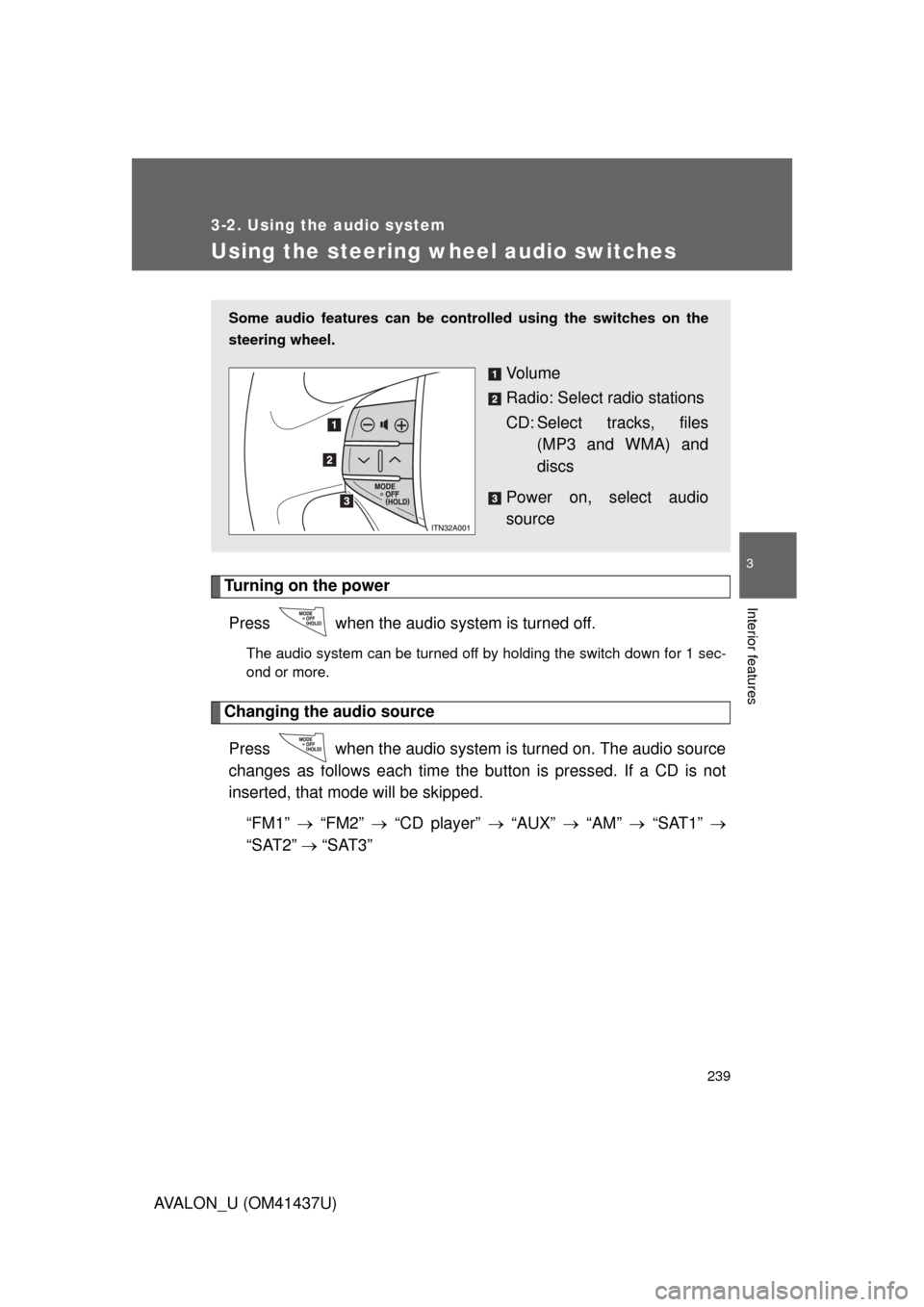
Some audio features can be cont rolled using the switches on the
steering wheel.
Vo l u m e
Radio: Select radio stations
CD: Select tracks, files (MP3 and WMA) and
discs
Power on, select audio
source
Page 320 of 476
320
4-2. Maintenance
AVALON_U (OM41437U)
General maintenance
Engine compartment
ItemsCheck points
Battery • Maintenance-free ( P. 341)
Brake fluid • At the correct level? ( P. 338)
Engine coolant • At the correct level? ( P. 336)
Engine oil • At the correct level? ( P. 332)
Exhaust system • No fumes or strange sounds?
Power steering fluid • At the correct level? ( P. 339)
Radiator/condenser/hoses • Not blocked with foreign matter?
(P. 337)
Washer fluid • At the correct level? ( P. 344)
Listed below are the general maintenance items that should be per-
formed at the intervals specified in the “Scheduled Maintenance
Guide” or “Owner’s” Manual Suppl ement”. It is recommended that
any problem you notice should be brought to the attention of your
Toyota dealer or qualified service shop for advice.
Page 325 of 476
4
Maintenance and care
325
4-3. Do-it-yourself maintenance
AVALON_U (OM41437U)
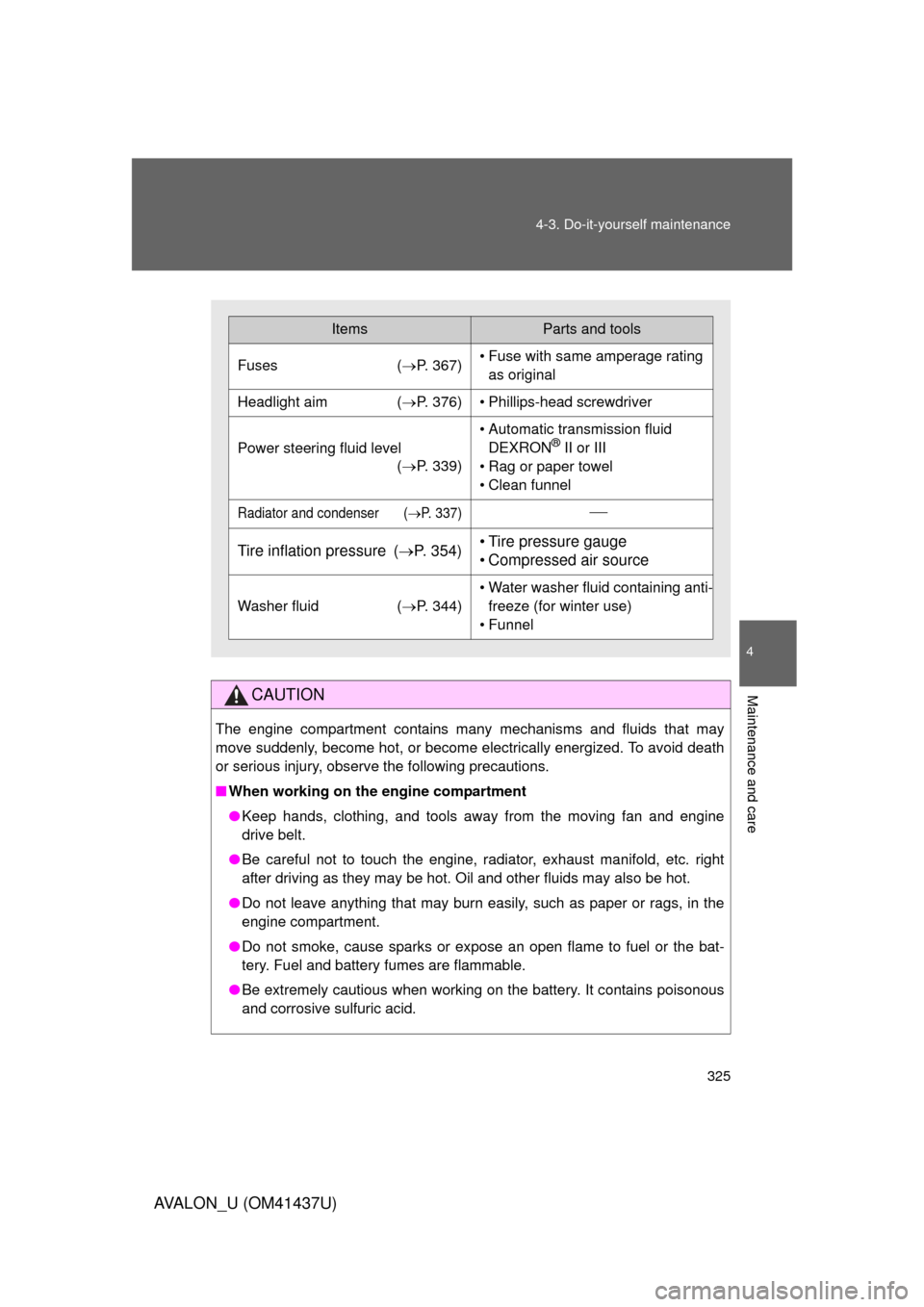
CAUTION
The engine compartment contains many mechanisms and fluids that may
move suddenly, become hot, or become electrically energized. To avoid death
or serious injury, observe the following precautions.
■
When working on the engine compartment
● Keep hands, clothing, and tools away from the moving fan and engine
drive belt.
● Be careful not to touch the engine, radiator, exhaust manifold, etc. right
after driving as they may be hot. Oil and other fluids may also be hot.
● Do not leave anything that may burn easily, such as paper or rags, in the
engine compartment.
● Do not smoke, cause sparks or expose an open flame to fuel or the bat-
tery. Fuel and battery fumes are flammable.
● Be extremely cautious when working on the battery. It contains poisonous
and corrosive sulfuric acid.
ItemsParts and tools
Fuses (P. 367)• Fuse with same amperage rating
as original
Headlight aim ( P. 376)• Phillips-head screwdriver
Power steering fluid level
(P. 339)
• Automatic transmission fluid
DEXRON® II or III
• Rag or paper towel
• Clean funnel
Radiator and condenser (P. 337)
Tire inflation pressure ( P. 354)• Tire pressure gauge
• Compressed air source
Washer fluid (P. 344)
• Water washer fluid containing anti-
freeze (for winter use)
• Funnel
Page 330 of 476
330
4-3. Do-it-yourself maintenance
AVALON_U (OM41437U)
Engine compar tment
Engine coolant reservoir( P. 336)
Power steering fluid
reservoir ( P. 339)
Engine oil filler cap ( P. 333)
Engine oil level dipstick ( P. 332)
Brake fluid reservoir ( P. 338)Fuse box ( P. 367)
Battery ( P. 341)
Radiator ( P. 337)
Electric cooling fans
Condenser ( P. 337)
Washer fluid tank ( P. 344)
Page 339 of 476
4
Maintenance and care
339
4-3. Do-it-yourself maintenance
AVALON_U (OM41437U)
Power steering fluid
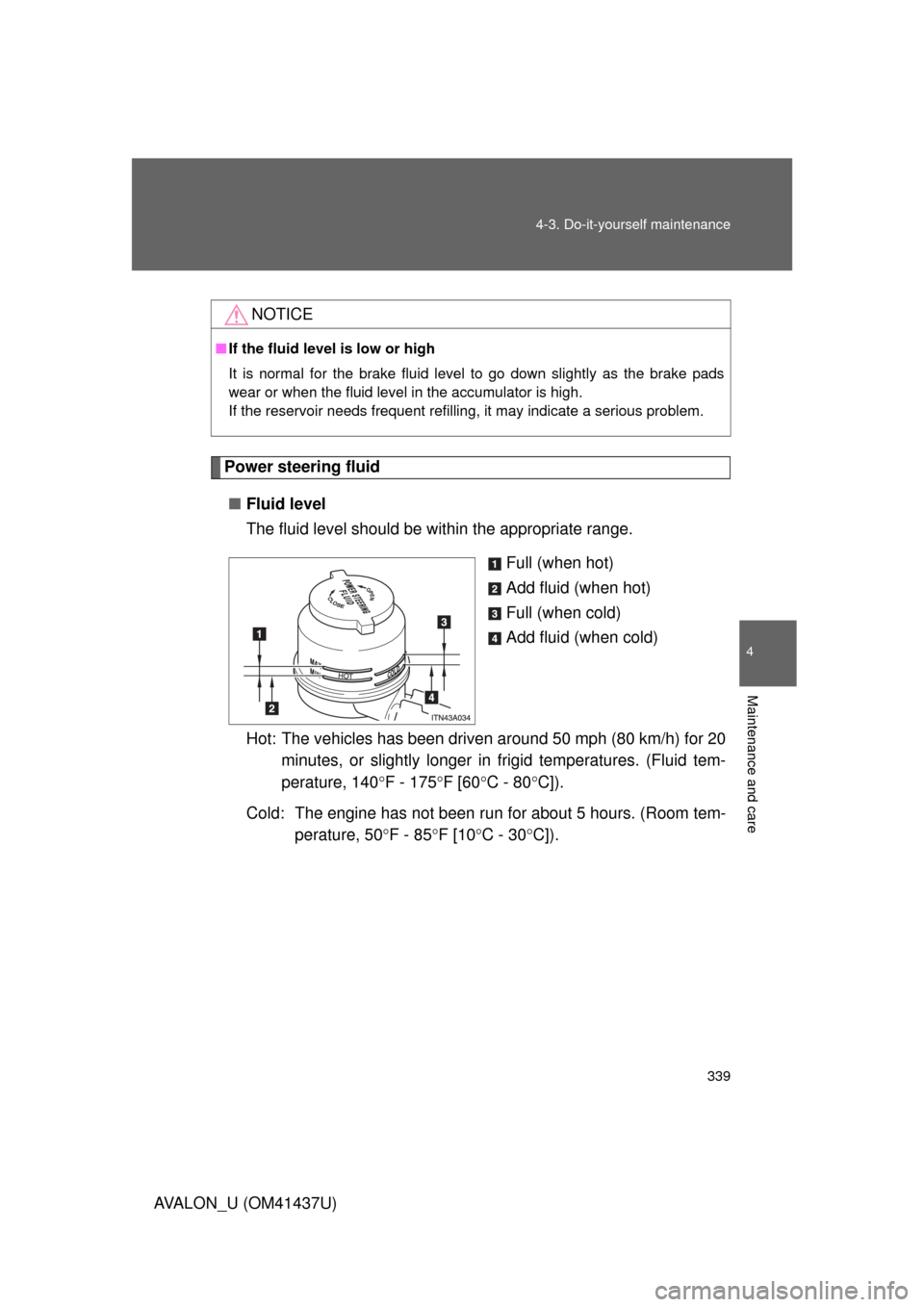
■ Fluid level
The fluid level should be within the appropriate range.
Full (when hot)
Add fluid (when hot)
Full (when cold)
Add fluid (when cold)
Hot: The vehicles has been driven around 50 mph (80 km/h) for 20 minutes, or slightly longer in frigid temperatures. (Fluid tem-
perature, 140 F - 175F [60C - 80 C]).
Cold: The engine has not been run for about 5 hours. (Room tem- perature, 50 F - 85F [10C - 30 C]).
NOTICE
■If the fluid level is low or high
It is normal for the brake fluid level to go down slightly as the brake pads
wear or when the fluid level in the accumulator is high.
If the reservoir needs frequent refilling, it may indicate a serious pro\
blem.