Page 226 of 476
226 3-2. Using the audio system
AVALON_U (OM41437U)
NOTICE
■Discs and adapters that cannot be used
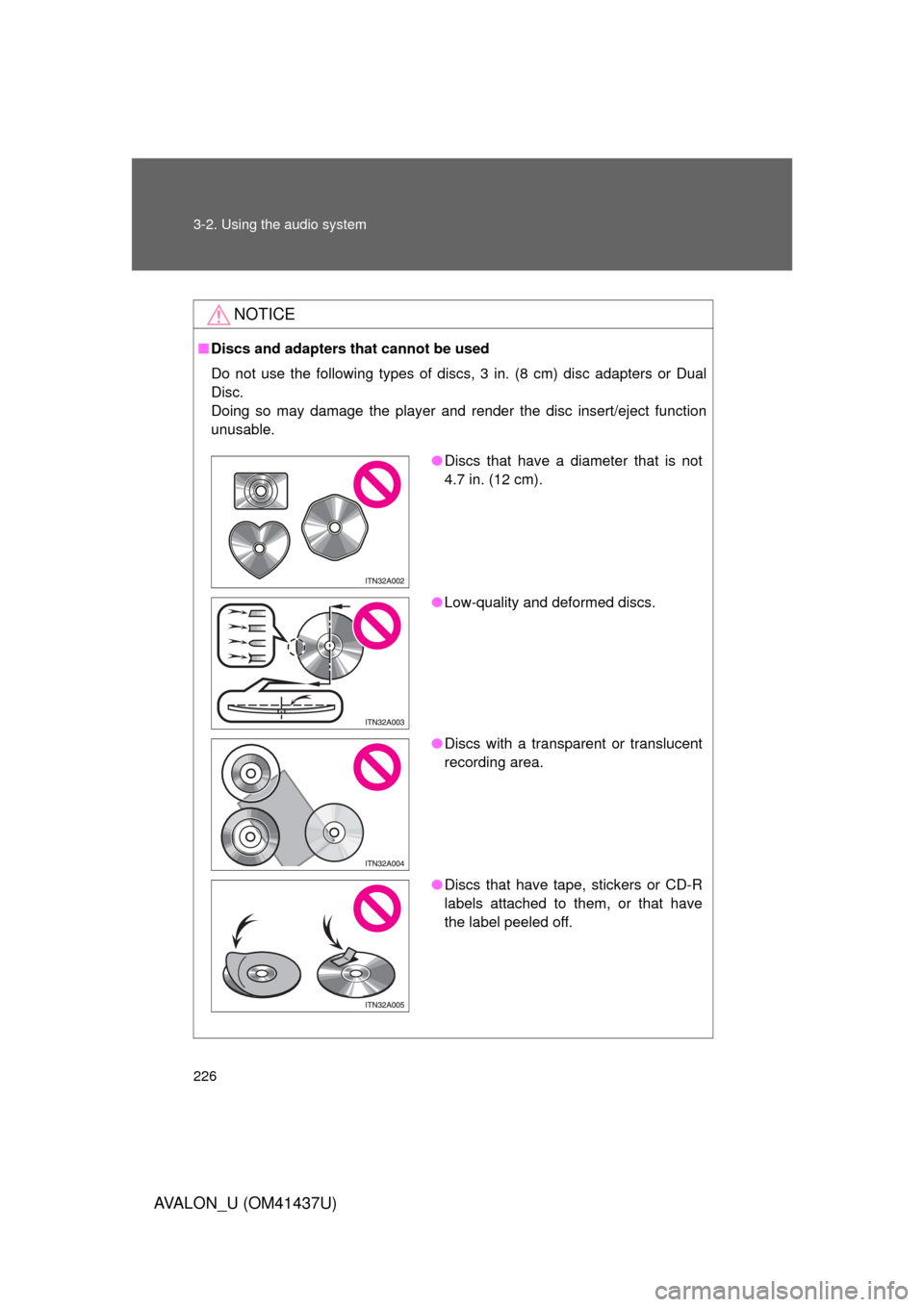
Do not use the following types of discs, 3 in. (8 cm) disc adapters or Dual
Disc.
Doing so may damage the player and render the disc insert/eject function
unusable.
● Discs that have a diameter that is not
4.7 in. (12 cm).
● Low-quality and deformed discs.
● Discs with a transparent or translucent
recording area.
● Discs that have tape, stickers or CD-R
labels attached to them, or that have
the label peeled off.
Page 227 of 476
227
3-2. Using the audio system
3
Interior features
AVALON_U (OM41437U)
NOTICE
■
Player precautions
Failure to follow the precautions below may result in damage to the discs or
the player itself.
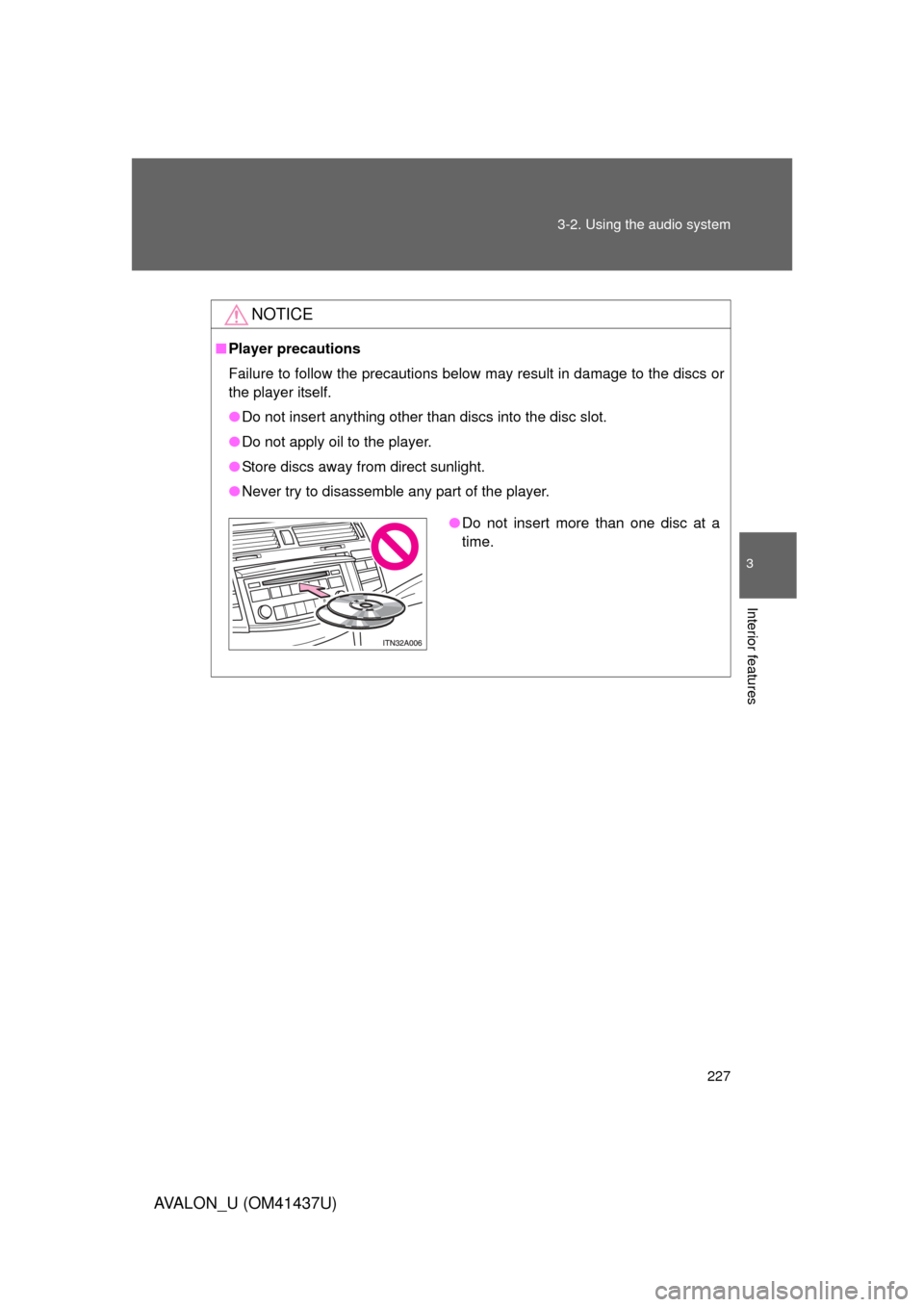
● Do not insert anything other than discs into the disc slot.
● Do not apply oil to the player.
● Store discs away from direct sunlight.
● Never try to disassemble any part of the player.
●Do not insert more than one disc at a
time.
Page 229 of 476
229
3-2. Using the audio system
3
Interior features
AVALON_U (OM41437U)
Loading, ejecting and sele
cting MP3 and WMA discs
Refer to the section titled “Using the CD player” for details. ( P. 220)
Selecting a folder
■ Selecting a folder
Press “ ” or “ ” on .
■ Selecting the desired folder by cueing the first file of each
folder
Press and hold until you hear a beep. When the desired
folder is reached, press the button again.
Returning to the first folder
Press and hold “ ” on until you hear a beep.
Selecting and scanning files
■ Selecting one file at a time
Turn or press “ ” or “ ” on to select the desired file.
■ Selecting a desired file by cueing the files in the folder
Press .
When the desired file is reached, press the button again.
Fast-forwarding and reversing files
To fast-reverse, press and hold .
To fast-forward, press and hold .
Page 231 of 476
231
3-2. Using the audio system
3
Interior features
AVALON_U (OM41437U)
■
Canceling random, repeat and scan playback
Press , or again.
■ Display
P. 224
■ Error messages
P. 224
■ CD player protection feature
To protect the internal components, playback is automatically stopped when
a problem is detected while the CD player is being used.
■ If CDs are left inside the CD pla yer or in the ejected position for
extended periods
CDs may be damaged and may not play properly.
■ Lens cleaners
Do not use lens cleaners. Doing so may damage the CD player.
Page 235 of 476
235
3-2. Using the audio system
3
Interior features
AVALON_U (OM41437U)
■
CD-R and CD-RW discs
● CD-R/CD-RW discs that have not been subject to the “finalizing process”
(a process that allows discs to be played on a conventional CD player)
cannot be played.
● It may not be possible to play CD-R/CD-RW discs recorded on a music
CD recorder or a personal computer because of disc characteristics,
scratches or dirt on the disc, or dirt, condensation, etc. on the lens of the
unit.
● It may not be possible to play discs recorded on a personal computer
depending on the application settings and the environment. Record with
the correct format. (For details, contact the appropriate application manu-
facturers of the applications.)
● CD-R/CD-RW discs may be damaged by direct exposure to sunlight,
high temperatures or other storage conditions. The unit may be unable to
play damaged discs.
● If you insert a CD-RW disc into the MP3/WMA player, playback will begin
more slowly than with a conventional CD or CD-R disc.
● Recordings on CD-R/CD-RW cannot be played using the DDCD (Double
Density CD) system.
■ Unsuitable discs, and player precautions
P. 226
Page 239 of 476
239
3-2. Using the audio system
3
Interior features
AVALON_U (OM41437U)
Using the steering wheel audio switches
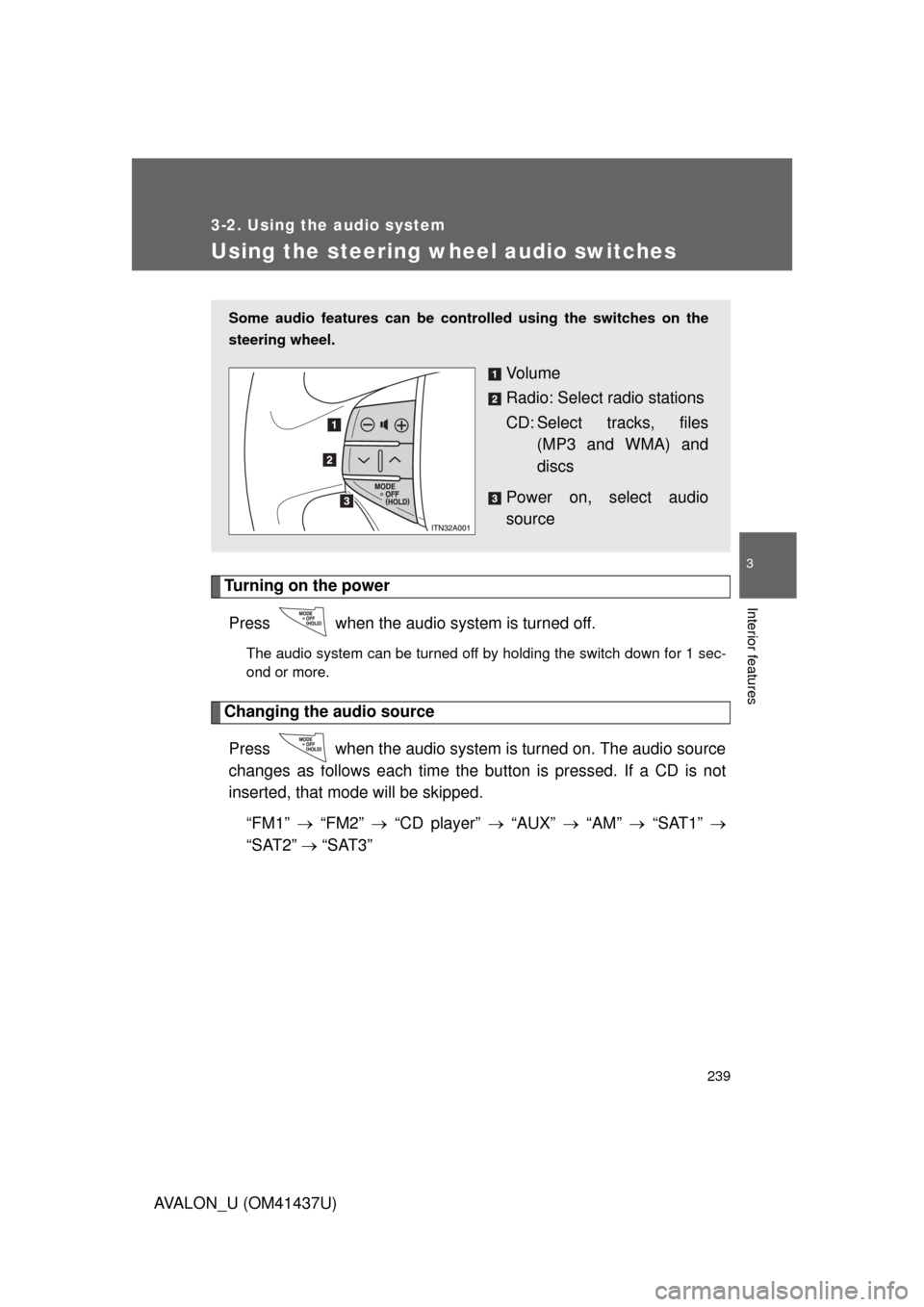
Turning on the powerPress when the audio system is turned off.
The audio system can be turned off by holding the switch down for 1 sec-
ond or more.
Changing the audio sourcePress when the audio system is turned on. The audio source
changes as follows each time the bu tton is pressed. If a CD is not
inserted, that mode will be skipped.
“FM1” “FM2” “CD player” “AUX” “AM” “SAT1”
“SAT2” “SAT3”
Some audio features can be cont rolled using the switches on the
steering wheel.
Vo l u m e
Radio: Select radio stations
CD: Select tracks, files (MP3 and WMA) and
discs
Power on, select audio
source
Page 240 of 476
240 3-2. Using the audio system
AVALON_U (OM41437U)
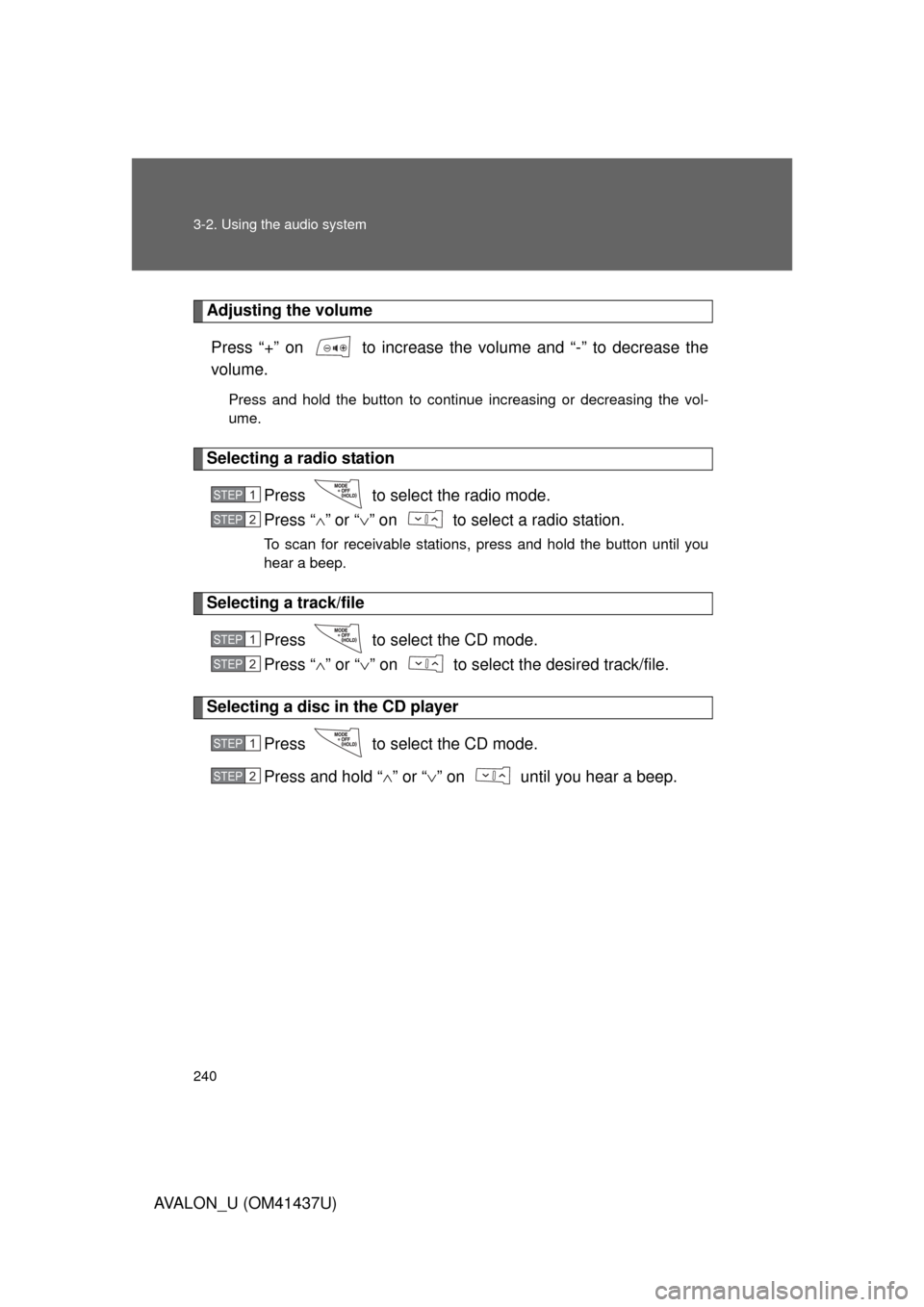
Adjusting the volumePress “+” on to increase the volume and “-” to decrease the
volume.
Press and hold the button to continue increasing or decreasing the vol-
ume.
Selecting a radio station Press to select the radio mode.
Press “”or “ ” on to select a radio station.
To scan for receivable stations, press and hold the button until you
hear a beep.
Selecting a track/file
Press to select the CD mode.
Press “” or “ ” on to select the desired track/file.
Selecting a disc in the CD player
Press to select the CD mode.
Press and hold “ ” or “ ” on until you hear a beep.
STEP1
STEP2
STEP1
STEP2
STEP1
STEP2
Page 467 of 476
467
AVALON_U (OM41437U)
Alphabetical index
Alphabetical index
A/C ............................................ 198
ABS........................................... 181
Air conditioning systemAir conditioning filter ............. 360
Automatic air conditioning system................................ 198
Steering switches ................. 206
Airbags
Airbag operating conditions .... 93
Airbag precautions for your child...................................... 97
Airbag warning light .............. 394
Curtain shield airbag
precautions ........................ 100
Front passenger occupant
classification system .......... 103
General airbag precautions .... 97
Locations of airbags ............... 90
Modification and disposal of airbags ............................... 102
Side airbag precautions.......... 97
Side and curtain shield airbags
operating conditions ............. 93
SRS airbags ........................... 90
Alarm .......................................... 85
Antenna .................................... 217
Anti-lock brake system ........... 181
Armrest .................................... 295
Ashtrays ................................... 290
Audio input .............................. 238
Audio system Antenna ................................ 217
Audio input ........................... 238
AUX adapter ......................... 238
CD player/changer ............... 220
MP3/WMA disc ..................... 228
Optimal use .......................... 236
Portable music player ........... 238
Radio .................................... 213
Steering switches ................. 239
Automatic headlight leveling system ................................... 156 Automatic light control
system ....................................156
Automatic transmission Automatic transmission .........140
If the shift lever cannot be shifted from P......................416
S mode ..................................142
AUX adapter .............................238
Back-up lights Wattage .................................438
Battery Checking ...............................341
If the vehicle battery is discharged ..........................420
Preparing and checking before winter .......................189
Bluetooth
®................................243
Brake Fluid ......................................338
Parking brake ........................146
Brake assist ..............................181
Break-in tips .............................125
Care Exterior ..................................312
Interior ...................................315
Seat belts ..............................316
Cargo capacity .........................184
CD player/changer ...................220
Center display ..........................154
Chains .......................................191
Child-protectors .........................42
Child restraint system Definition ...............................109
Installation .............................113
Installing CRS with lower anchorages .........................114
Installing CRS with seat belts ....................................116
Installing CRS with top straps ..................................120
A
B
C