2010 SUZUKI KIZASHI steering
[x] Cancel search: steeringPage 137 of 388

3-6
OPERATING YOUR VEHICLE
57L20-03E
on the information display when you
press the engine switch to change the
ignition mode to “ON”. Refer to “Informa-
tion Display” in the “Before Driving” sec-
tion for details. For details on replacing
the battery, refer to the “Keyless Start
System Remote Controller” section in
the “Before Driving” chapter.“Remote Controller Outside” Warn-
ingWhen the conditions described below are
met, the system gives a “remote controller
outside” warning by sounding the interior
and exterior buzzers and flashing the
immobilizer/keyless start system and mas-
ter warning indicator lights.
The remote controller is not inside the vehicle when any of the doors is opened
when the engine is running or when the
engine switch is pressed to change the
ignition mode to “ACC” or “ON” and then
all doors are closed.
The remote controller is not inside the vehicle when you attempt to start the
engine after changing the ignition mode
to “ACC” or “ON” by pressing the engine
switch.
57L31003
(1) Immobilizer/keyless start system
warning light (flashing)
(2) Master warning indicator light (flash- ing)
NOTE:
If the warning is given, locate the remote controller as soon as possible.
Any attempt to start the engine will fail while the warning is active. The mes-
sage appearing on the information dis-
play in the instrument cluster will also
indicate this condition. Refer to “Informa-
tion display” in the “Before Driving” sec-
tion for details.
Flashing of the immobilizer/keyless start
system warning light and the master
warning indicator light should stop
shortly after the remote controller is
brought back inside the vehicle. If they
do not stop flashing, change the ignition mode to “LOCK” (OFF) by pressing the
engine switch and then perform the
engine starting operation.
Always keep the remote controller with
you as the driver.
Interior Workable Area for Engine
Starting, Power Supply Mode Selec-
tion and “Remote Controller Out-
side” Warning
57L31004
(1) Interior workable area
The “interior workable area” for these func-
tions is defined as all the interior spaces
except for the space above the instrument
panel.
NOTE:
Even when the remote controller is in the “interior workable area”, if it is in any of
(1)
(2)
(1)
Rear Window Wiper/Washer Switch: 8
Tilt Steering Lock Lever: 6
Cruise Control: 7, 8
Page 139 of 388

3-8
OPERATING YOUR VEHICLE
57L20-03E
You should turn off such loads as theheadlights and air conditioning system to
facilitate starting of the engine.
Even if you fail to start the engine, the
starter motor will stop turning automati-
cally after a short time. After the starter
motor has stopped or if there is some
problem with the system, the starter
motor will rotate only while the engine
switch is being pressed.Stopping the engine Depress the engine switch to stop theengine after the vehicle stopped com-
pletely.
In case of emergency, you can stop the engine by depressing the engine switch
more than 3 seconds while the vehicle in
motion.
NOTE:
Except in emergency, do not stop the
engine while the vehicle in motion.
The steering and braking operation will
require more effort s when the engine
stopped.
Refer to “Braking” in the “OPERATING
YOUR VEHICLE” section.
Starting a Cold EngineWith your foot off the accelerator pedal,
crank the engine by pressing the engine
switch to change the ignition mode to
“START”.
After pressing the engine switch to change
the ignition mode to “START”, the starter
cranks the engine for about 12 seconds
before it can start the engine. If the engine
fails to start at the first attempt, wait about
15 seconds, then try again while keeping
the engine switch pressed while pressing
down the accelerator pedal to 1/3 of its
travel. Release the accelerator pedal when
the engine starts.
If the engine still does not start, try holding
the accelerator pedal all the way to the
floor while cranking. Th is should clear the
engine if it is flooded.
If you are unable to start the engine using
this procedure, consult your SUZUKI
dealer.
Starting a Warm EngineUse the same procedure as for “Starting a
Cold Engine”.If the master warning light flashes
and the engine cannot be startedYour keyless start system remote controller
may not be sensed as being within the
“interior workable area”. Try again after
making sure that you have the remote con-
troller with you. If the engine still cannot be
started, the battery of the remote controller
may be discharged. You must then use the
following method to be able to start the
engine.
57L21124
1) Make sure the parking brake is set fully.
2) Manual Transaxle – Shift to “N” (Neu- tral) and fully depress the clutch pedal.
Hold the clutch and brake pedals fully
depressed.
CAUTION
If the engine doesn’ t start on the first
try, wait about 15 seconds before try-
ing again.
(1)
(2)
Cruise Control: 7, 8
Remote Audio Controls:
Horn: 6
Page 141 of 388
3-10
OPERATING YOUR VEHICLE
57L20-03E
Steering lock warning buzzer
If the steering lock fails to engage due to a
fault in the system even when you press
the engine switch to change the ignition
mode to “LOCK” (OFF), the interior buzzer
will warn you of this condition with
repeated short beeps. If this happens,
have the vehicle inspected by an autho-
rized SUZUKI dealer.
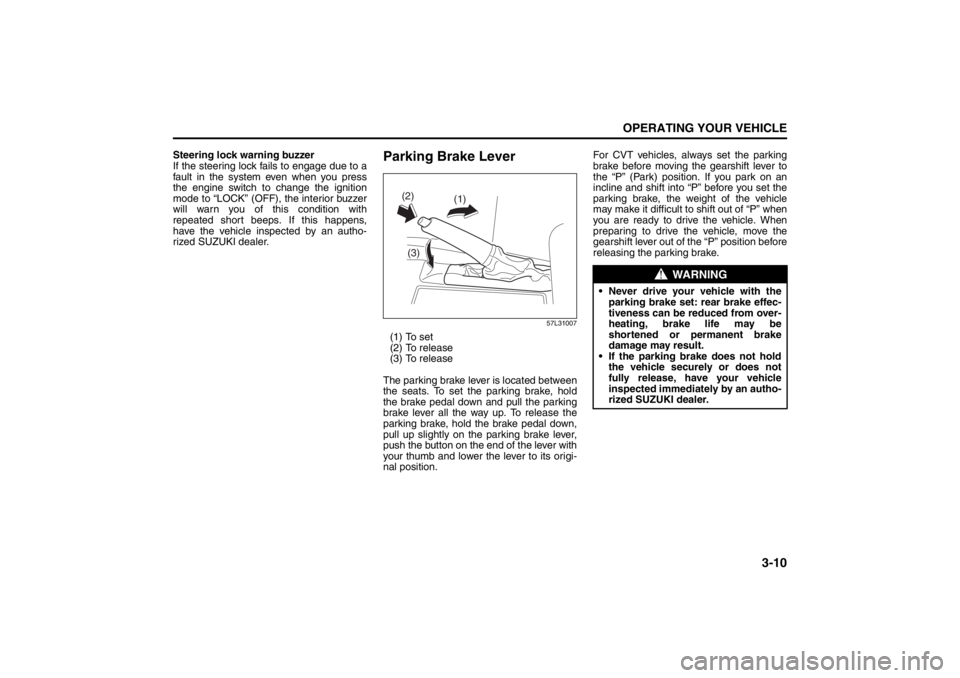
Parking Brake Lever
57L31007
(1) To set
(2) To release
(3) To release
The parking brake lever is located between
the seats. To set the parking brake, hold
the brake pedal down and pull the parking
brake lever all the way up. To release the
parking brake, hold the brake pedal down,
pull up slightly on the parking brake lever,
push the button on the end of the lever with
your thumb and lower the lever to its origi-
nal position. For CVT vehicles, always set the parking
brake before moving the gearshift lever to
the “P” (Park) position. If you park on an
incline and shift into “P” before you set the
parking brake, the weight of the vehicle
may make it difficult to
shift out of “P” when
you are ready to drive the vehicle. When
preparing to drive the vehicle, move the
gearshift lever out of the “P” position before
releasing the parking brake.
(1)
(2)
(3)
WARNING
Never drive your vehicle with the parking brake set: rear brake effec-
tiveness can be reduced from over-
heating, brake life may be
shortened or permanent brake
damage may result.
If the parking brake does not hold the vehicle securely or does not
fully release, have your vehicle
inspected immediately by an autho-
rized SUZUKI dealer.
Page 148 of 388
3-17OPERATING YOUR VEHICLE
57L20-03E
NOTE:
The indicated gear position on the infor-
mation display when you shift from “D” to
“M” is the gear position that was selected
automatically when the gearshift lever
was in “D”.
You can change to the manual mode
temporarily by pulling the shift paddle (if
equipped) on the steering wheel toward
you when the gearshift lever is in “D”.
Shifting in the manual mode
You can shift gears from 1st to 6th depend-
ing on driving speed.
NOTE:
If the CVT fluid becomes hot such as
when driving uphill, the transaxle will
automatically shift up in order to protect
itself and the engine regardless of your
gear shifting operation.
When the driving speed becomes slow,
the gear shifts down automatically, and
when the vehicle stops, the gear position
will be in 1st gear without shifting the
gearshift lever.
If you depress the accelerator pedal a
certain amount, the gear shifts down
automatically even if the gearshift lever
is in the manual mode.NOTE:
When you change gear, sometimes the
transaxle may not shift to the desired gear
but a buzzer sounds instead. This is to
maintain good drivability and to protect the
transaxle.
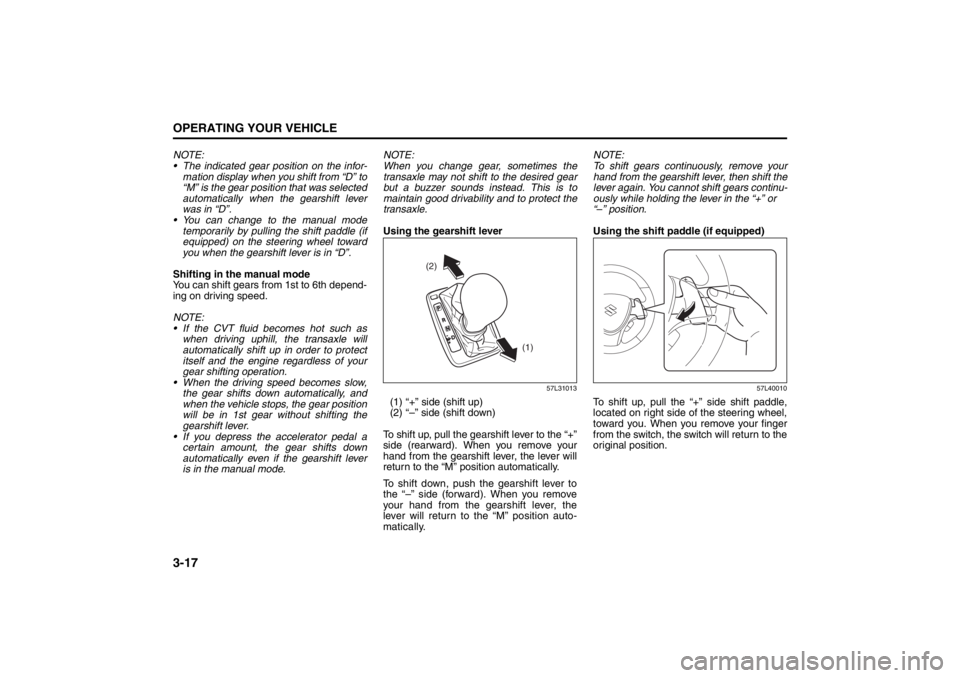
Using the gearshift lever
57L31013
(1) “+” side (shift up)
(2) “–” side (shift down)
To shift up, pull the gearshift lever to the “+”
side (rearward). When you remove your
hand from the gearshift lever, the lever will
return to the “M” position automatically.
To shift down, push the gearshift lever to
the “–” side (forward). When you remove
your hand from the gearshift lever, the
lever will return to the “M” position auto-
matically.NOTE:
To shift gears continuously, remove your
hand from the gearshift lever, then shift the
lever again. You cannot shift gears continu-
ously while holding the lever in the “+” or
“–” position.
Using the shift paddle (if equipped)
57L40010
To shift up, pull the “+” side shift paddle,
located on right side of the steering wheel,
toward you. When you remove your finger
from the switch, the switch will return to the
original position.
(2)
(1)
Page 149 of 388

3-18
OPERATING YOUR VEHICLE
57L20-03E
57L40011
To shift down, pull the “–” side shift paddle,
located on left side of the steering wheel,
toward you. When you remove your finger
from the switch, the switch will return to the
original position.
NOTE:
To shift gears continuously, remove your
finger from the shift paddle, then pull the
shift paddle again. You cannot shift
gears continuously while holding the
shift paddle toward you.
When you pull the both “+” and “–” shift
paddle simultaneously, the gear may not
shift.Canceling the manual mode
To cancel the manual mode, shift the gear-
shift lever from “M” to “D”.
Temporary manual mode
Pull the shift paddle (if equipped) toward
you when driving with the gearshift lever in
the “D” position. The information display
shows the manual mode indicator (1) and
the current gear position (2).
57L31012
(1) Manual mode indicator
(2) Gear position
The temporary manual mode will be can-
celed automatically in the following situa-
tions.
When you press and hold the accelera-
tor pedal for a certain period of time with-
out shifting gears.
When driving speed becomes slow.If You Cannot Shift CVT Gearshift Lever
Out of “P” (PARK)
57L31015
Vehicles with a CVT have an electrically
operated park-lock feature. If the vehicle’s
battery is discharged, or there is some
other electrical failure, the CVT cannot be
shifted out of Park in the normal way. Jump
starting may correct the condition. If not,
follow the procedure described below. This
procedure will permit changing the tran-
saxle out of Park.
1) Be sure the parking brake is firmly
applied.
2) If the engine is running, stop the
engine.
3) Remove the cover (1) over the button.
4) With pushing the release button by the
key or the flat end rod, shift the gear-
shift lever to the desired position.
(1)(2)
(1)
Page 152 of 388
3-21OPERATING YOUR VEHICLE
57L20-03E
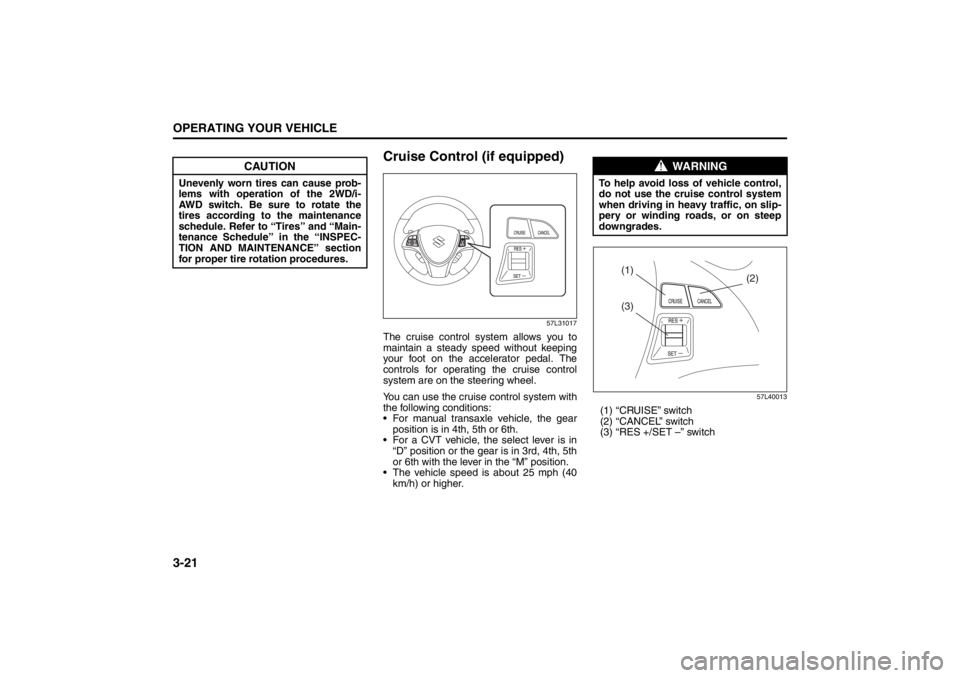
Cruise Control (if equipped)
57L31017
The cruise control system allows you to
maintain a steady speed without keeping
your foot on the accelerator pedal. The
controls for operating the cruise control
system are on the steering wheel.
You can use the cruise control system with
the following conditions:
For manual transaxle vehicle, the gear
position is in 4th, 5th or 6th.
For a CVT vehicle, the select lever is in
“D” position or the gear is in 3rd, 4th, 5th
or 6th with the lever in the “M” position.
The vehicle speed is about 25 mph (40
km/h) or higher.
57L40013
(1) “CRUISE” switch
(2) “CANCEL” switch
(3) “RES +/SET –” switch
CAUTION
Unevenly worn tires can cause prob-
lems with operation of the 2WD/i-
AWD switch. Be sure to rotate the
tires according to the maintenance
schedule. Refer to “Tires” and “Main-
tenance Schedule” in the “INSPEC-
TION AND MAINTENANCE” section
for proper tire rotation procedures.
WARNING
To help avoid loss of vehicle control,
do not use the cruise control system
when driving in heavy traffic, on slip-
pery or winding roads, or on steep
downgrades.
(3)
(2) (1)
Page 155 of 388

3-24
OPERATING YOUR VEHICLE
57L20-03E
taken by the ultrasonic wave to reach the
obstacle and return from it, from which it
determines the obstacle’s position.
The parking sensor function can be used
when you press the engine switch to
change the ignition mode to “ON”, the
gearshift lever is in the “R” position and
the parking sensor switch is in the ON
position. This function is helpful when
parallel-parking the vehicle, steering the
vehicle into the garage or moving slowly
in a place with obstacles.
Sensor LocationsOn rear bumper
57L31018
(1) Rear center sensors (2 places)
(2) Rear corner sensors (2 places)
NOTE:
If the bumper hits a hard object, the sen-
sors on it may not work properly. If this
occurs, have the sensors inspected by
an authorized SUZUKI dealer.Approximate Areas Where Obstacles
Can Be Detected
57L31019
An obstacle within about 20 cm (8 in)
from a sensor or just below a sensor is
not detectable.
The sensors can detect an obstacle up
to about 1.5 m (5 ft) from the rear of
vehicle.
WARNING
The parking sensor warns you of
obstacles with buzzers and by
showing you the location of the
obstacles on the information dis-
play. However, you must still pay
full attention yourself while driving.
The sensors can detect obstacles
only within a limited area and only
when the vehicle is moving within a
limited speed range. So, in tricky
areas, you must move the vehicle
slowly while checking around it
using your direct vision or rearview
mirrors. There is increased risk of
an accident if you control the vehi-
cle relying only on the parking sen-
sor.
CAUTION
Avoid hitting the sensor areas or
directing the nozzle of a high-pres-
sure car washer onto the sensor
areas. Otherwise, the sensors may be
damaged.
(1)
(1)
(2)
(2)
Page 160 of 388
3-29OPERATING YOUR VEHICLE
57L20-03E
Anti-Lock Brake System (ABS)
(if equipped)ABS will help you avoid skidding by elec-
tronically controlling braking pressure. It
will also help you maintain steering control
when braking on slippery surfaces or when
braking hard.
The ABS works automatically, so you do
not need any special braking technique.
Just push the brake pedal down without
pumping. The ABS will operate whenever it
senses that the wheels are locking up.
You may feel the brake pedal pulsate while
the ABS is operating.
NOTE:
The ABS will not work if vehicle speed is
under about 10 km/h (6 mph).
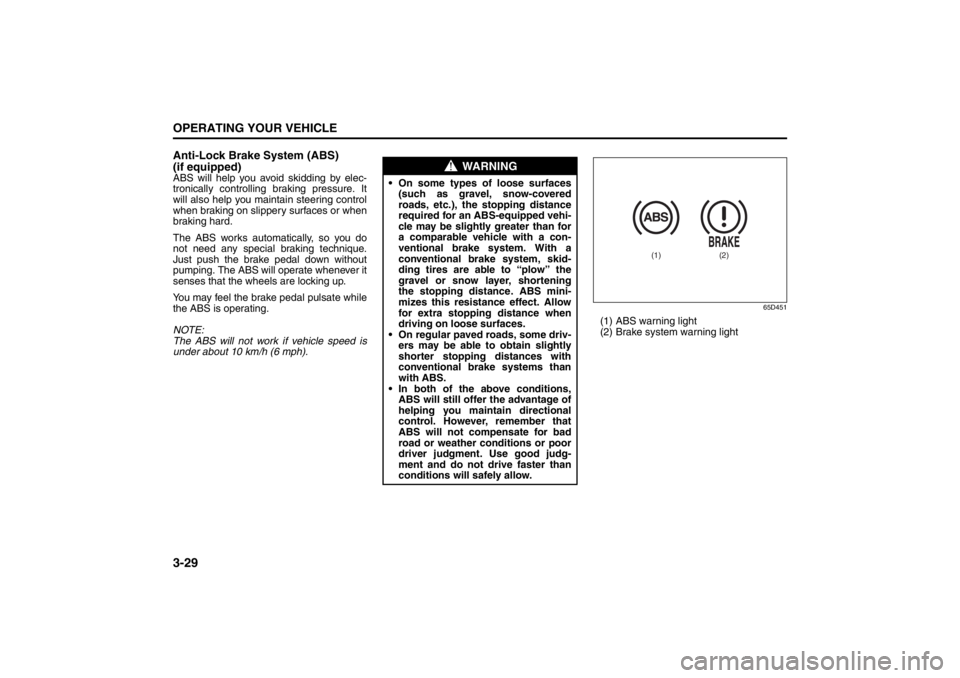
65D451
(1) ABS warning light
(2) Brake system warning light
WARNING
On some types of loose surfaces
(such as gravel, snow-covered
roads, etc.), the stopping distance
required for an ABS-equipped vehi-
cle may be slightly greater than for
a comparable vehicle with a con-
ventional brake system. With a
conventional brake system, skid-
ding tires are able to “plow” the
gravel or snow layer, shortening
the stopping distance. ABS mini-
mizes this resistance effect. Allow
for extra stopping distance when
driving on loose surfaces.
On regular paved roads, some driv-
ers may be able to obtain slightly
shorter stopping distances with
conventional brake systems than
with ABS.
In both of the above conditions,
ABS will still offer the advantage of
helping you maintain directional
control. However, remember that
ABS will not compensate for bad
road or weather conditions or poor
driver judgment. Use good judg-
ment and do not drive faster than
conditions will safely allow.
(1)
(2)