2010 SKODA OCTAVIA TOUR door lock
[x] Cancel search: door lockPage 4 of 199

Contents3
Using the system
Safety
Driving Tips
General Maintenance
Breakdown assistance
Technical Data
ContentsLayout of this Owner's Manual
(explanations)
. . . . . . . . . . . . . . . . . . . . . . . . . .
Using the system
. . . . . . . . . . . . . . . . . . . . . .
Cockpit
. . . . . . . . . . . . . . . . . . . . . . . . . . . . . . . . . . . . . . . .
Overview . . . . . . . . . . . . . . . . . . . . . . . . . . . . . . . . . . . .
The brief instruction
. . . . . . . . . . . . . . . . . . . . . . . . . .
Basic functions and important information . . . . .
Instruments and Indic ator/Warning Lights
. . .
Overview of the instrument cluster . . . . . . . . . . . . .
Engine revolutions counter . . . . . . . . . . . . . . . . . . . .
Speedometer . . . . . . . . . . . . . . . . . . . . . . . . . . . . . . . .
Engine coolant temperature Display . . . . . . . . . . .
Fuel gauge . . . . . . . . . . . . . . . . . . . . . . . . . . . . . . . . . . .
Counter for distance driven . . . . . . . . . . . . . . . . . . .
Service Interval Display . . . . . . . . . . . . . . . . . . . . . . .
Digital clock . . . . . . . . . . . . . . . . . . . . . . . . . . . . . . . . . .
Recommended gear* . . . . . . . . . . . . . . . . . . . . . . . . .
Multi-functional indicator (onboard computer)*
Warning lights . . . . . . . . . . . . . . . . . . . . . . . . . . . . . . . .
Unlocking and locking
. . . . . . . . . . . . . . . . . . . . . . . .
Key . . . . . . . . . . . . . . . . . . . . . . . . . . . . . . . . . . . . . . . . . .
Changing the battery in the remote control key .
Electronic immobiliser . . . . . . . . . . . . . . . . . . . . . . . .
Child safety lock . . . . . . . . . . . . . . . . . . . . . . . . . . . . . .
Central locking system . . . . . . . . . . . . . . . . . . . . . . . .
Remote control* . . . . . . . . . . . . . . . . . . . . . . . . . . . . . .
Synchronisation of the remote control . . . . . . . . . .
Anti-theft alarm system* . . . . . . . . . . . . . . . . . . . . . .
Power windows* . . . . . . . . . . . . . . . . . . . . . . . . . . . . .
Lights and Visibility
. . . . . . . . . . . . . . . . . . . . . . . . . . .
Lights . . . . . . . . . . . . . . . . . . . . . . . . . . . . . . . . . . . . . . . .
Interior lighting . . . . . . . . . . . . . . . . . . . . . . . . . . . . . . . Visibility . . . . . . . . . . . . . . . . . . . . . . . . . . . . . . . . . . . . . .
Windshield wiper and wash system . . . . . . . . . . . . .
Rear-view mirror . . . . . . . . . . . . . . . . . . . . . . . . . . . . . .
Seats and Stowage
. . . . . . . . . . . . . . . . . . . . . . . . . . . . .
Front seats . . . . . . . . . . . . . . . . . . . . . . . . . . . . . . . . . . . .
Head restraints . . . . . . . . . . . . . . . . . . . . . . . . . . . . . . . .
Middle rear head restraint* . . . . . . . . . . . . . . . . . . . .
Rear seats . . . . . . . . . . . . . . . . . . . . . . . . . . . . . . . . . . . .
Pedals . . . . . . . . . . . . . . . . . . . . . . . . . . . . . . . . . . . . . . . .
luggage compartment . . . . . . . . . . . . . . . . . . . . . . . . .
Net partition* (Combi) . . . . . . . . . . . . . . . . . . . . . . . .
The roof rack* . . . . . . . . . . . . . . . . . . . . . . . . . . . . . . . .
Cup holder . . . . . . . . . . . . . . . . . . . . . . . . . . . . . . . . . . .
Note holder . . . . . . . . . . . . . . . . . . . . . . . . . . . . . . . . . .
Ashtray* . . . . . . . . . . . . . . . . . . . . . . . . . . . . . . . . . . . . . .
Cigarette lighter*, power sockets . . . . . . . . . . . . . . .
Storage compartments . . . . . . . . . . . . . . . . . . . . . . . .
Overview . . . . . . . . . . . . . . . . . . . . . . . . . . . . . . . . . . . . .
Storage compartment on the front passenger side
Storage compartment on the driver's side . . . . . . .
Storage compartment on the dash panel . . . . . . . .
Storage compartment in front centre console* . .
Storage compartment in the front doors . . . . . . . .
Front seat armrest with storage compartment* . .
Rear seat armrest with storage compartment* . . .
Storage compartment in rear centre console* . . .
Seat backrest with opening for skis* . . . . . . . . . . . .
Clothes hooks* . . . . . . . . . . . . . . . . . . . . . . . . . . . . . . .
Heating and air conditioning system
. . . . . . . . . .
Air outlet vents . . . . . . . . . . . . . . . . . . . . . . . . . . . . . . . .
Heating . . . . . . . . . . . . . . . . . . . . . . . . . . . . . . . . . . . . . .
Climatic* . . . . . . . . . . . . . . . . . . . . . . . . . . . . . . . . . . . . .
Starting-off and Driving
. . . . . . . . . . . . . . . . . . . . . . .
Setting steering wheel position . . . . . . . . . . . . . . . . .
Ignition lock . . . . . . . . . . . . . . . . . . . . . . . . . . . . . . . . . . Starting the engine . . . . . . . . . . . . . . . . . . . . . . . . . . . .
Switching off the engine . . . . . . . . . . . . . . . . . . . . . . .
Shifting . . . . . . . . . . . . . . . . . . . . . . . . . . . . . . . . . . . . . .
Handbrake . . . . . . . . . . . . . . . . . . . . . . . . . . . . . . . . . . .
Rear parking aid* . . . . . . . . . . . . . . . . . . . . . . . . . . . . .
Cruise control system (CCS)* . . . . . . . . . . . . . . . . . .
Communication
. . . . . . . . . . . . . . . . . . . . . . . . . . . . . . .
Mobile phones and two-way radio systems . . . . .
Safety
. . . . . . . . . . . . . . . . . . . . . . . . . . . . . . . . . . . . . . .
Passive Safety
. . . . . . . . . . . . . . . . . . . . . . . . . . . . . . . . .
Basic information . . . . . . . . . . . . . . . . . . . . . . . . . . . . .
Correct seated position . . . . . . . . . . . . . . . . . . . . . . .
Seat belts
. . . . . . . . . . . . . . . . . . . . . . . . . . . . . . . . . . . . . .
Why seat belts? . . . . . . . . . . . . . . . . . . . . . . . . . . . . . . .
The physical principle of a frontal collision . . . . . .
Important safety information regarding the use of seat
belts . . . . . . . . . . . . . . . . . . . . . . . . . . . . . . . . . . . . . . . . .
How are seat belts correctly fastened? . . . . . . . . . .
Airbag system
. . . . . . . . . . . . . . . . . . . . . . . . . . . . . . . . .
Description of the airbag system . . . . . . . . . . . . . . .
Front airbags . . . . . . . . . . . . . . . . . . . . . . . . . . . . . . . . .
side airbags* . . . . . . . . . . . . . . . . . . . . . . . . . . . . . . . . .
Head airbags* . . . . . . . . . . . . . . . . . . . . . . . . . . . . . . . .
Deactivating an airbag . . . . . . . . . . . . . . . . . . . . . . . .
Transporting children safely
. . . . . . . . . . . . . . . . . .
What you should know about transporting children!
Child seat . . . . . . . . . . . . . . . . . . . . . . . . . . . . . . . . . . . .
Attaching a child seat using the “ISOFIX” system .
Attaching child seat using the “Top Tether”* system
6799101015151516161616171818182230303031313136373739424245
4647505252535454565761626364646465656666666767676868696970707173777777
78798080818284848585858689898990919494959799101103103105108109
s2bs.2.book Page 3 Monday, September 27, 2010 9:53 AM
Page 12 of 199

The brief instruction11
Using the system
Safety
Driving Tips
General Maintenance
Breakdown assistance
Technical Data
Seat belt height adjuster– Move the height adjuster in the desired direction up or down fig. 4 .
– Then pull firmly on the belt to ensure that the seat belt height adjuster has correctly
locked in place.
Further information page 91, “Seat belt height adjuster”.
WARNING
Adjust the height of the belt in such a way that the shoulder part of the belt is
positioned approximately across the middle of your shoulder - on no account
across your neck!Adjusting the front seats
Adjusting a seat in a forward/back direction
Adjusting height of seat*
Adjust the angle of the seat backrest
Adjusting lumbar support*
Further information page 52, “Adjusting the front seats”.
WARNING
Only adjust the driver seat when the ve hicle is stationary - risk of injury!Electric exterior mirror adjustment*Further information page 50, “Exterior mirror”.
Fig. 4 Front seat: Seat belt height
adjusterFig. 5 Controls at seat
Heating of the external mirror
Adjusting left and right exterior mirrors simultaneously
Adjusting the right-hand exterior mirror
Switching off operating control
A1A2A3A4
Fig. 6 Inner part of door: Rotary knob
s2bs.2.book Page 11 Monday, September 27, 2010 9:53 AM
Page 14 of 199

The brief instruction13
Using the system
Safety
Driving Tips
General Maintenance
Breakdown assistance
Technical Data
Slow wipe
Fast wipe
one time wipe
Automatic wipe/wash
Rear window wiper* Intermittent wipe - every 6 seconds
The automatic wiper/washer system
Further information page 47, “Windshield wiper”.
Power windows* Button for the power window in the driver's door
Button for the power window in the front passenger's door
Button for the power window at the rear right door
Button for the power window at the rear left door
Safety pushbutton for deactivating the power window buttons at the rear doors
Further information page 39, “Power windows*”.
RefuellingFig. 11 Right rear side of the vehicle: Open fu el filler flap/fuel filler flap with cap unscrewed– To open the fuel filler flap, press fig. 11 in the direction of arrow.
– Release the cap by unlocking it by turning the vehicle key to the left.
– Unscrew the fuel filler ca p anti-clockwise and place the fuel filler cap from above
on the fuel filler flap fig. 11 - right.
Further information page 137, “Refuelling”.Bonnet remote release– Pull the unlocking lever below the dash panel on the driver's side fig. 12 .
A2A3A4A5A6A7
Fig. 10 Buttons on the driver's door
AAABACADAS
A1
Fig. 12 Bonnet release lever
s2bs.2.book Page 13 Monday, September 27, 2010 9:53 AM
Page 24 of 199

Instruments and Indicator/Warning Lights23
Using the system
Safety
Driving Tips
General Maintenance
Breakdown assistance
Technical Data
WARNING
If you do not pay attention to the warning lights coming on and the corre-
sponding descriptions and warning notes, this may result in severe body inju-
ries or major vehicle damage.
The engine compartment of your car is a hazardous area. There is a risk of
injuries, scalding, accidents and fire wh en working in the engine compartment,
e.g. inspecting and replenishing oil and other fluids. It is also essential to
observe all warnings page 140, “Working in the engine compartment”.Note
The arrangement of the indicator lights depends on the model version. The
symbols shown in the following functional description are to be found as indicator
lights in the instrument cluster.
Operational faults are shown in the instrument cluster as red symbols (priority 1 -
danger) or yellow symbol s (priority 2 - warning).
Turn signal system
Either the left
or right
indicator light flashes depending on the position of the turn
signal lever.
The indicator light flashes at twice its normal rate if a turn signal light fails.
Switching off the hazard warning light system is switched on will cause all of the turn
signal lights as well as both indicator lights to flash.
Further information about the turn signal system page 44.
Fog lights*
The warning light
comes on when the fog lights are operating page 43.
Main beam
The indicator light
comes on when the main beam is selected or also when the
headlight flasher is operated.
Coolant temperature/coolant level page 25
Traction control system (TCS) page 26
Electronic stability programme (ESP)* page 26
Switch off the Traction control system (TCS); page 26
Tyre pres su re* page 27
Antilock brake system (ABS) page 27
Bonnet page 27
Seat belt warning light page 28
Brake pad wear* page 28
Boot lid page 28
Open door page 28
Brake system page 28
Dynamo page 28
Engine oil level page 29
Fuel reserve page 29
s2bs.2.book Page 23 Monday, September 27, 2010 9:53 AM
Page 32 of 199

Unlocking and locking31
Using the system
Safety
Driving Tips
General Maintenance
Breakdown assistance
Technical Data
Note
Pay attention to the correct pola rity when changing the battery.
The replacement battery must have the same specification as the original battery.
If it is still not be possible to unlock or lock the vehicle with the remote control even
after replacing the battery this means that the system has to be synchronised
page 37.
Electronic immobiliserThe electronic immobiliser prevents the vehicle being operated by an
unauthorised person.An electronic chip is integrated in the he ad of the key. The immobiliser is deactivated
with the aid of this chip when the key is in serted in the ignition lock. The electronic
immobiliser is automatically activated when you withdraw the ignition key from the
lock.
Note
It is only possible to start the engine of your car with a Genuine Škoda key with the
matching code.Child safety lockThe child safety lock prevents the re ar door from being opened from the
inside.
The rear doors are equipped with a child safe ty lock. You can switch the child safety
lock on and off using the vehicle key.Switching child safety lock on– Use the vehicle key to turn the slit in the rear door to the left in the direction of the arrow fig. 23 .Switching child safety lock off– Use the vehicle key to turn the slit to the right against the direction of the arrow.
So long as the child safety lock is switched on it is not possible to open the door from
the inside with the door opening lever. In this case the door can be opened only from
the outside.Central locking systemDescriptionUnlocking or locking the vehicle causes all doors to be unlocked or locked at the same
time by the central locking system. The boot lid is unlocked when opening. It can be
opened by pressing the hand grip above the licence plate page 35.
Operation of the central locking system is possible:
from the outside using the vehicle key page 33,
using the button for the central locking system page 33,
by using the remote control page 36.
Indicator light in the driver's door on vehicles without anti-theft alarm system
After the car is locked, the indica tor light flashes after 2 seconds.
After the car is locked with the deactivate d safe securing system, the indicator light
flashes only after 30 seconds.
Indicator light in the driver's door on vehicles with anti-theft alarm system
After locking the vehicle the indicator light flashes for 2 seconds fast, then more slowly.
Fig. 23 Child safety locks on the rear
doors
s2bs.2.book Page 31 Monday, September 27, 2010 9:53 AM
Page 33 of 199
Unlocking and locking
32
If the vehicle is locked and the safe securing system page 32 is not operating, the
indicator light in the driver door flashes for about 2 seconds fast, goes out and starts to
flash slowly after about 30 seconds.
If the indicator light first of all flashes fast for about 2 seconds, afterwards lights up for
about 30 seconds and then flashes slowly, there is a fault in the system of the central
locking or the interior monitor* page 38. Visit a specialist garage to obtain assist-
ance.
Convenience operatio n of the windows*
One can open and close the electrically powered windows when unlocking and
locking the vehicle page 41.
Opening a single door*
This function makes it possible to only unlock the driver's door. The other doors
remain locked and are only unlocked when the command is repeated.
If you wish, you can have your authorised Škoda Service Partner activate the function
of the single door opening mode.
Automatic unlocking and locking*
All the doors and the boot lid are locked au tomatically once the car reaches a speed of
about 15 km/h.
If the ignition key is withdrawn, the car is then automatically unlocked again. In addi-
tion, it is possible for the driver to unlock the car by pressing the central locking button or by pulling the door opening lever.
If you wish, you can have a sp ecialist garage activate the automatic locking function.
WARNING
Locking the doors prevents involuntary opening in an exceptional situation (an
accident). Locked doors prevent unwanted entry into the vehicle from outside,
for example at road crossings. Locked doors do, however, make it more difficult
for rescuers to get into the vehicle in an emergency - danger to life!
Note
In the event of an accident in which the airbags are deployed, the locked doors are
automatically unlocked in order to enable rescuers to gain access to the vehicle.
Only the front doors can be unlocked and locked using the key if the central locking
system fails. You can lock or unlock ma nually the other doors and the boot lid.
Emergency locking of the door page 34.
Emergency unlocking of the boot lid page 35.
Safe securingThe central locking system is equipped with a safe securing
2) system. Locking the
vehicle from the outside causes the door locks to be automatically blocked. It is not
possible to open the doors with the door handle either from the inside or from the
outside. This acts as an effective deterrent for attemp ts to break into your vehicle.
You can deactivate the safe securing sy stem by locking twice within 2 seconds.
If the safe securing system is not operating, the warning light in the driver door flashes
for about 2 seconds fast, goes out and starts to flash slowly again after about
30°seconds.
The safe securing system is again activated the next time the vehicle is unlocked and
locked again.
The doors can be opened from the inside if the vehicle is locked and the safe securing
system is deactivated:
The door is unlocked by actuating the door-opening lever.
The door opens upon actuating the door-opening lever again.
WARNING
If the vehicle is locked from the outsid e and the safe securing system is acti-
vated, there must not be any person and animals in the vehicle as it is then not
possible to open either a door or a window from the inside. The locked doors
make it more difficult for rescuers to get into the vehicle in an emergency -
hazard!2)Only valid for some countries.
s2bs.2.book Page 32 Monday, September 27, 2010 9:53 AM
Page 34 of 199

Unlocking and locking33
Using the system
Safety
Driving Tips
General Maintenance
Breakdown assistance
Technical Data
Note
The anti-theft alarm system* is also activated with the deactivated safe securing
system when locking the vehicle. The interior monitor* is however not activated.Unlocking the vehicle using the key– Turn the key in the locking cylinder of the driver's door in the direction of travel
(unlock position) fig. 24 .
– Pull on the door handle and open the door.
All the doors (only the driver 's door on vehicles with anti-theft alarm system) are
unlocked.
The boot lid is then unlocked.
The switched on interior lights come on over the door contact.
The safe securing system is deactivated.
The windows open provided the key is held* in the unlock posi tion. On vehicles
fitted with anti-theft alarm system the wi ndow operation is only possible 45 seconds
after deactivation of the warning system.
The indicator light in the driver's door stop s flashing if the vehicle is not fitted with
an anti-theft alarm system* page 37.Note
If the vehicle is equippe d with an anti-theft alarm system*, you must insert the key into
the ignition lock and switch the ignition on within 15 seconds after unlocking the door in order to deactivate the anti-theft alarm system. The alarm will be triggered
if you
do not switch on the ignition within 15 seconds.
Locking the vehicle with the key– Turn the key in the locking cylinder of the driver's door in the opposite direction of
travel (lock position) fig. 24 .
All the doors and the boot lid are locked.
The switched on interior lights will switch off over the door contact.
The windows close provided the key is held in the lock position.*
The safe securing system is activated immediately.
The indicator light in the dr iver door begins flashing.Note
If the driver's door has been op ened, the vehicle cannot be locked.Button for the central locking systemIf the vehicle was not locked from outside, you can also unlock and lock it with the
rocker switch on the centre consol e without the ignition switched on.Locking all doors and the boot lid– Press button fig. 25 . The symbol
in the button comes on.
Fig. 24 Turning the key for unlocking
and locking the vehicle
AA
AB
Fig. 25 Centre console: Buttons for
central locking
A1
s2bs.2.book Page 33 Monday, September 27, 2010 9:53 AM
Page 35 of 199
Unlocking and locking
34
Unlocking all doors and the boot lid
– Press button page 33, fig. 25. The symbol
goes out in the button.
The following applies if you have locked your vehicle using the button :
It is not possible to open the doors or the boot lid from the outside (safety feature,
e.g. when stopping at traffic lights etc.).
You can unlock the doors individually from the inside and open them by pulling the
door opening lever.
As long as one door is opened
3), the vehicle cannot be locked in order to avoid
inadvertently locking the key in the vehicle.
In the event of an accident in which the airbags are deployed, the locked doors are
automatically unlocked from the inside in orde r to enable rescuers to gain access to
the vehicle.
By pressing and holding the button or , you can conveniently close or open the
windows page 41.
WARNING
The central locking system al so operates if the ignition is switched off. All the
doors and the boot lid are locked. Children should never be left unattended in
the vehicle since it is difficult to prov ide assistance from the outside when the
doors are locked. Locked doors make it difficult for rescuers to get into the
vehicle in an emergency - hazard!
Note
The door opening lever and the buttons for the central locking system do not operate
if the safe securing system is activated.
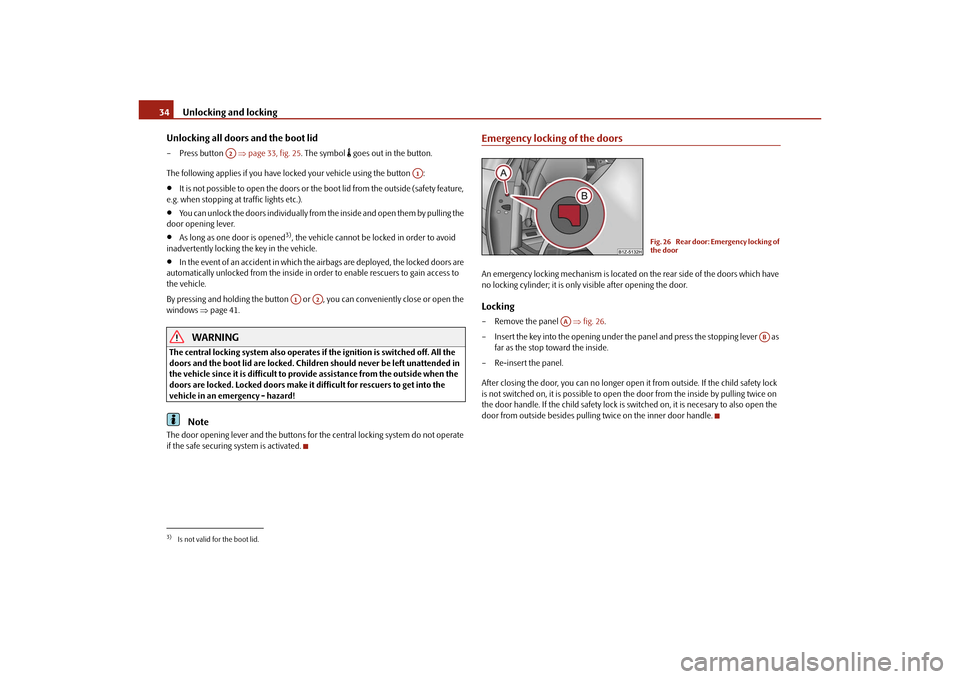
Emergency locking of the doorsAn emergency locking mechanism is located on the rear side of the doors which have
no locking cylinder; it is only visible after opening the door.Locking– Remove the panel fig. 26 .
– Insert the key into the opening under the panel and press the stopping lever as
far as the stop toward the inside.
– Re-insert the panel.
After closing the door, you can no longer open it from outside. If the child safety lock
is not switched on, it is possible to open the door from the inside by pulling twice on
the door handle. If the child sa fety lock is switched on, it is necesary to also open the
door from outside besides pulling twice on the inner door handle.
3)Is not valid for the boot lid.
A2
A1
A1
A2
Fig. 26 Rear door: Emergency locking of
the door
AA
AB
s2bs.2.book Page 34 Monday, September 27, 2010 9:53 AM