2010 SKODA OCTAVIA wheel
[x] Cancel search: wheelPage 131 of 275

Communication
130
the handwheel. You can select the numbers 0 - 9, the symbols +,
, # and the func-
tions Delete, Call, Cancel .
Call register
In the menu point Call register, you can select the following menu points:
Missed calls
Received calls
Last calls
Voice mailbox
In the menu Voice mailbox , it is possible to set the number of the voice mailbox and
then dial the number.
Bluetooth
In the menu Bluetooth you can select the following menu points:
User - the overview of the stored users
New user - Search for new telephones which are in the reception range
Visibility - Switching on the visibility of the telephone unit for other devices
Media player
Active device
Paired devices
Search
Phone name - the possibility to change the name of the telephone unit (pre-set
SKODA UHV)
Settings
In the menu Settings you can select the following menu points:
Phone book
Update
List
Surname
First name
Ring tone Back
Return in the basic menu of the telephone.
Voice controlIntroductionThe period, in which the telephone system is ready to receive voice commands and
carry out the voice commands, is called DIALOGUE. The system gives audible feedback
and guides you if necessary th
rough the relevant functions.
Switch on voice control (dialogue)
You can start the dialogue at any time by briefly pressing the PTT button
on the
adapter* page 128, fig. 123 or on the multifunction steering wheel* page 128.
If the system does not recognise your command, it repeats the first part of the aid and
thus a new entry is possible. After the 2nd error the system repeats the second part of
the aid. After the 3rd error the answer “ Cancel” is given and the dialogue is ended.
Switching off voice control (dialogue)
You can end the dialogue at any time by briefly pressing the PTT button
on the
adapter* page 128, fig. 123 or on the multifunction steering wheel* page 128. If
the system expects a voice command, you can end the dialogue with the command
CANCEL .
Only the message just repeated can be ended by pressing the PTT button during the
message and thus it is possible to pronounce the expected command sooner.
When receiving an incoming call, the dialog ue is immediately interrupted and you can
accept the call by pressing the button
on the multifunction steering wheel* or by
pressing the button for receiving a call directly on your telephone.
Optimum understanding of the voice commands depends on the following
factors:
Speak with a normal tone of voice withou t intonation and excessive voice pauses.
Avoid insufficient articulation.
Close the doors, windows and sliding roof, in order to reduce or stop disturbing
exterior noise.
s43s.1.book Page 130 Thursday, May 13, 2010 1:21 PM
Page 133 of 275

Communication
132
Music playback via Bluetooth
®
The universal telephone preinstallation GSM II makes it possible to play back music via
Bluetooth
® from the devices such as MP3 pl ayer, mobile phone or notebook.
In order to enable the music playback via Bluetooth
®, it is necessary to connect the
device with the handsfree-system in the menu Phone - Bluetooth - Media player .
The operation of the music pl ayback from the connected de vice can be performed via
the hands-free system with the voice control page 131 or directly via the connected
device.
Note
The device to be connected must support the Bluetooth
® profile A2DP, see Owner's
manual of the device to be connected.
Universal telephone preinstallation GSM IIl*IntroductionThe universal telephone preinstallation GSM IlI is a built-in “hands-free system”, it
provides a voice operated convenience mode via the multifunction steering wheel* or
the navigation system*.
All communication between a telephone and the hands-free system of your vehicle
can only be established with the help of the Bluetooth
®, when using HFP - Hands Free
Profile or rSAP - remote SIM Access Profile .
The following functions are included in th e universal telephone preinstallation GSM III:
Phone Phonebook page 132.
Convenience mode with the multifunction steering wheel* page 134 with
display in the information display page 136.
Voice control of the telephone, including the language selection of the telephone
contacts page 137.
Internet connection page 138.
Music playback from the telephone or other multimedia units page 139.
Display of SMS page 136.
The volume can be changed at any time with the control button of the radio* or with
the buttons on the multifunction steering wheel*.
WARNING
Pay attention primarily to the traffic situation! As the driver you are fully
responsible for road safety. Use the telephone system only to such an extent, so
that you are in full control of your vehicle at any time.
Note
Please also refer to the additional instructions page 125, “Mobile phones and
two-way radio systems”.
Should you have any questions, please contact an authorised Škoda Service
Par tner.
Phone PhonebookA phone phonebook is part of the mobile ph one preinstallation with voice control. In
the phone phonebook there are 2000 free me mory locations available. This phone
phonebook can be used in line with the mobile telephone.
After the first connection of the telephone, the system begins to load the phone book
from the phone and the SIM card into the memory of the control unit.
If the telephone book of the mobile phon e contains more than 2 000 entries, the
system announces after downloading Phone book not fully loaded.
Each time the telephone has establishe d a new connection with the hands-free
system, an update of the relevant phone b ook is performed. The updating can take a
few minutes. During this time the phone book, which was stored after the last update
was completed, is available. Newly stored telephone numbers are only shown after the
updating has ended.
If a telephone event (e.g. incoming or outg oing call, dialogue of the voice control)
occurs during the updating procedure, the updating is interrupted. After the telephone
event has ended, the updating starts anew.
s43s.1.book Page 132 Thursday, May 13, 2010 1:21 PM
Page 135 of 275
Communication
134
the icon on the touch-screen of the radio
13) or the navigation, see operating instruc-
tions for radio or for navigation.
WARNING
Pay attention primarily to the traffic situation! As the driver you are fully
responsible for road safety. Use the teleph one system only to such an extent, so
that you are in full control of your vehicle at any time - risk of accident!
In the event of air transport, the Bluetooth
® function of the hands-free
system must be switched off by a specialist garage!
Note
In the memory of the control unit, up to three users can be stored, whereby the
hands-free system can only communicate actively with one user. In the case of mutual
connection with a fourth mobile phone, you must erase one user.
Not valid for all mobile phones which enable a communication via Bluetooth
®.
You can ask at an authorised Škoda Service Partner if your telephone is compatible
with the universal telephon e preinstallation GSM IIl.
When connecting to the control unit, follow the instructions on your mobile phone.
The range of the Bluetooth
® connection to the hands-free system is intended for
the vehicle interior. The range is dependent on local factors, e.g. obstacles between the
devices and interferences with other devices.
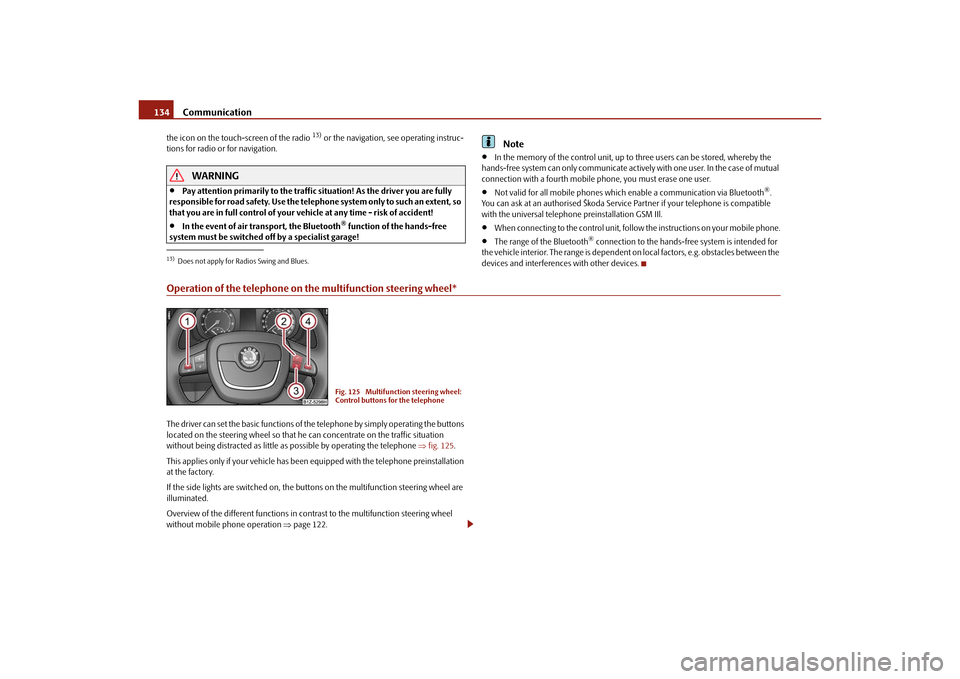
Operation of the telephone on the multifunction steering wheel*The driver can set the basic functions of the telephone by simply operating the buttons
located on the steering whee l so that he can concentrate on the traffic situation
without being distracted as little as possible by operating the telephone fig. 125 .
This applies only if your vehicle has been equipped with the telephone preinstallation
at the factory.
If the side lights are switched on, the butt ons on the multifunction steering wheel are
illuminated.
Overview of the different functions in contrast to the multifunction steering wheel
without mobile phone operation page 122.13)Does not apply for Radios Swing and Blues.
Fig. 125 Multifunction steering wheel:
Control buttons for the telephone
s43s.1.book Page 134 Thursday, May 13, 2010 1:21 PM
Page 137 of 275

Communication
136
Operate the telephone via the information display*The display of texts in the menu Phone is possible in the following languages:
German, English, French, Italian, Spanish, Portuguese and Czech.
In the menu Phone you can select the following menu points:
Phone book
Dial number
Call register
Voice mailbox
Messages
14)
Bluetooth
Settings
Back
Phone book
In the menu point Phone book is the list of the loaded contacts from the telephone
memory and the SIM card of the mobile phone. In the phone phonebook there are
2000 free memory locations available.
Dial number
In the menu point Dial number, you can write any telephone number. Select in
sequence the desired digits with the aid of the handwheel and confirm it by pressing
the handwheel. You can select the numbers 0 - 9, the symbols +, *, # and the functions
Delete, Call, Back .
Call register
In the menu point Call register, you can select the following menu points:
Missed calls
Received calls
Last calls
Delete lists Voice mailbox
In the menu
Voice mailbox, it is possible to set the number of the voice mailbox and
then dial the number.
Messages
In the menu point Messages there is a list of received text messages.
Bluetooth
In the menu Bluetooth you can select the fo llowing menu points:
User - the overview of the stored users
New user - Search for users who are in the reception range
Visibility - Switching on the visibility of th e hands-free system for other devices
Media player
Extras
Modem - overview of the active and paired devices for the connection to the
internet
Phone name - the possibility to change the name of the hands-free system (pre-
set SKODA UHV)
Settings
In the menu Settings you can select the following menu points:
Phone book
Update
Select memory
SIM & phone (SIM & Mobile phone)
SIM card
Mobile phone
List
Surname
First name
Own number - the possibility to suppress on e's own number on the unit called
14)Only when connecting the telephone with th e hands-free system via the rSAP profile.s43s.1.book Page 136 Thursday, May 13, 2010 1:21 PM
Page 138 of 275

Communication137
Using the system
Safety
Driving Tips
General Maintenance
Breakdown assistance
Technical Data
Signal settings
Ring tone
Volume
Phone settings
Select operator
Automatic
Manual
Network mode
Off time
SIM mode - applies to telephones with the rSAP profile in which two SIM cards
can be inserted - there is the possibility to select which SIM card may be connected
with the hands-free system and the possibility to select the name for the SIM card.
SIM mode 1
SIM mode 2
GPRS - You can ask a network provider about the settings of the access point for an
internet connection
Switch off ph. - switching off the telephone unit (telephone remains connected)
Back
Return in the main menu of the information display.
Voice controlIntroductionThe period, in which the telephone system is ready to receive voice commands and
carry out the voice commands, is called DI ALOGUE. The system gives audible feedback
and guides you if necessary through the relevant functions.
The volume can be changed at any time with the control button of the radio* or the
navigation system* or with the buttons on the multifunction steering wheel*. Switch on voice control (dialogue)
You can start the dialogue at any time
by briefly pressing the PTT button
on the
multifunction st eering wheel* page 134.
If the system does not recognise your command, it repeats the first part of the aid and
thus a new entry is possible. After the 2nd error the system repeats the second part of
the aid. After the 3rd error the answer “ Procedure cancelled” is given and the dialogue
is ended.
Switching off voice control (dialogue)
You can end the dialogue at an y time by briefly pressing the button on the multifunc-
tion steering wheel* page 134. If the system expects a voice command, you can end
the dialogue with the command CANCEL.
Only the message just repeated can be ended by pressing the PTT button during the
message and thus it is possible to pronounce the expected command sooner.
The dialogue of the incoming call is immediately interrupted and you can accept the
call by pressing the button
on the multifunction steering wheel*.
Optimum understanding of the voice commands depends on the following
factors:
Speak with a normal tone of voice withou t intonation and excessive voice pauses.
Avoid insufficient articulation.
Close the doors, windows and sliding roof, in order to reduce or stop disturbing
exterior noise.
It is recommended to speak louder at higher speeds, so that the tone of your voice
is louder than the increased surrounding noise.
During the dialogue avoid additional noise in the vehicle, e.g. simultaneously
talking occupants.
Do not speak, if the system makes an announcement.
The microphone for voice control is inserted in the moulded headliner and
directed to the driver and front passenger. Therefore the driver and the front passenger
can operate the equipment.
s43s.1.book Page 137 Thursday, May 13, 2010 1:21 PM
Page 143 of 275

Passive Safety
142
Ensure that all the windows offer a good visibility to the outside.
Safely attach the items of luggage page 74, “Loading the luggage compartment”.
Ensure that no objects can obstruct the pedal.
Adjust the mirror, the front seat and the head restraint to match your body size.
Point out to your occupants that the head restraints must be adjusted to match
their body size.
Protect the children in suitable child seats with correctly fastened seat belts
page 159, “Transporting children safely”.
Adopt the correct seated position page 142, “Correct seated position”. Also
inform your occupants to adopt the correct seated position.
Fasten the seat belt correctly. Also inform your occupants to properly fasten the
seat belts page 147, “How are seat belts correctly fastened?”.
What influences the driving safety?
The driving safety is primarily determined by the style of driving and the
personal behaviour of all the occupants.The driver is fully responsible for himself an d his occupants. If your driving safety is
effected, you place yourself and the oncomi ng traffic at risk. Please refer to the
following guidelines.
Do not get distracted from concentrating on the traffic situation, e.g. by your occu-
pants or mobile phone calls.
Never drive when your driving ability is impaired, e.g. through medication, alcohol,
drugs.
Keep to the traffic regulations and the permissible speed limit.
Adjust the driving speed at all times to the road condition as well as to the traffic
and weather conditions.
Take regular breaks on long journe ys - at the latest every two hours.
Correct seated positionCorrect seated position for the driver
Correct seated position for the driver is important for safe and relaxed
driving.Fig. 127 The correct distance of the driver from the steering wheelFor your own safety and to reduce the risk of injury in the event of an accident, we
recommend the following setting:
Adjust the steering wheel so that the distance between the steering wheel and your
chest is at least 25 cm fig. 127 - left.
Position the driver seat in the forward/back direction so that you are able to fully
press the pedals with your legs at a slight angle.
Adjust the seat backrest so that you are able to reach the highest point of the
steering wheel with your arms at a slight angle.
Adjust the head restraint so that the top edge of the head restraint is at the same
level as the upper part of your head fig. 127 - right.
Fasten the seat belt correctly page 147, “How are seat belts correctly fastened?”.
Manual driver se at adjustment page 11, “Adjusting the front seats”.
Electrical driver seat adjustment page 68, “Adjusting front seats electrically*”.
s43s.1.book Page 142 Thursday, May 13, 2010 1:21 PM
Page 144 of 275

Passive Safety143
Using the system
Safety
Driving Tips
General Maintenance
Breakdown assistance
Technical Data
WARNING
The front seats and the head restraints must always be adjusted to match
the body size of the seat occupant as well as the seat belts must always be
correctly fastened in order to provide an optimal protection for you and your
occupants.
The driver must maintain a distance of at least 25 cm to the steering wheel
page 142, fig. 127 left. Not maintaining this minimum distance will mean
that the airbag system will not be able to properly protect you - hazard!
When driving, hold the st eering wheel with both hands firmly on the outer
edge in the 9 o'clock and 3 o'clock po sition. Never hold the steering wheel
firmly in the 12 o'clock position or in another way (e.g. in the middle of the
steering wheel or at the inner steering wheel edge). In such cases, injuries to the
arms, the hands and the head can occur when the driver airbag is deployed.
The seat backrests must not be angled too far back when driving otherwise
this will affect proper operation of the se at belts and of the airbag system - risk
of injury!
Ensure that there are no objects in the footwell as any objects may get
behind the pedals during a driving or braking manoeuvre. You would then no
longer be able to operate the clutch, to brake or accelerate.
Correct seated position for the front passenger
The fro n t p assen ger must mai n tai n a d i stan ce of a t l ea st 25 c m from th e
dash panel so that the airbag offers him the greatest possible safety it is
deployed.For the safety of the front passenger and to reduce the risk of injury in the event of an
accident, we recommend the following setting:
Adjust the front passenger seat as far as possible to the rear.
Adjust the head restraint so that the top edge of the head restraint is at the same
level as the upper part of your head page 142, fig. 127 - right.
Fasten the seat belt correctly page 147, “How are seat belts correctly fastened?”.
In exceptional cases the front pass enger airbag can be deactivated page 157,
“Deactivating an airbag”. Manual front passenger adjustment
page 11, “Adjusting the front seats”.
Electrical front passenger seat adjustment page 68, “Adjusting front seats electri-
cally*”.
WARNING
The front seats and the head restraints must always be adjusted to match
the body size of the seat occupant as well as the seat belts must always be
correctly fastened in order to provide an optimal protection for you and your
occupants.
The front passenger must maintain a distance of at least 25 cm to the dash
panel. Not maintaining this minimum distance will mean that the airbag
system will not be able to properly protect you - hazard!
Always keep your feet in the footwel l when the vehicle is being driven -
never place your feet on the instrument panel, out of the window or on the
surfaces of the seats. You will be exposed to increased risk of injury if it becomes
necessary to apply the brake or in the ev ent of an accident. If an airbag is
deployed, you may suffer fatal injuries wh en adopting an incorrect seated posi-
tion!
The seat backrests must not be angled too far back when driving otherwise
this will affect proper operation of the se at belts and of the airbag system - risk
of injury!
Correct seated position for the occupants on the rear seats
Occupants on the rear seats must sit upright, keep the feet in the foot-
well and must have their se at belts correctly fastened.To reduce the risk of injury in the event of a sudden braking manoeuvre or an accident,
the occupants on the rear seats must observe the following:
Adjust the head restraints so that the top edge of the head restraints is at the same
level as the upper part of your head page 142, fig. 127 - on the right.
Fasten the seat belt correctly page 147, “How are seat belts correctly fastened?”.
If you are transporting page 159, “Transporting children safely” children in the
vehicle, please use a suitable child restraint system.
s43s.1.book Page 143 Thursday, May 13, 2010 1:21 PM
Page 147 of 275

Seat belts
146
The speed of the vehicle is, nevertheless, the most important factor. Doubling the
speed of the vehicle from 25 km/h up to 50 km/hour increases the kinetic energy four
times.
The common opinion that it is possible to su pport your body in a minor accident with
your hands, is incorrect. Even in a collision at only a low speed, the forces acting on the
body are such that it is no longer possible to support your body.
Even if you only drive at a speed within the range from 30 km/hour to 50 km/hour, the
forces which are produced on your body in the event of an accident can easily exceed
10.000 N (Newton). This equals a weight of one tonne (1 000 kg).
In the event of a frontal collision, occupants of the vehicle not wearing a seat belt, are
thrown forward and strike in an uncontrolled way parts of the interior of the vehicle,
such as steering wheel, dash panel, windscreen, page 145, fig. 129 - left. The occu-
pants of a vehicle who have not fastened their seat belts may even be thrown out of
the vehicle. This can result in fatal injuries.
It is also important that rear seat occupants fasten their seat belts as they will otherwise
be thrown through the vehicle in an uncontr olled manner in the event of an accident
A rear seat passenger who has not fastened the s eat bel t i s a dang er not o nl y to hims elf
but also for those seated at the front page 145, fig. 129 - right.Important safety information regarding the use of seat beltsThe correct use of the seat belts cons iderably reduces the risk of injury!
WARNING
The belt webbing must not be jammed in-between at any point or twisted,
or chafe against any sharp edges.
It is important that the belt webbing is properly routed if the seat belts are
to offer their maximum protection page 147.
No two persons (also not children) should ever use a single seat belt
together.
The maximum protection which seat belts can offer is only achieved if you
are correctly seated page 142, “Correct seated position”.
The belt webbing must not run across solid or fragile objects (e.g. specta-
cles, ball-point pens, keys etc.) as this may be a cause of injuries.
Bulky, loose clothing (e.g. a winter coat over a jacket) does not allow you to
be correctly seated and impairs proper operation of the seat belts.
It is prohibited to use clamps or other objects to adjust seat belts (e.g. for
shortening the belts for smaller persons).
The lock tongue should only be inserted into the lock which is the correct
one for your seat. Wrong use of the safety belt will reduce its capacity to protect
and the risk of injury increases.
The seat backrests of the front seats must not be tilted too far to the rear
otherwise the seatbelts can lose their effectiveness.
The belt webbing must always be ke pt clean. Soiled belt webbing may
impair proper operation of the inertia reel page 191, “Seat belts”.
The slot of the belt tongue must not be blocked by paper or similar objects
otherwise the belt tongue will not lock in place properly.
Inspect the seat belts regula rly to ensure they are in good condition. If you
find seat belts which have damage to the seat belt webbing, seat belt connec-
tions, to the inertia reels or to the lock, the relevant safety belt must be replaced
by a specialist garage.
The seat belts must not be removed or changed in any way. Do not make an
attempt to repair the seat belts yourself.
Damaged seat belts which have been subjected to stress in an accident and
were therefore stretched, must be replaced - this is best done by a specialist
garage. The anchorage points of the belts must also be inspected. The
anchorage points for the belts should also be checked.
In certain countries it is possible to use seat belts which differ in terms of
their operation from the seat belts which are described on the pages which
follow.WARNING (continued)
s43s.1.book Page 146 Thursday, May 13, 2010 1:21 PM