2010 SKODA OCTAVIA service
[x] Cancel search: servicePage 82 of 275

Seats and Stowage81
Using the system
Safety
Driving Tips
General Maintenance
Breakdown assistance
Technical Data
Pay attention that the rear seat backrest is correctly interlocked. It is only
then that the three-point seat belt for th e middle seat can reliably fulfil its func-
tion.
First check for yourself that the cross road is inserted into the mounts in
the front position!
Removing and installing the luggage net partition housingRemoving– Fold the rear seats forwards page 72.
– Open the right rear door.
– Push the luggage net partition housing fig. 78 in the direction of arrow
and take it out of the mount of the rear seats in the direction of arrow .Installing– Position the luggage net partition housing into the mounts in the rear seat back- rests.
– Push the luggage net partition housing in the opposite direction of arrow as far as the stop.
– Fold the rear seats back into their original position.
The roof rack*DescriptionPay attention to the following points if you wish to transport luggage or other items on
the roof of your vehicle:
A special roof luggage rack system was de veloped for the vehicle, that is why you
should only use a roof luggage rack which has been released for use by Škoda Auto.
The base carrier is the basis for a comple te roof luggage rack system. Separate
additional holders are required for safety reasons for transporting luggage, bikes, surf-
boards, skis and boats.
The basic version of the roof luggage rack system and further components are
obtainable as accessories from the authorised Škoda Service Partners.Caution
If you use other roof rack systems or if the roof bars are not properly fitted, then any
damage which may result to your car is not covered by the warranty agreements. It is
therefore essential to pay attention to the fitting instructions supplied with the roof
luggage rack system.
On models fitted with a power sliding/ tilting roof, ensure that the opened
sliding/tilting roof does not strike any items of luggage transported on the roof.
Ensure that the opened boot lid do es not collide with the roof load.For the sake of the environment
The increased aerodynamic drag results in a higher fuel consumption. One should
therefore take off the roof bar system after use.
Note
A roof rail is obtainable from a specialist garage if hasn't been fitted onto an estate car
at the works, which carries out the professional fitting.
WARNING (continued)
AC
Fig. 78 Rear seats: Luggage net parti-
tion housing
AA
A1
A2A1
s43s.1.book Page 81 Thursday, May 13, 2010 1:21 PM
Page 127 of 275

Communication
126
Furthermore the volume can be changed indivi dually during the call at any time with
the button for setting the radio* or navigation system* or with the buttons on the
multifunction steering wheel*.
WARNING
Pay attention primarily to the traffic situation! As the driver you are fully
responsible for road safety. Use the teleph one system only to such an extent, so
that you are in full control of your vehicle at any time.
Note
Please also refer to the additional instructions page 125, “Mobile phones and
two-way radio systems”.
Should you have any questions, please contact an authorised Škoda Service
Par tner.
Phone PhonebookA phone phonebook is part of the mobile ph one preinstallation with voice control. In
the phone phonebook there are 2500 free memory locations available. This phone
phonebook can be used in line with the mobile telephone.
After the first connection of the telephone, the system begins to load the phone book
from the phone and the SIM card into the memory of the control unit.
Each time the telephone has establishe d a new connection with the hands-free
system, an update of the relevant phone b ook is performed. The updating can take a
few minutes. During this time the phone book, which was stored after the last update
was completed, is available. Newly stored telephone numbers are only shown after the
updating has ended.
If the number of contacts loaded exceed s 2 500, the phone book is not complete.
If a telephone event (e.g. incoming or outgoing call, dialogue of the voice control)
occurs during the updating pr ocedure, the updating is interrupted. After the telephone
event has ended, the updating starts anew. Store voice recording of a contact
For each entry in the menu
Phone book, you can store your own voice entry for the
voice control with Voice Tag - Record. You can also store your own voice entry using
voice control in the menu “further options”.
Connection of the mobile phone with the hands-free systemIn order to connect a mobile phone with th e hands-free system, it is necessary to
connect the telephone to the hands-free sy stem. Detailed information on this is
provided in the operating instructions of your mobile phone. The following steps must
be carried out for the connection:
– Activate the Bluetooth
® in your telephone and the visibility of the mobile phone.
– Switch on the ignition.
– Select the menu Phone - Phone search in the information display and wait until
the control unit has ended the search.
– Select your mobile phone in the menu of the units found.
–Confirm the PIN (as standard 1234).
– If the hands-free system announces (as standard Skoda UHV) on the display of the
mobile phone, enter the PIN (as standard 1234) within 30 seconds and wait until
the connection is established
12).
– After ending the connection, confirm in the information display that a new user profile was created.
If no more free space is available for creating a new user profile, delete an existing user
profile.
If you have not managed to connect your mobile phone with the hands-free system
within 3 minutes after switching on the ignition, switch the ignition off and then again
on. The visibility of the hands-free system is established again for 3 minutes. The visi-
bility of the Bluetooth
® device is automatically switched off if the vehicle starts off or
if the mobile phone connects to the device.
12)Some mobile phones have a menu, in which the authorization for establishing a Bluetooth
®
connection is performed via the input of a code. If the input for the authorization is necessary, it
must always be performed when re-e stablishing the Bluetooth connection.
s43s.1.book Page 126 Thursday, May 13, 2010 1:21 PM
Page 128 of 275

Communication127
Using the system
Safety
Driving Tips
General Maintenance
Breakdown assistance
Technical Data
During the connecting procedur
e, no other mobile phone may be connected with the
hands-free system.
Up to four mobile phones can be paired to the hands-free system, whereby only one
mobile phone can communicate with the hands-free system.
Connection with an already paired mobile phone
After switching on the ignition, the connect ion is automatically established for the
already paired mobile phone
12). Check on the mobile unit if the automatic connection
was established.
Disconnecting the connection
By withdrawing the ignition key.
By disconnecting the device in the information display.
By disconnecting the device in the mobile phone.
Solving connection problems
If the system announces No paired phone found , check the operating state of the
telephone:
Is the telephone switched on?
Is the PIN code entered?
Is Bluetooth
® active?
Is the visibility of the mobile phone active?
Was the telephone already paired with the hands-free system?
WARNING
In the event of air transport, the Bluetooth
® function of the hands-free system
must be switched off by a specialist garage!
Note
Not valid for all mobile phones which enable a communication via Bluetooth
®.
You can ask at an authorised Škoda Service Partner if your telephone is compatible
with the universal telephone preinstallation GSM II.
If a suitable adapter is available for your mobile phone, use your mobile phone
exclusively in the adapter so that the radiation in the vehicle drops to a minimum.
Inserting the mobile phone into the adapter ensures an optimal sending and
receiving power and offers at the same ti me the advantage of the battery charging.
The range of the Bluetooth
® connection to the hands-free system is restricted to
the vehicle interior. The range is dependent on local factors, e.g. obstacles between the
devices and mutual interferences with other de vices. If your mobile phone is e.g. in a
jacket pocket, this can lead to diffic ulties when establishing the Bluetooth
® connection
with the hands-free system or the data transfer.
Inserting the mobile phone with the adapter*Only one telephone mount* is factory-fitted. An adapter for the telephone can be
purchased from the range of the Škoda original accessories.Inserting the mobile phone with the adapter– First of all push the adapter in the direction of arrow fig. 122 up to the stop
into the mount. Press the adapter slightly downwards, until it locks securely into
position.
– Insert the mobile phone into the adap ter (as specified in manufacturer's
instructions).Removing the mobile phone with the adapter– Press simultaneouly the side locks of the mount and remove the mobile phone and adapter fig. 122 .
Fig. 122 Universal preparation for the
phone
AA
AA
s43s.1.book Page 127 Thursday, May 13, 2010 1:21 PM
Page 133 of 275

Communication
132
Music playback via Bluetooth
®
The universal telephone preinstallation GSM II makes it possible to play back music via
Bluetooth
® from the devices such as MP3 pl ayer, mobile phone or notebook.
In order to enable the music playback via Bluetooth
®, it is necessary to connect the
device with the handsfree-system in the menu Phone - Bluetooth - Media player .
The operation of the music pl ayback from the connected de vice can be performed via
the hands-free system with the voice control page 131 or directly via the connected
device.
Note
The device to be connected must support the Bluetooth
® profile A2DP, see Owner's
manual of the device to be connected.
Universal telephone preinstallation GSM IIl*IntroductionThe universal telephone preinstallation GSM IlI is a built-in “hands-free system”, it
provides a voice operated convenience mode via the multifunction steering wheel* or
the navigation system*.
All communication between a telephone and the hands-free system of your vehicle
can only be established with the help of the Bluetooth
®, when using HFP - Hands Free
Profile or rSAP - remote SIM Access Profile .
The following functions are included in th e universal telephone preinstallation GSM III:
Phone Phonebook page 132.
Convenience mode with the multifunction steering wheel* page 134 with
display in the information display page 136.
Voice control of the telephone, including the language selection of the telephone
contacts page 137.
Internet connection page 138.
Music playback from the telephone or other multimedia units page 139.
Display of SMS page 136.
The volume can be changed at any time with the control button of the radio* or with
the buttons on the multifunction steering wheel*.
WARNING
Pay attention primarily to the traffic situation! As the driver you are fully
responsible for road safety. Use the telephone system only to such an extent, so
that you are in full control of your vehicle at any time.
Note
Please also refer to the additional instructions page 125, “Mobile phones and
two-way radio systems”.
Should you have any questions, please contact an authorised Škoda Service
Par tner.
Phone PhonebookA phone phonebook is part of the mobile ph one preinstallation with voice control. In
the phone phonebook there are 2000 free me mory locations available. This phone
phonebook can be used in line with the mobile telephone.
After the first connection of the telephone, the system begins to load the phone book
from the phone and the SIM card into the memory of the control unit.
If the telephone book of the mobile phon e contains more than 2 000 entries, the
system announces after downloading Phone book not fully loaded.
Each time the telephone has establishe d a new connection with the hands-free
system, an update of the relevant phone b ook is performed. The updating can take a
few minutes. During this time the phone book, which was stored after the last update
was completed, is available. Newly stored telephone numbers are only shown after the
updating has ended.
If a telephone event (e.g. incoming or outg oing call, dialogue of the voice control)
occurs during the updating procedure, the updating is interrupted. After the telephone
event has ended, the updating starts anew.
s43s.1.book Page 132 Thursday, May 13, 2010 1:21 PM
Page 135 of 275
Communication
134
the icon on the touch-screen of the radio
13) or the navigation, see operating instruc-
tions for radio or for navigation.
WARNING
Pay attention primarily to the traffic situation! As the driver you are fully
responsible for road safety. Use the teleph one system only to such an extent, so
that you are in full control of your vehicle at any time - risk of accident!
In the event of air transport, the Bluetooth
® function of the hands-free
system must be switched off by a specialist garage!
Note
In the memory of the control unit, up to three users can be stored, whereby the
hands-free system can only communicate actively with one user. In the case of mutual
connection with a fourth mobile phone, you must erase one user.
Not valid for all mobile phones which enable a communication via Bluetooth
®.
You can ask at an authorised Škoda Service Partner if your telephone is compatible
with the universal telephon e preinstallation GSM IIl.
When connecting to the control unit, follow the instructions on your mobile phone.
The range of the Bluetooth
® connection to the hands-free system is intended for
the vehicle interior. The range is dependent on local factors, e.g. obstacles between the
devices and interferences with other devices.
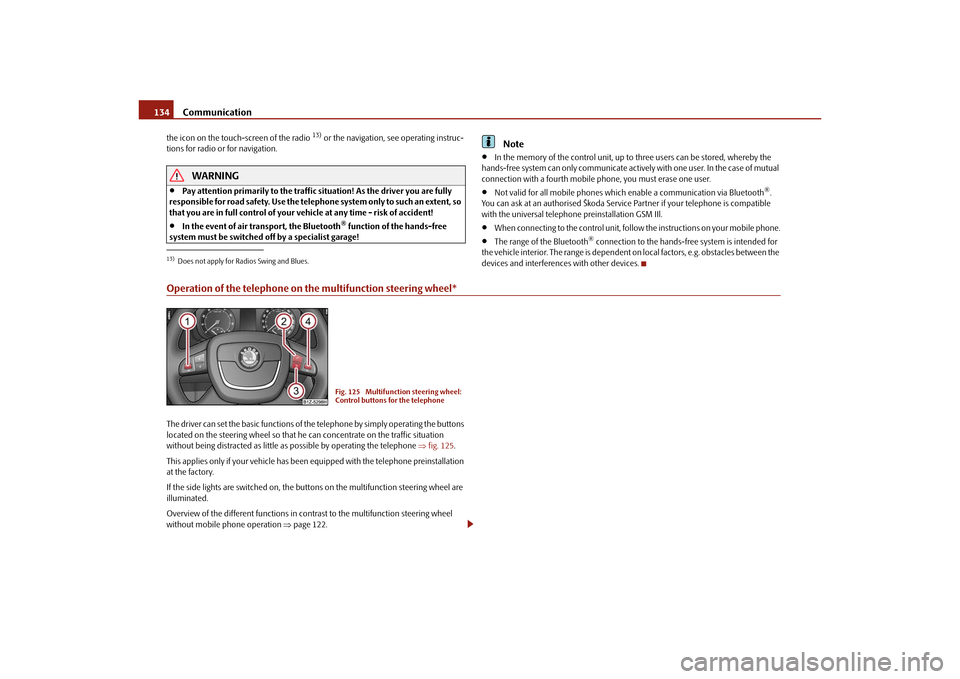
Operation of the telephone on the multifunction steering wheel*The driver can set the basic functions of the telephone by simply operating the buttons
located on the steering whee l so that he can concentrate on the traffic situation
without being distracted as little as possible by operating the telephone fig. 125 .
This applies only if your vehicle has been equipped with the telephone preinstallation
at the factory.
If the side lights are switched on, the butt ons on the multifunction steering wheel are
illuminated.
Overview of the different functions in contrast to the multifunction steering wheel
without mobile phone operation page 122.13)Does not apply for Radios Swing and Blues.
Fig. 125 Multifunction steering wheel:
Control buttons for the telephone
s43s.1.book Page 134 Thursday, May 13, 2010 1:21 PM
Page 151 of 275

Airbag system
150
Airbag systemDescription of the airbag systemGeneral information on the airbag systemThe front airbag system is complementary to the three-point seat belts and offers addi-
tional protection for the head and chest area of the driver and passenger in the event
of a frontal collision.
In the case of a violent side cr ash, the side* and head airbags* reduce the risk of inju-
ries to the occupants on the side of the collision .
The airbag system is only functional af ter the ignition has been switched on.
The operational readiness of the airbag syst em is monitored electronically. The airbag
indicator light comes on for a few seconds each time the ignition is switched on.
The airbag system (according to vehicle equipment) consists of:
an electronic control unit,
front airbag for the driver and the front seat passenger*,
side airbags*,
head airbags*,
an airbag indicator light in the instrument cluster,
a front passenger airbag switch* page 157,
an indicator light for a switched off fron t seat passenger airbag* in the middle of
the dash panel page 157.
A fault in the airbag system exists if:
the airbag indicator light does not light up when the ignition is switched on,
the warning light does not go out after about 4 seconds after the ignition is
switched on,
the airbag indicator light goes out and come s on again after the ignition is switched
on,
the airbag indicator light comes on or flickers when driving,
an airbag indicator light showing a switched-off front passenger airbag* in the
middle of the dash panel flashes.
WARNING
To enable the occupants of a vehicle to be protected with the greatest
possible effect when the airbag is deployed, the front seats must be
page 142, “Correct seated position” correctly adjusted to match the body
size of the occupant.
If you do not fasten the seat belts when driving, lean too far forward or
adopt an incorrect seated position, you are exposing yourself to increased risk
of injury in the event of an accident.
Have the airbag system checked immediat ely by a specialist garage if a fault
exists. Otherwise, there is a risk of the airbag not being activated in the event of
an accident.
No modifications of any kind may be made to parts of the airbag system.
It is prohibited to manipulate individual parts of the airbag system as this
might result in the airbag being deployed.
The protective function of the airbag system is sufficient for only one acci-
dent. The airbag system must then be re placed if the airbag has been deployed.
The airbag system needs no maintenance during its working life.
If you sell your car, please hand over the complete vehicle documentation to
the new owener. Please note that the documents relating to the possibility of
deactivating the front passenger airbag are also part of the vehicle documents!
If the vehicle or individual parts of the airbag system are scrapped, it is
essential to observe the relevant safety precautions. The authorised Škoda
Service Partners are familiar with these regulations.
When disposing of vehicle or parts of the airbag system, it is important to
comply with the national legal requirements.
s43s.1.book Page 150 Thursday, May 13, 2010 1:21 PM
Page 158 of 275

Airbag system157
Using the system
Safety
Driving Tips
General Maintenance
Breakdown assistance
Technical Data
being deployed. When the deployed head airbag is inflated, parts of the acces-
sories fitted may in certain circumstances be thrown into the interior of the car
and cause injuries to the occupants
page 214, “Accessories, changes and
replacement of parts”.
Any work on the head airbag system including installing and removing
system components because of other repair work (e.g. removing headliner)
must only be carried out by a specialist garage.
Deactivating an airbagDeactivating airbags
If any airbags have been deactivated, switch them on again as soon as
possible so that they are able to again provide their proper protection.There is the technical means installed within your vehicle to switch off the front, side*
or head* airbag (take out of commission).
This is why you should have the deactivation of the airbags carried out by a specialist
garage.
On vehicles equipped with the switch for de activation of the airbags, you can deacti-
vate the front passenger airbag by means of this switch page 157.
Deactivation of airbags is envisaged only for particular instances, such as if:
you must in exceptional cases use a child seat on the front passenger seat where
the child has its back to the direction of tr avel of the vehicle (in some countries this
must be in the direction of travel due to other legal regulations applying) page 159,
“Important safety information regarding the use of child safety seats”,
you are not able to maintain the distan ce of at least 25 cm between middle of
steering wheel and chest, despite the driver seat being correctly adjusted,
special attachments are required in the ar ea of the steering wheel because of a
physical disability,
you have installed other seats (e.g. orthopaedic seats without side airbags). Monitoring the airbag system
The functionality of the airbag system is al
so monitored electronically when one airbag
has been switched off.
If the airbag was switched off using diagnostic equipment:
The warning light for the airbag system li ghts up for 4 seconds after switching on
the ignition and then flashes for 12 seconds afterwards in 2 second intervals.
The following situation applies if the ai rbag has been switched off using the
switch for the airbag* in the storage compartment:
the airbag indicator light in the instrume nt cluster comes on for about 4 seconds
each time the igniti on is switched on,
if the airbags are switched off, this is in dicated in the middle of the dash panel by
the lighting up of the indicator light
fig. 140 - right.
Note
Your authorised Škoda Service Partner will be able to advise you whether national
legislation in your country allows airbags in your vehicle to be deactivated, and which
ones.Switch for the front passenger airbag*Fig. 140 Storage compartment: Switch for the front passenger airbag / indicator light for a
switched off front seat passenger airbagThe front passenger airbag is deactivated with the switch.
WARNING (continued)
s43s.1.book Page 157 Thursday, May 13, 2010 1:21 PM
Page 166 of 275

Transporting children safely165
Using the system
Safety
Driving Tips
General Maintenance
Breakdown assistance
Technical Data
– Insert the mounting funnels onto the
locking eyes between the seat back-
rest and the seat cushion fig. 147 .
– Push the notched arms of the child seat in to the locking eyes in direction of arrow
, until they are heard to lock in place fig. 147 .
– Pull on both sides of the child seat!
One can mount a child safety seat using the “I SOFIX” system quickly, easily and reliably.
Please pay close attention to instructions from the manufacturer of the child safety
seat when installing and removing the seat.
Child seats fitted with the “ISOFIX” system can only be mounted and fixed in a vehicle
fitted with an “ISOFIX” system when these child seats have been released for this type
of vehicle according to the ECE-R 44 standard.
You can obtain child seats with the “ISOFIX” attachment system from specialist garages
who will also installed it as well.
Complete installation instructions are enclosed with the child safety seat.
WARNING
The locking eyes have just been deve loped for child safety seats which use
the “ISOFIX” system. You should therefore never attach other child safety seats,
seat belts or objects to the locking eyes - hazard!
Ask an authorised Škoda Service Part ner whether a child seat which you
bought for another vehicle is recommended for use in a Škoda before using an
“ISOFIX” system.
Certain child seats which use the “ISO FIX” system can be attached with
standard three-point seat belts. Please pay close attention to instructions from
the manufacturer of the child safety seat when installing and removing the seat.Note
Child seats which use the “ISOFIX” system are currently available for children
weighing from 9 up to 18 kg. This correspond s to an age range of from 9 months to 4
years.
The child seats can also be fitted with the “Top Tether” system page 165.
Attaching child seat using the “Top Tether” systemIIn certain countries national legal provisions also require the equipment of the rear
seat with fixing eyes for child seat using the “Top Tether” system fig. 148 .
Always perform the installation and removal of the child seat using the “Top Tether”
system as stated in the instructions from the manufacturer of the child seat.
WARNING
Attach the child seats with the “Top Tether” system only to the points
provided for this purpose fig. 148 .
On no account should you equip your vehicle, e.g. mount screws or other
anchorage points.
Pay attention to the important safety information regarding the use of child
seats.Note
Store the remaining part of the belt for the “Top Tether” system in a textile pocket,
which is located at the child seat.
AA
AB
A1
Fig. 148 Rear seat: Top Tether
s43s.1.book Page 165 Thursday, May 13, 2010 1:21 PM