2010 SKODA OCTAVIA service
[x] Cancel search: servicePage 27 of 275
Instruments and warning lights
26
Lights and Visibility
Here you can set how long the light should stay on for the function Coming/Leaving
Home. Furthermore you can here switch on or off the functions daylight driving lights
and convenience turn signal.
After selecting the menu point Fa ct or y se t ting the factory setting of the lighting is
established again.
Time
Here you can set the time, the time format (12 or 24 hour indicator) and the time
change summer/winter time.
Winter tyres
Here you can set at which speed a warning si gnal should sound. This function is used
for e.g winter tyres with the permissibl e maximum speed less than the maximum
speed of the vehicle.
When exceeding the speed, the following is displayed on the information display*:
Winter tyres max. speed ... km/h
Measures
Here you can set the units for temperature, consumption and distance driven. Assistant
Here you can adjust the tones of the
acoustic signals of the parking aid*.
Second speed
Here you can switch on the display of the second speed in mph or in km/h
3).
Service
Here you can have the kilometers still to be driven and the days until the following
service interval shown and the Service Interval Display reset.
Factory Setting
After selecting the menu point Factory Setting the factory setting of the information
display is established again.
Mirror down
Here you can switch on or off the function for mirror low-
ering on the front passenger side when engaging the
reverse gear
a).
Mirror adjust.
Here you can switch on or off the function for left and right
exterior mirror adjustment simultaneously.
Fa cto r y se tt ing
After selecting this menu the convenience setting is reset
to factory setting. The following is displayed in the infor-
mation display:
Convenience factory settings restored
a)This function is only available on vehicles with an electrically adjustable driver seat.
3)Valid for countries where the values are indicated in British measuring units.
s43s.1.book Page 26 Thursday, May 13, 2010 1:21 PM
Page 33 of 275

Instruments and warning lights
32
If the coolant is within the specified range, the increased temperature may be caused
by an operating problem at th e coolant fan. Check the fuse for the coolant fan, replace
it if necessary page 227, “Fuse assignment in engine compartment”.
Do not continue driving if the warning light does not go off although the fluid is at the
correct level and also the fuse of the fan is in proper order. Contact a specialist garage
to obtain assistance.
Please also refer to the additional instructions page 200, “Cooling system”.
The following text will be displayed in the information display*: Check coolant! Owner's manual
WARNING
If you must stop for technical reasons, then park the vehicle at a safe
distance from the traffic and switch off the engine and switch on the hazard
warning light system page 56.
Take care when opening the coolant expa nsion bottle. If the engine is hot,
the cooling system is pressurized - risk of scalding! It is best to allow the engine
to cool down before removing the cap.
Do not touch the coolant fan The coolant fan may switch on automatically
even if the ignition is off.
Traction control system (TCS)
The warning light
comes on for a few seconds when the ignition is switched on.
The warning light flashes when a control cycle is activated while driving.
The warning light lights up permanentl y if there is a fault in the system.
The fact that the TCS system operates together with the ABS means that the TCS
warning light will also come on if the ABS system is not operating properly.
If the warning light comes on immediately after starting the engine, the TCS system
can be switched off for technical reasons. In this case, the TCS system can be switched
on again by switching the ignition on and off. If the warning light goes out, the TCS
system is fully functional again.
Further information about the TCS page 169, “Traction control system (TCS)”.
Note
If the battery has been disconnected and reconnected, the warning light
comes on
after switching on the ignition. The warning light must go out after driving a short
distance.
Switch off traction control system (TCS)
The TCS system is switched off by pressing the button page 169, fig. 150 and the
warning light
lights up.
Electronic stability programme (ESP)*
The warning light
comes on for a few seconds when the ignition is switched on.
When the ESP helps to stabilise the vehicle, the warning light
flashes in the instru-
ment cluster.
The warning light lights up permanently if there is a fault in the ESP system.
The fact that the ESP system operates together with the ABS means that the ESP
warning light will also come on if the ABS system is not operating properly.
If the warning light
comes on immediately after starting the engine, the ESP system
can be switched off for technical reasons. In this case, the ESP system can be switched
on again by switching the igni tion on and off. If the warning light goes out, the ESP
system is fully functional again.
Further information on the ESP page 167, “Electronic stab ility programme (ESP)*”.
Electronic Differential Lock (EDL)*
The EDL is a part of the ESP. A fault in the ED L is indicated by the lighting up of the ESP
warning light in the instrument cluster. Have the vehicle inspected without delay by an
authorised Škoda Service Partner. Further information on the EDL page 168, “Elec-
tronic Differential Lock (EDL and XDL)*”.
Note
If the battery has been disconnected and reconnected, the warning light
comes on
after switching on the ignition. The warning light must go out after driving a short
distance.
s43s.1.book Page 32 Thursday, May 13, 2010 1:21 PM
Page 40 of 275

Unlocking and locking39
Using the system
Safety
Driving Tips
General Maintenance
Breakdown assistance
Technical Data
Indicator light in the driver's door on vehicles with anti-theft alarm system
After locking the vehicle the indicator light fl
ashes for 2 seconds fast, then more slowly.
If the vehicle is locked and the safe securing system page 39 is not operating, the
indicator light in the driver door flashes for about 2 seconds fast, goes out and starts to
flash slowly after about 30 seconds.
If the indicator light first of all flashes fast for about 2 seconds, afterwards lights up for
about 30 seconds and then flashes slowly, there is a fault in the system of the central
locking or the interior monitor* page 45. Visit a specialist garage to obtain assist-
ance.
Convenience operatio n of the windows
One can open and close the electrically powered windows when unlocking and
locking the vehicle page 48.
Opening a single door*
This function makes it possible to only unlock the driver's door. The other doors and
the fuel filler flap* remain locked and ar e only unlocked after repetitive unlocking.
If you wish, you can have your authorised Škoda Service Partner activate the function
of the single door opening mode.
On vehicles with information display*, this function can be switched on in the menu
Setup - Convenience - Door open.
Automatic locking and unlocking*
All the doors and the boot lid are locked au tomatically once the car reaches a speed of
about 15 km/h.
If the ignition key is withdrawn, the car is then automatically unlocked again. In addi-
tion, it is possible for the driver to unlock the car by pressing the central locking button
or by pulling the door opening lever.
If you wish, you can have a sp ecialist garage activate the automatic locking function.
WARNING
Locking the doors prevents involuntary opening in an exceptional situation (an
accident). Locked doors prevent unwanted entry into the vehicle from outside, for example at road crossings. Locked do
ors do, however, make it more difficult
for rescuers to get into the vehicle in an emergency - danger to life!
Note
In the event of an accident in which the airbags are deployed, the locked doors are
automatically unlocked in order to enable rescuers to gain access to the vehicle.
Only the front doors can be unlocked and locked using the key if the central locking
system fails. You can lock or unlock ma nually the other doors and the boot lid.
Emergency locking of the door page 41.
Emergency unlocking of the boot lid page 42.
Safe securingThe central locking system is equipped with a safe securing
7) system. Locking the
vehicle from the outside causes the door locks to be automatically blocked. It is not
possible to open the doors with the door ha ndle either from the inside or from the
outside. This acts as an effective deterrent for attemp ts to break into your vehicle.
You can deactivate the safe securing sy stem by locking twice within 2 seconds.
If the safe securing system is not operating, the warning light in the driver door flashes
for about 2 seconds fast, goes out and starts to flash slowly again after about
30°seconds.
The safe securing system is again activate d the next time the vehicle is unlocked and
locked again.
The doors can be opened from the inside if the vehicle is locked and the safe securing
system is deactivated:
The door is unlocked by actuating the door-opening lever.
The door opens upon actuating the door-opening lever again.
7)Only valid for some countries.WARNING (continued)
s43s.1.book Page 39 Thursday, May 13, 2010 1:21 PM
Page 44 of 275
Unlocking and locking43
Using the system
Safety
Driving Tips
General Maintenance
Breakdown assistance
Technical Data
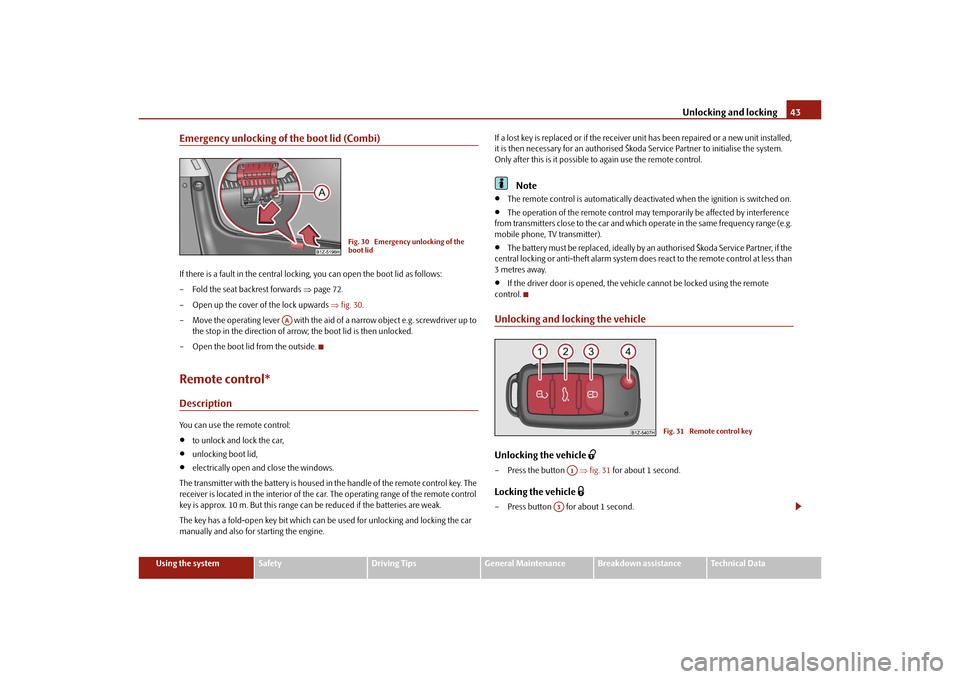
Emergency unlocking of the boot lid (Combi)If there is a fault in the central lockin g, you can open the boot lid as follows:
– Fold the seat backrest forwards page 72.
– Open up the cover of the lock upwards fig. 30 .
– Move the operating lever with the aid of a narrow object e.g. screwdriver up to
the stop in the direction of arro w; the boot lid is then unlocked.
– Open the boot lid from the outside.Remote control*DescriptionYou can use the remote control:
to unlock and lock the car,
unlocking boot lid,
electrically open and close the windows.
The transmitter with the battery is housed in the handle of the remote control key. The
receiver is located in the interior of the car. The operating range of the remote control
key is approx. 10 m. But this range can be reduced if the batteries are weak.
The key has a fold-open key bit which can be used for unlocking and locking the car
manually and also for starting the engine. If a lost key is replaced or if the receiver unit has been repaired or a new unit installed,
it is then necessary for an authorised Škoda Service Partner to initialise the system.
Only after this is it possible
to again use the remote control.
Note
The remote control is automatically deacti vated when the ignition is switched on.
The operation of the remote control may temporarily be affected by interference
from transmitters close to the car and which operate in the same frequency range (e.g.
mobile phone, TV transmitter).
The battery must be replaced, ideally by an authorised Škoda Service Partner, if the
central locking or anti-theft alarm system does react to the remote control at less than
3 metres away.
If the driver door is opened, the vehi cle cannot be locked using the remote
control.
Unlocking and locking the vehicleUnlocking the vehicle
– Press the button fig. 31 for about 1 second.Locking the vehicle
– Press button for about 1 second.
Fig. 30 Emergency unlocking of the
boot lid
AA
Fig. 31 Remote control key
A1
A3
s43s.1.book Page 43 Thursday, May 13, 2010 1:21 PM
Page 63 of 275

Lights and Visibility
62
The windscreen wipers and the wash system only operate if the ignition is switched on
and the bonnet is closed
10).
If the intermittent wipe is switched on, the intervals are also controlled depending on
speed.
The rain sensor* automatically regulates the break between the individual wiper
strokes depending on the intensity of the rain.
The rear window will be wiped again if the front window wipers are on when reverse
gear is selected.
The windscreen washer nozzles are heated* when the ignition is switched on.
Top up with wash liquid page 207.
Winter position
If the windscreen wipers are in rest positi on, they cannot be folded out from the wind-
screen. For this reason we recommend adjusting the windscreen wipers in winter so
that they can be folded out from the windscreen easily. You can set this rest position as
follows:
Switch on the windscreen wipers.
Switch off the ignition. The windscreen wipers remain in the position in which they
were when switching off the ignition.
You can also use the service position page 63 as a winter position.
WARNING
Properly maintained wind screen wiper blades are essential for clear visi-
bility and safe driving page 63.
Do not use the windscreen washer sy stem at low temperatures, without
heating the windscreen beforehand. Otherwise the window cleaner could
freeze on the windscreen and re strict the view to the front.
The rain sensor only operates as a support. The driver is not released from
the responsibility to set the function of the windscreen wipers manually
depending on the visibility conditions.
Caution
In frosty weather, please firs t of all check whether the windscreen wiper blades are not
frozen to the windscreen before switching them on. Switching on windscreen wipers
when the blades are frozen to the windscreen may result in damage both to the blades
and the motor of the windscreen wipers!
Note
If the slower or the faster wiper setting is switched on page 61, fig. 50 and
the vehicle speed decreases to below 4 km/h, the lower wiper step is switched on
automatically. At a speed increase of more than 8 km/h the previous wiper setting is
established again.
If there is an obstacle on the windscre en, the wiper will try to push away the
obstacle. If the obstacle continues to block the wiper, the wiper stops after 5 cycles, in
order to avoid a damage to the wiper. Re move the obstacle and and switch on the
wiper again.
Automatic rear window wiper* (Combi)If the windshield wiper lever is in the position page 61, fig. 50 or , the rear
window wiper carries out a wi ping process every 30 seconds or 10 seconds at a speed
above 5 km/h.
When the rain sensor* is active (the lever is in the position ) the function is only
active if the front window wipers continue to operate (no break between each wiping
process).
Activation/deactivation
The function of the automatic rear window wiper is activated/deactivated in the infor-
mation display* in the menu:
Setup
Lights & Vision
Rear wiper
10)On vehicles which do not have a contact switch for the bonnet, the windshield wiper and wash
system operates also when the bonnet is opened.
A2
A3
A2
A3
A1
s43s.1.book Page 62 Thursday, May 13, 2010 1:21 PM
Page 64 of 275

Lights and Visibility63
Using the system
Safety
Driving Tips
General Maintenance
Breakdown assistance
Technical Data
Note
The function of the automatic rear window wi per is only valid for Combi vehicles which
are equipped with the information display*. The function is activated in the factory.Headlight cleaning system*The headlights are being cleaned after the windscreen has been sprayed for the first
time and fifth time, the low beam or main beam are switched on and the windscreen
wiper lever was held in the position page 61, fig. 50 for about 1 second.
The headlight washer nozzles are moved forward out of the bumper by the water pres-
sure for cleaning the headlights.
You should remove stubborn dirt (such as in sect residues) from the headlight lenses at
regular intervals, for example when refuelling . Please refer to the following guidelines
page 188, “The headlight lenses”.
You should remove any snow from the fixtur es of the washer nozzles and clear ice in
winter with a de-icing spray in order to ensure proper operation of the cleaning
system.Replacing wiper blades for the windscreen wipersOne cannot fold out the wiper arms in the re st position from the windscreen. Before
replacing the wiper arms you must put them into the service position.
Service position for changing wiper blades– Close the bonnet.
– Switch the ignition on and then again off.
– Then press the windscreen wiper lever in the position page 61, fig. 50 within
20 seconds - the wiper arms move into the service position.Taking off the wiper blade– Fold windscreen wiper arm out from the windscreen and position the wiper blade at right angles to the wiper arm .
– Take off the wiper blade in direction of arrow fig. 51 .Attaching a wiper blade– Push the new wiper blade ov er the wiper arm and turn the wiper blade into the
vertical position.
– Check whether the wiper blade is correctly attached.
– Fold the windscreen wiper arms onto the window and switch on the ignition. By pressing the window wiper leve r into the sprung position fig. 51 or when
driving at a speed greater than 4 km/h, the windscreen wiper arms move back into
the rest position.
Wiper blades in proper condition are essentia l to obtain good visibility. Wiper blades
should not be allowed to become dirtied by dust, insect remains and preserving wax.
Juddering or smearing of the wiper blades co uld then be due to wax residues left on
the windscreen by vehicle wash ing in automatic vehicle wash systems. It is therefore
important to degrease the lips of the wiper blades after every pass through an auto-
matic vehicle wash system .
WARNING
The ignition must not be switched on if the front windscreen wiper arms are
folded out. The wiper blades would move back into their rest position and while
doing so damage the paintwork of the bonnet.
If the windscreen wipers are handled ca relessly, there is a risk of damage to
the windscreen.
A5
Fig. 51 Wiper blade for the windscreen
wiper
A4
A4
s43s.1.book Page 63 Thursday, May 13, 2010 1:21 PM
Page 65 of 275

Lights and Visibility
64
You should clean the wiper blades regularly with a windscreen cleaner in
order to avoid any smears. Clean a wiper blad e with a sponge or cloth if it is very
dirty, for example from insect residues.
Replace the wiper blades once or twice a year for safety reasons. These can
be bought from an authorised Škoda Service Partner.
Replacing the wiper blade on the rear window wiperTaking off the wiper blade – Fold windscreen wiper arm out from the windscreen and position the wiper blade at right angles to the wiper arm fig. 52 .
– Hold the window wiper arm at the top end with one hand.
– With the other hand unlock the locking button in the direction of arrow and remove the wiper blade.Attaching a wiper blade– Position the wiper blade onto the wiper arm and lock the locking button .
– Check whether the wiper blade is correctly attached.
The same remarks apply here as for page 63.
Rear-view mirrorManual dimming interior rear-view mirrorBasic setting– Pull the lever on the bottom edge of the mirror forward.Dimming mirror– Pull the lever on the bottom edge of the mirror back.Automatic dimming interior mirror*Switching on the automatic dimming– Press the button - the warning light lights up fig. 53 .Switching off the automatic dimming– Press again the button - the warning light goes out .
If the automatic dimming is switched on, the mirror dims automatically depending on
the light striking the mirror from the rear. The mirror has no lever on the bottom edge
of the mirror. After the reverse gear is engaged, the mirror always moves back into the
normal position.
WARNING (continued)
Fig. 52 Wiper blade for rear windowAA
AA
Fig. 53 Automatic dimming interior
mirror
AB
AA
AB
AA
s43s.1.book Page 64 Thursday, May 13, 2010 1:21 PM
Page 71 of 275

Seats and Stowage
70
If you wish to be able to retrieve the settings which are stored in the memory by also
using the radio remote control, you have to assign the radio remote control to a
memory button in each case.
If you wish, you can obtain an additional remote control key from an authorised Škoda
Service partner and then assign the remote control key to another memory button.
Note
If the radio remote control had previously been assigned to another memory
button, this setting is then erased by the new assignment.
If you assign the radio remote control to a memory button which has already been
assigned to a radio remote control, the ol d assignment is also replaced by a new
assignment in this case.
The assignment of the radio remote co ntrol to a memory button is retained,
however, after reassigning the seats and exterior mirrors.
Retrieving settings of the seat and mirrors
You can retrieve the stored settings either with the memory buttons or
with the remote control*.Retrieving settings with memory buttons– In order to retrieve the stored setting, you have two possibilities:
– One-touch automatic memory: briefly press the desired memory button
page 69, fig. 57 . The seat and exterior mirror are moved automatically into the
stored positions (this applies only if the ignition is switched on and the speed is less
than 5 km/h).
– Memory keying : Press and hold the desired memory button pressed long
enough until the seat and the exterior mi rror are moved into the stored positions.Retrieving settings with remote control– If the driver door is closed and the ignition is switched off, briefly press the unlock
button of the radio remote control page 43 and then open the driver door.
– The seat and exterior mirrors now move automatically into the stored positions.
Retrieving setting of exterior mirror for reversing*– Turn the rotary knob for the exterior mirror setting into the position
page 65
before engaging the reverse gear.
The mirror returns into its initial position , after the rotary knob is moved out of the
position
and put into another position or if the speed is more than 15 km/h.
Emergency Off
You can interrupt the setting operation at any time, if you operate any button of the
driver seat.
Note
If the inclination angle of the seat backrest is more than 102° in relation to the seat
cushion, the backrest remains in this position , after reaching this angle, when retrieving
the setting by briefly pressing the memory button. Once the stored angle is reached, it
is necessary to press the memory button and hold it pressed until the seat is in the
stored position.Head restraintsFig. 58 Head restraint: Adjust - left / remove - rightBest protection is achieved if the top edge of the head restraint is at the same level as
the upper part of your head.
AB
AB
s43s.1.book Page 70 Thursday, May 13, 2010 1:21 PM