2010 Seat Leon 5D child lock
[x] Cancel search: child lockPage 101 of 309

Unlocking and locking99
Safety First
Operating Instructions
Practical Tips
Technical Specifications
Unlocking and lockingCentral locking Basic functions
The central locking system enables you to lock and unlock all
doors by just pushing the button.Description
Central locking can be activated by using any of the following options:•the key, by inserting it into the driver door cylinder and rotating it manu-
ally,•the central locking button in the vehicle interior ⇒page 101.•the remote control, using the buttons on the key ⇒page 106.
Various functions are available to improve the vehicle safety:
– Safe locking system
– Selective unlocking system*
– Automatic speed-dependent locking and unlocking system*
– Self-locking system to prevent involuntary unlocking
– Emergency unlocking system
Unlocking the vehicle*
–Press button ⇒page 106, fig. 62 on the remote control to unlock all
the doors and tailgate.
Locking the vehicle*
– Press button ⇒page 106, fig. 62 on the remote control to lock all
doors and the tailgate or turn the key in the door to lock all doors and the
tailgate.
WARNING
•Never leave children or disabled persons in the vehicle. In case of emer-
gency, they may not be able to leave the vehicle and not manage on their
own.•Never allow children to play in or around the vehicle. A locked vehicle
can be subjected to extremely high and low temperatures, depending on
the time of year, thus causing serious injuries/illness. It could even have
fatal consequences. Close and lock both the tailgate and all the other doors
when you are not using the vehicle.•Always take you car keys with you when you leave the vehicle. Misuse
of the keys, for example, by children, may result in serious damage and
accident.
−The engine may accidentally be started and be out of control.
− If the ignition is switched on, the electric equipment could be acti-
vated with risk of injury, for example, in the electric windows.
− The doors can be locked using the remote control key. This could
make the aid difficult in an emergency situation.
− Always take the key with you when you leave the vehicle.•Never remove the key from the ignition if the vehicle is in motion. The
steering lock could suddenly engage, and you would not be able to turn the
steering wheel.Note
•While the driver door is open, the vehicle cannot be locked with the
remote control. This avoids the user from forgetting his key inside the vehicle.•If the driver door is unlocked with the key shaft, only the driver door is
unlocked, the rest of the doors remain locked. When the ignition is switched
Leon_EN.book Seite 99 Mittwoch, 1. September 2010 6:16 18
Page 104 of 309

Unlocking and locking
102
Locking the vehicle
–Press the button ⇒.
Unlocking the doors
–Press button .The central locking button is still operative when the ignition is switched off.
Except when the Safe security system is activated.
Please note the following if you lock your vehicle with the central locking
button:•For safety reasons it is not possible to open the doors or the tailgate from
the outside (for instance, when stopped at a traffic light).•The driver door and/or front passenger door cannot be locked if any of the
vehicle doors (except the tailgate) are open. This avoids the user from forget-
ting his key inside the vehicle.•Repeated operation of the central locking will deactivate the central
locking button for 30 seconds. Once this time has passed, the button if oper-
ative again.•There is a danger of leaving the key inside the vehicle if the vehicle is
locked by the central locking button when the driver door is closed and any of
the rear doors open. On closing any of the rear doors, the vehicle locks and
the keys remain inside it.•All doors can be locked separately from inside the vehicle. Do this by
pulling the door release lever once.WARNING
•If the vehicle is locked, children and disabled people may be trapped
inside it.•The central locking button is not operative in the following cases:
•When the vehicle is locked from the outside (with the remote control or
the key).•While the ignition is not activated after unlocking the door lock cylinder
with the key.Note
•Vehicle locked, button , amber•Vehicle unlocked, button , redUnlocking and locking - Manual personalisation Activating selective unlocking
With the driver door open, turn the key to unlock for approx. 3 s
Deactivating selective unlocking
With the driver door open, turn the key to lock for approx. 3 s
The turn signal lamps flash to confirm activation or deactivation.
Activation of automatic locking
Press the lock button on the central locking button for 3 seconds.
Deactivation of automatic locking
Press the unlock button on the central locking button for 3 seconds.
The lock button lamp flashes to confirm activation or deactivation.
WARNING (continued)
Leon_EN.book Seite 102 Mittwoch, 1. September 2010 6:16 18
Page 105 of 309

Unlocking and locking103
Safety First
Operating Instructions
Practical Tips
Technical Specifications
Emergency manual locking
This permits mechanical locking of the doors in case of
central locking system failure.Locking the driver door manually
Insert the key in the door lock cylinder and rotate in a clockwise direction for
the left hand side door and anti-clockwise for the right hand side door.
Once the door has been closed it can no longer be opened from the outside.
Manual (emergency) locking of the remaining doors
Open the door and remove the cap ⇒fig. 58 printed with a lock image.
This will expose a circular element with a groove in the centre. Insert the key
into the groove and rotate the element clockwise for the right hand side doors
and anticlockwise for the left hand side doors.
Replace the cap and close the door. Once the door has been closed it can no
longer be opened from the outside. Unlocking the manually (emergency) locked driver door
Insert the key in the door lock cylinder and rotate anti-clockwise for the left
hand side doors and clockwise for the right hand side doors.
T h e do or lo ck is r eleas ed a nd th e do or m ay b e op e ne d using the ex te r io r do o r
handle.
Unlocking the remaining manually (emergency) locked doors
First the driver door must be unlocked to gain entry to the vehicle. Operate the
internal door handle for the required door. If the childproof lock is activated
on the rear doors, when the interior door release lever is operated the door is
unlocked but does not open. The door must be opened from the outside.
Note
Once the vehicle is open, if you wish to lock it manually (emergency locking),
repeat the previous instructions.
Fig. 58 Locking the doors
manually
AA
Leon_EN.book Seite 103 Mittwoch, 1. September 2010 6:16 18
Page 106 of 309
Unlocking and locking
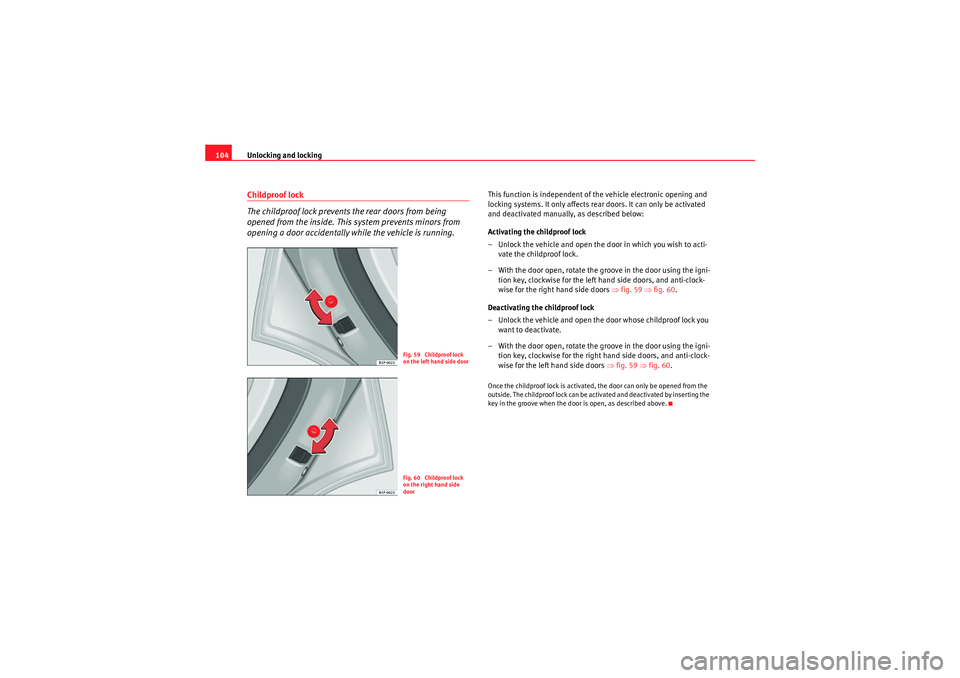
104Childproof lock
The childproof lock prevents the rear doors from being
opened from the inside. This system prevents minors from
opening a door accidentally while the vehicle is running.
This function is independent of the vehicle electronic opening and
locking systems. It only affects rear doors. It can only be activated
and deactivated manually, as described below:
Activating the childproof lock
– Unlock the vehicle and open the door in which you wish to acti- vate the childproof lock.
– With the door open, rotate the groove in the door using the igni- tion key, clockwise for the left hand side doors, and anti-clock-
wise for the right hand side doors ⇒fig. 59 ⇒ fig. 60 .
Deactivating the childproof lock
– Unlock the vehicle and open the door whose childproof lock you want to deactivate.
– With the door open, rotate the groove in the door using the igni- tion key, clockwise for the right hand side doors, and anti-clock-
wise for the left hand side doors ⇒fig. 59 ⇒ fig. 60 .Once the childproof lock is activated, the door can only be opened from the
outside. The childproof lock can be activated and deactivated by inserting the
key in the groove when the door is open, as described above.
Fig. 59 Childproof lock
on the left hand side doorFig. 60 Childproof lock
on the right hand side
door
Leon_EN.book Seite 104 Mittwoch, 1. September 2010 6:16 18
Page 107 of 309

Unlocking and locking105
Safety First
Operating Instructions
Practical Tips
Technical Specifications
KeysSet of keys
The set of keys includes a remote control, a key without a
remote control and a plastic key tab*The set of keys belonging to your vehicle consists of the following items:•one remote control key ⇒fig. 61 with folding key bit,•a key without remote control ,•a plastic key tab* .
Duplicate keys
If you need a replacement key, go to an Authorised Service Centre with your
vehicle identification number.
WARNING
•An incorrect use of the keys can cause serious injuries.•Never leave children or disabled persons in the vehicle. In case of emer-
gency, they may not be able to leave the vehicle and not manage on their
own.•An uncontrolled use of the key could start the engine or activate any
electric equipment (e.g. electric windows), causing risk of accident. The
doors can be locked using the remote control key. This could make the aid
difficult in an emergency situation.•Never forget the keys inside the vehicle. An unauthorised use of your
vehicle could result in injury, damage or theft. Always take the key with you
when you leave the vehicle.•Never remove the key from the ignition if the vehicle is in motion.
Otherwise, the steering could suddenly block and it would be impossible
to turn the steering wheel.Caution
There are electronic components in the remote control key. Avoid wetting and
hitting the keys
Fig. 61 Set of keys
AA
AB
AC
Leon_EN.book Seite 105 Mittwoch, 1. September 2010 6:16 18
Page 109 of 309

Unlocking and locking107
Safety First
Operating Instructions
Practical Tips
Technical Specifications
WARNING
•An improper use of the key can cause serious injuries.•Never leave children or disabled persons in the vehicle. In case of emer-
gency, they may not be able to leave the vehicle and not manage on their
own.•Never forget the keys inside the vehicle. Otherwise, this could result in
serious injuries, accidents or even the theft of your vehicle. Always take the
key with you when you leave the vehicle.•An uncontrolled use of the key could start the engine or activate any
electric equipment (e.g. electric windows), causing risk of accident. The
vehicle can be locked when using the remote control key. This could
complicate the aid in case of emergency.Note
•The remote control can be programmed by means of pressing the
unlocking button once; as a result, only the driver door will unlock. When the
button is pressed once more, all doors and the tailgate will be unlocked.•The remote control functions only when you are in range ⇒page 106,
fig. 63 (red area).•If the vehicle is unlocked using the button, it will lock again auto-
matically if any of the doors or the tailgate are not opened within 30 seconds
after unlocking it. This function prevents the vehicle from remaining unlocked
if the unlock button is pressed by mistake.•If the vehicle cannot be opened and closed using the remote control, the
remote control key will have to be re-synchronised ⇒page 107.
Changing the batteryIf the battery indicator does not flash when the buttons are pushed, the
battery must be replaced.
Caution
The use of inappropriate batteries may damage the radio frequency remote
control. For this reason, always replace the dead battery with another of the
same size and power.
For the sake of the environment
Used batteries must be disposed of at an appropriate waste facility or
through an authorised service, given that their components can affect the
environment.Synchronising the remote control key
If it is not possible to unlock or lock the door with the remote
control, it should be re-synchronised.–Press the ⇒page 106, fig. 62 button on the remote control.
– Then close the vehicle using the key bit within one minute.It is possible that the vehicle could no longer be opened and closed with the
remote control if the button is repeatedly pressed outside of the effective
range of the radio frequency remote control. The remote control key will have
to be resynchronised.
Spare remote control keys are available in your Authorised Service Centres,
where they must be matched to the locking system.
A1
Leon_EN.book Seite 107 Mittwoch, 1. September 2010 6:16 18
Page 113 of 309

Unlocking and locking111
Safety First
Operating Instructions
Practical Tips
Technical Specifications
WARNING
•Always close the tailgate properly. Risk of accident or injury.•The tailgate must not be opened when the reverse or rear fog lights are
lit. This may damage the tail lights•Do not close the tailgate by pushing it down with your hand on the rear
window. The glass could smash. Risk of injury!•Ensure the tailgate is locked after closing it. If not, it may open unex-
pectedly while driving.•Never allow children to play in or around the vehicle. A locked vehicle
can be subjected to extremely high and low temperatures, depending on
the time of year, thus causing serious injuries/illness. It could even have
fatal consequences. Close and lock both the tailgate and all the other doors
when you are not using the vehicle.•Closing the tailgate without observing and ensuring it is clear could
cause serious injur y to you and to third parties. Make sure that no one is in
the path of the tailgate.•Never drive with the tailgate open or half-closed, exhaust gases may
penetrate into the interior of the vehicle. Danger of poisoning!•If you only open the tailgate, do not leave the key inside. The vehicle
will not be opened if the key is left inside.
Emergency opening
This allows the vehicle to be opened if the central locking
does not operate (for exampl e, if the battery is flat)There is a groove in the luggage compartment allowing access to the
emergency opening mechanism.
Opening the tailgate from inside the luggage compartment
– Insert the key in the groove and unlock the locking system,
turning the key from right to left, as shown by the arrow
⇒fig. 66 .
Fig. 66 Tailgate: emer-
gency open
Leon_EN.book Seite 111 Mittwoch, 1. September 2010 6:16 18
Page 114 of 309

Unlocking and locking
112Windows Opening or closing the windows electrically
The front and rear electric windows can be operated by using
the controls on the driver door.Opening and closing the windows
– Press the button to open the window.
– Pull button to close the window ⇒.Always close the windows fully if you park the vehicle or leave it unattended
⇒.
You can use the electric windows for approx. 10 minutes after switching off
the ignition if neither the driver door nor the front passenger door has been
opened and the key has not been removed from the ignition. Buttons on the driver door
Button for window in front left door
Button for window in front right door
Buttons for rear windows* Safety switch for deactivating the electric window buttons in the rear
doors
Button for window in rear left door
Button for window in rear right door
Safety switch
*
Safety switch on the driver door can be used to disable the electric
window buttons in the rear doors.
Safety switch not pressed: buttons on rear doors are activated.
Safety switch pressed: buttons on rear doors are deactivated.
WARNING
•Incorrect use of the electric windows can result in injury.•Never close the tailgate without observing and ensuring it is clear, to do
otherwise could cause serious injury to you and third parties. Make sure
that no one is in the path of a window.•Always take the vehicle key with you when you leave the vehicle.•Never leave children or disabled persons in the vehicle, particularly if
they have access to the keys. An uncontrolled use of the key could start the
engine or activate any electric equipment (e.g. electric windows), causing
risk of accident. The doors can be locked using the remote control key. This
could make the aid difficult in an emergency situation.•The electric windows will work until the key has been removed from the
ignition and one of the front doors has been opened.•If necessary, use the safety switch to disable the rear electric windows.
Make sure that they have been disabled.
Fig. 67 Detail of the
driver door: controls for
the front and rear
windows
p
p
A1A2A3A4A5
A3
Leon_EN.book Seite 112 Mittwoch, 1. September 2010 6:16 18