2010 PONTIAC G5 phone
[x] Cancel search: phonePage 395 of 422

Online Owner Center
Online Owner Center (U.S.) —
www.gmownercenter.com/pontiac
Information and services customized for your specific
vehicle — all in one convenient place.
•Digital owner manual, warranty information,
and more
•Online service and maintenance records
•Find Pontiac dealers for service nationwide
•Exclusive privileges and offers
•Recall notices for your specific vehicle
•OnStar®and GM Cardmember Services Earnings
summaries
Other Helpful Links:
Pontiac — www.pontiac.com
Pontiac Merchandise — www.pontiacmall.com
Help Center — www.pontiac.com/helpcenter
•FAQ
•Contact Us
My GM Canada (Canada) — www.gm.ca
My GM Canada is a password-protected section of
www.gm.ca where you can save information on
GM vehicles, get personalized offers, and use handy
tools and forms with greater ease.
Here are a few of the valuable tools and services you
will have access to:
•My Showroom: Find and save information on
vehicles and current offers in your area.
•My Dealers/Retailers: Save details such as address
and phone number for each of your preferred GM
dealers/retailers.
•My Driveway: Access quick links to parts and
service estimates, check trade-in values, or
schedule a service appointment by adding the
vehicles you own to your driveway profile.
•My Preferences: Manage your profile and use tools
and forms with greater ease.
To sign up, visit the My GM Canada section within
www.gm.ca.
8-5
Page 396 of 422

Customer Assistance for Text
Telephone (TTY) Users
To assist customers who are deaf, hard of hearing, or
speech-impaired and who use Text Telephones (TTYs),
Pontiac has TTY equipment available at its Customer
Assistance Center. Any TTY user in the U.S. can
communicate with Pontiac by dialing: 1-800-833-PONT
(7668). (TTY users in Canada can dial 1-800-263-3830.)
Customer Assistance Offices
Pontiac encourages customers to call the toll-free
number for assistance. However, if a customer wishes to
write or e-mail Pontiac, the letter should be addressed to:
United States — Customer Assistance
Pontiac Customer Assistance Center
P.O. Box 33172
Detroit, MI 48232-5172
www.Pontiac.com
1-800-762-2737 or
1-800-833-7668 (For Text Telephone devices (TTYs))
Roadside Assistance: 1-800-ROADSIDE (762-3743)
From Puerto Rico: 1-800-496-9992 (English)
1-800-496-9993 (Spanish)
From U.S. Virgin Islands: 1-800-496-9994
Canada — Customer Assistance
General Motors of Canada Limited
Customer Communication Centre, CA1-163-005
1908 Colonel Sam Drive
Oshawa, Ontario L1H 8P7
www.gmcanada.com
1-800-263-3777 (English)
1-800-263-7854 (French)
1-800-263-3830 (For Text Telephone devices (TTYs))
Roadside Assistance: 1-800-268-6800
Overseas — Customer Assistance
Please contact the local General Motors Business Unit.
Mexico, Central America and Caribbean
Islands/Countries (Except Puerto Rico
and U.S. Virgin Islands) — Customer
Assistance
General Motors de Mexico, S. de R.L. de C.V.
Customer Assistance Center
Paseo de la Reforma #2740
Col. Lomas de Bezares
C.P. 11910, Mexico, D.F.
01-800-508-0000
Long Distance: 011-52-53 29 0 800
8-6
Page 397 of 422

GM Mobility Reimbursement
Program
This program, available to qualified applicants, can
reimburse you up to $1,000 of the cost of eligible
aftermarket adaptive equipment required for your vehicle,
such as hand controls or a wheelchair/scooter lift.
The offer is available for a very limited period of time
from the date of vehicle purchase/lease. For more
details, or to determine your vehicle’s eligibility, visit
gmmobility.com or call the GM Mobility Assistance
Center at 1-800-323-9935. Text telephone (TTY) users,
call 1-800-833-9935.
General Motors of Canada also has a Mobility Program.
Call 1-800-GM-DRIVE (463-7483) for details. TTY
users call 1-800-263-3830.
Roadside Assistance Program
For U.S. purchased vehicles, call1-800-ROADSIDE
(762-3743); (Text telephone (TTY): 1-888-889-2438) .
For Canadian purchased vehicles, call 1-800-268-6800.
Service is available 24 hours a day, 365 days a year.
Calling for Assistance
When calling Roadside Assistance, have the following
information ready:
•Your name, home address, and home telephone
number
•Telephone number of your location
•Location of the vehicle
•Model, year, color, and license plate number of the
vehicle
•Odometer reading, Vehicle Identification Number
(VIN), and delivery date of the vehicle
•Description of the problem
8-7
Page 403 of 422
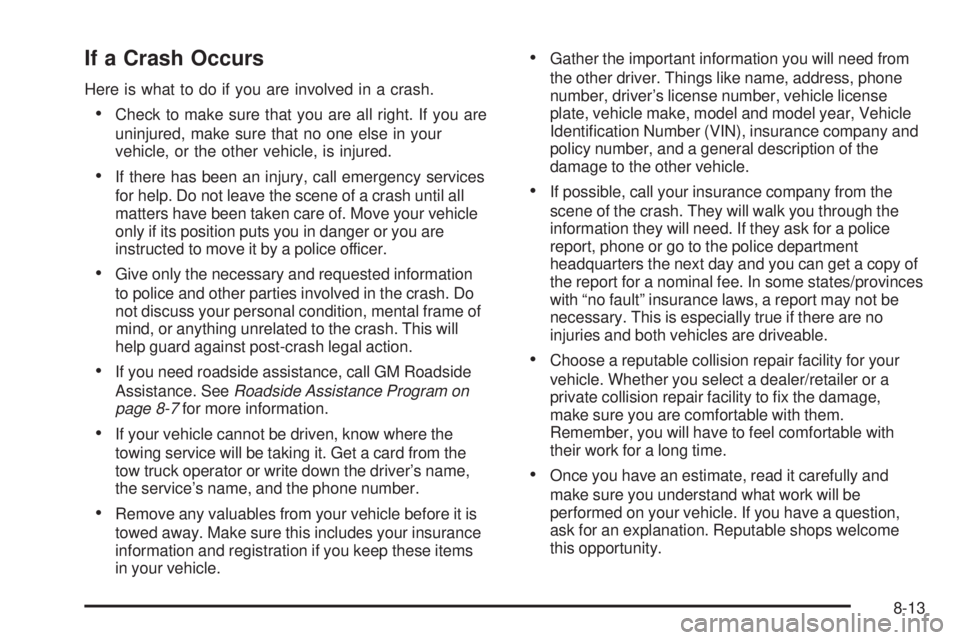
If a Crash Occurs
Here is what to do if you are involved in a crash.
•Check to make sure that you are all right. If you are
uninjured, make sure that no one else in your
vehicle, or the other vehicle, is injured.
•If there has been an injury, call emergency services
for help. Do not leave the scene of a crash until all
matters have been taken care of. Move your vehicle
only if its position puts you in danger or you are
instructed to move it by a police officer.
•Give only the necessary and requested information
to police and other parties involved in the crash. Do
not discuss your personal condition, mental frame of
mind, or anything unrelated to the crash. This will
help guard against post-crash legal action.
•If you need roadside assistance, call GM Roadside
Assistance. SeeRoadside Assistance Program on
page 8-7 for more information.
•If your vehicle cannot be driven, know where the
towing service will be taking it. Get a card from the
tow truck operator or write down the driver’s name,
the service’s name, and the phone number.
•Remove any valuables from your vehicle before it is
towed away. Make sure this includes your insurance
information and registration if you keep these items
in your vehicle.
•Gather the important information you will need from
the other driver. Things like name, address, phone
number, driver’s license number, vehicle license
plate, vehicle make, model and model year, Vehicle
Identification Number (VIN), insurance company and
policy number, and a general description of the
damage to the other vehicle.
•If possible, call your insurance company from the
scene of the crash. They will walk you through the
information they will need. If they ask for a police
report, phone or go to the police department
headquarters the next day and you can get a copy of
the report for a nominal fee. In some states/provinces
with “no fault” insurance laws, a report may not be
necessary. This is especially true if there are no
injuries and both vehicles are driveable.
•Choose a reputable collision repair facility for your
vehicle. Whether you select a dealer/retailer or a
private collision repair facility to fix the damage,
make sure you are comfortable with them.
Remember, you will have to feel comfortable with
their work for a long time.
•Once you have an estimate, read it carefully and
make sure you understand what work will be
performed on your vehicle. If you have a question,
ask for an explanation. Reputable shops welcome
this opportunity.
8-13
Page 408 of 422

OnStar®
If the vehicle has OnStar and you subscribe to the
OnStar services, please refer to the OnStar Terms and
Conditions for information on data collection and use.
Navigation System
If your vehicle has a navigation system, use of the
system may result in the storage of destinations,
addresses, telephone numbers, and other trip
information. Refer to the navigation system operating
manual for information on stored data and for deletion
instructions.
Radio Frequency
Identication (RFID)
RFID technology is used in some vehicles for functions
such as tire pressure monitoring and ignition system
security, as well as in connection with conveniences
such as key fobs for remote door locking/unlocking and
starting, and in-vehicle transmitters for garage door
openers. RFID technology in GM vehicles does not use
or record personal information or link with any other
GM system containing personal information.
Radio Frequency Statement
This vehicle has systems that operate on a radio
frequency that comply with Part 15 of the Federal
Communications Commission (FCC) Rules and with
RSS-210/211 of Industry and Science Canada.
Operation is subject to the following two conditions:1. The device may not cause interference.
2. The device must accept any interference received, including interference that may cause undesired
operation of the device.
Changes or modifications to any of these systems by
other than an authorized service facility could void
authorization to use this equipment.
8-18
Page 412 of 422

Cooling System.............................................. 6-20
Courtesy Transportation Program ......................8-10
Cruise Control .................................................. 4-7
Cupholders .................................................... 3-36
Customer Assistance ......................................... 8-6
Offices ......................................................... 8-6
Text Telephone (TTY) Users ........................... 8-6
Customer Information Service Publications Ordering Information ........8-15
Customer Satisfaction Procedure ........................ 8-2
D
Damage Repair, Collision.................................8-11
Data Recorders, Event .................................... 8-17
Daytime Running Lamps (DRL) .........................4-10
Defensive Driving ............................................. 5-2
Delayed Locking ............................................... 3-9
Disc, MP3 ...................................................... 4-63
Doing Your Own Service Work ........................... 6-4
Dome Lamp ................................................... 4-11
Door Automatic Door Lock ..................................... 3-9
Delayed Locking ........................................... 3-9
Locks .......................................................... 3-8
Power Locks ................................................ 3-9
Programmable Automatic Door Unlock ............3-10
Rear Door Security Locks .............................3-10Driver
Seat Height Adjuster ...................................... 2-3
Driver Information Center (DIC) .........................4-35
DIC Operation and Displays ..........................4-36
DIC Vehicle Personalization ..........................4-43
DIC Warnings and Messages ........................4-38
Driver Storage Compartment ............................3-36
Driving At Night ..................................................... 5-17
Before a Long Trip ...................................... 5-19
Defensive ..................................................... 5-2
Drunk .......................................................... 5-2
Highway Hypnosis ....................................... 5-19
Hill and Mountain Roads ..............................5-20
In Rain and on Wet Roads ...........................5-18
Loss of Control ........................................... 5-15
Off-Road Recovery ...................................... 5-15
Rocking Your Vehicle to Get it Out .................5-24
Winter ........................................................ 5-21
Driving for Better Fuel Economy .......................1-21
E
Easy Entry Seat............................................... 2-8
EDR ............................................................. 8-16
Electrical Equipment, Add-On ..........................6-102
4
Page 417 of 422

O
Odometer...................................................... 4-21
Off-Road Recovery .................................................... 5-15
Oil Engine ....................................................... 6-13
Engine Oil Life System ................................. 6-16
Pressure Light ............................................. 4-33
Older Children, Restraints ................................2-32
Online Owner Center ........................................ 8-5
OnStar, Privacy .............................................. 8-18
Outlet Adjustment ............................................ 4-17
Outlets Accessory Power ......................................... 4-13
Outside Convex Mirror ............................................. 3-36
Power Mirrors ............................................. 3-35
Remote Control Mirror .................................. 3-35
Owner Checks and Services .............................. 7-8
Owners, Canadian .............................................. iii
P
Paint, Damage.............................................. 6-100
Park Shifting Into ................................................ 3-30
Shifting Out of ............................................ 3-31Parking
Brake ........................................................ 3-29
Over Things That Burn ................................. 3-32
Parking Your Vehicle ....................................... 3-32
Passenger Airbag Status Indicator .....................4-24
Passenger Compartment Air Filter .....................4-18
Passenger Sensing System ..............................2-64
Passing ......................................................... 5-15
PASS-Key
®III+ Electronic Immobilizer ...............3-17
PASS-Key®III+ Electronic Immobilizer
Operation ................................................... 3-17
Perchlorate Materials Requirements, California ...... 6-4
Phone Bluetooth
®.................................................. 4-71
Power Door Locks .................................................. 3-9
Electrical System ....................................... 6-102
Retained Accessory (RAP) ............................3-22
Windows .................................................... 3-14
Pregnancy, Using Safety Belts ..........................2-31
Privacy .......................................................... 8-16
Navigation System ....................................... 8-18
OnStar ....................................................... 8-18
Radio Frequency Identification (RFID) .............8-18
9
Page 420 of 422
Specifications and Capacities..........................6-109
Speedometer .................................................. 4-21
Split Folding Rear Seat ..................................... 2-9
Start Vehicle, Remote ....................................... 3-6
Starting the Engine ......................................... 3-22
Steering ........................................................ 5-13
Steering Wheel Controls, Audio .........................4-82
Steering Wheel, Tilt Wheel ................................. 4-3
Storage Areas Center Console ........................................... 3-36
Convenience Net ......................................... 3-36
Cupholders ................................................. 3-36
Driver Storage Compartment .........................3-36
Glove Box .................................................. 3-36
Storing the Tire Sealant and Compressor Kit ......6-79
Stuck in Sand, Mud, Ice, or Snow .....................5-23
Sun Visors ..................................................... 3-15
Sunroof ......................................................... 3-37
T
Tachometer.................................................... 4-21
Taillamps Turn Signal Lamps ...................................... 6-44
Turn Signal, Stoplamps and Back-up Lamps ....6-44
Text Telephone (TTY) Users ............................... 8-6
Theft-Deterrent Feature .................................... 4-81Theft-Deterrent Systems
................................... 3-15
Content Theft-Deterrent ................................3-15
PASS-Key
®III+ Electronic Immobilizer ............3-17
PASS-Key®III+ Electronic Immobilizer
Operation ................................................ 3-17
Tilt Wheel ........................................................ 4-3
Time, Setting .................................................. 4-50
Tires ............................................................. 6-48
Aluminum or Chrome-Plated Wheels, Cleaning ................................................. 6-99
Buying New Tires ........................................ 6-64
Chains ....................................................... 6-70
Changing a Flat Tire .................................... 6-80
Cleaning ................................................... 6-100
Compact Spare ........................................... 6-93
Different Size .............................................. 6-66
If a Tire Goes Flat ....................................... 6-70
Inflation - Tire Pressure ................................6-55
Inspection and Rotation ................................6-62
Installing the Spare Tire ................................6-86
Pressure Light ............................................. 4-29
Pressure Monitor Operation ...........................6-58
Pressure Monitor System ..............................6-56
Removing the Flat Tire ................................. 6-86
Removing the Spare Tire and Tools ...............6-81
Sealant and Compressor Kit .................6-72, 6-79
Sidewall Labeling ......................................... 6-49
12