Page 142 of 422

Electronic Stability Control (ESC)/TractionControl System (TCS) Indicator/Warning
Light ....................................................... .4-28
Engine Coolant Temperature Warning Light ......4-29
Tire Pressure Light ...................................... .4-29
Malfunction Indicator Lamp .............................4-30
Oil Pressure Light ........................................ .4-33
Security Light .............................................. .4-33
Fog Lamp Light ........................................... .4-34
Highbeam On Light ...................................... .4-34
Fuel Gage .................................................. .4-34
Driver Information Center (DIC) .......................4-35
DIC Operation and Displays ...........................4-36
DIC Warnings and Messages .........................4-38
DIC Vehicle Personalization ............................4-43Audio System(s)
............................................ .4-49
Setting the Clock ......................................... .4-50
Radio(s) ..................................................... .4-51
Using an MP3 ............................................. .4-63
XM Radio Messages .................................... .4-70
Bluetooth
®.................................................. .4-71
Theft-Deterrent Feature ................................. .4-81
Audio Steering Wheel Controls .......................4-82
Radio Reception .......................................... .4-83
Fixed Mast Antenna ..................................... .4-84
XM™ Satellite Radio Antenna System .............4-84
Section 4 Instrument Panel
4-2
Page 143 of 422
Instrument Panel Overview
Hazard Warning Flashers
|(Hazard Warning Flasher):Press this button
located on the instrument panel, to make the front and
rear turn signal lamps flash on and off. This warns
others that you are having trouble.
Press
|again to turn the flashers off.
Horn
To sound the horn, press the center pad on the steering
wheel.
Tilt Wheel
The lever is located on the left side of the steering
column.
1. Pull the lever down to unlock the steering wheel.
2. Move the steering wheel up or down into a comfortable position.
3. Pull the lever up to lock the steering wheel in place.
Do not adjust the steering wheel while driving.
4-3
Page 144 of 422
Turn Signal/Multifunction Lever
The lever on the left side of the steering column
operates the following:
G:Turn and Lane-Change Signals
53:Headlamp High/Low-Beam Changer
O:Exterior Lamp Control
Flash-to-Pass.
Information for these features is on the pages following.
Turn and Lane-Change Signals
An arrow on the instrument
panel cluster flashes in the
direction of the turn or lane
change.
Move the lever all the way up or down to signal a turn.
Raise or lower the lever until the arrow starts to flash
to signal a lane change. Hold it there until the lane
change is complete.
The lever returns to its starting position when it is
released.
If after signaling a turn or a lane change the arrows
flash rapidly or do not come on, a signal bulb could be
burned out.
Have the bulbs replaced. If the bulb is not burned out,
check the fuse. See Fuses and Circuit Breakers on
page 6-103.
4-4
Page 145 of 422
Headlamp High/Low-Beam Changer
To change the headlamps from low beam to high
beam, push the turn signal lever away from you.This indicator light appears
on the instrument panel
cluster when the high
beams are on.
To change the headlamps from high beam to low beam,
pull the turn signal lever toward you.
Flash-to-Pass
To signal to a driver in front of you that you want to pass,
pull the turn signal/multifunction lever until the high-beam
headlamps come on. Then release the lever to turn
them off.
Windshield Wipers
The windshield wiper lever is on the right side of the
steering column.
Move the lever to control the windshield wipers.
9(Off): Turns the windshield wipers off.
&(Intermittent; Speed Sensitive Wipers): For
intermittent or speed sensitive operation. The amount of
delay time varies between wiping cycles due to the delay
setting selected or the speed of the vehicle. As vehicle
speed is increased or decreased, the wiper interval also
increases or decreases.
4-5
Page 150 of 422

P(Off/On):When operating in AUTO, a momentary
turn of the switch to Off/On will turn the Automatic
Headlamp System off or back on. For vehicles first
sold in Canada, the automatic transmission must be
in P (Park) or the manual transmission must have the
park brake set, before the Automatic Headlamp System
can be turned off.
Wiper Activated Headlamps
The headlamps and parking lamps are activated
15 seconds after the windshield wipers are turned on.
For this feature to work, automatic lighting must be
enabled. See Headlamps on page 4-9 for additional
information.
When the ignition is turned off, the wiper-activated
headlamps will immediately turn off. They also turn
off 15 seconds after the windshield wiper control
is turned off.
Headlamps on Reminder
If the drivers door is opened with the ignition off and the
lamps on, a warning chime will sound. This indicates
that the headlamps are still on.
Daytime Running Lamps (DRL)
Daytime Running Lamps (DRL) can make it easier for
others to see the front of your vehicle during the day.
DRL can be helpful in many different driving conditions,
but they can be especially helpful in the short periods
after dawn and before sunset. Fully functional daytime
running lamps are required on all vehicles first sold in
Canada.
The vehicle has a light sensor on top of the instrument
panel. Make sure it is not covered or the headlamps
will come on when you do not need them.
The DRL system will make the headlamps come on at
reduced intensity when the following conditions are met:
•The ignition is on.
•The exterior lamp control is turned to AUTO.
•The light sensor detects daytime light.
•The shift lever is not in P (Park).
While the DRL system is on, the taillamps, sidemarker
lamps, and instrument panel lights will not be illuminated.
The DRL system will be off any time the vehicle is in
P (Park). The DRL system on U.S. vehicles can also be
turned off by using the off/on switch for one ignition cycle.
The regular headlamp system should be used when
needed.
4-10
Page 151 of 422
Fog Lamps
For vehicles with fog lamps, the button is located on the
instrument panel, to the left of the steering wheel.
The ignition must be on to use the fog lamps.
#:Press to turn the fog lamps on off. An indicator
light on the button comes on when the fog lamps are on.
The parking lamps automatically turn on and off when
the fog lamps are turned on and off.
The fog lamps will turn off while the high-beam
headlamps are turned on.
Some localities have laws that require the headlamps to
be on along with the fog lamps.
Instrument Panel Brightness
The control for this feature
is located on the instrument
panel to the left of the
steering wheel.
Turn the knob clockwise to brighten the lights or
counterclockwise to dim them.
Dome Lamp
The vehicle may have a dome lamp.
Move the lever to the following positions:
9(Off): Turns the lamp off, even when a door is
opened.
1(Door): Turns the lamp on whenever a door is
opened.
+(On): Turns the dome lamp on.
4-11
Page 154 of 422
Ashtray(s) and Cigarette Lighter
The vehicle may have an ashtray and cigarette lighter.
To use the lighter, located on the instrument panel
below the climate controls, push it in all the way and
let go. When it is ready, it will pop back out by itself.
Notice:Holding a cigarette lighter in while it is
heating will not allow the lighter to back away from
the heating element when it is hot. Damage from
overheating may occur to the lighter or heating
element, or a fuse could be blown. Do not hold a
cigarette lighter in while it is heating. Do not use
equipment exceeding maximum amperage rating
of 15 amperes.
To clean the center console ashtray, remove the entire
ashtray and empty it.
Notice: If papers, pins, or other ammable items
are put in the ashtray, hot cigarettes or other
smoking materials could ignite them and possibly
damage the vehicle. Never put ammable items
in the ashtray.
Climate Controls
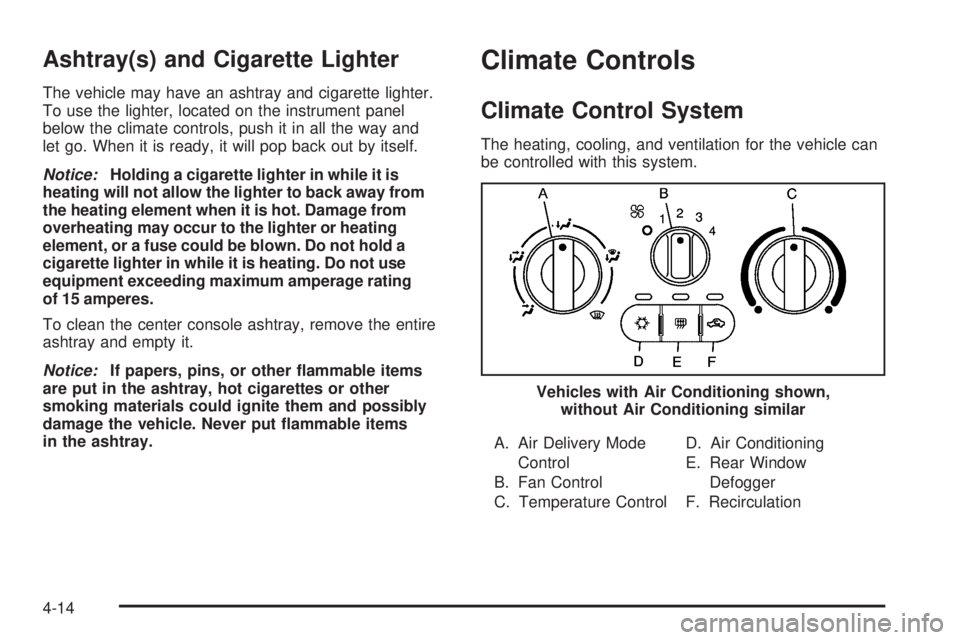
Climate Control System
The heating, cooling, and ventilation for the vehicle can
be controlled with this system.
A. Air Delivery Mode Control
B. Fan Control
C. Temperature Control D. Air Conditioning
E. Rear Window
Defogger
F. Recirculation
Vehicles with Air Conditioning shown,
without Air Conditioning similar
4-14
Page 155 of 422

To change the current mode, select one of the following:
9(Off):Turn the fan control to this position to turn
the fan off.
Temperature Control: Turn clockwise or
counterclockwise to increase or decrease the
temperature.
9(Fan Control): Turn clockwise or counterclockwise to
increase or decrease the fan speed. In any setting other
than off, the fan will run continuously with the ignition on.
The fan must be turned on to run the air conditioning
compressor.
Air Delivery Mode Control: Turn clockwise or
counterclockwise to change the direction of the
airflow inside the vehicle.
Select from the following modes:
H(Vent): Air is directed to the instrument panel
outlets.
)(Bi-Level): Air is divided between the instrument
panel outlets and the floor outlets. Cooler air is directed
to the upper outlets and warmer air to the floor outlets.
6(Floor): Air is directed to the floor outlets, with some
air directed to the windshield and side windows.
-(Defog): This mode clears the windows of fog or
moisture. Air is directed to the windshield, side window,
and floor outlets. To defog the windows faster, turn the
temperature control knob clockwise to the warmest
setting. In this mode, the system runs the air conditioning
compressor.
0(Defrost): This mode removes fog or frost from
the windshield more quickly. Air is directed to the
windshield, with some air directed to the side window
outlets and the floor outlets. To defrost the windows
faster, turn the temperature control knob clockwise to
the warmest setting. In this mode, the system runs
the air conditioning compressor.
For best results, clear all snow and ice from the
windshield before defrosting.
#(Air Conditioning): For vehicles with air
conditioning, press this button to turn the air conditioning
system on or off. An indicator light comes on to show that
the air conditioning is on.
On hot days, open the windows to let hot inside air
escape; then close them. This helps to reduce the time
it takes for the vehicle to cool down. It also helps the
system to operate more efficiently.
4-15


