2010 PONTIAC G5 air condition
[x] Cancel search: air conditionPage 108 of 422

Remote Vehicle Start
Your vehicle may have a remote start feature. This
feature allows you to start the engine from outside the
vehicle. It may also start the vehicle’s heating or air
conditioning systems. When you start your vehicle using
the remote start feature, the climate control system
will come on and adjust the interior to the temperature
settings that you left it set to when you turned the
vehicle off.
Laws in some communities may restrict the use of
remote starters. For example, some laws may require a
person using remote start to have the vehicle in view
when doing so. Check local regulations for any
requirements on remote starting of vehicles.
Do not use the remote start feature if your vehicle is low
on fuel. Your vehicle may run out of fuel.
The remote start feature provides two separate starts
per ignition cycle, each with 10 minutes of engine
running time.
After your vehicle’s engine has been started two times
using the remote vehicle start button, the vehicle’s
ignition switch must be turned to ON/RUN and then back
to LOCK/OFF using the key before the remote start
procedure can be used again. SeeIgnition Positions on
page 3-19 for information regarding the ignition
positions on your vehicle. If your vehicle has the remote start feature, the RKE
transmitter functions will have an increased range
of operation. However, the range may be less while the
vehicle is running.
There are other conditions which can affect the
performance of the transmitter, see
Remote Keyless
Entry (RKE) System on page 3-3 for additional
information.
/(Remote Start): This button will be on the RKE
transmitter if you have remote start.
To start the vehicle using the remote start feature, do
the following:
1. Aim the transmitter at the vehicle.
2. Press and release
Q, then immediately press and
hold
/until the vehicle’s turn signal lamps flash.
When the vehicle starts, the parking lamps will turn
on and remain on while the engine is running.
The vehicle’s doors will be locked.
3. If it is the first remote start since the vehicle has been driven, repeat these steps, while the engine
is running, to extend the time by 10 minutes for the
engine to continue to run.
After entering the vehicle after a remote start, insert and
turn the key to ON/RUN to drive the vehicle.
3-6
Page 128 of 422

N (Neutral):In this position, the engine does not
connect with the wheels. To restart the engine when the
vehicle is already moving, use N (Neutral) only. Also,
use N (Neutral) when the vehicle is being towed.
{WARNING:
Shifting into a drive gear while the engine is
running at high speed is dangerous. Unless your
foot is firmly on the brake pedal, the vehicle could
move very rapidly. You could lose control and hit
people or objects. Do not shift into a drive gear
while the engine is running at high speed.
Notice: Shifting out of P (Park) or N (Neutral) with
the engine running at high speed may damage
the transmission. The repairs would not be covered
by the vehicle warranty. Be sure the engine is
not running at high speed when shifting the vehicle. D (Drive):
This position is for normal driving with the
automatic transmission. It provides the best fuel
economy. If you need more power for passing and
you are:
•Going less than about 35 mph (55 km/h), push the
accelerator pedal about halfway down.
•Going about 35 mph (55 km/h), push the accelerator
all the way down.
Downshifting the transmission in slippery road conditions
could result in skidding, see “Skidding” under Loss of
Control on page 5-15 .
I (Intermediate): This position is also used for normal
driving. However, it reduces vehicle speed without using
the brakes for slight downgrades where the vehicle
would otherwise accelerate due to steepness of grade.
If constant upshifting or downshifting occurs while
driving up steep hills, this position can be used to
prevent repetitive types of shifts. You might choose
I (Intermediate) instead of D (Drive) when driving
on hilly, winding roads and when towing a trailer, so that
there is less shifting between gears.
L (Low): This position reduces vehicle speed more
than I (Intermediate) without actually using the brakes.
You can use it on very steep hills, or in deep snow
or mud. If the shift lever is put in L (Low), the
transmission will not shift into a low gear until the
vehicle is going slowly enough.
3-26
Page 154 of 422
Ashtray(s) and Cigarette Lighter
The vehicle may have an ashtray and cigarette lighter.
To use the lighter, located on the instrument panel
below the climate controls, push it in all the way and
let go. When it is ready, it will pop back out by itself.
Notice:Holding a cigarette lighter in while it is
heating will not allow the lighter to back away from
the heating element when it is hot. Damage from
overheating may occur to the lighter or heating
element, or a fuse could be blown. Do not hold a
cigarette lighter in while it is heating. Do not use
equipment exceeding maximum amperage rating
of 15 amperes.
To clean the center console ashtray, remove the entire
ashtray and empty it.
Notice: If papers, pins, or other ammable items
are put in the ashtray, hot cigarettes or other
smoking materials could ignite them and possibly
damage the vehicle. Never put ammable items
in the ashtray.
Climate Controls
Climate Control System
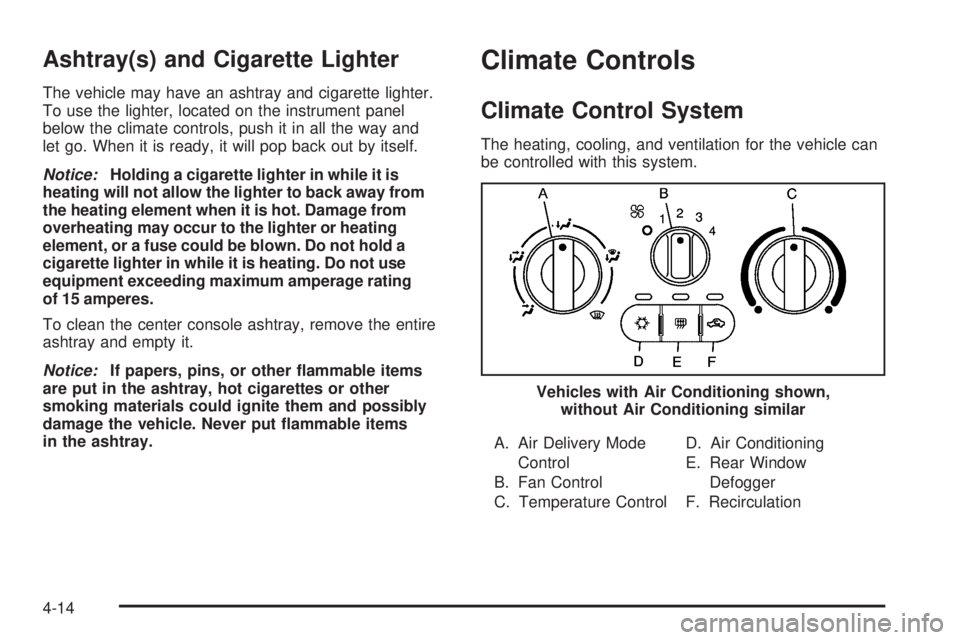
The heating, cooling, and ventilation for the vehicle can
be controlled with this system.
A. Air Delivery Mode Control
B. Fan Control
C. Temperature Control D. Air Conditioning
E. Rear Window
Defogger
F. Recirculation
Vehicles with Air Conditioning shown,
without Air Conditioning similar
4-14
Page 155 of 422

To change the current mode, select one of the following:
9(Off):Turn the fan control to this position to turn
the fan off.
Temperature Control: Turn clockwise or
counterclockwise to increase or decrease the
temperature.
9(Fan Control): Turn clockwise or counterclockwise to
increase or decrease the fan speed. In any setting other
than off, the fan will run continuously with the ignition on.
The fan must be turned on to run the air conditioning
compressor.
Air Delivery Mode Control: Turn clockwise or
counterclockwise to change the direction of the
airflow inside the vehicle.
Select from the following modes:
H(Vent): Air is directed to the instrument panel
outlets.
)(Bi-Level): Air is divided between the instrument
panel outlets and the floor outlets. Cooler air is directed
to the upper outlets and warmer air to the floor outlets.
6(Floor): Air is directed to the floor outlets, with some
air directed to the windshield and side windows.
-(Defog): This mode clears the windows of fog or
moisture. Air is directed to the windshield, side window,
and floor outlets. To defog the windows faster, turn the
temperature control knob clockwise to the warmest
setting. In this mode, the system runs the air conditioning
compressor.
0(Defrost): This mode removes fog or frost from
the windshield more quickly. Air is directed to the
windshield, with some air directed to the side window
outlets and the floor outlets. To defrost the windows
faster, turn the temperature control knob clockwise to
the warmest setting. In this mode, the system runs
the air conditioning compressor.
For best results, clear all snow and ice from the
windshield before defrosting.
#(Air Conditioning): For vehicles with air
conditioning, press this button to turn the air conditioning
system on or off. An indicator light comes on to show that
the air conditioning is on.
On hot days, open the windows to let hot inside air
escape; then close them. This helps to reduce the time
it takes for the vehicle to cool down. It also helps the
system to operate more efficiently.
4-15
Page 156 of 422

For quick cool down on hot days:1. Select the
Hmode.
2. Select the
hmode.
3. Select
#.
4. Select the coolest temperature.
5. Select the highest fan speed.
Using these settings together for long periods of time
may cause the air inside of the vehicle to become
too dry. To prevent this from happening, after the air
in the vehicle has cooled, turn off the recirculation
by pressing the button again.
The air conditioning system removes moisture from the
air, so a small amount of water might drip under the
vehicle while idling or after turning off the engine.
This is normal.
The air conditioning compressor cannot be turned on
when the fan is off.
h(Recirculation): Press to turn the recirculation
mode on. An indicator light comes on to show that
recirculation is on.
This mode recirculates and helps to quickly cool the
air inside the vehicle. It can be used to help prevent
outside air and odors from entering the vehicle.
The air conditioning compressor also comes on.
Recirculation is not available for floor, defog and
defrost modes. If recirculation is selected in any of
these modes, the recirculate indicator light flashes five
times and outside air will be delivered. Operation in this
mode during periods of high humidity and cool outside
temperatures may result in increased window fogging.
If window fogging is experienced, select the
defrost mode.
Outside Air: This mode allows outside air to circulate
through the vehicle. This mode is automatically active
if recirculate is not selected. There is no button for
outside air.
4-16
Page 165 of 422

Charging System Light
This light comes on briefly
when the ignition key is
turned to START, but
the engine is not running,
as a check to show it
is working.
If it does not, have the vehicle serviced by your
dealer/retailer.
The light should go out once the engine starts. If it stays
on, or comes on while driving, there could be a problem
with the charging system. A charging system message
in the Driver Information Center (DIC) can also appear.
See DIC Warnings and Messages on page 4-38 for more
information. This light could indicate that there are
problems with a generator drive belt, or that there is an
electrical problem. Have it checked right away. If the
vehicle must be driven a short distance with the light
on, turn off accessories, such as the radio and air
conditioner.
Up-Shift Light
The vehicle may have an
up-shift light.
When this light comes on, shift to the next higher gear if
weather, road, and traffic conditions allow.
See Manual Transmission Operation on page 3-27 for
more information.
4-25
Page 176 of 422

Press and hold the information and reset buttons at the
same time for one second, then release the buttons
to enter the personalization menu. SeeDIC Vehicle
Personalization on page 4-43 for more information.
DIC Operation and Displays
The DIC comes on when the ignition is on. The DIC has
different modes which can be accessed by pressing the
DIC buttons. The button functions are detailed in the
following.
Information Modes
INFO (Information):Press this button to scroll through
the following vehicle information modes:
Outside Air Temperature and Odometer
Press the information button until the outside air
temperature and the odometer display. This mode shows
the temperature outside of the vehicle in either degrees
Fahrenheit (°F) or degrees Celsius (°C) and the total
distance the vehicle has been driven in either miles (mi)
or kilometers (km). The outside air temperature appears
on the left side of the DIC display and the odometer
appears on the right side of the display.
To change the DIC display to English or metric units,
see “UNITS” under DIC Vehicle Personalization on
page 4-43.
TRIP A or TRIP B
Press the information button until TRIP A or TRIP B
display. These modes show the current distance
traveled since the last reset for each trip odometer in
either miles (mi) or kilometers (km). Both odometers
can be used at the same time.
To reset the trip odometer to zero, press and hold
the reset button for a few seconds while the desired
trip odometer is displayed.
FUEL RANGE
Press the information button until FUEL RANGE
displays. This mode shows the remaining distance
you can drive without refueling in either miles (mi) or
kilometers (km). It is based on fuel economy and the
fuel remaining in the tank.
When the fuel level is low, FUEL RANGE LOW displays.
The fuel economy data used to determine fuel range
is an average of recent driving conditions. As your
driving conditions change, this data is gradually updated.
The FUEL RANGE mode cannot be reset.
4-36
Page 180 of 422

ESC (Electronic Stability Control) NOT
READY
If your vehicle has Electronic Stability Control (ESC), this
message may display briefly after starting the vehicle if
the system’s sensors are not yet calibrated. The system
is not functional until the message stops displaying.
Adjust your driving accordingly. When the message is no
longer displayed, the system is functional. SeeElectronic
Stability Control (ESC) on page 5-6 for more information.
ESC (Electronic Stability Control) OFF
If your vehicle has Electronic Stability Control (ESC),
this message displays and the ESC/TCS light on the
instrument panel cluster comes on solid when ESC is
turned off. Adjust your driving accordingly. See Electronic
Stability Control (ESC) on page 5-6 andElectronic
Stability Control (ESC)/Traction Control System (TCS)
Indicator/Warning Light on page 4-28 for more
information.
ICE POSSIBLE
This message displays when the outside air temperature
is cold enough to create icy road conditions. Adjust
your driving accordingly.
KEY FOB BATT (Battery) LOW
This message displays if the Remote Keyless Entry
(RKE) transmitter battery is low. Replace the battery
in the transmitter. See “Battery Replacement” under
Remote Keyless Entry (RKE) System Operation
on page 3-3.
LEARN COMPLETE
On vehicles without the Remote Keyless Entry (RKE)
system, this message displays when the Tire Pressure
Monitor System (TPMS) has completed the tire learning
process. See Tire Pressure Monitor System on page 6-56
for more information.
LOW FUEL
This message displays when your vehicle is low on
fuel. Refill the fuel tank as soon as possible. See Fuel
Gage on page 4-34 ,Fuel on page 6-5, and Filling
the Tank on page 6-8 for more information.
4-40