2010 NISSAN ROGUE radio
[x] Cancel search: radioPage 4 of 328

Black plate (4,1)
Model "S35-D" EDITED: 2009/ 9/ 4
BLUETOOTH
®is a trademark
owned by Bluetooth SIG, Inc.,
U.S.A.
XM Radio
®requires subscrip-
tion, sold separately after first
90 days. Not available in Alaska,
Hawaii or Guam. For more in-
formation, visit
www.xmradio.com.
*C2009 NISSAN MOTOR CO., LTD.
All rights reserved. No part of this Owner’s
Manual may be reproduced or stored in a
retrieval system, or transmitted in any form, or
by any means, electronic, mechanical, photo-
copying, recording or otherwise, without the
prior written permission of Nissan Motor Co.,
Ltd.
Page 10 of 328

Black plate (6,1)
Model "S35-D" EDITED: 2009/ 9/ 4
SSI0350
1. Lift gate (P.3-23)— Intelligent Key system* (P.3-10)
2. Rear window wiper and washer — Switch operation (P.2-23)
— Window washer fluid (P.8-12)
3. Rear window defroster (P.2-24) 4. High-mounted stop light
— Bulb replacement (P.8-26)
5. Antenna (P.4-24) — Satellite radio antenna* (P.4-7)
6. Back-up light — Bulb replacement (P.8-26) 7. Rear combination light
— Bulb replacement (P.8-26)
8. Fuel-filler door — Operation (P.3-25)
— Fuel recommendation (P.9-3)
*: if so equippedEXTERIOR REAR0-4
Illustrated table of contents
Page 119 of 328

Black plate (115,1)
Model "S35-D" EDITED: 2009/ 9/ 4
SIC2131A
When the switch is in the ON position
*1, the
light illuminates while the lift gate is opened.
When the lift gate is closed, the light will turn off.
When the switch is in the OFF position
*2, the
light will turn off.
The light will turn off after 30 minutes
when the lights remain illuminated to
prevent the battery from becoming dis-
charged. HomeLink
®Universal Transceiver provides a
convenient way to consolidate the functions of
up to three individual hand-held transmitters into
one built-in device.
HomeLink®Universal Transceiver:
. Will operate most Radio Frequency (RF)
devices such as garage doors, gates, home
and office lighting, entry door locks and
security systems.
. Is powered by your vehicle’s battery. No
separate batteries are required. If the
vehicle’s battery is discharged or is dis-
connected, HomeLink
®will retain all pro-
gramming.
Once HomeLink
®Universal Transceiver is
programmed, retain the original transmit-
ter for future programming procedures
(Example: new vehicle purchases) . Upon
sale of the vehicle, the programmed
HomeLink
®Universal Transceiver buttons
should be erased for security purposes.
For additional information, see “PRO-
GRAMMING HomeLink
®” later in this sec-
tion.
WARNING
. Do not use HomeLink
®Universal
Transceiver with any garage door
opener that lacks safety stop and reverse features as required by
federal safety standards. (These
standards became effective for
opener models manufactured after
April 1, 1982.) A garage door opener
which cannot detect an object in the
path of a closing garage door and
then automatically stop and reverse,
does not meet current federal safety
standards. Using a garage door
opener without these features in-
creases the risk of serious injury or
death.
. During programming procedure,
your garage door or security gate
may open or close. Make sure that
people and objects are clear of the
garage door, gate, etc. that you are
programming.
. Your vehicle’s engine should be
turned off while programming
HomeLink
®Universal Transceiver.
PROGRAMMING HomeLink
®
To program your HomeLink
®Transceiver to
operate a garage door, gate, or entry door
opener, home or office lighting, you need to be
at the same location as the device. Note:
Garage door openers (manufactured after
CARGO LIGHT (if so equipped) HomeLink
®UNIVERSAL
TRANSCEIVER (if so equipped)
Instruments and controls
2-47
Page 128 of 328

Black plate (126,1)
Model "S35-D" EDITED: 2009/ 9/ 4
SPA2037
CHILD SAFETY REAR DOOR LOCKChild safety rear door locks help prevent the rear
doors from being opened accidentally, espe-
cially when small children are in the vehicle.
When the levers are in the lock position*1, the rear doors can be opened only
from the outside.
To disengage, move the levers to the unlock
position
*2. It is possible to lock/unlock all doors (including
the lift gate) , and activate the panic alarm by
using the keyfob from outside the vehicle.
Before locking the doors, make sure the
key is not left in the vehicle.
The keyfob can operate at a distance of
approximately 33 ft (10 m) from the vehicle.
(The effective distance depends upon the
conditions around the vehicle.)
As many as 5 keyfobs can be used with one
vehicle. For information concerning the pur-
chase and use of additional keyfobs, contact a
NISSAN dealer.
The keyfob will not function:
.
When the keyfob is not within the opera-
tional range.
. When the doors are open or not closed
securely.
. When the key is in the ignition switch.
. When the battery is discharged.
WARNING
The remote keyless entry keyfob trans-
mits radio waves when the buttons are
pushed. The FAA advises that the radio
waves may affect aircraft navigation
and communication systems. Do not
operate the keyfob while on an air- plane. Make sure the buttons are not
operated unintentionally when the unit
is stored during a flight.
CAUTION
The following conditions or occur-
rences will damage the keyfob.
.
Do not allow the keyfob to become
wet.
. Do not drop the keyfob.
. Do not strike the keyfob sharply
against another object.
. Do not place the keyfob for an
extended period in an area where
temperatures exceed 140 8F (60 8C) .
If a keyfob is lost or stolen, NISSAN
recommends erasing the ID code of that
keyfob. This will prevent the keyfob
from unauthorized use to unlock the
vehicle. For information regarding the
erasing procedure, please contact a
NISSAN dealer.
If the indicator light on the keyfob does not
illuminate when pushing the buttons, the keyfob
battery may be discharged.
REMOTE KEYLESS ENTRY SYSTEM
(if so equipped)
3-6
Pre-driving checks and adjustments
Page 132 of 328

Black plate (130,1)
Model "S35-D" EDITED: 2009/ 9/ 4
WARNING
.Radio waves could adversely affect
electric medical equipment. Those
who use a pacemaker should con-
tact the electric medical equipment
manufacturer for the possible influ-
ences before use.
. The Intelligent Key transmits radio
waves when the buttons are
pushed. The FAA advises that the
radio waves may affect aircraft na-
vigation and communication sys-
tems. Do not operate the
Intelligent Key while on an airplane.
Makesurethebuttonsarenot
operated unintentionally when the
unit is stored during a flight.
The Intelligent Key system can operate all the
door locks using the remote controller function
or pushing the request switch on the vehicle
without taking the key out from a pocket or
purse. The operating environment and/or condi-
tions may affect the Intelligent Key system
operation.
Be sure to read the following before using the
Intelligent Key system.
CAUTION
. Be sure to carry the Intelligent Key
with you when operating the vehi-
cle.
. Never leave the Intelligent Key in
the vehicle when you leave the
vehicle.
The Intelligent Key is always communicating with
the vehicle as it receives radio waves. The
Intelligent Key system transmits weak radio
waves. Environmental conditions may interfere
with the operation of the Intelligent Key system
under the following operating conditions.
. When operating near a location where
strong radio waves are transmitted, such
as a TV tower, power station and broad-
casting station.
. When in possession of wireless equipment,
such as a cellular telephone, transceiver,
and CB radio.
. When the Intelligent Key is in contact with or
covered by metallic materials.
. When any type of radio wave remote control
is used nearby.
. When the Intelligent Key is placed near an
electric appliance such as a personal computer.
. When the vehicle is parked near a parking
meter.
In such cases, correct the operating conditions
before using the Intelligent Key function or use
the mechanical key.
Although the life of the battery varies depending
on the operating conditions, the battery’s life is
approximately 2 years. If the battery is dis-
charged, replace it with a new one.
Since the Intelligent Key is continuously receiv-
ing radio waves, if the key is left near equipment
which transmits strong radio waves, such as
signals from a TV and personal computer, the
battery life may become shorter.
For information regarding replacement of a
battery, see “BATTERY REPLACEMENT” in
the “8. Maintenance and do-it-yourself” section.
As many as 4 Intelligent Keys can be registered
and used with one vehicle. For information about
the purchase and use of additional Intelligent
Keys, contact a NISSAN dealer.
CAUTION
. Do not allow the Intelligent Key,
which contains electrical compo-
nents, to come into contact with
INTELLIGENT KEY SYSTEM (if so
equipped)3-10
Pre-driving checks and adjustments
Page 134 of 328
Black plate (132,1)
Model "S35-D" EDITED: 2009/ 9/ 4
SPA2074
INTELLIGENT KEY OPERATING
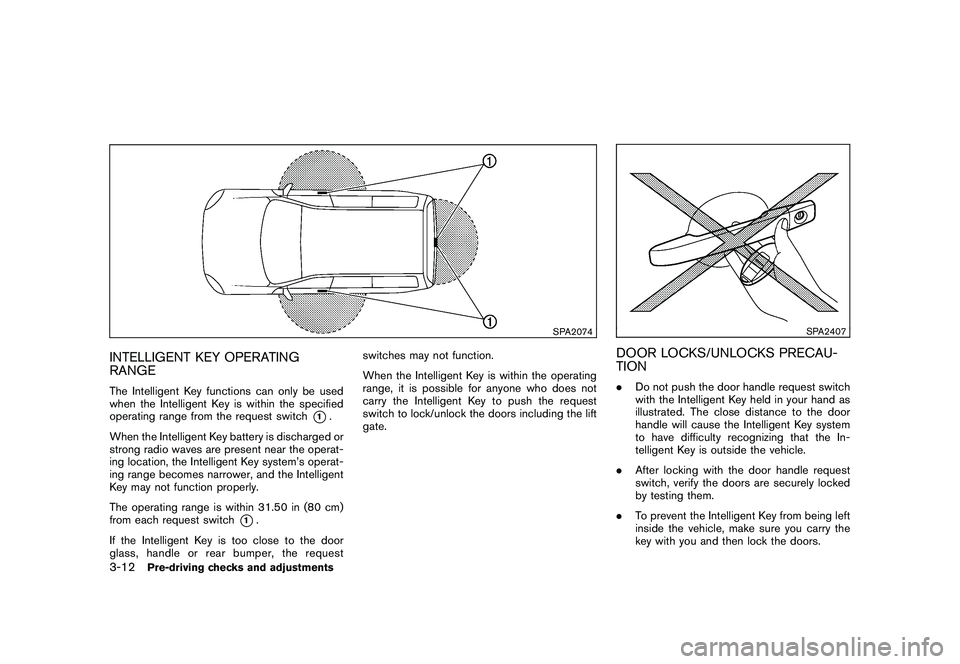
RANGEThe Intelligent Key functions can only be used
when the Intelligent Key is within the specified
operating range from the request switch
*1.
When the Intelligent Key battery is discharged or
strong radio waves are present near the operat-
ing location, the Intelligent Key system’s operat-
ing range becomes narrower, and the Intelligent
Key may not function properly.
The operating range is within 31.50 in (80 cm)
from each request switch
*1.
If the Intelligent Key is too close to the door
glass, handle or rear bumper, the request switches may not function.
When the Intelligent Key is within the operating
range, it is possible for anyone who does not
carry the Intelligent Key to push the request
switch to lock/unlock the doors including the lift
gate.
SPA2407
DOOR LOCKS/UNLOCKS PRECAU-
TION.
Do not push the door handle request switch
with the Intelligent Key held in your hand as
illustrated. The close distance to the door
handle will cause the Intelligent Key system
to have difficulty recognizing that the In-
telligent Key is outside the vehicle.
. After locking with the door handle request
switch, verify the doors are securely locked
by testing them.
. To prevent the Intelligent Key from being left
inside the vehicle, make sure you carry the
key with you and then lock the doors.
3-12
Pre-driving checks and adjustments
Page 140 of 328

Black plate (138,1)
Model "S35-D" EDITED: 2009/ 9/ 4
HOW TO USE REMOTE KEYLESS
ENTRY FUNCTION
WARNING
.Radio waves could adversely affect
electric medical equipment. Those
who use a pacemaker should con-
tact the electric medical equipment
manufacturer for the possible influ-
ences before use.
. The Intelligent Key transmits radio
waves when the buttons are
pushed. The FAA advises that the
radio waves may affect aircraft na-
vigation and communication sys-
tems. Do not operate the
Intelligent Key while on an airplane.
Makesurethebuttonsarenot
operated unintentionally when the
unit is stored during a flight.
CAUTION
.Do not allow the Intelligent Key,
which contains electrical compo-
nents, to come into contact with
water or salt water. This could affect
the system function. .
Do not drop the Intelligent Key.
. Do not strike the Intelligent Key
sharply against another object.
. Do not change or modify the Intel-
ligent Key.
. Wetting may damage the Intelligent
Key. If the Intelligent Key gets wet,
immediately wipe until it is comple-
tely dry.
. Do not place the Intelligent Key for
an extended period in an area where
temperatures exceed 140 8F (60 8C) .
. Do not attach the Intelligent Key
with a key holder that contains a
magnet.
. Do not place the Intelligent Key near
equipment that produces a mag-
netic field, such as a TV, audio
equipment, personal computers or
cellular phone.
The remote keyless entry function can operate
all door locks using the remote keyless entry
function of the Intelligent Key. The remote
keyless entry function can operate at a distance
of approximately 33 ft (10 m) from the vehicle.
(The operating distance depends upon the
conditions around the vehicle.) The remote keyless entry function will not
operate:
.
When the Intelligent Key is not within the
operational range.
. When the doors are open or not closed
securely.
. When the Intelligent Key battery is dis-
charged.
The remote keyless entry function can also
operate the vehicle alarm.3-18
Pre-driving checks and adjustments
Page 153 of 328
Black plate (13,1)
4 Heater, air conditioner, audio and phonesystems
Model "S35-D" EDITED: 2009/ 9/ 4
Ventilators ........................................................ 4-2
Heater and air conditioner .................................... 4-2
Manual air conditioner ..................................... 4-3
In-cabin microfilter .......................................... 4-5
Servicing air conditioner .................................. 4-5
Audio system .................................................... 4-6
Audio operation precautions ............................. 4-6
FM-AM radio with Compact Disc (CD) player ..... 4-13
FM-AM-SAT radio with Compact Disc (CD)
changer ..................................................... 4-17 CD care and cleaning
................................... 4-22
Steering wheel switch for audio control
(if so equipped) ........................................... 4-23
Antenna ..................................................... 4-24
Car phone or CB radio ...................................... 4-24
Bluetooth
®Hands-Free Phone System with
NISSAN voice recognition (if so equipped) ............ 4-25
Using system .............................................. 4-27
Speaker Adaptation (SA) mode ....................... 4-36
Troubleshooting guide ................................... 4-39