2010 NISSAN ROGUE radio
[x] Cancel search: radioPage 172 of 328

Black plate (172,1)
Model "S35-D" EDITED: 2009/ 9/ 4
following order. When the DISP button is
pushed for longer than 1.5 seconds, the display
will automatically switch to the next display.
(For FM radio)(For satellite radio)Compact Disc (CD) changer operationTurn the ignition switch to the ACC or ON
position, push the LOAD button
and insert
the compact disc into the slot with the label side
facing up. The compact disc will be guided
automatically into the slot and start playing.
If the radio is already operating, it will auto-
matically turn off and the compact disc will play.
If the system has been turned off while the
compact disc was playing, pushing the
ON·OFF/VOL control knob will start the com-
pact disc.
Do not use 3.1 in (8 cm) discs.
CD LOAD:
To insert a CD in the CD changer, push the
button for less than 1.5 seconds. Select the
loading position by pushing the CD insert select
button
to
, then insert the CD.
To insert 6 CDs to the CD changer in
succession, push the
button for more than
1.5 seconds.
The inserted slot numbers (
*1
-*6) will
illuminate on the display.
CD PLAY:
When the CD button is pushed with the system
off and the compact disc loaded, the system will
turn on and the compact disc will start to play.
When the CD button is pushed with the
compact disc loaded and the radio playing, the
radio will automatically be turned off and the
compact disc will start to play.CD PLAY INFORMATION:
When the DISP button is pushed for less than
1.5 seconds while the CD is being played, the
disc information display will change as follows: CD:
CD with MP3 or WMA:
FF (Fast Forward) , REW (Re-
wind):
CD:
When the(fast forward) or
(rewind)
button is pushed while the compact disc is
being played, the compact disc will play while
fast forwarding or rewinding. When the button is
released, the compact disc will return to normal
play speed.
CD with MP3 or WMA:
When the
or
button is pushed for less
than 1.5 seconds while the compact disc is
being played, the folders in the compact disc will
change.
When the
or
button is pushed for
more than 1.5 seconds while the compact disc
4-20
Heater, air conditioner, audio and phone systems
Page 175 of 328

Black plate (175,1)
Model "S35-D" EDITED: 2009/ 9/ 4
SAA1780
Type B
1. Tuning switch
2. VOLUME control switch
3. SOURCE select switch
4. POWER on/off switchSTEERING WHEEL SWITCH FOR
AUDIO CONTROL (if so equipped)The audio system can be operated using the
controls on the steering wheel.POWER on/off switch (Type B)With the ignition switch turned to the ACC or
ON position, push the POWER on/off switch to
turn the audio system on or off.
SOURCE select switch (Type A)With the ignition switch turned to the ACC or
ON position, push the SOURCE select switch
to turn the audio system on. Push the switch to
change the mode in the sequence of AM, FM,
SAT (if so equipped) , CD and AUX.
If no CD is loaded or AUX is not connected, CD
or AUX mode will be skipped.SOURCE select switch (Type B)Push the SOURCE select switch to change the
mode.
Without satellite radio:
AM, FM, CD and AUX
With satellite radio:
AM, FM, SAT, CD and AUX
If no CD is loaded or AUX is not connected, the
CD or AUX mode will be skipped.VOLUME control switchPush up or down the VOLUME control switch to
increase or decrease the volume.
Tuning switch
Memory change (radio):
Push up or down the tuning switch for less than
1.5 seconds to change the next or previousradio preset.
SEEK tuning (radio):
Push up or down the tuning switch for more than
1.5 seconds to seek the next or previous radio
station.
APS (Automatic Program Search) FF, APS
REW (CD or CD changer):
Push up or down the tuning switch for less than
1.5 seconds to return to the beginning of the
present program or skip to the next program.
Push several times to skip back or skip through
programs.
This system searches for the blank intervals
between selections. If there is a blank interval
within one program or there is no interval
between programs, the system may not stop in
the desired or expected location.
FOLDER change (CD changer - CD with
MP3 or WMA):
Push up or down the tuning switch for more than
1.5 seconds to change the folders (if there are
any folders) .
DISC change (CD changer - CD without
MP3 or WMA):
Push up or down the tuning switch for more than
1.5 seconds to change the playing disc up or
down.
Heater, air conditioner, audio and phone systems
4-23
Page 176 of 328

Black plate (176,1)
Model "S35-D" EDITED: 2009/ 9/ 4
SAA2102
ANTENNATo remove the antenna, hold the bottom of the
antenna and turn it counterclockwise.
To install the antenna, turn the antenna clock-
wise and tighten.
CAUTION
.To avoid damaging or deforming the
antenna,besuretoremovethe
antenna under the following condi-
tions.
— The vehicle enters an automatic
car wash. — The vehicle enters a garage with
a low ceiling.
— The vehicle is covered with a car cover.
. Always properly tighten the antenna
rod during installation. Otherwise,
the antenna rod may break during
vehicle operation. When installing a car phone or a CB radio in
your NISSAN, be sure to observe the following
precautions, otherwise the new equipment may
adversely affect the electronic control modules
and electronic control system harness.
WARNING
.
A cellular telephone should not be
used while driving so full attention
may be given to vehicle operation.
Some jurisdictions prohibit the use
of cellular telephones while driving.
. If you must make a call while your
vehicle is in motion, the hands-free
cellular phone operational mode (if
so equipped) is highly recom-
mended. Exercise extreme caution
at all times so full attention may be
given to vehicle operation.
. If a conversation in a moving vehicle
requires you to take notes, pull off
the road to a safe location and stop
your vehicle before doing so.CAR PHONE OR CB RADIO
4-24
Heater, air conditioner, audio and phone systems
Page 177 of 328

Black plate (177,1)
Model "S35-D" EDITED: 2009/ 9/ 4
CAUTION
.Keep the antenna as far away as
possible from the electronic control
modules.
. Keep the antenna wire more than 8
in (20 cm) away from the electronic
control system harness. Do not
route the antenna wire next to any
harness.
. Adjust the antenna standing-wave
ratio as recommended by the man-
ufacturer.
. Connect the ground wire from the
CB radio chassis to the body.
. For details, consult a NISSAN deal-
er.
WARNING
.Use a phone after stopping your
vehicle in a safe location. If you
have to use a phone while driving,
exercise extreme caution at all
times so full attention may be given
to vehicle operation.
. If you find yourself unable to devote
full attention to vehicle operation
while talking on the phone, pull off
the road to a safe location and stop
your vehicle before doing so.
CAUTION
To avoid discharging the vehicle bat-
tery, use a phone after starting the
engine.BLUETOOTH
®HANDS-FREE PHONE
SYSTEM WITH NISSAN VOICE
RECOGNITION (if so equipped)
Heater, air conditioner, audio and phone systems
4-25
Page 178 of 328
Black plate (178,1)
Model "S35-D" EDITED: 2009/ 9/ 4
SAA1781
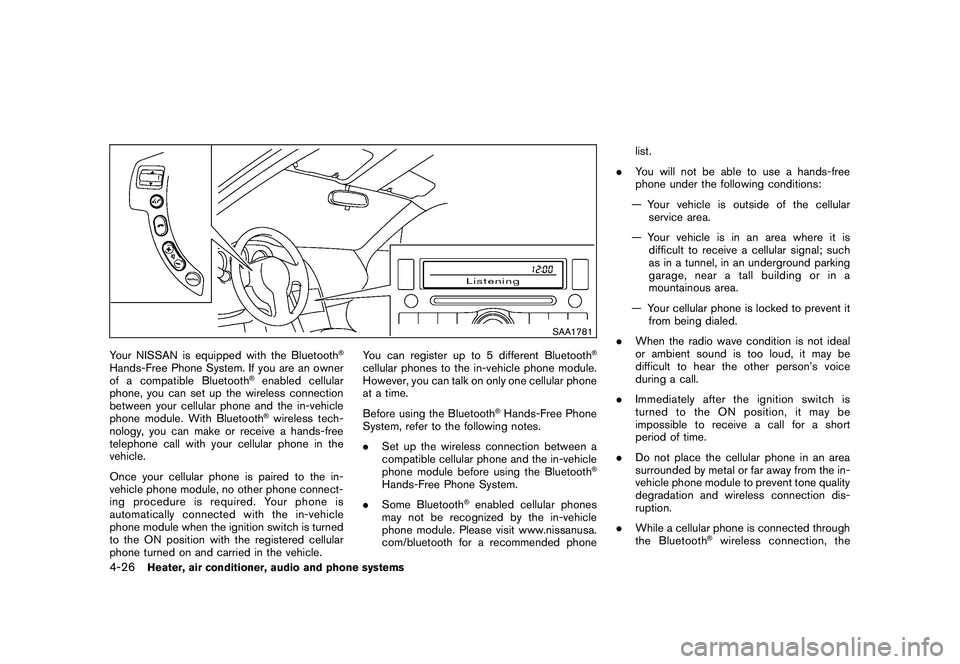
Your NISSAN is equipped with the Bluetooth
®
Hands-Free Phone System. If you are an owner
of a compatible Bluetooth
®enabled cellular
phone, you can set up the wireless connection
between your cellular phone and the in-vehicle
phone module. With Bluetooth®wireless tech-
nology, you can make or receive a hands-free
telephone call with your cellular phone in the
vehicle.
Once your cellular phone is paired to the in-
vehicle phone module, no other phone connect-
ing procedure is required. Your phone is
automatically connected with the in-vehicle
phone module when the ignition switch is turned
to the ON position with the registered cellular
phone turned on and carried in the vehicle. You can register up to 5 different Bluetooth
®
cellular phones to the in-vehicle phone module.
However, you can talk on only one cellular phone
at a time.
Before using the Bluetooth
®Hands-Free Phone
System, refer to the following notes.
. Set up the wireless connection between a
compatible cellular phone and the in-vehicle
phone module before using the Bluetooth
®
Hands-Free Phone System.
. Some Bluetooth
®enabled cellular phones
may not be recognized by the in-vehicle
phone module. Please visit www.nissanusa.
com/bluetooth for a recommended phone list.
. You will not be able to use a hands-free
phone under the following conditions:
— Your vehicle is outside of the cellular service area.
— Your vehicle is in an area where it is difficult to receive a cellular signal; such
as in a tunnel, in an underground parking
garage, near a tall building or in a
mountainous area.
— Your cellular phone is locked to prevent it from being dialed.
. When the radio wave condition is not ideal
or ambient sound is too loud, it may be
difficult to hear the other person’s voice
during a call.
. Immediately after the ignition switch is
turned to the ON position, it may be
impossible to receive a call for a short
period of time.
. Do not place the cellular phone in an area
surrounded by metal or far away from the in-
vehicle phone module to prevent tone quality
degradation and wireless connection dis-
ruption.
. While a cellular phone is connected through
the Bluetooth
®wireless connection, the
4-26
Heater, air conditioner, audio and phone systems
Page 180 of 328

Black plate (180,1)
Model "S35-D" EDITED: 2009/ 9/ 4
.You can cancel a command when the
system is waiting for a response by saying,
“Cancel” or “Quit.” The system announces
“Cancel” and ends the voice recognition
(VR) session. You can also push the
button on the steering wheel at any time.
Whenever the VR session is canceled, a
double beep sounds to indicate you have
exited the system.
. If you want to adjust the volume of the voice
feedback, push the volume control switches
(+ or ) on the steering wheel while being
provided with feedback. You can also use
the radio volume control knob.
How to say numbers:
NISSAN Voice Recognition requires a certain
way to speak numbers in voice commands.
Refer to the following rules and examples:
. Either “zero” or “oh” can be used for “0”.
Example: 1-800-662-6200
—“One eight oh oh six six two six two oh
oh”, or
—“One eight zero zero six six two six two oh oh”
. Words can be used for the first 4 digits
places only. Example: 1-800-662-6200
—“One eight hundred six six two six two oh
oh”,
—NOT “One eight hundred six six two sixty two hundred, and
—NOT “One eight oh oh six six two sixty two hundred.
. Numbers can be spoken in small groups.
The system will prompt you to continuing
entering digits, if desired.
Example: 1-800-662-6200
—“One eight oh oh”
The system repeats the numbers and
prompts you to enter more.
—“six six two”
The system repeats the numbers and
prompts you to enter more.
—“six two oh oh”
. You can say “Star” for * and “Pound” for # at
anytime in any position of the phone number.
(Available only when using “Call Interna-
tional” command.)
Example: 1-555-1212 *123
—“One five five five one two one two star one two three”
NOTE:
For best results, say phone numbers as
single digits.
4-28
Heater, air conditioner, audio and phone systems
Page 197 of 328

Black plate (197,1)
Model "S35-D" EDITED: 2009/ 9/ 4
pressure sensors, and the TPMS will
not function properly.
Some devices and transmitters may temporarily
interfere with the operation of the TPMS and
cause the low tire pressure warning light to
illuminate. Some examples are:
. Facilities or electric devices using similar
radio frequencies are near the vehicle.
. If a transmitter set to similar frequencies is
being used in or near the vehicle.
. If a computer (or similar equipment) or a DC/
AC converter is being used in or near the
vehicle.
FCC Notice:
Changes or modifications not expressly
approved by the party responsible for
compliance could void the user’s authority
to operate the equipment.
This device complies with Part 15 of the
FCC Rules and RSS-210 of Industry Cana-
da.
Operation is subject to the following two
conditions: (1) This device may not cause
harmful interference, and (2) this device
must accept any interference received,
including interference that may cause un-
desired operation of the device.
AVOIDING COLLISION AND ROLL-
OVER
WARNING
Failure to operate this vehicle in a safe
and prudent manner may result in loss
of control or an accident.
Be alert and drive defensively at all times. Obey
all traffic regulations. Avoid excessive speed,
high speed cornering, or sudden steering
maneuvers, because these driving practices
could cause you to lose control of your vehicle.
As with any vehicle, a loss of control could
result in a collision with other vehicles or
objects, or cause the vehicle to rollover,
particularly if the loss of control causes the
vehicle to slide sideways. Be attentive at all
times, and avoid driving when tired. Never drive
when under the influence of alcohol or drugs
(including prescription or over-the-counter
drugs which may cause drowsiness) . Always
wear your seat belt as outlined in the “SEAT
BELTS” in the “1. Safety — Seats, seat belts and
supplemental restraint system” section of this
manual, and also instruct your passengers to do
so.
Seat belts help reduce the risk of injury in
collisions and rollovers. In a rollover crash, an
unbelted or improperly belted person is significantly more likely to be injured or
killed than a person properly wearing a
seat belt.
ON-PAVEMENT AND OFF-ROAD
DRIVING PRECAUTIONSUtility vehicles have a significantly higher
rollover rate than other types of vehicles.
They have higher ground clearance than pas-
senger cars to make them capable of performing
in a variety of on-pavement and off-road
applications. This gives them a higher center of
gravity than ordinary cars. An advantage of
higher ground clearance is a better view of the
road, allowing you to anticipate problems.
However, they are not designed for cornering
at the same speeds as conventional passenger
cars any more than low-slung sports cars are
designed to perform satisfactorily under off-road
conditions. If at all possible, avoid sharp turns or
abrupt maneuvers, particularly at high speeds.
As with other vehicles of this type, failure to
operate this vehicle correctly may result in loss
of control or vehicle rollover. Seat belts help
reduce the risk of injury in collisions and
rollovers. In a rollover crash, an unbelted or
improperly belted person is significantly more
likely to be injured or killed than a person
properly wearing a seat belt.
Be sure to read “DRIVING SAFETY PRECAU-
TIONS” later in this section.
Starting and driving
5-5
Page 202 of 328

Black plate (202,1)
Model "S35-D" EDITED: 2009/ 9/ 4
SSD0436
Operating rangeThe Intelligent Key functions can only be used
for starting the engine when the Intelligent Key is
within the specified operating range
*1.
When the Intelligent Key battery is almost
discharged or strong radio waves are present
near the operating location, the Intelligent Key
system’s operating range becomes narrower
and may not function properly.
If the Intelligent Key is within the operating
range, it is possible for anyone, even someone
who does not carry the Intelligent Key, to turn
the ignition switch to start the engine. .
The cargo area is not included in the
operating range, but the Intelligent Key may
function.
. If the Intelligent Key is placed on the
instrument panel, inside the glove box or
door pocket, the Intelligent Key may not
function.
. If the Intelligent Key is placed near the door
or window outside the vehicle, the Intelligent
Key may function.
SSD0392
Without Intelligent Key system
SSD0437A
With Intelligent Key system
5-10
Starting and driving